FindThatLead vs MergeMail: Full 2026 Comparison Guide
FindThatLead finds and sends. MergeMail only sends — from inside Gmail. Here is the honest breakdown of pricing, data quality, deliverability risk, and which one actually belongs in your 2026 outbound stack.
TL;DR
- FindThatLead and MergeMail are not really competitors. FindThatLead is a lead-database-plus-sender; MergeMail is a Gmail mail-merge layer that assumes you already have a list.
- If you have zero contact data, MergeMail alone gets you nowhere. If you have a clean CRM export and send from Google Workspace, FindThatLead is overkill.
- FindThatLead's weak point is data accuracy on smaller and non-US domains; MergeMail's weak point is that it inherits every deliverability limit of your Gmail account.
- The strongest 2026 setup for most teams is a specialist data source (find + verify) feeding a specialist sender — not one tool trying to do both badly.
- Budget reality: a "find + verify + send" stack built from best-in-class parts often costs less than FindThatLead's mid tier and bounces far less.
What are FindThatLead and MergeMail, actually?#
Different layers of the same funnel. That is the whole comparison in one sentence.
FindThatLead is a Barcelona-built prospecting suite that launched in 2015. It bundles a lead search engine, a domain-based email finder, a Chrome scraper, a bulk verifier, and a campaign sender called Email Sender. You start with "I need contacts at SaaS companies in Spain" and end with a sequence going out.
MergeMail is a Gmail add-on. It merges a Google Sheet or CSV into a personalized email template, sends it through your own Gmail account, tracks opens and clicks, and schedules follow-up drips. It never finds a single email address. You bring the list; MergeMail handles the merge tags, throttling, and reporting.
So the honest framing of FindThatLead vs MergeMail is not "which is better." It is: which gap in your stack is currently bleeding money?
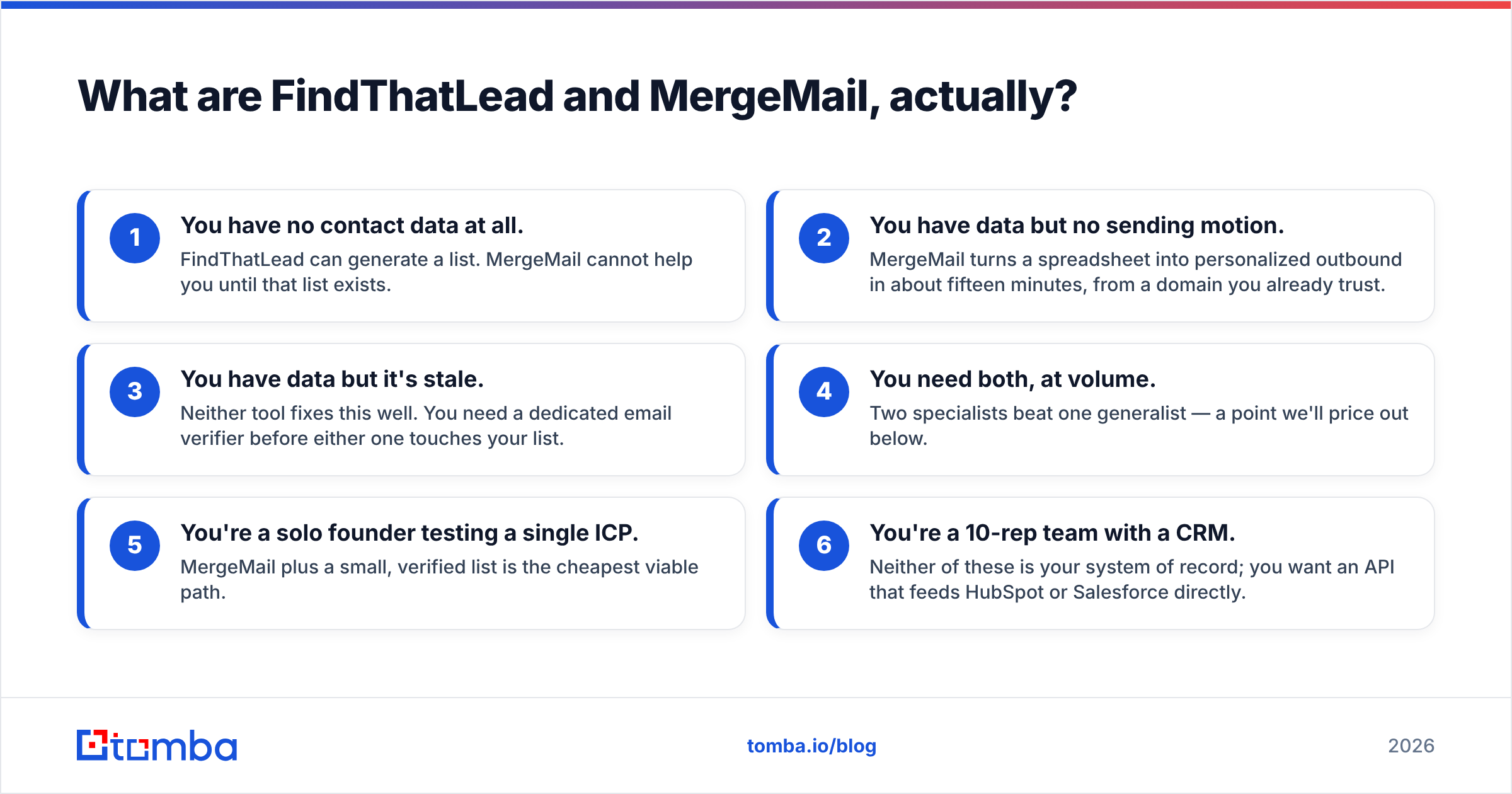
- You have no contact data at all. FindThatLead can generate a list. MergeMail cannot help you until that list exists.
- You have data but no sending motion. MergeMail turns a spreadsheet into personalized outbound in about fifteen minutes, from a domain you already trust.
- You have data but it's stale. Neither tool fixes this well. You need a dedicated email verifier before either one touches your list.
- You need both, at volume. Two specialists beat one generalist — a point we'll price out below.
- You're a solo founder testing a single ICP. MergeMail plus a small, verified list is the cheapest viable path.
- You're a 10-rep team with a CRM. Neither of these is your system of record; you want an API that feeds HubSpot or Salesforce directly.
How do FindThatLead and MergeMail compare feature by feature?#
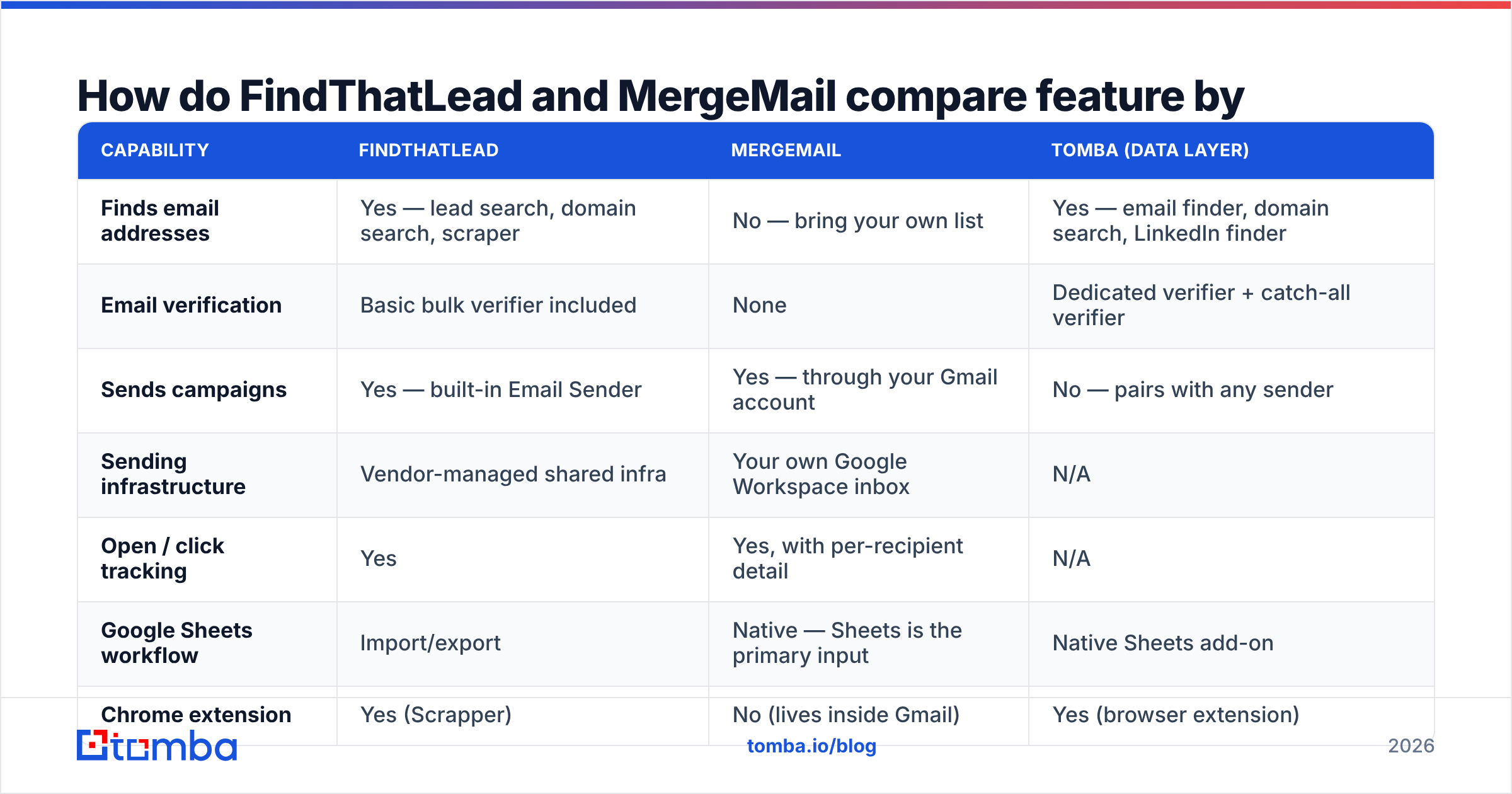
Here is the side-by-side, with a third column showing what a specialist data layer contributes, because most readers end up combining tools rather than picking one.
| Capability | FindThatLead | MergeMail | Tomba (data layer) |
|---|---|---|---|
| Finds email addresses | Yes — lead search, domain search, scraper | No — bring your own list | Yes — email finder, domain search, LinkedIn finder |
| Email verification | Basic bulk verifier included | None | Dedicated verifier + catch-all verifier |
| Sends campaigns | Yes — built-in Email Sender | Yes — through your Gmail account | No — pairs with any sender |
| Sending infrastructure | Vendor-managed shared infra | Your own Google Workspace inbox | N/A |
| Open / click tracking | Yes | Yes, with per-recipient detail | N/A |
| Google Sheets workflow | Import/export | Native — Sheets is the primary input | Native Sheets add-on |
| Chrome extension | Yes (Scrapper) | No (lives inside Gmail) | Yes (browser extension) |
| API access | Yes, on higher tiers | Limited | Full email finder API, CLI, MCP |
| Entry price (published) | ~$49/mo tier | Free tier, then ~$15–$20/mo | Free 25 searches, then $49/mo |
| Best for | Cold list building from scratch | Personalized sends to a list you own | Accuracy-critical data sourcing |
Pricing on both vendors shifts — check their live pages before you commit budget. The shape of the difference is stable, though: FindThatLead prices per credit for data, MergeMail prices per seat for sending.

Which one has better data quality?#
FindThatLead wins by default, because MergeMail has no data product to evaluate. But "wins by default" is not the same as "is good enough."
FindThatLead's finder works the way most pattern-based tools do: it identifies the company's dominant email format, applies the prospect's name, then runs an SMTP-level check. On large US technology companies with predictable first.last@ conventions, hit rates are respectable. On three characteristics, users consistently report degradation:
- Small domains under 50 employees, where there is not enough public signal to confirm a pattern.
- Catch-all domains, which accept every address at the SMTP handshake and therefore defeat naive verification. A pattern-guessed address on a catch-all domain looks "valid" and still bounces or lands in a spam trap.
- Non-English-speaking markets with accented characters or compound surnames, where format inference gets messy.
Review aggregators tell the same story from a different angle — browse the FindThatLead reviews on G2 and the recurring theme in three-star write-ups is credits burned on results that never landed. That is the real cost model of any finder: you don't pay for searches, you pay for usable contacts.
This is where a specialist layer earns its keep. Running a suspect list through a catch-all verifier before it ever reaches a sender is the single highest-ROI step in cold outbound, and it is the step both of these tools treat as optional. A 9% bounce rate does not just waste sends — it degrades the sender reputation of the domain doing the sending, which for MergeMail users is the domain you also use for customer email.
Is MergeMail's Gmail-native approach a strength or a liability?#
Both, and the split is sharper than most comparison posts admit.
The strength: sending from your real Gmail account means your messages carry the authentication and reputation history of a domain that already exchanges legitimate mail. Replies land in your normal inbox. There is no separate sending domain to warm up, no SPF/DKIM migration, no "via" header that tips off a recipient. For a founder emailing 40 well-researched prospects a week, this is genuinely better than a dedicated cold-email platform.
The liability: you inherit Google's limits and Google's judgment. Workspace caps external recipients per day (commonly 2,000 for paid accounts, far fewer for trial and consumer accounts), and hitting spam complaints on that account is not a sandboxed mistake — it affects your invoices, your support threads, and your calendar invites. MergeMail throttles sensibly, but it cannot protect a domain from a bad list.
Google's own bulk-sender requirements, tightened across 2024–2025, made this stricter: authenticated sending, one-click unsubscribe, and a spam-complaint rate held under 0.3%. You can read the current thresholds in Google's sender guidelines. Miss them and MergeMail's convenience becomes a single point of failure for your entire company's email.
FindThatLead's Email Sender avoids that by sending through vendor infrastructure — which trades your reputation risk for a shared-pool reputation you do not control. Neither model is free of risk; they simply move it.
What does each one actually cost at real volume?#
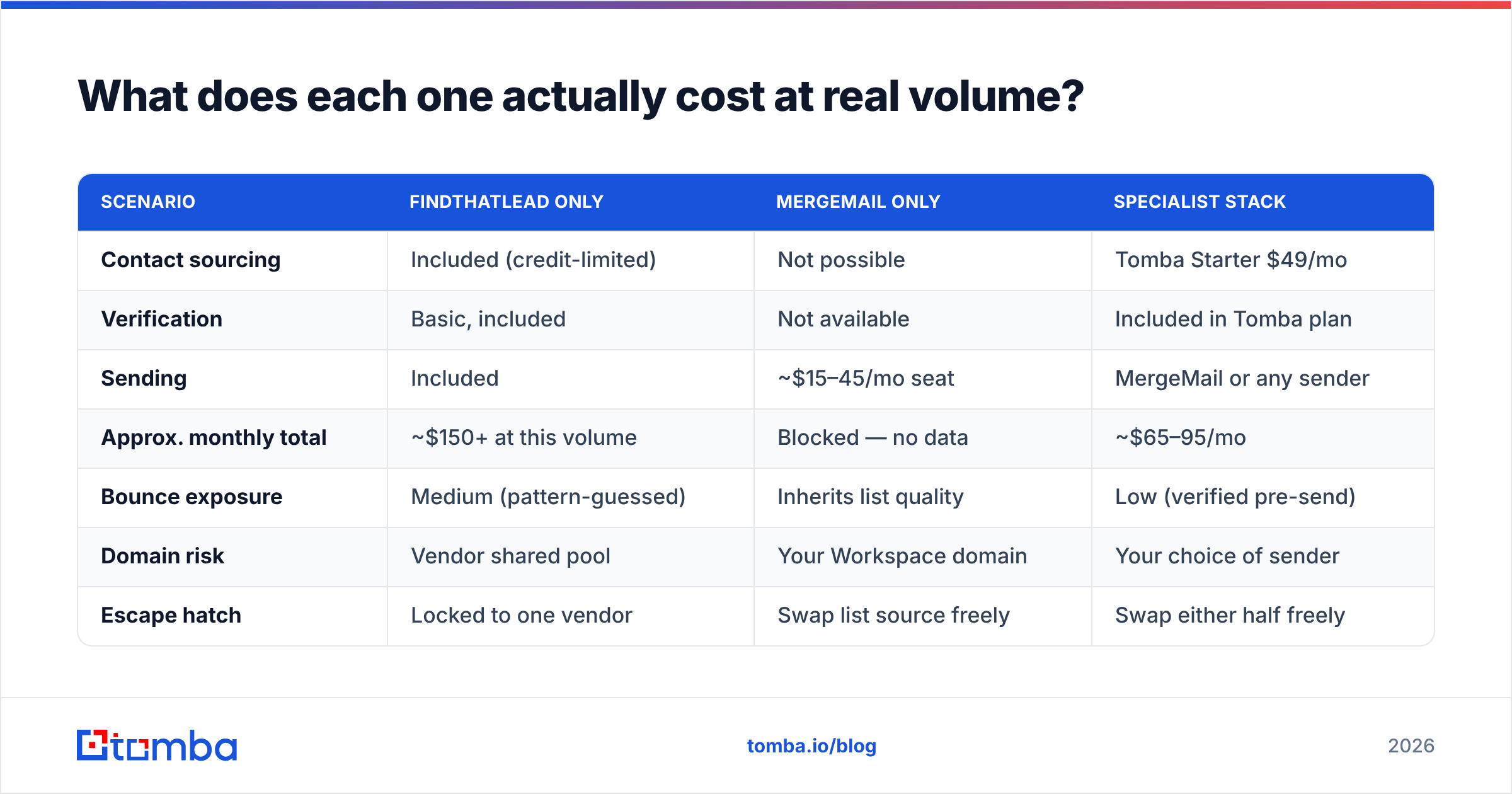
Run the numbers on a concrete scenario: one SDR, 1,000 net-new verified contacts per month, 3,000 emails sent per month across sequences.
| Scenario | FindThatLead only | MergeMail only | Specialist stack |
|---|---|---|---|
| Contact sourcing | Included (credit-limited) | Not possible | Tomba Starter $49/mo |
| Verification | Basic, included | Not available | Included in Tomba plan |
| Sending | Included | ~$15–45/mo seat | MergeMail or any sender |
| Approx. monthly total | ~$150+ at this volume | Blocked — no data | ~$65–95/mo |
| Bounce exposure | Medium (pattern-guessed) | Inherits list quality | Low (verified pre-send) |
| Domain risk | Vendor shared pool | Your Workspace domain | Your choice of sender |
| Escape hatch | Locked to one vendor | Swap list source freely | Swap either half freely |
The all-in-one convenience premium is real, and for some teams it is worth paying. But notice the last row. When your data source and your sender are separate contracts, a bad quarter with either vendor costs you a migration of half your stack, not all of it.
If you're weighing FindThatLead against other bundled prospecting suites, the same logic applies to Apollo alternatives and to Findymail alternatives — the question is always whether the bundled data is accurate enough to justify losing modularity.

Who should choose FindThatLead?#
Pick FindThatLead if three things are true at once:
- You are building lists from scratch, with no CRM history and no existing contact database to mine.
- Your ICP skews mid-market and US or Western European, where format inference works best.
- You want one login and one invoice, and you accept a lower ceiling on data accuracy as the cost of that simplicity.
The Chrome scraper is the underrated part of the product. Pulling structured company lists off a directory or search results page, then enriching them in one pass, is a genuinely fast workflow for agencies running many small campaigns. If your work looks like "new client, new vertical, new list, every two weeks," that speed matters more than a few percentage points of accuracy.
Where FindThatLead becomes a poor fit: enterprise ABM lists where every wrong contact is a wasted account, and any motion where deliverability is already fragile.
Who should choose MergeMail?#
Pick MergeMail if you already have the data problem solved and the sending problem open.
Classic fits:
- Founder-led sales to a hand-built list of 100–500 accounts, where personalization depth matters more than volume.
- Customer lifecycle emails — onboarding nudges, renewal reminders, event invites — sent to people who already know you and expect mail from your domain.
- Recruiting and partnerships, where a Gmail-native send reads as human and a platform-sent email reads as a campaign.
- Teams already living in Google Sheets, because the merge-from-Sheets flow requires almost no new process.
MergeMail is a bad fit for high-volume cold outbound to purchased or scraped lists. Not because the tool is weak — because Gmail is the wrong pipe for that job, and no add-on changes that.
What's the best 2026 setup for most teams?#
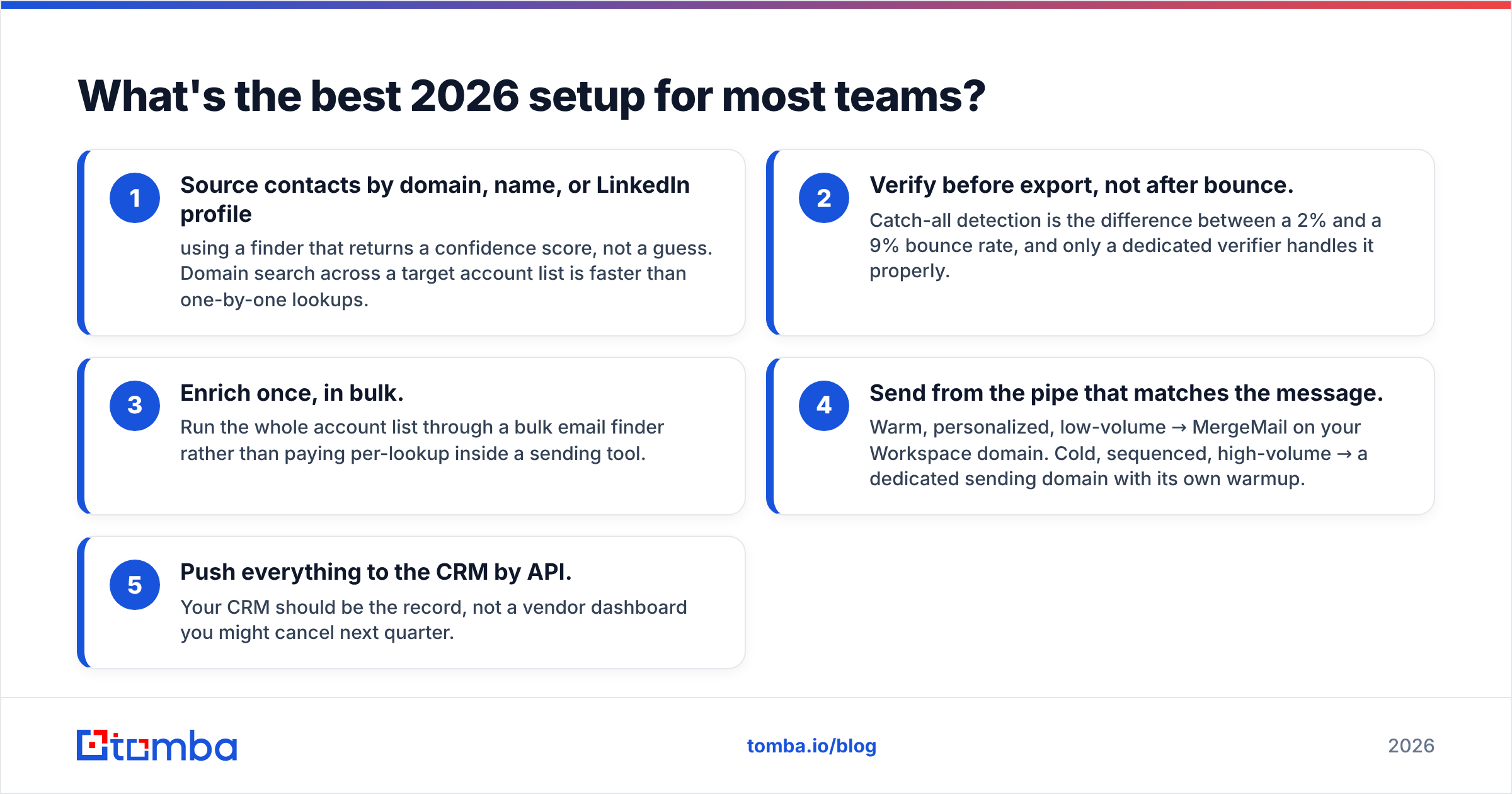
Split the stack. Source and verify with a specialist, send with whatever fits your motion.
Concretely, that means:
- Source contacts by domain, name, or LinkedIn profile using a finder that returns a confidence score, not a guess. Domain search across a target account list is faster than one-by-one lookups.
- Verify before export, not after bounce. Catch-all detection is the difference between a 2% and a 9% bounce rate, and only a dedicated verifier handles it properly.
- Enrich once, in bulk. Run the whole account list through a bulk email finder rather than paying per-lookup inside a sending tool.
- Send from the pipe that matches the message. Warm, personalized, low-volume → MergeMail on your Workspace domain. Cold, sequenced, high-volume → a dedicated sending domain with its own warmup.
- Push everything to the CRM by API. Your CRM should be the record, not a vendor dashboard you might cancel next quarter.
That architecture survives a vendor price hike, a product pivot, or a deliverability incident. The all-in-one architecture does not.
Frequently asked questions#
Does MergeMail find email addresses? No. It merges and sends. You supply the addresses.
Does FindThatLead replace a dedicated verifier? Only partially. Its bulk verifier catches obvious syntax and MX failures, but catch-all domains — a large share of mid-market B2B — need deeper checks.
Can I use both together? Yes, and some teams do: FindThatLead for list building, MergeMail for the personalized top-of-list sends. It works, though you're paying two vendors for one workflow and still not solving verification.
Which is cheaper? MergeMail, on paper — but only because it does half the job. Compare total cost per delivered, replied-to email, not per seat.
What about GDPR? Both put compliance responsibility on you. Document your lawful basis, honor opt-outs immediately, and keep source provenance for every contact — check where the data comes from before you buy from any vendor.
The bottom line#
FindThatLead and MergeMail solve different problems, and the "winner" is whichever gap you have. FindThatLead if you need contacts and accept mixed accuracy. MergeMail if you have contacts and want Gmail-native personalization. Neither one, alone, gives you the accuracy floor that 2026 deliverability standards demand.
Start with the data. A verified list makes a mediocre sender look good; an unverified list makes the best sender in the world burn your domain. Run your next target account list through the Tomba Email Finder — 25 free searches, no card, and every result comes back with a confidence score and verification status so you know what you're sending to before you send it. Then plug the clean output into whichever sender fits your motion, and let the two halves of your stack be replaceable independently.
Related guides#
Ready to find emails that actually work?
Join 150,000+ professionals who stopped guessing and started sending. Free credits on signup — no credit card required.
Get the Tomba newsletter
Practical outbound tactics and product updates — once every two weeks.
About the author