FindThatLead vs ReachInbox: Which Cold Email Stack Wins in 2026?
FindThatLead finds the leads. ReachInbox sends the sequences. They are not the same product — and picking wrong costs you either data quality or deliverability. Here is the honest breakdown.
TL;DR
- They solve different problems. FindThatLead is a lead-sourcing and email-finding tool. ReachInbox is a cold email sending, warmup, and inbox-management platform. Comparing them head-to-head only makes sense if you're deciding where your budget goes first.
- If your bounce rate is the problem, you have a data problem — that's the FindThatLead side of the fence, and it's where a dedicated email finder with a separate verification layer usually beats a bundled one.
- If your open rate collapsed but your list is clean, you have a placement problem — that's ReachInbox territory (warmup, rotation, unified inbox).
- Price shapes the decision. ReachInbox's unlimited-mailbox model is aggressive for teams running many sending domains. FindThatLead charges by credits, so cost scales with prospecting volume, not send volume.
- The realistic 2026 stack is a specialist data source plus a specialist sender. Bundles look cheaper on the invoice and more expensive on the pipeline.
What Are FindThatLead and ReachInbox, Actually?#
Start with the conclusion: these two tools sit at opposite ends of the same pipeline, and half the people searching "FindThatLead vs ReachInbox" are really asking "which half of cold outbound should I pay for first?"
FindThatLead (findthatlead.com) is a Spanish-built prospecting suite. Its core is a domain-and-name email finder with a Chrome extension, a lead-search database, a basic verifier, and a light sender bolted on top. You feed it a company domain or a LinkedIn profile, it returns a probable business email. The sending features exist, but nobody adopts FindThatLead for the sender.
ReachInbox (reachinbox.ai) came at outbound from the opposite direction. It's an AI-flavoured cold email platform: connect unlimited mailboxes, warm them up, rotate sends across them, run multichannel sequences, and manage every reply in one unified inbox with AI categorisation. It has a lead-finding add-on, but the data isn't why anyone signs up.
Think of it like a restaurant. FindThatLead is your supplier — it decides whether the ingredients are fresh. ReachInbox is the kitchen and the waiter — it decides whether the plate reaches the table hot. A great kitchen cannot save rotten ingredients, and perfect ingredients don't matter if the food never leaves the pass.

How Do FindThatLead and ReachInbox Compare Feature by Feature?#
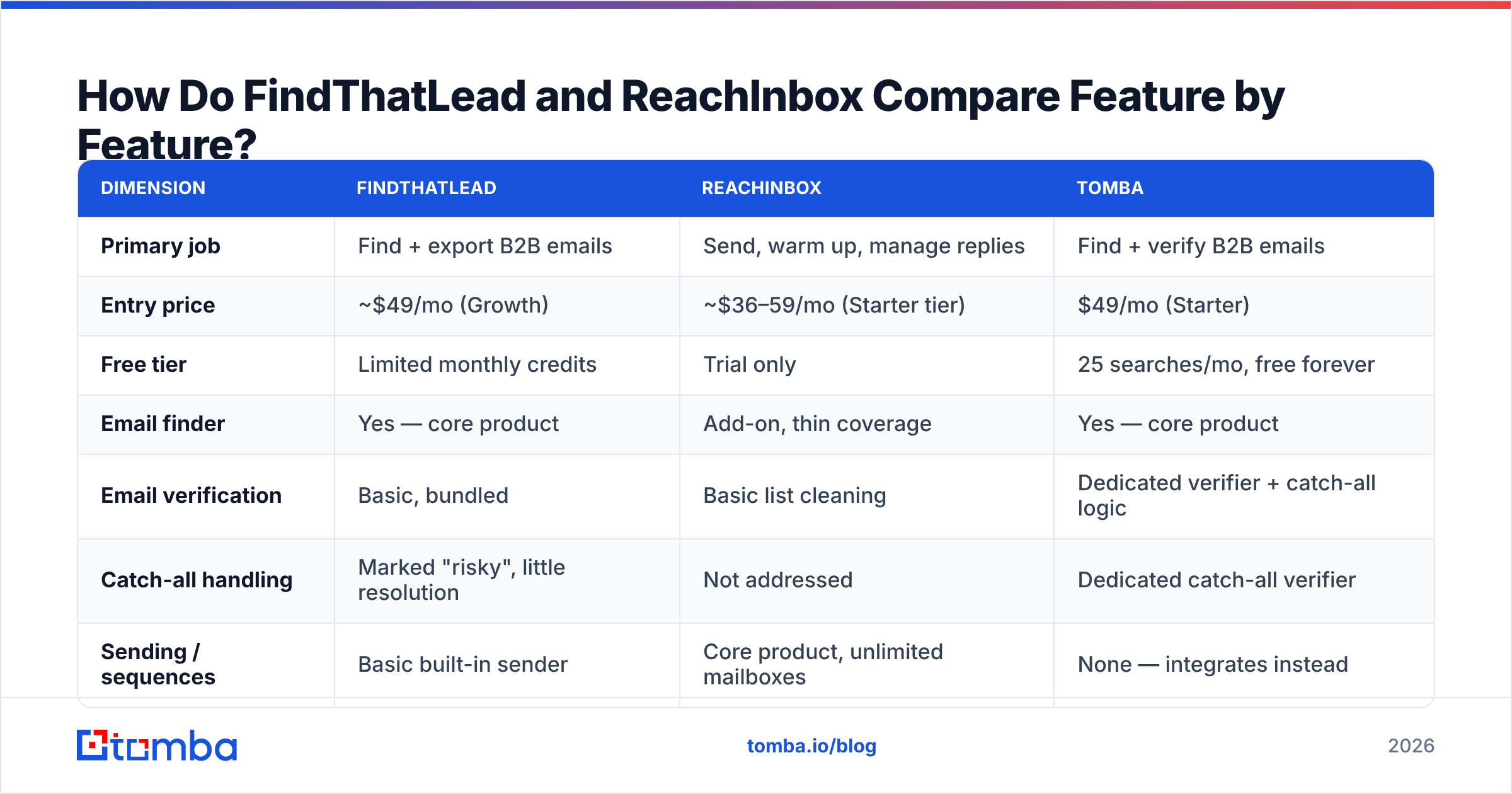
Here's the side-by-side. Prices reflect publicly listed plans as of early 2026 and change often — check each vendor before you commit.
| Dimension | FindThatLead | ReachInbox | Tomba |
|---|---|---|---|
| Primary job | Find + export B2B emails | Send, warm up, manage replies | Find + verify B2B emails |
| Entry price | ~$49/mo (Growth) | ~$36–59/mo (Starter tier) | $49/mo (Starter) |
| Free tier | Limited monthly credits | Trial only | 25 searches/mo, free forever |
| Email finder | Yes — core product | Add-on, thin coverage | Yes — core product |
| Email verification | Basic, bundled | Basic list cleaning | Dedicated verifier + catch-all logic |
| Catch-all handling | Marked "risky", little resolution | Not addressed | Dedicated catch-all verifier |
| Sending / sequences | Basic built-in sender | Core product, unlimited mailboxes | None — integrates instead |
| Mailbox warmup | No | Yes, included | No |
| Unified reply inbox | No | Yes, AI-categorised | No |
| API for developers | Yes, limited endpoints | Yes, send-focused | Full REST API, CLI, MCP server |
| Best for | Solo prospectors, small agencies | High-volume senders, agencies | Data-quality-first teams and devs |
The pattern is obvious once it's laid out: each tool is excellent at exactly one column and mediocre at the other. FindThatLead's sender will not survive a serious volume ramp. ReachInbox's lead data will not survive a serious accuracy audit.
Which One Actually Finds Better Emails?#
FindThatLead wins this against ReachInbox — but that's a low bar, and neither leads the category.
Three things separate a strong email finder from a weak one in 2026:
- Pattern inference vs. observed data. Weak finders guess
first.last@domain.comand ship it. Strong finders confirm the pattern against emails actually observed in the wild, then verify the specific mailbox. FindThatLead does a mix; its confidence scores are directionally useful but not tight. - Catch-all resolution. Roughly a fifth of B2B domains accept every address at the SMTP layer, so a naive check returns "valid" for
asdfgh@company.com. Tools that simply flag these as "risky" push the decision back to you. A catch-all verifier that resolves them using secondary signals is the difference between a 4% bounce rate and a 14% one. - Refund policy on bad data. Ask any vendor whether unverified or bouncing results consume credits. The answer tells you how confident they are.
This is where Tomba's email verifier does the work FindThatLead's bundled check doesn't: SMTP-level validation, MX record checks, disposable and role-account detection, and explicit catch-all handling as a separate step rather than a shrug. Independent user reviews on G2 consistently rank verification depth — not raw database size — as the strongest predictor of bounce rate.

Practical test before you buy either: take 100 contacts you already know are valid — your own customers, ideally — and run them through each tool's finder. Score on three axes: found-and-correct, found-and-wrong, and not-found. "Found-and-wrong" is the number that hurts, because it burns your sending reputation while looking like success on the dashboard.
Is ReachInbox Better Than FindThatLead for Sending Cold Email?#
Yes, and it isn't close.
ReachInbox was built for the modern reality that you cannot send 500 cold emails a day from one mailbox and survive. Its model — connect many mailboxes, warm each one, rotate sends, cap per-mailbox volume — is the correct architecture for 2026, where Google and Microsoft bulk-sender requirements make sender reputation the binding constraint on outbound.
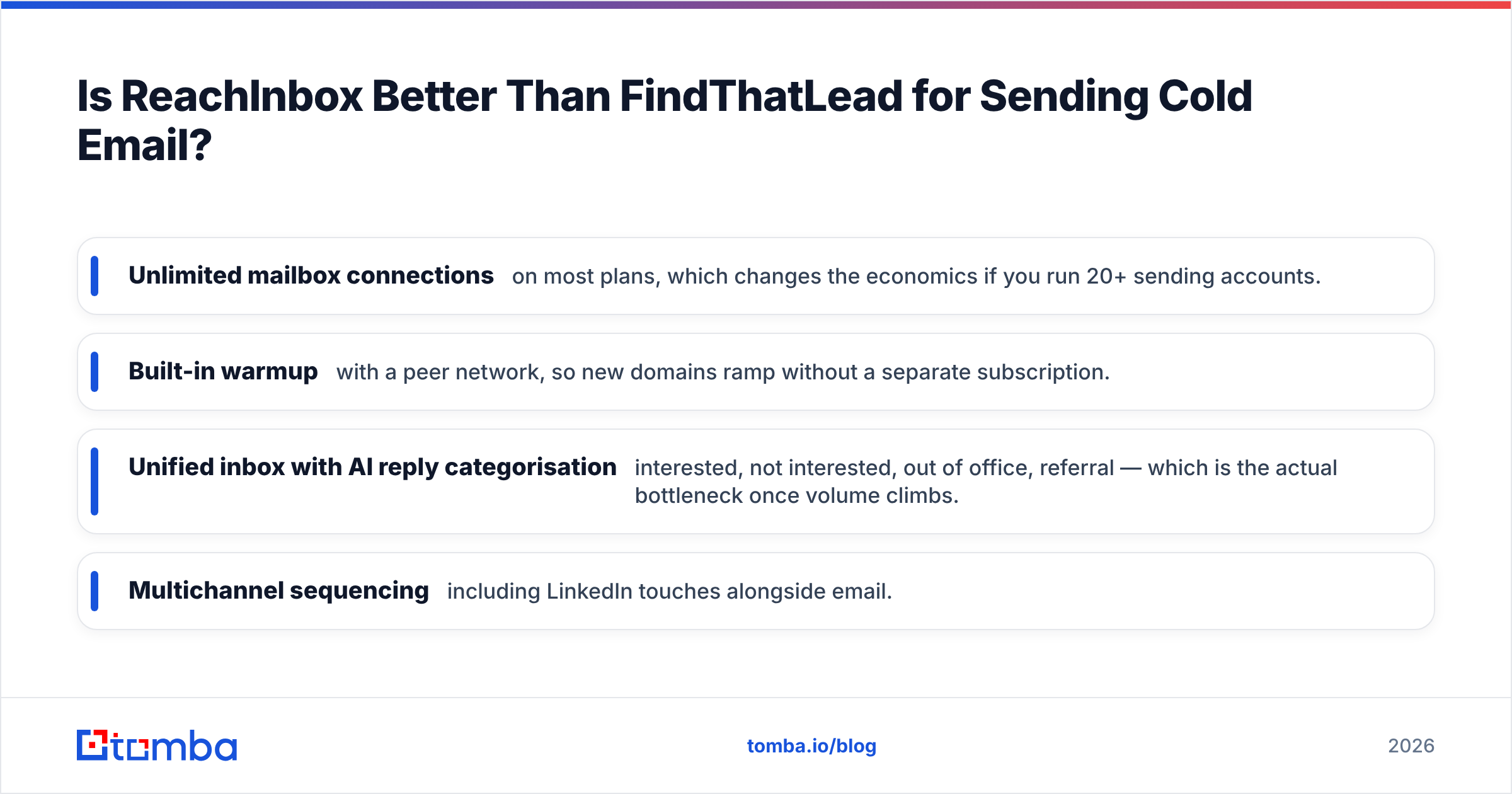
What ReachInbox gives you that FindThatLead simply does not:
- Unlimited mailbox connections on most plans, which changes the economics if you run 20+ sending accounts.
- Built-in warmup with a peer network, so new domains ramp without a separate subscription.
- Unified inbox with AI reply categorisation — interested, not interested, out of office, referral — which is the actual bottleneck once volume climbs.
- Multichannel sequencing including LinkedIn touches alongside email.
FindThatLead's sender, by contrast, is a convenience feature. It works for a few hundred emails a month from a single domain. Push it and you'll be shopping for a real sending platform within a quarter.
That said, don't confuse ReachInbox's warmup with immunity. Warmup improves the odds; it doesn't repair the damage from mailing a list where one in eight addresses is dead. Filters increasingly weight bounce rate and spam-complaint rate over sending history. Check your authentication first with an SPF checker, then worry about warmup.
What Do They Actually Cost at Real Volume?#
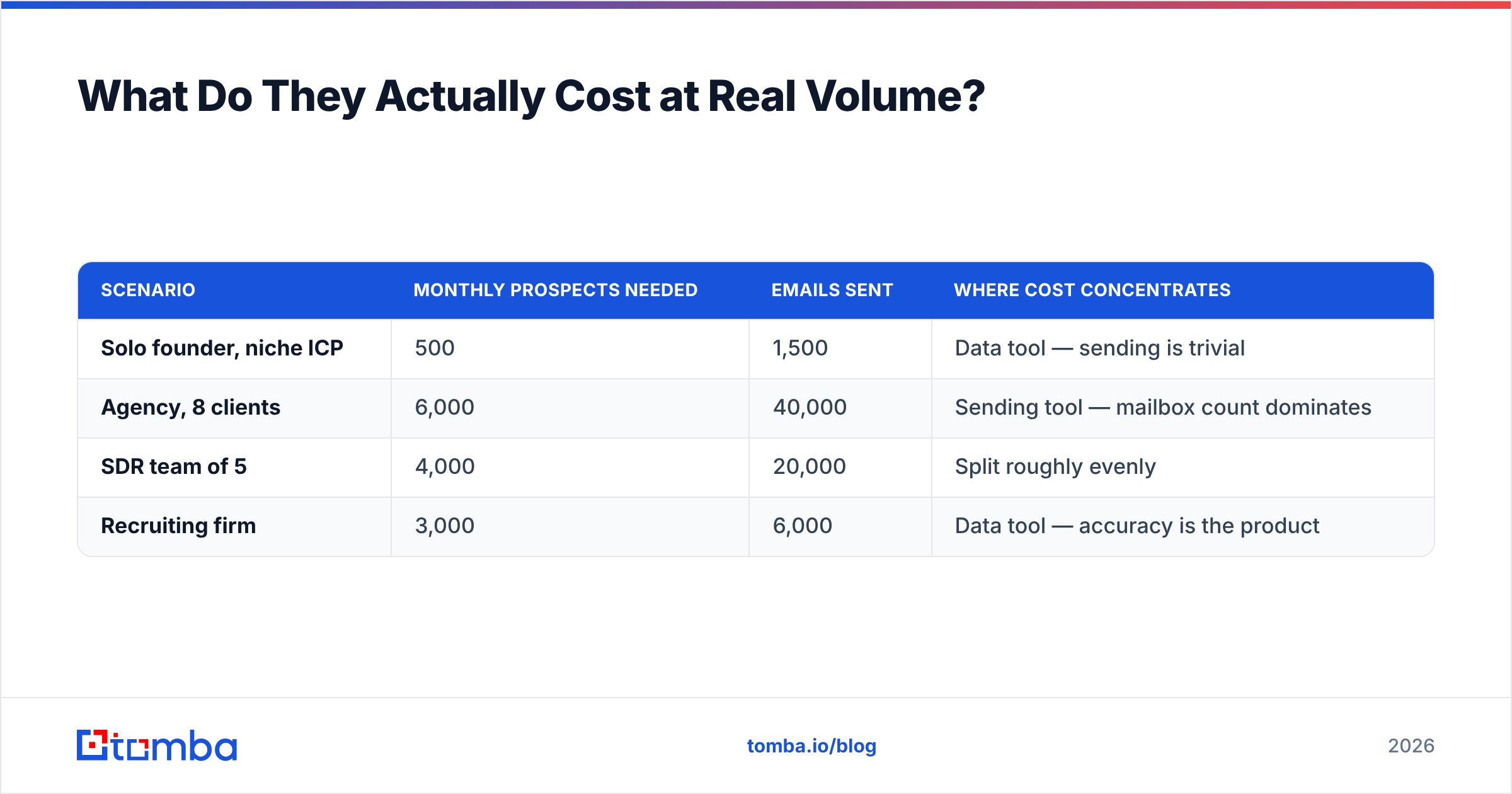
Pricing comparison is where most "X vs Y" posts get lazy. The honest answer is that these two bill on different axes, so total cost depends entirely on your ratio of prospects-found to emails-sent.
| Scenario | Monthly prospects needed | Emails sent | Where cost concentrates |
|---|---|---|---|
| Solo founder, niche ICP | 500 | 1,500 | Data tool — sending is trivial |
| Agency, 8 clients | 6,000 | 40,000 | Sending tool — mailbox count dominates |
| SDR team of 5 | 4,000 | 20,000 | Split roughly evenly |
| Recruiting firm | 3,000 | 6,000 | Data tool — accuracy is the product |
If you're in row two, ReachInbox's unlimited-mailbox pricing is a genuine advantage and FindThatLead's credit model will feel like a rounding error. If you're in rows one or four, you're paying for a sending platform you barely use while under-investing in the data that determines whether any of it lands.
For teams in that second camp, Tomba pricing is built the other way around: Free at 25 searches/mo, Starter at $49/mo, Growth at $99/mo, Pro at $249/mo, with the verifier, domain search, and enrichment included rather than sold as upsells. You pair it with whatever sender you like — including ReachInbox.


Can You Just Use One Tool for Everything?#
You can. You'll pay for it somewhere else.
The all-in-one pitch is seductive: one invoice, one login, one support queue. In practice, bundled suites optimise for the feature they sell on and let the rest coast. FindThatLead's sender coasts. ReachInbox's data coasts. Neither is being dishonest — they're allocating engineering to what customers actually renew for.
The counter-argument for bundling is real, though, and worth stating fairly:
- Fewer integration points means fewer places for a CSV to break.
- Simpler procurement matters in companies where every new vendor is a two-week security review.
- Lower floor price if your volumes are genuinely small.
Some vendors do the bundle honestly — BookYourData, for instance, focuses hard on pay-as-you-go verified B2B data rather than trying to be a sender too, which is a reasonable model if you buy lists in bursts rather than prospecting continuously.
The split-stack argument wins on one number: bounce rate. If your data source and your verifier are the same vendor, nobody in the chain is incentivised to tell you the data was weak. Separating them — or at minimum using a finder that ships verification as a distinct, auditable step — puts a real check in the pipeline.
How Should You Choose Between Them?#
Pick by the bottleneck you actually have, not the tool that markets hardest.
Choose FindThatLead if: you're a solo operator or small agency, your monthly send volume is under a few thousand, you prospect in Spanish- or European-market segments where its database is comparatively strong, and you want one subscription to cover finding plus light sending.
Choose ReachInbox if: you already have a data source you trust, you're running multiple sending domains, reply management is eating your day, and deliverability — not lead supply — is what's capping your meetings booked.
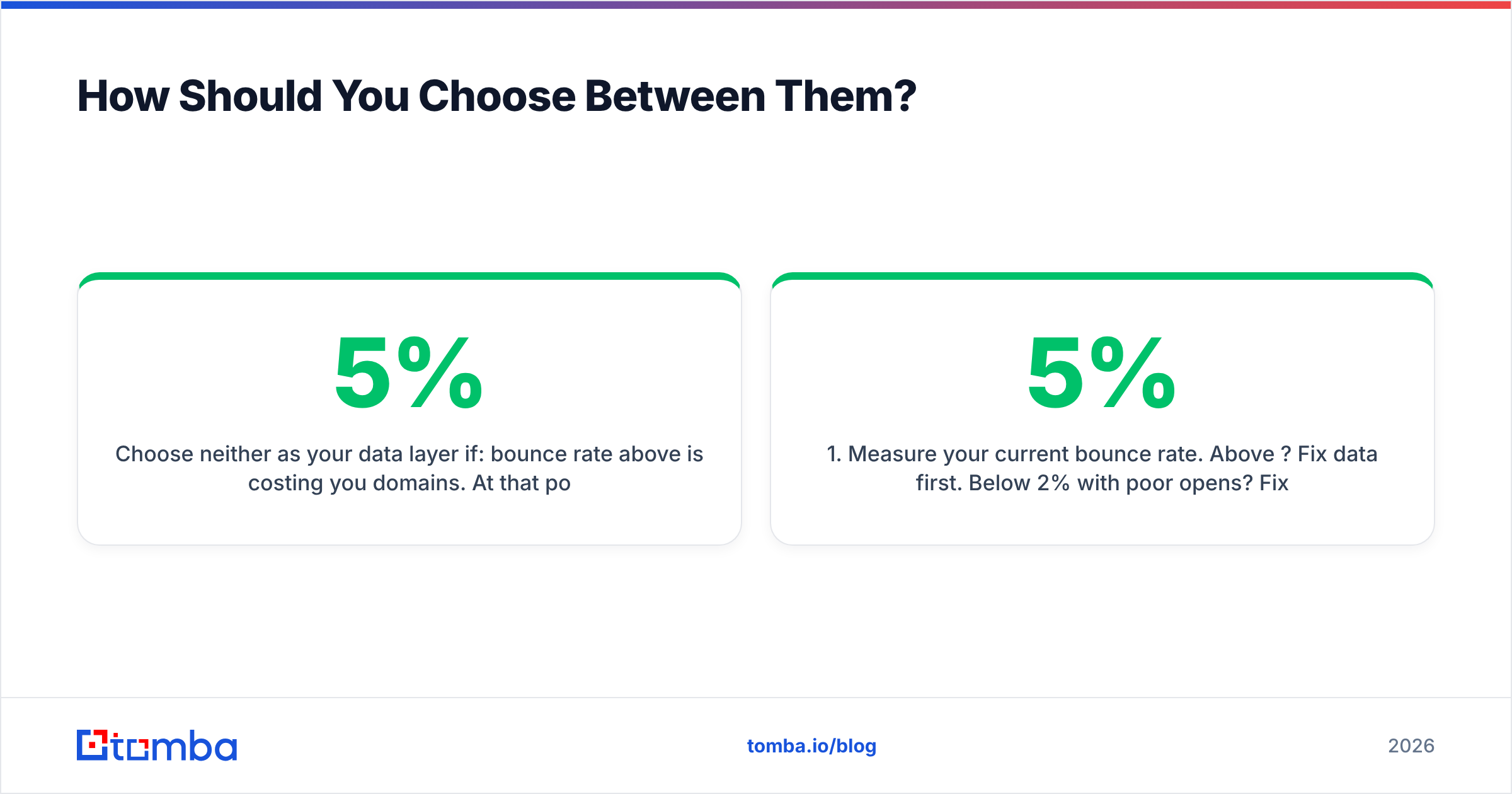
Choose neither as your data layer if: bounce rate above 5% is costing you domains. At that point you need a finder built around verification depth, not breadth. Run your existing list through a bulk email finder and verification pass before you renew anything, and diff the results against what your current vendor claimed.
A quick decision sequence:
- Measure your current bounce rate. Above 5%? Fix data first. Below 2% with poor opens? Fix sending first.
- Count your sending domains. More than five and ReachInbox-style pricing starts winning on math alone.
- Audit 100 known-good contacts against each finder. Trust the found-and-wrong column, not the marketing page.
- Check the API. If your team automates, the Tomba API, CLI, and MCP server matter more than any dashboard feature.
- Test the catch-all handling. Feed each tool a domain you know is catch-all and see whether it resolves or shrugs.
- Read the credit-refund policy before you buy annual.
Both companies publish current plans on their own sites and both have live review profiles on Capterra — worth ten minutes before you commit to a year.
The Verdict#
FindThatLead vs ReachInbox isn't a fight; it's a division of labour. FindThatLead is the better prospecting tool of the two. ReachInbox is the better sending platform by a wide margin. Buying one and expecting it to cover both halves is how teams end up with a warm, well-authenticated domain mailing addresses that don't exist.
If the half you need to fix is data — and for most teams with a bounce problem, it is — start with the Tomba Email Finder. Free tier gives you 25 searches a month to run the 100-contact audit described above against your current vendor, with verification, catch-all resolution, and domain search included rather than metered separately. Run the test, keep whichever finder wins on found-and-wrong, and pair it with whatever sender your volume justifies.
Related guides#
Ready to find emails that actually work?
Join 150,000+ professionals who stopped guessing and started sending. Free credits on signup — no credit card required.
Get the Tomba newsletter
Practical outbound tactics and product updates — once every two weeks.
About the author