FindThatLead vs SalesRipe (2026): Which Data Tool Wins?
FindThatLead sells discovery-plus-sending. SalesRipe sells a downloadable US contact database. Here's how the two actually compare on data accuracy, pricing, and workflow fit in 2026 — plus when neither is the right pick.
FindThatLead vs SalesRipe is a common shortlist for outbound teams. Both start near $49 a month. Both promise B2B contacts. But they do different jobs, and neither one leads on data quality. Here is the short version.
TL;DR
- FindThatLead finds and sends. It does domain search, lead search, email checks, and cold email sequences in one tab.
- SalesRipe is a US contact database. You filter it, then export a CSV. Good if you already own a sender.
- On FindThatLead vs SalesRipe accuracy, neither wins. G2 reviews and small independent tests put both in the "usable, but verify everything" tier. Real bounce rates land in the 8–20% band.
- Need an API, or a live check before send? A dedicated finder like the Tomba Email Finder fits better than either.
- Price signal: FindThatLead gives about 5,000 credits for ~$49/mo. SalesRipe starts near $49/mo with export caps. Both cost more per usable contact than the sticker suggests.
FindThatLead vs SalesRipe: what does each tool do?#
They solve different halves of the same problem. That is the whole comparison in one line.
FindThatLead is a Spanish prospecting suite. Give it a domain, a name, or a set of filters. It returns email addresses. You can then check those addresses and drop them into a cold email campaign. A LinkedIn tool called Scrab.in and a sender module come attached. The pitch is speed: find, verify, send, with no CSV round trip.
SalesRipe works more like a licensed list. You log in and filter by industry, staff count, revenue, job title, location, or tech stack. Then you export the records. Each record holds an email, a phone number, a LinkedIn URL, and company details. Coverage is mostly American. The company markets 30M+ US business contacts. Europe and Asia are thin.
So the real question is not which tool is better. It is which failure mode you can live with. FindThatLead has a smaller database. SalesRipe has bigger, older records.
FindThatLead vs SalesRipe: feature by feature#
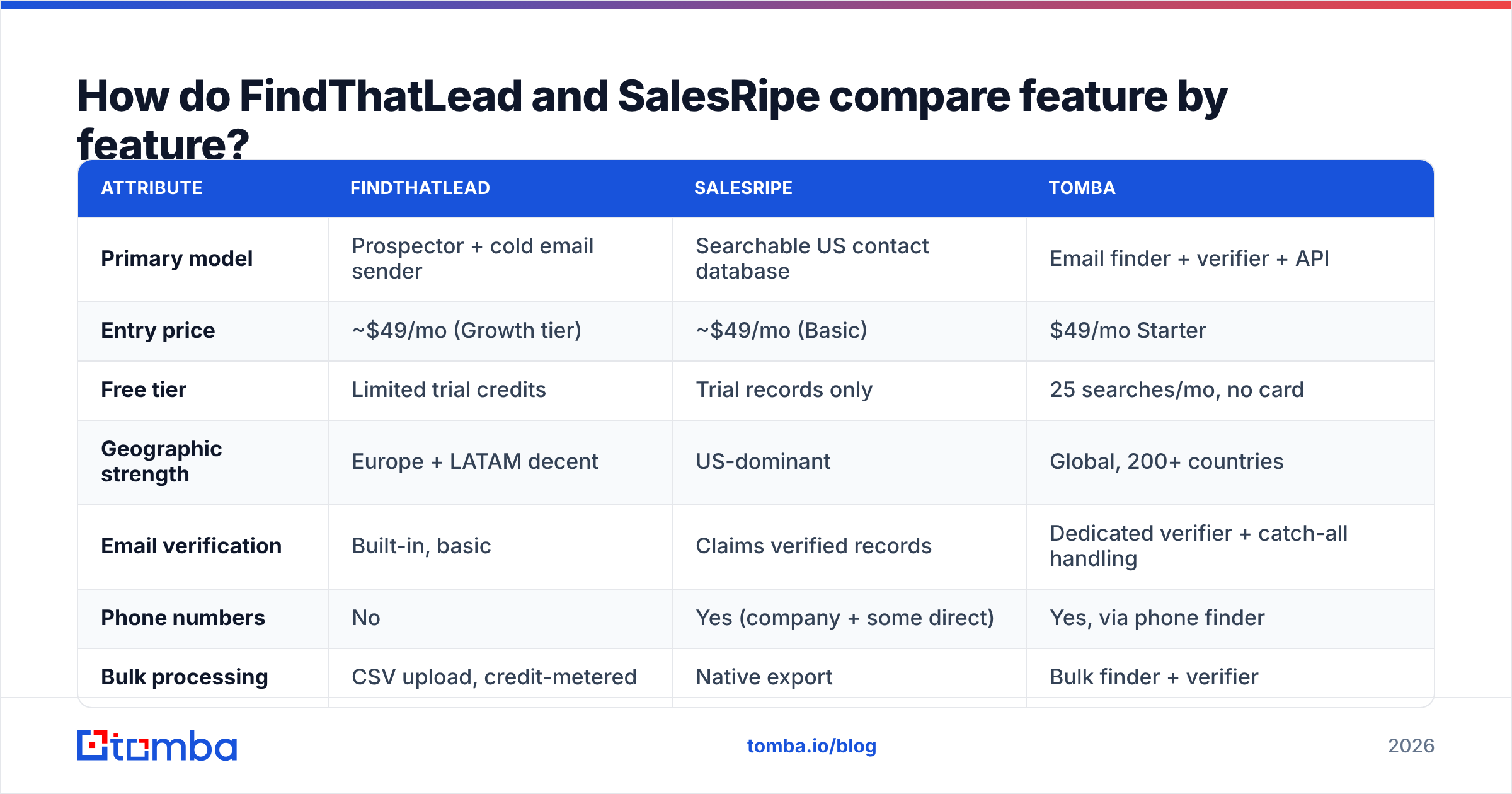
Here is the side by side. Tomba sits in the third column as a reference point, since most buyers also look at a pure email finder.
| Attribute | FindThatLead | SalesRipe | Tomba |
|---|---|---|---|
| Primary model | Prospector + cold email sender | Searchable US contact database | Email finder + verifier + API |
| Entry price | ~$49/mo (Growth tier) | ~$49/mo (Basic) | $49/mo Starter |
| Free tier | Limited trial credits | Trial records only | 25 searches/mo, no card |
| Geographic strength | Europe + LATAM decent | US-dominant | Global, 200+ countries |
| Email verification | Built-in, basic | Claims verified records | Dedicated verifier + catch-all handling |
| Phone numbers | No | Yes (company + some direct) | Yes, via phone finder |
| Bulk processing | CSV upload, credit-metered | Native export | Bulk finder + verifier |
| API access | Yes, limited endpoints | Limited / higher tiers | Full REST API, CLI, MCP server |
| Native integrations | Zapier, HubSpot | CRM exports (CSV-first) | HubSpot, Salesforce, Pipedrive, Sheets, Airtable, Zapier |
| Sending / sequences | Yes, native | No | No — pairs with your sender |
| Best for | Solo founders, small agencies | US SMB list-building | Dev teams, RevOps, accuracy-first outbound |
Read that table as three jobs. FindThatLead wants to be your whole outbound stack. SalesRipe wants to be your data supply. Tomba wants to be the accurate contact layer under the stack you already run.
FindThatLead vs SalesRipe: which has better data accuracy?#
Neither vendor publishes an audited number. So treat every accuracy claim as marketing until you test it.
Buyer reviews on G2 and Capterra show a clear pattern. So do the small tests that practitioners publish.
FindThatLead does fine on European and LATAM firms with public team pages. It does worse on US enterprise, and on firms with odd email patterns. Its checker catches syntax and MX errors. It is soft on catch-all domains, and that is where most silent bounces hide.
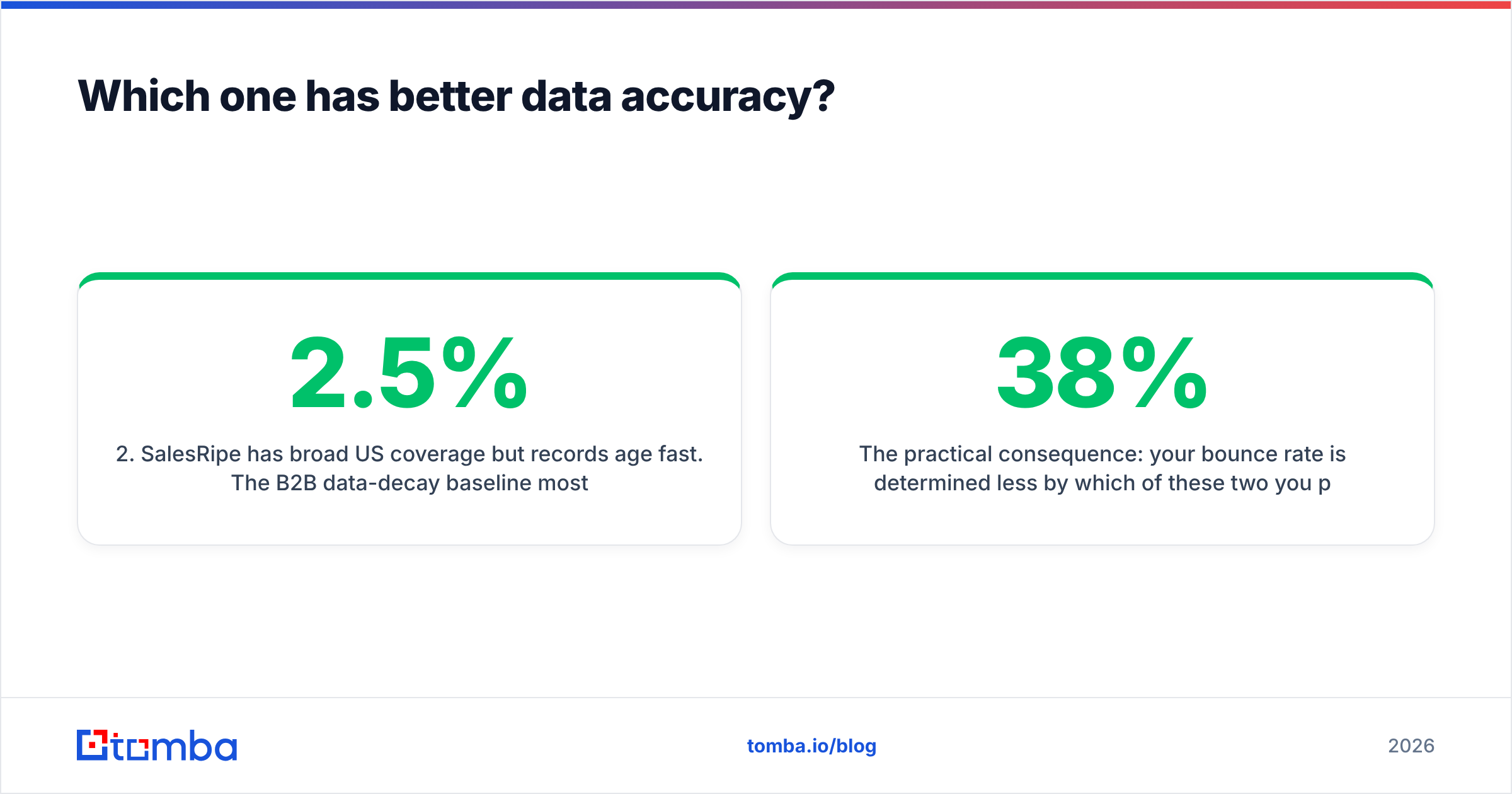
SalesRipe covers the US well, but records age fast. B2B data decays about 2 to 2.5% per month. Over a year, roughly a quarter of a database goes stale. A list you downloaded in January is a different list by June.
Both hand you catch-all addresses marked "valid." A catch-all domain accepts every address at the SMTP layer. A basic checker then calls it deliverable, even when the mail goes nowhere. Run those through a catch-all verifier first.
Job changes hurt both. About one in five B2B contacts changes role each year. Neither tool re-checks your saved lists on the entry plans.
So your bounce rate rests less on the FindThatLead vs SalesRipe choice than on one habit: verify before you send. A 38% bounce on a "verified" export is not a horror story. It is what a stale timestamp buys you.

FindThatLead vs SalesRipe: how does pricing compare?#
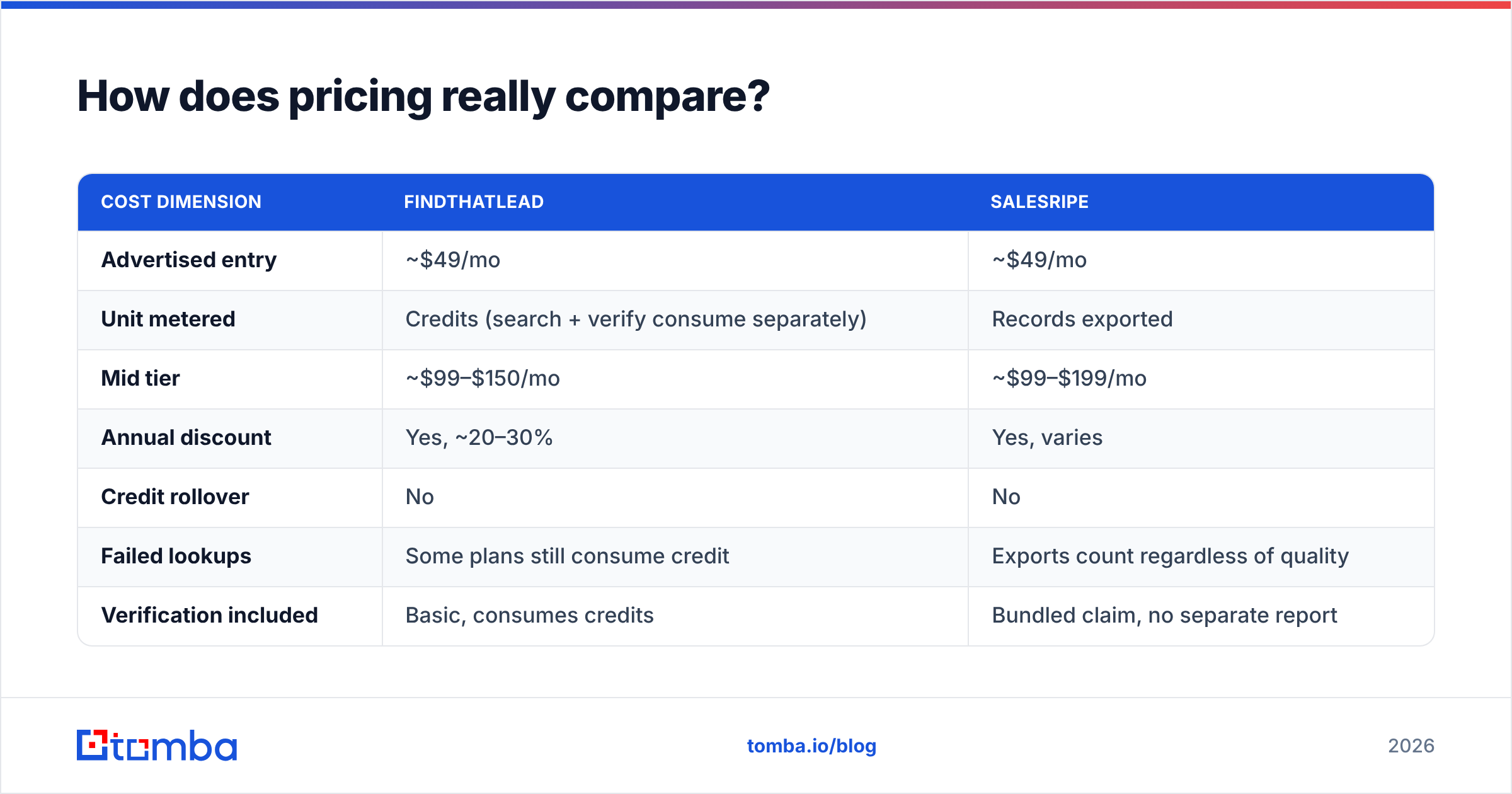
The sticker price is almost the same. The cost per usable contact is not.
| Cost dimension | FindThatLead | SalesRipe |
|---|---|---|
| Advertised entry | ~$49/mo | ~$49/mo |
| Unit metered | Credits (search + verify consume separately) | Records exported |
| Mid tier | ~$99–$150/mo | ~$99–$199/mo |
| Annual discount | Yes, ~20–30% | Yes, varies |
| Credit rollover | No | No |
| Failed lookups | Some plans still consume credit | Exports count regardless of quality |
| Verification included | Basic, consumes credits | Bundled claim, no separate report |
| Effective cost per deliverable contact | Higher than sticker | Higher than sticker |
Two traps are worth naming.
Trap one: double metering. On most FindThatLead plans, a search and a check are separate credit events. Find 5,000 emails and check them all, and you spend close to 10,000 credits. Budget for that.
Trap two: export billing. SalesRipe bills for records you export, not records that work. If a quarter of the file is stale, you still paid full price for it. That is the built-in flaw of static list licensing. It is also why many buyers move to per-lookup pricing after a year.
For reference, Tomba pricing runs Free (25 searches a month), Starter $49, Growth $99, Pro $249, and custom Enterprise. Finding and checking are separate, priced steps. Whichever vendor you pick, model the cost per delivered email, not per row.
When should you pick FindThatLead?#
Pick FindThatLead when you want fewer tools, not better data.
It is a fair choice if:
- You are a solo founder or a two-person agency. Wiring a finder to a sender costs time you do not have.
- Your buyers sit in Europe or LATAM. This is the tool's strongest region. It beats US-first databases there.
- You want LinkedIn work bundled in. Scrab.in sends connection requests and scrapes profiles. Note that LinkedIn automation risks your account, whoever sells it.
- Your volume is modest. Under a few thousand contacts a month, the credit math stays sane.
Skip it if you need an API-first flow, or if you sell to North American enterprise. Skip it too if you already pay for Instantly, Smartlead, or Lemlist. In that case you would buy a second sending engine and never use it.
When should you pick SalesRipe?#
Pick SalesRipe when you need US volume today and you already own the sending side.
It fits when:
- Your whole market is US SMB. Local services, regional makers, franchise owners: the filters are built for that.
- You want phone numbers too. If you call first and email second, dial coverage beats an email-only tool. Run the numbers through a phone validator before your dialer burns time on dead lines.
- You prefer a flat list to a meter. Some teams plan better against a fixed export cap.
- Your CRM import is CSV based anyway. Then the export-first design costs you nothing.
Skip it if you sell abroad, or if you need live enrichment inside a product. Skip it as well if you must show where each record came from. Bulk list vendors say less about sourcing than finders that publish their data sources.
Is there a better option than either?#
For most teams, the honest answer is to split the job.
FindThatLead vs SalesRipe feels like a hard call because each one bundles things you may not want. One bundles a sender. The other bundles a static list. Unbundle, and the choice gets easier and cheaper:
- Discovery — a finder with domain search and a real API. Enrich on demand, instead of downloading a snapshot that decays.
- Verification — an email verifier run right before send, not at export time. This is the highest-ROI step in the chain. Both tools underrate it.
- Sending — whatever sequencer your team knows, with warmup and domain hygiene done well. Your email deliverability rests far more on this than on the database you bought.
Other tools worth a look, depending on your angle:
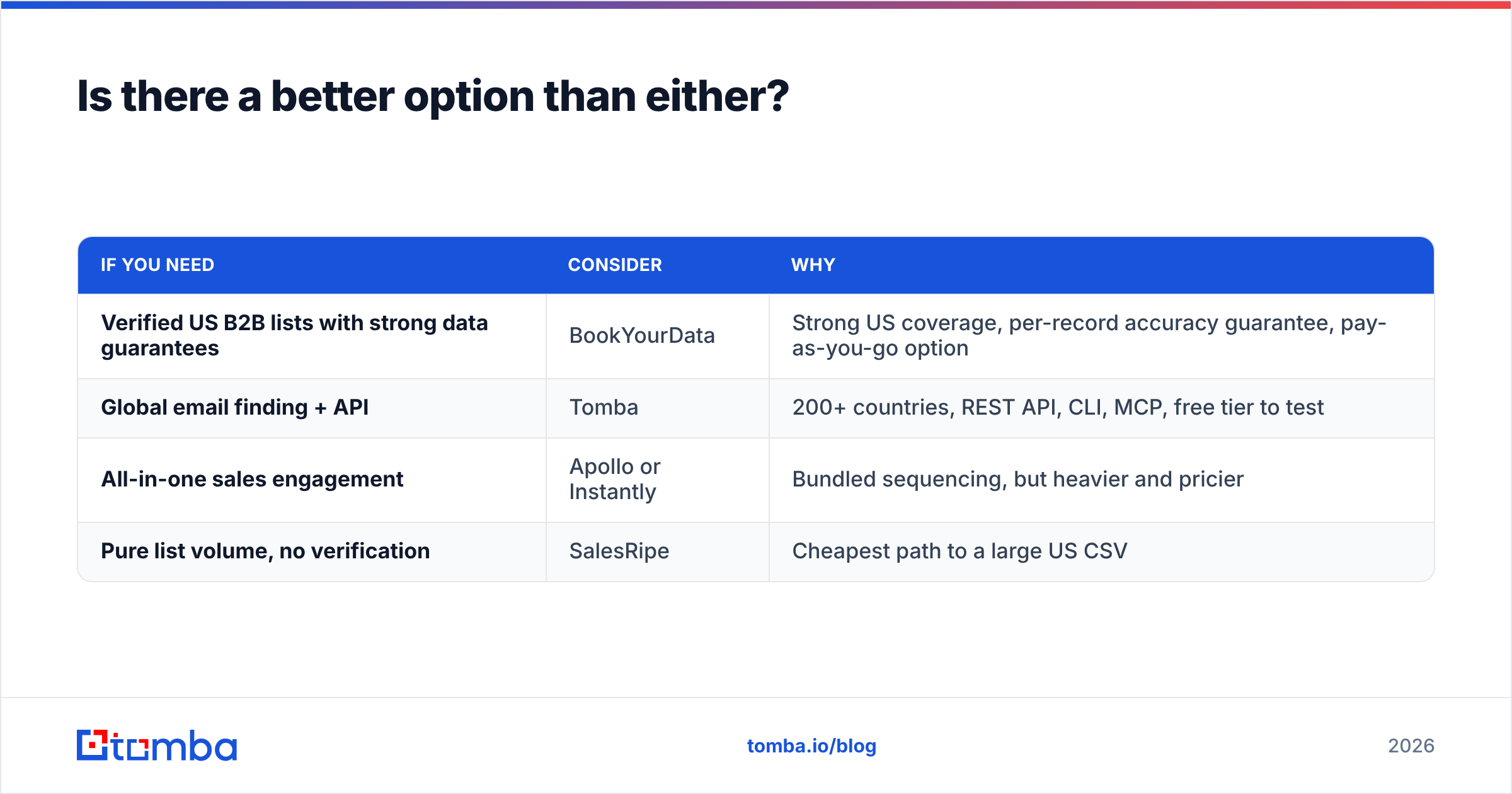
| If you need | Consider | Why |
|---|---|---|
| Verified US B2B lists with strong data guarantees | BookYourData | Strong US coverage, per-record accuracy guarantee, pay-as-you-go option |
| Global email finding + API | Tomba | 200+ countries, REST API, CLI, MCP, free tier to test |
| All-in-one sales engagement | Apollo or Instantly | Bundled sequencing, but heavier and pricier |
| Pure list volume, no verification | SalesRipe | Cheapest path to a large US CSV |
Already deep in one stack? The Apollo alternative and Findymail alternative posts cover nearby trade-offs.
How do you test both before you commit?#
Run a FindThatLead vs SalesRipe bake-off on your own data. It takes about two hours and saves a quarter of your spend.
- Build a 100-contact truth set. Use firms you can confirm yourself: customers, partners, people who have replied to you. Mix regions and company sizes on purpose.
- Run the same list through both tools. Record the match rate and the confidence label.
- Check the results with a neutral third tool. Do not let a vendor grade its own homework. Use a free email checker or any independent service.
- Send a 50-address seed campaign per tool. Measure the real bounce, not the predicted one. This is the number that matters.
- Work out the cost per delivered contact. Total spend, divided by the emails that landed.
- Check catch-all handling. Pull out the catch-all domains and see how each tool labeled them. This is where the two split most.
Most teams find match rates within 10 points of each other. Deliverable rates then differ by 15 to 25 points. That gap is the real product difference, and no pricing page shows it.
The verdict#
The FindThatLead vs SalesRipe answer depends on your market and your stack.
Pick FindThatLead if you are a small Europe-focused team that wants one tool. Pick SalesRipe if you need US volume and already have a sender. Pick neither if accuracy and API access drive your stack.
Both are real products with real users. Both share one weakness. Verification is a checkbox, not a core step. That is fine at 200 emails a month. At 5,000 it gets costly, because a 15% bounce rate starts to hurt your sender reputation.
Would you rather fix the data layer first and pick a sender later? Start with the Tomba Email Finder. The free tier gives you 25 searches a month, no card needed. That is enough to run the bake-off above on your own truth set.
Test it head to head against whatever FindThatLead vs SalesRipe returns. Check both with an independent tool. Then let the delivered-contact count decide. If Tomba does not win on your market, you still learned something useful. If it does, an API, a CLI, and a bulk pipeline are waiting behind the same key.
Related guides#
Ready to find emails that actually work?
Join 150,000+ professionals who stopped guessing and started sending. Free credits on signup — no credit card required.
Get the Tomba newsletter
Practical outbound tactics and product updates — once every two weeks.
About the author