FindThatLead vs SMTP Ghost (2026): Which One Should You Use?
FindThatLead finds the contacts. SMTP Ghost sends the volume. They solve different halves of outbound — here is how they actually compare on data quality, sending limits, pricing, and who should pick which.
TL;DR
- These two tools are not really competitors. FindThatLead is a prospecting and email-finding platform; SMTP Ghost is a cold email sending platform built around multi-inbox volume. Comparing them head-to-head only makes sense if you are deciding which problem to solve first.
- If your bottleneck is "I don't have contacts," you want a finder. If your bottleneck is "I have 40,000 contacts and can't send to them without burning my domain," you want sending infrastructure.
- FindThatLead bundles finding, verification, and a light sender. SMTP Ghost bundles inbox rotation, warmup, and volume sending — with lead sourcing as a secondary feature.
- Both approaches fail the same way: unverified data. A 25–30% bounce rate kills a domain regardless of which vendor sent the mail.
- The most common 2026 stack is a dedicated finder plus a dedicated sender, not one tool trying to be both.
What are FindThatLead and SMTP Ghost, exactly?#
FindThatLead is a Spanish-built B2B prospecting suite that has been around since roughly 2015. Its core loop is: give it a domain, a name, or a LinkedIn profile, and it returns a business email address. Around that core it has stacked a Chrome extension, a bulk CSV processor, a lead database with filters, a basic verifier, and a lightweight campaign sender called Scrab.in / Cold Email. You can see the current product lineup on findthatlead.com.
SMTP Ghost comes from the opposite direction. It is a cold outreach platform whose selling point is sending scale: connect many mailboxes, rotate sends across them, warm them automatically, and push high daily volume without tripping provider throttles. Lead sourcing exists inside it, but the engineering effort is clearly on the delivery side — SMTP connections, inbox rotation, spintax, deliverability tooling. If you strip the marketing away, it is closer to an SMTP orchestration layer with a campaign UI on top.
That difference matters more than any feature checklist. Buying SMTP Ghost when your real problem is "my list is 4,000 guessed addresses" is like buying a bigger truck when the warehouse is empty.
How do FindThatLead and SMTP Ghost compare feature by feature?#
Here is the honest side-by-side. Treat every price as directional — both vendors change tiers and run promotions, so confirm on their own pricing pages before you buy.
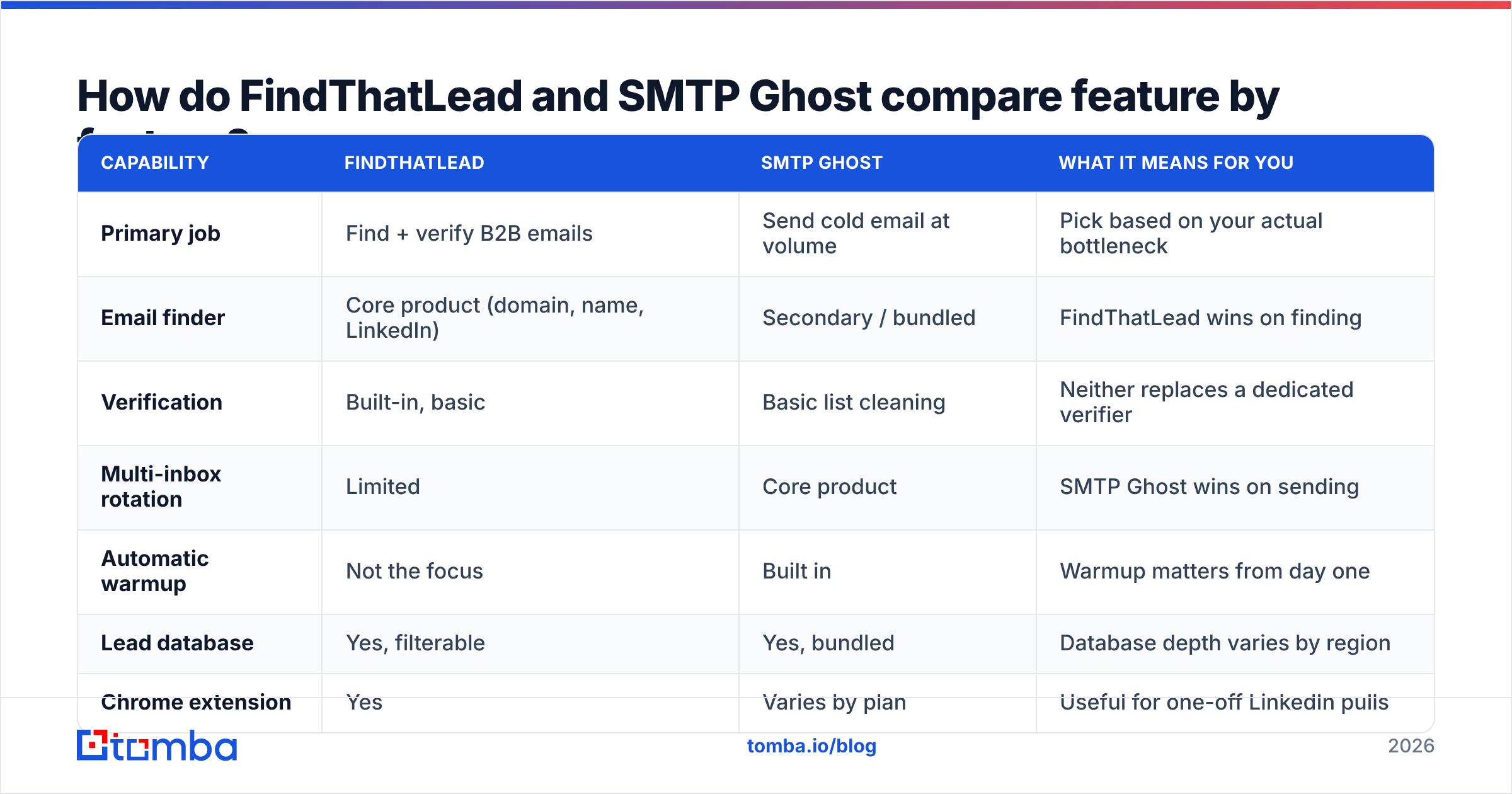
| Capability | FindThatLead | SMTP Ghost | What it means for you |
|---|---|---|---|
| Primary job | Find + verify B2B emails | Send cold email at volume | Pick based on your actual bottleneck |
| Email finder | Core product (domain, name, LinkedIn) | Secondary / bundled | FindThatLead wins on finding |
| Verification | Built-in, basic | Basic list cleaning | Neither replaces a dedicated verifier |
| Multi-inbox rotation | Limited | Core product | SMTP Ghost wins on sending |
| Automatic warmup | Not the focus | Built in | Warmup matters from day one |
| Lead database | Yes, filterable | Yes, bundled | Database depth varies by region |
| Chrome extension | Yes | Varies by plan | Useful for one-off LinkedIn pulls |
| API access | Yes, on paid tiers | Sending-oriented | Check rate limits before building |
| Entry paid price | Roughly $49/mo range | Flat-rate tiers, often higher | Confirm current published pricing |
| Best for | SDRs building lists | Teams already sitting on lists |
Two things stand out. First, neither tool is weak — they are simply optimized for different halves of the outbound pipeline. Second, both treat verification as a checkbox feature rather than a core competency, which is where most cold email programs quietly break.
Which one actually finds better email addresses?#
FindThatLead, if you are comparing finder to finder. It has a decade of pattern data and a workflow designed around the search itself: paste a domain, get the team, export. SMTP Ghost's lead features exist to keep you inside the platform, not to win an accuracy benchmark.
But "better" needs a definition. In email finding there are three numbers that matter, and vendors love to blur them:
- Hit rate — of 100 prospects you search, how many return any address? A tool that returns 90 addresses looks great until you check the next number.
- Accuracy / deliverability rate — of the addresses returned, how many actually accept mail? This is the only number your domain reputation cares about.
- Catch-all handling — what the tool does when a domain accepts everything. Marking catch-alls as "valid" inflates hit rate and quietly inflates your bounce rate too.
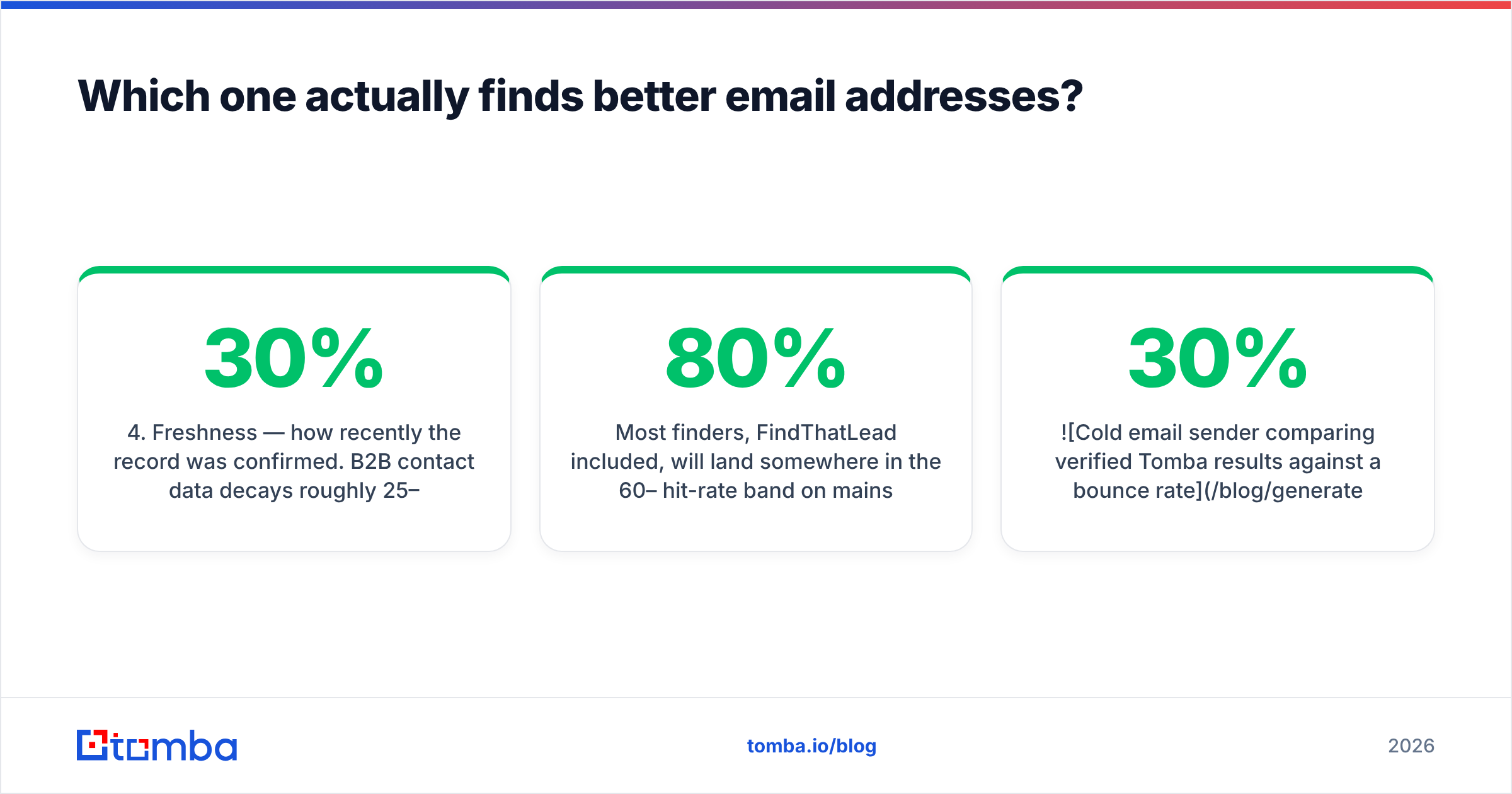
- Freshness — how recently the record was confirmed. B2B contact data decays roughly 25–30% per year as people change jobs; a 2023 record is a coin flip in 2026.
Most finders, FindThatLead included, will land somewhere in the 60–80% hit-rate band on mainstream domains and drop sharply on small companies, regional TLDs, and privacy-heavy sectors. The gap between vendors narrows on Fortune 500 domains and widens enormously on the long tail — which is exactly where your ICP usually lives.

If accuracy is the deciding factor, run your own test. Take 200 contacts you can independently confirm, run them through each tool, and measure the three numbers above. Vendor-published accuracy stats are marketing; your own 200-row test is data. This is also why a dedicated email verifier sits between the finder and the sender in most mature stacks — it catches what the finder over-promised before the sender turns it into a bounce.
How does the sending side really differ?#
This is SMTP Ghost's home turf, and it is worth understanding what the "unlimited sending" pitch actually means.
No tool grants you unlimited sending. Google and Microsoft enforce per-mailbox limits, and modern bulk-sender rules require authenticated domains, low complaint rates, and one-click unsubscribe on volume mail. What multi-inbox platforms do is distribute volume: 40 mailboxes at 30 sends per day is 1,200 sends per day, spread thin enough to look human. SMTP Ghost is built around that math — connecting mailboxes, rotating them, warming them, and pausing the ones that start looking risky.
FindThatLead's sender is much simpler. It exists so you can act on a list you just built without exporting it, and it works fine for a few hundred sends a week from one or two mailboxes. It is not designed to run 40 rotating inboxes across three domains.
The honest framing:
- Under ~500 sends/week from 1–2 mailboxes — FindThatLead's built-in sending is adequate. Adding a second vendor is overhead you don't need yet.
- Above that, you need real rotation, warmup, and per-inbox health monitoring. That is a sending platform's job, and SMTP Ghost is built for it.
- Either way, SPF, DKIM, and DMARC must be correct before your first send. Run an SPF checker on every sending domain — misconfigured records are the single most common cause of "the tool isn't working."
One more thing worth saying plainly: sending infrastructure amplifies whatever list quality you feed it. Rotating 40 inboxes through a 28%-bounce list does not protect you. It burns 40 inboxes instead of one.
What do they cost once you account for hidden fees?#
Sticker price is the least interesting part of either quote. Here is where the real money goes.
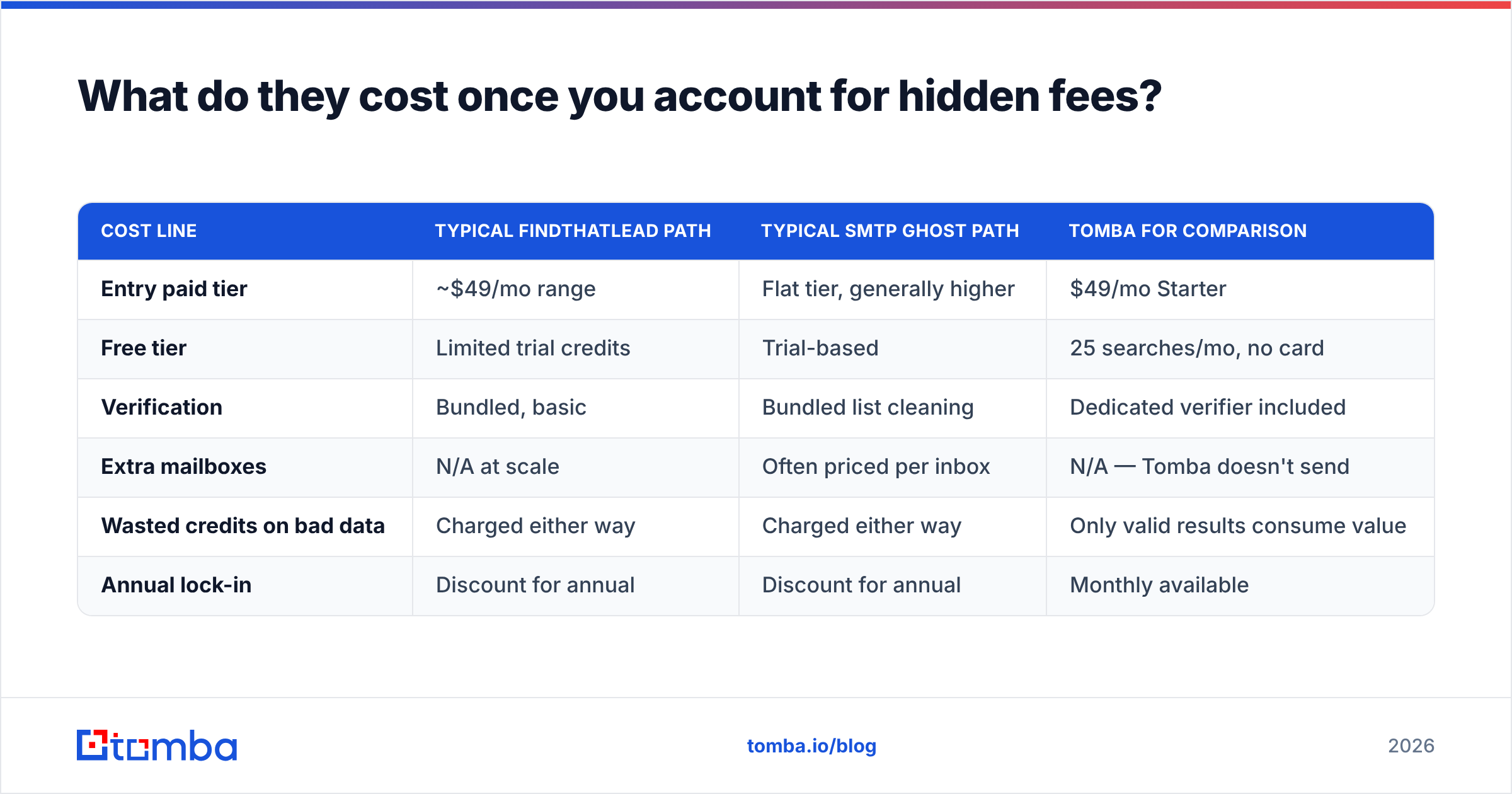
| Cost line | Typical FindThatLead path | Typical SMTP Ghost path | Tomba for comparison |
|---|---|---|---|
| Entry paid tier | ~$49/mo range | Flat tier, generally higher | $49/mo Starter |
| Free tier | Limited trial credits | Trial-based | 25 searches/mo, no card |
| Verification | Bundled, basic | Bundled list cleaning | Dedicated verifier included |
| Extra mailboxes | N/A at scale | Often priced per inbox | N/A — Tomba doesn't send |
| Wasted credits on bad data | Charged either way | Charged either way | Only valid results consume value |
| Annual lock-in | Discount for annual | Discount for annual | Monthly available |
Confirm live numbers on each vendor's page; Tomba pricing is public and unchanged at $49 Starter, $99 Growth, $249 Pro, with a free tier at 25 searches per month.
The hidden cost nobody itemizes is the mailbox layer. If you go the volume-sending route, you are also buying domains, mailboxes (Google Workspace or Microsoft 365 seats), and warmup time. Ten sending domains with four mailboxes each is a real monthly line item on top of whatever the platform charges — often larger than the platform fee itself. Budget for it before you commit to a "just send more" strategy.
The second hidden cost is credits burned on nothing. When a finder returns a guessed address that bounces, you paid for the search and the deliverability damage. Over a quarter that is usually a bigger number than the difference between any two vendors' monthly plans.

Which should you pick for your team?#
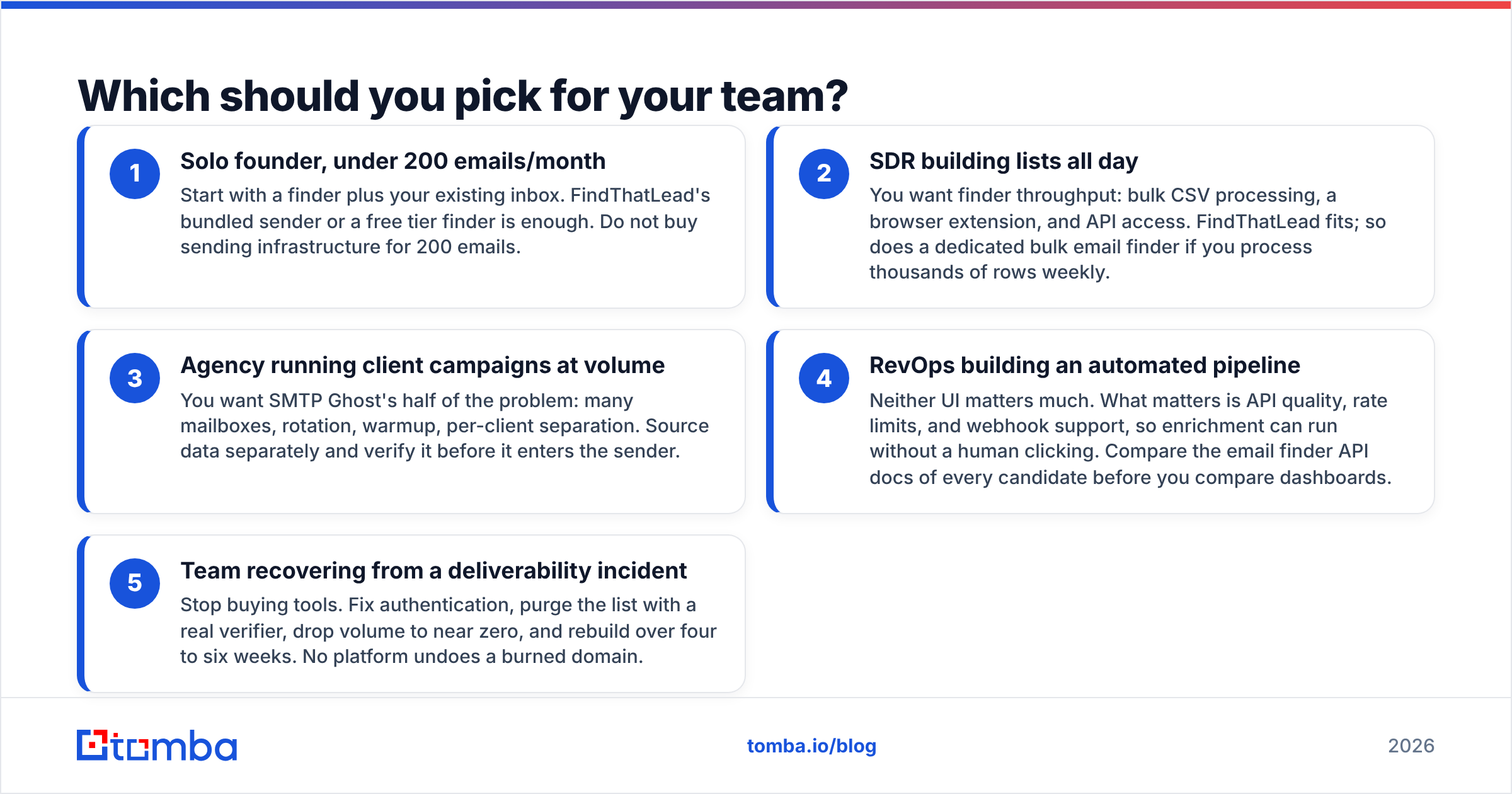
Pick by bottleneck, not by feature count.
- Solo founder, under 200 emails/month — Start with a finder plus your existing inbox. FindThatLead's bundled sender or a free tier finder is enough. Do not buy sending infrastructure for 200 emails.
- SDR building lists all day — You want finder throughput: bulk CSV processing, a browser extension, and API access. FindThatLead fits; so does a dedicated bulk email finder if you process thousands of rows weekly.
- Agency running client campaigns at volume — You want SMTP Ghost's half of the problem: many mailboxes, rotation, warmup, per-client separation. Source data separately and verify it before it enters the sender.
- RevOps building an automated pipeline — Neither UI matters much. What matters is API quality, rate limits, and webhook support, so enrichment can run without a human clicking. Compare the email finder API docs of every candidate before you compare dashboards.
- Team recovering from a deliverability incident — Stop buying tools. Fix authentication, purge the list with a real verifier, drop volume to near zero, and rebuild over four to six weeks. No platform undoes a burned domain.
If you genuinely need both halves and want to minimize vendors, understand the trade: an all-in-one gives you two adequate products instead of one excellent one. That is a reasonable trade at low volume and a bad trade at high volume.
Can you use them together — or replace both?#
Yes to all three options, and the right answer depends on volume.
Use them together. Find and verify in one tool, export a clean CSV, send from the other. This is the most common setup among teams doing serious outbound, because it lets you upgrade either half independently. When your finder disappoints, you swap finders without touching campaigns.
Replace the finder half. If you like the sending platform but the bundled lead data is thin, plug in a dedicated finder via API or CSV. A domain search that returns every public address at a company, plus verification, plus catch-all verification for the domains that accept everything, will out-perform a bundled finder in most tests — particularly on the long-tail companies that make up real ICPs.
Replace the sending half. If you already run Instantly, Smartlead, Salesloft, or a homegrown sender, you do not need SMTP Ghost's sending layer at all — you need better contacts flowing into it.
A practical checklist before you commit to any combination:
- Run a 200-row accuracy test on your real ICP, not on Fortune 500 domains.
- Check the catch-all policy — ask each vendor directly whether catch-alls count as valid in their reported accuracy figures.
- Read the credit refund policy for invalid results. Some vendors only charge for confirmed-valid returns; some charge for every lookup.
- Verify export rights. Some platforms restrict CSV export on lower tiers, which quietly locks your data in.
- Confirm API rate limits if you plan to automate. A generous monthly credit pool with a stingy per-second limit is not generous.
- Read recent reviews, not the ones from three years ago. Vendor data quality shifts fast — the review pages on G2 are useful mainly for spotting recent complaint patterns.
What is the verdict on FindThatLead vs SMTP Ghost?#
FindThatLead wins if your job is finding people. SMTP Ghost wins if your job is reaching a lot of people you already found. Neither wins the other's category, and any review that declares one the outright champion is comparing a hammer to a saw.
The failure mode to avoid is buying a sending platform to fix a data problem. Volume tooling multiplies whatever you feed it — good data becomes more meetings, bad data becomes more bounces across more inboxes. Fix the input first: confirm the address exists, confirm the person still works there, confirm the domain is not a catch-all pretending to be valid. Then scale the send.
If the input side is where you are losing, start there. The Tomba Email Finder returns verified business addresses by domain, name, or company, with catch-all detection built in and a free tier of 25 searches a month so you can run your own accuracy test before spending anything. Paid plans start at $49/month, and the same data is available through the API, Chrome extension, Google Sheets, and bulk CSV — so it drops into whatever sending platform you end up choosing.
Related guides#
Ready to find emails that actually work?
Join 150,000+ professionals who stopped guessing and started sending. Free credits on signup — no credit card required.
Get the Tomba newsletter
Practical outbound tactics and product updates — once every two weeks.
About the author