FindThatLead vs Sparkle: Which Email Finder Wins in 2026?
FindThatLead is a mature prospecting suite; Sparkle is the AI-native newcomer. Here is how they compare on data accuracy, pricing, and workflow fit, plus the cheaper option most outbound teams end up running instead.
TL;DR
- FindThatLead is the older, broader product: prospector search, email finder, verifier, and a built-in cold email sender. Best if you want one login for list-building and sending.
- Sparkle is the AI-native side of the market: you describe an ideal customer profile in plain language and it assembles and enriches the list for you. Best if you hate building filters by hand.
- Neither tool wins on raw email accuracy. Both are aggregators, and both leave you with catch-all domains you still have to verify before sending.
- On price, FindThatLead's mid-tiers climb fast once you need real volume, and AI-native tools usually charge a premium per enriched record. A dedicated finder plus verifier stack is normally cheaper per usable contact.
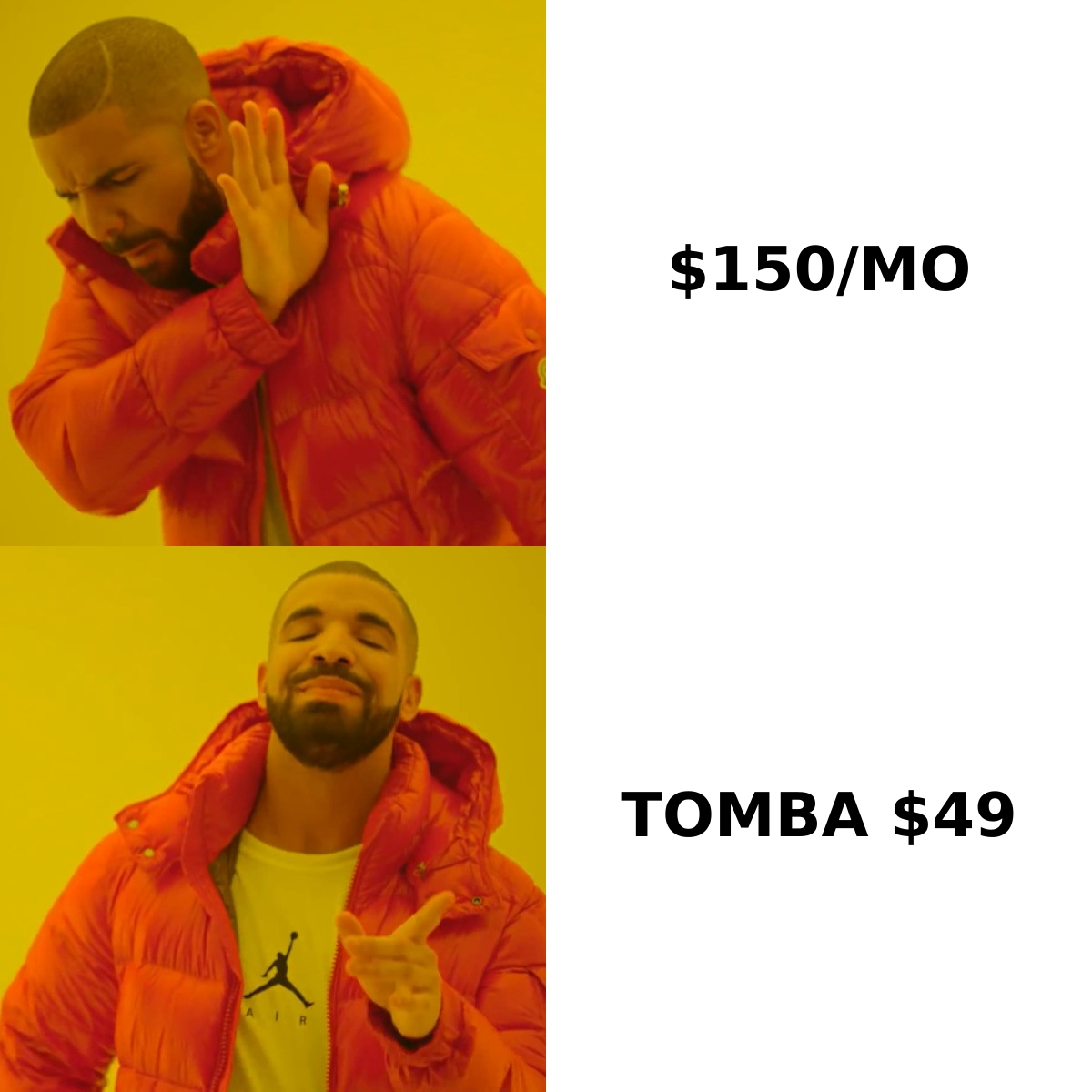
- If you only need clean, deliverable B2B emails at API speed, a focused tool like Tomba (free tier, then $49/mo) does that job for less than either suite.
What are FindThatLead and Sparkle?#
They solve the same business problem from opposite directions.
FindThatLead is a Barcelona-based B2B prospecting suite that has been around since the mid-2010s. Its core loop is: search a database or a domain, pull contacts, verify them, drop them into a campaign, and send. The Prospector lets you filter by role, location, and industry; the Domain Search pulls every published address on a company domain; the Email Verifier scrubs the list; and the built-in sender handles the sequence. It is a "do the whole thing here" product.
Sparkle sits in the newer AI-agent category. Instead of building boolean filters, you describe who you want — "Series A fintech companies in the UK with a Head of Growth" — and the tool interprets that, searches its sources, and returns an enriched list. The pitch is time saved on list construction, not a fundamentally different data pool. Because tools in this category iterate on packaging and pricing frequently, treat any plan detail you read (including here) as a snapshot and confirm on the vendor's own site before you buy.
The honest framing: FindThatLead sells a workflow. Sparkle sells a shortcut to the list. Whichever you pick, the underlying contact data comes from the same broad ecosystem — public web pages, crawled company sites, licensed datasets, and pattern inference — and it all needs verification before it touches your sending domain.
How do FindThatLead and Sparkle compare feature by feature?#
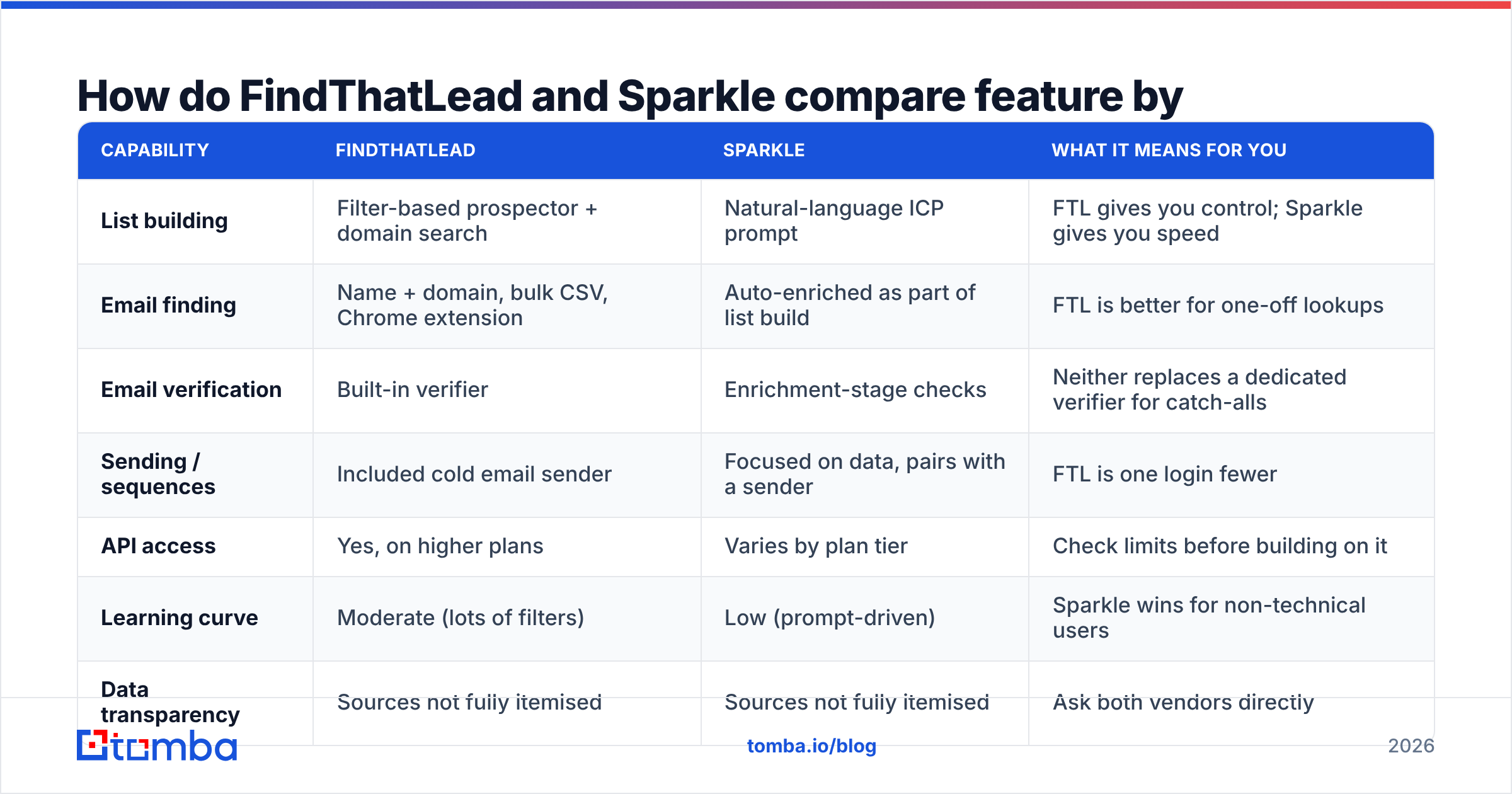
| Capability | FindThatLead | Sparkle | What it means for you |
|---|---|---|---|
| List building | Filter-based prospector + domain search | Natural-language ICP prompt | FTL gives you control; Sparkle gives you speed |
| Email finding | Name + domain, bulk CSV, Chrome extension | Auto-enriched as part of list build | FTL is better for one-off lookups |
| Email verification | Built-in verifier | Enrichment-stage checks | Neither replaces a dedicated verifier for catch-alls |
| Sending / sequences | Included cold email sender | Focused on data, pairs with a sender | FTL is one login fewer |
| API access | Yes, on higher plans | Varies by plan tier | Check limits before building on it |
| Learning curve | Moderate (lots of filters) | Low (prompt-driven) | Sparkle wins for non-technical users |
| Data transparency | Sources not fully itemised | Sources not fully itemised | Ask both vendors directly |
Two takeaways from that grid.
First, FindThatLead is the more complete outbound tool because it sends. If you are a solo founder or a two-person agency and you do not already own an email sequencer, that consolidation is worth real money — you are effectively getting a finder, a verifier, and a lightweight Lemlist competitor in one subscription.
Second, Sparkle's advantage is time-to-first-list, not data quality. Natural-language targeting is genuinely faster than clicking through fifteen filter dropdowns. But it does not conjure contacts that do not exist in the underlying sources, and it can quietly return loosely-matched companies when your prompt is ambiguous. Spot-check the first 50 rows of any AI-assembled list against LinkedIn before you trust the next 5,000.
Which one finds more valid emails?#
Neither vendor publishes an independently audited accuracy figure, and you should be skeptical of any comparison post that claims a precise win. What you can do is run the same control list through both.
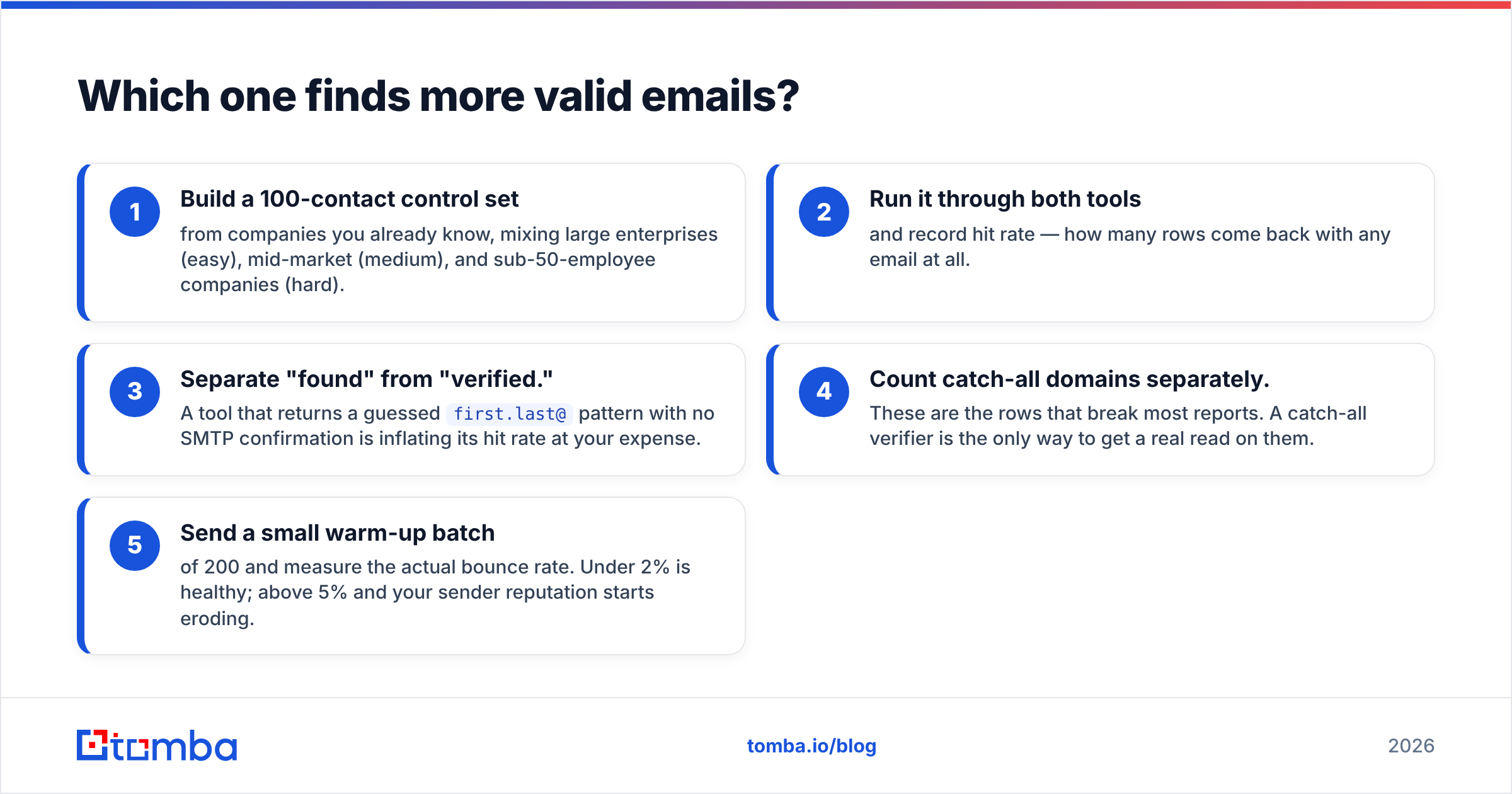
Here is the test that actually predicts your bounce rate:
- Build a 100-contact control set from companies you already know, mixing large enterprises (easy), mid-market (medium), and sub-50-employee companies (hard).
- Run it through both tools and record hit rate — how many rows come back with any email at all.
- Separate "found" from "verified." A tool that returns a guessed
first.last@pattern with no SMTP confirmation is inflating its hit rate at your expense. - Count catch-all domains separately. These are the rows that break most reports. A catch-all verifier is the only way to get a real read on them.
- Send a small warm-up batch of 200 and measure the actual bounce rate. Under 2% is healthy; above 5% and your sender reputation starts eroding.

In practice, hit rates across mainstream finders cluster closer together than marketing pages suggest, and the differences show up in the hard segment: small companies, non-English domains, and recently-hired employees. That is where cheaper aggregators fall off a cliff and where a finder with active SMTP checking and pattern confidence scoring pulls ahead.
One more thing that separates a good result from a bad one: bounces are not only a data problem. A perfectly valid address will still bounce if your domain authentication is broken. Run an SPF checker and confirm DKIM and DMARC are in place before you blame the tool. Wikipedia's overview of bounce messages is a decent primer on what the different failure codes actually mean.
What does FindThatLead vs Sparkle actually cost?#
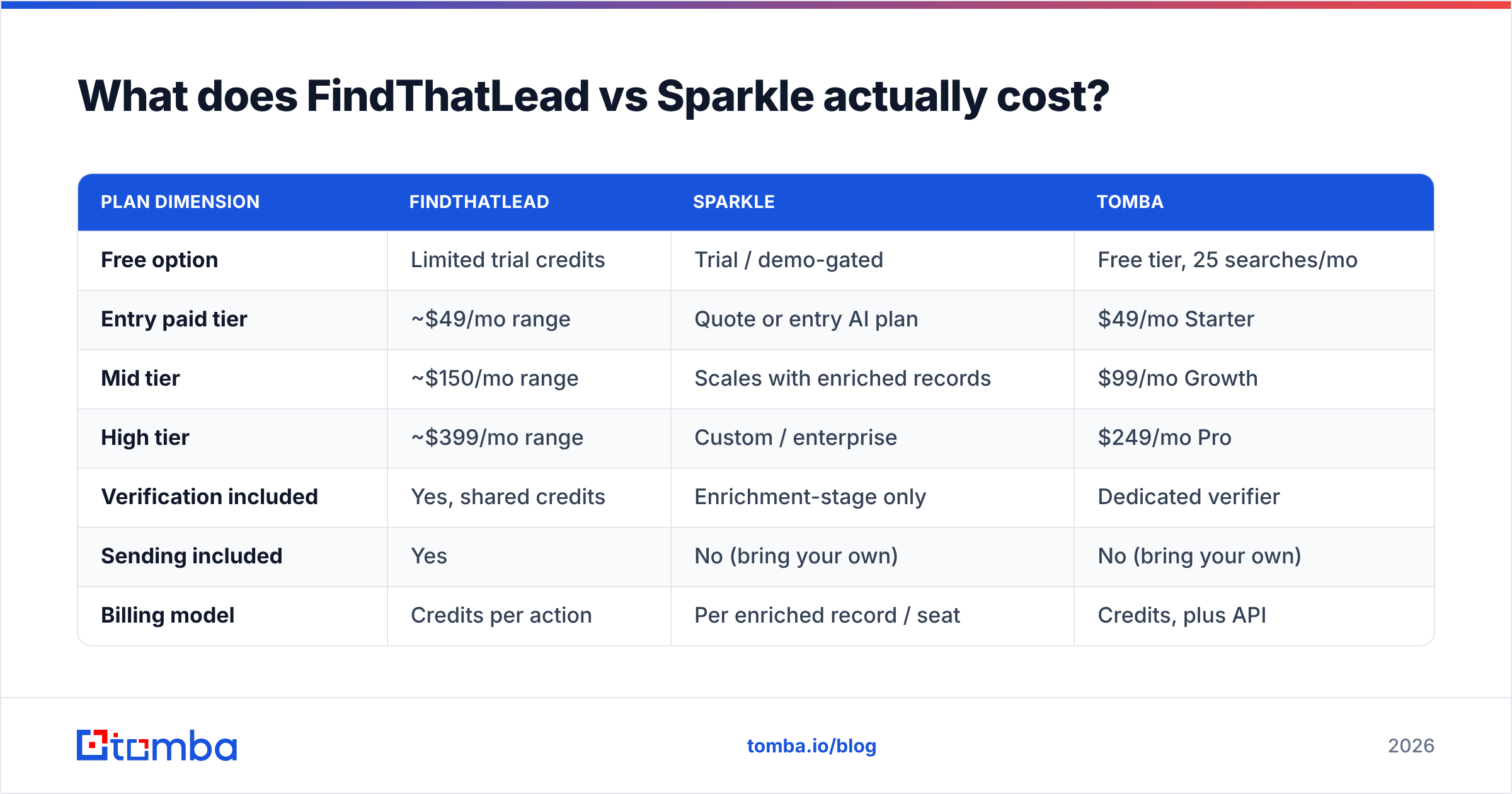
Pricing is where the two diverge most, and where you should do your own arithmetic rather than trusting a headline number. Both vendors adjust plans regularly — verify on their sites.
| Plan dimension | FindThatLead | Sparkle | Tomba |
|---|---|---|---|
| Free option | Limited trial credits | Trial / demo-gated | Free tier, 25 searches/mo |
| Entry paid tier | ~$49/mo range | Quote or entry AI plan | $49/mo Starter |
| Mid tier | ~$150/mo range | Scales with enriched records | $99/mo Growth |
| High tier | ~$399/mo range | Custom / enterprise | $249/mo Pro |
| Verification included | Yes, shared credits | Enrichment-stage only | Dedicated verifier |
| Sending included | Yes | No (bring your own) | No (bring your own) |
| Billing model | Credits per action | Per enriched record / seat | Credits, plus API |
The trap in both products is the shared credit pool. When a search, a find, and a verify all draw from the same bucket, your effective cost per usable contact is two to three times the sticker rate. Say a plan gives you 5,000 credits. If a prospector search costs a credit per row, finding the email costs another, and verifying costs a third, you did not buy 5,000 contacts — you bought roughly 1,600.
Run the number that matters: cost per contact you actually email. Take the monthly price, divide by the number of verified, non-catch-all, role-relevant addresses you extracted last month. Teams that do this exercise are usually surprised: the "cheap" $49 plan and the "expensive" $249 plan often land within cents of each other per usable record, and sometimes the expensive one wins.
If you want a sanity check on list quality economics, prepaid verified-list providers like BookYourData price per contact upfront, which makes the comparison arithmetic easy — useful as a benchmark even if you never buy from them. Peer reviews on G2 are also worth ten minutes; filter for reviews from companies your size, not enterprise logos.
Where does each tool break down?#
Every tool in this category has a failure mode. Knowing them in advance saves you a wasted month.
- FindThatLead — credit burn on wide searches. Broad prospector queries return a lot of low-fit rows, and you pay for them. Narrow your ICP filters before you export, not after.
- FindThatLead — the sender is adequate, not best-in-class. It works for straightforward sequences. If you need advanced conditional branching, inbox rotation at scale, or deep CRM sync, you will outgrow it.
- Sparkle — prompt ambiguity produces list drift. "Fast-growing SaaS companies" means something different to the model than it does to you. Always review a sample before scaling.
- Sparkle — data source opacity. AI-assembled lists feel authoritative because they arrive pre-formatted. Ask directly which sources are licensed versus crawled, especially if you sell into the EU and need a defensible GDPR position.
- Both — catch-all domains. Roughly a fifth of B2B domains accept everything at the SMTP layer. Neither tool fully solves this, and both will happily hand you rows that look valid and are not.
- Both — no substitute for warm-up. A clean list into a cold domain still lands in spam. Model your ramp with a warmup calculator before you send volume.

Is there a cheaper alternative to both?#
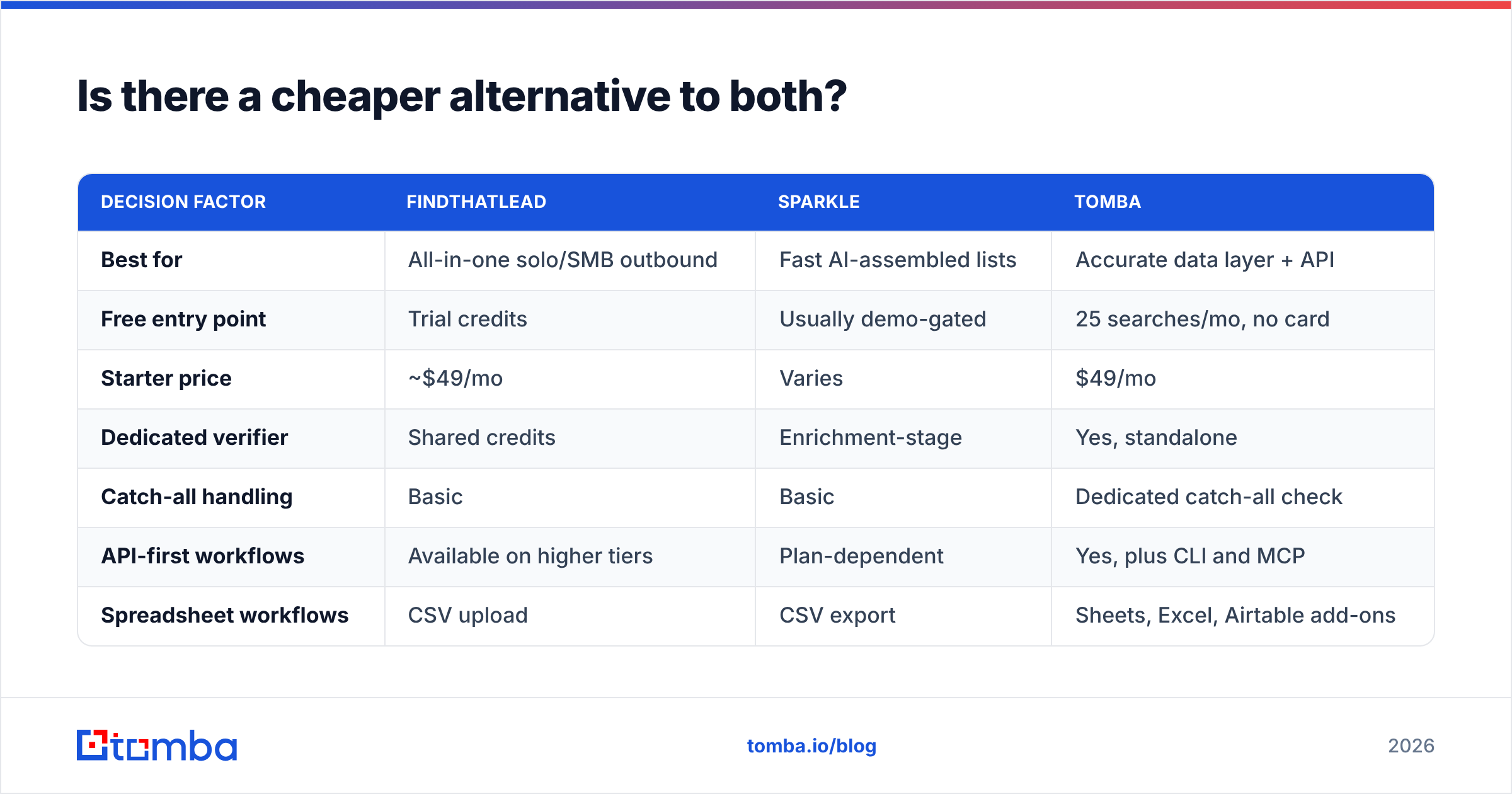
Yes, if you unbundle. The reason suites cost what they cost is that you are paying for a sender and a database you may not need.
Most outbound teams already have a sequencer they like — Instantly, Smartlead, Lemlist, or their CRM's native sequences. What they actually need is a reliable data layer feeding it: find the address, verify it, enrich it, push it into the CRM. That is a narrower job, and a focused tool does it for less.

| Decision factor | FindThatLead | Sparkle | Tomba |
|---|---|---|---|
| Best for | All-in-one solo/SMB outbound | Fast AI-assembled lists | Accurate data layer + API |
| Free entry point | Trial credits | Usually demo-gated | 25 searches/mo, no card |
| Starter price | ~$49/mo | Varies | $49/mo |
| Dedicated verifier | Shared credits | Enrichment-stage | Yes, standalone |
| Catch-all handling | Basic | Basic | Dedicated catch-all check |
| API-first workflows | Available on higher tiers | Plan-dependent | Yes, plus CLI and MCP |
| Spreadsheet workflows | CSV upload | CSV export | Sheets, Excel, Airtable add-ons |
| Sending included | Yes | No | No |
Tomba's email finder covers name-plus-domain lookups, domain search pulls every address on a company site, and the email verifier runs SMTP and catch-all checks as a separate step rather than quietly consuming your finding credits. Full Tomba pricing starts free at 25 searches per month, then $49/mo Starter, $99/mo Growth, and $249/mo Pro.
The trade-off is real and worth stating plainly: Tomba does not send email. If your entire requirement is "one tool, one login, from list to inbox," FindThatLead is the more convenient answer and you should buy it. If your requirement is "give me contacts that do not bounce, and let me plug them into what I already run," the unbundled stack wins on both price and quality.
How should you choose between FindThatLead and Sparkle?#
Match the tool to your actual constraint.
- You have no sequencer and a small budget → FindThatLead. The included sender is worth more than a marginal accuracy difference.
- You hate building filters and value speed over control → Sparkle. Run a paid pilot on one segment before committing annually.
- You have a sequencer and bounce rates are your problem → unbundle. Dedicated finder plus dedicated verifier, wired through an API.
- You are a developer or RevOps engineer → whichever has the API you can actually build on. Test rate limits and response schemas during the trial, not after.
- You sell into the EU → put data provenance at the top of your evaluation, above price and above hit rate.
Whatever you pick, run the same 100-contact control test on both trials. It takes an afternoon and it beats every comparison article on the internet, including this one, because it uses your ICP rather than a generic sample.
Ready to fix the data layer first?#
The fastest way to know whether your bounce problem is a tool problem is to test it against a clean baseline. Run your next list through the Tomba Email Finder — free tier included, 25 searches a month, no card — and compare the verified hit rate against whatever you are paying for now. If it wins, plug it into your existing sequencer through the Tomba API and keep the sender you already like. If it does not, you have lost nothing but an afternoon.
Related guides#
Ready to find emails that actually work?
Join 150,000+ professionals who stopped guessing and started sending. Free credits on signup — no credit card required.
Get the Tomba newsletter
Practical outbound tactics and product updates — once every two weeks.
About the author