FindThatLead vs Woodpecker (2026): Which Tool Wins?
FindThatLead finds the emails. Woodpecker sends the sequences. They overlap less than the pricing pages suggest — here's the honest breakdown of which one you actually need in 2026, and when you need both.
FindThatLead vs Woodpecker is the wrong fight to pick. One tool finds email addresses. The other one sends the emails. Here is what that means for your stack and your budget.
TL;DR
- FindThatLead and Woodpecker barely compete. FindThatLead finds contacts and has a light sender bolted on. Woodpecker sends cold email at scale, with real deliverability engineering and no contact database.
- Already have lists, but replies are flat and bounces are high? Woodpecker wins outright.
- No contacts at all? FindThatLead fits better. Its weak spot is verification, which is where a dedicated email finder earns its keep.
- Most teams that pick one buy the other within six months. Budget for both jobs from day one.
- The cost table below shows the per-reply math, not the sticker price.
What are FindThatLead and Woodpecker, actually?#
FindThatLead is a Spanish-built prospecting suite. Its core job is turning a domain, a name, or a LinkedIn profile into an email address. Around that core it stacks a Chrome extension, a lead search by role and location, a social prospector, and a basic email sender called Scrapper/Sender. It is a "get contacts, blast them" tool.
Woodpecker is a Polish-built cold email platform. Its core job is landing sequences in inboxes without burning your domain. Around that core it stacks warmup, inbox rotation, deliverability monitoring, conditional multi-step campaigns, reply detection, and agency-grade client workspaces. It has almost no native contact database. You bring the list.
Put plainly: FindThatLead answers who do I email. Woodpecker answers how do I actually reach their inbox. Comparing them head-to-head is like comparing a grocery store to an oven. The honest question is not which one is better. It is which half of the problem is killing your pipeline right now.
Still, the comparison is worth doing carefully. Both vendors bid on the same "cold outbound" search terms. Both sell to the same 5–50 person sales teams. And both will tell you they cover the whole workflow.

FindThatLead vs Woodpecker: feature-by-feature comparison#
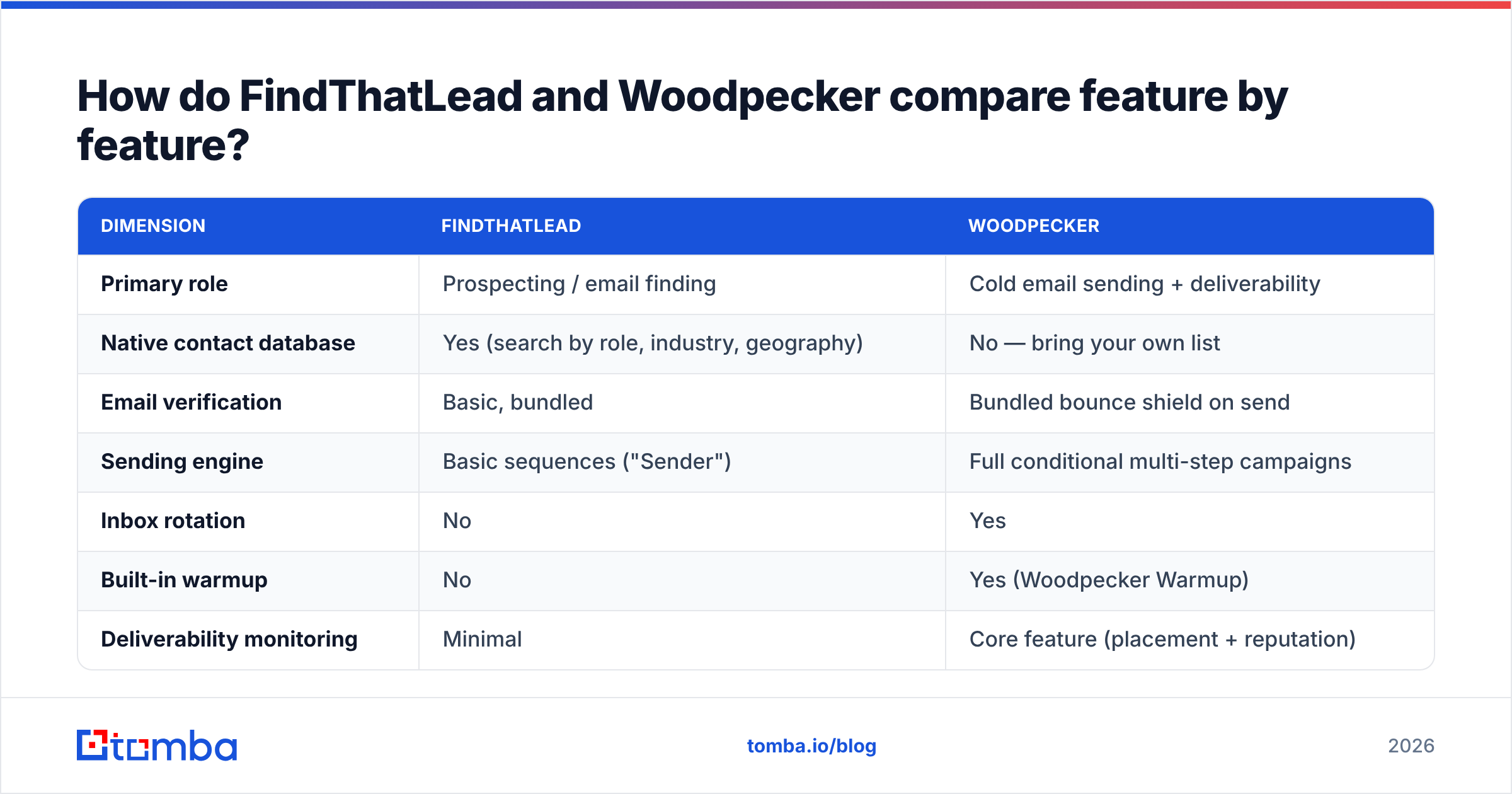
Here is the side-by-side on the attributes that actually change your numbers.
| Dimension | FindThatLead | Woodpecker |
|---|---|---|
| Primary role | Prospecting / email finding | Cold email sending + deliverability |
| Native contact database | Yes (search by role, industry, geography) | No — bring your own list |
| Email verification | Basic, bundled | Bundled bounce shield on send |
| Sending engine | Basic sequences ("Sender") | Full conditional multi-step campaigns |
| Inbox rotation | No | Yes |
| Built-in warmup | No | Yes (Woodpecker Warmup) |
| Deliverability monitoring | Minimal | Core feature (placement + reputation) |
| Reply detection / auto-pause | Basic | Advanced, thread-aware |
| Agency multi-client workspaces | Limited | Yes, purpose-built |
| Chrome extension | Yes | Limited (LinkedIn assist) |
| API | Yes | Yes |
| CRM sync | HubSpot, Pipedrive, Zapier | HubSpot, Pipedrive, Salesforce, Zapier |
| Entry price | ~$49/mo (Growth) | ~$29/mo per slot, scales with contacts |
| Best for | Solo founders needing lists fast | Teams and agencies running volume outbound |
Two things jump out of that table.
First, Woodpecker is deeper inside its lane. Inbox rotation, warmup, and placement monitoring are not nice-to-haves in 2026. Google and Microsoft's bulk sender rules made them table stakes. FindThatLead's Sender has none of that infrastructure. Use it as your main sending tool and you are sending unprotected.
Second, FindThatLead has one real edge Woodpecker does not offer: it produces contacts. If you are starting from a blank sheet, Woodpecker hands you a beautiful pipe with nothing to put in it.
FindThatLead vs Woodpecker: which one has better data accuracy?#
This is where FindThatLead is most exposed. It is worth being specific rather than diplomatic.
FindThatLead's finder leans on pattern guessing. It assumes firstname.lastname@company.com is likely, then runs a light SMTP check. That works well for mid-size companies with clean, consistent formats. It breaks down on three common cases:
- Catch-all domains. A catch-all accepts every address at the SMTP layer. So a basic check returns "valid" for a mailbox that goes nowhere. Roughly a third of B2B domains are catch-all or partly catch-all. You need a dedicated catch-all verifier to tell real mailboxes from black holes.
- Role and alias addresses.
info@,sales@, andteam@come back green and tank your reply rate. - Recently changed roles. Someone left in Q1. The mailbox forwards quietly until one day it does not.
Woodpecker never claims to solve this. It is not a data vendor. Its bounce shield catches obviously bad addresses at send time and pauses the campaign. That limits the damage, but it does not improve the list. If your list is 18% junk, Woodpecker protects your domain. Your campaign still reaches only 82% of the people you paid to reach.
Most teams land on the same fix. Verify the list with a purpose-built tool before it ever touches the sender. An email verifier sorts valid, invalid, catch-all, and role addresses for a fraction of the cost of a burnt domain. Every vendor accuracy figure is self-reported, including Tomba's. Test each claim on 100 of your own contacts before you trust it at scale.

If accuracy is your bottleneck, the honest answer is blunt. Neither tool is the strongest option in that category. Both are good at their main job and average at this one.
What does each one really cost?#
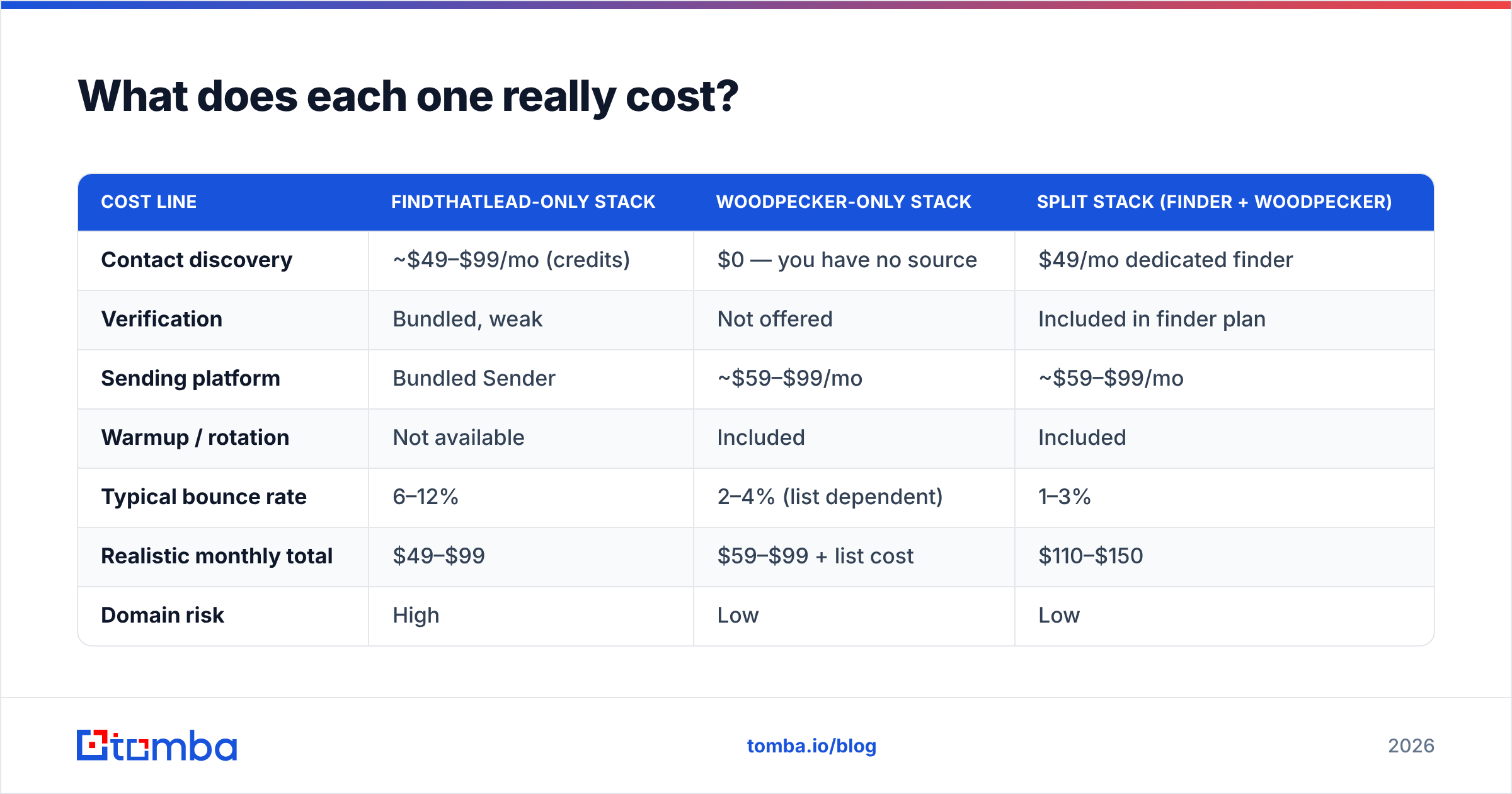
Sticker prices mislead here, because the two tools bill on different units. FindThatLead bills credits per lookup. Woodpecker bills per sending slot and per contacted prospect. So a fair comparison needs a scenario.
Say you are a 3-person sales team. You target 2,000 new contacts a month and send a 4-step sequence.
| Cost line | FindThatLead-only stack | Woodpecker-only stack | Split stack (finder + Woodpecker) |
|---|---|---|---|
| Contact discovery | ~$49–$99/mo (credits) | $0 — you have no source | $49/mo dedicated finder |
| Verification | Bundled, weak | Not offered | Included in finder plan |
| Sending platform | Bundled Sender | ~$59–$99/mo | ~$59–$99/mo |
| Warmup / rotation | Not available | Included | Included |
| Typical bounce rate | 6–12% | 2–4% (list dependent) | 1–3% |
| Realistic monthly total | $49–$99 | $59–$99 + list cost | $110–$150 |
| Domain risk | High | Low | Low |
The split stack looks most expensive on paper. It is usually the cheapest per meeting booked. A 10% bounce rate does not just waste 10% of your sends. Past roughly 5%, providers throttle you and file your mail in tabs nobody opens. That drags down the other 90% too. Nobody puts that compounding cost on a pricing page.
For reference, Tomba pricing runs a free tier at 25 searches/mo, Starter at $49/mo, Growth at $99/mo, and Pro at $249/mo. The verifier, domain search, and catch-all tooling are included, not sold as add-ons. Compare that with whatever credit math FindThatLead quotes you. The difference is usually in what is bundled, not in the headline number.

Is Woodpecker better than FindThatLead for deliverability?#
Yes, and it is not close. But the reason matters more than the verdict.
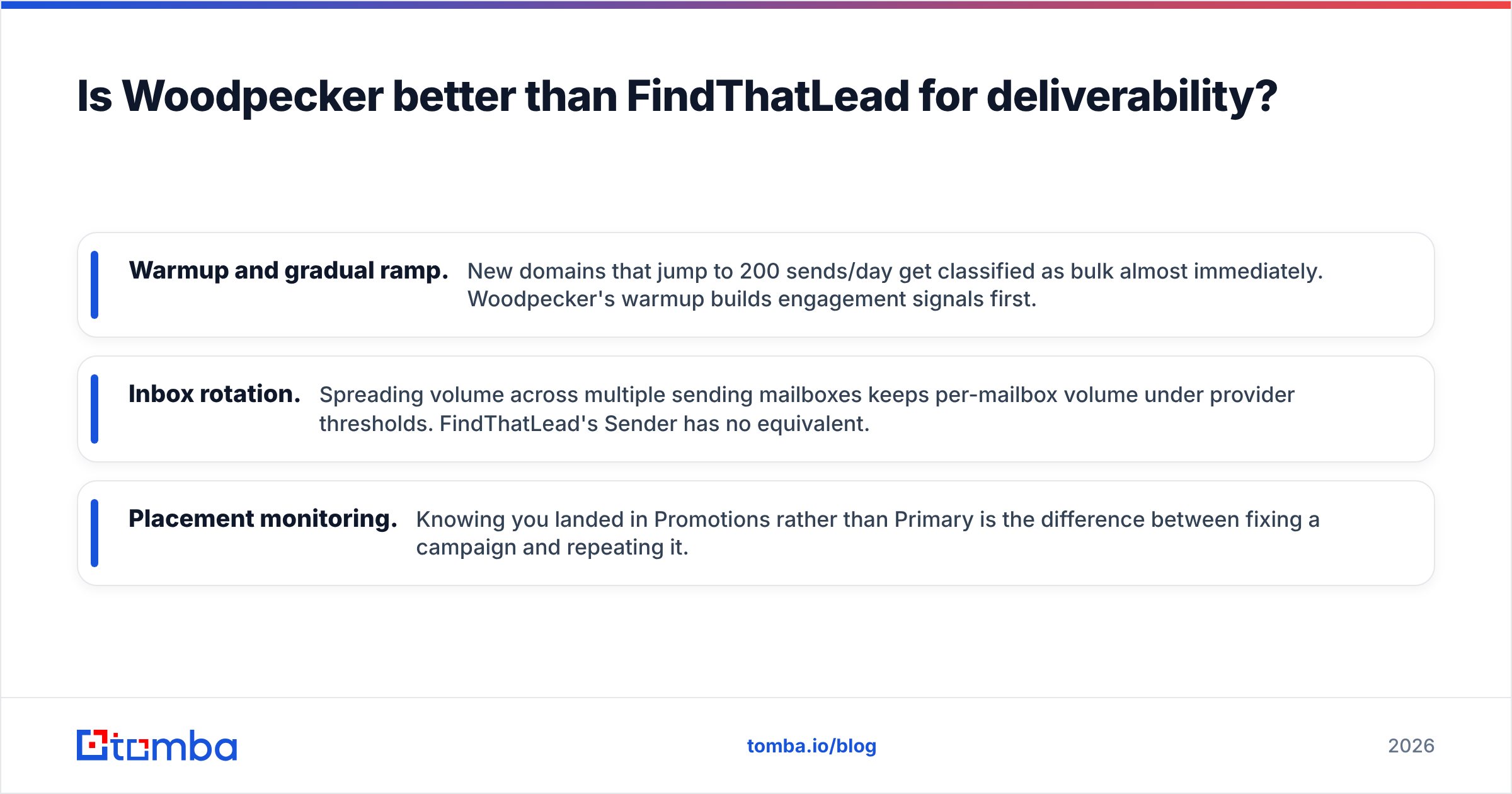
Woodpecker built its product around three things that decide whether your mail lands:
- Warmup and gradual ramp. A new domain that jumps to 200 sends a day gets flagged as bulk almost at once. Woodpecker's warmup builds engagement signals first.
- Inbox rotation. Spreading volume across several sending mailboxes keeps each one under provider limits. FindThatLead's Sender has no equivalent.
- Placement monitoring. Knowing you landed in Promotions instead of Primary is the difference between fixing a campaign and repeating it.
Google's bulk sender requirements and Microsoft's equivalent rules made authentication non-negotiable. You need SPF, DKIM, and DMARC aligned, plus a spam complaint rate under 0.3%. Woodpecker surfaces those checks. FindThatLead mostly assumes you handled them. If you are unsure, run your domain through an SPF checker and confirm your sender reputation before you scale anything.
One caveat in FindThatLead's favor. If you send 30 hand-written emails a week from one mailbox, Woodpecker's infrastructure is overkill. Deliverability engineering matters in proportion to volume.
Who should pick which?#
Use this as a decision rule rather than a feature preference.
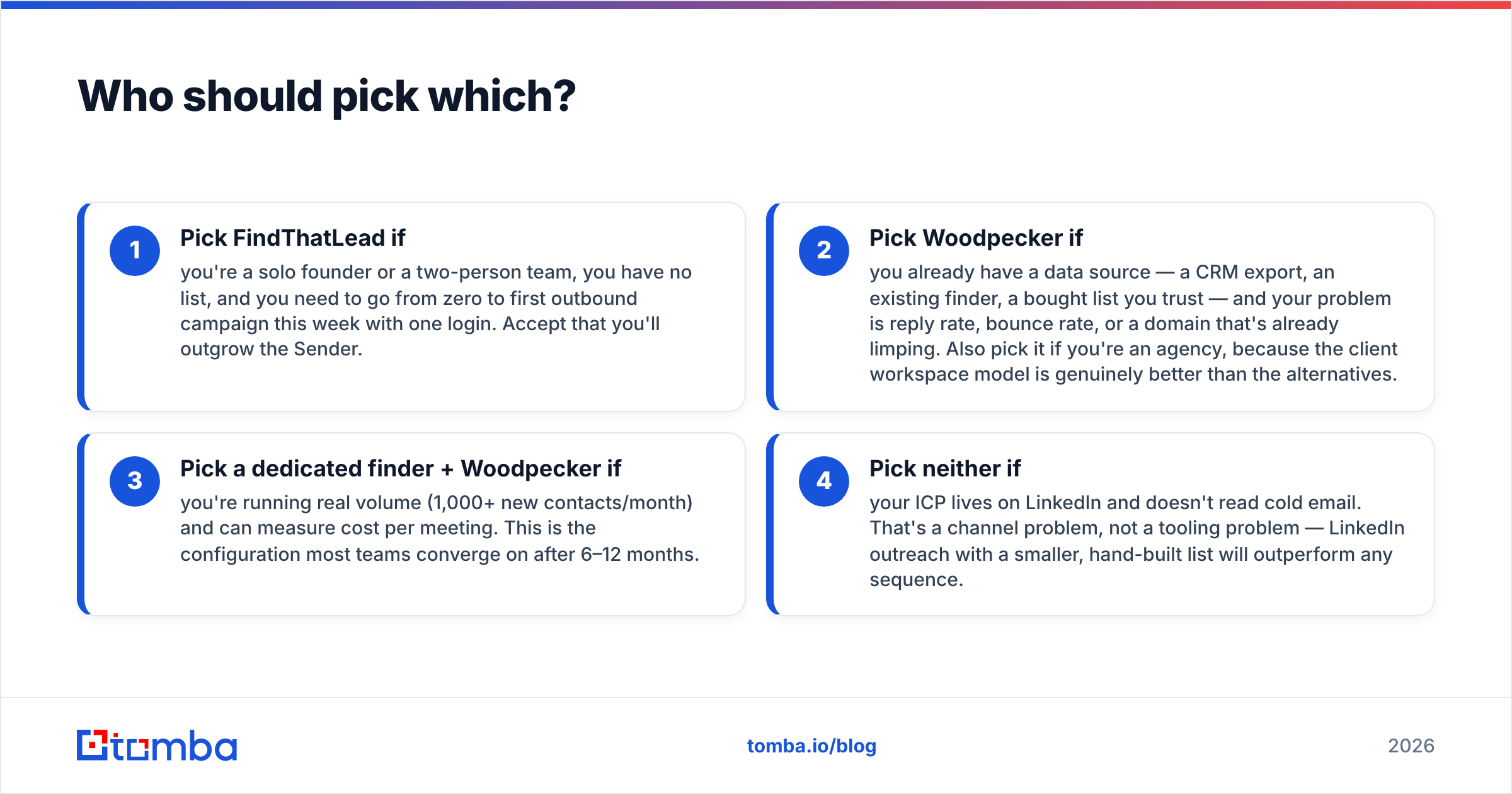
- Pick FindThatLead if you are a solo founder or a two-person team with no list, and you need a first campaign out this week from one login. Accept that you will outgrow the Sender.
- Pick Woodpecker if you already have a data source, such as a CRM export, an existing finder, or a bought list you trust. Pick it when your problem is reply rate, bounce rate, or a domain that is already limping. Agencies should pick it too, because the client workspace model beats the alternatives.
- Pick a dedicated finder + Woodpecker if you run real volume, meaning 1,000+ new contacts a month, and you can measure cost per meeting. Most teams land here after 6–12 months.
- Pick neither if your buyers live on LinkedIn and ignore cold email. That is a channel problem, not a tooling problem. LinkedIn outreach with a small, hand-built list will beat any sequence.
If you are comparing options on the data side, read how the finder category stacks up. Accuracy, catch-all handling, and credit models vary far more between finders than between sending platforms.

What do users actually complain about?#
Reviews on G2 and Capterra cluster around predictable themes for each tool.
FindThatLead, recurring complaints:
- Credits burned on failed or unverified lookups
- Stale data on smaller and non-US companies
- The Sender feeling like a side product rather than a core one
- Slow support response times
Woodpecker, recurring complaints:
- Pricing climbs faster than expected as contact volume grows
- No native lead database, which surprises buyers who skimmed the site
- A UI that is functional rather than delightful
- A learning curve on conditional campaign logic
Notice that the complaints are near mirror images. FindThatLead users wish the sending were better. Woodpecker users wish they had contacts. That is the strongest sign these are complementary tools sold as substitutes.
How do you build the stack properly?#
A workable 2026 outbound stack has four distinct jobs. You should know which tool owns each one:
- Source — where contacts come from. A finder, a database, a scraper, or your CRM. Tools like BookYourData and dedicated finders both solve this, with different tradeoffs on list freshness versus targeting control.
- Verify — sorting deliverable from undeliverable before send. Non-negotiable above 500 sends a month.
- Enrich — adding titles, company size, tech stack, and phone numbers so personalization is not guesswork. Data enrichment turns a list into a segmented campaign.
- Send — sequencing, warmup, rotation, reply handling. This is Woodpecker's lane.
FindThatLead attempts jobs 1, 2, and 4, and does 1 best. Woodpecker does 4 excellently and nothing else. Neither does 3 well.
The teams with the best numbers are not the ones with the fanciest tool. They are the ones who assigned each of those four jobs to something explicit. Then they tracked bounce rate and reply rate separately, so they knew which stage was broken. A 0.5% reply rate is a targeting and copy problem. A 9% bounce rate is a data problem. Those need different fixes, and a bundled tool makes them hard to tell apart.
The verdict#
The FindThatLead vs Woodpecker verdict is short. Woodpecker is the better product. FindThatLead solves the more urgent problem for beginners. If you can only pay for one and you already have contacts, take Woodpecker. If you have nothing and need to start, FindThatLead gets you moving. Just plan the migration.
The setup that actually performs is a purpose-built data layer feeding a purpose-built sending layer. Fix the data first. A great sequence sent to bad addresses is just an expensive way to damage your domain.
If contact quality is where your funnel leaks, start with the Tomba Email Finder. The free tier gives you 25 searches a month, so you can test accuracy against your own known-good contacts first. Starter at $49/mo bundles verification, domain search, and catch-all handling instead of metering them. Run 100 contacts through it, compare the bounce rate with what you get today, and let the numbers pick your stack.
Related guides#
Ready to find emails that actually work?
Join 150,000+ professionals who stopped guessing and started sending. Free credits on signup — no credit card required.
Get the Tomba newsletter
Practical outbound tactics and product updates — once every two weeks.
About the author