FindThatLead vs YAMM (Yet Another Mail Merge): 2026 Comparison
One finds the leads, the other mails them from a Google Sheet. Here is an honest 2026 breakdown of FindThatLead vs YAMM on pricing, sending limits, data quality, and which stack actually books meetings.
TL;DR
- They are not the same category. FindThatLead is a prospecting platform (find + verify + send). YAMM (Yet Another Mail Merge) is a Google Sheets add-on that sends personalized email through your own Gmail account. Comparing them is comparing a lead engine to a delivery mechanism.
- YAMM is dramatically cheaper — annual pricing in the tens of dollars versus FindThatLead's monthly subscription — but it gives you zero contact data and inherits every Gmail sending limit you already have.
- FindThatLead gives you the list, but users consistently flag credit burn and uneven hit rates on smaller domains, which is where a dedicated finder-plus-verifier stack earns its keep.
- The most common real-world setup is three layers: a data layer, a verification layer, and a sending layer. YAMM only covers the third. FindThatLead tries to cover all three at moderate depth.
- Pick by bottleneck: no list → data tool. List but no send flow → YAMM. Bounces and spam folders → verification, not either of these.
What are FindThatLead and YAMM, exactly?#
FindThatLead is a Spanish-built B2B prospecting suite. You give it a domain, a name, or a LinkedIn profile, and it returns business email addresses. It also bundles a "Scrab.in" LinkedIn automation layer, a lead search by role and geography, and a "Prospector" campaign sender so you can email the contacts you just found without exporting a CSV.
YAMM — Yet Another Mail Merge — is something else entirely. It is a Google Workspace add-on built by Talarian. You keep your recipient list in a Google Sheet, write a draft in Gmail with {{merge tags}}, and YAMM fires personalized copies from your own mailbox. Tracking (opens, clicks, bounces, replies) writes back into the sheet as status columns. There is no database behind it. It never finds a single email address for you.
That distinction drives everything below. If you searched "FindThatLead vs YAMM," you are almost certainly deciding where to spend the next hundred dollars in an outbound stack — not choosing between two interchangeable products.
How do FindThatLead and YAMM compare head-to-head?#
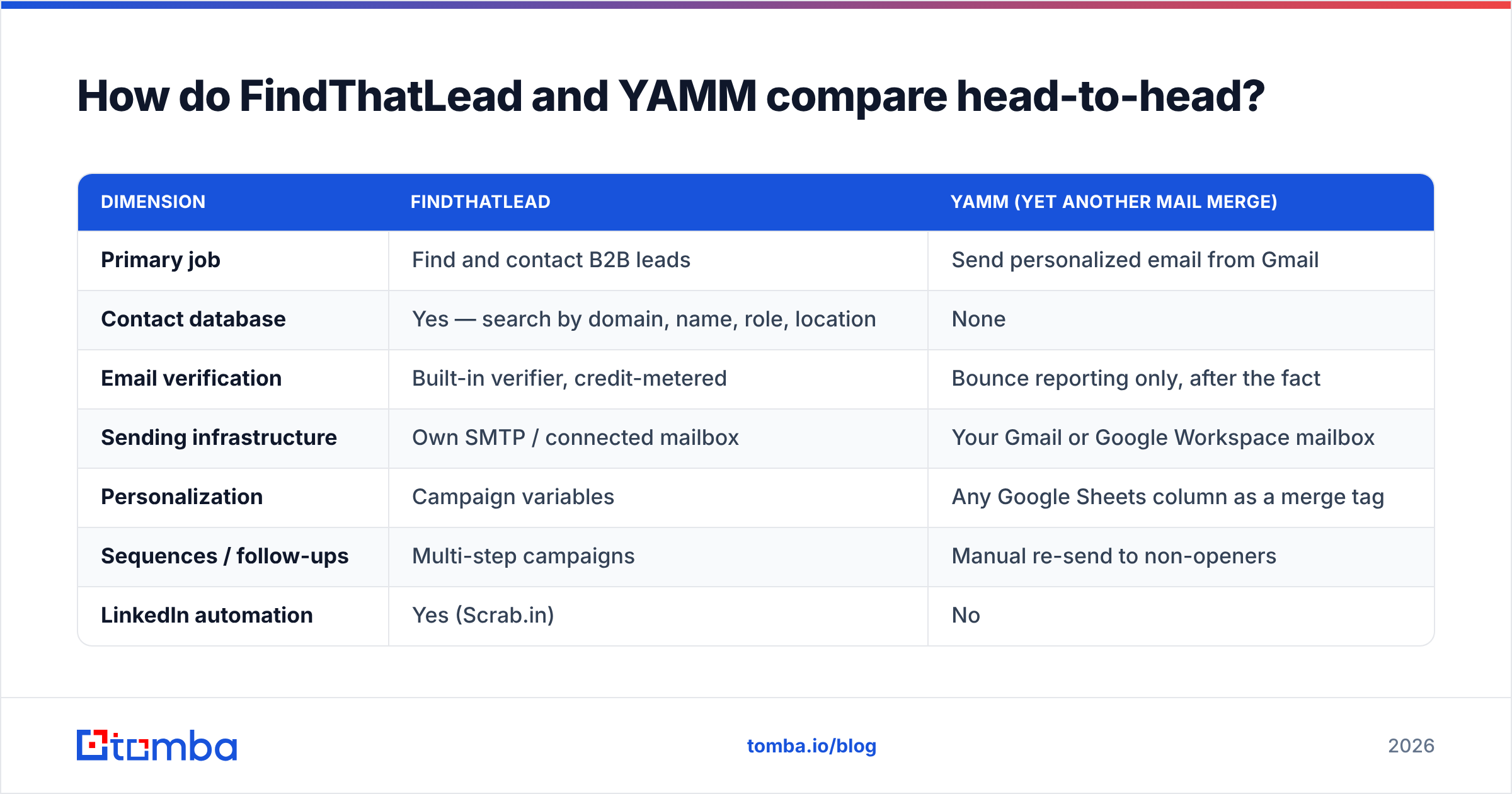
| Dimension | FindThatLead | YAMM (Yet Another Mail Merge) |
|---|---|---|
| Primary job | Find and contact B2B leads | Send personalized email from Gmail |
| Contact database | Yes — search by domain, name, role, location | None |
| Email verification | Built-in verifier, credit-metered | Bounce reporting only, after the fact |
| Sending infrastructure | Own SMTP / connected mailbox | Your Gmail or Google Workspace mailbox |
| Personalization | Campaign variables | Any Google Sheets column as a merge tag |
| Sequences / follow-ups | Multi-step campaigns | Manual re-send to non-openers |
| LinkedIn automation | Yes (Scrab.in) | No |
| API | Yes | No public API |
| Learning curve | Moderate — full app to learn | Low — it is a spreadsheet |
| Best for | Building lists from zero | Mailing a list you already own |
Read that table as a division of labor, not a scoreboard. YAMM losing nine of eleven rows does not make it worse software; it makes it a smaller, sharper tool. Reviewers on G2 consistently praise YAMM for exactly what it is — a spreadsheet-native merge that non-technical people can run in fifteen minutes.
What does each one actually cost?#
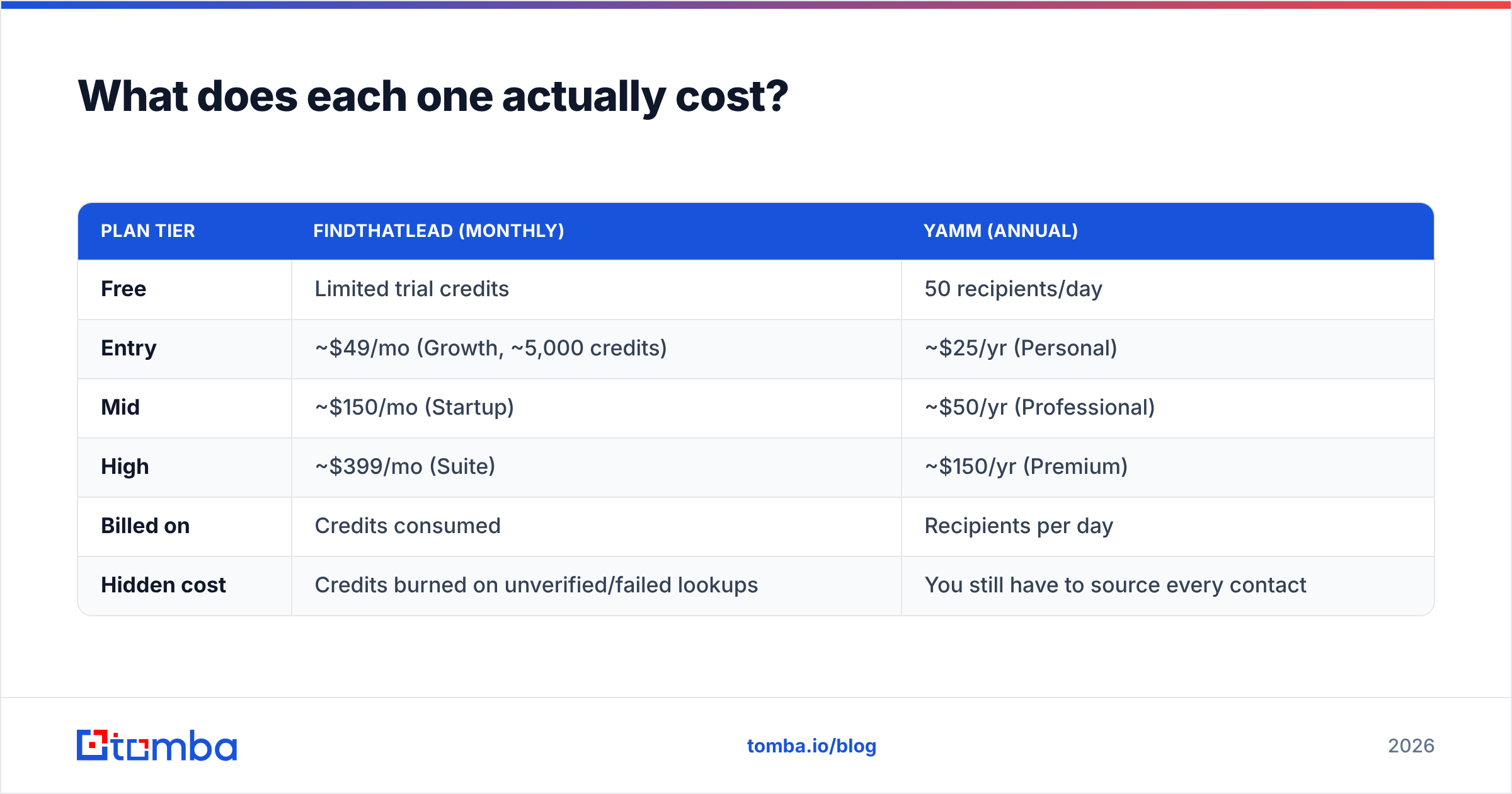
Pricing on both vendors shifts, so treat these as directional and confirm on the vendor page before you buy. The structural difference, however, is stable: YAMM charges per year, FindThatLead charges per month.
| Plan tier | FindThatLead (monthly) | YAMM (annual) |
|---|---|---|
| Free | Limited trial credits | 50 recipients/day |
| Entry | ~$49/mo (Growth, ~5,000 credits) | ~$25/yr (Personal) |
| Mid | ~$150/mo (Startup) | ~$50/yr (Professional) |
| High | ~$399/mo (Suite) | ~$150/yr (Premium) |
| Billed on | Credits consumed | Recipients per day |
| Hidden cost | Credits burned on unverified/failed lookups | You still have to source every contact |
The honest framing: YAMM's annual price is a rounding error next to a single month of any prospecting platform. But a $25/year merge tool that mails a list you never built is worth exactly nothing. The cost question is really "what does a usable, verified list cost me," and that lands back on the data layer.
That is where a specialist matters more than a suite. If your only gap is contact data, an email finder priced against verified results — Tomba pricing starts free at 25 searches/month and moves to $49/mo Starter, $99/mo Growth, and $249/mo Pro — plus YAMM at $50/year is a materially cheaper stack than a single all-in-one subscription, and each layer is replaceable.
Which one gives you better data quality?#
Only one of them gives you data at all, so the real question is: is FindThatLead's data good enough to skip a dedicated finder?
Here is what actually determines hit rate, in order of impact:
- Pattern coverage on the target domain. Most tools nail
first.last@at Fortune 500s. The spread appears on 10–200 employee companies with irregular formats, where a company email pattern check saves you from guessing. - SMTP verification depth. A "found" email that was never handshake-tested is a bounce waiting to happen. Any serious workflow ends in an email verifier pass, no exceptions.
- Catch-all handling. Roughly a third of B2B domains accept everything at the gateway, so a plain verifier returns "unknown." A dedicated catch-all verifier is what separates a 5% bounce rate from a 20% one.
- Source transparency. Ask any vendor where the records come from and how often they refresh. If the answer is vague, the data is stale. Tomba publishes its data sources for this reason.
- Credit refund policy. Some platforms charge a credit for a failed lookup. Over a 5,000-contact month that is a real line item, and it is the most common complaint pattern in FindThatLead reviews.
FindThatLead scores fine on points 1 and 2 and is thinner on point 3. YAMM scores on none of them — it will happily mail a list of typos and then dutifully log the bounces in column F, after your sender reputation has already taken the hit.
Which one sends better email?#
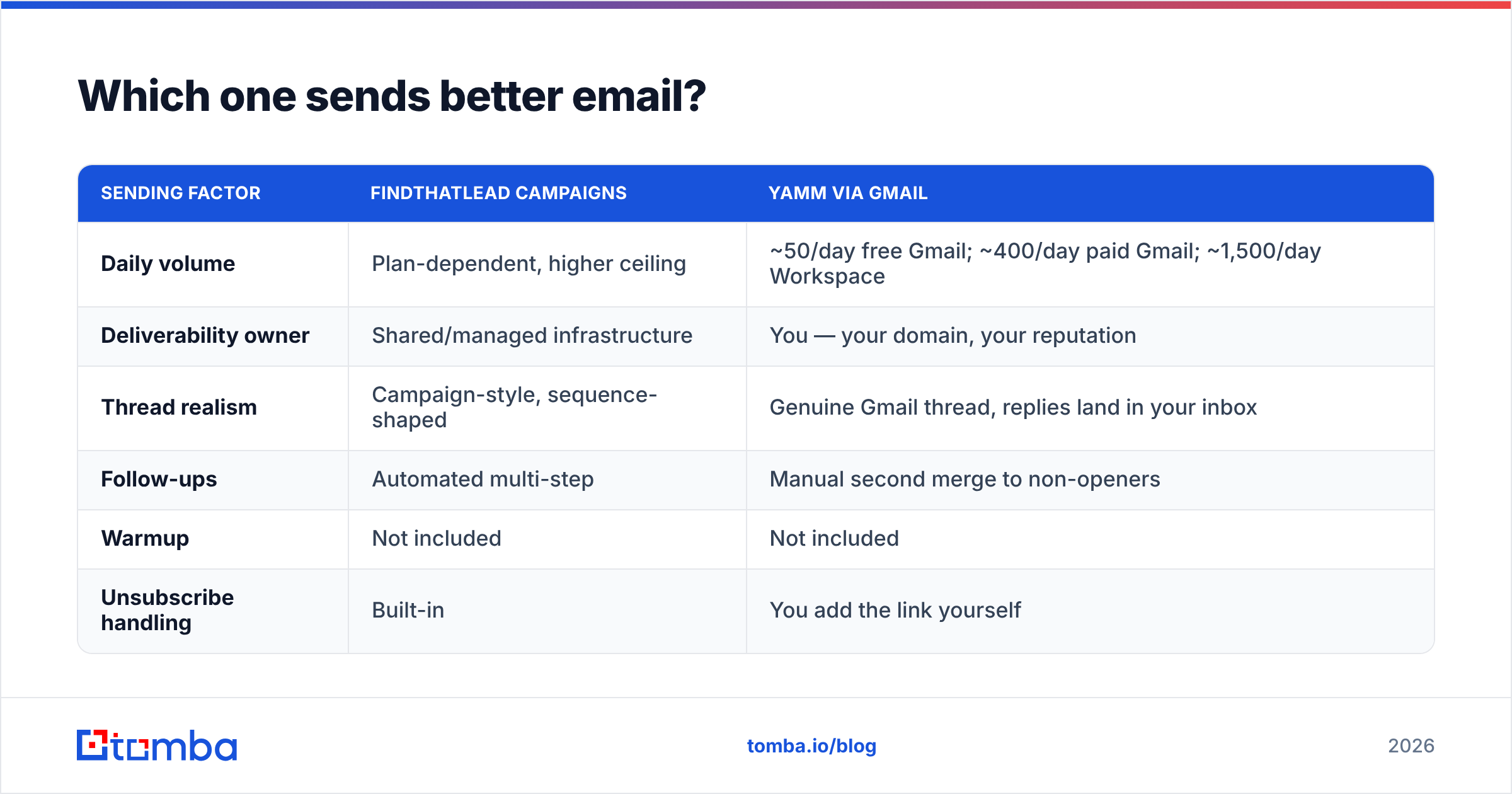
YAMM, with a caveat: it sends from your mailbox, which is both the feature and the ceiling.
| Sending factor | FindThatLead campaigns | YAMM via Gmail |
|---|---|---|
| Daily volume | Plan-dependent, higher ceiling | ~50/day free Gmail; ~400/day paid Gmail; ~1,500/day Workspace |
| Deliverability owner | Shared/managed infrastructure | You — your domain, your reputation |
| Thread realism | Campaign-style, sequence-shaped | Genuine Gmail thread, replies land in your inbox |
| Follow-ups | Automated multi-step | Manual second merge to non-openers |
| Warmup | Not included | Not included |
| Unsubscribe handling | Built-in | You add the link yourself |
The Workspace ceiling is the thing people miss. YAMM does not raise Google's limits; it operates inside them. If your plan is 3,000 sends a week, YAMM on a single Workspace seat gets you there — but only if the domain is warmed and authenticated. Confirm your SPF record with an SPF checker, get DKIM and DMARC in place, and understand that email deliverability is a property of your domain, not of the merge tool bolted onto it.
Also note the reply asymmetry. YAMM replies land in your normal Gmail inbox, threaded like a real conversation. Sales teams that live in a CRM find this messy; solo founders and agencies find it perfect.

Is FindThatLead better than YAMM for cold outreach?#
For cold outreach at any scale, FindThatLead is the more complete answer — it will not leave you staring at an empty spreadsheet. But "more complete" and "better" diverge fast in practice.
Choose FindThatLead if:
- You have no list and no data source. This is the deciding factor. A sender without a source is a car without fuel.
- You want LinkedIn plus email in one seat. The Scrab.in bundle is genuinely convenient for a solo operator.
- You need automated multi-step sequences and do not want to stitch together a separate sender.
Choose YAMM if:
- Your list already exists in a CRM export, event registration, customer database, or newsletter list.
- Your volume sits under a few hundred a day and you want the sends to look and feel like ordinary human email.
- Non-technical teammates run the campaigns. If they can edit a Google Sheet, they can run YAMM. That is the whole pitch.
- You are mailing warm contacts — renewals, event invites, customer updates — where deliverability risk is low and personalization comes from data you already hold.
Choose neither if your actual problem is bounce rate. Neither tool fixes a dirty list; one creates it and the other exposes it.
Can you use FindThatLead and YAMM together?#
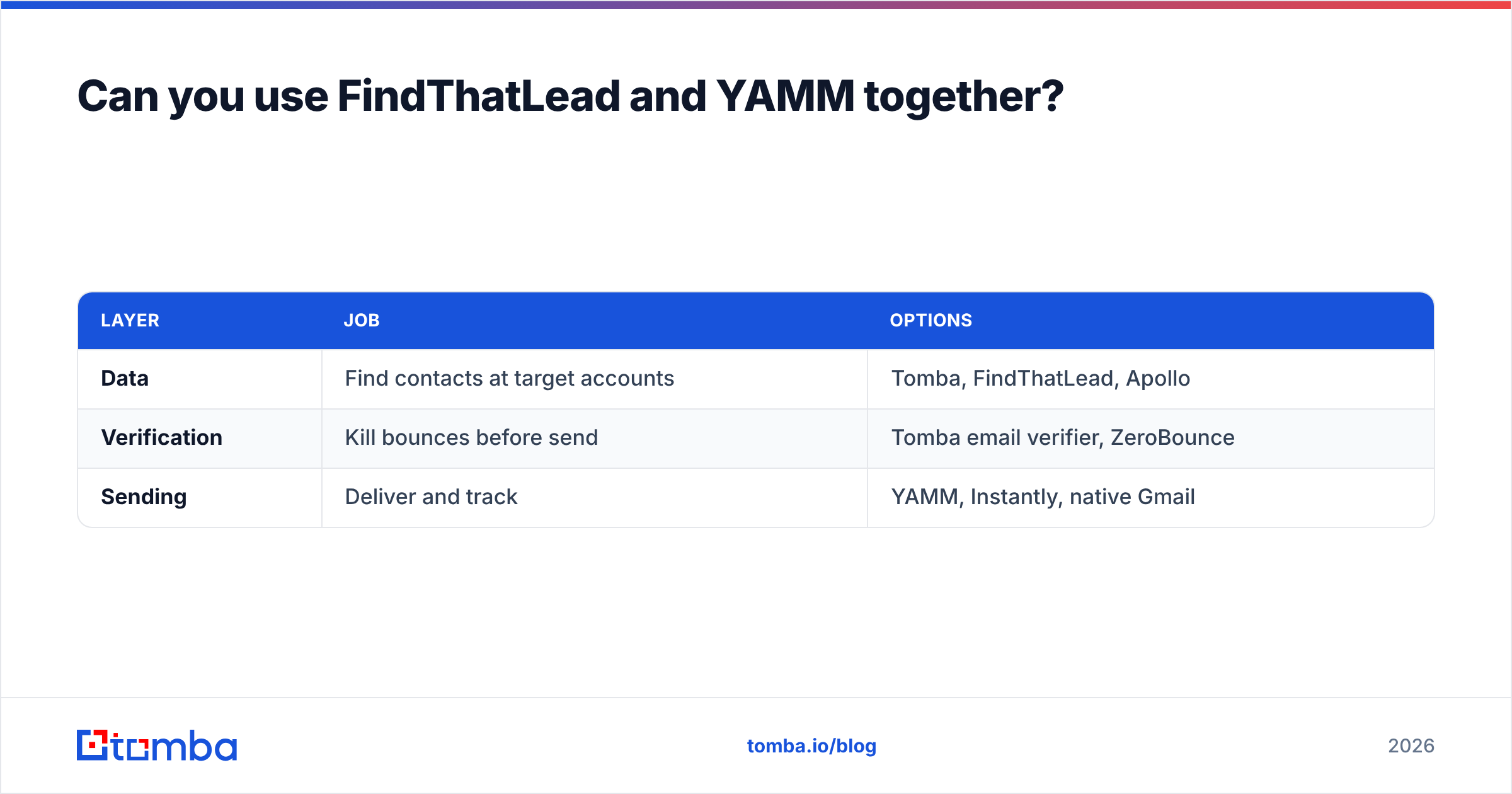
Yes, and a cheaper variant of that stack is what most efficient teams end up running. Split the job into three layers and buy the best-value option for each:
| Layer | Job | Options |
|---|---|---|
| Data | Find contacts at target accounts | Tomba, FindThatLead, Apollo |
| Verification | Kill bounces before send | Tomba email verifier, ZeroBounce |
| Sending | Deliver and track | YAMM, Instantly, native Gmail |
A concrete version of that: run a domain search across your target account list to pull every reachable contact, push results straight into Google Sheets with the add-on, verify in the same sheet, then let YAMM merge from those exact rows. No CSV round-trips, no re-keying, and the verification status sits in a column right next to the send status.
For bigger lists, the bulk email finder handles thousands of rows at once, and teams with engineers wire the Tomba API directly into their enrichment job so the sheet is populated before anyone opens it.
The strategic point: layers are replaceable, suites are not. When FindThatLead's hit rate disappoints on your specific ICP, you are stuck — the sender, the sequences, and the data all live in one subscription. When a layer in a modular stack disappoints, you swap that one line item and everything else keeps running.
What should you actually do next?#
Diagnose the bottleneck honestly, then buy for it:
- "I don't know who to email." Data problem. Neither a merge add-on nor a sequencer solves it. Start with domain search and role filters.
- "I know who, but not their address." Finder problem. This is the highest-ROI $50 in outbound, and it is where dedicated tools out-hit bundled ones.
- "I have addresses but they bounce." Verification problem. Run the list through a verifier and a catch-all check before a single send.
- "I have a clean list and no way to send it." Now — and only now — YAMM is the right $50/year.
- "I need CRM sync and multichannel." You have outgrown both. Look at a real sequencer with a HubSpot integration or Salesforce sync.
The verdict#
FindThatLead wins on scope; YAMM wins on price, simplicity, and inbox realism. Neither wins on data quality, which is the variable that decides whether your campaign returns meetings or bounces.
If you are assembling the stack today, start where the leverage is highest: verified contact data. The Tomba Email Finder searches by domain, name, or company, verifies in the same pass, and exports straight into the Google Sheet YAMM is already reading from — free for your first 25 searches a month, $49/mo when you scale. Fix the data layer first, and the rest of the stack gets a lot cheaper to argue about.
Related guides#
Ready to find emails that actually work?
Join 150,000+ professionals who stopped guessing and started sending. Free credits on signup — no credit card required.
Get the Tomba newsletter
Practical outbound tactics and product updates — once every two weeks.
About the author