Findymail vs Salesripe: Which B2B Email Tool Wins in 2026
Findymail sells verified email discovery. Salesripe sells prebuilt contact lists. They solve different problems, and picking the wrong one wastes your whole quarter's outbound budget.
TL;DR — Findymail vs Salesripe in one screen. Both get pitched to the same outbound teams. They do different jobs.
- Findymail is a real-time email finder built for outbound teams. You give it a name and a domain, or a LinkedIn export. It returns a verified work email. It does not sell you a static list.
- Salesripe is a prebuilt B2B contact database. You filter by industry, title, location and headcount, then export a list. It is a list product, not a discovery engine.
Which one fits depends on where your prospecting starts.
- Do you source from LinkedIn or a scraped account list? Findymail's model fits. Do you want territory lists built from filters? Salesripe's model fits.
- Cost per usable contact is the number that matters, not the sticker price. A $49 plan with a 40% bounce rate costs more than a $99 plan at 2%.
- Neither tool fits well if you need API-first enrichment inside your own product or CRM. That is where a platform like Tomba's email finder and email verifier slots in more cleanly.
Findymail vs Salesripe: what is each tool, actually?#
The two get compared constantly. The comparison is a little unfair, because they are not the same kind of product.
Findymail (findymail.com) is a waterfall email finder. You feed it identity signals: first name, last name, company domain, LinkedIn profile URL, or a Sales Navigator export. It guesses the address pattern, checks several sources, then verifies the result. It hands back an email it is willing to stand behind. Its pitch has always been the bounce guarantee. It would rather return nothing than return a guess. Its native LinkedIn and Sales Navigator scraping is why most of its users picked it.
Salesripe (salesripe.com) sits on the other side of the fence. It is a searchable database of B2B companies and contacts. You filter by industry code, revenue band, employee count, geography and job title. You do not bring a list — you build one in the UI, then export a CSV or push it to your CRM. It is closer to a data vendor than to a lookup tool.
That one difference drives almost everything below.
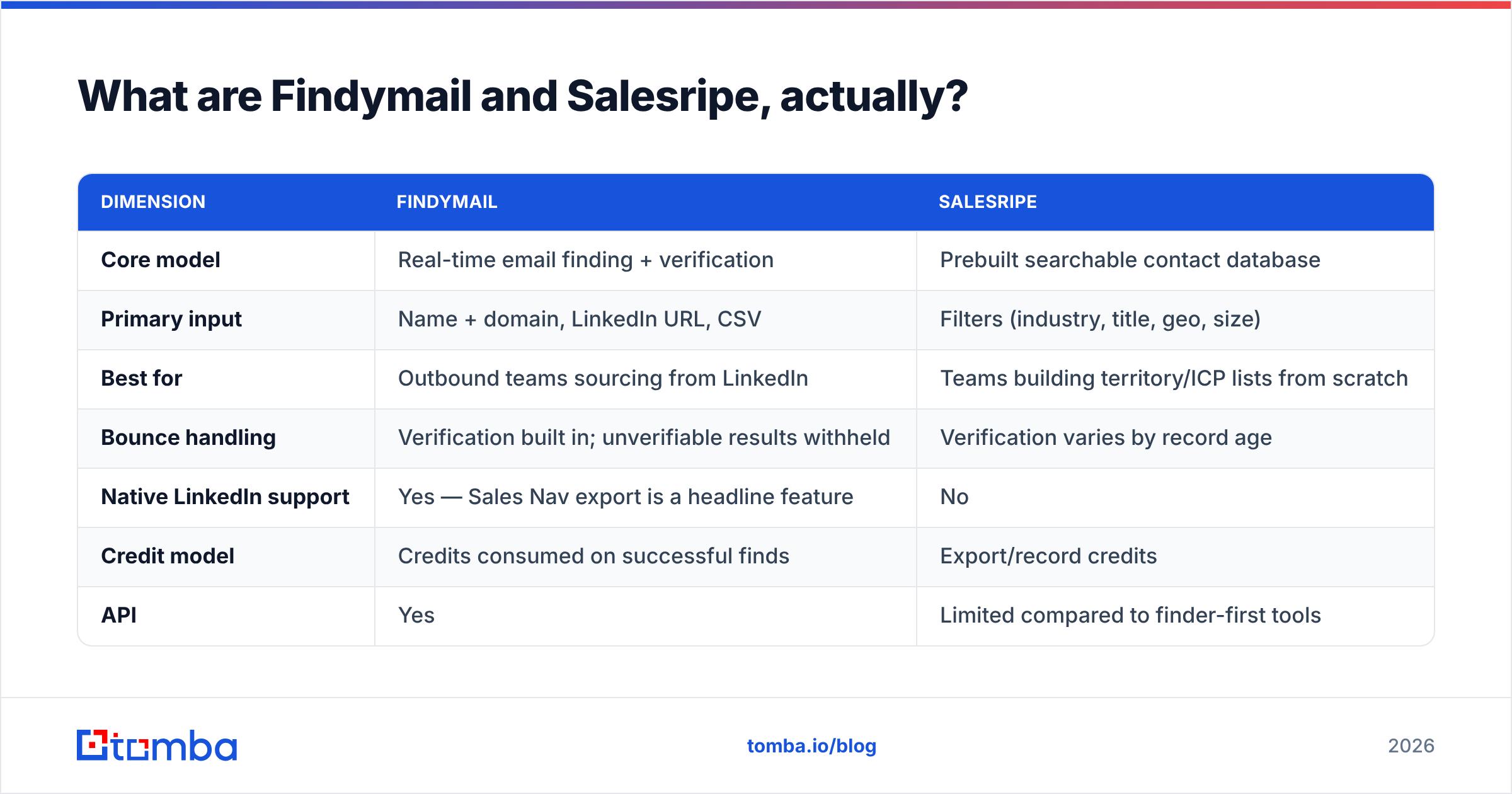
| Dimension | Findymail | Salesripe |
|---|---|---|
| Core model | Real-time email finding + verification | Prebuilt searchable contact database |
| Primary input | Name + domain, LinkedIn URL, CSV | Filters (industry, title, geo, size) |
| Best for | Outbound teams sourcing from LinkedIn | Teams building territory/ICP lists from scratch |
| Bounce handling | Verification built in; unverifiable results withheld | Verification varies by record age |
| Native LinkedIn support | Yes — Sales Nav export is a headline feature | No |
| Credit model | Credits consumed on successful finds | Export/record credits |
| API | Yes | Limited compared to finder-first tools |
| Typical starting tier | ~$49/mo entry range | ~$49/mo entry range |
Check both vendors' pricing pages before you commit. B2B data pricing changes often. Treat every number here as a directional benchmark from the time of writing, not a quote.
How accurate is each one in practice?#
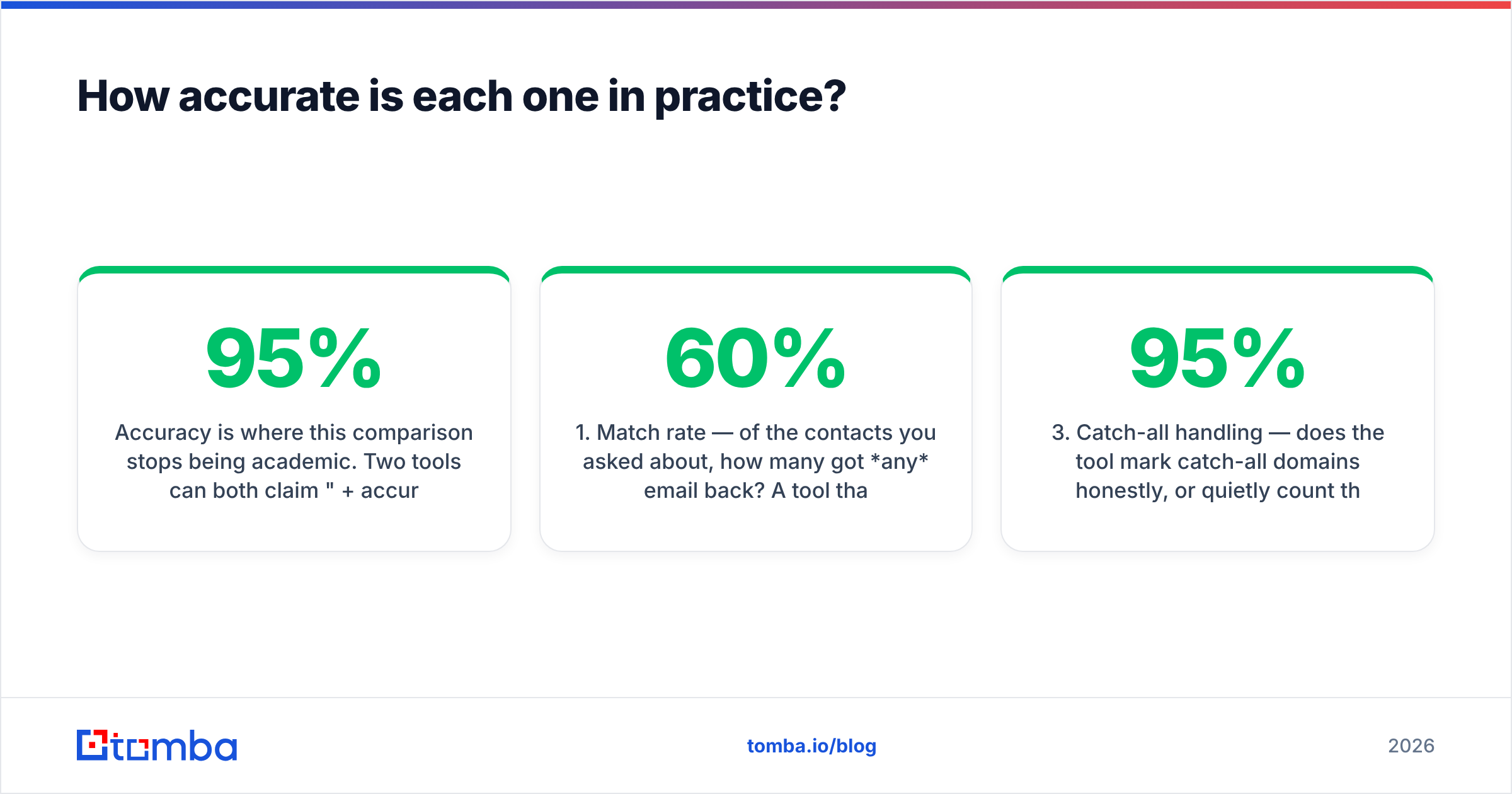
Accuracy is where Findymail vs Salesripe stops being academic. Two tools can both claim "95%+ accuracy" and still hand you very different outcomes. They measure different things:
- Match rate — of the contacts you asked about, how many came back with any email? A tool that returns nothing 60% of the time can still post a pretty accuracy number.
- Deliverability rate — of the emails returned, how many actually land? This is the number your ESP cares about.
- Catch-all handling — does the tool flag catch-all domains honestly? About a fifth of B2B domains are catch-all. That single policy choice can swing a "95% accurate" claim by ten points.
- Data freshness — a correct email for someone who left in 2024 is a wrong email today. Databases decay. Real-time finders decay less.
Findymail is built for #2 and #4. It runs the lookup at request time and holds back low-confidence results. Users report low bounce rates, and lower match rates than more aggressive tools. That trade is deliberate, and for cold email it is usually the right one.
Salesripe is built for #1 and for breadth. Filter-driven databases give you volume across a defined segment. Record age is the variable to watch. If a record was verified 14 months ago, treat it as a guess, not a fact.

The practical move is the same either way: re-verify before you send. Run every export through a standalone email verification pass. Then check how catch-all domains get classified. A catch-all verifier that returns a real risk score beats a valid/invalid flag that hides the doubt.
Findymail vs Salesripe: which is cheaper per usable contact?#
Sticker price lies. Here is the math to run instead.
Take the plan price and divide by credits. Then divide by your effective success rate — match rate times deliverability rate. A worked example with round numbers:
- Tool A: $49 for 1,000 credits = $0.049/credit. 55% match, 97% deliverable → 53% effective → $0.092 per usable contact.
- Tool B: $49 for 2,500 credits = $0.020/credit. 80% match, 72% deliverable → 58% effective → $0.034 per usable contact.
Tool B looks like a runaway win. Then you add the second cost line: bounces. A 28% bounce rate on 2,500 sends does more than waste credits. It burns sender reputation, and fixing a burned domain costs weeks of pipeline. Price that in, and the cheap tool is often the expensive one.
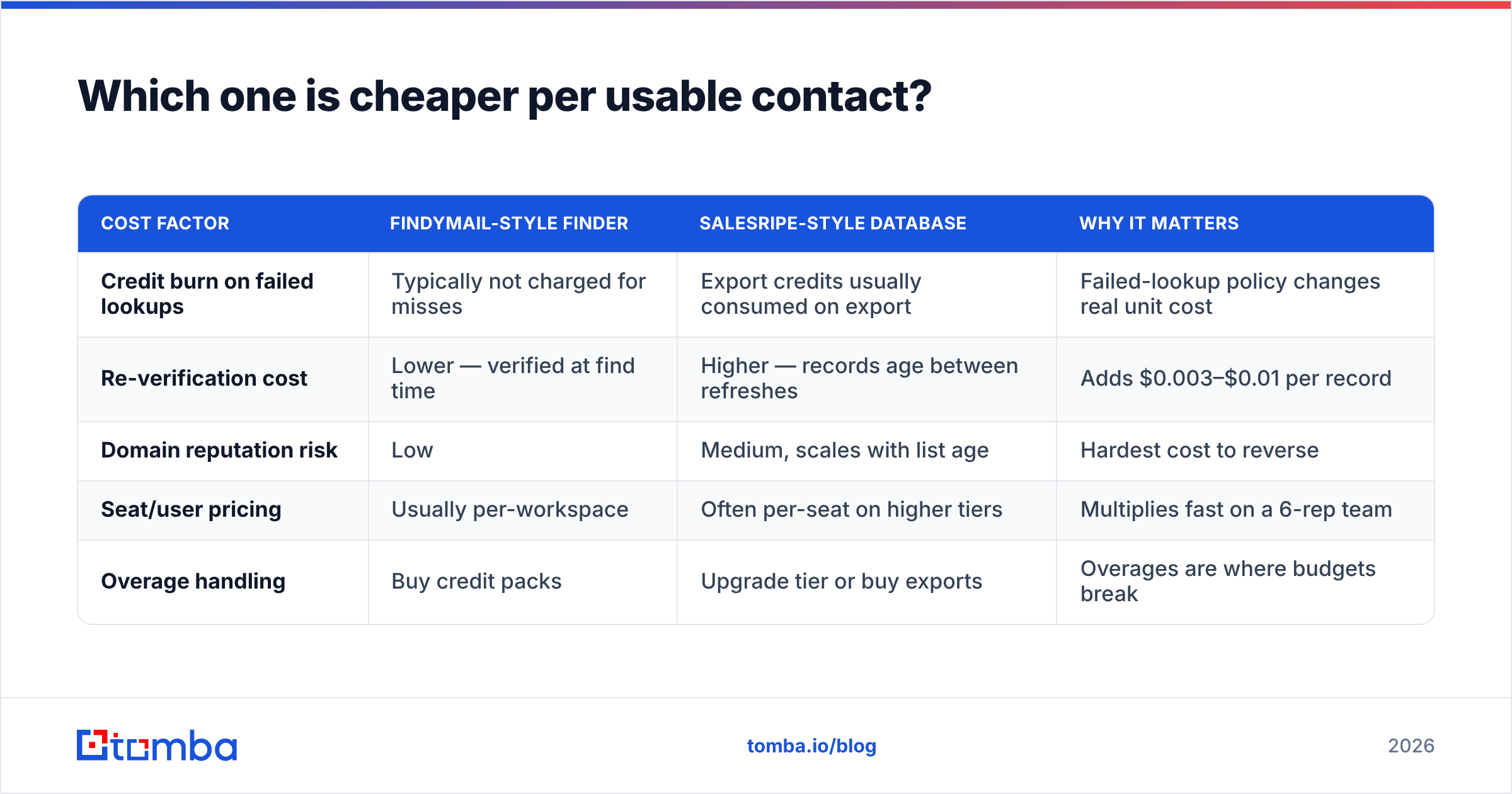
| Cost factor | Findymail-style finder | Salesripe-style database | Why it matters |
|---|---|---|---|
| Credit burn on failed lookups | Typically not charged for misses | Export credits usually consumed on export | Failed-lookup policy changes real unit cost |
| Re-verification cost | Lower — verified at find time | Higher — records age between refreshes | Adds $0.003–$0.01 per record |
| Domain reputation risk | Low | Medium, scales with list age | Hardest cost to reverse |
| Seat/user pricing | Usually per-workspace | Often per-seat on higher tiers | Multiplies fast on a 6-rep team |
| Overage handling | Buy credit packs | Upgrade tier or buy exports | Overages are where budgets break |
Tomba's own pricing works as a benchmark line here. The free tier runs 25 searches a month, Starter is $49/mo, Growth is $99/mo and Pro is $249/mo. That maps to the same entry band as both vendors.
Is Findymail better than Salesripe for cold outbound?#
For LinkedIn-led outbound, yes — and it is not close.
The main cold-email motion in 2026 still starts with a Sales Navigator search. Build a filtered list of people, export it, find emails, verify, send. Findymail was built for that exact pipeline. Its Sales Nav export handling means you are not stitching three tools together with a CSV and a prayer.
Salesripe wins a different motion: territory building. Say a rep is handed "manufacturing companies, 50–500 employees, Midwest, ops titles" and told to find 400 accounts. A filterable database gets there faster than any LinkedIn workflow. You are sourcing segments, not chasing named people.
So the honest framing is not "which is better." It is:
- Do you already know who you want to reach? → Finder-first (Findymail, or an API-first alternative).
- Do you need the system to tell you who exists in a segment? → Database-first (Salesripe, or a broader provider).
- Do you need both, on a schedule, inside your CRM? → You want an API and a B2B database under one roof, not two subscriptions and a Zapier tax.
That third case is more common than vendors admit. Most teams that buy one end up buying the other within nine months.
What are the real limitations of each?#
Findymail's limits:
- No native prospect discovery. It finds emails for people you already picked out. If your list-building is weak, Findymail cannot fix it. Garbage in, verified garbage out.
- Match rate on small domains. Companies under 50 people often have no public email footprint. A conservative tool returns fewer results there by design.
- Thin coverage outside the US and EU. APAC and LATAM data is much weaker than North American data. That is true across the whole category.
- Credit anxiety. Metered credits push teams to hoard rather than test. Good outbound needs the opposite.
Salesripe's limits:
- Record freshness. This is the core risk of any static database. Ask directly: what is the median verification age of records in my target segment? If the vendor cannot answer, that is the answer.
- Filters versus reality. Job-title filters rely on self-reported titles. "VP Operations" at a 40-person company and at a 4,000-person company are different buyers with the same label.
- Export-first workflow. CSV round-trips create stale copies and duplicate records across your stack. You will need a deduplication step and a CRM hygiene process.
- Weaker developer surface. Do you want enrichment inside product signup flows or automated CRM backfill? A database UI is the wrong shape for that.

What should you check before you buy either one?#
Whichever way the Findymail vs Salesripe call goes, run this before the demo, not after the invoice. Start with the three checks that expose data quality.
- Test on your own list, not theirs. Take 100 contacts whose emails you already confirmed. Strip the emails, then see what each tool returns. Score match rate and exact-match accuracy. Vendor sample data is curated by definition.
- Ask the catch-all question out loud. "How do you classify catch-all domains, and do they count as valid in your accuracy figure?" The quality of the answer tells you more than the trial does.
- Read the credit-refund policy. Are failed lookups refunded? Are duplicates charged twice? Do unused credits roll over? Those three clauses set your real annual cost.
The next three are about what happens after you sign.
- Check the exit path. Can you export everything you paid for, in full, at any time? Some database vendors cap export volume on lower tiers.
- Confirm compliance posture. Ask about GDPR/CCPA handling, opt-out processing and data provenance. Vendors with clear data sourcing documentation are easier to defend in a procurement review.
- Price the integration, not just the tool. Getting data into your CRM may need a middleware seat and an ops hour every week. Add that to the monthly figure. It is usually the biggest hidden line item.
Cross-check your shortlist against reviews on G2. Filter for reviewers in your company-size band. A 12-person agency and a 900-person enterprise experience these products very differently.
What are the alternatives worth shortlisting?#
Do not run Findymail vs Salesripe as a two-horse race. The category has a few distinct shapes, and knowing which shape you need saves a lot of trial time.
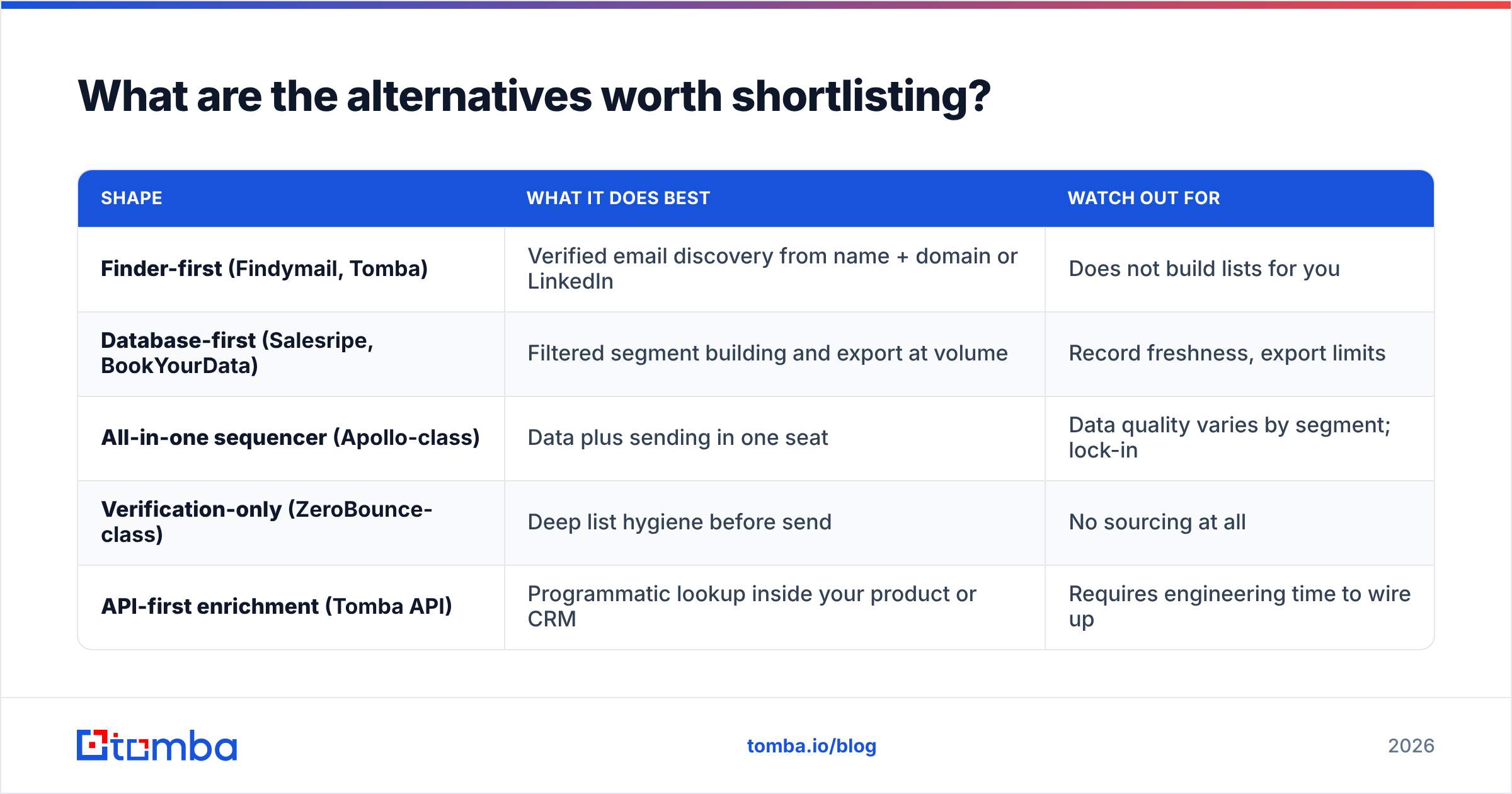
| Shape | What it does best | Watch out for |
|---|---|---|
| Finder-first (Findymail, Tomba) | Verified email discovery from name + domain or LinkedIn | Does not build lists for you |
| Database-first (Salesripe, BookYourData) | Filtered segment building and export at volume | Record freshness, export limits |
| All-in-one sequencer (Apollo-class) | Data plus sending in one seat | Data quality varies by segment; lock-in |
| Verification-only (ZeroBounce-class) | Deep list hygiene before send | No sourcing at all |
| API-first enrichment (Tomba API) | Programmatic lookup inside your product or CRM | Requires engineering time to wire up |
BookYourData is worth a look in the database-first column. It is a solid, well-regarded option if prebuilt verified lists are what you actually need, and it competes directly with Salesripe on that job.
Tomba sits in the finder-first and API-first columns. Alongside the core finder there is a domain search for mapping every published address at a company, plus a LinkedIn finder for profile-based lookup. Bulk processing covers list work. The Tomba API runs enrichment automatically, so nobody has to export a CSV by hand. The free tier at 25 searches a month exists so you can run the 100-contact accuracy test above without a card.
So which one should you pick?#
Pick Findymail if your outbound starts on LinkedIn, you work named accounts, and a low bounce rate matters more than raw volume. Its conservative return policy is a feature, not a bug. Treat a withheld result as a signal that the contact needs a different channel.
Pick Salesripe if you build territories from filters, your ICP is defined by company traits rather than named people, and you have a verification step downstream to catch record decay. Do not send to a raw export.
Pick neither, and go API-first, if the real need is enriching contacts inside your CRM or product without a human exporting a CSV. That is a different problem, and neither tool is built for it.
The Findymail vs Salesripe choice matters less than what you do next. Build the verification step into your process for good. The highest-ROI change most outbound teams make is not switching data vendors. It is verifying every address right before send, every time, whatever the source tool promised.
Ready to test the accuracy claims yourself? Run your own 100-contact benchmark with the Tomba Email Finder. You get 25 free searches a month, no card required. Verification is built into every result, so you can compare match rate and deliverability side by side against the tool you pay for today. If the numbers favor your incumbent, keep it. If they don't, you have the data to make the case.
Related guides#
Ready to find emails that actually work?
Join 150,000+ professionals who stopped guessing and started sending. Free credits on signup — no credit card required.
Get the Tomba newsletter
Practical outbound tactics and product updates — once every two weeks.
About the author