Findymail vs Zintlr 2026: Which Prospecting Tool Wins?
Findymail sells verified B2B emails with a no-bounce guarantee. Zintlr sells a contact database with personality intel and phone numbers. We tested both on pricing, coverage, and export limits to see which one fits your outbound motion.
Findymail vs Zintlr is a choice between two different jobs. One finds and verifies emails for people you already know. The other hands you a database to search. This guide compares both on price, accuracy, phone data, and export limits.
TL;DR
- Findymail is a verified-email specialist: LinkedIn and Sales Navigator scraping, a bounce guarantee, and credit-based pricing from about $49/mo. It does one job, and it does it tightly.
- Zintlr is a contact database play. You search a pre-built B2B index, pull direct dials, and add "personality intel" profiling. Broader data, less depth on per-email verification.
- Pick Findymail if bounce rate on cold email is your bottleneck. Pick Zintlr if you need phone numbers and lists built from scratch.
- Both are narrow. If you want email finding, verification, catch-all handling, phone lookup, and enrichment under one API, a platform like Tomba covers more of the stack at $49/mo.
- The real decision isn't the vendor. It's whether you verify before you send. Unverified data from any provider will torch your domain.
What are Findymail and Zintlr, actually?#
They get compared because both sell "B2B contact data." But they solve different problems.
Findymail (findymail.com) launched as a reaction to bounce-heavy scraping tools. The pitch is simple. Every email it returns is verified, and if one bounces, you get the credit back. It plugs into LinkedIn and Sales Navigator, exports lists, and pushes into sequencers like Instantly, Lemlist, and Smartlead.
Think of it as a finder plus a verifier in one motion, built for cold-email operators who measure success in deliverability.
Zintlr (zintlr.com) is built around a searchable database. You filter by industry, title, geography, and headcount, then pull contacts out — emails plus direct dials.
Its differentiator is "Zintros," a personality-profiling layer. It guesses how a prospect prefers to be spoken to: analytical, driver, expressive, and so on. That is a genuinely distinct feature. Whether it moves your reply rate is a separate question.
The mental model is easy. Findymail is a precision instrument — you bring the target, it returns a clean address. Zintlr is a fishing net — you cast filters and see what comes back.
Findymail vs Zintlr: features and pricing compared#
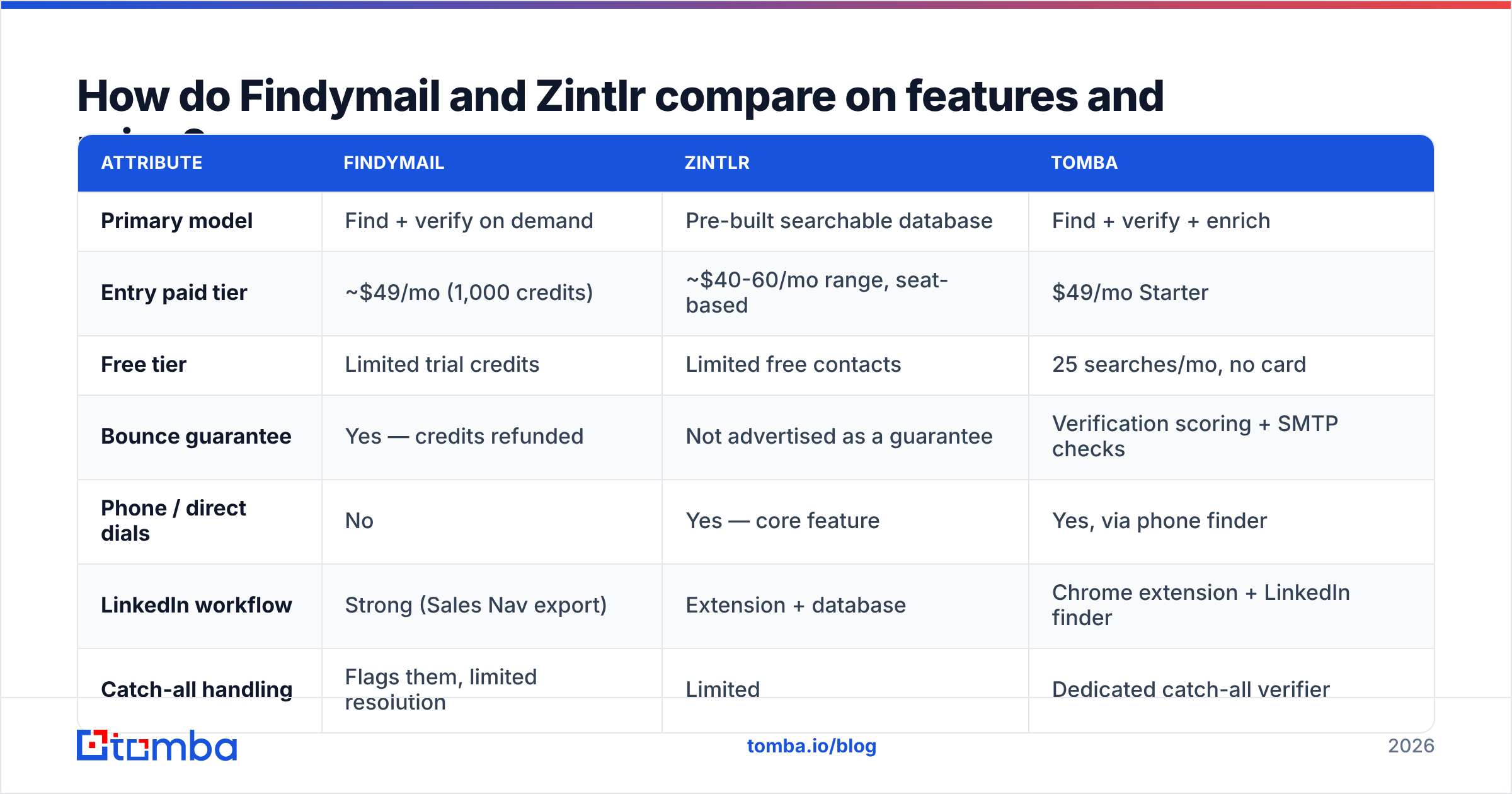
Pricing on both moves, so treat these as directional and confirm on the vendor sites before you buy. The sticker matters less than the unit. Findymail charges per email found. Zintlr charges per contact revealed. Those are not the same thing.
| Attribute | Findymail | Zintlr | Tomba |
|---|---|---|---|
| Primary model | Find + verify on demand | Pre-built searchable database | Find + verify + enrich |
| Entry paid tier | ~$49/mo (1,000 credits) | ~$40-60/mo range, seat-based | $49/mo Starter |
| Free tier | Limited trial credits | Limited free contacts | 25 searches/mo, no card |
| Bounce guarantee | Yes — credits refunded | Not advertised as a guarantee | Verification scoring + SMTP checks |
| Phone / direct dials | No | Yes — core feature | Yes, via phone finder |
| LinkedIn workflow | Strong (Sales Nav export) | Extension + database | Chrome extension + LinkedIn finder |
| Catch-all handling | Flags them, limited resolution | Limited | Dedicated catch-all verifier |
| Public API | Yes | Yes | Yes, full REST + CLI + MCP |
| Personality/behavioral data | No | Yes ("Zintros") | No |
| Best for | Cold email at volume | Multichannel with calling | Teams needing one data layer |
A few notes on reading that table honestly:
- "Credits" mean different things. Findymail usually burns a credit only when it returns a verified email, so a failed lookup costs you nothing. Database tools often charge on reveal, whatever the quality. Model your cost per usable contact, not per credit.
- Seat-based pricing punishes teams. If a tool prices per user, a five-rep team pays five times for the same data. Credit-pooled pricing usually wins past three seats.
- Phone data is a real differentiator. Findymail simply doesn't do it. If your motion is cold call plus email, that's a hard filter: either Zintlr, or an email tool paired with a phone finder.
- The bounce guarantee is worth money. A 3% bounce rate on 10,000 sends is fine. At 12% you sit in spam folders within a week. A vendor that refunds on bounce is signaling confidence in its data.
- API access changes the ceiling. If you plan to enrich inside your CRM or a workflow tool, check the rate limits. Also check whether the API sits on the entry tier or behind an upgrade.
Which one has better data accuracy?#
Neither vendor publishes an audited accuracy number. Be skeptical of any vendor that claims one without a methodology. What you can judge is process.
Findymail verifies at source. It won't hand you an address it hasn't checked. That yields a smaller list with a higher hit rate. On a mid-market SaaS ICP, expect find rates in the 50-70% range with low single-digit bounce.
Zintlr leans on database coverage. It hands you what's in the index, which is larger and messier, so you get more rows. Some of those rows are stale. Job changes are the silent killer in every static B2B database, and about a quarter of contacts leave a role each year.
The fix is the same either way: run everything through a verifier before it touches your sequencer. That holds whether the data came from Findymail, Zintlr, an intent platform, or a CSV a founder handed you. Use an email verifier as a mandatory gate, not an optional one.
Watch catch-all domains in particular. A catch-all server accepts every address at SMTP time, so a naive verifier marks it "valid." You learn the truth four days later, when the bounce arrives. Roughly 15-20% of B2B domains are catch-all.
Neither tool resolves these deeply. A catch-all verifier that uses pattern confidence plus secondary signals is the only way to get a real answer.
When should you pick Findymail?#
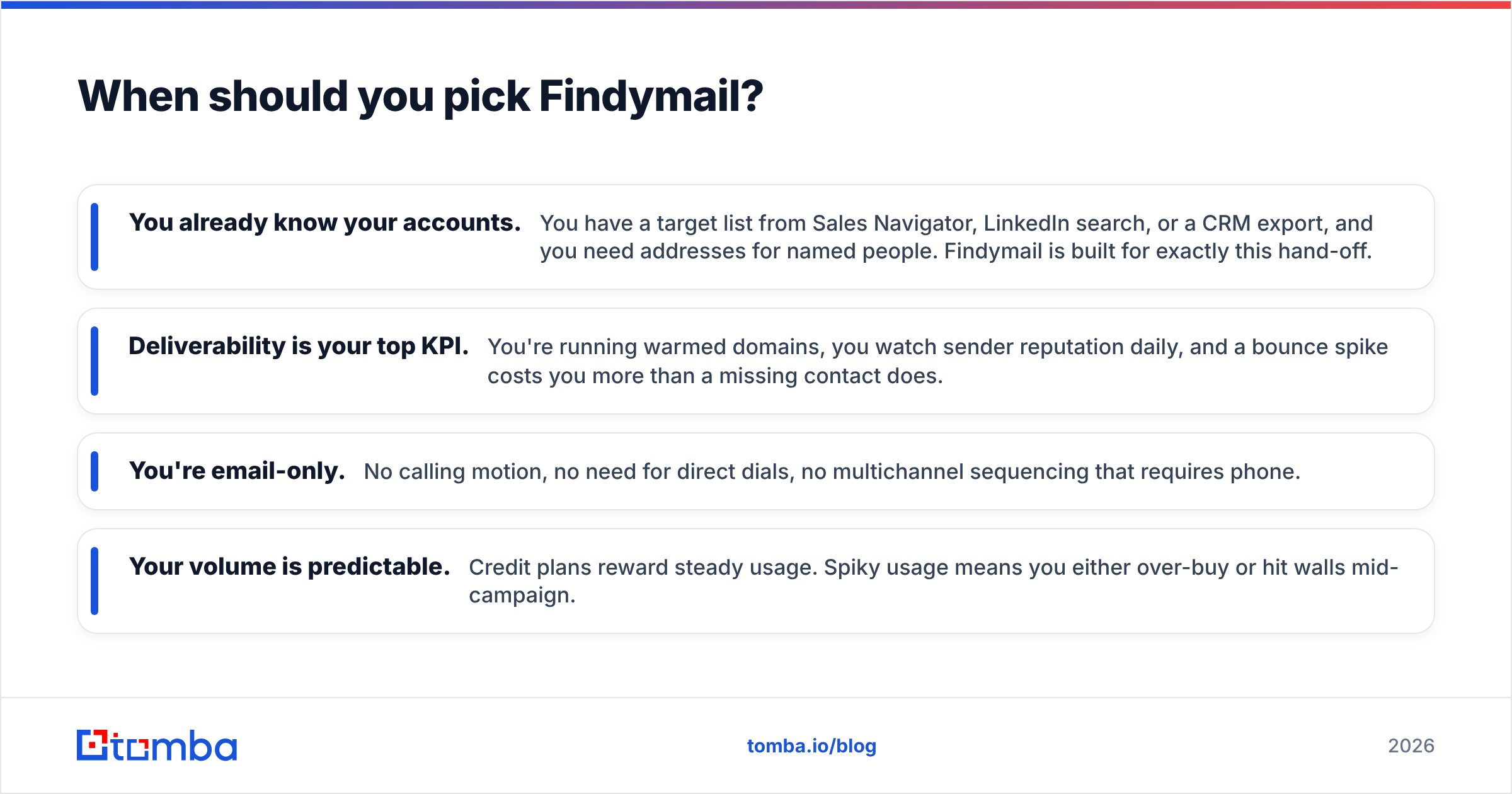
Choose Findymail when these describe you:
- You already know your accounts. You have a target list from Sales Navigator, LinkedIn search, or a CRM export, and you need addresses for named people. Findymail is built for that hand-off.
- Deliverability is your top KPI. You run warmed domains, you watch sender reputation daily, and a bounce spike costs you more than a missing contact.
- You're email-only. No calling motion, no direct dials, no multichannel sequencing that needs phone.
- Your volume is predictable. Credit plans reward steady usage. Spiky usage means you over-buy or hit a wall mid-campaign.
Where it frustrates people: no phone numbers, and no firmographic filtering deep enough to build a list from nothing. Coverage also thins outside North America and Western Europe. If your ICP sits in APAC or LATAM, test hard before you commit.
When should you pick Zintlr?#
Choose Zintlr when:
- You're building lists from scratch. No account list, no LinkedIn scrape, just an ICP definition. A searchable database is the right shape of tool for that.
- Calling is part of the motion. Direct dials lift your connect rate versus switchboard numbers. If SDRs are dialing, phone coverage is not optional.
- You want the personality layer. Zintros is unusual. Some teams find the behavioral hints useful for openers; others find them noise. Test it on 50 contacts against a control group.
- You need breadth over precision. Some workflows tolerate a 10% miss rate: a broad awareness campaign, a webinar invite list, a market-mapping exercise.
Where it frustrates people: there's no bounce guarantee, so the risk of bad data lands on your domain, not the vendor's balance sheet. Budget separately for verification.
What about the alternatives worth testing?#
The Findymail vs Zintlr framing is too narrow for most buyers. Three other shapes of tool compete for the same budget line:
- All-in-one sales platforms (Apollo, Amplemarket) bundle data with sequencing. That's convenient, but you're locked into their sender infrastructure and their data quality at once. See our take on Apollo alternatives for the trade-offs.
- Curated database vendors like BookYourData sell pre-verified list downloads with pay-as-you-go pricing. That suits teams who buy in bursts. If your pattern is "one list per quarter," a subscription is dead weight and a credit pack is cheaper.
- API-first data layers — this is where Tomba sits. Instead of a UI you log into, you get an email finder API plus verification, domain search, enrichment, and phone lookup wired into your own systems. Entry is $49/mo Starter, $99/mo Growth, $249/mo Pro, with 25 free searches a month to test coverage first.
The evaluation method matters more than the shortlist. Do this before you buy anything:
- Build a 100-contact golden set from your real ICP — people you can confirm exist and are still in-role.
- Run the same 100 through each trial. Measure find rate, not marketing claims.
- Send a 50-contact test campaign from a throwaway subdomain and measure real bounce rate. That's the number that matters.
- Check job-change freshness. Pick five contacts who changed roles in the last six months. Does the tool still show the old company?
- Time the API. If you're automating, latency and rate limits bite at scale in ways the pricing page never mentions.
Vendor-reported accuracy is marketing. Your golden set is data. Reviews on G2 help you spot support and billing complaints, which trials never reveal.
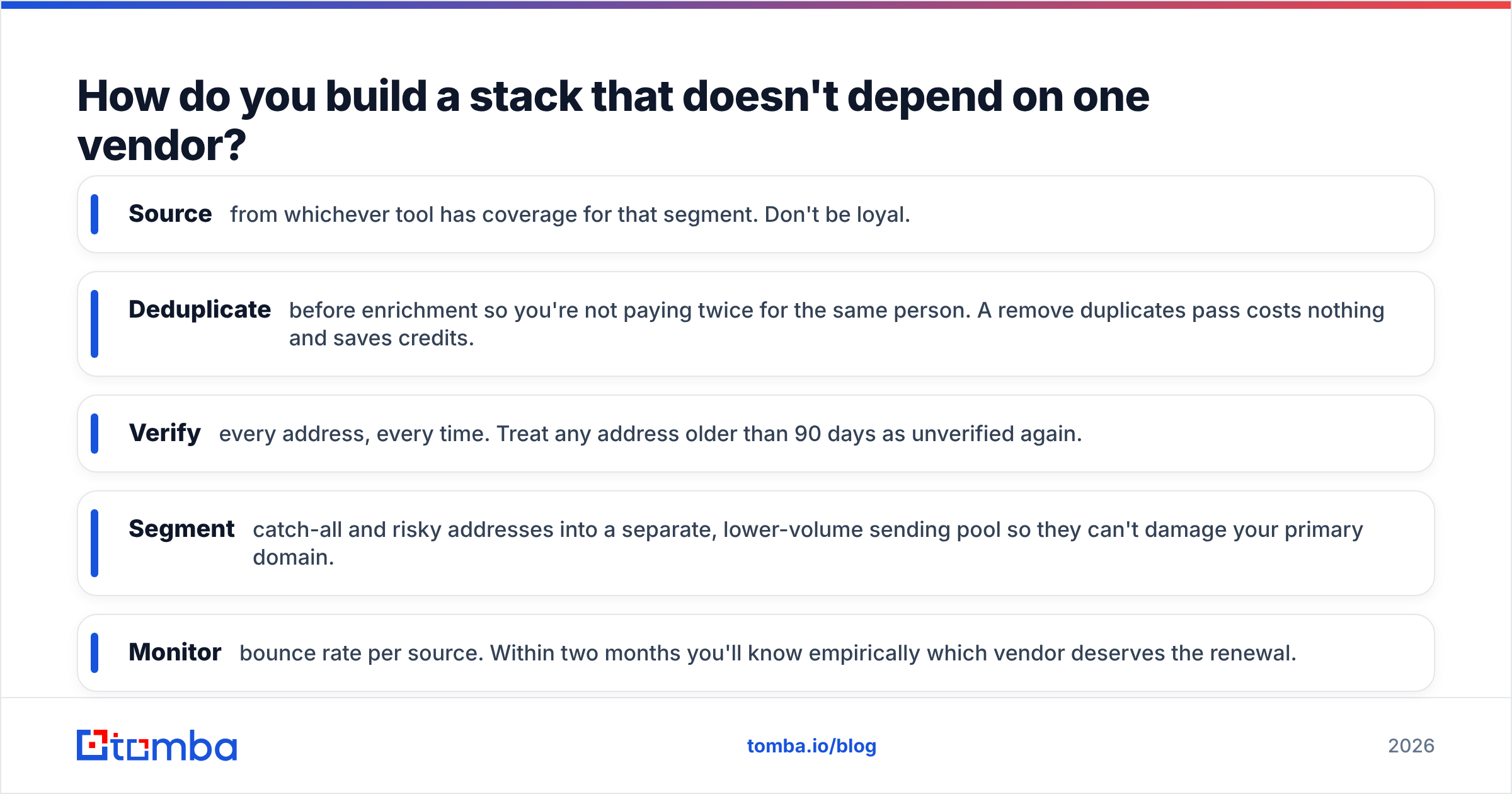
How do you build a stack that doesn't depend on one vendor?#
The teams with the best outbound numbers don't pick one data vendor. They layer.
A working pattern looks like this. Use a database tool for list-building breadth. Use a finder for named-account precision. Then run everything through a verification gate, whatever the source. People skip that third layer, and it's the one that protects the asset you can't buy back: your sending domain.
Concretely:
- Source from whichever tool covers that segment. Don't be loyal.
- Deduplicate before enrichment so you don't pay twice for the same person. A remove duplicates pass costs nothing and saves credits.
- Verify every address, every time. Treat any address older than 90 days as unverified again.
- Segment catch-all and risky addresses into a lower-volume sending pool so they can't hurt your primary domain.
- Monitor bounce rate per source. Within two months you'll know which vendor deserves the renewal.
That last point is the whole game. Run both tools for a quarter if budget allows, tag every contact with its source, and let bounce and reply data decide. Eight weeks of real sending teaches you more than any comparison post, including this one.
The bottom line#
Findymail vs Zintlr comes down to this. Findymail wins on email precision and bounce protection. Zintlr wins on database breadth and phone coverage. Neither is a complete data layer, and both assume you bring your own verification discipline.
If you'd rather not stitch three vendors together, start with the Tomba Email Finder. It handles finding, verification, catch-all resolution, domain search, and enrichment through one API and one credit pool. It's free for the first 25 searches, $49/mo when you scale, and there's no seat tax as your team grows. Run your golden-set test against it alongside the other two, and let the bounce rate pick the winner.
Related guides#
Ready to find emails that actually work?
Join 150,000+ professionals who stopped guessing and started sending. Free credits on signup — no credit card required.
Get the Tomba newsletter
Practical outbound tactics and product updates — once every two weeks.
About the author