Firmographic Data Sources: Where B2B Teams Get Company Data
Firmographic data decays fast and most vendors resell the same crawls. Here's how the major firmographic data sources actually differ on coverage, freshness, and price — and which one fits your motion.
TL;DR
- Firmographic data sources fall into four buckets: crawled/public web, self-reported registries, community-contributed networks, and technographic scrapers. Most commercial vendors blend all four and rebrand the result.
- The differentiator is not "how many companies" — it's freshness, field depth, and how the vendor handles the fields it doesn't know. A confident wrong headcount costs more than a null.
- Company records decay roughly 25-30% per year through funding rounds, layoffs, rebrands, acquisitions, and domain changes. A one-time CSV purchase is a depreciating asset.
- Price ranges from free (SEC EDGAR, Companies House, OpenCorporates) to six figures (ZoomInfo, Dun & Bradstreet enterprise). The middle — $50-$300/mo API access — is where most sub-500-person GTM teams should live.
- Test every vendor the same way: pull 200 accounts you already know cold, score field-by-field, and weight the fields your routing logic actually consumes.
What is firmographic data, exactly?#
Firmographic data is demographic data for companies. Where B2C marketers segment by age, income, and postcode, B2B teams segment by industry, employee count, revenue, location, funding stage, and corporate structure.
Think of it like a credit report for a business you've never met. You can't interview every account before you decide whether to route it to enterprise AE or to a self-serve nurture. So you buy a summary someone else compiled, and you make a call based on it. The quality of that summary determines whether your best rep spends Tuesday on a 12-person consultancy that looked like a 900-person enterprise.
The core fields nearly every vendor ships:
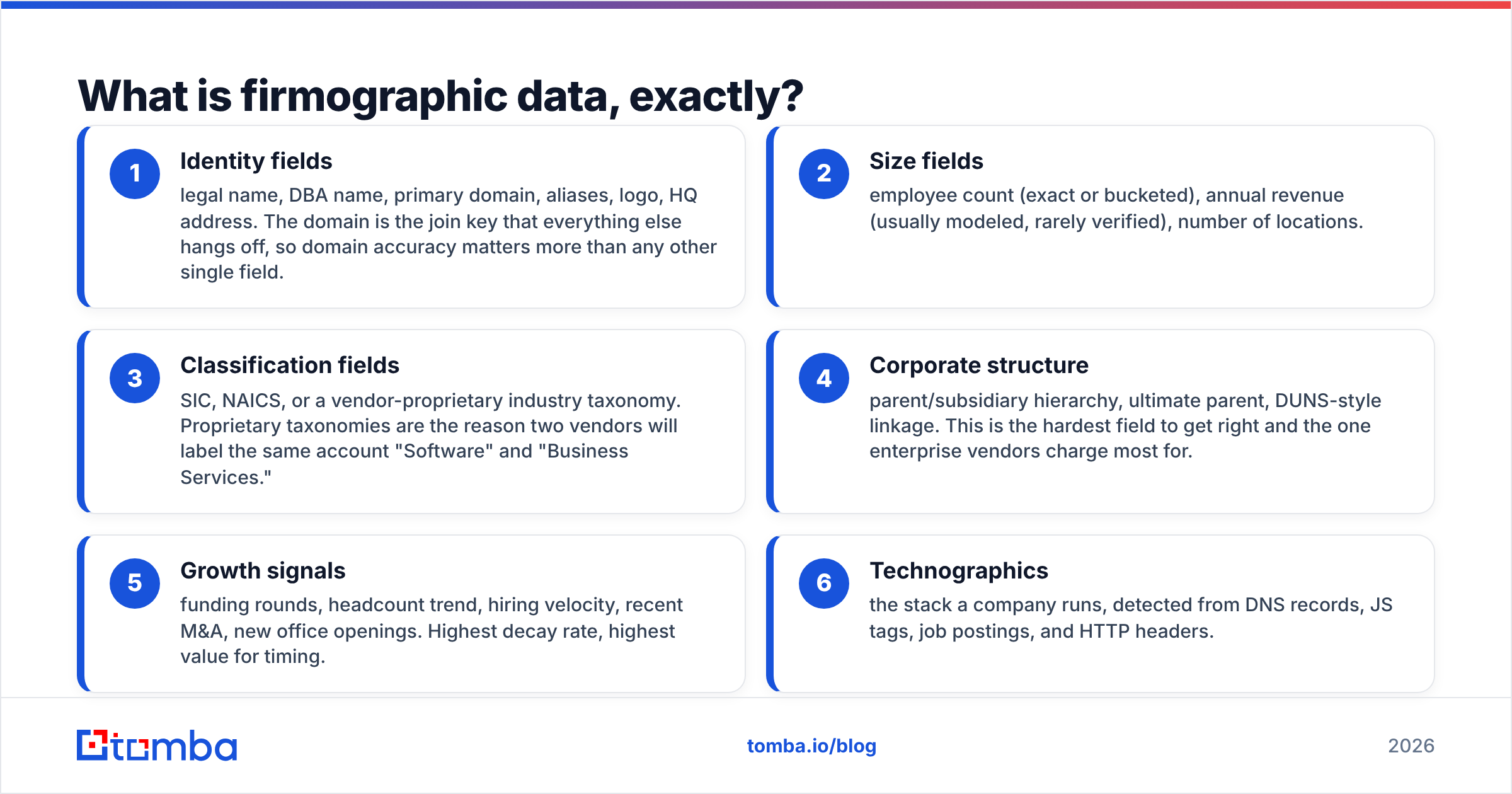
- Identity fields — legal name, DBA name, primary domain, aliases, logo, HQ address. The domain is the join key that everything else hangs off, so domain accuracy matters more than any other single field.
- Size fields — employee count (exact or bucketed), annual revenue (usually modeled, rarely verified), number of locations.
- Classification fields — SIC, NAICS, or a vendor-proprietary industry taxonomy. Proprietary taxonomies are the reason two vendors will label the same account "Software" and "Business Services."
- Corporate structure — parent/subsidiary hierarchy, ultimate parent, DUNS-style linkage. This is the hardest field to get right and the one enterprise vendors charge most for.
- Growth signals — funding rounds, headcount trend, hiring velocity, recent M&A, new office openings. Highest decay rate, highest value for timing.
- Technographics — the stack a company runs, detected from DNS records, JS tags, job postings, and HTTP headers.
If you're building an ICP scoring model, decide which of those six groups your model actually reads before you shop. Most teams pay for corporate hierarchy and never use it.
Where does firmographic data actually come from?#
Four upstream sources feed nearly every commercial dataset. Once you know them, vendor marketing gets a lot easier to read.
Public registries and filings. SEC EDGAR, UK Companies House, EU business registers, state incorporation records. Authoritative on legal entity, incorporation date, and officers. Useless for headcount at private companies and always lagging.
Web crawling. Company sites, careers pages, press releases, news. This is where employee counts, descriptions, and locations mostly come from — inferred, not stated. Crawl-derived revenue figures are models on top of models.
Professional networks and community contribution. Self-reported profiles plus data submitted by users of a vendor's browser extension. High freshness, structural bias toward tech and toward companies whose employees are active online. A 40-person manufacturer in Ohio is systematically underrepresented.
Partnerships and data co-ops. Vendor A licenses vendor B's set, adds a field, resells it. This is why three tools you evaluate will return the identical wrong headcount for the same account — they share an upstream.
That last point is the single most useful thing to know when evaluating firmographic data sources. If two vendors agree perfectly on a hard field, suspect a shared supplier rather than independent confirmation.

How do the major firmographic data sources compare?#
Prices below are public list rates as of early 2026; enterprise contracts vary widely and most vendors negotiate.
| Source | Type | Coverage claim | Entry price | Strongest field | Weakest field |
|---|---|---|---|---|---|
| ZoomInfo | Commercial platform | 100M+ companies | ~$15k/yr, seat-based | Direct dials, org charts | Price transparency; SMB freshness |
| Dun & Bradstreet | Commercial registry | 500M+ records | Enterprise quote | Corporate hierarchy, DUNS | Speed of update; tech stack |
| Clearbit (HubSpot) | Enrichment API | ~40M companies | Bundled with HubSpot | Domain-to-company resolution | Standalone availability post-acquisition |
| Apollo.io | Platform + database | 60M+ companies | $49/user/mo | Price-to-volume ratio | Employee-count accuracy at SMB |
| BookYourData | List provider | 250M+ contacts | Pay-per-record credits | Verified-on-delivery guarantee, no subscription lock-in | Less suited to always-on API enrichment |
| Crunchbase | Funding-first | ~4M companies | $49/mo Starter | Funding rounds, investor graph | Non-venture-backed companies |
| OpenCorporates | Public registry aggregate | 200M+ legal entities | Free / API tiers | Legal entity truth, jurisdictions | No headcount, no revenue, no contacts |
| Tomba | Contact + company data | 400M+ email records | Free tier, $49/mo Starter | Domain-level contact discovery, verification | Not a full firmographic warehouse |
A note on how to read that table: nobody wins every column. D&B's hierarchy data is genuinely hard to replicate and worth enterprise money if you sell into the Fortune 2000. BookYourData works well when you want a defined list without an annual seat commitment — the pay-per-record model means you're not paying for months you don't prospect. Crunchbase is excellent and narrow. OpenCorporates is free and should be in every stack as a legal-entity backstop.
And if what you actually need is not "a warehouse of 100M company profiles" but "the right people at the 800 accounts I already picked," a domain search plus enrichment approach costs a fraction of a full data platform.
Why does firmographic data decay so fast?#
Because companies are not static objects, and every field you buy is a snapshot with a timestamp you usually can't see.
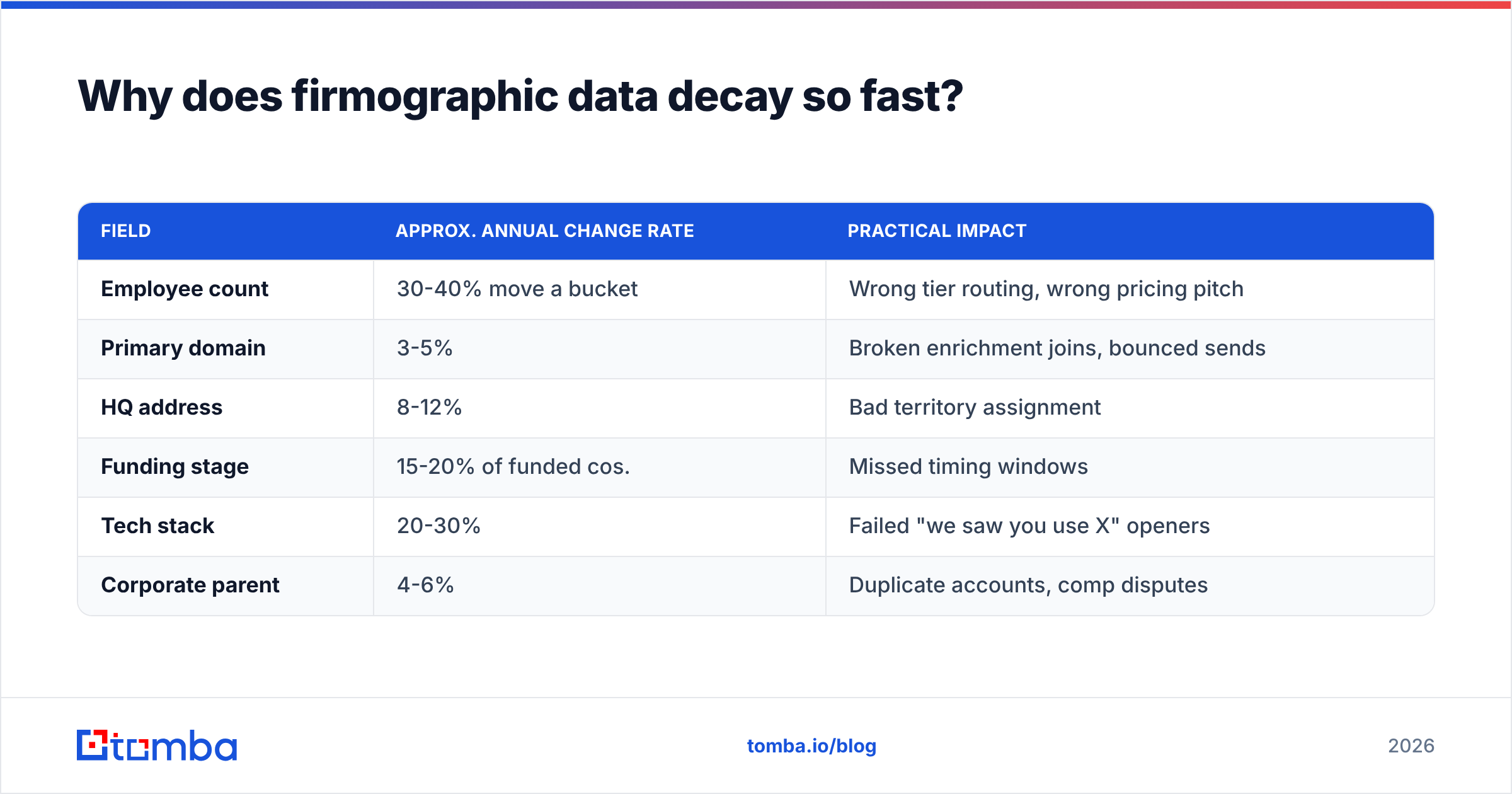
Rough annual decay by field, based on what most practitioners observe:
| Field | Approx. annual change rate | Practical impact |
|---|---|---|
| Employee count | 30-40% move a bucket | Wrong tier routing, wrong pricing pitch |
| Primary domain | 3-5% | Broken enrichment joins, bounced sends |
| HQ address | 8-12% | Bad territory assignment |
| Funding stage | 15-20% of funded cos. | Missed timing windows |
| Tech stack | 20-30% | Failed "we saw you use X" openers |
| Corporate parent | 4-6% | Duplicate accounts, comp disputes |
Two consequences follow.
First, buy access, not files. A one-time list is worth roughly half its purchase price in twelve months. An API or subscription that re-resolves on demand holds value.
Second, re-verify at the point of use, not at the point of purchase. The relevant question is never "was this record accurate when the vendor built it" but "is it accurate the moment my rep sends the email." That's why enrichment and email verification belong in the send workflow, not in a quarterly data-hygiene project. Bad contact data is also the fastest route to damaging your sender reputation — the deliverability cost of stale data usually exceeds the data cost itself.
Which firmographic data source fits your team?#
Match the source to the motion, not to the coverage number on the homepage.
You sell to enterprises with complex corporate structures. You need hierarchy. D&B or ZoomInfo. The premium is real and so is the value — misattributing a subsidiary to the wrong parent breaks territory, comp, and forecasting simultaneously.
You sell to SMBs at volume. Hierarchy is irrelevant; freshness and price-per-record dominate. A mid-tier platform plus a verification layer beats an enterprise contract. Consider Apollo alternatives if you're paying enterprise rates for SMB-quality records.
You're building a product that enriches customers' data. You need an API with predictable latency, clear rate limits, and licensing that permits redistribution. Read the terms carefully — many list vendors forbid passing data to your end users. An email finder API with explicit commercial terms saves a legal review later.
You're doing account-based marketing on a fixed list. You don't need a database at all. You need deep enrichment on 200-2,000 named accounts. Buy per-record enrichment or run bulk lead generation against your target list. Paying for 100M records to use 800 is the most common overspend in B2B data.
You're a two-person team validating a market. Start free. OpenCorporates for entities, Crunchbase free tier for funding, and a free-tier finder for contacts. You can get 200 qualified accounts without a contract.
How do you evaluate a firmographic vendor before buying?#
Run the same test on every vendor. Vendors will offer you their sample file — refuse it. Sample files are curated.
Step 1: Build a truth set. Take 200 accounts you know cold — current customers, churned accounts, companies where you know someone. You must know the real answers independently.
Step 2: Strip everything but the domain. Hand each vendor a bare domain list. Domain-to-company resolution is the foundational capability; a vendor that fumbles it will fumble everything downstream.
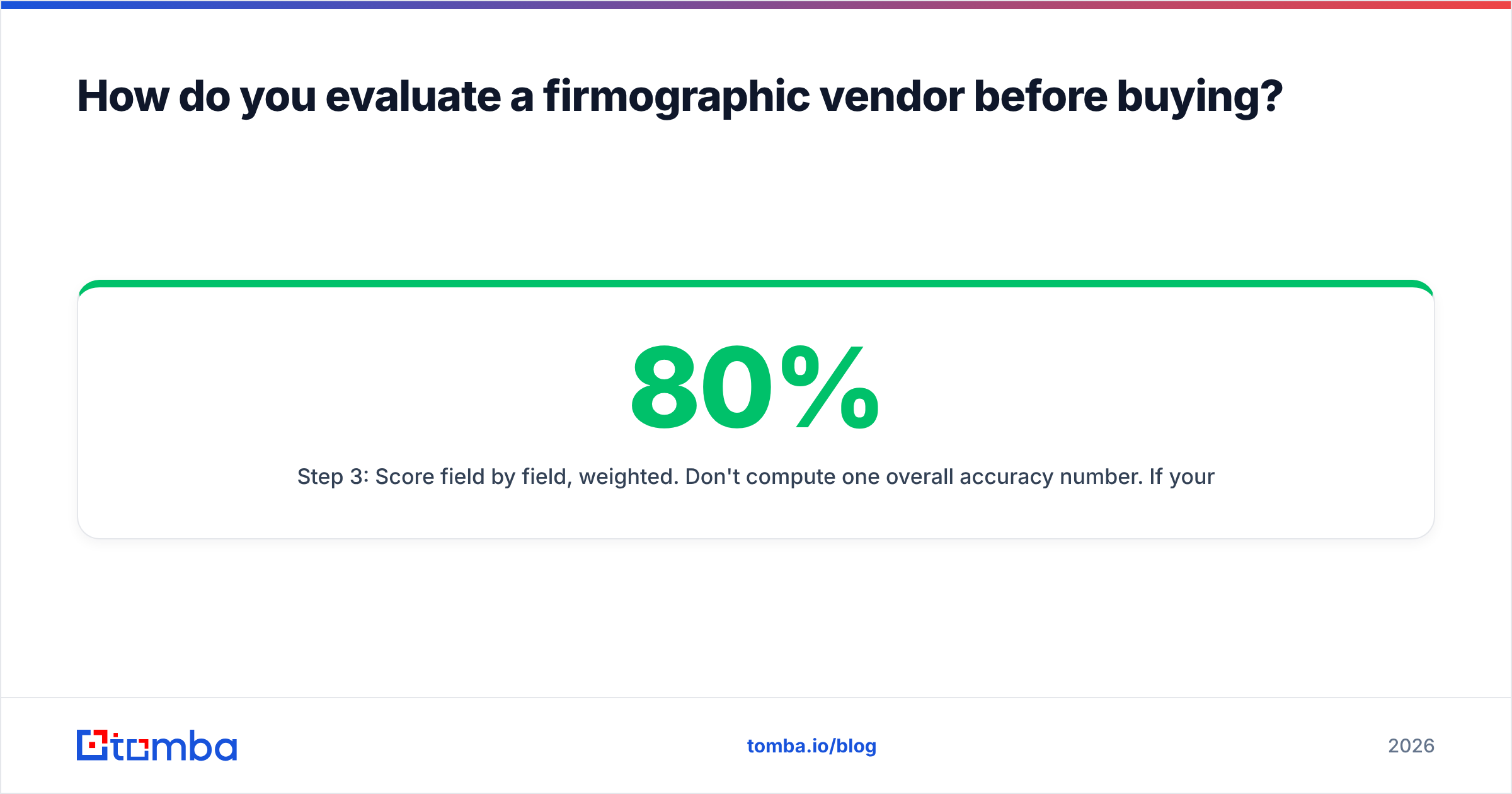
Step 3: Score field by field, weighted. Don't compute one overall accuracy number. If your routing logic keys on employee count and industry, those two fields carry 80% of the weight. A vendor at 94% on revenue and 71% on headcount is worse for you than the reverse, even though the average looks similar.
Step 4: Count nulls separately from errors. A null costs you a lookup. A confident wrong value costs you a rep-hour and possibly the account. Reward vendors that admit uncertainty — most penalize themselves in naive accuracy tests by being honest, which is exactly backwards.
Step 5: Check the timestamp. Ask directly: when was this record last refreshed, and what triggers a refresh? "Continuously" is not an answer. Good vendors will tell you the crawl cadence and the event triggers.
Step 6: Test the edges. Include in your 200: a recently acquired company, a company that rebranded in the last year, a non-US company, a sub-20-person company, and a company with a domain that doesn't match its brand name. Those five cases separate real coverage from claimed coverage.
Step 7: Price the actual workflow. Model your real monthly volume against each pricing structure. Credit-based pricing, seat-based pricing, and record-based pricing produce wildly different totals at the same volume. Compare Tomba pricing against a seat-based platform at your team's actual usage before assuming the enterprise tool is more expensive — or that it isn't.
Independent review data on G2 and Capterra is useful for spotting support and billing complaints, which never show up in a data-quality bake-off but will absolutely show up in month four.
What are the compliance constraints on firmographic data?#
Firmographic data about companies is not personal data, and that distinction matters legally.
Company name, HQ address, revenue, and NAICS code describe a legal entity. GDPR governs personal data — a named individual's work email, direct dial, or job title tied to their name. In practice your dataset mixes both, and the mixed record inherits the stricter rules.
Practical guardrails:
- Know your lawful basis for contact-level fields. In the EU, legitimate interest can support B2B outreach, but it requires a documented assessment and a working opt-out.
- Keep provenance. For every contact record, be able to answer "where did this come from." Vendors that won't disclose sourcing methodology are a liability you're absorbing. Tomba publishes its data sources for this reason.
- Honor suppression across systems. An opt-out in your ESP must propagate to your enrichment layer, or you'll re-import the same person next quarter.
- Check CCPA/CPRA if you sell into California. Business contact data lost its blanket exemption; treat it as in scope.
- Read redistribution terms. Nearly every vendor forbids reselling their data. If your product surfaces enriched data to customers, you need explicit permission.
The GDPR guidance from the ICO is the most readable regulator source available, and it's free.
What does a sensible firmographic stack look like in 2026?#
Most effective teams run layers, not a single vendor.
Layer 1 — Legal entity truth (free). OpenCorporates or the relevant national registry. Resolves "is this the same company" questions that plague dedup.
Layer 2 — Core firmographics (paid, subscription). One primary vendor matched to your segment. This carries industry, size, location, and hierarchy if you need it.
Layer 3 — Signals (paid, narrow). Funding, hiring, technographics. Buy only the signals your plays actually trigger on. Every unused signal is pure cost.
Layer 4 — Contact resolution and verification (paid, usage-based). Turning "Acme Corp, 340 employees, Chicago" into a reachable person. This is where firmographics become pipeline, and where verification is non-negotiable.
Layer 5 — Hygiene automation. Scheduled re-enrichment on accounts that entered a sequence, with a HubSpot integration or similar writing fresh values back to the CRM. Manual quarterly cleanups always slip.
The mistake is buying one platform that promises all five layers and delivers three of them well. You'll pay platform pricing for the two weak layers and then buy point solutions anyway.
Getting from company data to actual conversations#
Firmographic data tells you which companies to approach. It doesn't tell you who to email or whether that address still works — and that gap is where most data budgets quietly leak.
If your accounts are already picked and what's missing is reachable contacts, start with the Tomba Email Finder. Feed it a domain and a name, or run a full domain search to see every discoverable address at the company, each returned with a confidence score and verification status rather than a guess. The free tier gives you 25 searches a month to test against your own truth set, and Starter is $49/mo when you're ready to run it at volume — priced per lookup, not per seat, so you pay for prospecting you actually do.
Build your account list from firmographic sources. Build your contact list from a tool whose only job is finding and verifying the address.
Related guides#
Ready to find emails that actually work?
Join 150,000+ professionals who stopped guessing and started sending. Free credits on signup — no credit card required.
Get the Tomba newsletter
Practical outbound tactics and product updates — once every two weeks.
About the author