First Cold Email Template: A Proven Framework for 2026
Your first cold email is the hardest one to write. Here's a line-by-line template framework, four ready-to-send variants, and the data on what actually gets replies in 2026.
TL;DR
- A first cold email has one job: earn a reply, not close a deal. Every line should be cut or rewritten against that test.
- The structure that works in 2026 is five parts: subject, opening relevance line, one-sentence problem, one-sentence proof, one low-friction ask. Under 120 words total.
- Personalization only pays when it's specific and recent. Merge-tag spam ("I loved your work at {{company}}") now reads as automation and depresses replies.
- Deliverability is upstream of copy. A perfect template sent to a 22% invalid list still fails — verify before you send.
- Four variants below (pain-led, trigger-led, referral-led, question-led) cover roughly 90% of B2B first-touch scenarios.
What Is a First Cold Email Template, and Why Does It Matter So Much?#
A first cold email template is the reusable skeleton for the very first message you send someone who has never heard of you. It's the highest-leverage asset in outbound, because everything downstream — follow-ups, calls, demos — only happens if this one earns a response.
Think of it like the first ten seconds of a phone call with a stranger. You don't get to explain your product. You get to prove you're not a robot, that you know something about them, and that responding costs them almost nothing. That's it.
Most first emails fail for boring, fixable reasons. They're too long. They ask for 30 minutes before establishing why anyone should care. They open with "I hope this email finds you well." Or they land in spam because the sender never checked whether the address existed.
Here's the mental model to hold: your first email is a door-knock, not a pitch deck. The goal is a two-word reply — "Sure, when?" or even "Not now" — because both tell you something. A non-response tells you nothing.
What Are the Five Parts of a First Cold Email That Works?#
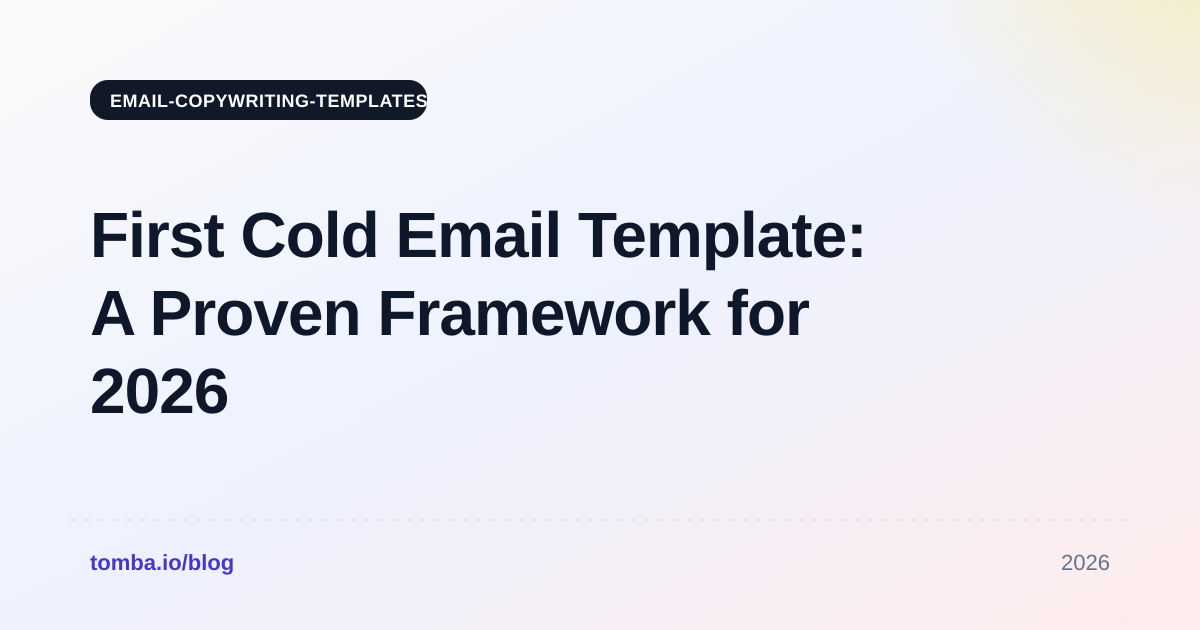
Every high-performing first cold email in 2026 decomposes into the same five components. Change the words, keep the skeleton.
Subject line (3–5 words, lowercase, no pitch). Your subject exists to get the email opened, not to summarize your offer. "quick question re: onboarding" beats "Transform Your Onboarding With AI-Powered Automation." Lowercase reads like a colleague; title case reads like a newsletter. Test variants with a subject line tester before you commit a whole sequence to one line.
Relevance opener (1 sentence). This proves you did not blast 5,000 people. It references something specific and recent: a hiring post, a funding round, a product launch, a podcast appearance, a change in their tech stack. Bad: "I see you're in SaaS." Good: "Saw you posted three SDR roles in Berlin last week."
Problem statement (1 sentence). Name the pain your relevance line implies. Do not describe your product yet. "Ramping three reps at once usually means your best AE spends half of Q1 training instead of selling."
Proof point (1 sentence). One concrete, checkable data point. A named customer, a percentage, a timeframe. "We cut ramp time from 90 to 41 days for two Series B teams in the same motion." Vague social proof ("trusted by hundreds of companies") is worse than none.
Low-friction ask (1 sentence, question form). Ask for a reply, not a calendar block. "Worth a look?" or "Want me to send the two-page breakdown?" converts far better than "Do you have 30 minutes Thursday at 2pm ET?"
That's it. Five sentences, roughly 80–110 words, no attachments, no images, one link at most.
Wait — that image needs a proper alt. Here it is:

What Does a Good First Cold Email Template Actually Look Like?#
Here's the base template with the five parts labeled, then four variants you can lift directly.
The base template#
Subject: quick question re: [specific thing]

Hi [First name],

[Relevance opener — something specific and recent about them.]

[Problem statement — the cost of that situation, in their words.]

[Proof point — one concrete result, named or numbered.]

[Ask — a yes/no question that takes 5 seconds to answer.]

[Your name]
[Title, Company]
Variant 1 — Pain-led (best for well-defined, urgent problems)#
Subject: bounce rate on the Q3 list
Hi Marcus,
Noticed your team is pushing outbound hard — three new SDRs on LinkedIn since June.
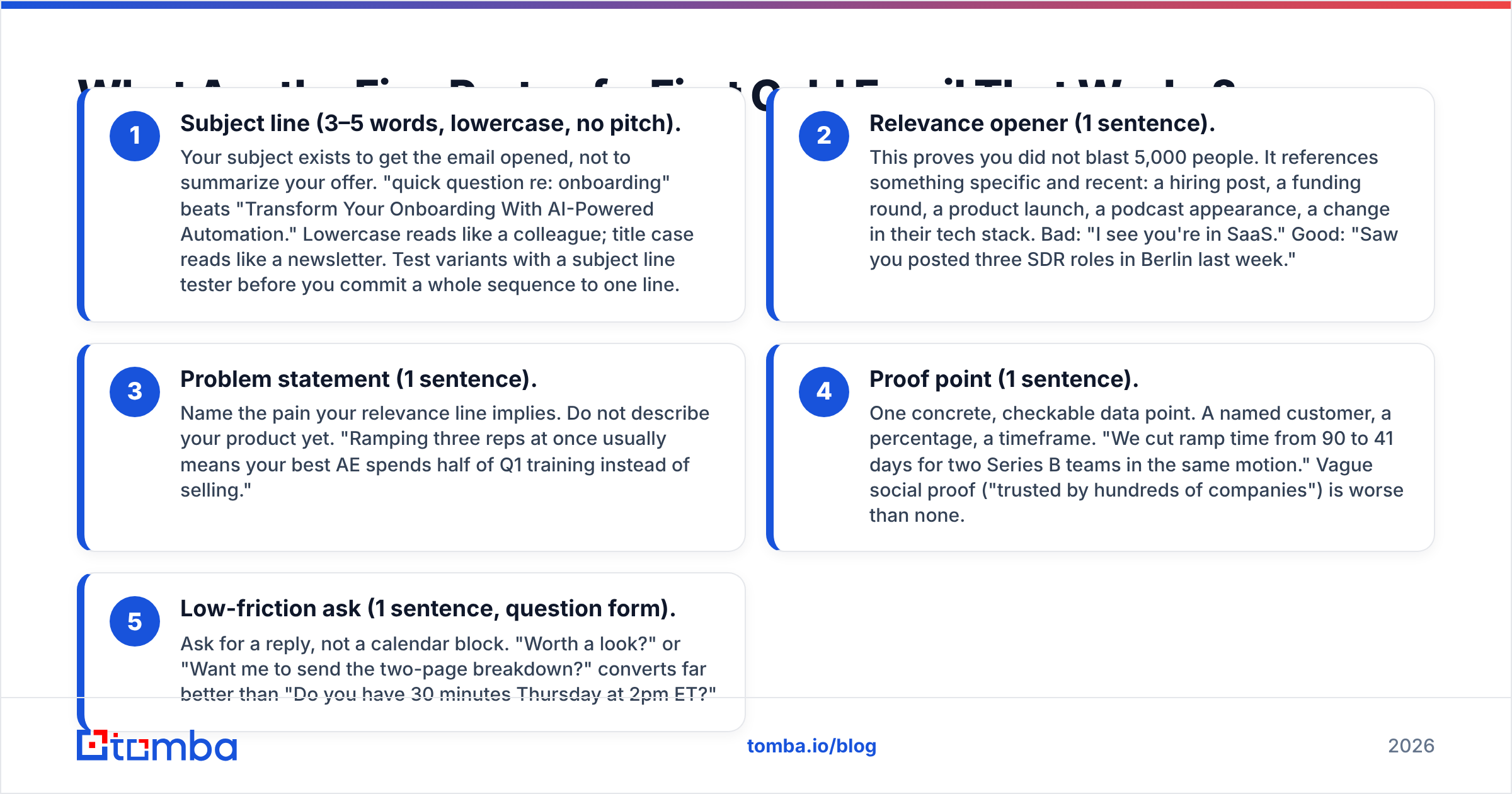
When headcount jumps like that, list quality usually slips before anyone notices; most teams find 15–25% of scraped addresses are dead by the time they send.
We ran a free audit for a 12-rep team last month and pulled 4,100 invalid addresses out of a 19,000-row list before their first send.
Want me to run the same check on one of your lists?
— Dana
Variant 2 — Trigger-led (best for funding, hiring, launches, leadership changes)#
Subject: congrats on the Series A
Hi Priya,
Saw the $14M announcement Tuesday — congrats.
Post-raise, the pressure usually lands on pipeline coverage before the new AEs are even onboarded.
Two companies that raised in the same quarter used us to build their first 8,000-contact target list in under a week.
Useful to see how they scoped it?
— Tom
Variant 3 — Referral-led (highest reply rate, lowest volume)#
Subject: Sam suggested I reach out
Hi Alex,
Sam Rivera at Northbeam mentioned you're rebuilding the RevOps data stack this quarter.
He hit the same problem you're probably hitting — enrichment coverage falls off a cliff outside the US and UK.
We got Northbeam from 61% to 88% match rate on their EMEA accounts.
Worth a 10-minute walkthrough, or should I just send what we sent Sam?
— Yasmin
Variant 4 — Question-led (best for early-stage discovery, no clear trigger)#
Subject: how are you handling catch-alls?
Hi Jordan,
Your careers page lists two demand-gen roles, so I'm guessing volume is going up.
Curious how you're handling catch-all domains right now — most tools just mark them "unknown" and leave you to guess.
We resolve about 70% of catch-alls to a definite valid/invalid, which usually recovers 8–12% of a list that would otherwise get dropped.
Is that a problem on your side, or already solved?
— Chris
Which First Cold Email Structure Performs Best?#
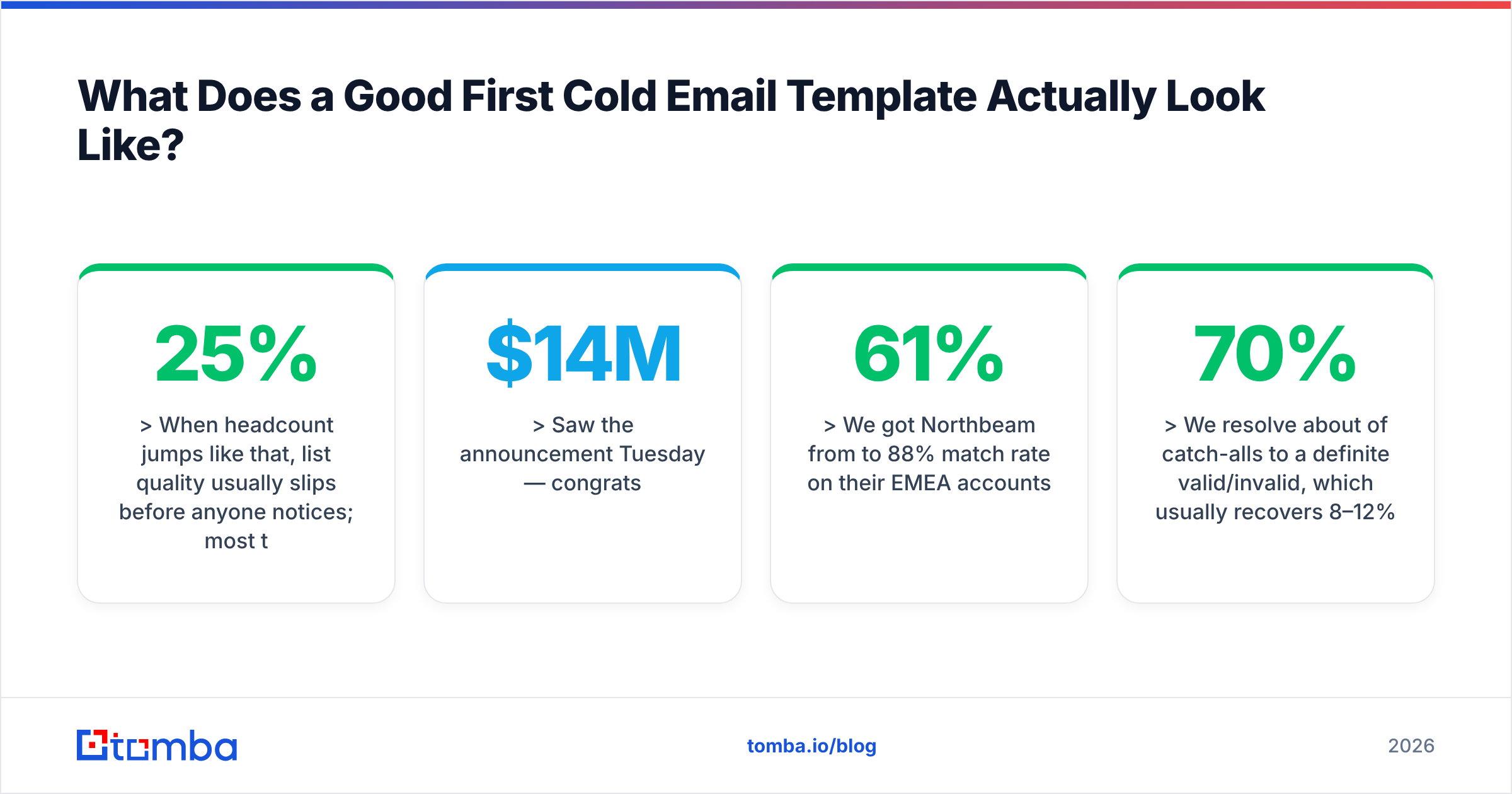
There's no single winner — the right structure depends on how much you know about the prospect and how urgent their problem is. This table maps the four variants against realistic expectations.
| Attribute | Pain-led | Trigger-led | Referral-led | Question-led |
|---|---|---|---|---|
| Typical reply rate | 4–8% | 6–11% | 15–30% | 3–6% |
| Research time per prospect | 2–4 min | 1–2 min | 5–10 min | <1 min |
| Scales past 500/mo | Yes | Yes | No | Yes |
| Needs a named trigger event | No | Yes | No | No |
| Risk of sounding generic | Medium | Low | Very low | High |
| Best for | Mature ICP, known pain | Funding/hiring/launch signals | Warm network, ABM | Top-of-funnel discovery |
| Worst for | Undefined problems | Quiet, stable accounts | Volume outbound | Crowded categories |
Reply rates above are directional ranges from B2B outbound benchmarks, not guarantees. Your list quality moves them more than your copy does — which is the part most people skip.
Two things this table won't tell you. First, referral-led wins on rate but loses on volume: if you only have 40 warm intros, you cannot build a pipeline on it. Second, question-led looks weak on paper but is the cheapest to run at scale, so its absolute reply count can beat pain-led in a big enough list.
What Kills a First Cold Email Before Anyone Reads It?#
Copy is the last mile. Most first emails die earlier, in the plumbing.
- Invalid addresses. B2B contact data decays roughly 25–30% a year as people change jobs. A list you bought or scraped in January is materially worse in June. Every hard bounce chips at your domain's sender reputation, and mailbox providers weight that heavily. Run the list through an email verifier before the first send, not after the first bounce report.
- Catch-all domains marked "unknown." Many enterprise domains accept everything at the SMTP layer, so basic verifiers shrug. If you delete every unknown, you throw away real buyers; if you send to all of them, you gamble your reputation. A dedicated catch-all verifier resolves most of the middle.
- Missing or broken authentication. No SPF, no DKIM, no DMARC policy means Google and Microsoft treat you as suspect by default. Google's bulk sender requirements made this table stakes, not optional. Check your records with an SPF checker before you scale volume.
- Cold domain, hot volume. A brand-new sending domain going from 0 to 300 emails a day is the single loudest spam signal available. Warm gradually over 3–6 weeks.
- Spam-trigger formatting. Multiple links, tracking pixels on every send, large images, and attachment-heavy first touches all raise risk. Plain text with at most one link is the safe default.
The honest summary: a mediocre template sent to a clean, well-targeted list will beat a brilliant template sent to a decayed one. Fix the list first.
How Do You Personalize Without Wasting an Hour Per Email?#
Personalization has a threshold. Below it, you're worse off than sending nothing personalized at all, because a hollow merge tag actively signals automation.
The useful test: could this sentence be true of 500 other companies? If yes, it's not personalization, it's padding.
Three tiers, ranked by cost and payoff:
Tier 1 — Segment-level (cheapest). Written once per segment, not per person. "Series A fintech teams selling into credit unions usually hit the same compliance-review bottleneck." Costs minutes for hundreds of prospects. Good enough for question-led and pain-led variants.
Tier 2 — Signal-level (best ROI). Triggered by a public event: a job posting, a funding round, a tech-stack change, a conference talk. Takes 60–120 seconds per prospect and can be partially automated. This is where most teams should live.
Tier 3 — Person-level (expensive, highest yield). You read their post, their podcast appearance, their open-source commits. Five to ten minutes each. Reserve it for your top 50 accounts, not your top 5,000.
A practical workflow: pull the target company list, use domain search to map who actually works there and in what role, enrich with data enrichment to get titles and seniority right, then layer signal-level personalization only on the segment that clears your ICP score. Getting the name and title right is table stakes; getting the trigger right is the multiplier.
One caution on AI-written personalization: models are good at rephrasing a fact you feed them and bad at finding the fact. Use AI for the rewrite, not the research. If you feed a model a company description and ask it to invent a compliment, you get exactly the kind of sentence that now reads as machine-generated to any experienced buyer. Tools like a cold email AI writer are worth using for phrasing variants and tone — just never for facts you haven't checked.
How Long Should Your First Cold Email Be?#
Short — but not artificially clipped. The word count that consistently performs in B2B first-touch is 50 to 125 words, which is roughly what fits on a phone screen without scrolling. Over 60% of B2B email now gets opened on mobile first, so treat the phone viewport as the real canvas.
Practical rules:
- One idea per email. If you're explaining two benefits, you have two emails.
- No paragraph over three lines. On mobile, a four-line paragraph looks like a wall.
- Kill every adverb and every "just." "I just wanted to quickly reach out" is seven words that say nothing.
- Cut the last sentence before your ask. It's almost always a hedge.
- Signature under four lines. No banners, no legal boilerplate, no quotes.
Run your draft through a spam checker once per template — not per send — to catch phrasing that trips filters. And read it aloud. If you wouldn't say it to someone at a conference, don't send it.
How Do You Test and Iterate a First Cold Email Template?#
Treat the template as a hypothesis with a sample size, not a piece of writing you either like or don't.
- Minimum sample: 200 sends per variant. Below that, you're reading noise. A 4% vs 6% reply rate on 50 emails is one extra reply.
- Change one variable at a time. Subject line OR opener OR ask. If you change all three and replies go up, you've learned nothing reusable.
- Measure reply rate, not open rate. Apple Mail Privacy Protection and similar features have made open rates directionally useless since 2021. Positive-reply rate and meetings booked are the only metrics that survive.
- Log negative replies as data. "Wrong person, talk to Sana" is a win — it gives you a routing fix and a warm intro line.
- Retire templates at 6–8 weeks. Your best-performing email is also the one your competitors are now imitating. Rotate before it decays.
Independent review sites like G2's sales engagement category are useful for sanity-checking which sending tools actually report positive-reply rate natively versus burying it — a surprising number still lead with opens.
Store your winners somewhere reusable. A shared library of cold email templates with notes on which segment each one won in beats a Slack thread of screenshots.
What Should You Do Right After the First Email?#
Two things, both boring and both decisive.
Plan the follow-up before you send the first email. A single cold email is a coin flip; a three-to-four touch sequence spread over 10–14 days is a process. Roughly half of all replies to cold sequences arrive on touch two or later. Your follow-ups should add something — a case study, a different angle, a shorter ask — never "just bumping this to the top of your inbox."
Set a stop rule. Four touches, then out of the sequence and into a nurture list. Sending a fifth and sixth email to silence is how domains get burned and brands get remembered for the wrong reason. Respect the unsubscribe, honor every opt-out immediately, and check your regional obligations — the CAN-SPAM Act in the US and GDPR legitimate-interest rules in the EU are not optional.
Get the Data Layer Right First#
The template above is free, and so is every other template on the internet. What separates outbound that books meetings from outbound that burns a domain is the contact data underneath it — right person, right title, verified address, resolved catch-alls.
That's the part Tomba Email Finder is built for: find the exact person by name and domain, confirm the address is deliverable, and enrich the record before a single word of your first cold email gets written. Start on the free tier (25 searches/month) to test your ICP, then move to Starter at $49/month once you know which segment replies. Full Tomba pricing runs Starter $49, Growth $99, and Pro $249, with an API and bulk tools on every paid plan.
Write the template once. Clean the list every time.
Related guides#
Ready to find emails that actually work?
Join 150,000+ professionals who stopped guessing and started sending. Free credits on signup — no credit card required.
Get the Tomba newsletter
Practical outbound tactics and product updates — once every two weeks.
About the author