Firstname Lastname Email Formats: How to Find Them in 2026
The firstname.lastname pattern covers roughly a third of B2B domains — but guessing it blind burns your sender reputation. Here's how to identify, generate, and verify name-based email formats at scale.
TL;DR
firstname.lastname@company.comis the single most common B2B email format, but it still only accounts for roughly a third of domains — the other two-thirds use eight-plus competing patterns.- Guessing a name-based address and firing a cold email at it is the fastest way to rack up hard bounces and torch your sender reputation.
- The reliable workflow is: detect the domain's actual pattern → generate the candidate → verify it via SMTP/MX → only then send.
- Permutators are free and fine for one-off lookups; pattern detection plus verification is what you need above ~50 contacts.
- Catch-all domains break naive verification entirely, which is why catch-all-specific tooling matters more than raw finder volume.
What is a firstname lastname email format?#
A firstname lastname email is any corporate address built mechanically from a person's name and the company domain. The company picks one rule and applies it to every hire, so Sarah Chen at acme.com becomes sarah.chen@acme.com — and so does every other employee, in the same shape.
Think of it like a parking garage numbering scheme. Once you know the building numbers spots as "floor-dash-space," you can find any car from its ticket. Email formats work the same way: crack the pattern once, and every contact at that domain becomes derivable.
The common patterns, ranked roughly by how often they appear across B2B domains:
firstname.lastname@—sarah.chen@acme.com. The default for most mid-market and enterprise companies. Roughly 30-35% of domains.firstname@—sarah@acme.com. Dominant at startups under ~50 people, then abandoned once name collisions start.flastname@—schen@acme.com. Heavy in finance, legal, healthcare, and older enterprises running Exchange.firstnamelastname@—sarahchen@acme.com. Common in tech and among companies that migrated from Google Workspace defaults.firstname_lastname@—sarah_chen@acme.com. Rarer, but persistent in Japanese and German corporate domains.firstnamel@—sarahc@acme.com. Uncommon; usually a sign of a legacy system with a character limit.
There are more — lastname.firstname, f.lastname, firstname-lastname, initials-only — plus per-department exceptions. Sales might sit on the standard pattern while support hides behind an alias.
Why does guessing a firstname lastname email fail so often?#
Because "most common" is not "most likely for this domain." If you apply firstname.lastname universally, you are right about a third of the time. That means two out of three sends hit a nonexistent mailbox.
Here is what that costs you concretely. Mailbox providers track the ratio of delivered-to-rejected messages coming from your domain. Cross roughly 2-3% hard bounces and Google and Microsoft start throttling; cross 5% and your emails route to spam even for the addresses that are valid. A single 500-contact campaign built on guessed patterns can produce 300+ bounces and effectively burn the sending domain for weeks. Recovering sender reputation takes far longer than getting the addresses right in the first place.

Three failure modes compound the problem:
- Name normalization.
José Martínezmight bejose.martinez@,j.martinez@, orjmartinez@with the accent stripped — or kept. Hyphenated surnames, suffixes, and preferred names (Bob for Robert) all fork the guess tree. - Legacy overlap. Companies that went through an acquisition often run two patterns simultaneously. Half the org is on the acquirer's format, half is still on the acquired company's.
- Catch-all domains. These accept mail to any address at the domain, so a naive SMTP check returns "valid" for
asdfgh@company.com. You get a green light on garbage, then a silent black hole after you send.
How do you identify the pattern a domain actually uses?#
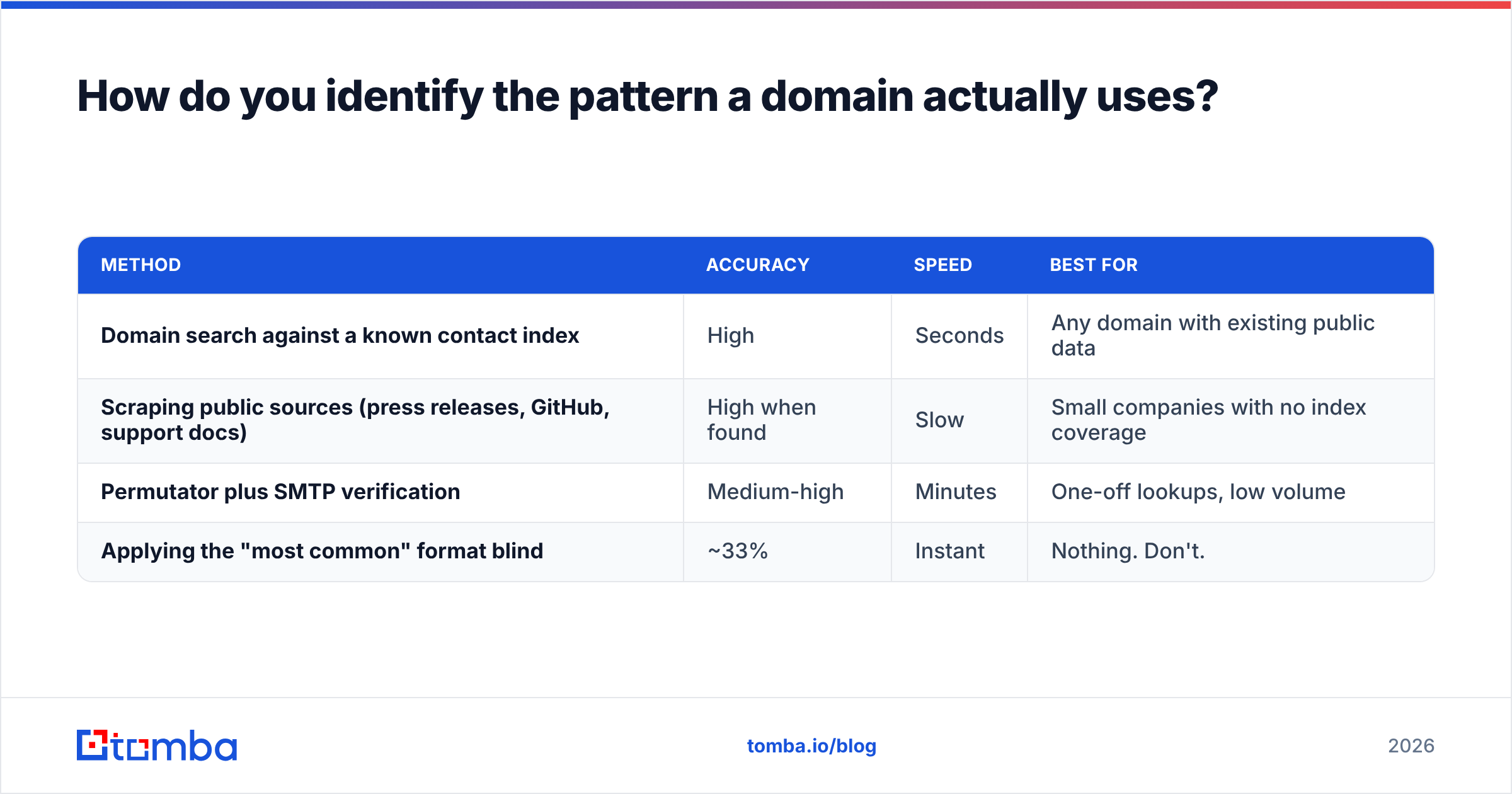
Work from evidence, not probability. Four methods, ordered by reliability:
| Method | Accuracy | Speed | Best for |
|---|---|---|---|
| Domain search against a known contact index | High | Seconds | Any domain with existing public data |
| Scraping public sources (press releases, GitHub, support docs) | High when found | Slow | Small companies with no index coverage |
| Permutator plus SMTP verification | Medium-high | Minutes | One-off lookups, low volume |
| Applying the "most common" format blind | ~33% | Instant | Nothing. Don't. |
The first method is the workhorse. A domain search pulls every known address at a domain and shows you the format they share. Once you see mchen@, jrivera@, and dpatel@ on the same domain, the pattern is settled: flastname@. You no longer need to guess for the fourth contact — you derive.
If the domain returns nothing, fall back to public artifacts. Engineering-heavy companies leak formats in git commit histories. Press contacts appear on newsroom pages. Support docs sometimes name a real person. One confirmed address is enough to unlock the entire domain.
For a fast manual check on a single company, a company email pattern lookup tells you the dominant format without you having to assemble the evidence yourself.
What's the difference between an email permutator and an email finder?#
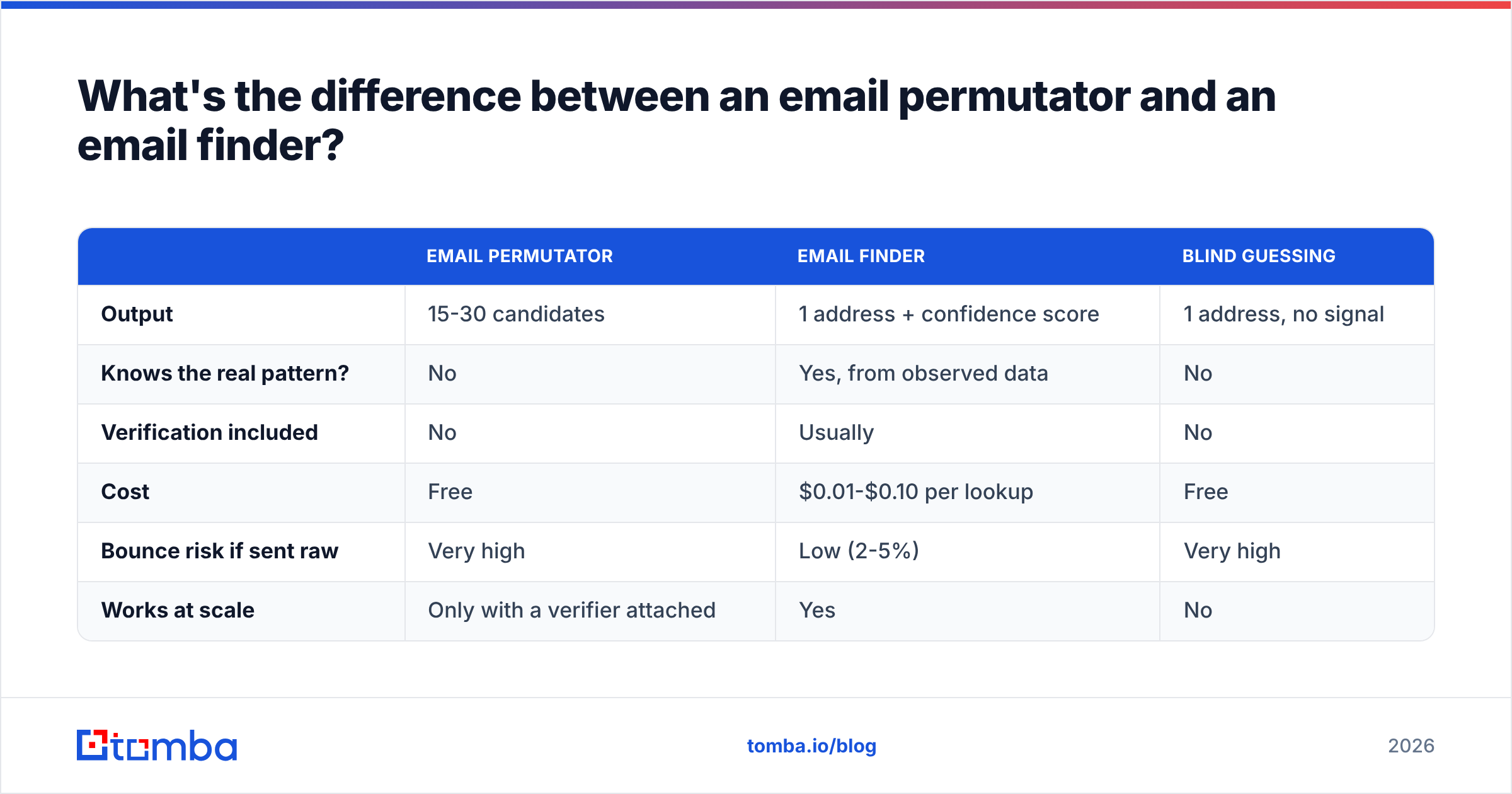
They solve different halves of the problem, and conflating them is where most prospecting workflows break.
A permutator generates every plausible combination from a name and domain. Feed it "Sarah Chen" and "acme.com" and it returns 15-30 candidates. It knows nothing about which one is real — it's a combinatorics function. Free, instant, and useful when you want a candidate list to test.
An email finder queries an index of observed, previously-validated addresses and returns the one that exists, usually with a confidence score. It's doing lookup, not generation.
| Email permutator | Email finder | Blind guessing | |
|---|---|---|---|
| Output | 15-30 candidates | 1 address + confidence score | 1 address, no signal |
| Knows the real pattern? | No | Yes, from observed data | No |
| Verification included | No | Usually | No |
| Cost | Free | $0.01-$0.10 per lookup | Free |
| Bounce risk if sent raw | Very high | Low (2-5%) | Very high |
| Works at scale | Only with a verifier attached | Yes | No |
The practical sequence: use an email permutator when you have a name and nothing else, then run the candidates through verification to find the live one. Or skip straight to a finder and let it do both steps. Above about 50 contacts, the second path is cheaper in time and far cheaper in reputation.
How do you verify a name-based address before sending?#
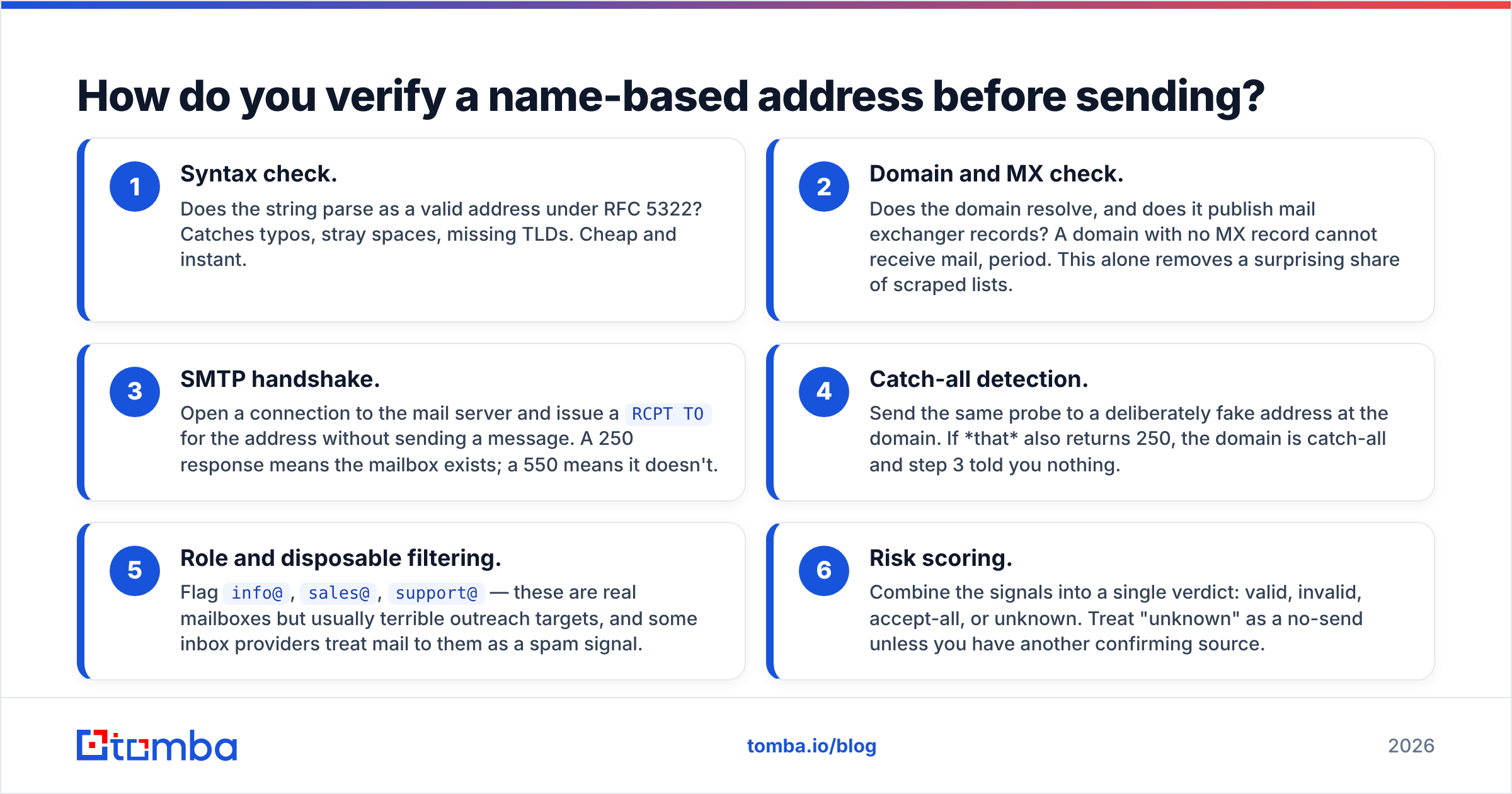
Verification is a multi-stage check, and each stage kills a different class of bad address.
- Syntax check. Does the string parse as a valid address under RFC 5322? Catches typos, stray spaces, missing TLDs. Cheap and instant.
- Domain and MX check. Does the domain resolve, and does it publish mail exchanger records? A domain with no MX record cannot receive mail, period. This alone removes a surprising share of scraped lists.
- SMTP handshake. Open a connection to the mail server and issue a
RCPT TOfor the address without sending a message. A 250 response means the mailbox exists; a 550 means it doesn't. - Catch-all detection. Send the same probe to a deliberately fake address at the domain. If that also returns 250, the domain is catch-all and step 3 told you nothing.
- Role and disposable filtering. Flag
info@,sales@,support@— these are real mailboxes but usually terrible outreach targets, and some inbox providers treat mail to them as a spam signal. - Risk scoring. Combine the signals into a single verdict: valid, invalid, accept-all, or unknown. Treat "unknown" as a no-send unless you have another confirming source.
Steps 1-3 are table stakes for any email verifier. Step 4 is where tools genuinely diverge. Catch-all domains are common in enterprise (they're a side effect of certain Exchange and security-gateway configurations), and a verifier that just marks them "accept-all" and shrugs leaves you guessing on your highest-value accounts. A dedicated catch-all verifier applies additional signals — historical engagement data, pattern consistency across the domain, provider-specific behavior — to give an actual verdict instead of a shrug.
Which tools handle firstname lastname email patterns best?#
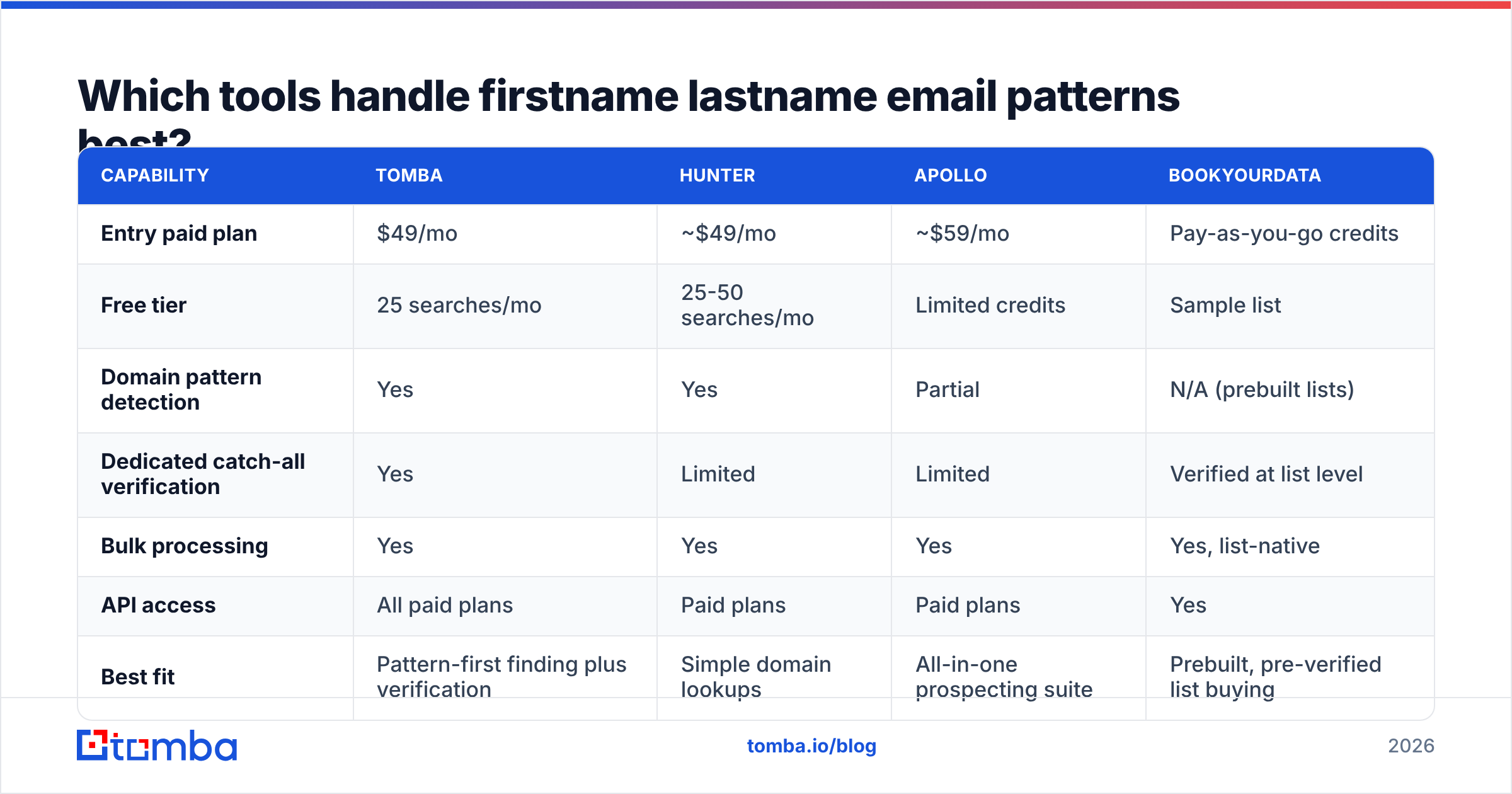
Any tool in this category is doing some mix of pattern detection, index lookup, and verification. The differences show up in coverage, catch-all handling, and price per verified contact.

Accuracy claims in this space deserve skepticism. Vendors quote hit rates measured on their own test sets, which skew toward large, well-indexed US tech companies. Your real-world hit rate on, say, German mid-market manufacturers will be materially lower across every vendor. The number that matters is your verified deliverable rate on your actual ICP — run a 200-contact pilot before committing to an annual plan.

| Capability | Tomba | Hunter | Apollo | BookYourData |
|---|---|---|---|---|
| Entry paid plan | $49/mo | ~$49/mo | ~$59/mo | Pay-as-you-go credits |
| Free tier | 25 searches/mo | 25-50 searches/mo | Limited credits | Sample list |
| Domain pattern detection | Yes | Yes | Partial | N/A (prebuilt lists) |
| Dedicated catch-all verification | Yes | Limited | Limited | Verified at list level |
| Bulk processing | Yes | Yes | Yes | Yes, list-native |
| API access | All paid plans | Paid plans | Paid plans | Yes |
| Best fit | Pattern-first finding plus verification | Simple domain lookups | All-in-one prospecting suite | Prebuilt, pre-verified list buying |
Each of these is a legitimate pick depending on how you work. BookYourData is genuinely strong if you'd rather buy a pre-verified list than build one — it removes the pattern problem entirely by selling you addresses that are already validated. Hunter is clean and simple for occasional domain lookups. Apollo bundles finding into a full sequencer, which is convenient if you want one vendor for everything and acceptable if you don't mind the data quality tradeoff; if you don't, an Apollo alternative focused purely on data will usually beat it on accuracy per dollar.
Tomba's differentiator is that pattern detection and catch-all verification sit in the same pipeline rather than being bolted together. You give it a name and a domain, it identifies the format from observed data, generates the address, and verifies it — including on catch-all domains — before it hands you a result. Tomba pricing runs Free (25 searches/mo), Starter $49/mo, Growth $99/mo, Pro $249/mo, and custom Enterprise.
How do you run this at scale without wrecking deliverability?#
Volume changes the math. At ten contacts, a bad guess costs you one ignored email. At two thousand, it costs you the domain.
Batch by domain, not by person. Resolve the pattern once per company, then derive every contact at that company from it. A 500-contact list across 120 companies is 120 pattern lookups, not 500 guesses. Group your list before you touch any tool.
Verify every single address, including the ones you're confident about. Pattern detection tells you the shape; it doesn't confirm that this specific person is still employed there. B2B contact data decays at roughly 25-30% per year — job changes, restructures, domain migrations. A bulk verify pass on your full list catches the departures before your sequencer does.
Segment by verification verdict, not by score. Valid addresses go into the main sequence. Accept-all and unknown go into a separate, smaller sequence sent from a secondary domain so any bounces don't touch your primary. Invalid gets dropped, not "tried anyway."
Cap your bounce rate below 2%. Set this as a hard gate in your sending tool. If a segment exceeds it, stop the sequence and re-verify rather than pushing through. Protecting email deliverability is a one-way door — it's far easier to keep a clean reputation than to rebuild a damaged one. Google's own bulk sender guidelines are explicit that repeated delivery to nonexistent addresses is a spam signal.
Re-verify anything older than 90 days. A list you verified in Q1 is meaningfully stale by Q3. Build the re-verification pass into your quarterly cadence rather than treating it as a one-time cleanup.
When is guessing actually acceptable?#
Rarely, but not never. Three cases:
- A single high-value target you've researched personally. One email to one prospect at a company you know well. The downside of one bounce is negligible; the upside of reaching a decision-maker is not.
- Warm replies from a known domain. Someone from
acme.comalready emailed you, so you have the pattern confirmed. Deriving a colleague's address from it is low-risk. - Testing from a throwaway domain. If you're validating a pattern hypothesis, do it from a sending domain you don't care about, never your primary.
Outside those, verify. The cost of a verification credit is a fraction of a cent. The cost of a damaged sending domain is measured in weeks of lost pipeline.
Find the pattern, verify the address, then send#
Name-based email formats are solvable — they're mechanical rules, not mysteries. The mistake is treating "solvable" as "guessable." Detect the format from real observed data, generate the candidate, verify it against the mail server, and handle catch-all domains explicitly instead of hoping they resolve themselves.
If you want the whole sequence in one step, Tomba Email Finder does pattern detection, address generation, and verification in a single call — with catch-all handling included rather than sold separately. Start on the free tier with 25 searches a month, run a pilot against 200 contacts from your actual ICP, and measure the verified deliverable rate yourself before you commit to anything.
Related guides#
Ready to find emails that actually work?
Join 150,000+ professionals who stopped guessing and started sending. Free credits on signup — no credit card required.
Get the Tomba newsletter
Practical outbound tactics and product updates — once every two weeks.
About the author