7 Best Folderly Alternatives in 2026: Honest Comparison
Folderly is a strong deliverability suite, but it is priced per mailbox and bundles services many teams never use. Here are seven Folderly alternatives compared on warmup quality, spam testing, reporting, and real monthly cost.

TL;DR
- Folderly is a full-service deliverability platform: automated warmup, spam-placement testing, DNS auditing, and a managed-services layer. It works, but it is priced per mailbox and lands well above most point tools.
- If you need warmup only, tools like Mailreach, Warmup Inbox, or a warmup feature bundled into your sending platform cover 80% of the job for a fraction of the cost.
- If you need seed testing and inbox-placement data, GlockApps and Inbox Insight-style tools are the closer functional match — not warmup apps.
- No warmup tool fixes a bad list. A 25–30% bounce rate is a data problem, and it must be solved before any deliverability spend pays off.
- Budget realistically: warmup + spam testing + list verification usually costs less combined than a single Folderly mailbox seat.
What is Folderly, and what does it actually do?#
Folderly is an email deliverability platform built by Belkins, a B2B lead-generation agency. That origin matters, because it shapes the product. Folderly is not a lightweight warmup app bolted onto a sequencer — it is closer to a deliverability consultancy wrapped in software.
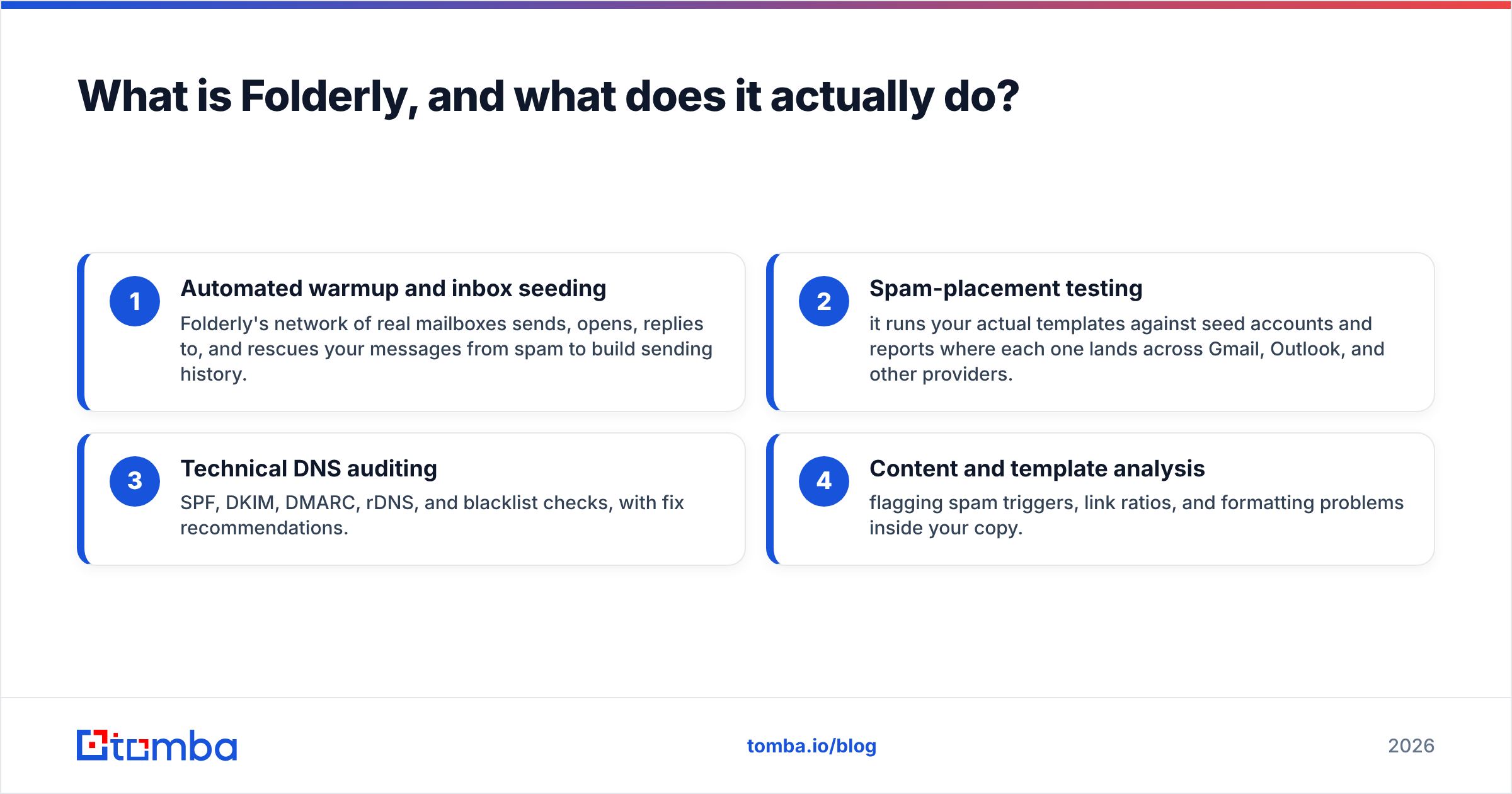
The platform bundles four things:
- Automated warmup and inbox seeding — Folderly's network of real mailboxes sends, opens, replies to, and rescues your messages from spam to build sending history.
- Spam-placement testing — it runs your actual templates against seed accounts and reports where each one lands across Gmail, Outlook, and other providers.
- Technical DNS auditing — SPF, DKIM, DMARC, rDNS, and blacklist checks, with fix recommendations.
- Content and template analysis — flagging spam triggers, link ratios, and formatting problems inside your copy.
Layered on top of that is a human element: onboarding calls, deliverability specialists, and remediation guidance. That is genuinely valuable if you are a sales org with 40 mailboxes and no one internally who understands email deliverability. It is also why the price sits where it does.
Public pricing has historically started around $120 per mailbox per month, with custom enterprise contracts above that. Verify the current numbers directly — deliverability vendors change packaging often — but the per-mailbox model is the structural thing to understand. Ten mailboxes is not ten times a $29 warmup tool. It is a five-figure annual commitment.
Why do teams look for Folderly alternatives?#
Four reasons come up repeatedly in G2 reviews and in practice:
Cost scaling. Per-mailbox pricing punishes exactly the teams that need deliverability help most — outbound orgs running 15, 30, or 50 sending accounts across multiple domains. The bill grows linearly with your infrastructure.
Bundled features you already have. If you send through Instantly, Smartlead, or Lemlist, you already pay for warmup. Buying Folderly on top means paying twice for the same function, and running two warmup systems against one mailbox can produce conflicting signals.
Overlap with free tooling. DNS auditing is not proprietary. Google Postmaster Tools, MXToolbox, and a handful of free checkers cover SPF, DKIM, DMARC, and blacklist status at zero cost. A free SPF checker will tell you if your record is malformed in about four seconds.
The wrong diagnosis. This is the big one. Many teams buy a deliverability platform when their actual problem is list quality. If 28% of your addresses bounce, no warmup network on earth will save your sender reputation. You are treating a symptom.
How should you evaluate Folderly alternatives?#
Before you compare logos, decide which of these four jobs you are actually buying. Most teams need one or two, not all four.
- Warmup and reputation building — automated send/open/reply activity that establishes history on a new domain or rehabilitates a burned one. Commodity feature in 2026; heavily bundled.
- Inbox placement testing — seed lists across Gmail, Outlook, Yahoo, and corporate filters that tell you where a specific campaign landed. Genuinely distinct from warmup, and fewer vendors do it well.
- Technical configuration and monitoring — SPF/DKIM/DMARC correctness, blacklist monitoring, custom tracking domains, alerting on drift. Largely solvable with free tools plus discipline.
- List hygiene and data quality — verifying addresses before they ever get sent to, catching catch-all domains, and removing spam traps. This is upstream of everything else and the highest-ROI line item for most teams.
The mistake is buying category 1 or 2 when your failure is in category 4. Run your list through an email verifier first and see what your real bounce exposure is. If it is above 5%, fix that before you spend a dollar on warmup.
Which Folderly alternatives are worth testing in 2026?#
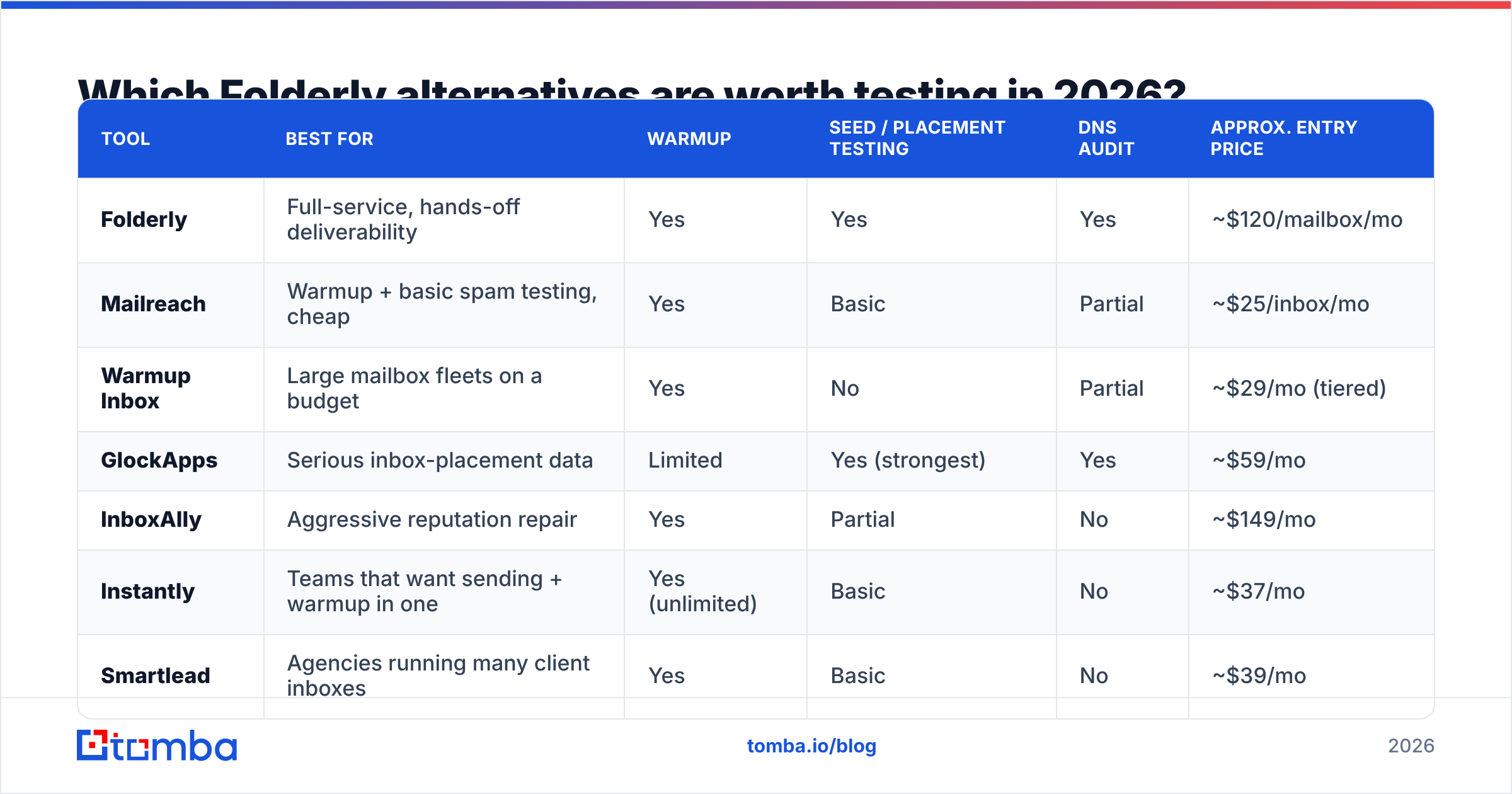
Here is the honest breakdown. Pricing is approximate list pricing at the time of writing — confirm on each vendor's site, since deliverability tools reprice frequently.
| Tool | Best for | Warmup | Seed / placement testing | DNS audit | Approx. entry price |
|---|---|---|---|---|---|
| Folderly | Full-service, hands-off deliverability | Yes | Yes | Yes | ~$120/mailbox/mo |
| Mailreach | Warmup + basic spam testing, cheap | Yes | Basic | Partial | ~$25/inbox/mo |
| Warmup Inbox | Large mailbox fleets on a budget | Yes | No | Partial | ~$29/mo (tiered) |
| GlockApps | Serious inbox-placement data | Limited | Yes (strongest) | Yes | ~$59/mo |
| InboxAlly | Aggressive reputation repair | Yes | Partial | No | ~$149/mo |
| Instantly | Teams that want sending + warmup in one | Yes (unlimited) | Basic | No | ~$37/mo |
| Smartlead | Agencies running many client inboxes | Yes | Basic | No | ~$39/mo |
| Warmy.io | Multi-channel warmup incl. Outlook/SMTP | Yes | Yes | Partial | ~$49/mo |
Mailreach#
The most direct like-for-like swap if warmup is your primary need. Mailreach runs a real-mailbox warmup network and adds a spam-test module that scores your template against a seed list. Per-inbox pricing means it scales the same way Folderly does — but at roughly a fifth of the cost per seat. What you give up is the managed-services layer and the depth of DNS remediation.
Warmup Inbox#
Positioned squarely at volume. If you run 20+ mailboxes across multiple domains, the tiered plans work out cheaper per inbox than anything charging per seat. The reporting is thinner than Folderly's, and it will not tell you why a specific template is triggering filters — it just builds history.
GlockApps#

The one people misclassify. GlockApps is not a warmup tool with testing attached; it is a testing tool first. Its seed-list network and inbox-placement reports are the closest thing on this list to Folderly's spam-testing module, and arguably more granular. If your question is "where did this campaign actually land at Gmail versus Office 365," GlockApps answers it better than any warmup app will. Pair it with a cheap warmup tool and you have reconstructed most of Folderly for well under $100/month.
InboxAlly#
Built for rehabilitation rather than routine maintenance. InboxAlly's engagement network is deliberately aggressive — heavy opens, replies, and spam-folder rescues — which makes it a reasonable choice when a domain is already burned and you are trying to claw back reputation. It is expensive relative to plain warmup, and overkill if your domains are healthy.
Instantly and Smartlead#
Both are sending platforms with warmup included, not standalone deliverability suites. If you are already paying for one of them, buying Folderly for warmup is redundant. Instantly's unlimited-warmup positioning and Smartlead's per-client inbox model are the practical picks for agencies. Neither gives you real placement testing or DNS auditing — you would still need GlockApps or free tools for that. If you are weighing the sending side of this decision, our breakdown of Instantly alternatives covers the sequencer layer specifically.
Warmy.io#
Sits between the warmup-only tools and the full suites. Warmy handles Google Workspace, Outlook, and custom SMTP, adds template checking, and surfaces a deliverability score. It is a decent middle option when you want more than raw warmup but cannot justify a per-mailbox suite.
Is a warmup tool enough to fix deliverability?#
No — and this is where most deliverability budgets get wasted.
Think of it like a restaurant health inspection. Warmup is polishing the dining room. It matters. But if the walk-in cooler is full of spoiled inventory, the inspector is still going to shut you down. Your list is the walk-in cooler.
Mailbox providers weight hard bounces and spam complaints far more heavily than send volume history. Google's bulk sender guidelines are explicit about keeping spam complaint rates under 0.3% and maintaining valid recipient addresses. Blow through those thresholds and no amount of warmup engagement offsets the damage — you are pouring clean water into a leaking bucket.

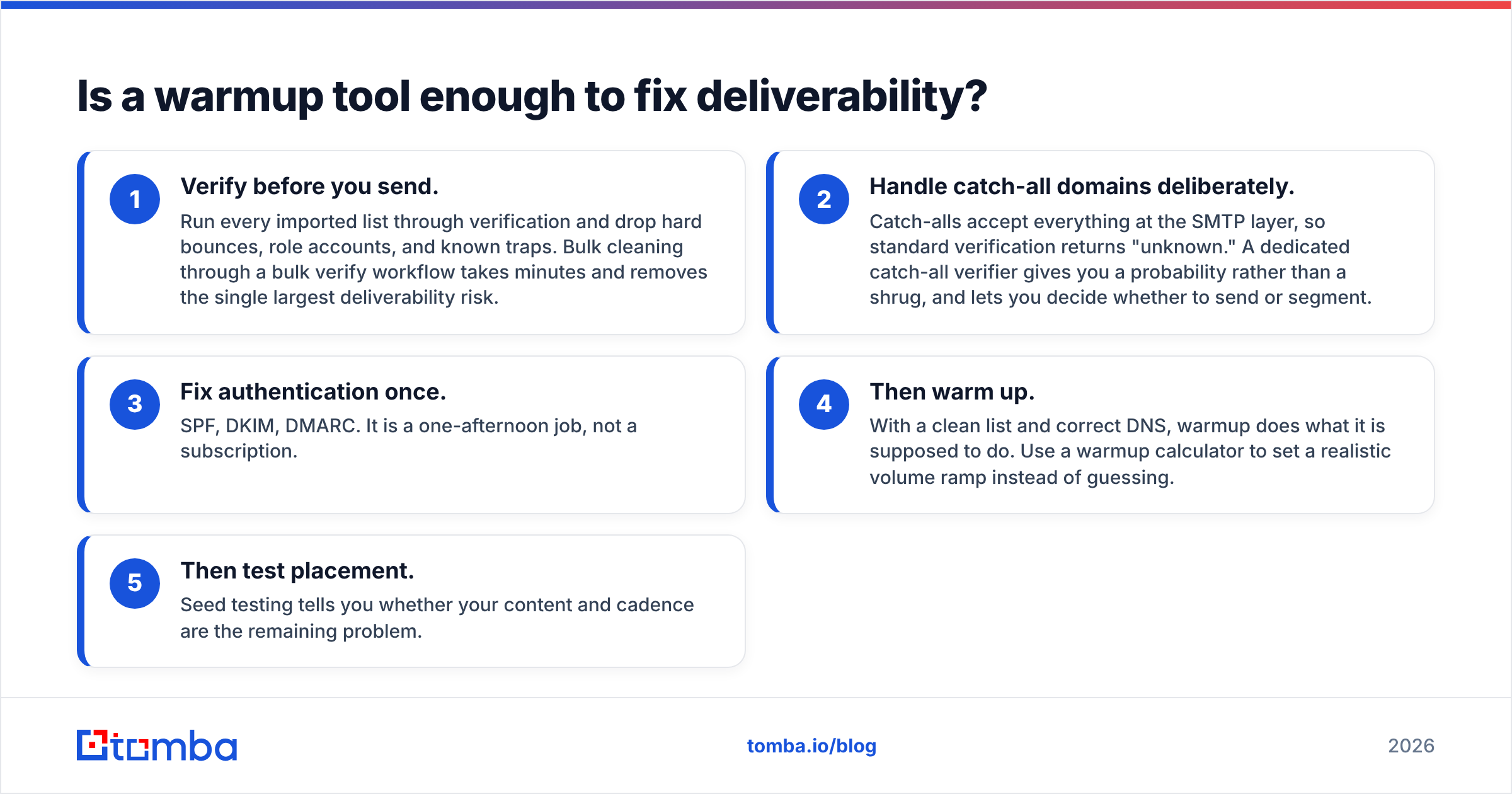
The practical sequence, in order of ROI:
- Verify before you send. Run every imported list through verification and drop hard bounces, role accounts, and known traps. Bulk cleaning through a bulk verify workflow takes minutes and removes the single largest deliverability risk.
- Handle catch-all domains deliberately. Catch-alls accept everything at the SMTP layer, so standard verification returns "unknown." A dedicated catch-all verifier gives you a probability rather than a shrug, and lets you decide whether to send or segment.
- Fix authentication once. SPF, DKIM, DMARC. It is a one-afternoon job, not a subscription.
- Then warm up. With a clean list and correct DNS, warmup does what it is supposed to do. Use a warmup calculator to set a realistic volume ramp instead of guessing.
- Then test placement. Seed testing tells you whether your content and cadence are the remaining problem.
Teams that run steps 1–3 first frequently discover they never needed step 5 at all.
How do the real monthly costs compare?#
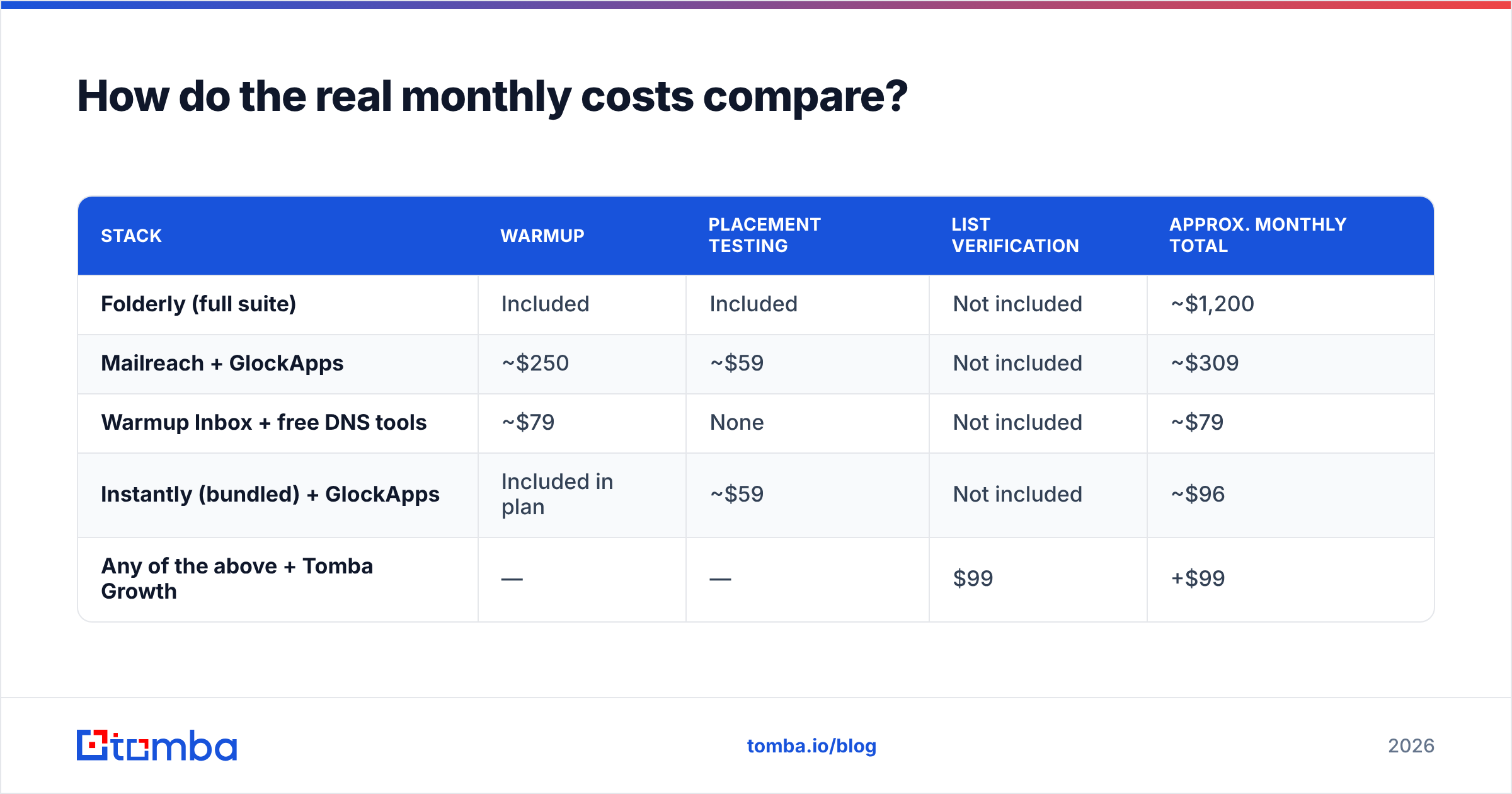
Here is what a 10-mailbox outbound setup actually costs under different stacks. Numbers are illustrative list pricing.
| Stack | Warmup | Placement testing | List verification | Approx. monthly total |
|---|---|---|---|---|
| Folderly (full suite) | Included | Included | Not included | ~$1,200 |
| Mailreach + GlockApps | ~$250 | ~$59 | Not included | ~$309 |
| Warmup Inbox + free DNS tools | ~$79 | None | Not included | ~$79 |
| Instantly (bundled) + GlockApps | Included in plan | ~$59 | Not included | ~$96 |
| Any of the above + Tomba Growth | — | — | $99 | +$99 |
Two observations. First, the assembled stacks come in an order of magnitude below the full suite — you are paying Folderly for integration and human support, not for capabilities that are otherwise unavailable. Second, none of these deliverability tools include list verification. That line is separate no matter which vendor you choose, which is exactly why it gets forgotten. Tomba's plans start free at 25 searches per month, with Starter at $49/mo, Growth at $99/mo, and Pro at $249/mo — a rounding error against a per-mailbox deliverability contract.
Which Folderly alternative should you pick?#
- You have 5+ mailboxes, no in-house deliverability expertise, and budget — Folderly still makes sense. The managed layer is real value if nobody on your team wants to own this.
- You need warmup and nothing else — Mailreach for small fleets, Warmup Inbox for large ones.
- You need to know where campaigns actually land — GlockApps. Do not buy a warmup tool for this job.
- You already use Instantly, Smartlead, or Lemlist — use the bundled warmup, add GlockApps for testing, and skip the suite entirely.
- Your domain is already burned — InboxAlly for the repair phase, then downgrade to maintenance warmup.
- Your bounce rate is above 5% — none of the above yet. Clean the list first.
One caveat worth stating plainly: the tool matters less than the sequence. Teams that buy a deliverability platform before auditing their data almost always renew at the same inbox rate they started with, then blame the vendor. Teams that clean data first often find that a $29 warmup tool was sufficient all along.
Frequently asked questions#
Is Folderly worth the price? For organizations with many mailboxes and no internal deliverability owner, yes — the managed services justify the premium. For a three-person team with clean data, it is significant overkill.
Can I replicate Folderly with cheaper tools? Most of it. Warmup + GlockApps + free DNS checkers covers the software functionality. What you cannot replicate is the human remediation support.
Does warmup still work in 2026? Warmup networks still help establish sending history on new domains, but providers have gotten better at discounting artificial engagement. Treat it as a foundation, not a fix — and never as a substitute for list hygiene.
How often should I verify my list? Before every import, and re-verify anything older than 90 days. B2B contact data decays roughly 2–3% per month as people change jobs.
Clean data first, then pick your deliverability tool#
Whichever alternative you land on, the highest-leverage change is upstream of all of them. Verified addresses cut bounce rates, protect sender reputation, and make every dollar of warmup spend go further.
Start with accurate contacts. Tomba's Email Finder returns verified professional addresses with confidence scoring, so the list you warm up to is one worth sending to in the first place. The free tier gives you 25 searches a month to test the accuracy against your own domains before you commit to anything — deliverability tool included.
Related guides#
Ready to find emails that actually work?
Join 150,000+ professionals who stopped guessing and started sending. Free credits on signup — no credit card required.
Get the Tomba newsletter
Practical outbound tactics and product updates — once every two weeks.
About the author