Follow Up Email After Exhibition: 2026 Templates & Timing
Badge scans go stale in days, not weeks. Here's the timing, segmentation, and template set that turns exhibition booth conversations into booked meetings — plus the data cleanup step most teams skip.
TL;DR
- Send the first follow up email after exhibition within 24-48 hours. Reply rates drop hard after day three, when your prospect is back at their desk with 400 unread emails and a fading memory of your booth.
- Segment before you write. A demo-request lead and a badge you scanned during the coffee rush do not get the same email.
- Reference something only the two of you would know — the machine you demoed, the objection they raised, the conference session you both walked out of.
- Clean the list first. Badge scan exports are full of typos, personal Gmail addresses, and role changes. Verify and enrich before you send, or you burn your domain reputation on a list you paid $15,000 to collect.
- Plan four touches over three weeks across email, phone, and LinkedIn. One email is not a follow-up, it is a receipt.
Why do most exhibition follow-ups fail?#
Because they arrive late, they arrive generic, and they arrive at bad addresses.
Think of a trade show like speed dating with a badge scanner. You had 90 seconds of genuine attention from someone who walked past 200 other booths that day. That attention has a half-life. By Friday afternoon they remember "some email tool company, blue booth, nice guy." By Monday they remember nothing. Your follow-up is not competing with other vendors — it is competing with forgetting.
The three failure modes, in order of how much money they cost:
- Latency. The lead list goes to marketing ops, sits in a queue, gets deduped, and lands in the sequencing tool ten days later. Everything after that is damage control.
- Sameness. Every exhibitor sends "It was great meeting you at [EVENT]!" on the same Tuesday. Your prospect's inbox becomes a wall of identical greetings, and pattern-matching kills all of them at once.
- Bad data. Badge scans capture whatever the registrant typed months earlier, often on a phone. You get
jsmith@acmecorp.coinstead of.com, personal addresses that never route to a work inbox, and contacts who changed jobs between registration and the show floor.
Fix the third problem first, because it silently ruins the other two. A perfectly timed, deeply personal email that bounces still counts as a bounce against your sender reputation.
How fast should you follow up after an exhibition?#
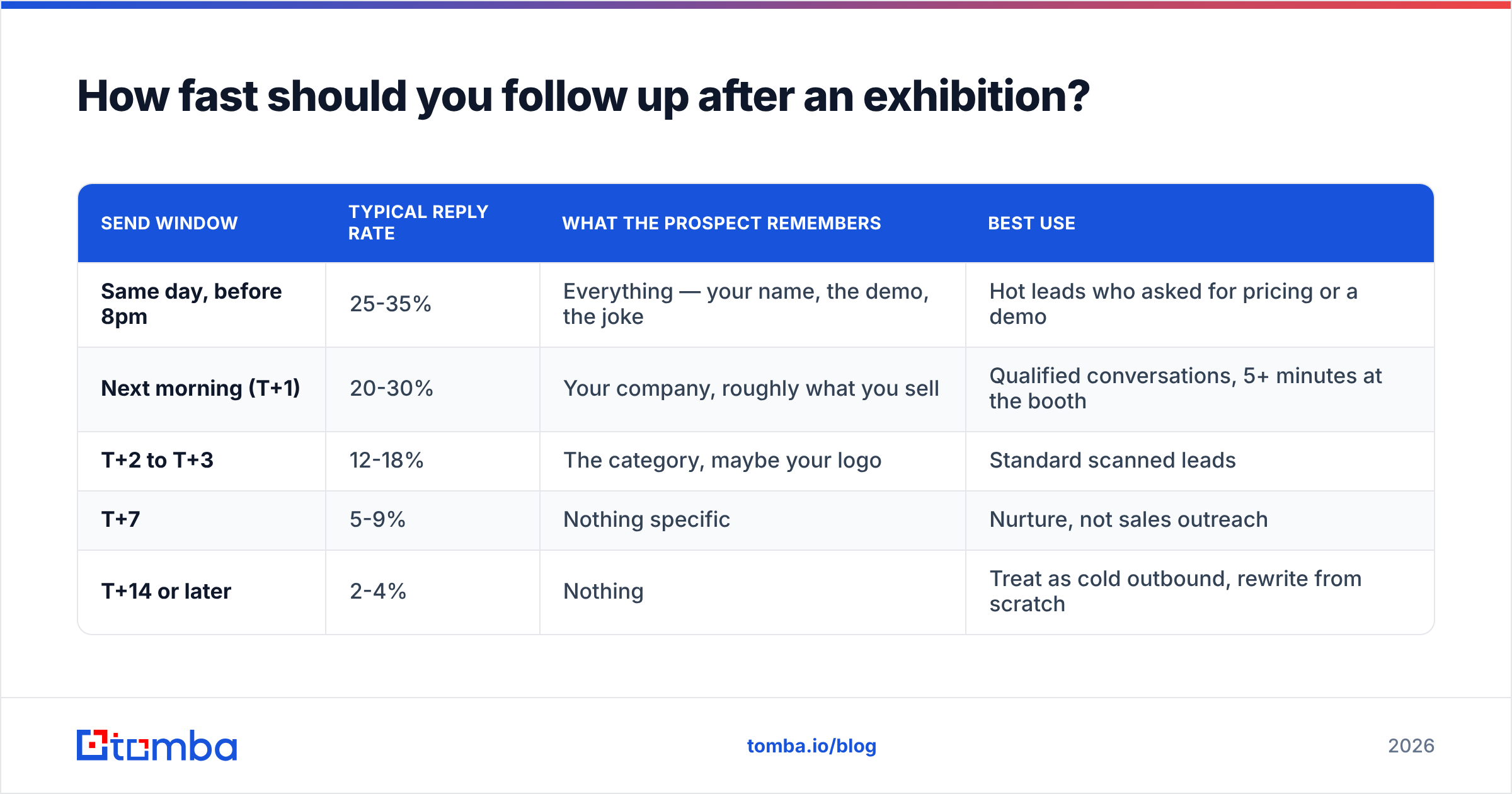
Faster than feels polite. Here is the decay curve most B2B teams see on event lists:
| Send window | Typical reply rate | What the prospect remembers | Best use |
|---|---|---|---|
| Same day, before 8pm | 25-35% | Everything — your name, the demo, the joke | Hot leads who asked for pricing or a demo |
| Next morning (T+1) | 20-30% | Your company, roughly what you sell | Qualified conversations, 5+ minutes at the booth |
| T+2 to T+3 | 12-18% | The category, maybe your logo | Standard scanned leads |
| T+7 | 5-9% | Nothing specific | Nurture, not sales outreach |
| T+14 or later | 2-4% | Nothing | Treat as cold outbound, rewrite from scratch |
The practical rule: hot leads get an email before you leave the venue, everything else goes out within 48 hours. If your ops process cannot move that fast, the fix is not a better process — it is doing the enrichment on-site with a laptop and a bulk email finder while the show is still running.
One nuance for international shows. If you exhibited at a European fair and your leads are spread across time zones, schedule sends for 7-9am local time rather than blasting at once. A follow-up that lands at 3am local reads as automated even when it isn't.
How do you segment booth leads before writing anything?#
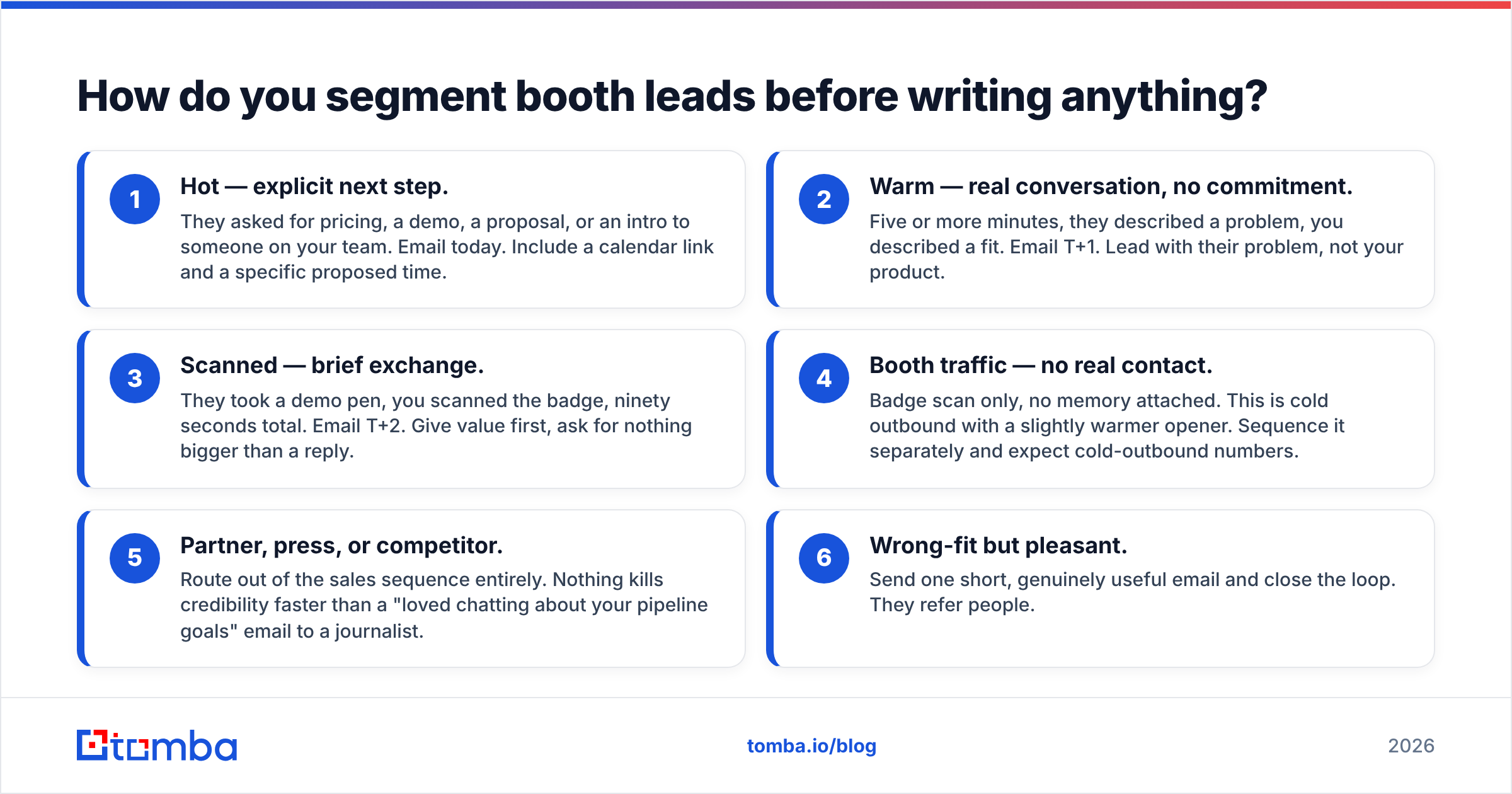
Do not write a single template. Write four, mapped to how the conversation actually went. Sort your scan list into these buckets within an hour of the show closing, while the reps still remember faces.
- Hot — explicit next step. They asked for pricing, a demo, a proposal, or an intro to someone on your team. Email today. Include a calendar link and a specific proposed time.
- Warm — real conversation, no commitment. Five or more minutes, they described a problem, you described a fit. Email T+1. Lead with their problem, not your product.
- Scanned — brief exchange. They took a demo pen, you scanned the badge, ninety seconds total. Email T+2. Give value first, ask for nothing bigger than a reply.
- Booth traffic — no real contact. Badge scan only, no memory attached. This is cold outbound with a slightly warmer opener. Sequence it separately and expect cold-outbound numbers.
- Partner, press, or competitor. Route out of the sales sequence entirely. Nothing kills credibility faster than a "loved chatting about your pipeline goals" email to a journalist.
- Wrong-fit but pleasant. Send one short, genuinely useful email and close the loop. They refer people.
Reps should tag each scan on the spot with a one-word code and a five-word note. "HOT — replacing Outreach in Q1" is worth more than any firmographic append you can buy.
What does a good follow up email after exhibition look like?#
Short, specific, one ask. Here are four templates matched to the buckets above. Steal the structure, replace every bracket, and delete any sentence that could have been written by a competitor.
Template 1 — Hot lead, same day
Subject: The pricing breakdown I promised, [First name]
[First name] — great talking at booth [number] this afternoon. You mentioned your team is running [tool] for sequencing but the data layer is the bottleneck.
Here's the pricing sheet, plus the two-page breakdown of how [customer] cut their bounce rate from 14% to under 2%.
Are you free Thursday at 10am or Friday at 2pm for 20 minutes to map this to your setup?
[Signature]
Template 2 — Warm conversation, T+1
Subject: your point about [specific objection]
[First name], you said something at [event] that stuck with me: that you've been burned by data vendors who bill for credits on contacts that bounce.
That's a fair objection and I didn't have a good answer on the floor. Here's the honest one: [one-paragraph, specific answer including the limitation].
Worth 15 minutes to see if it holds up against your list? If not, no hard feelings — I'll send the benchmark data either way.
Template 3 — Quick scan, T+2
Subject: from [event] — the [topic] checklist
Hi [First name] — we met briefly at [event]; you grabbed the [thing] at the [company] booth.
Rather than pitch you, here's the thing most people came to ask about: [link to genuinely useful resource — a checklist, a benchmark, a calculator].
If [problem] is on your roadmap this quarter, reply "send it" and I'll share how [similar company] handled it.
Template 4 — Breakup, T+21
Subject: closing the loop from [event]
[First name] — I've sent a few notes since [event] and haven't heard back, which usually means the timing is wrong or it's not a priority. Both are fine.
I'll stop here. If [problem] moves up the list in Q[X], reply to this and I'll pick it back up.
Last thing: [one useful link, no strings].
Three rules across all four. One ask per email. No attachment on the first send — attachments and heavy HTML hurt deliverability on a cold-ish list. Subject lines in lowercase-ish, human phrasing beat title-case marketing phrasing on event lists; if you want to pressure-test yours, run them through a subject line tester before the batch goes out.
Should you email, call, or message on LinkedIn first?#
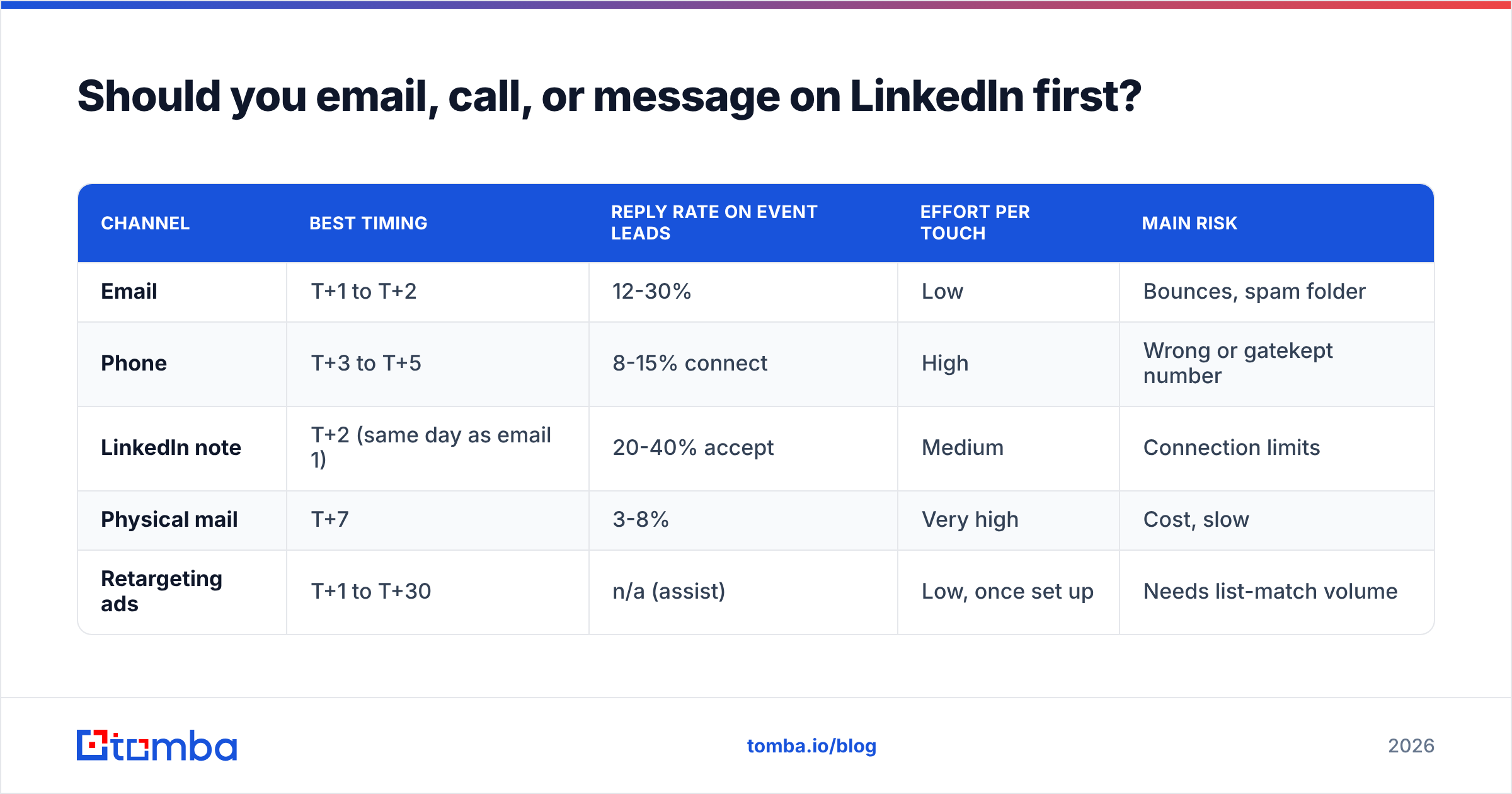
Email first, then layer. But the layering is where most teams under-invest. HubSpot's sales research consistently shows multi-channel sequences outperforming single-channel by a wide margin, and event leads are the best possible case for it because you have a shared reference point on every channel.
| Channel | Best timing | Reply rate on event leads | Effort per touch | Main risk |
|---|---|---|---|---|
| T+1 to T+2 | 12-30% | Low | Bounces, spam folder | |
| Phone | T+3 to T+5 | 8-15% connect | High | Wrong or gatekept number |
| LinkedIn note | T+2 (same day as email 1) | 20-40% accept | Medium | Connection limits |
| Physical mail | T+7 | 3-8% | Very high | Cost, slow |
| Retargeting ads | T+1 to T+30 | n/a (assist) | Low, once set up | Needs list-match volume |
A realistic multi-channel plan for a 300-lead list: email on T+1, LinkedIn connection with a one-line note on T+2, call the hot and warm buckets on T+4, second email on T+6, call again T+10, breakup email T+21. That's four to six touches, which is roughly where marginal return flattens on event lists.
For the phone leg, badge data rarely gives you a direct dial — it gives you a switchboard. Appending mobile or direct numbers with a phone finder turns a 3% connect rate into something worth a rep's afternoon.
How do you clean an exhibition lead list before sending?#
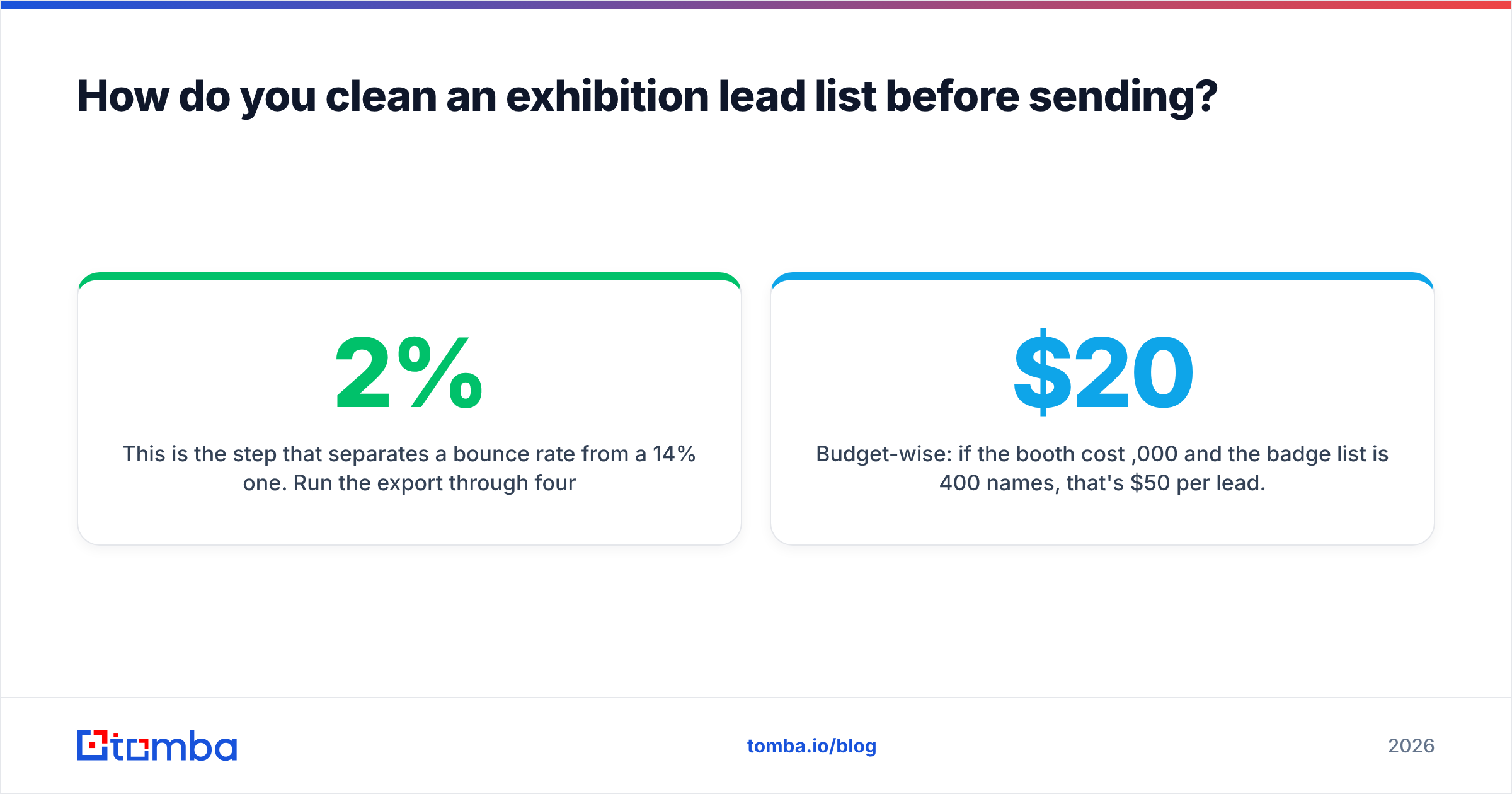
This is the step that separates a 2% bounce rate from a 14% one. Run the export through four passes before a single email leaves your domain.
- Deduplicate. The same person scanned at two booths, or registered twice under different emails. Merge on domain plus last name, then eyeball the collisions.
- Normalize and correct. Fix obvious typos in domains (
gmial.com,acmecorp.co), strip whitespace, lowercase everything. - Find the work address. For every personal-domain address, resolve the real corporate address from name plus company. This is what an email finder does, and on a 300-row list it takes minutes rather than the afternoon a manual pass would cost.
- Verify. Every remaining address goes through an email verifier that checks syntax, domain, MX records, and mailbox existence. Suppress anything that comes back invalid.
- Handle catch-alls separately. Catch-all domains accept everything at the SMTP layer, so standard verification returns "unknown." A dedicated catch-all verifier scores these instead of forcing a guess. Send to them, but in a smaller, later batch so a bad segment can't drag the whole send down.
- Enrich for personalization. Title, seniority, company size, and tech stack turn "great meeting you" into "since you're running [stack]". Contact-level data enrichment is the cheapest personalization you can buy.
Budget-wise: if the booth cost $20,000 and the badge list is 400 names, that's $50 per lead. Spending another $0.02 per row to make sure the email arrives is not a line item worth arguing about. Most teams find a paid tier — Tomba's Starter plan runs $49/mo, Growth $99/mo, with a free tier at 25 searches for testing — cheaper than the bounced sends it prevents. Full Tomba pricing is public if you want to model it against your list size.
What should you measure?#
Track these five, per event, and compare across shows rather than against generic benchmarks:
- Bounce rate — under 2% or your data process is broken.
- Reply rate by segment — hot, warm, scanned, traffic. Blending them hides everything useful.
- Meetings booked per 100 scans — the number that actually justifies next year's booth.
- Time-to-first-touch — measure in hours, not days. This is the single biggest lever you control.
- Pipeline sourced at 90 days — event deals close slower than inbound; a 30-day readout will make every show look like a failure.
Compare event lists against your cold outbound baseline. If your exhibition follow-ups aren't beating cold email by 3-5x on reply rate, the problem is the follow-up, not the show. For broader benchmarks on sequencing tools and their reported performance, the category pages on G2 and the sales research published on the HubSpot blog are the least marketing-warped public sources.
What mistakes should you avoid?#
- "It was great meeting you!" as the subject line. So is everyone else's.
- Attaching the full slide deck to email one. Nobody opens a 12MB PDF from a stranger.
- Emailing all 400 leads from a brand-new domain. If you spun up a domain for the event, warm it first — a warmup calculator tells you how long you actually need.
- Waiting for the "official" list from the organizer. It arrives in two weeks and is worse than your own scans.
- Sending only one follow-up. Most replies on event lists come on touch two or three.
- Treating booth traffic as warm. They took a pen. Write the email that a stranger would answer.
- Letting reps write from scratch. Templates plus a mandatory personalization line beats freeform every time, and it means the list actually goes out in 48 hours.
Ready to turn badge scans into real conversations?#
The follow-up copy matters, but it only matters if the email arrives. Run your exhibition list through the Tomba Email Finder to resolve personal addresses and typos into verified work emails, then verify the whole file before your first send. The free tier covers 25 searches if you want to test it on the leads you care about most — and if the list is a few hundred rows deep, the bulk workflow will have it clean before your reps finish unpacking the booth.
Related guides#
Ready to find emails that actually work?
Join 150,000+ professionals who stopped guessing and started sending. Free credits on signup — no credit card required.
Get the Tomba newsletter
Practical outbound tactics and product updates — once every two weeks.
About the author