Follow Up Email After Meeting With Potential Client: 2026 Guide
Most deals die in the 48 hours after a good first meeting. Here are the timing rules, structures, and eight tested templates that turn a friendly conversation into a signed next step.
TL;DR
- Send the follow up email after meeting with potential client within 24 hours — reply rates drop sharply after 48, and by day five you are competing with everything else in their inbox.
- The winning structure is five blocks: specific thank-you, one-line problem restatement, the two or three things you agreed on, the value add, and one unambiguous next step with a proposed time.
- Never end with "let me know your thoughts." That sentence puts the work on them and is the single most common reason good meetings go quiet.
- Plan for four to six touches over three weeks. Most closed deals need more than one follow-up, and each one should carry something new — not just "circling back."
- Get the address right before you write. A perfect email to
firstname@when the company usesf.lastname@bounces silently and reads as ghosting.
Why does the follow up email after meeting with potential client decide the deal?#
Because the meeting is where interest peaks and the follow-up is where it either converts into a commitment or evaporates.
Think of it like leaving a restaurant with someone you want to see again. The dinner went well. If you text the next morning with a specific reference to something you talked about and a concrete suggestion, you get a second date. If you wait a week and send "hey, was nice meeting you," you get nothing — not because they disliked you, but because the moment cooled and someone else filled it.
B2B buying works the same way. Your prospect left the call with a mental to-do list of twelve items, and yours was number nine. The follow-up email is what pulls you back to number one — or, if written badly, confirms that number nine was the right slot.
Three things happen in the 48 hours after a discovery call:
- Memory decays. Specifics blur into a general impression. If your email restates their exact words, you reload the context for free.
- Internal conversations start. Your champion tells a colleague about the call. Your email is the artifact they forward. Write it so it survives being forwarded.
- Competitors send theirs. If three vendors pitched, whoever documents the conversation best usually looks the most competent.
What are the rules for follow-up timing in 2026?#
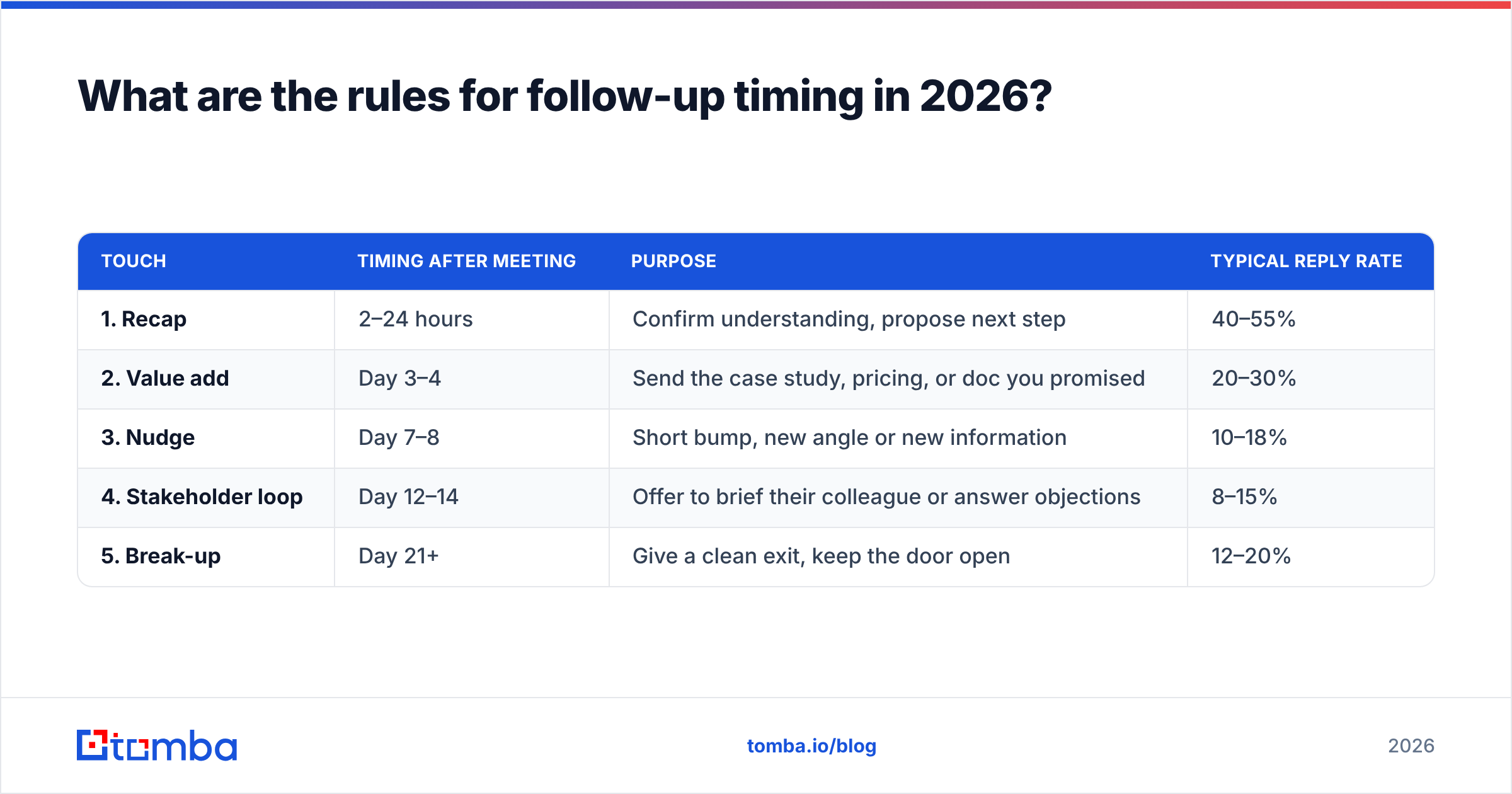
Send fast, then space out. The first email goes out the same day if you can, within 24 hours at the latest. After that, widen the gaps.
| Touch | Timing after meeting | Purpose | Typical reply rate |
|---|---|---|---|
| 1. Recap | 2–24 hours | Confirm understanding, propose next step | 40–55% |
| 2. Value add | Day 3–4 | Send the case study, pricing, or doc you promised | 20–30% |
| 3. Nudge | Day 7–8 | Short bump, new angle or new information | 10–18% |
| 4. Stakeholder loop | Day 12–14 | Offer to brief their colleague or answer objections | 8–15% |
| 5. Break-up | Day 21+ | Give a clean exit, keep the door open | 12–20% |
Two notes on that table. First, the break-up email consistently beats touches three and four — the permission-to-close-the-file framing shakes loose responses that polite nudges never do. Second, if you sent a proposal, compress the schedule. A proposal in a decision window of two weeks needs touches on day two, day five, and day nine, not day fourteen.
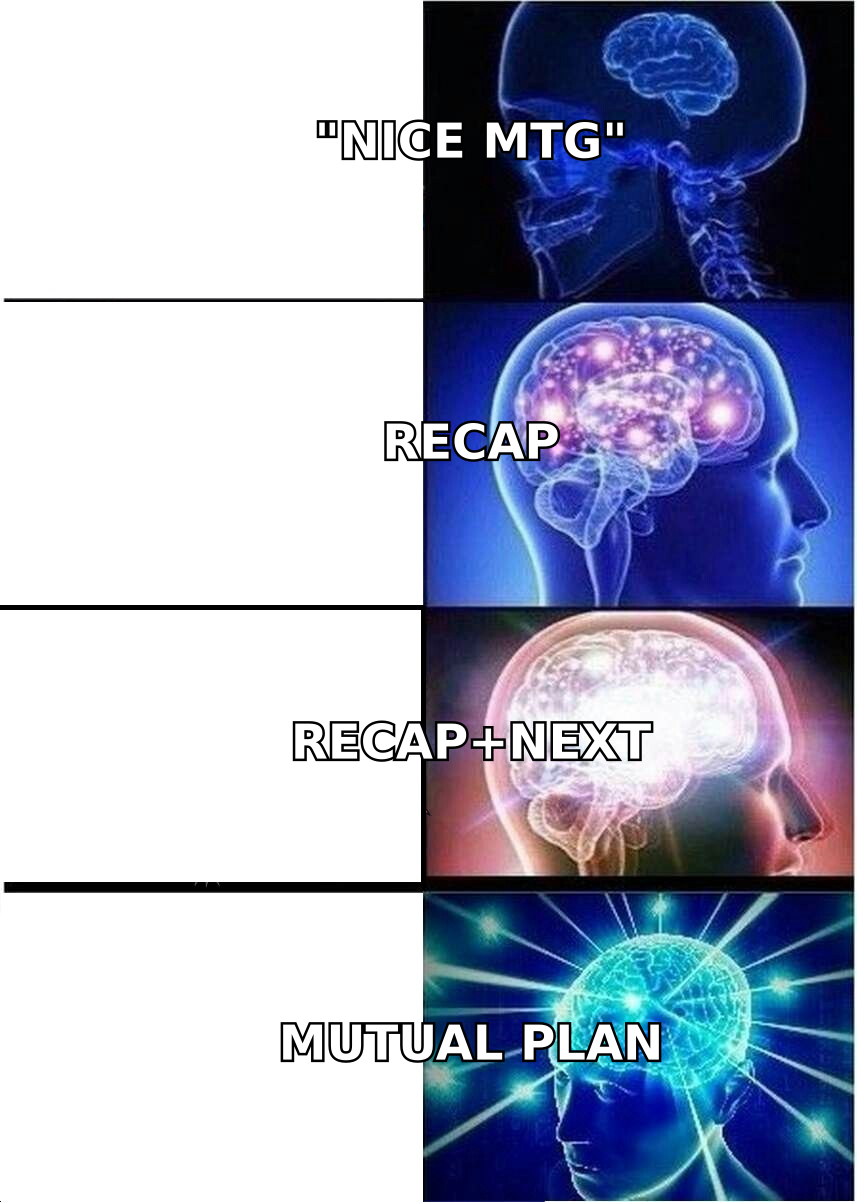
Time of day matters less than people claim, but consistency does. If your prospect replied to the meeting invite at 7:40 a.m., they are a morning inbox processor. Send at 7:15.
What does the perfect structure look like?#
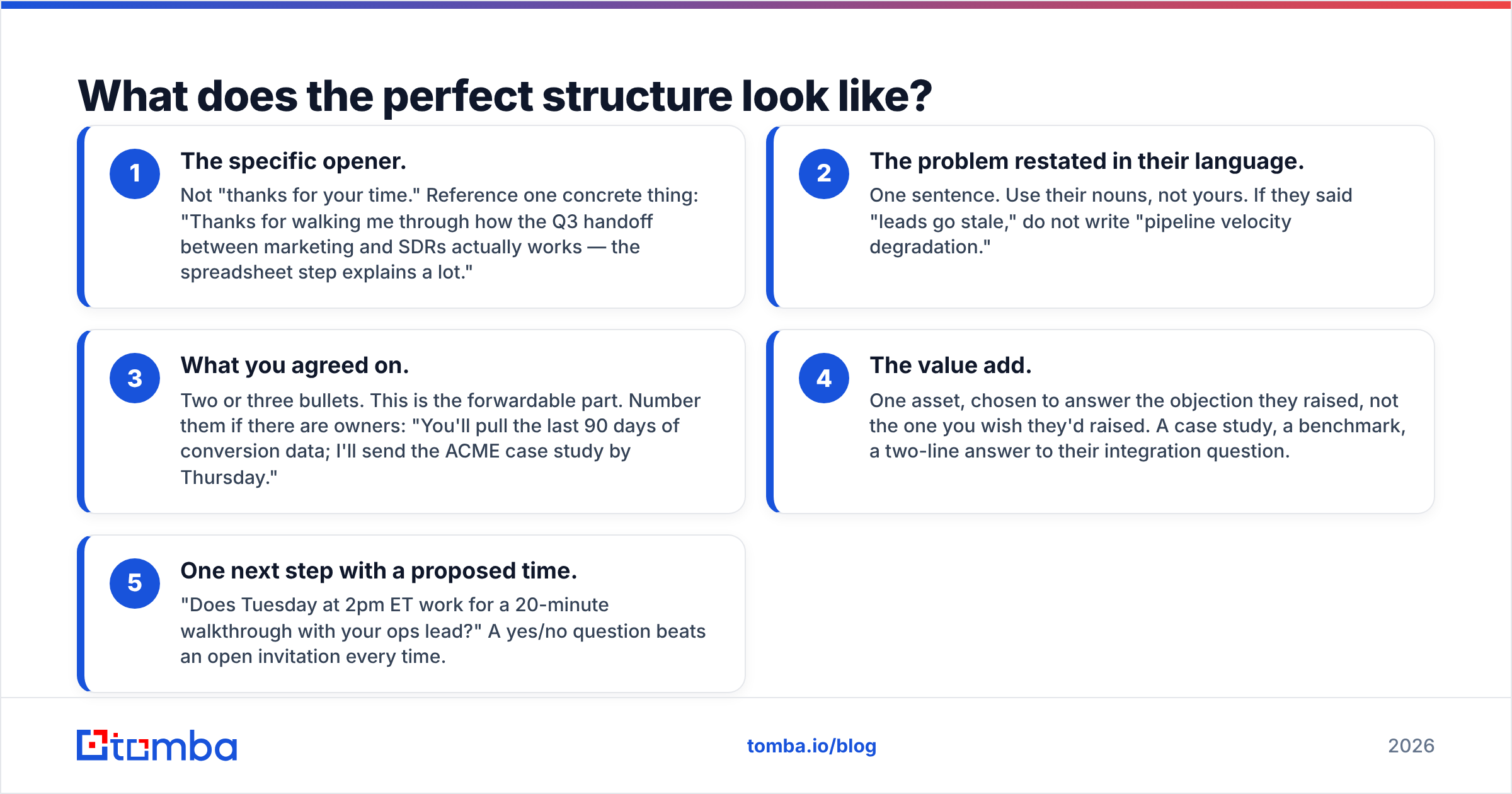
Five blocks, in this order, under 200 words total.
- The specific opener. Not "thanks for your time." Reference one concrete thing: "Thanks for walking me through how the Q3 handoff between marketing and SDRs actually works — the spreadsheet step explains a lot."
- The problem restated in their language. One sentence. Use their nouns, not yours. If they said "leads go stale," do not write "pipeline velocity degradation."
- What you agreed on. Two or three bullets. This is the forwardable part. Number them if there are owners: "You'll pull the last 90 days of conversion data; I'll send the ACME case study by Thursday."
- The value add. One asset, chosen to answer the objection they raised, not the one you wish they'd raised. A case study, a benchmark, a two-line answer to their integration question.
- One next step with a proposed time. "Does Tuesday at 2pm ET work for a 20-minute walkthrough with your ops lead?" A yes/no question beats an open invitation every time.
The block that gets cut most often is number three — and it is the one that matters most. It converts a sales email into a meeting record. Your champion can forward it to their VP without editing anything, and now your framing of the problem is the version circulating internally.
Which follow-up templates actually get replies?#
Eight patterns, each for a specific situation. Swap the brackets, keep the structure.
1. The standard 24-hour recap
Subject: Recap — [their company] + [your company], [day]
[Name], thanks for the detail on [specific thing]. Quick summary so we're aligned:
- The problem: [their words]
- What we discussed: [approach]
- Next: I'll send [asset] by [day]; you'll check with [person] on [thing]
Does [day, time] work for a 20-minute follow-up? Happy to work around [their constraint].
2. The "you asked a question I couldn't answer" follow-up
Open with the answer. "You asked whether we can sync custom fields into Pipedrive — yes, and here's exactly how it maps." This is the highest-reply-rate template on this list because you are delivering, not asking.
3. The multi-stakeholder brief
Written to be forwarded. Third person, no sales language, one page. "Here's a summary your CFO can read in 90 seconds — happy to join a call with her if useful."
4. The pricing follow-up
Send the number. Never write "pricing depends on scope, let's discuss." A range with the variables named ("$X at 5 seats, $Y at 20, driven by volume and API usage") builds more trust than a mystery.
5. The day-8 nudge with new information
Never send "just checking in." Bring something: a competitor announcement, a benchmark, a relevant change in their industry. "Saw [competitor] announced [thing] — it's the same problem we mapped last week. Two minutes on how three companies handled it?"
6. The objection-handler
They raised a concern and went quiet. Name it directly: "I think the honest sticking point is implementation time. Here's what the first 30 days actually look like, including what we need from your team."
7. The break-up
Subject: Closing the loop
[Name] — I've sent a few notes and haven't heard back, which usually means the timing isn't right or this dropped down the list. Both fine. I'll stop here. If [problem] resurfaces in Q4, reply to this thread and I'll pick it straight back up.
8. The re-engage, 90 days later
Reference the original conversation specifically, add what changed since. "Last spring you said the blocker was headcount. You've since hired three SDRs — does the math look different now?"
For more starting points, Tomba's library of cold email templates covers first-touch sequences, and the subject line generator is useful when your recap thread has gone cold and needs a fresh subject.
What should you never do in a post-meeting email?#
The failure modes are predictable.
- "Just circling back." It signals you have nothing new. If you have nothing new, find something before you send.
- "Let me know your thoughts." Zero-friction for you, high-friction for them. Replace with a yes/no question.
- The wall of text. If your recap runs 400 words, your prospect reads the first line and archives it. Cut to the three bullets that matter.
- Attaching the deck with no context. Name the slide that answers their question. "Slide 7 has the security review answers."
- Sending from a domain with no SPF record configured. Your carefully written email lands in spam and you conclude the prospect ghosted you. Check your setup with a free SPF checker before you blame the copy.
- Guessing the email address. Half of "unresponsive prospects" never received anything.
That last one deserves its own section.
How do you make sure the email actually arrives?#
Verify the address before the meeting ends, not after three silent follow-ups.
Here is the common failure: you meet someone at a conference or on a partner call, you get their name and company but not their card, and you construct sarah@northwind.com from a pattern that looks obvious. The company actually uses s.chen@northwind.com. Your email hard-bounces, or worse, silently vanishes into a catch-all server that accepts everything and delivers nothing.
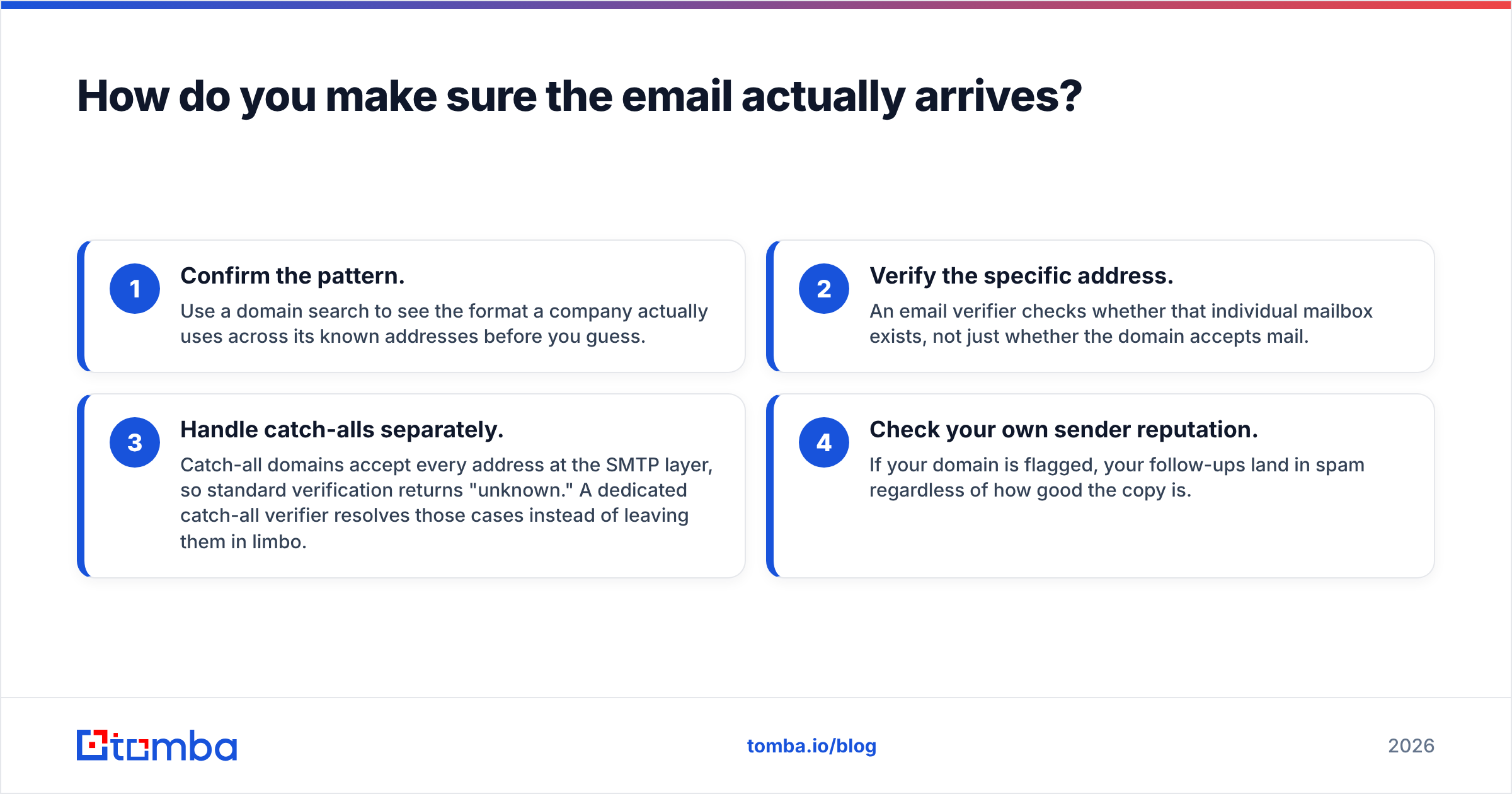
Four checks worth running:
- Confirm the pattern. Use a domain search to see the format a company actually uses across its known addresses before you guess.
- Verify the specific address. An email verifier checks whether that individual mailbox exists, not just whether the domain accepts mail.
- Handle catch-alls separately. Catch-all domains accept every address at the SMTP layer, so standard verification returns "unknown." A dedicated catch-all verifier resolves those cases instead of leaving them in limbo.
- Check your own sender reputation. If your domain is flagged, your follow-ups land in spam regardless of how good the copy is.
Google's Postmaster Tools and Microsoft's SNDS both give free visibility into how mailbox providers see your domain — worth checking monthly if you send follow-ups at any volume. Google's bulk sender guidelines spell out the authentication requirements that took effect for all senders, and they apply to one-to-one sales email too if your domain sends enough total volume.
How do the main follow-up approaches compare?#
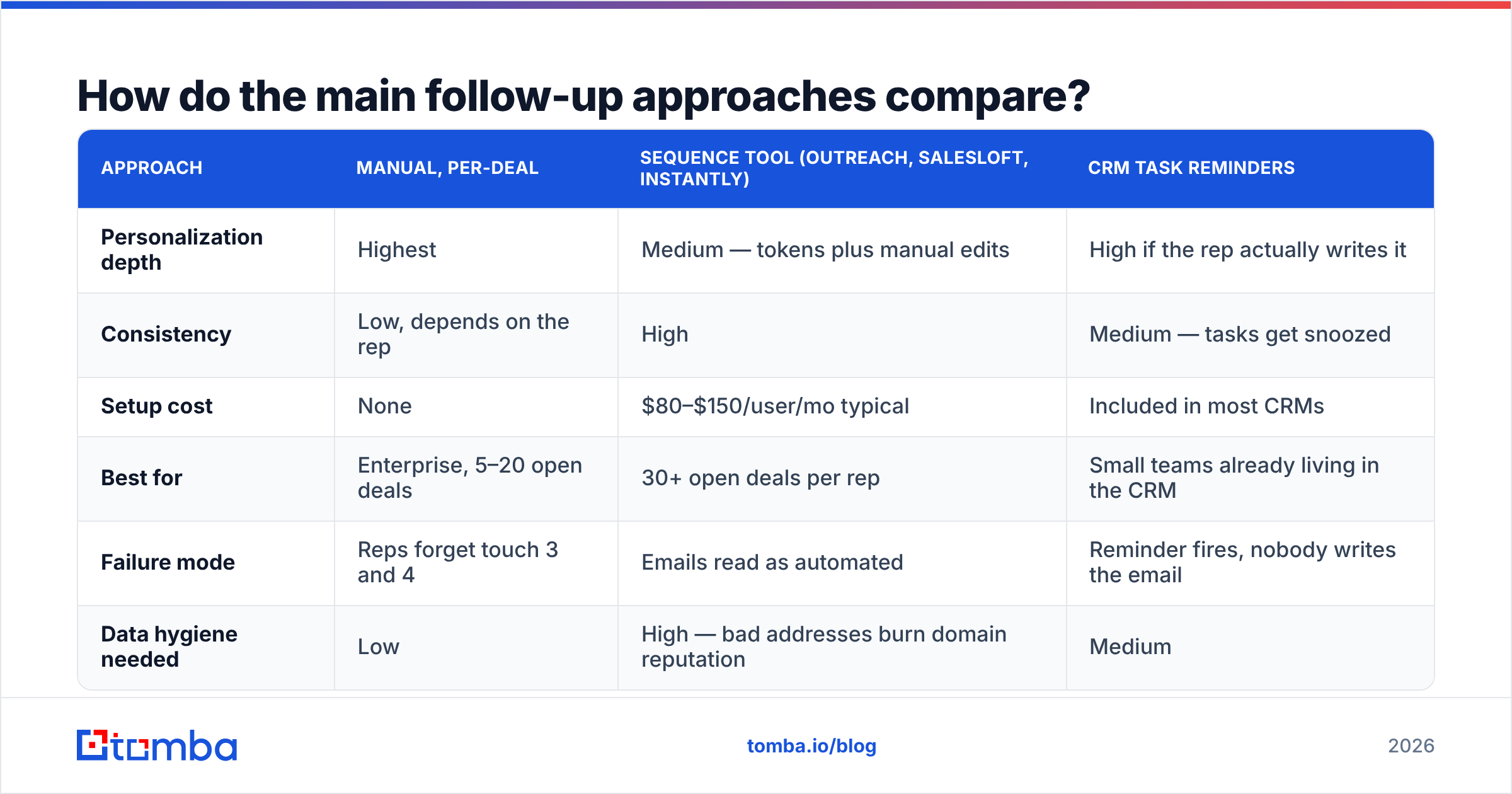
There are three ways teams handle post-meeting follow-up, and they scale very differently.
| Approach | Manual, per-deal | Sequence tool (Outreach, Salesloft, Instantly) | CRM task reminders |
|---|---|---|---|
| Personalization depth | Highest | Medium — tokens plus manual edits | High if the rep actually writes it |
| Consistency | Low, depends on the rep | High | Medium — tasks get snoozed |
| Setup cost | None | $80–$150/user/mo typical | Included in most CRMs |
| Best for | Enterprise, 5–20 open deals | 30+ open deals per rep | Small teams already living in the CRM |
| Failure mode | Reps forget touch 3 and 4 | Emails read as automated | Reminder fires, nobody writes the email |
| Data hygiene needed | Low | High — bad addresses burn domain reputation | Medium |
For high-ACV deals with fewer than 20 open opportunities, manual wins. Sequencing tools start paying off around 30 concurrent deals, but only if your contact data is clean — automated follow-ups to dead addresses are the fastest way to damage email deliverability.
A hybrid works best for most teams: sequence the reminders and the structural scaffolding, write touches one and six by hand. Those two carry the most weight. Independent reviews on G2 are useful for comparing sequencing tools, and HubSpot's sales research publishes regular benchmark data on reply rates by touch count.
How many follow-ups before you stop?#
Four to six, over roughly three weeks, then a scheduled re-engage at 90 days.
The instinct to stop after two is the most expensive habit in B2B sales. The data consistently shows a meaningful share of closed deals require five or more touches, yet a large majority of reps stop at one or two. That gap is where quota gets lost.
But volume without variety is just noise. Each touch needs a distinct reason to exist:
- Touch 2 delivers something promised.
- Touch 3 introduces information they did not have.
- Touch 4 addresses the objection you suspect exists.
- Touch 5 offers to work with a different stakeholder.
- Touch 6 closes the loop honestly.
If you cannot articulate what a touch adds, do not send it. Move it to the 90-day list instead and re-engage with a real trigger — funding round, new hire in a relevant role, product launch.
One more thing: track response rate per touch number, not just overall. If touch three underperforms badly across your team, the template is the problem, not the prospects.
What should you do in the next 10 minutes?#
Open your last five meetings that went quiet. For each one, ask three questions: Did the email land in the right inbox? Did it contain a specific next step with a proposed time? Did it stop at touch two?
Most likely, at least two of those five failed on the first question — the address was wrong, the domain was a catch-all, or the message never cleared spam filtering. Fixing your copy is worthless if the delivery layer is broken.
Start there. Run your contact list through the Tomba Email Finder to confirm every address you plan to follow up with, and use domain search to find the additional stakeholders your champion mentioned but never introduced you to. The free tier gives you 25 searches a month to test it against a handful of stalled deals; paid plans start at $49/mo on Starter, with Growth at $99/mo for teams running higher volume — full Tomba pricing is on the site. Verified addresses first, then better follow-up copy. In that order.
Related guides#
Ready to find emails that actually work?
Join 150,000+ professionals who stopped guessing and started sending. Free credits on signup — no credit card required.
Get the Tomba newsletter
Practical outbound tactics and product updates — once every two weeks.
About the author