Follow Up Email After Voicemail: Templates That Get Replies
Voicemail alone converts at roughly 4-5%. Pairing it with a follow-up email inside 10 minutes is what actually books meetings. Here's the timing, structure, and 6 templates that work in 2026.
TL;DR
- A voicemail on its own is a dead end — most buyers never call back. The follow-up email is what converts the touch, and it should land within 10 minutes of hanging up.
- Reference the voicemail in the first line, not the subject line. Subject lines that say "Following up on my voicemail" get opened less than subject lines that name the problem.
- Keep it under 90 words with one ask. The voicemail already made the introduction; the email's only job is to make replying easier than deleting.
- Sequence beats volume: call → email (same day) → email (day 3) → call + email (day 7) → breakup (day 12). Four to six total touches, then stop.
- None of it matters if the email bounces. Verify the address before the call so your voicemail and your email hit the same person.
Why does a voicemail need a follow-up email at all?#
Because voicemail is a one-way broadcast on a channel almost nobody uses to reply. Think of it like knocking on a door and walking away — you announced yourself, but you left no way to respond that costs less than five minutes of the other person's day. Email is the doorbell with a note attached.
Industry sales-engagement benchmarks consistently put cold voicemail callback rates in the low single digits. The number moves around by industry and seniority, but the direction never does: a standalone voicemail is a low-yield touch. What lifts it is pairing. The voicemail creates recognition — a name, a voice, a company — and the email arrives while that recognition is still warm, in a channel where replying takes eleven seconds.
There's a second mechanic that gets ignored. Most professionals get voicemail-to-text transcription pushed to their inbox or Slack anyway. So your voicemail is already partly an email. Your actual email either reinforces that transcript or contradicts it. If your voicemail said one thing and your email pitches something else, you've spent two touches confusing someone.
The practical framing: voicemail is the handshake, email is the business card. Neither works alone at scale.
How fast should you send the follow up email after voicemail?#
Within 10 minutes. Not tomorrow, not "later that afternoon."
The reason is memory decay, not urgency theater. When your name is still sitting in someone's missed-call log and voicemail notification, an email from that same name reads as coherent — one person trying to reach them. Twenty-four hours later, the same email reads as a cold email from a stranger, and the voicemail is just noise they already deleted.
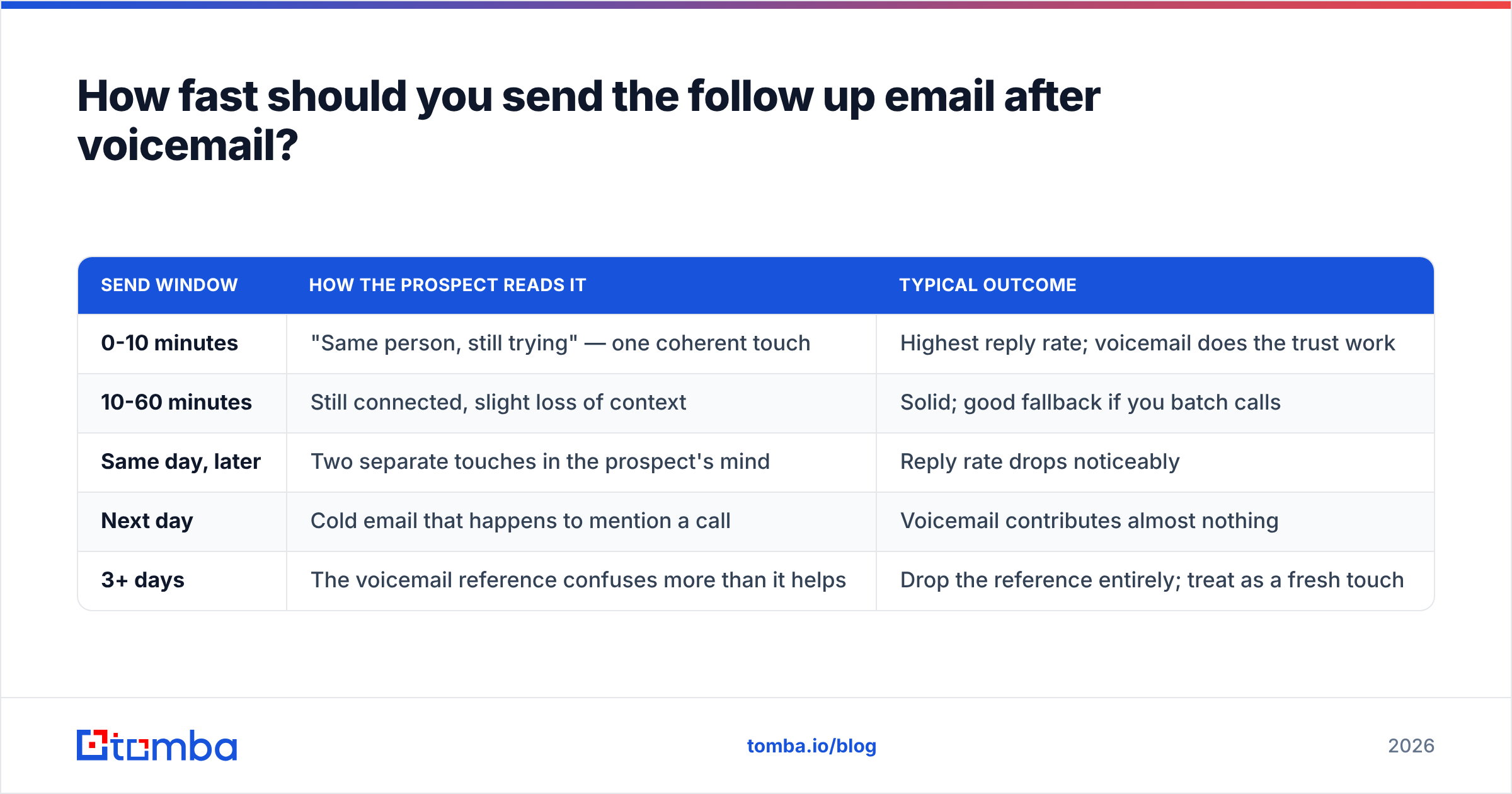
Here's how the timing windows actually perform in practice:
| Send window | How the prospect reads it | Typical outcome |
|---|---|---|
| 0-10 minutes | "Same person, still trying" — one coherent touch | Highest reply rate; voicemail does the trust work |
| 10-60 minutes | Still connected, slight loss of context | Solid; good fallback if you batch calls |
| Same day, later | Two separate touches in the prospect's mind | Reply rate drops noticeably |
| Next day | Cold email that happens to mention a call | Voicemail contributes almost nothing |
| 3+ days | The voicemail reference confuses more than it helps | Drop the reference entirely; treat as a fresh touch |
If you dial in blocks — and you should, because context-switching between calling and writing destroys both — pre-write the email before the call block starts. Leave one blank line for a personalized detail, then paste, fill, send. That keeps you inside the 10-minute window without breaking dial rhythm.
One caveat on send time of day: the 10-minute rule beats "optimal send time" advice. A 3:47 PM email that follows a 3:42 PM voicemail outperforms a "perfectly timed" 9:00 AM email the next morning. Coherence wins over calendar optimization.
What does the structure of a good follow-up email look like?#
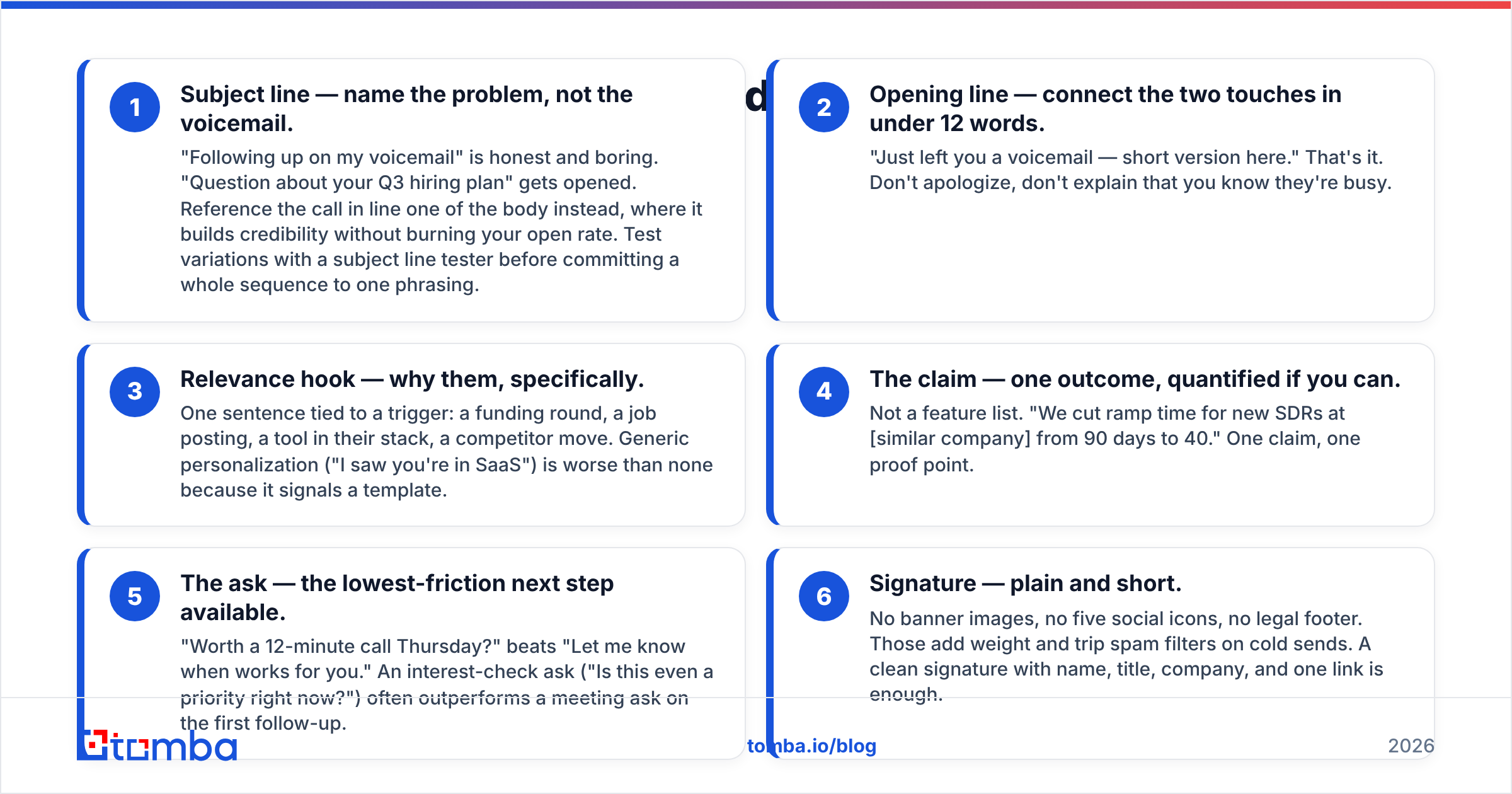
Six components, in this order. Each has a job, and each one is where reps usually go wrong.
- Subject line — name the problem, not the voicemail. "Following up on my voicemail" is honest and boring. "Question about your Q3 hiring plan" gets opened. Reference the call in line one of the body instead, where it builds credibility without burning your open rate. Test variations with a subject line tester before committing a whole sequence to one phrasing.
- Opening line — connect the two touches in under 12 words. "Just left you a voicemail — short version here." That's it. Don't apologize, don't explain that you know they're busy.
- Relevance hook — why them, specifically. One sentence tied to a trigger: a funding round, a job posting, a tool in their stack, a competitor move. Generic personalization ("I saw you're in SaaS") is worse than none because it signals a template.
- The claim — one outcome, quantified if you can. Not a feature list. "We cut ramp time for new SDRs at [similar company] from 90 days to 40." One claim, one proof point.
- The ask — the lowest-friction next step available. "Worth a 12-minute call Thursday?" beats "Let me know when works for you." An interest-check ask ("Is this even a priority right now?") often outperforms a meeting ask on the first follow-up.
- Signature — plain and short. No banner images, no five social icons, no legal footer. Those add weight and trip spam filters on cold sends. A clean signature with name, title, company, and one link is enough.
Total: 60-90 words. If you can't say it in 90 words, your voicemail probably wasn't clear either.
Which templates actually get replies in 2026?#
Six that hold up across industries. Adapt the specifics — the structure is the part that transfers.
1. The 10-minute mirror (send immediately after the voicemail)
Subject: Your [specific initiative]
[Name] — just left a voicemail, here's the 20-second version.
Noticed [trigger event]. Teams at that stage usually hit [specific problem] within a quarter.
We helped [comparable company] handle it without [common tradeoff].
Worth 12 minutes Thursday, or is this not a priority right now?
2. The transcript assist (when you know they use voicemail-to-text)
Subject: Cleaning up my voicemail
My voicemail transcript probably mangled this, so: [one sentence].
The reason I called: [trigger]. The reason it matters: [outcome].
Open to a short call, or should I send the two-line version instead?
3. The value-first no-ask (day 3, no reply)
Subject: [Competitor] just changed how they [do X]
No ask here — you didn't reply and that's fine.
Came across this and thought of your team: [link or one-paragraph insight].
If [problem] ever moves up your list, I'm easy to find.
4. The permission reset (day 7)
Subject: Wrong person?
I've called and emailed twice about [topic]. Silence usually means one of three things: wrong person, wrong timing, or wrong problem.
Which is it? A one-word reply saves us both time.
5. The specific-ask pivot (day 7, alternative)
Subject: One question
Skipping the pitch. One question: how is your team handling [specific problem] today?
If the answer is "manually," I have something worth 10 minutes. If it's "we solved it," I'll close the loop and stop calling.
6. The breakup (day 12, final touch)
Subject: Closing the file
This is my last note on [topic]. I'll assume the timing is off and stop reaching out.
If it changes in Q4, reply "later" and I'll circle back then. Otherwise — good luck with [initiative].
Breakup emails routinely out-reply everything before them, which is a signal about pressure, not about the copy. Don't fake a breakup and then keep emailing; reps who do that burn the domain and the relationship. If you want more starting points, our cold email templates library has variants by persona and industry.
Should you use voicemail at all, or just email?#
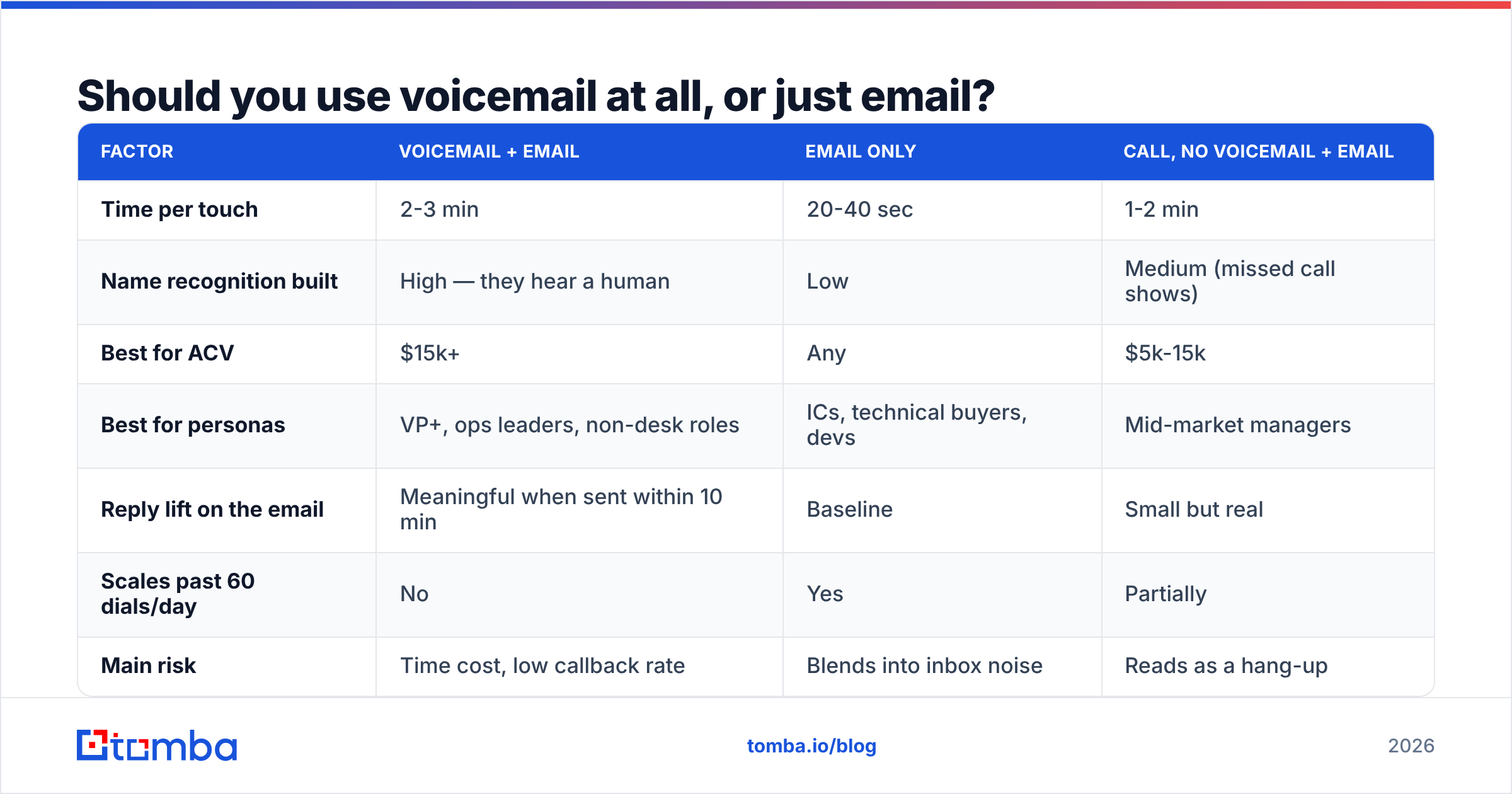
Depends on deal size and who you're calling. Here's the honest comparison — voicemail is not free, it costs 30-45 seconds per attempt plus the dial time.
| Factor | Voicemail + email | Email only | Call, no voicemail + email |
|---|---|---|---|
| Time per touch | 2-3 min | 20-40 sec | 1-2 min |
| Name recognition built | High — they hear a human | Low | Medium (missed call shows) |
| Best for ACV | $15k+ | Any | $5k-15k |
| Best for personas | VP+, ops leaders, non-desk roles | ICs, technical buyers, devs | Mid-market managers |
| Reply lift on the email | Meaningful when sent within 10 min | Baseline | Small but real |
| Scales past 60 dials/day | No | Yes | Partially |
| Main risk | Time cost, low callback rate | Blends into inbox noise | Reads as a hang-up |
The pattern most teams land on: leave voicemails for the top tier of the account list — the accounts where a 3-minute touch is justified by deal size — and run email-only or call-no-voicemail on everything else. Technical buyers in particular tend to treat voicemail as an imposition; engineers and developers reply to email at far higher rates than they return calls.
If you're building the calling motion itself, having verified mobile numbers matters more than script quality. A phone finder that returns direct dials instead of switchboard numbers changes your connect rate more than any opener rewrite.

What kills follow-up emails after a voicemail?#
Five failure modes, ranked by how often they show up in audits of real sequences.
The email never arrives. This is the biggest one and the least discussed. You leave a voicemail at a direct line you sourced correctly, then email a guessed address that bounces. Now you've burned the touch and your sender reputation at the same time. Bounce rates above 3% start affecting inbox placement for your entire domain, not just that one send. Run addresses through an email verifier before the sequence starts, not after the bounces come back.
The email restates the voicemail. If the transcript and the email say the same thing in the same words, the second touch adds zero information. Give the email a different angle — the voicemail asks, the email proves.
Too many asks. "Let me know if you'd like the deck, or we could do a call, or I can send over a case study." Three doors means no door. One ask.
Wrong length. Anything over 125 words on a cold follow-up reads as work. The prospect scans the shape of the email before reading a word, and a wall of text gets archived on shape alone.
No stopping rule. Sequences that run 14 touches don't get 14 chances — they get flagged. Cap at 4-6 touches over roughly two weeks, then move the contact to a nurture list. Persistence past that point is a deliverability problem wearing a work-ethic costume.
A sixth, quieter one: sending from a domain that isn't authenticated. If your SPF record and DMARC aren't configured, Google and Microsoft's 2024 bulk-sender requirements will quietly route you to spam regardless of how good the copy is. Google's sender guidelines spell out the current thresholds.
How do you build a call-then-email sequence that runs itself?#
Four steps, in order. The tooling matters less than the sequencing.
- Build the list with verified contact data. You need a direct dial and a valid email for the same person. Sourcing them from two different vendors is where mismatches creep in — you call Sarah in Ops and email Sara in Marketing. Pull both from one source where possible, then verify.
- Set the cadence in your sequencer. Day 0: call + voicemail + email (10-min gap). Day 3: email. Day 7: call + email. Day 12: breakup email. Most sequencers — Outreach, Salesloft, Instantly, Reply — handle the call task and email step as separate objects; make sure the email step is set to manual-send on day 0 so you control the 10-minute window.
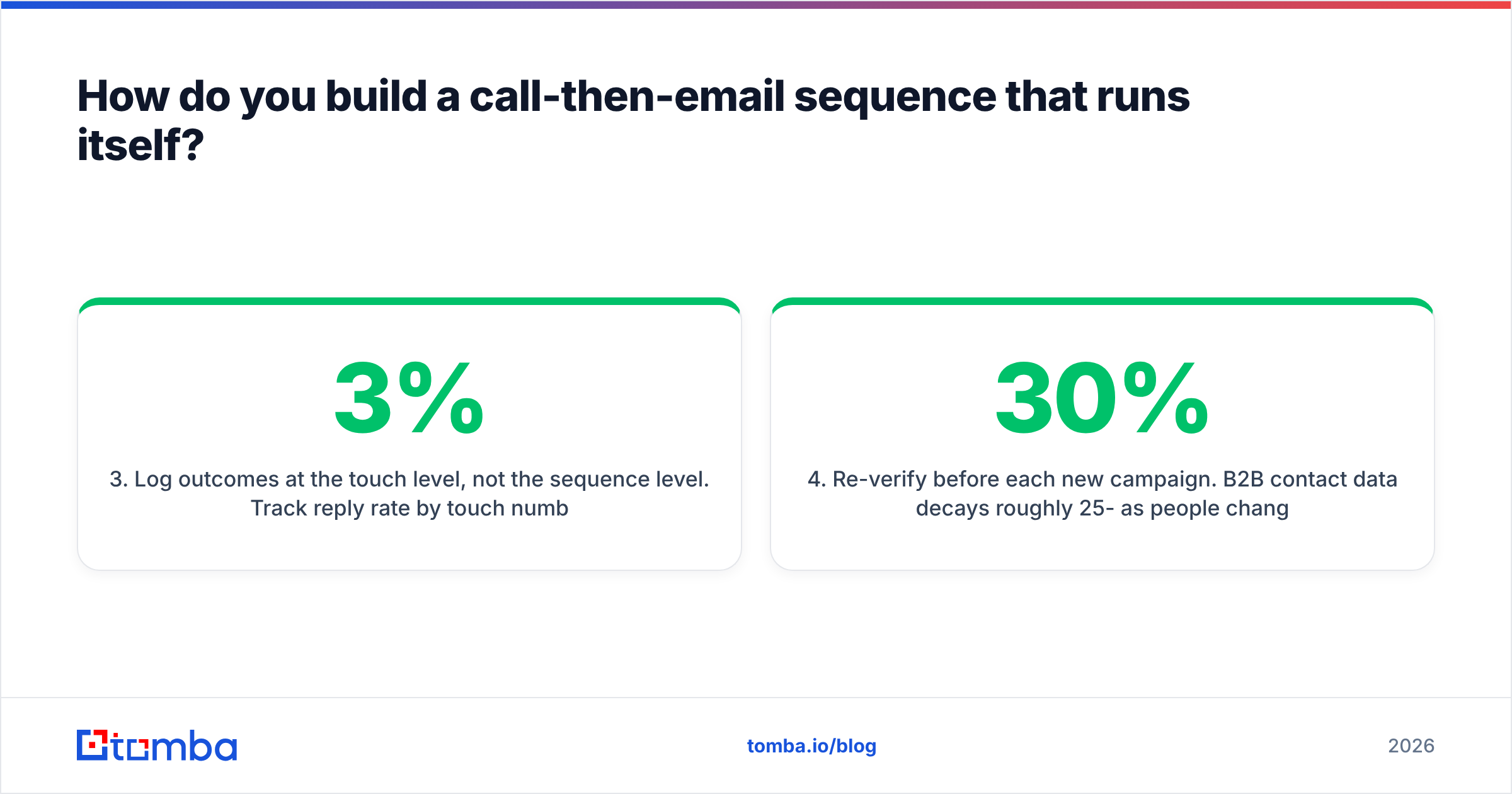
- Log outcomes at the touch level, not the sequence level. Track reply rate by touch number. If touch 1 does 3% and touch 4 does 9%, your problem is the opener, not the persistence. Most teams never look at this and end up rewriting the wrong email.
- Re-verify before each new campaign. B2B contact data decays roughly 25-30% per year as people change jobs. A list you verified in January is materially worse by July. G2's sales-intelligence category reviews are a reasonable place to sanity-check what other teams are using for this.
For teams running this at volume, the data side is the bottleneck. Bulk verification before a campaign takes minutes and prevents the bounce cascade that quietly kills a domain over a quarter. If your workflow lives in a spreadsheet, a Google Sheets add-on keeps enrichment in the same place as the list.
What should you measure?#
Four numbers, checked weekly.
- Reply rate by touch number — tells you which email in the sequence is carrying the load.
- Bounce rate — keep it under 2%. Above 3% and you have a data problem, not a copy problem.
- Voicemail-to-reply lift — compare the reply rate of contacts who got a voicemail vs. those who didn't, holding the email constant. If the lift is under two points, stop leaving voicemails for that segment and reclaim the time.
- Meetings per 100 dials — the only number that ties to pipeline. Everything else is a leading indicator.
Track the response rate trend across months, not weeks. Single-week swings on cold outbound are mostly noise.
Get the contact data right before you dial#
Every tactic in this post assumes one thing: the voicemail and the email reach the same real person. That assumption breaks more often than reps realize, and it breaks silently — bounces get filtered, direct dials ring dead switchboards, and the sequence looks like a copy problem when it's a data problem.
Tomba Email Finder returns verified professional email addresses by name and domain, with confidence scoring so you know which addresses are safe to send to before you burn a touch on them. The free tier covers 25 searches a month if you want to test the accuracy on accounts you already know; paid plans start at $49/mo on Starter, with Growth at $99/mo for teams running full outbound cadences. Full Tomba pricing is public — no demo call required to see it.
Verify the list, then dial. The templates work a lot better when the emails land.
Related guides#
Ready to find emails that actually work?
Join 150,000+ professionals who stopped guessing and started sending. Free credits on signup — no credit card required.
Get the Tomba newsletter
Practical outbound tactics and product updates — once every two weeks.
About the author