Follow Up Email Asking For Update: Templates That Get Replies
Most update-request emails get ignored because they ask for status instead of giving a reason to reply. Here are the templates, timing windows, and scripts that actually move a stalled deal forward.
TL;DR
- A follow up email asking for update fails when the ask is "any update?" — that puts the work on the recipient and gives them nothing to react to.
- Replace the status request with a reason to reply: a deadline, a new piece of information, a decision you need, or an explicit close-the-file option.
- Timing beats volume. Days 3, 7, 14, and 30 outperform daily bumps by a wide margin, and 4-6 touches captures most of the reply volume you will ever get.
- Break-up emails ("should I close this out?") consistently pull the highest single-touch reply rate of any follow-up in a sequence.
- If your follow-ups bounce or land in spam, the problem is the data, not the copy — verify the address before you blame the wording.
What Is a Follow Up Email Asking for Update?#
It's the message you send when someone went quiet after a proposal, an application, an invoice, a demo, or a handoff — and you need to know where things stand.
Think of it like knocking on a neighbour's door. Knocking once and walking away gets you nothing. Knocking every hour makes you the problem. Knocking at reasonable intervals, and saying through the door why you came, is what actually gets it opened.
Most people write the equivalent of standing outside silently. "Just following up." "Any update on this?" "Circling back." Those sentences contain zero new information. The recipient has to reconstruct the context, decide what you want, and compose a reply — three jobs, none of which they asked for.
A follow-up that works does the opposite. It carries the context, states the decision needed, and makes replying cheaper than ignoring.
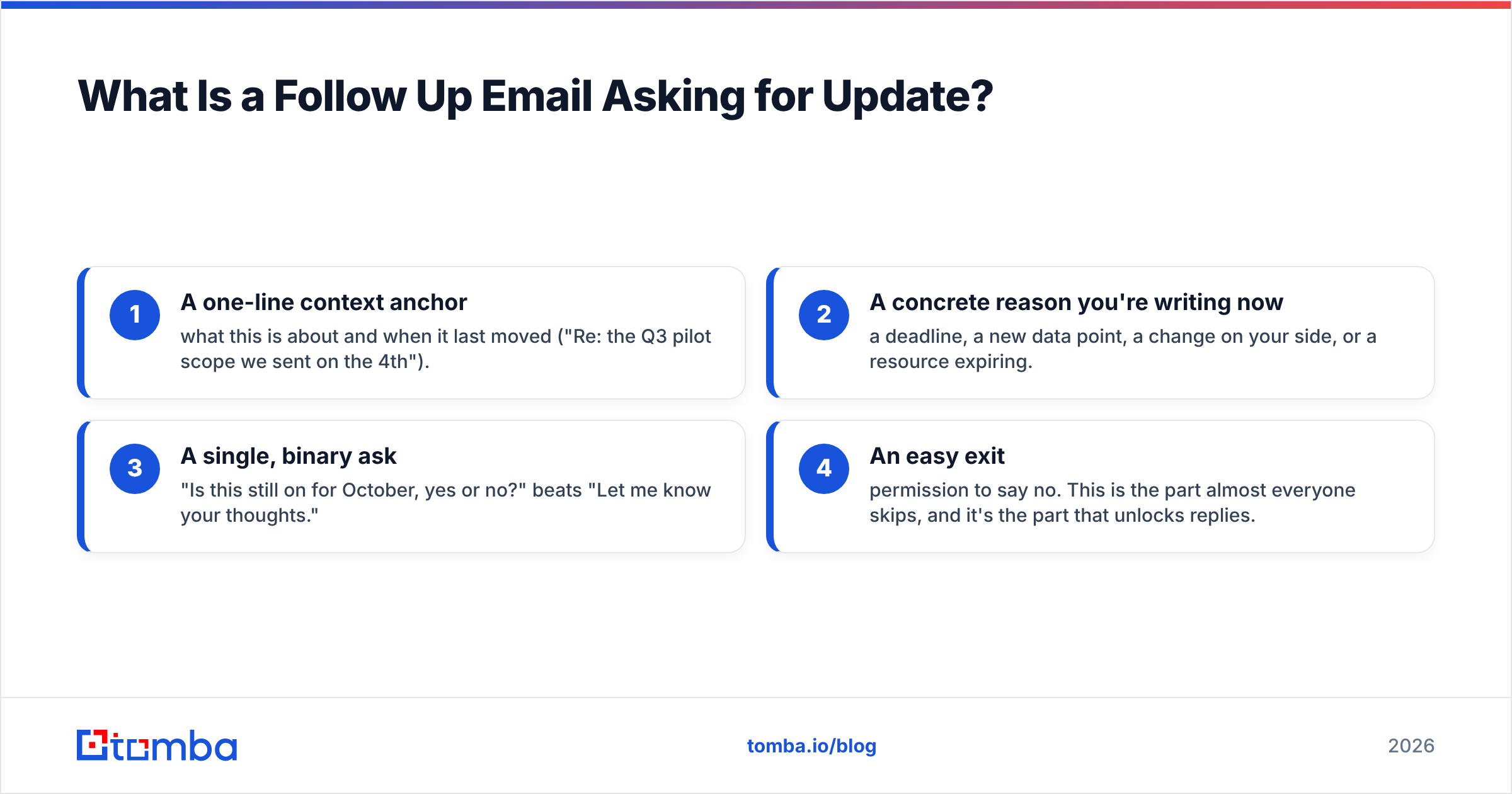
The four things every effective update request contains:
- A one-line context anchor — what this is about and when it last moved ("Re: the Q3 pilot scope we sent on the 4th").
- A concrete reason you're writing now — a deadline, a new data point, a change on your side, or a resource expiring.
- A single, binary ask — "Is this still on for October, yes or no?" beats "Let me know your thoughts."
- An easy exit — permission to say no. This is the part almost everyone skips, and it's the part that unlocks replies.
Why Do Most Update-Request Emails Get Ignored?#
Because they're status checks, and nobody owes you a status.
Here's what's actually happening on the other side. Your contact isn't avoiding you. They're managing 40 threads, and yours has no forcing function. A message that says "any update?" ranks below every message that says "we need X by Friday." It gets archived with good intentions and never surfaces again.
Four specific failure patterns show up in almost every stalled thread:
- Guilt framing. "I haven't heard back from you" makes the recipient the defendant. People don't reply to accusations; they avoid them.
- Open-ended asks. "Thoughts?" requires composition. A yes/no question requires a keystroke.
- No new information. If touch four says the same thing as touch one, you've taught them your emails are safe to skip.
- Wrong person entirely. A meaningful share of "ghosting" is a contact who left, changed roles, or never owned the decision. No copy fixes that.
That last one is worth sitting with. Before you rewrite the email for the fifth time, confirm the address is still live and the person still holds the role. Running the domain through a domain search will surface who else on that team is reachable, and an email verifier tells you whether the silence is a decision or a dead mailbox. Those are very different problems.
What Should You Actually Write? Templates by Scenario#
Below are five patterns, each stripped to the bone. Adapt the specifics; keep the structure.
The value-add bump (touch 2, day 3-4)#
Subject: One thing I forgot — the migration timeline
Hi Dana,
After we talked Tuesday, I pulled the migration timeline from the last two accounts your size. Both cut over in under nine days, which is shorter than what I quoted you.
Does that change anything on your side? If the timing was the sticking point, this might be worth another ten minutes.
— Sam
Why it works: no status request at all. New information creates a legitimate reason for the email to exist.
The deadline anchor (touch 3, day 7-10)#
Subject: Holding your pilot slot until Thursday
Hi Dana,
Quick logistics note: I'm holding the October onboarding slot for you, but I need to release it Thursday if we're not moving.
Want me to keep it or let it go? Either answer works.
— Sam
Why it works: a real constraint, honestly stated, plus explicit permission to decline.
The decision-reset (touch 4, day 14)#
Subject: Did this become a next-year problem?
Hi Dana,
Reading the silence as "this dropped down the list," which is completely fair — Q3 is loud.
Two options: I check back in January, or we do fifteen minutes now and lock the scope while budget is still open. Which is less annoying?
— Sam
Why it works: names the likely reality out loud, which relieves pressure and makes replying feel low-stakes.
The break-up (touch 5-6, day 21-30)#
Subject: Closing your file
Hi Dana,
I'm going to close this out so I stop cluttering your inbox. No hard feelings — timing is timing.
If it ever comes back around, reply to this thread and I'll pick it up from where we left it.
— Sam
Why it works: loss aversion plus a genuine end to the pressure. This is routinely the highest-reply message in a sequence.
The internal / post-interview version#
Subject: Timeline check on the platform role
Hi Priya,
You mentioned decisions would land around the 15th. Is that still roughly the shape of it?
Asking because I have another process moving and I'd rather be straight with you about timing than go quiet myself.
— Marcus
Why it works: gives a reason for the urgency that isn't about pressure, and models the transparency it's asking for.
Need a starting library rather than a blank page? The cold email templates collection covers adjacent sequences, and the subject line tester will tell you whether "Closing your file" reads as intriguing or as spam in your specific niche.
How Does Timing Compare Across Follow-Up Strategies?#
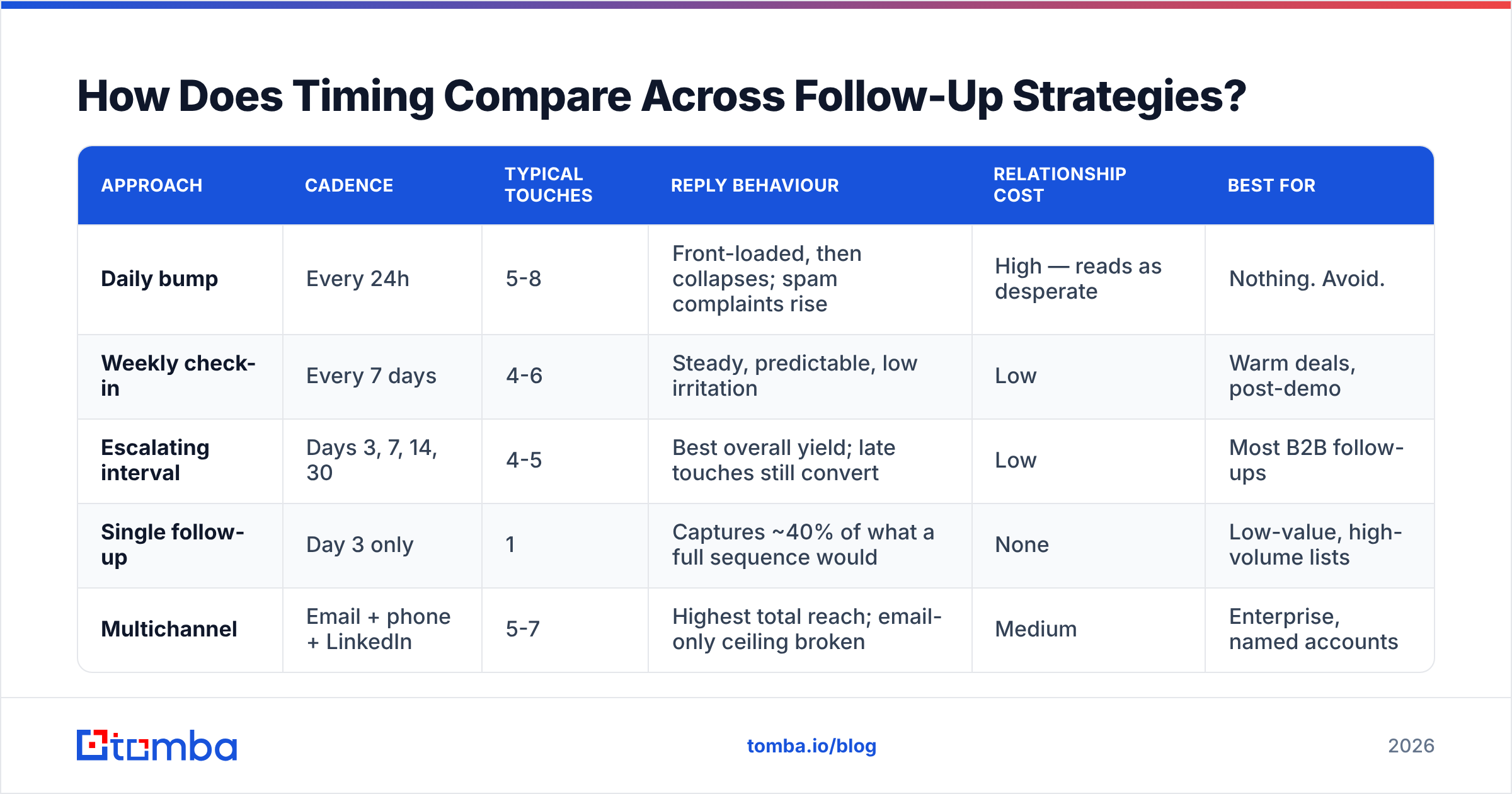
The single biggest lever is spacing, not wording. Here's how the common approaches stack up in practice.
| Approach | Cadence | Typical touches | Reply behaviour | Relationship cost | Best for |
|---|---|---|---|---|---|
| Daily bump | Every 24h | 5-8 | Front-loaded, then collapses; spam complaints rise | High — reads as desperate | Nothing. Avoid. |
| Weekly check-in | Every 7 days | 4-6 | Steady, predictable, low irritation | Low | Warm deals, post-demo |
| Escalating interval | Days 3, 7, 14, 30 | 4-5 | Best overall yield; late touches still convert | Low | Most B2B follow-ups |
| Single follow-up | Day 3 only | 1 | Captures ~40% of what a full sequence would | None | Low-value, high-volume lists |
| Multichannel | Email + phone + LinkedIn | 5-7 | Highest total reach; email-only ceiling broken | Medium | Enterprise, named accounts |
Two things fall out of that table. First, the escalating interval wins because each gap gives the recipient's situation time to actually change — a budget unfreezes, a hiring manager returns, a competitor's contract lapses. Second, stopping at one follow-up leaves most of the available replies on the table, which is why "I already followed up once" is rarely a finished job.
For the multichannel row, the mechanics matter: a voicemail referencing the email you sent yesterday raises the odds that email gets opened. That requires a working number, which is where a phone finder earns its place next to email in the same workflow. HubSpot's ongoing sales research has consistently found that persistence across channels, not within a single channel, is what separates reps who close from reps who bump.

What Subject Lines Get Update Emails Opened?#
Subject lines for follow-ups obey different rules than cold opens, because you already have thread history working for you.
Keep the reply thread when the original had engagement. "Re: Q3 pilot scope" inherits the visual weight of a conversation. Starting a fresh thread throws that away.
Start a new thread when the old one is buried. After 14+ days of silence, the original subject line is associated with being ignored. A new one gets a clean read.
What actually performs:
- Question format — "Still targeting October?" invites a one-word answer.
- Named specificity — "The Ashworth proposal, revised" beats "Following up."
- Low-stakes framing — "Quick one" and "Closing your file" both signal the email is short.
- Zero urgency theatre — "URGENT" and "Second attempt" trigger the same reflex as a parking ticket.
Avoid: "Just checking in," "Touching base," "Bumping this," and anything with an exclamation mark. Those phrases are so overused that filters and humans both pattern-match them to noise. If you want a data check rather than a vibe check, G2's sales-engagement category reviews frequently surface which sequencing tools report subject-line performance at the touch level, which is the only way to test this properly on your own list.
When Should You Stop Following Up?#
Stop after the break-up email — with one exception.
The practical rule: 4-6 touches over 30 days, ending with an explicit close-out. Past that, additional emails to the same contact produce diminishing replies and rising complaint risk, and complaints damage the domain you need for every other prospect.
The exception is a trigger event. If the account raises funding, hires a new VP in the relevant function, appears in a job posting for a tool you replace, or the contact changes companies — that's a new conversation, not a continuation. Reset the thread, reference the trigger, and start the clock over.
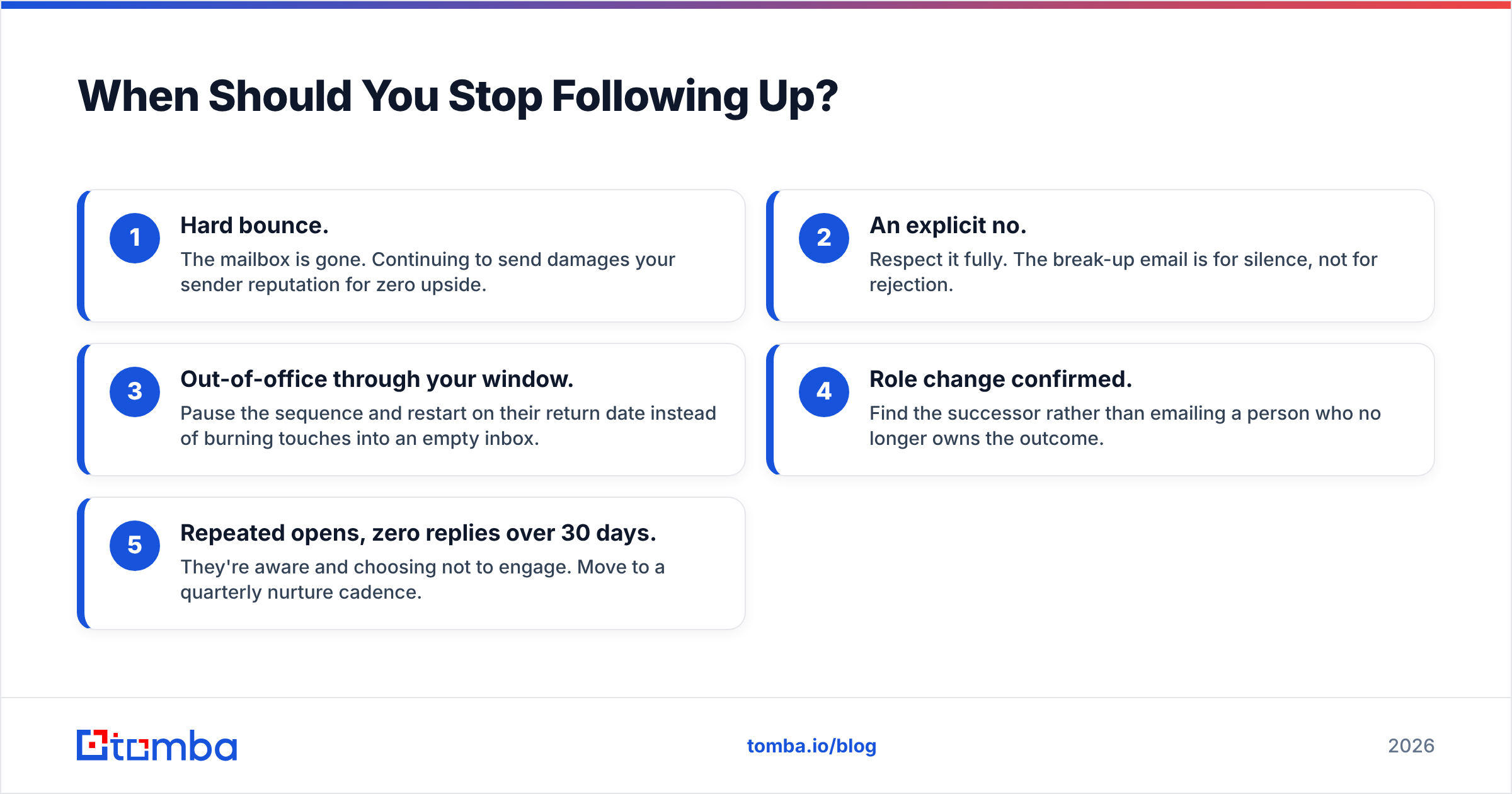
Signals it's time to stop now, not at touch six:
- Hard bounce. The mailbox is gone. Continuing to send damages your sender reputation for zero upside.
- An explicit no. Respect it fully. The break-up email is for silence, not for rejection.
- Out-of-office through your window. Pause the sequence and restart on their return date instead of burning touches into an empty inbox.
- Role change confirmed. Find the successor rather than emailing a person who no longer owns the outcome.
- Repeated opens, zero replies over 30 days. They're aware and choosing not to engage. Move to a quarterly nurture cadence.
How Do You Make Sure Your Follow-Ups Actually Land?#
Copy quality is irrelevant if the message never reaches an inbox. Three checks, in order of impact.
Verify before you sequence. A list with even a modest share of invalid addresses drives bounce rates into the range where mailbox providers start filtering your good sends too. Verification is not a nice-to-have on follow-up campaigns; it's the precondition. Catch-all domains deserve special handling — a catch-all verifier distinguishes "this domain accepts everything" from "this specific person exists," which are wildly different bets.
Check authentication once, then forget it. SPF, DKIM, and DMARC records are a one-afternoon setup with permanent returns. Run your domain through an SPF checker and confirm it resolves. Both Google and Microsoft now enforce bulk-sender authentication requirements, so a missing record is a hard block rather than a soft penalty.
Watch the reply-to-send ratio, not the open rate. Open tracking has been unreliable since privacy protection started pre-fetching images. Replies are the honest metric. If reply rate falls while volume climbs, you're not scaling — you're eroding.
One more structural point worth making: the most reliable way to reduce the number of follow-ups you need is to send the first email to a better-qualified contact. Sequences exist to compensate for imprecise targeting. Tighten the targeting and the sequence gets shorter, which is cheaper for everyone.
What's the Difference Between Persistent and Annoying?#
The line is whether each message gives more than it takes.
A persistent sender sends five emails, and each one contains a fact, an option, or a decision the recipient can act on. An annoying sender sends five emails that all say the same thing in different words, escalating in tone.
Practical test before you hit send: could this email be forwarded internally as useful? If yes, send it. If it would only make sense as "this person is bothering me again," rewrite it or drop it.
The second test is tone under silence. If your day-14 email carries any trace of resentment — "I've reached out several times now" — you've made your inbox anxiety their problem. Nobody has ever bought anything to relieve a salesperson's frustration.
Getting the Contact Right Before You Write the Copy#
Every template above assumes one thing: the address is correct and the person still holds the role. That assumption fails more often than most teams measure, and when it fails, no amount of rewriting helps.
Start by confirming who you're actually writing to. The Tomba Email Finder resolves a name and company domain into a verified professional address, with a free tier of 25 searches a month to test your assumptions before committing budget. Paid plans start at $49/mo for Starter, $99/mo for Growth, and $249/mo for Pro — see Tomba pricing for the full breakdown of credits and limits per tier.
Fix the data layer first. Then the follow-up email asking for update becomes what it should have been all along: a short, honest message to the right person at a reasonable interval, with an easy way to say no.
Related guides#
Ready to find emails that actually work?
Join 150,000+ professionals who stopped guessing and started sending. Free credits on signup — no credit card required.
Get the Tomba newsletter
Practical outbound tactics and product updates — once every two weeks.
About the author