Follow Up Email For Next Steps: Templates That Close Deals
Most deals stall because nobody wrote down what happens next. Here are the follow-up email structures, timing rules, and templates that keep next steps concrete and calendars booked.
TL;DR
- A follow up email for next steps is not a thank-you note. Its only job is to convert a conversation into a dated, owned, single-action commitment.
- The highest-performing structure is four blocks: confirmation of what they said, the decision that came out of it, the specific next action with an owner and a date, and one question that is easy to answer.
- Send within 4 business hours of a live call. After 24 hours, reply rates drop sharply because the buyer's internal context has moved on.
- One next step per email. Two asks in one message reliably produce zero responses.
- Bad contact data kills more follow-up sequences than bad copy. If your recap lands in a catch-all or a dead alias, structure doesn't matter.
What Is a Follow Up Email for Next Steps?#
A follow up email for next steps is the message you send after a meeting, demo, discovery call, interview, or proposal review that turns a verbal conversation into a written commitment. Think of it as the receipt for a conversation. The talking already happened; this email is the paper trail that says what was bought, by whom, and when it's due.
It differs from a generic follow-up in three ways:
- It has a single action, not a summary. "Let me know your thoughts" is a summary. "Can you confirm Thursday 2pm ET for the security review with your IT lead?" is an action.
- It names an owner. Every next step belongs to a specific human, not to "the team" or "we."
- It carries a date. A next step without a date is a wish. Deals with dated next steps advance measurably faster than deals tracked as "following up."
- It's forwardable. Your champion will paste it into Slack or forward it to a VP. Write it so it survives being read by someone who was not on the call.
That last point matters more than most reps realize. The recipient of your email is rarely the only reader. In a typical B2B purchase, five to eleven people touch the decision, and most of them will only ever see your words secondhand. Gartner's research on the B2B buying process has consistently found that buying groups are large and that most of the journey happens without the seller in the room. Your next-steps email is the only asset you control that travels into those rooms.
Why Do Most Next-Steps Emails Get Ignored?#
Because they ask the reader to do work.
Here's the mechanic. A vague follow-up ("Great chatting — let me know how you'd like to proceed") transfers the cognitive load to the buyer. They now have to remember the call, decide what the next step should be, check their calendar, coordinate internally, and compose a reply. That's five tasks. Most people who are busy and mildly interested will defer five tasks indefinitely.
A precise follow-up transfers zero load. "Proposed: Thursday 2pm ET, 30 min, with Dana from your security team. Calendar invite attached — decline if it doesn't work and I'll send two alternates." That's one task: click or don't click.
The other common failure modes:
- Multiple asks. You want the contract signed, the security questionnaire returned, and a call with the CFO. Pick one. The rest go in a follow-up next week.
- Passive framing. "It would be great to reconnect at some point" gives the reader nothing to accept or decline.
- Buried action. Your ask sits in paragraph four, below a recap nobody asked for. Put the action above the fold, on its own line.
- No consequence. Nothing bad happens if they ignore you. Add a real, honest deadline — a pricing window, an implementation slot, a quarter-end resource allocation — but never fabricate one.
- Wrong address. The person gave you a business card email that routes to a shared inbox, or you guessed the format wrong. This is quieter than the other failures because you never see the bounce on a catch-all domain.
What Structure Should a Follow Up Email for Next Steps Use?#
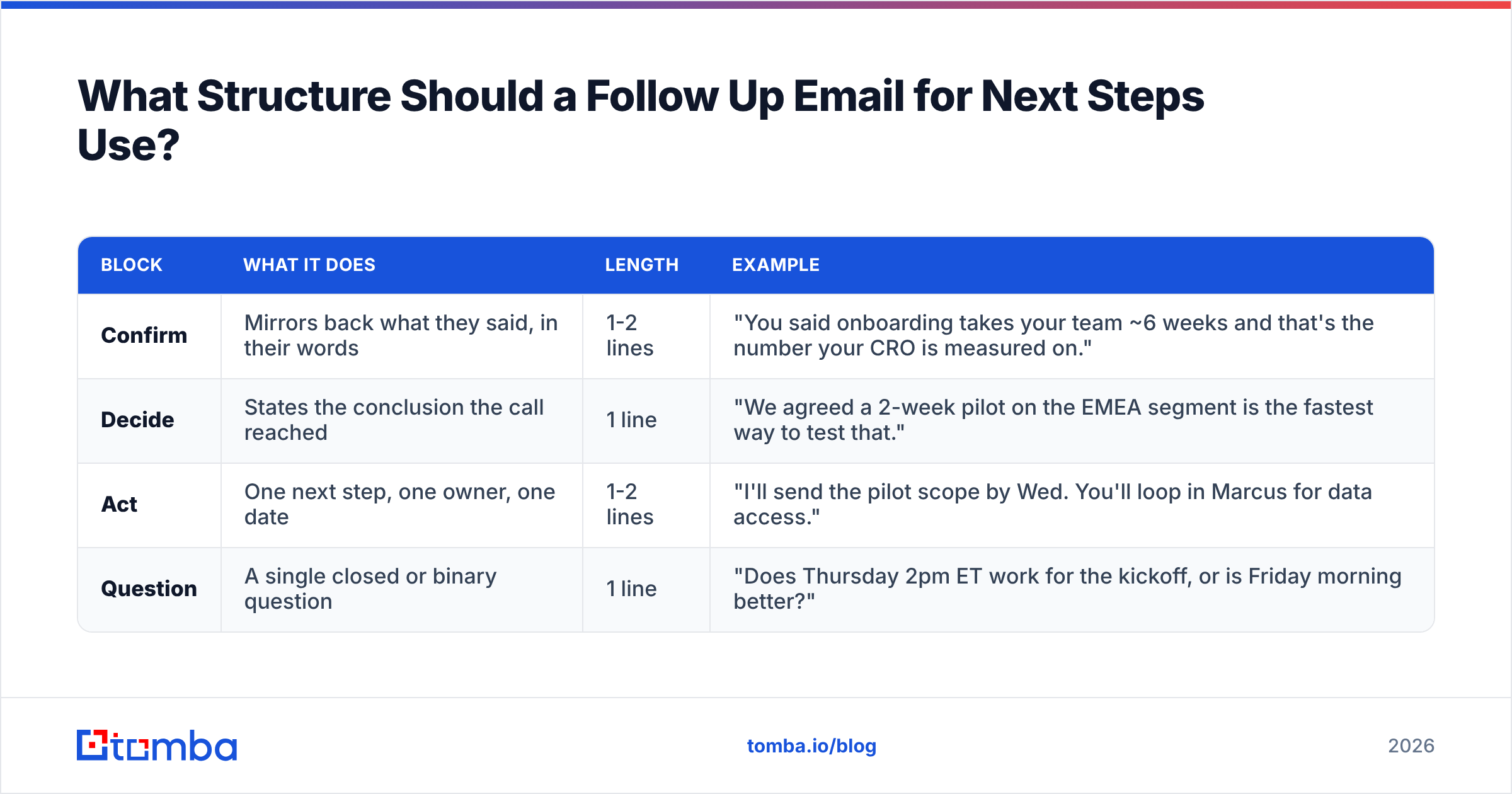
Use the CDAQ pattern: Confirm, Decide, Act, Question.
| Block | What it does | Length | Example |
|---|---|---|---|
| Confirm | Mirrors back what they said, in their words | 1-2 lines | "You said onboarding takes your team ~6 weeks and that's the number your CRO is measured on." |
| Decide | States the conclusion the call reached | 1 line | "We agreed a 2-week pilot on the EMEA segment is the fastest way to test that." |
| Act | One next step, one owner, one date | 1-2 lines | "I'll send the pilot scope by Wed. You'll loop in Marcus for data access." |
| Question | A single closed or binary question | 1 line | "Does Thursday 2pm ET work for the kickoff, or is Friday morning better?" |
Four blocks, under 120 words, no attachments unless promised on the call. The reason to cap length is mechanical: mobile preview panes show roughly the first 100 words, and your ask has to be visible without scrolling.
A worked example, end to end:
Subject: Pilot scope + Thursday kickoff?
Hi Priya,
You mentioned onboarding is running 6 weeks and that number is on your CRO's board this quarter.
We agreed a 2-week pilot on the EMEA segment is the cleanest way to test whether we can cut it to under 3.
Next steps: I'll send the pilot scope doc by Wednesday. You'll confirm data access with Marcus.
Does Thursday 2pm ET work for kickoff? If not, I have Friday 9am or 11am ET open.
— Sam
Notice what's missing: no "hope you're doing well," no recap of your product, no three-paragraph value proposition, no "circling back." The email is 78 words and contains exactly one decision for Priya to make.
When Should You Send It?#
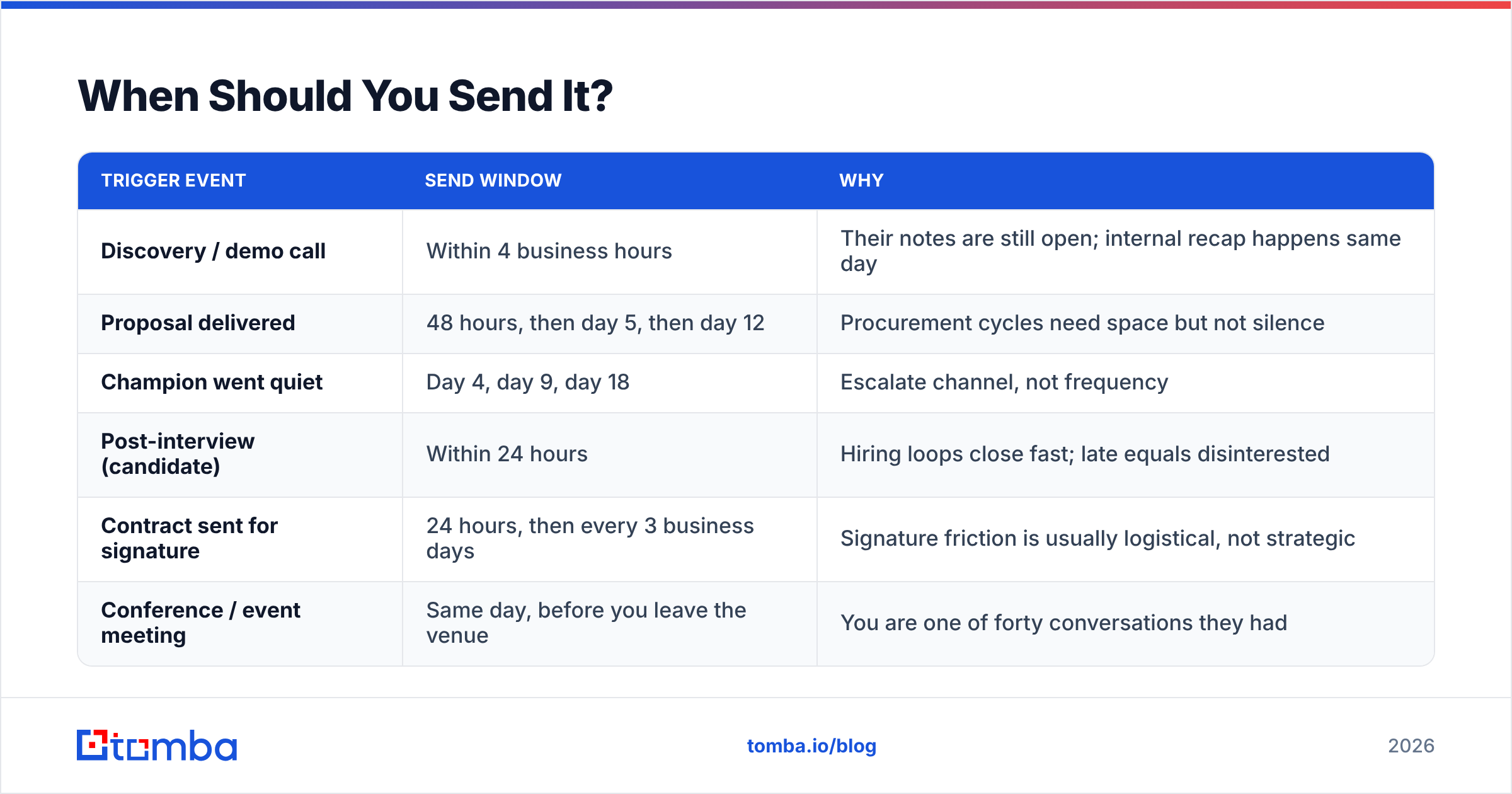
Timing is a bigger lever than wording. The rule set:
| Trigger event | Send window | Why |
|---|---|---|
| Discovery / demo call | Within 4 business hours | Their notes are still open; internal recap happens same day |
| Proposal delivered | 48 hours, then day 5, then day 12 | Procurement cycles need space but not silence |
| Champion went quiet | Day 4, day 9, day 18 | Escalate channel, not frequency |
| Post-interview (candidate) | Within 24 hours | Hiring loops close fast; late equals disinterested |
| Contract sent for signature | 24 hours, then every 3 business days | Signature friction is usually logistical, not strategic |
| Conference / event meeting | Same day, before you leave the venue | You are one of forty conversations they had |
Two constraints that override the table. First, never send more than one follow-up per business day to the same person, regardless of channel. Second, if you've sent four next-steps emails with no reply, the problem isn't cadence — it's that you're emailing the wrong person or the wrong address. Go find the actual decision maker, or verify the mailbox.
That second point is where a lot of "our follow-up isn't working" diagnoses go wrong. Before you rewrite templates, confirm the mailbox is live. Running the address through an email verifier takes seconds and tells you whether you're writing copy for a deliverable inbox or a black hole. Domains configured as catch-all are the sneakiest case: they accept everything, bounce nothing, and route most of it to a graveyard. A dedicated catch-all verifier is the only reliable way to separate real mailboxes from accept-all noise on those domains.
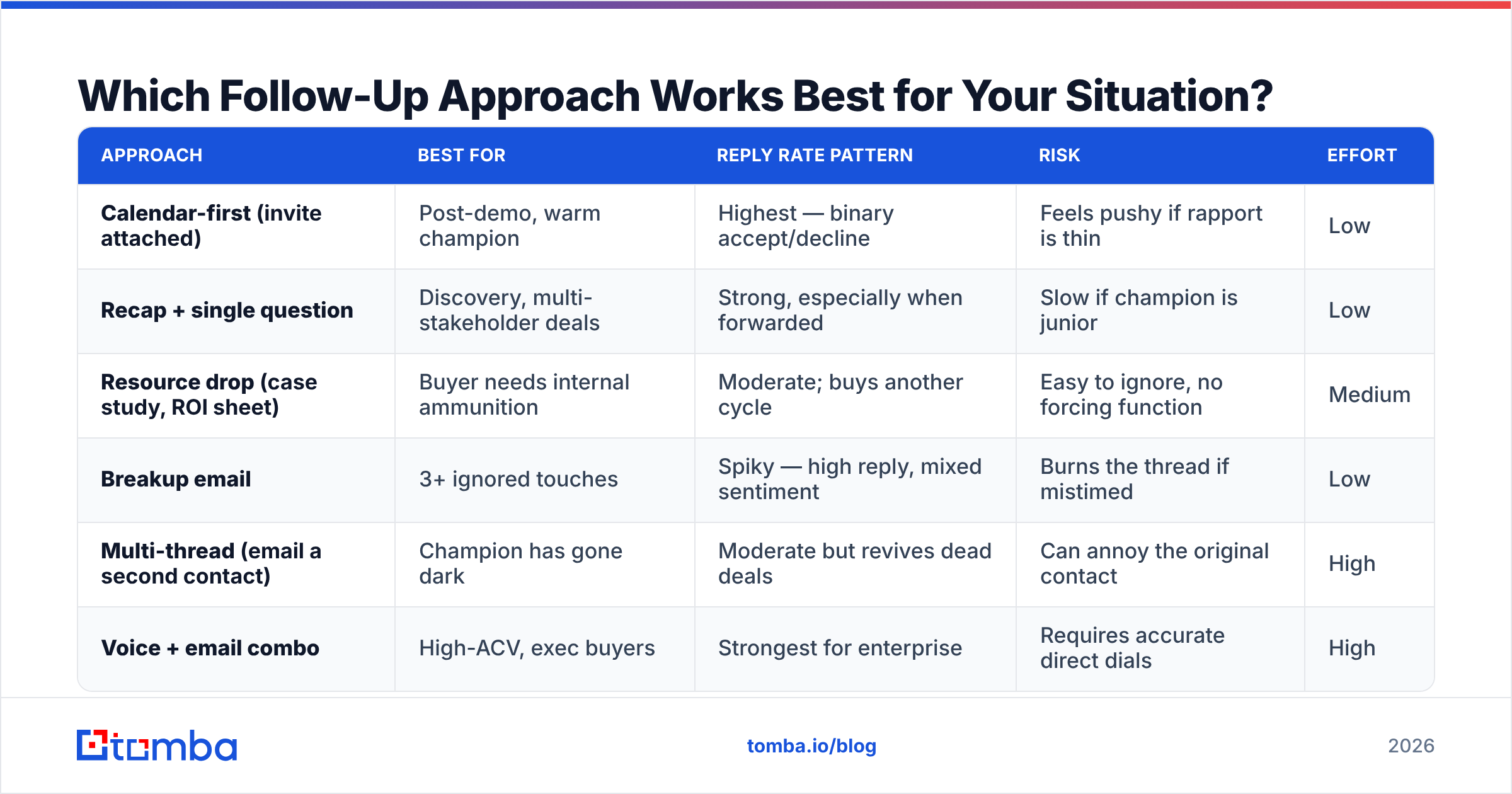
Which Follow-Up Approach Works Best for Your Situation?#
Different stalls need different emails. Here's how the main approaches compare:
| Approach | Best for | Reply rate pattern | Risk | Effort |
|---|---|---|---|---|
| Calendar-first (invite attached) | Post-demo, warm champion | Highest — binary accept/decline | Feels pushy if rapport is thin | Low |
| Recap + single question | Discovery, multi-stakeholder deals | Strong, especially when forwarded | Slow if champion is junior | Low |
| Resource drop (case study, ROI sheet) | Buyer needs internal ammunition | Moderate; buys another cycle | Easy to ignore, no forcing function | Medium |
| Breakup email | 3+ ignored touches | Spiky — high reply, mixed sentiment | Burns the thread if mistimed | Low |
| Multi-thread (email a second contact) | Champion has gone dark | Moderate but revives dead deals | Can annoy the original contact | High |
| Voice + email combo | High-ACV, exec buyers | Strongest for enterprise | Requires accurate direct dials | High |
The multi-thread play deserves a note. When your champion disappears, sending them a fifth email is theater. Finding the VP above them or the ops lead beside them and opening a parallel thread is what actually moves the deal. That requires contact data you probably don't have on hand — which is where domain search earns its keep: you give it the company domain, and you get the named contacts and email patterns for that org, so your second thread starts with a real address instead of a guess.
For the voice-plus-email combo, you need direct dials rather than switchboards, and a phone finder is the difference between reaching a person and reaching a menu tree.
What Are the Best Follow Up Email Templates for Next Steps?#
Six templates covering the situations that actually recur. Adapt the specifics; keep the structure.
1. Post-discovery, clear next step
Subject: Next step: scoping call w/ [Name]?
[First name] — you flagged [specific problem] as the thing blocking [specific outcome].
Next step we discussed: a 30-min scoping call with [technical stakeholder].
I'm holding Tue 10am ET and Wed 3pm ET. Which works?
2. Post-demo, decision pending
Subject: The [feature] question from Tuesday
You asked whether [feature] handles [edge case]. Short answer: yes, and here's the two-line explanation: [answer].
That was the last open item. Are we clear to move to pricing this week, or is there another question I should get ahead of?
3. Proposal sent, day 5, no reply
Subject: Proposal — anything blocking?
Checking in on the proposal from [date]. Three things usually hold these up: budget timing, a missing stakeholder, or a scope question.
Which one is it? I can fix any of the three today.
4. Champion went dark
Subject: Should I close this out?
[First name] — I haven't heard back since [date], which usually means priorities shifted. Totally fair.
Want me to pause this until [next quarter], or is there someone else on the team who should pick it up?
5. Post-contract-sent
Subject: Signature — any redlines?
The agreement's been with [legal contact] since [date]. Is legal reviewing, or is it waiting on someone?
If there are redlines, send them over and I'll turn them around in 24 hours.
6. Post-event / conference
Subject: [Event] — the [topic] conversation
We talked at [booth/session] about [specific detail they mentioned]. You said you'd want [specific thing] before [timeframe].
I have Thursday and Friday open next week for 20 minutes. Does either work?
If you want more starting points before you write your own, the cold email templates library covers first-touch structures that pair well with these follow-up patterns, and a subject line tester will tell you whether "Quick follow-up" is dragging your open rate down (it is).
How Do You Track Whether Your Next-Steps Emails Are Working?#
Measure three things, not twelve.
- Next-step conversion rate. Of the meetings you held, what percentage produced a dated, written next step within 24 hours? This is a rep-discipline metric, and it's usually the ugliest number in the funnel.
- Reply rate by template. Track it per template, not per campaign. You will find one template carries most of your responses and two are dead weight.
- Days-to-next-touch. How long between the meeting and the next real interaction? Deals that go 10+ days between touches close at a fraction of the rate of deals that stay under 5.
Don't measure open rate on one-to-one follow-ups. Apple Mail Privacy Protection and similar features inflate it into noise, and pixel tracking on a personal follow-up is a bad look if the recipient notices. Track replies and booked meetings.
For deliverability hygiene on the sending side, check that your domain authentication is clean before you blame copy. A quick SPF checker run and a look at your sender reputation will surface the boring infrastructure problems that masquerade as "low response rates." Google's own sender guidelines are the reference to check yourself against, and HubSpot's sales research is a reasonable public benchmark for follow-up cadence norms if you need to argue a case internally.
What Should You Never Do in a Next-Steps Follow-Up?#
A short list of things that measurably hurt:
- "Just checking in." It says you have nothing to add. Every follow-up should carry one new piece of information, even if it's small.
- "Circling back" / "touching base." Same problem, older vocabulary.
- Guilt. "I've reached out three times" makes the reader's silence about you, not their problem.
- Attachments they didn't ask for. They trip spam filters and rarely get opened.
- Reply-all recaps to five people. Send the recap to your champion and let them distribute it. Broadcasting makes it nobody's job to respond.
- Sending to unverified addresses. A hard bounce on a personal follow-up is worse than no email — it damages your domain reputation and tells you nothing about interest.
On that last point: if you're rebuilding a list of stalled contacts to re-engage, run the batch through a bulk verify pass before you send. A six-month-old CRM export typically has 15-25% decay from job changes alone, and every one of those is a bounce charged against your sending domain.
How Do You Make Next Steps Stick Across a Whole Team?#
Structure beats willpower. Three mechanisms that work:
- A next-step field that's required to advance a stage. If your CRM lets a deal sit in "Proposal" with an empty next-step date, it will. Make it mandatory.
- A shared template library, not personal drafts. Reps hoard their good emails. Put the top three in a shared snippet library and measure which one wins.
- A weekly "no next step" report. Every open deal without a dated next action, listed by owner. It's uncomfortable, which is why it works.
- Verified contact data at the top of the funnel. Fixing follow-up discipline is pointless if a fifth of your addresses are wrong. Enrich and verify at the point of entry, not after three bounces.
The fourth one is the least glamorous and the most load-bearing. Sales teams debate subject lines for hours and never audit whether the email addresses in the sequence are real. If you're pulling contacts from LinkedIn, event lists, or scraped company pages, the address quality varies wildly, and a LinkedIn finder that resolves profiles to verified work emails removes an entire class of silent failure.
Get the Follow-Up in Front of a Real Person#
The best next-steps email in the world does nothing if it lands in a dead alias. Before you spend another week A/B testing "Quick question" against "Next steps," confirm the addresses in your pipeline actually resolve to a human.
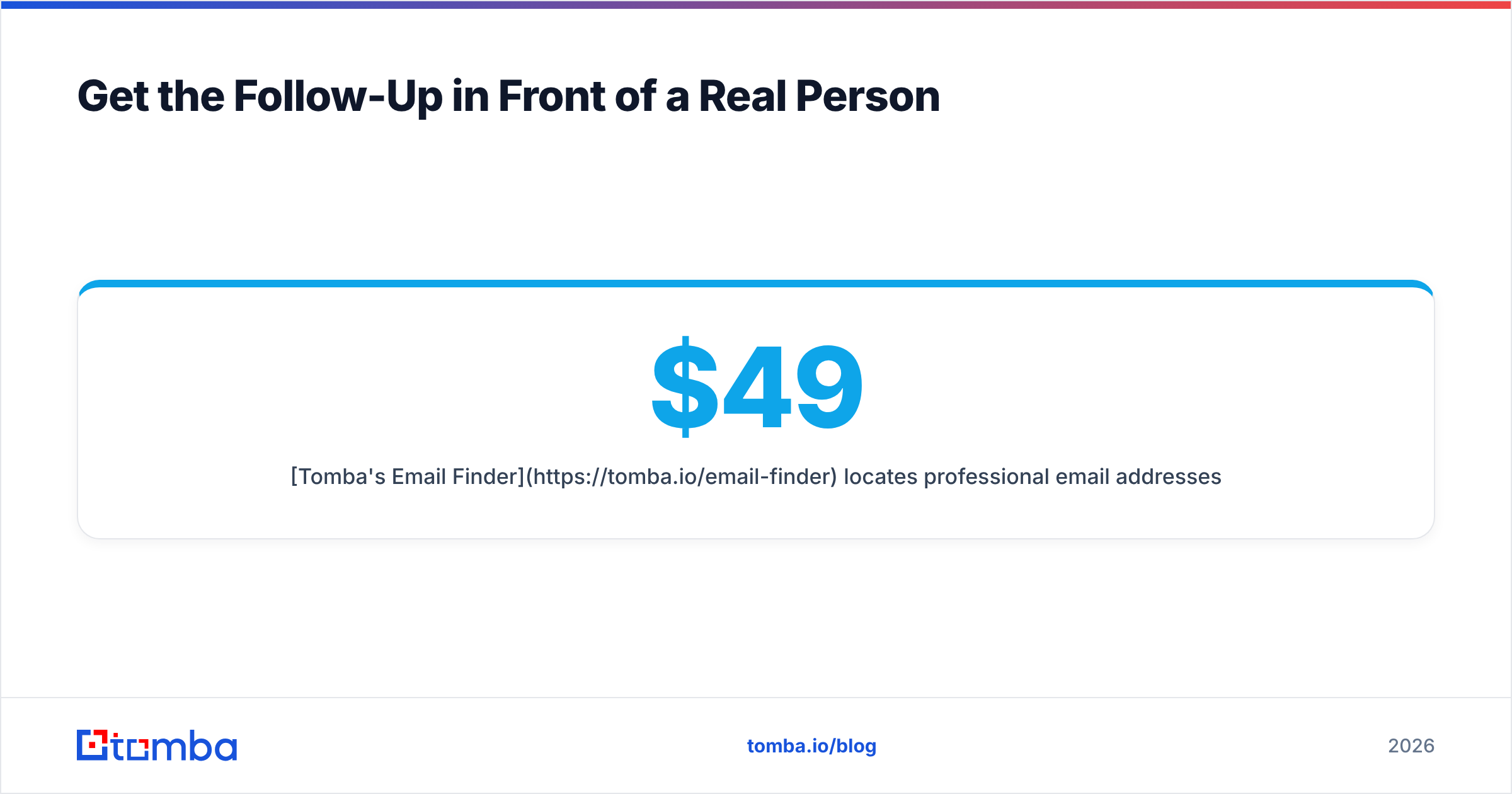
Tomba's Email Finder locates professional email addresses by name, company, or domain, and returns a confidence score so you know what you're sending into. The free tier gives you 25 searches a month to test it against your own stalled deals; paid plans start at $49/mo on Starter, with Growth at $99/mo and Pro at $249/mo — full Tomba pricing is public. If you're re-engaging a large dormant list, the bulk tools and the Tomba API handle verification at volume so your follow-up cadence starts from a clean base.
Fix the address, then fix the copy. In that order.
Related guides#
Ready to find emails that actually work?
Join 150,000+ professionals who stopped guessing and started sending. Free credits on signup — no credit card required.
Get the Tomba newsletter
Practical outbound tactics and product updates — once every two weeks.
About the author