Follow Up Email For Update: Templates That Get Replies in 2026
Most status-check emails get ignored because they ask the recipient to do work. Here are the timing rules, templates, and sequence structures that actually pull replies out of silent threads.
TL;DR
- A follow up email for update fails when it asks the recipient to produce information instead of just confirming something. Flip the ask: propose a status, let them correct it.
- The highest-response window is 3–4 business days after the last touch for active deals, 7–10 days for cold or dormant threads.
- Never send a bare "just checking in." Every follow-up needs a new unit of value: a date, a document, a data point, or an exit.
- Sequences of 4–6 touches over 3 weeks outperform 2-touch sequences by a wide margin — most replies land on touch 3 and later.
- Bad addresses look identical to silence. Verify the address before you blame the copy.
What Is a Follow Up Email for Update?#
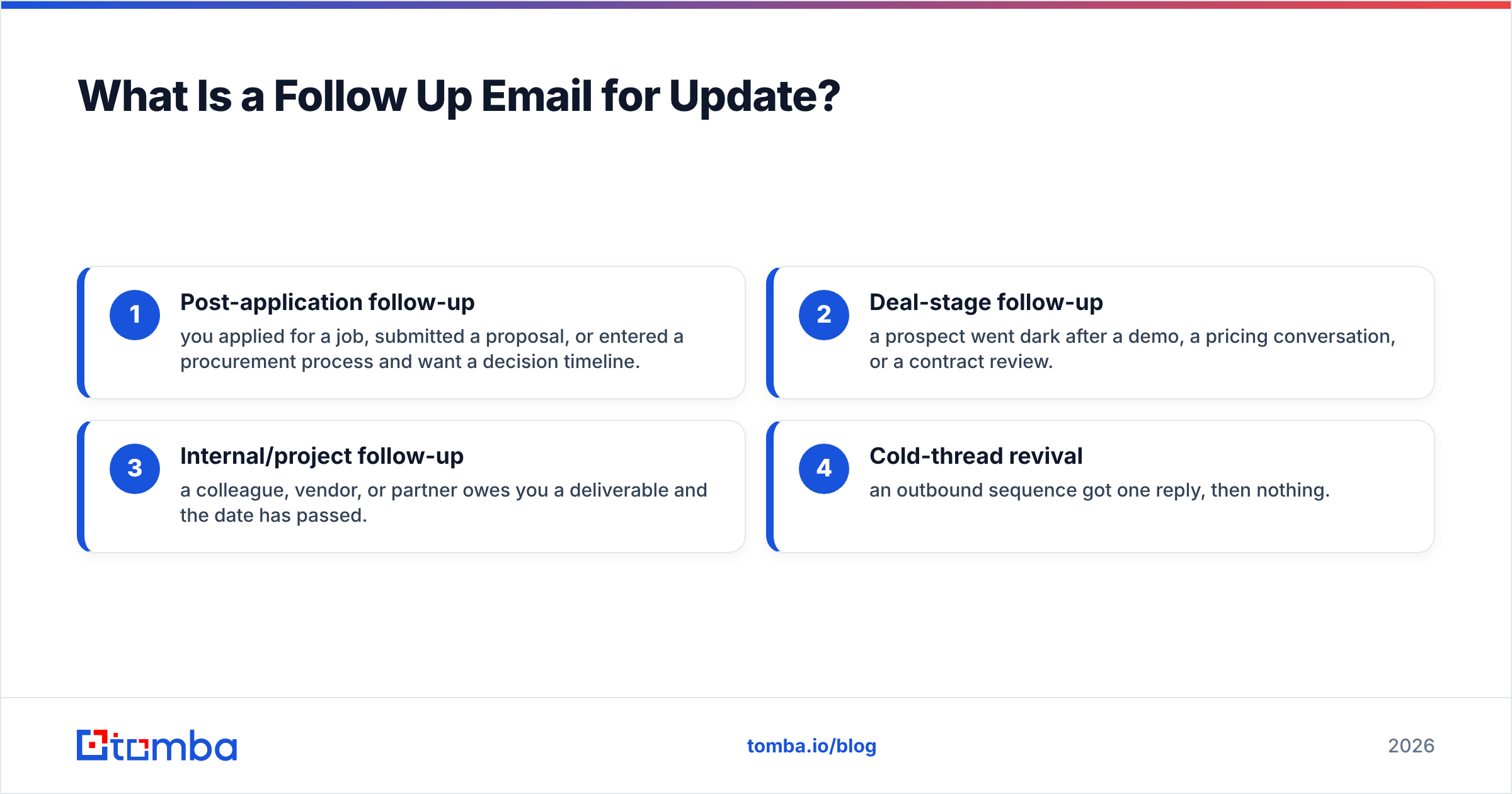
A follow up email for update is any message you send to re-open a thread that has gone quiet, asking where things stand. It shows up in four distinct situations, and treating them as one thing is the reason most of them get ignored.
The four situations:
- Post-application follow-up — you applied for a job, submitted a proposal, or entered a procurement process and want a decision timeline.
- Deal-stage follow-up — a prospect went dark after a demo, a pricing conversation, or a contract review.
- Internal/project follow-up — a colleague, vendor, or partner owes you a deliverable and the date has passed.
- Cold-thread revival — an outbound sequence got one reply, then nothing.
Each one has a different power balance. In a post-application follow-up you have almost no leverage, so brevity and grace matter more than persuasion. In a deal-stage follow-up you have something the other side wanted, so you can reasonably re-anchor on the outcome. In an internal follow-up you can be direct about the missed date. In a cold-thread revival you have essentially zero standing and must earn attention from scratch.
The mistake nearly everyone makes is writing the same email for all four. "Hi, just following up to see if there's any update on this?" is technically valid in all four contexts, and effective in none of them. It puts the entire cognitive load on the recipient: they have to remember who you are, reconstruct the thread, decide what the status actually is, and compose a reply. That's four jobs. Most people defer all four indefinitely.
Why Do Most Follow Up Emails Get Ignored?#
Because silence is usually not rejection — it's deprioritization, and vague emails do nothing to change the priority.
Here's what's actually happening on the other side. Your email lands in an inbox that receives somewhere between 100 and 300 messages a day for a typical B2B manager. Your recipient triages in roughly two seconds per message. A message that requires thought but promises no immediate benefit gets archived-for-later, which is functionally the same as deleted.
The specific failure modes:
- The ask is open-ended. "Any update?" requires the recipient to generate content. "Are we still on track for the March 3 kickoff, or should I move it?" requires a yes/no.
- There's no new information. If your follow-up adds nothing that wasn't in the previous email, you've proven the thread is low-stakes. Every bump without value teaches the recipient that ignoring you costs nothing.
- You're following up with the wrong person. Champions leave, roles change, and the person who owned your project six weeks ago may no longer be there. If two follow-ups get no response, the problem is often routing, not copy.
- The email never arrived. Deliverability failures and bad addresses are invisible from your side. A bounced-but-not-hard-bounced message, a spam-foldered message, and a genuinely ignored message all look identical in your sent folder.
- The subject line reopens a dead thread. Replying in-thread with "Re: Re: Re:" signals "this is the same thing you already decided to ignore."
That last invisible category is worth taking seriously. Before you rewrite your copy for the fourth time, confirm that the address is real and the domain accepts mail. Running the list through an email verifier takes minutes and eliminates an entire class of false conclusions. Catch-all domains are especially deceptive — they accept everything and deliver only some of it, which is why a dedicated catch-all verifier matters for enterprise targets.
When Should You Send a Follow Up Email for Update?#
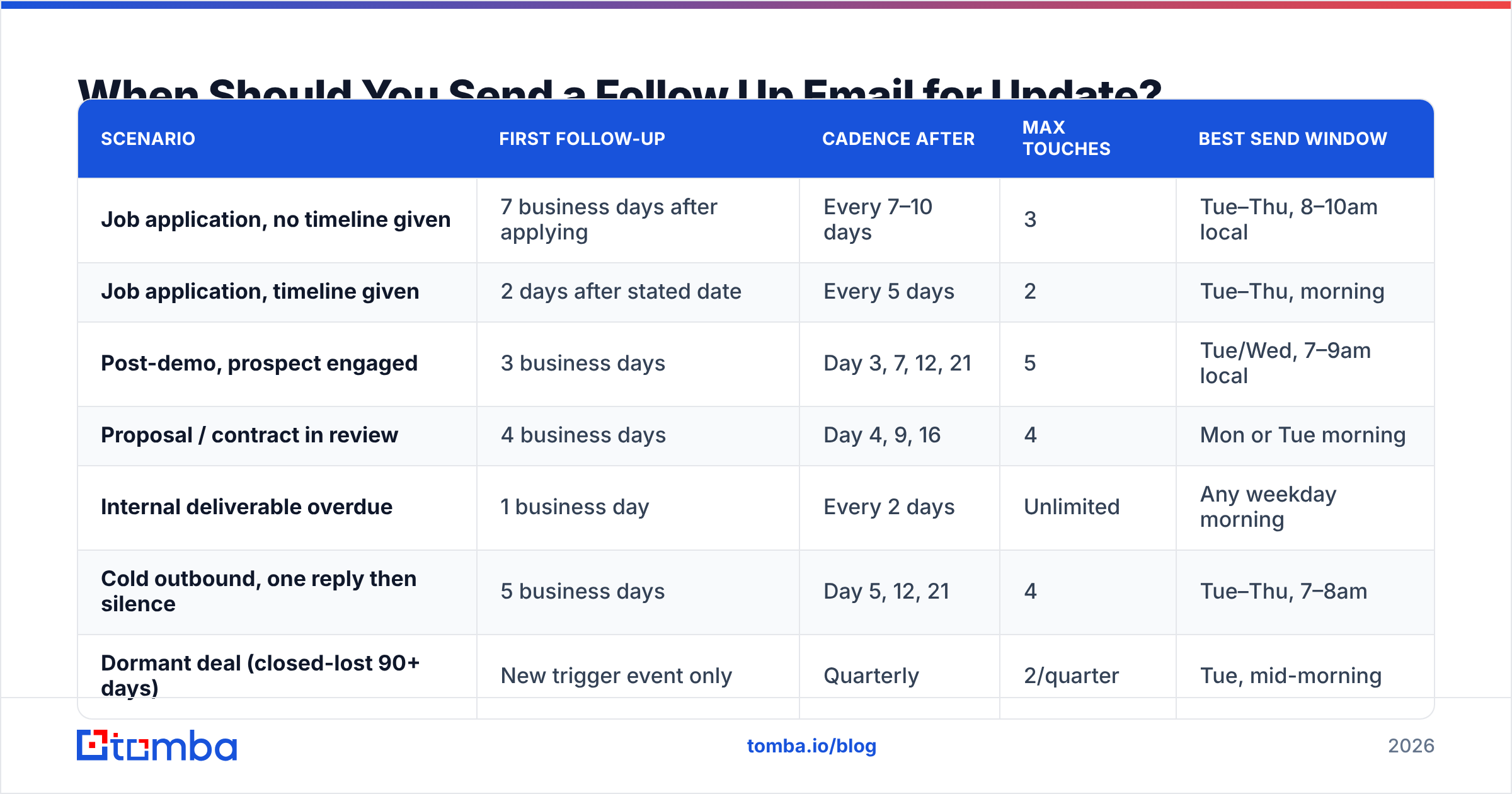
Timing depends on the thread type, not on a universal rule. Here's the framework that holds up across contexts:
| Scenario | First follow-up | Cadence after | Max touches | Best send window |
|---|---|---|---|---|
| Job application, no timeline given | 7 business days after applying | Every 7–10 days | 3 | Tue–Thu, 8–10am local |
| Job application, timeline given | 2 days after stated date | Every 5 days | 2 | Tue–Thu, morning |
| Post-demo, prospect engaged | 3 business days | Day 3, 7, 12, 21 | 5 | Tue/Wed, 7–9am local |
| Proposal / contract in review | 4 business days | Day 4, 9, 16 | 4 | Mon or Tue morning |
| Internal deliverable overdue | 1 business day | Every 2 days | Unlimited | Any weekday morning |
| Cold outbound, one reply then silence | 5 business days | Day 5, 12, 21 | 4 | Tue–Thu, 7–8am |
| Dormant deal (closed-lost 90+ days) | New trigger event only | Quarterly | 2/quarter | Tue, mid-morning |
Two rules cut across all of these. First, never follow up on a Friday afternoon or a Monday before 9am — Friday messages get buried by weekend accumulation, and Monday-morning inboxes are triaged brutally. Second, stop guessing at "business days" across time zones. If your prospect is in Singapore and you're in Chicago, your Tuesday 9am is their Tuesday 10pm. Send according to their clock.
The other timing question people get wrong is how many touches to plan. Two-touch sequences dramatically underperform. Data from outreach platforms consistently shows that a meaningful share of replies arrive on the third message or later, which means anyone stopping at touch two is discarding a large slice of their pipeline. G2's sales engagement category reviews reflect the same pattern in how vendors position multi-step sequences as table stakes.
What Should a Follow Up Email for Update Actually Say?#
Four components, in this order. Miss any one and reply rate drops.
- Context anchor (one line). Remind them what this is about in under 12 words. "Following our March 3 call about the EU data migration —" Not a paragraph of recap.
- New value (one to two lines). Give them something they didn't have. A relevant case study, a competitor's announcement, an updated number, a shortened timeline, a piece of your own work. This is the component that separates a follow-up from a nag.
- A specific, binary ask. Propose the status rather than requesting it. "I'm assuming this slipped to Q3 — correct?" is easier to answer than "what's the status?"
- A graceful exit. Explicitly permit a no. "If this isn't a priority right now, tell me and I'll stop emailing" resolves threads and, paradoxically, produces a high volume of replies.
The exit line is the most underused of the four. People fear it because it invites rejection. But an explicit no is worth far more than an indefinite maybe — it clears your pipeline, protects your sender reputation by reducing sends to unengaged addresses, and frequently triggers a "no wait, we're still interested" response.
Which Follow Up Email Templates Work Best?#
Nine templates, mapped to the scenarios above. Adapt the specifics; keep the structure.
1. Post-application, first follow-up
Subject: Senior RevOps role — quick timeline question
Hi [Name],
I applied for the Senior RevOps position on [date] and wanted to check whether you've set a timeline for first-round conversations.
Since applying I shipped a lead-routing rebuild that cut our SLA breach rate from 18% to 4% — happy to walk through it if useful.
If the role is filled or on hold, no problem at all — just let me know and I'll stop checking in.
[Name]
2. Post-demo, prospect went quiet
Subject: Assuming the [Project] eval slipped to Q3?
[Name] — after our demo you mentioned wanting to compare against [Competitor] before deciding. I'm assuming that eval slipped past the original date.
One thing that came up since: [specific, relevant fact].
Should I check back in July, or is this off the table?
3. Proposal in legal review
Subject: Anything blocking on our side for the [Company] MSA?
Hi [Name] — the MSA went to your legal team on [date]. Is there anything we can pre-answer to speed it up? We've handled [common objection] for three other customers in your industry and can send the redline language that worked.
4. Internal deliverable overdue
Subject: [Deliverable] — moving the date?
Hey [Name], the [deliverable] was due [date] and I haven't seen it land. Do you want to move the date to [new date], or is something blocking?
5. The "closing the loop" email
Subject: Closing the loop on [Topic]
[Name] — I've reached out a few times about [topic] and haven't heard back, which usually means it's not a priority. I'm going to stop here.
If that changes, my line's open. Genuinely good luck with [initiative].
6. Trigger-based revival
Subject: Saw the [Series B / new office / acquisition]
Congrats on [event]. Last time we talked, [objection] was the blocker. That usually changes after a raise — worth a 15-minute revisit?
7. Multi-thread escalation
Subject: Right person for [topic]?
Hi [Name] — I've been working with [Colleague] on [topic] and the thread's gone quiet. Are they still the right owner, or should I be talking to someone else on your team?
8. The single-question email
Subject: One question
Is [Project] still happening this year? Yes or no is a complete answer.
9. Value-first, no ask
Subject: This might be relevant to the [Project] thing
[Name] — not chasing a reply, just saw [resource] and it maps directly to the [challenge] you described. Link's here. Ignore if not useful.
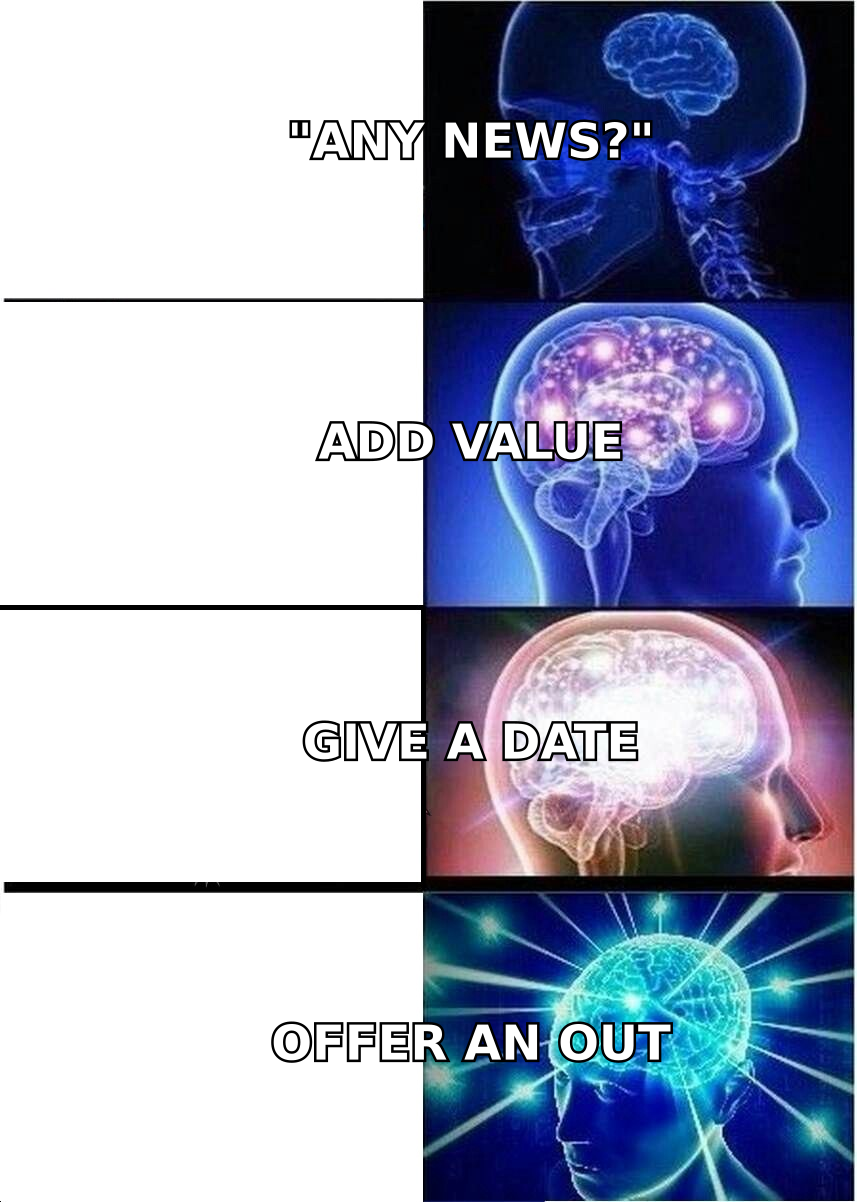
Template 9 is worth building into every sequence. Sending something with no ask attached resets the relationship dynamic and makes your next ask land differently. If you need help generating variants at scale, the subject line generator and cold email AI tools handle the mechanical part.
How Do Follow-Up Emails Compare to Other Channels?#
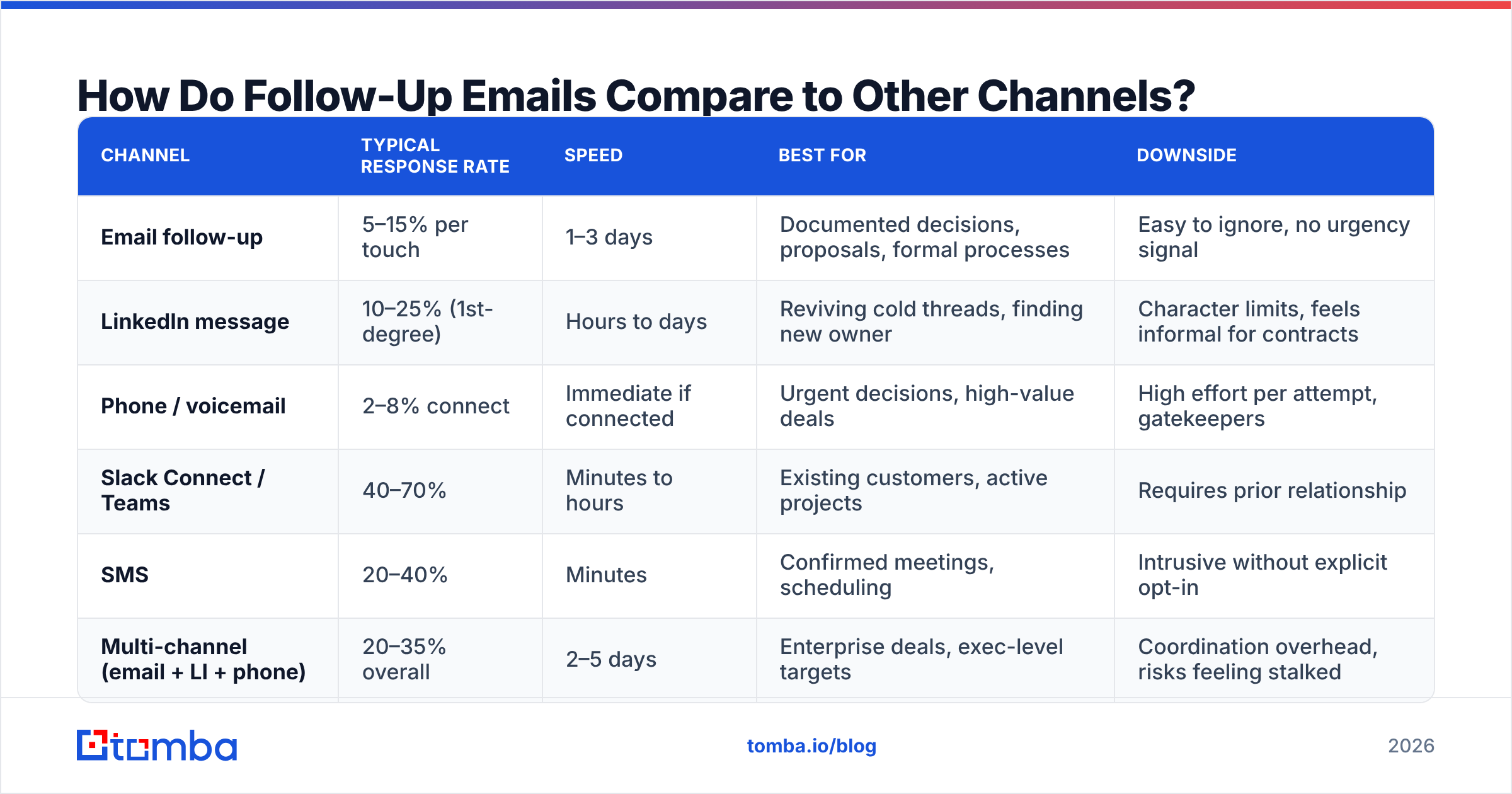
Email isn't always the right vehicle for a status check. Here's an honest comparison across the channels most B2B teams have available.
| Channel | Typical response rate | Speed | Best for | Downside |
|---|---|---|---|---|
| Email follow-up | 5–15% per touch | 1–3 days | Documented decisions, proposals, formal processes | Easy to ignore, no urgency signal |
| LinkedIn message | 10–25% (1st-degree) | Hours to days | Reviving cold threads, finding new owner | Character limits, feels informal for contracts |
| Phone / voicemail | 2–8% connect | Immediate if connected | Urgent decisions, high-value deals | High effort per attempt, gatekeepers |
| Slack Connect / Teams | 40–70% | Minutes to hours | Existing customers, active projects | Requires prior relationship |
| SMS | 20–40% | Minutes | Confirmed meetings, scheduling | Intrusive without explicit opt-in |
| Multi-channel (email + LI + phone) | 20–35% overall | 2–5 days | Enterprise deals, exec-level targets | Coordination overhead, risks feeling stalked |
The pattern: email for the record, other channels for the nudge. A common high-performing sequence is email → LinkedIn view → email → LinkedIn message → call → breakup email. The channel switch itself is a signal that this matters to you.
For that to work you need more than an email address. A phone finder covers the call leg, and LinkedIn finder bridges profile-to-inbox when you only have one side of the identity. Teams running this at volume typically pull contacts through a bulk email finder rather than one at a time.
Worth noting: multi-channel discipline matters more than multi-channel volume. HubSpot's sales research has repeatedly found that persistence beyond a reasonable threshold damages brand perception more than it recovers pipeline. Six touches across three weeks is persistence. Twenty touches across three weeks is harassment, and it will show up in your spam complaint rate.
What Kills Follow-Up Performance Behind the Scenes?#
Copy is the visible variable. These are the invisible ones, and they usually matter more.
- Address decay. B2B contact data goes stale at roughly 25–30% per year through job changes alone. A follow-up sequence built on a six-month-old list is sending a meaningful fraction of its volume into the void.
- Authentication gaps. Missing or misconfigured SPF record entries, absent DKIM, or a non-enforcing DMARC policy will route your follow-ups to spam regardless of how good the copy is. Google and Yahoo's bulk-sender requirements made this non-negotiable.
- Thread fatigue. After three replies in the same thread with no response, the thread itself is contaminated. Start a fresh subject line.
- Volume-per-domain. Sending 200 follow-ups a day from a single domain with no warmup is a deliverability problem, not a copy problem.
- No suppression logic. If someone told you no in March and your sequence re-enrolls them in June, you've torched the relationship for a marginal send.
Run a spam checker against your templates before a sequence goes live, and confirm your authentication with an SPF checker. Both take under five minutes and prevent the most common silent failures. Google's own bulk sender guidelines remain the clearest reference on what the major mailbox providers actually enforce.
How Do You Measure Whether Your Follow-Ups Are Working?#
Track four numbers per sequence step, not just aggregate reply rate:
- Reply rate by touch number. If touch 1 outperforms touch 3 by a large margin, your later messages have no new value. If touch 3 wins, your first message is too vague.
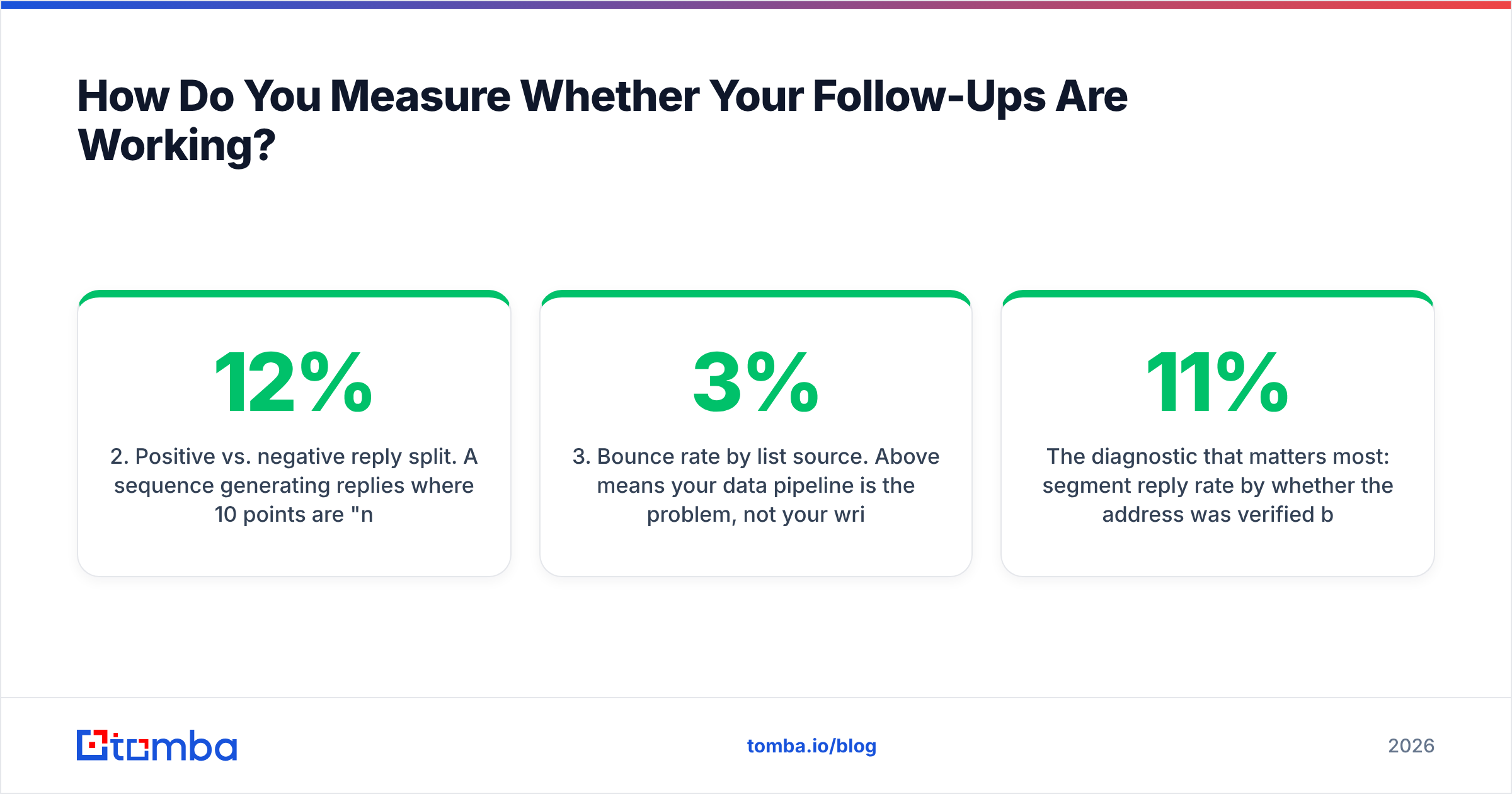
- Positive vs. negative reply split. A sequence generating 12% replies where 10 points are "no thanks" is still working — you're clearing pipeline. A sequence with 12% replies and no negatives is probably too soft to produce decisions.
- Bounce rate by list source. Above 3% means your data pipeline is the problem, not your writing.
- Time-to-first-reply. If replies cluster on touch 4 at day 16, your cadence is too slow — compress it.
The diagnostic that matters most: segment reply rate by whether the address was verified before sending. If verified addresses reply at 11% and unverified at 4%, the gap isn't persuasion — it's delivery.
Where Should You Start?#
Rewrite your worst-performing follow-up first. Take the message you send most often, and check it against the four components: context anchor, new value, binary ask, graceful exit. Most "just checking in" emails are missing three of four.
Then fix the input. The best follow-up sequence in the world sends into a void if the address is wrong or the owner has changed roles. Use Tomba's Email Finder to source and re-confirm the addresses behind your sequences — it covers domain-level discovery, pattern detection, and verification in one pass, and the free tier gives you 25 searches a month to test it against your own list before committing. Paid plans start at $49/mo, with full Tomba pricing laid out if you need bulk or API volume. Get the addresses right, then let the copy do its job.
Related guides#
Ready to find emails that actually work?
Join 150,000+ professionals who stopped guessing and started sending. Free credits on signup — no credit card required.
Get the Tomba newsletter
Practical outbound tactics and product updates — once every two weeks.
About the author