Follow Up Email Professional: Templates and Timing for 2026
Most deals die in the follow-up, not the first email. Here are the sequences, timing windows, and templates that actually get replies in 2026 — plus what to stop sending.
TL;DR
- A professional follow up email is not a reminder — it's a second pitch with a new reason to reply. "Just bumping this" converts at roughly a third the rate of a value-add follow-up.
- Send follow-up 1 on day 3, not day 1. The 48–72 hour window balances recall against annoyance.
- Four to six touches over 18–21 days captures the bulk of replies. Most senders quit after two and leave the majority of their pipeline on the table.
- Never reply-all a follow-up into a thread the prospect never opened. Break the thread on touch 3 with a new subject line.
- Bad data ruins good sequences. If 18% of your list bounces, no template saves you — verify before you sequence.
What is a professional follow up email?#
A professional follow up email is a short, purposeful message sent after an unanswered first contact, a meeting, an interview, a proposal, or a networking conversation. Its job is to move a specific decision forward — not to check in.
The distinction matters because most people write follow-ups as social gestures. They apologize for the intrusion, restate their original ask verbatim, and close with "let me know your thoughts." That message gives the recipient nothing new to react to, so they don't react.
Think of it like a second knock on a door. The first knock says "someone is here." The second knock, if it's identical, says the same thing louder — irritating, not informative. A useful second knock adds information: "It's the plumber, about the leak downstairs." Technically, a good follow-up changes the information payload, not just the volume.
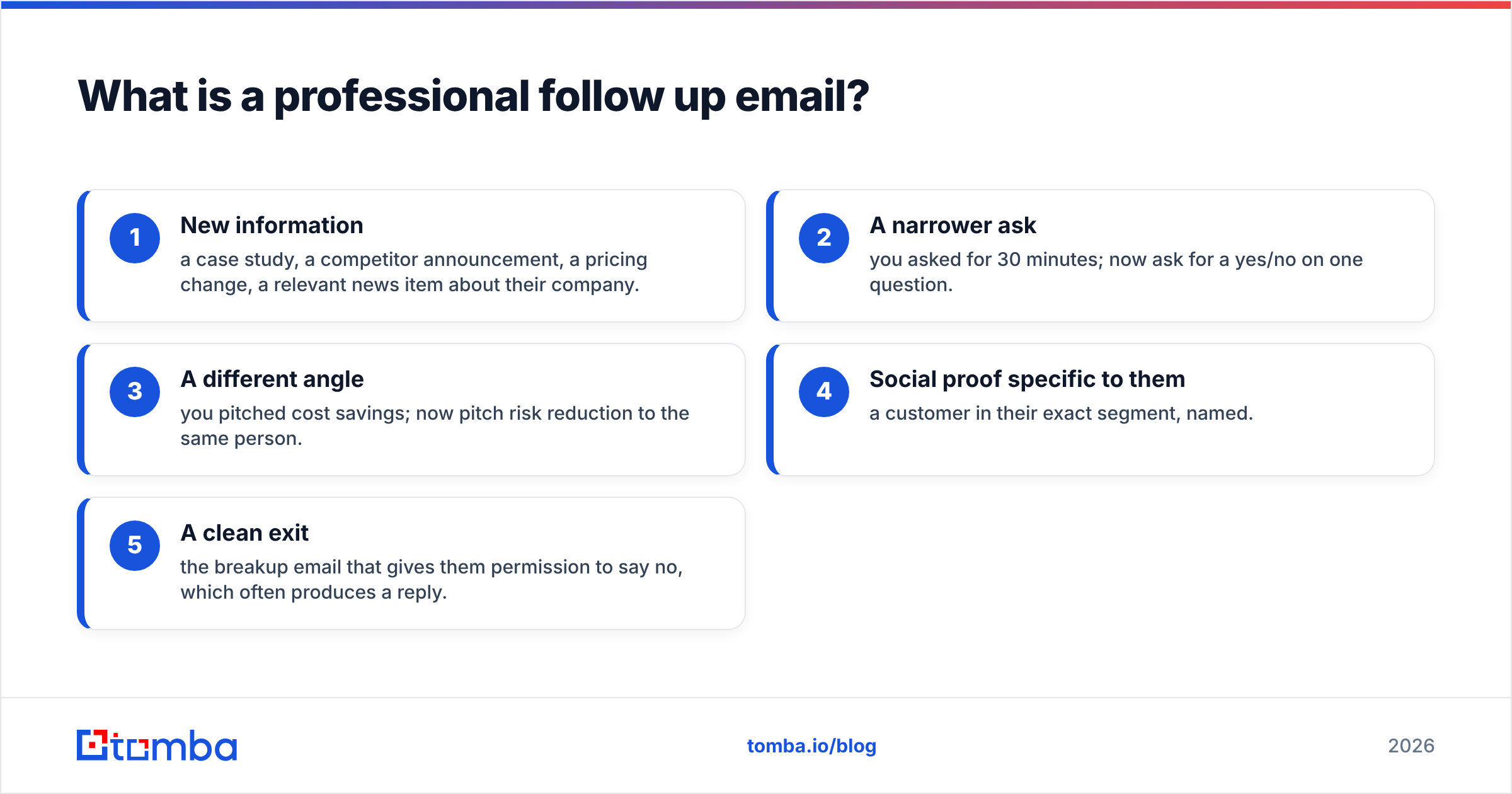
Every effective follow-up carries at least one of five payloads:
- New information — a case study, a competitor announcement, a pricing change, a relevant news item about their company.
- A narrower ask — you asked for 30 minutes; now ask for a yes/no on one question.
- A different angle — you pitched cost savings; now pitch risk reduction to the same person.
- Social proof specific to them — a customer in their exact segment, named.
- A clean exit — the breakup email that gives them permission to say no, which often produces a reply.
If your draft contains none of the five, delete it and start over. That is the single highest-leverage edit in this entire guide.
When should you send each follow up email?#
Timing is where most sequences break. Send too fast and you look anxious; send too slow and the context evaporates. The windows below reflect what most B2B senders converge on after enough volume to see the pattern.
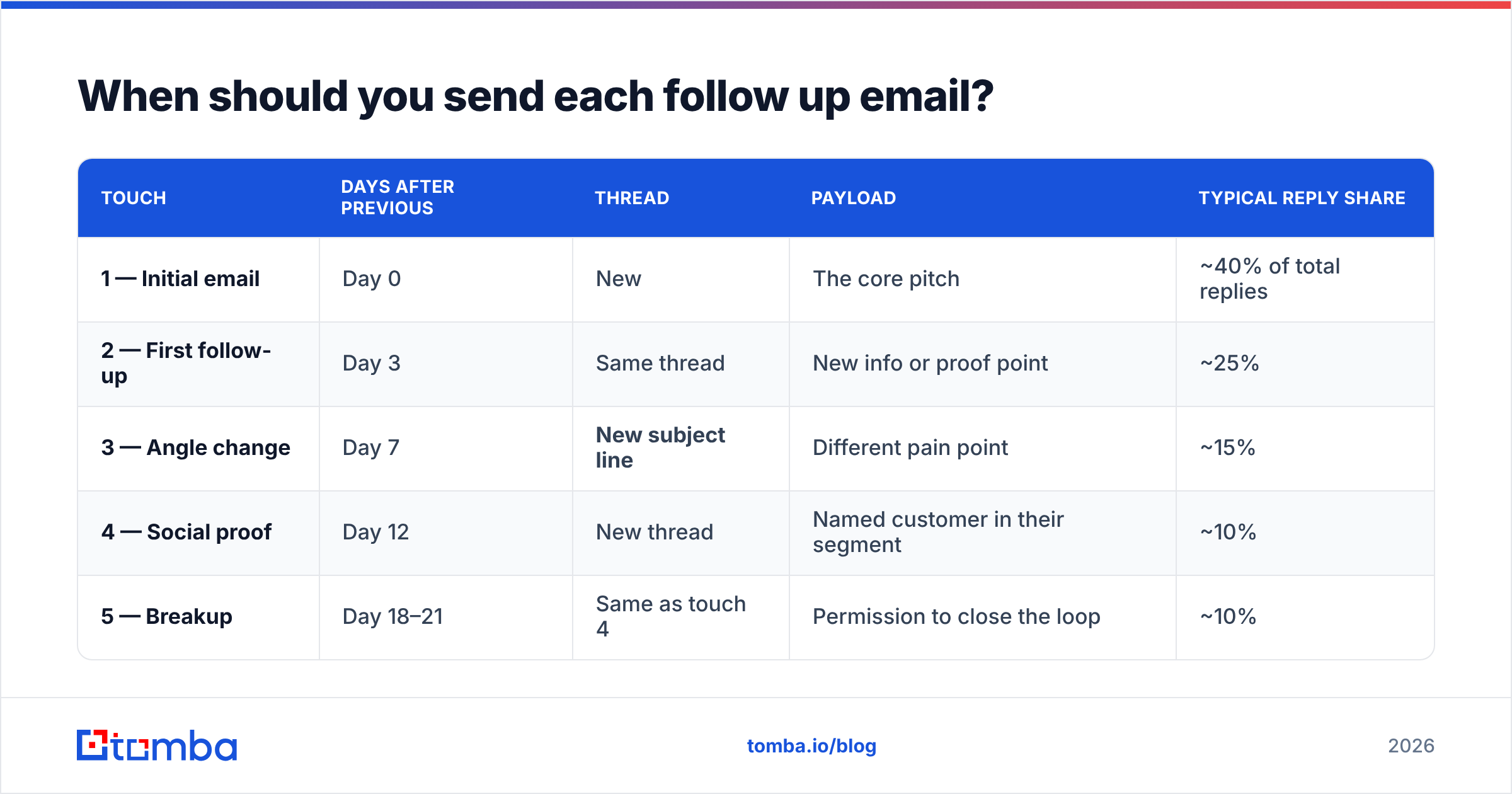
| Touch | Days after previous | Thread | Payload | Typical reply share |
|---|---|---|---|---|
| 1 — Initial email | Day 0 | New | The core pitch | ~40% of total replies |
| 2 — First follow-up | Day 3 | Same thread | New info or proof point | ~25% |
| 3 — Angle change | Day 7 | New subject line | Different pain point | ~15% |
| 4 — Social proof | Day 12 | New thread | Named customer in their segment | ~10% |
| 5 — Breakup | Day 18–21 | Same as touch 4 | Permission to close the loop | ~10% |
Two rules do most of the work here. First, widen the gap as the sequence progresses — day 3, then 4 days, then 5, then 6. Compressed sequences read as automated because they are. Second, break the thread at touch 3. If someone ignored two messages in one thread, a third message in that same thread is buried under two things they already decided not to read.
Timing by scenario differs from cold outreach:
- After an interview: within 24 hours, always. This is the one case where speed beats spacing.
- After a demo or discovery call: same day if you promised materials, otherwise next morning.
- After a proposal: 3 business days, then weekly. Proposals sit in approval queues; weekly is polite, daily is desperate.
- After a conference meeting: within 48 hours, while your face is still attached to your name.
- After a referral introduction: within 24 hours, and reply to the intro thread so the referrer sees you moved.
Why do most follow up emails get ignored?#
Four reasons, in rough order of impact.
The email never arrived. Before you blame your copy, check your infrastructure. Missing authentication, a warmed-up-yesterday domain, or a list full of dead addresses will bury a perfect message. Run your sending domain through an SPF checker and confirm your DMARC policy is published. Google and Yahoo's bulk sender requirements — documented in Google's own sender guidelines — made authentication non-negotiable, and enforcement has only tightened since.
The address was wrong. Guessed patterns like first.last@company.com are right maybe six times in ten depending on the company. Every bounce degrades your sender reputation, which then depresses inbox placement for the addresses that were valid. Verified contact data is not a nice-to-have in a follow-up sequence; it's the precondition.
The message added nothing. "Following up on my last email" is a sentence that costs the reader time and returns zero value. Compare:
Bad: "Hi Dana — just following up on my email from Tuesday. Let me know if you'd like to chat."
Better: "Hi Dana — Gartner put out a note last week on procurement cycle compression that lines up with what you mentioned about Q4 renewals. Two-line summary below. Worth 15 minutes?"
The second version can be ignored, but it can't be ignored for free — the reader gives up something by not reading.
The ask was too big. "Do you have 30 minutes this week?" asks for a calendar commitment from someone who hasn't decided you're worth 30 seconds. Replace it with a question they can answer in four words: "Is inventory forecasting owned by you or by Ops?"
What does a good follow up email template look like?#
Templates are scaffolding, not scripts. Rewrite the specifics every time — the structure is what you keep.
Template 1 — Value-add follow-up (touch 2, day 3)
Subject: (reply in existing thread)
Hi {First},
One thing I left out: {Competitor or peer company} moved off {legacy approach} last quarter and cut {specific metric} by {number}. Their setup looked a lot like yours.
Short writeup here if it's useful: {link}
Still worth a conversation, or is this not a priority this quarter?
{Your name}
Template 2 — Angle change (touch 3, day 7, new subject)
Subject: {Their company} + {specific pain, 3-4 words}
Hi {First},
I came at this from a cost angle before, which may not be your problem. The teams I talk to at {their segment} companies usually care more about {alternative pain} — specifically {concrete symptom}.
If that's closer to the mark, I can send the 2-minute version. If not, tell me and I'll stop.
{Your name}
Template 3 — Post-interview follow-up (within 24 hours)
Subject: Thanks — {role} conversation
Hi {First},
Thanks for the time today. The part about {specific project they mentioned} stuck with me — I ran into the same constraint at {your company} and solved it by {one-sentence approach}.
Happy to send the details if it's relevant to how you're scoping the role. Either way, I'm glad we talked.
{Your name}
Template 4 — Breakup (touch 5, day 18–21)
Subject: (reply in touch-4 thread)
Hi {First},
I've reached out a few times without landing at the right moment, so I'll close the loop here.
If {problem} moves up the list later this year, reply to this and I'll pick it back up. Otherwise, no further emails from me.
{Your name}
The breakup email is the highest-reply-rate message in most sequences, and the reason is boring: loss aversion. People who ignored four value-add emails will reply to one that threatens to stop.
Before you send any of these at volume, run the copy through a spam checker. Words are rarely the issue in 2026 — link density, image-to-text ratio, and unauthenticated domains are — but a 30-second check is cheaper than a burned domain.
How many follow-ups is too many?#
Four to six touches over three weeks is the working range for cold B2B outreach. Below four, you're leaving the majority of your replies uncollected. Above six, incremental replies flatten while complaint rates climb, and complaints are what actually damage you.
Context shifts the number:
- Warm inbound lead: 3 touches over 10 days. They raised their hand; heavy sequencing insults that.
- Cold outbound, enterprise: 5–6 touches, 21–28 days. Long buying cycles, multiple stakeholders, more legitimate reasons for silence.
- Cold outbound, SMB: 4 touches, 14 days. Faster decisions, shorter attention.
- Post-proposal: unlimited, but weekly and always with a status question, not a pitch.
- Job application: 2 touches, maximum. One at day 7, one at day 14. Then stop.
Stop immediately on any of these signals: an explicit "no," an out-of-office with a departure date, a bounce, an unsubscribe, or a reply from someone else at the company redirecting you. Ignoring any of those is how you end up on a blocklist — and how your company's domain follows you there.
Which tools help you send better follow-ups?#
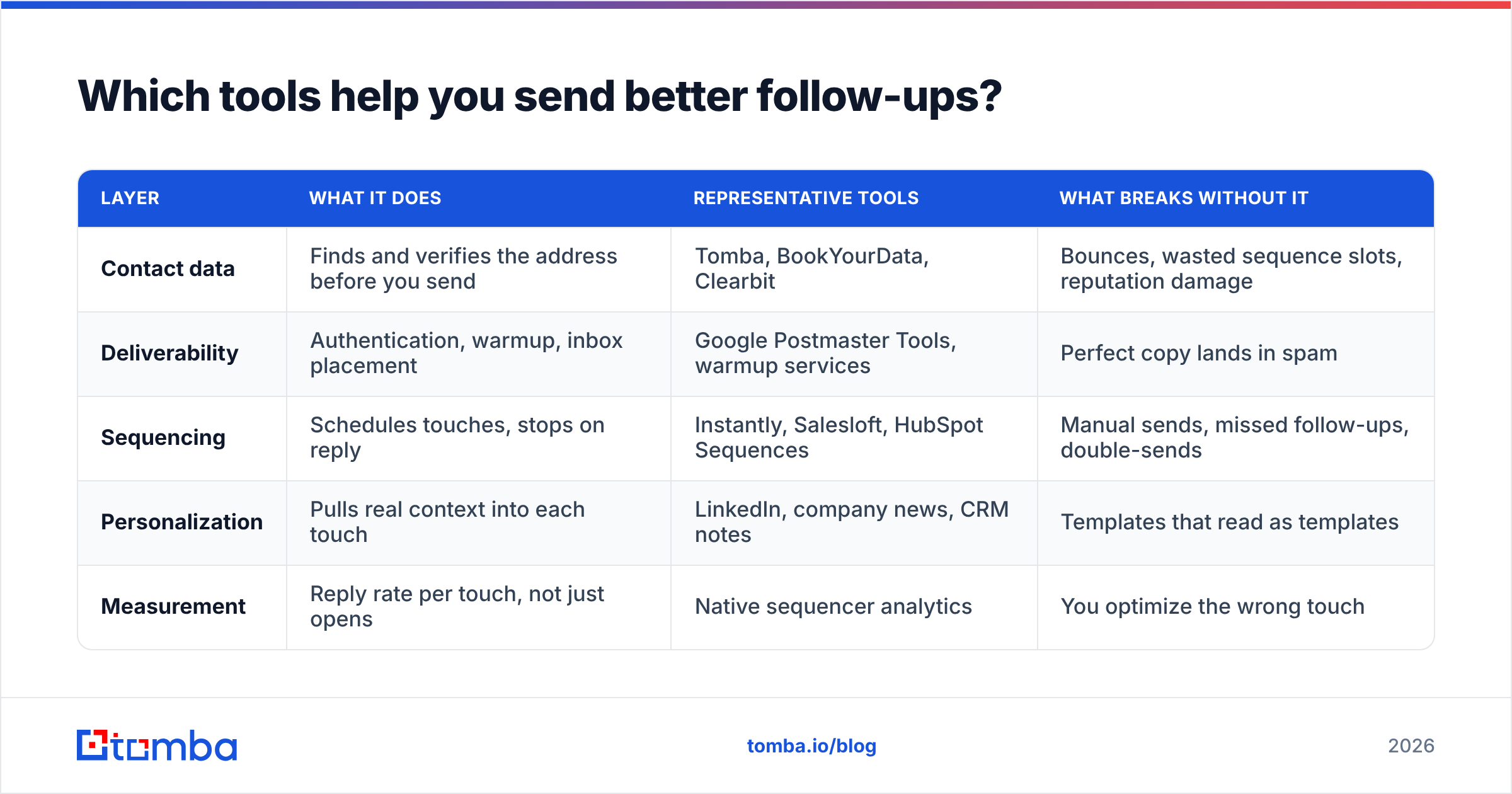
Follow-up quality depends on three separate layers: the contact data, the sending infrastructure, and the sequencing engine. Confusing them is why teams buy the wrong tool.
| Layer | What it does | Representative tools | What breaks without it |
|---|---|---|---|
| Contact data | Finds and verifies the address before you send | Tomba, BookYourData, Clearbit | Bounces, wasted sequence slots, reputation damage |
| Deliverability | Authentication, warmup, inbox placement | Google Postmaster Tools, warmup services | Perfect copy lands in spam |
| Sequencing | Schedules touches, stops on reply | Instantly, Salesloft, HubSpot Sequences | Manual sends, missed follow-ups, double-sends |
| Personalization | Pulls real context into each touch | LinkedIn, company news, CRM notes | Templates that read as templates |
| Measurement | Reply rate per touch, not just opens | Native sequencer analytics | You optimize the wrong touch |
A common mistake is buying a sequencer first. A sequencer multiplies whatever you feed it — including a list where a fifth of the addresses don't exist. Start at the data layer. Use a domain search to map who actually works at a target account, then run the results through an email verifier before anything enters a sequence. For accounts with catch-all servers — where standard verification returns "unknown" — a dedicated catch-all verifier is the difference between sending blind and sending informed.
On pricing, most data tools cluster in the same range. Tomba pricing starts with a free tier at 25 searches per month, then Starter at $49/mo, Growth at $99/mo, and Pro at $249/mo, with Enterprise custom. BookYourData takes a different route with pay-as-you-go credit packs, which suits teams doing occasional list builds rather than continuous prospecting. Neither approach is wrong — they solve different purchasing patterns. Check current listings on G2 before committing to an annual plan; this category moves fast.
How do you measure follow up email performance?#
Measure replies per touch, not aggregate open rate. Apple Mail Privacy Protection and similar features made open tracking directionally useless years ago — you're now measuring proxy loads, not humans.
Track four numbers:
- Reply rate by touch number. If touch 4 outperforms touch 2, your early messages are weak, not your persistence.
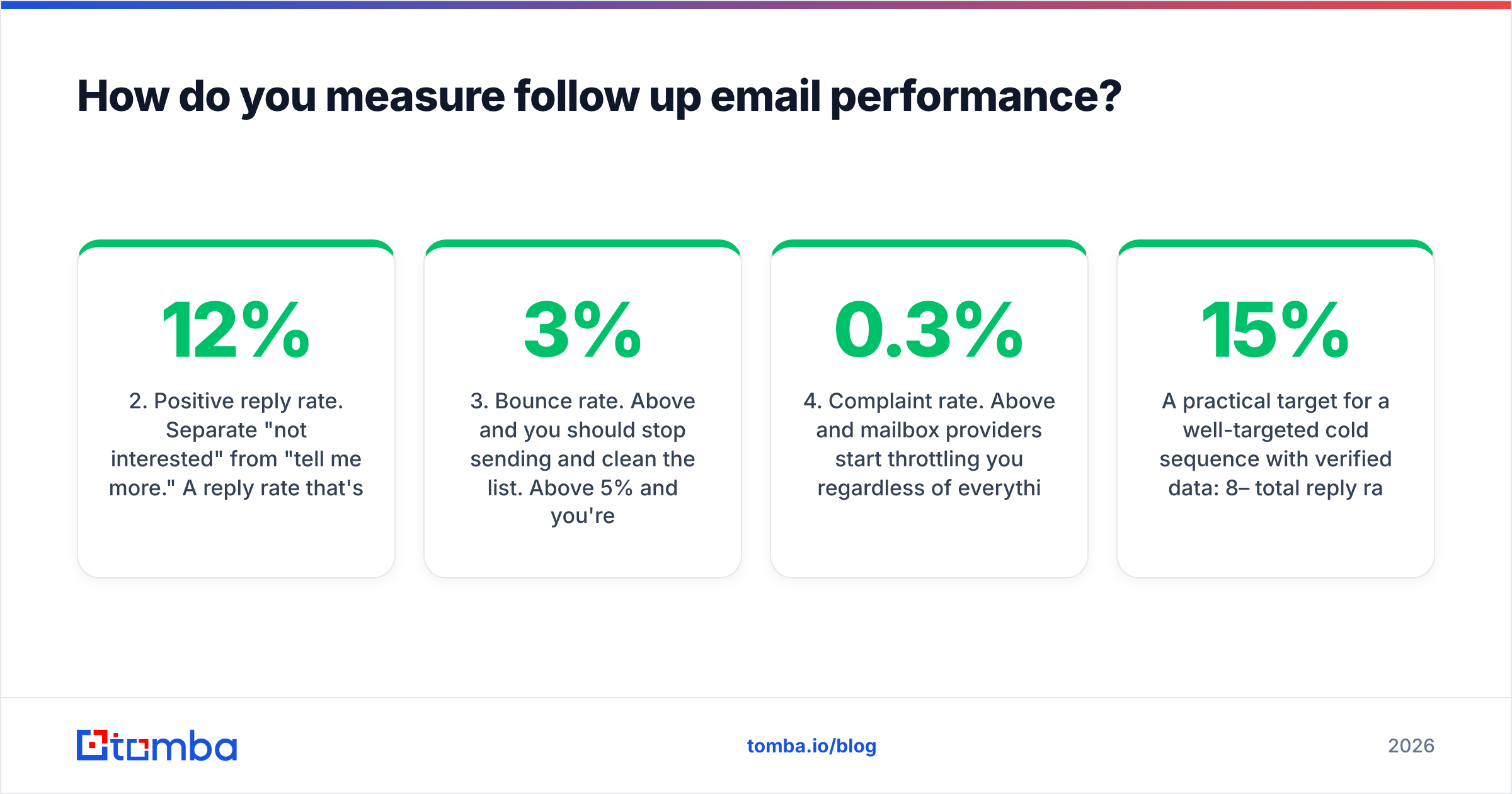
- Positive reply rate. Separate "not interested" from "tell me more." A 12% reply rate that's all rejections is a targeting problem, not a copy problem.
- Bounce rate. Above 3% and you should stop sending and clean the list. Above 5% and you're actively damaging deliverability.
- Complaint rate. Above 0.3% and mailbox providers start throttling you regardless of everything else.
Then run one variable at a time. Change subject lines for two weeks, hold everything else constant, read the delta. Changing timing, copy, and list quality in the same sprint teaches you nothing.
A practical target for a well-targeted cold sequence with verified data: 8–15% total reply rate, 3–5% positive. Warm or referral-sourced sequences run considerably higher. If you're under 3% total with clean data, the problem is almost always targeting — you're emailing people who genuinely don't have the problem you solve. No amount of follow-up discipline fixes a list of the wrong people. For a broader view of what moves the number, the response rate benchmarks are a reasonable sanity check.
What should you never do in a follow up email?#
- Never send "just checking in." It's the clearest possible signal that you had nothing to say but sent anyway.
- Never guilt the recipient. "I noticed you opened my email but didn't respond" is surveillance, not persistence, and it reads that way.
- Never send more than one follow-up per thread without changing the subject. Buried threads stay buried.
- Never attach a file on a cold follow-up. Attachments from unknown senders trigger filters and suspicion in equal measure.
- Never fake a reply thread. "RE:" prefixes on a first-contact email are a dark pattern that recipients recognize instantly.
- Never send at 4:59pm Friday. Tuesday through Thursday, 8–10am in the recipient's timezone, remains the reliable window. Confirm timezone from their profile rather than assuming.
One more: never let a sequence keep running after someone replies. Every sequencer supports reply detection. Every sequencer occasionally misses one. Spot-check weekly.
Where should you start?#
Start with the data, then the sequence, then the copy — in that order, because each layer depends on the one before it.
Pull a list of 50 target accounts. Find the right contact at each one, verify the address, and only then write the sequence. Skipping straight to templates is how teams end up with beautiful copy landing on 40% dead addresses and a domain reputation that takes a quarter to repair.
If you need verified contacts to sequence against, the Tomba Email Finder finds professional addresses by domain, name, or company, with confidence scoring on each result so you know what you're sending into. The free tier covers 25 searches a month — enough to test the workflow on a real account list before you commit budget to it.
Related guides#
Ready to find emails that actually work?
Join 150,000+ professionals who stopped guessing and started sending. Free credits on signup — no credit card required.
Get the Tomba newsletter
Practical outbound tactics and product updates — once every two weeks.
About the author