Follow Up Tools in 2026: What Actually Books Meetings
Most deals die in the gap between email one and email four. Here's an honest breakdown of follow up tools in 2026 — sequencers, reminder layers, CRM tasks, and what each one actually costs.
TL;DR
- Between 40% and 60% of closed-won B2B deals come from touch three or later, yet most reps stop at touch one or two. Follow up tools exist to close that gap mechanically.
- There are four distinct categories — sequencers, CRM task engines, reminder/inbox layers, and multichannel orchestrators. Buying the wrong category is the most common and most expensive mistake.
- Pricing looks similar on the surface ($30–$100 per seat/month) but diverges violently once you add seats, sending mailboxes, or data credits.
- No follow up tool fixes bad data. A sequencer firing at a bounced address burns your domain reputation faster than sending nothing at all.
- Best starting stack for a small team: clean contact data + one sequencer + native CRM tasks. Add multichannel only when reply rates plateau.
What are follow up tools, exactly?#
Follow up tools are software that make sure the second, third, and fourth touch actually happen — on time, in the right channel, and without a human remembering to do it.
Think of them like a dishwasher. You could wash every plate by hand and get an identical result. You won't, because after a long day the plates pile up in the sink. Follow up is the same: every rep knows they should send touch four on day eleven, and almost nobody does it consistently across 300 open threads. The tool is the machine that runs the cycle whether or not you feel like it.
Technically, these tools sit on top of your mailbox, your CRM, or both. They watch for a trigger (no reply after N days, a link click, a deal stage change), then either send a pre-written message automatically or drop a task in someone's queue.
Here's the part most vendors gloss over: the categories are genuinely different products that all describe themselves with the same three words.
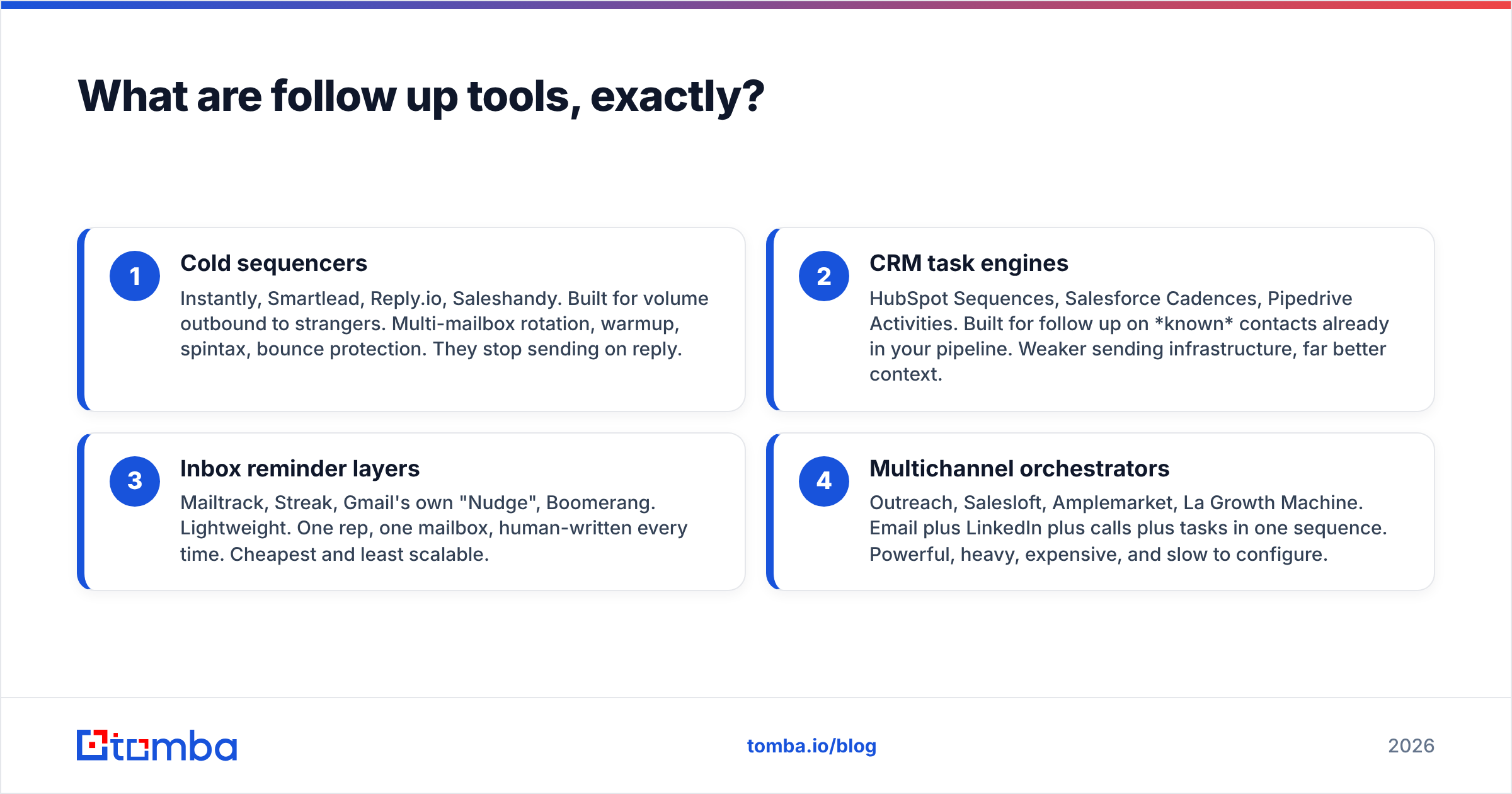
- Cold sequencers — Instantly, Smartlead, Reply.io, Saleshandy. Built for volume outbound to strangers. Multi-mailbox rotation, warmup, spintax, bounce protection. They stop sending on reply.
- CRM task engines — HubSpot Sequences, Salesforce Cadences, Pipedrive Activities. Built for follow up on known contacts already in your pipeline. Weaker sending infrastructure, far better context.
- Inbox reminder layers — Mailtrack, Streak, Gmail's own "Nudge", Boomerang. Lightweight. One rep, one mailbox, human-written every time. Cheapest and least scalable.
- Multichannel orchestrators — Outreach, Salesloft, Amplemarket, La Growth Machine. Email plus LinkedIn plus calls plus tasks in one sequence. Powerful, heavy, expensive, and slow to configure.
If you buy a cold sequencer to follow up on inbound demo requests, you'll be furious that it has no deal context. If you buy Salesforce Cadences to send 2,000 cold emails a week, your domain will be on a blocklist by Thursday.

Why do most follow up sequences fail before touch four?#
Three reasons, in order of how much damage they do.
Bad data. A sequencer is an amplifier. Feed it a list with 22% invalid addresses and it will amplify that into a bounce rate that gets your sending domain throttled by Google and Microsoft within two weeks. This is the single most common cause of "the tool didn't work." Run every list through an email verifier before it touches a sequence — not after.
Identical spacing. Day 3, day 6, day 9, day 12. Every filter vendor on earth has seen that pattern ten million times. Vary the gaps (2, 5, 4, 9, 14) and the sequence looks human.
No new information. "Just bumping this to the top of your inbox" is not a follow up, it's a guilt trip. Each touch should carry something the previous one didn't: a customer story from their industry, a relevant benchmark, a specific question about their stack. Google's own bulk sender guidelines are explicit that engagement — opens, replies, non-complaints — is what protects placement. Low-value bumps get ignored, ignored mail gets filtered, filtered mail hurts your sender reputation for every future send.
A fourth, quieter failure: the tool keeps sending after a human already replied on LinkedIn or picked up the phone. Every tool claims to stop on reply. Almost none of them stop on out-of-band reply. Check this before you buy.
How do the main follow up tools compare on price and fit?#
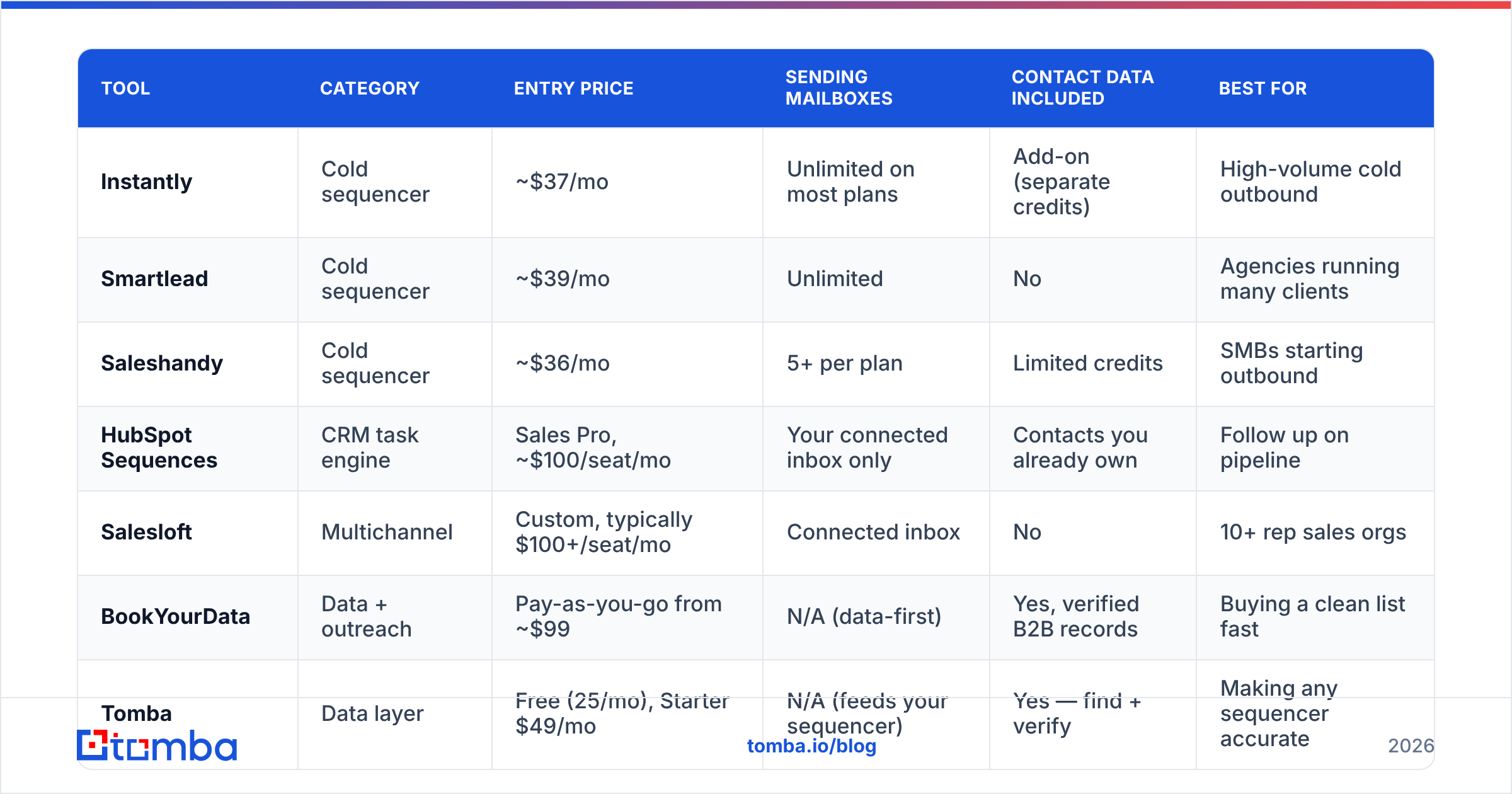
Prices below are list rates for the entry-level paid tier as published on each vendor's pricing page in early 2026. Annual billing usually shaves 15–25%. Always confirm before you buy — sequencer pricing changes more often than almost any other SaaS category.
| Tool | Category | Entry price | Sending mailboxes | Contact data included | Best for |
|---|---|---|---|---|---|
| Instantly | Cold sequencer | ~$37/mo | Unlimited on most plans | Add-on (separate credits) | High-volume cold outbound |
| Smartlead | Cold sequencer | ~$39/mo | Unlimited | No | Agencies running many clients |
| Saleshandy | Cold sequencer | ~$36/mo | 5+ per plan | Limited credits | SMBs starting outbound |
| HubSpot Sequences | CRM task engine | Sales Pro, ~$100/seat/mo | Your connected inbox only | Contacts you already own | Follow up on pipeline |
| Salesloft | Multichannel | Custom, typically $100+/seat/mo | Connected inbox | No | 10+ rep sales orgs |
| BookYourData | Data + outreach | Pay-as-you-go from ~$99 | N/A (data-first) | Yes, verified B2B records | Buying a clean list fast |
| Tomba | Data layer | Free (25/mo), Starter $49/mo | N/A (feeds your sequencer) | Yes — find + verify | Making any sequencer accurate |
Two things stand out.
First, the cheap sequencers are cheap because they exclude data. That ~$37/month is the sending engine only. You still need addresses, and you still need them verified. Budget for the data layer separately or you'll be surprised.
Second, per-seat tools scale differently than per-mailbox tools. Six reps on Salesloft is a meaningfully different invoice than six reps sharing an Instantly workspace. Model it at your 12-month headcount, not today's.
Should you use a sequencer or your CRM's built-in follow up?#
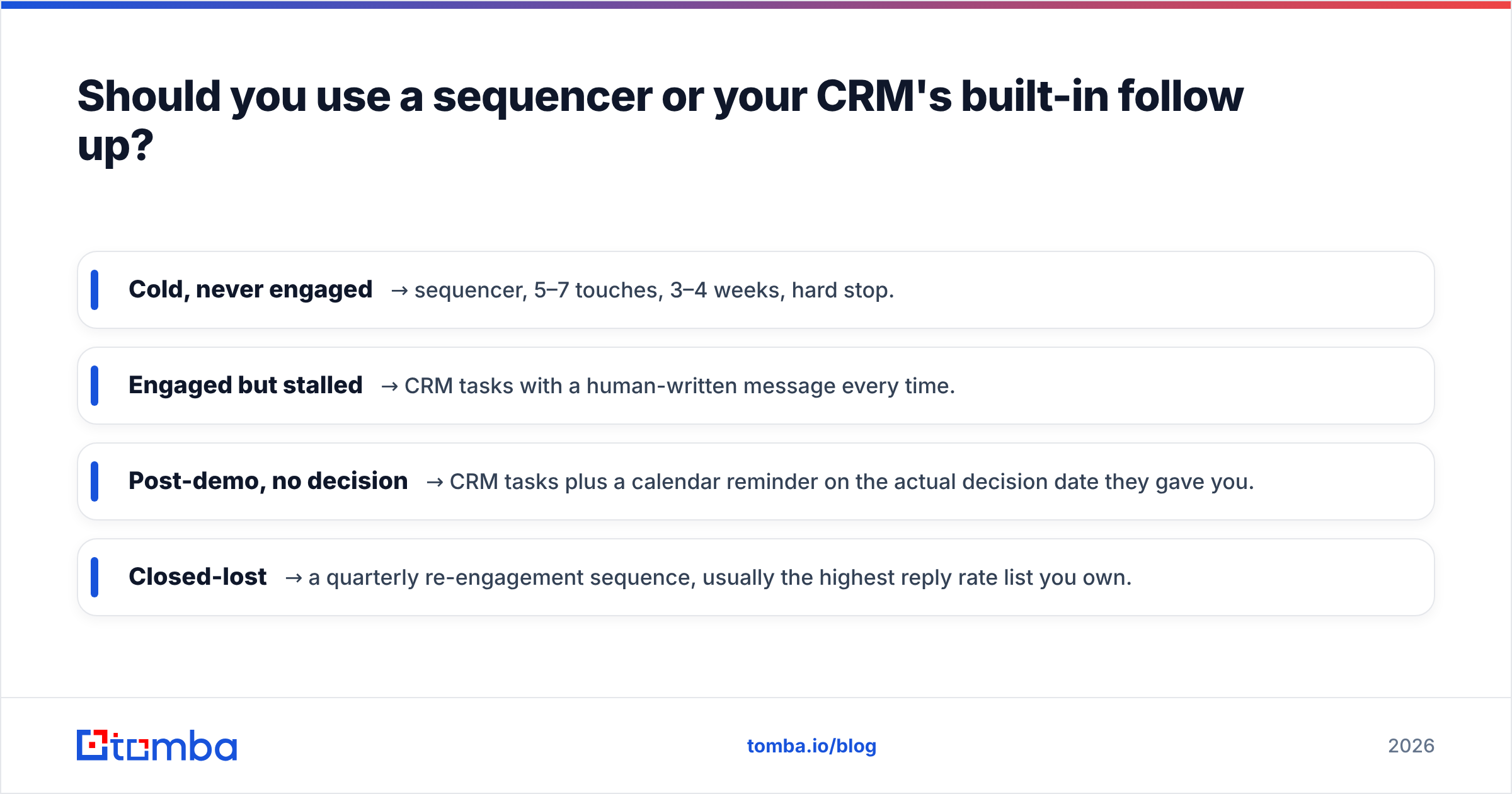
Use the CRM for anyone who already knows who you are. Use a sequencer for everyone else.
The dividing line is relationship state, not volume. Once a contact has replied, booked, demoed, or gone dark mid-deal, the follow up needs deal context — what they objected to, which stage they stalled in, who else is on the buying committee. Your CRM has that; a standalone sequencer doesn't.
Cold prospects are the reverse. There's no context to preserve, but there is real infrastructure risk. You need mailbox rotation so no single domain carries the whole load, warmup to build reputation, and bounce-triggered auto-pause. CRM sequence tools generally have none of that.
A workable split for most teams:
- Cold, never engaged → sequencer, 5–7 touches, 3–4 weeks, hard stop.
- Engaged but stalled → CRM tasks with a human-written message every time.
- Post-demo, no decision → CRM tasks plus a calendar reminder on the actual decision date they gave you.
- Closed-lost → a quarterly re-engagement sequence, usually the highest reply rate list you own.
That last one is chronically under-used. A closed-lost contact from 14 months ago already understands your category, and their situation has probably changed. According to G2's software buyer research, buyers re-enter the market far more often than most pipelines assume.
What does a follow up cadence that actually works look like?#
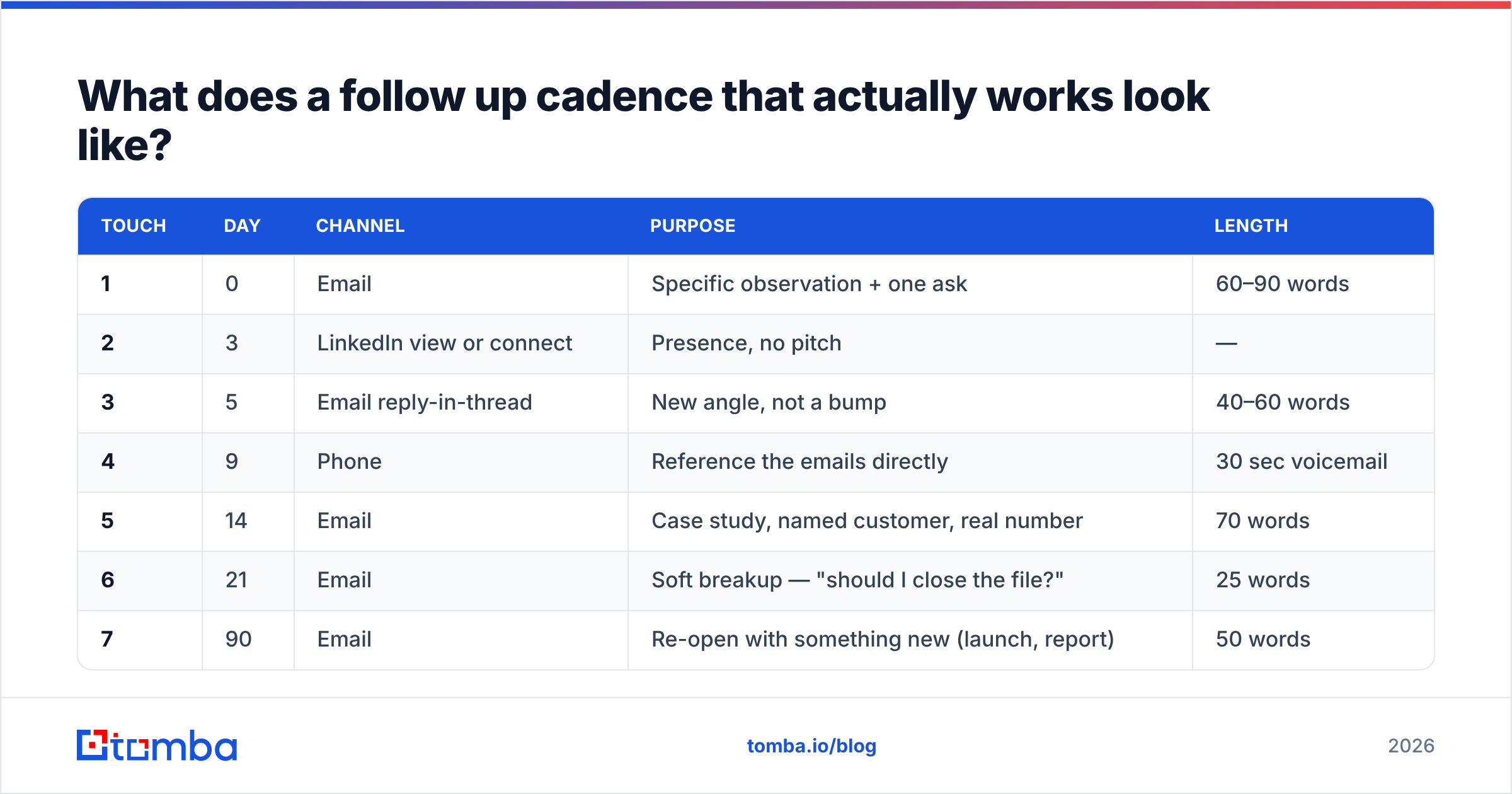
Here's a seven-touch structure that holds up across most B2B categories. Adjust the gaps for deal size — enterprise runs longer.
| Touch | Day | Channel | Purpose | Length |
|---|---|---|---|---|
| 1 | 0 | Specific observation + one ask | 60–90 words | |
| 2 | 3 | LinkedIn view or connect | Presence, no pitch | — |
| 3 | 5 | Email reply-in-thread | New angle, not a bump | 40–60 words |
| 4 | 9 | Phone | Reference the emails directly | 30 sec voicemail |
| 5 | 14 | Case study, named customer, real number | 70 words | |
| 6 | 21 | Soft breakup — "should I close the file?" | 25 words | |
| 7 | 90 | Re-open with something new (launch, report) | 50 words |
The breakup email at touch six is the highest-reply message in most sequences, which tells you something uncomfortable: people respond to the removal of an obligation more reliably than to the offer itself.
Note what isn't in the table — there's no touch that says only "checking in." If you can't name the new information a touch carries, delete the touch.
For the phone leg, you need actual numbers, not the company switchboard. A phone finder that returns direct dials is the difference between touch four working and touch four being a gatekeeper conversation.
How do you stop follow up automation from wrecking deliverability?#
Treat volume as a budget you spend, not a dial you turn up.
Cap per mailbox. 30–50 cold sends per mailbox per day is the ceiling most experienced senders hold to in 2026. Need 500/day? That's 10–15 mailboxes, not one mailbox sending 500. Provider filtering has tightened significantly — Google and Yahoo's bulk sender requirements pushed the whole industry toward lower per-domain volume.
Use separate domains. Never sequence from your primary company domain. Buy lookalike domains, warm them for 3–4 weeks, and keep your main domain for real conversations and transactional mail. If a sending domain gets burned, you throw it away instead of losing your billing emails.
Authenticate everything. SPF, DKIM, DMARC — all three, on every sending domain, before touch one. Verify with an SPF checker rather than trusting the DNS panel. This is table stakes; missing DMARC alone will bury you with major providers.
Verify continuously, not once. B2B contact data decays roughly 2–3% per month through job changes. A list you verified in January is measurably worse by June. Re-verify anything older than 90 days before it re-enters a sequence, especially for a re-engagement play.
Watch the leading indicator. Reply rate is lagging. Bounce rate and spam-complaint rate move first. Set a hard rule: bounce rate above 3% pauses the campaign, no exceptions, no "let's see if it recovers."
For teams sending from multiple domains, run periodic checks with a blacklist checker so you find out about a listing before your reply rate quietly collapses.
Which follow up tool should you pick for your situation?#
Match the tool to your constraint, not to the feature list.
- Solo founder, under 100 sends/month — Skip the sequencer entirely. Gmail plus a reminder extension plus a spreadsheet. The overhead of configuring a sequencer exceeds the value at this volume.
- 2–5 person team, cold outbound is the growth motion — One cheap sequencer (Instantly, Smartlead, Saleshandy) plus a dedicated data layer. Budget roughly $40 for sending and $50–100 for data monthly.
- Inbound-heavy, follow up is on warm leads — Your CRM's native sequences. HubSpot or Pipedrive. Don't add a second tool; you'll fragment the activity history and lose attribution.
- 10+ reps, multichannel, manager oversight required — Salesloft, Outreach, or Amplemarket. You're buying reporting and coaching surface as much as sending.
- Agency running outbound for clients — Smartlead or Instantly for workspace isolation, plus per-client data sourcing. Client separation matters more than features here.
If you're evaluating a specific vendor, the honest move is to read third-party reviews on Capterra or G2 filtered to your company size — a tool that's excellent for 50-rep teams is often miserable for three people, and the aggregate rating hides that completely.
What's the cheapest way to fix follow up without new software?#
Three changes that cost nothing:
- Write touches two through six before you send touch one. Almost nobody does this. The reason follow up doesn't happen isn't lack of tooling — it's that writing a follow up from a cold start requires re-loading context you've forgotten.
- Reply in the same thread. New threads reset the conversation and look like fresh cold outreach. Same-thread replies keep the history visible and land better with filters.
- Put a decision date in the CRM every time someone gives you one. "Circle back next quarter" is a specific, plannable date. Most reps write it in a notebook and lose it.
Do these three things and a paid follow up tool will roughly double in value when you eventually buy one. Skip them and the tool automates a broken process faster.
Get the data layer right first#
Every follow up tool on this page assumes you already have accurate contact data. None of them source it, and most of them charge extra for a thin version of it.
That's the gap Tomba Email Finder fills. Find verified professional addresses by domain, name, or company, confirm them before they enter a sequence, and push clean records into whatever sequencer or CRM you've chosen. The free tier covers 25 searches a month if you want to test accuracy against a list you already know the answers to; Starter is $49/mo and Growth is $99/mo — full Tomba pricing is public, and the Tomba API drops the same verification step directly into your existing workflow.
Fix the data, then automate the follow up. That order matters more than which sequencer you pick.
Related guides#
Ready to find emails that actually work?
Join 150,000+ professionals who stopped guessing and started sending. Free credits on signup — no credit card required.
Get the Tomba newsletter
Practical outbound tactics and product updates — once every two weeks.
About the author