Free Bulk Email Checker: 8 Tools Tested and Ranked 2026
Free bulk email checkers all promise clean lists — until the credits run out at 100 addresses. Here's what each free tier really gives you, how accurate the results are, and when paying beats patching.
TL;DR
- A free bulk email checker is real, but "bulk" usually means 100–1,000 addresses per month, not the 40,000-row CSV sitting on your desktop.
- The free tiers worth using in 2026 are Tomba (25 searches/mo, verification included), ZeroBounce (100 credits), MillionVerifier (free trial credits), and Bouncer (100/mo). Everything beyond that is paid.
- Accuracy gaps between free and paid tiers are usually not in the syntax/MX checks — they're in catch-all handling, role-account detection, and greylisting retries.
- The real cost of a free checker is throughput and API access, not the check itself. Most free plans strip the API, which kills automation.
- Verify before you send, not after you bounce. A 3% bounce rate is the line where mailbox providers start throttling you.
What is a free bulk email checker?#
A free bulk email checker takes a list of email addresses — usually a CSV upload — and tells you which ones will actually deliver, without charging you for the first batch. Think of it like a bouncer checking IDs at the door: cheap to do at the entrance, expensive to fix once the wrong people are inside and the venue loses its license.
The "bulk" part matters. A single-address checker answers one question at a time. A bulk checker parallelizes hundreds or thousands of SMTP conversations, handles rate limits per mailbox provider, retries greylisted responses, and hands you back a labeled file. That infrastructure costs money to run, which is why genuinely unlimited free bulk verification does not exist. What exists is a free tier: a fixed monthly allowance, usually 25–500 addresses, designed to prove the tool works before you buy credits.
If someone offers you unlimited free bulk verification, you are the product. Uploaded lists get harvested into a shared database, resold as "B2B data," or used to train matching models. Read the terms before you paste 8,000 customer emails into a tool with no pricing page.
How does bulk email verification actually work?#
Every serious checker runs the same layered pipeline. Understanding the layers tells you exactly where free tools cut corners.
- Syntax validation — RFC 5322 pattern matching. Catches
john@@company, trailing spaces, and the person who typedgmial.com. Free everywhere, costs nothing, catches maybe 2% of bad records. - Domain and MX record lookup — Does the domain resolve, and does it publish mail exchange records? A domain with no MX record cannot receive mail, full stop. Also free everywhere.
- Disposable and role detection — Flags
mailinator.comthrowaways and role accounts likeinfo@,sales@,support@. Role accounts deliver fine but tank reply rates and raise complaint risk. - SMTP handshake — The tool opens a connection to the receiving mail server and asks whether the mailbox exists, without delivering a message. This is where infrastructure quality shows: good providers rotate IPs, respect per-provider rate limits, and retry greylists.
- Catch-all resolution — Some domains accept mail for every address, valid or not. Weak tools return "unknown" and hand you the problem. Better tools use pattern confidence, historical engagement data, and secondary signals to score the address anyway.
- Risk scoring — The output that actually matters: valid, invalid, catch-all, risky, unknown. A binary valid/invalid answer is a red flag on any 2026 tool.
Layers 1–3 are cheap and every free tier includes them. Layers 4–6 are where the money goes, and where free tiers throttle you.

Which free bulk email checkers give you the most in 2026?#
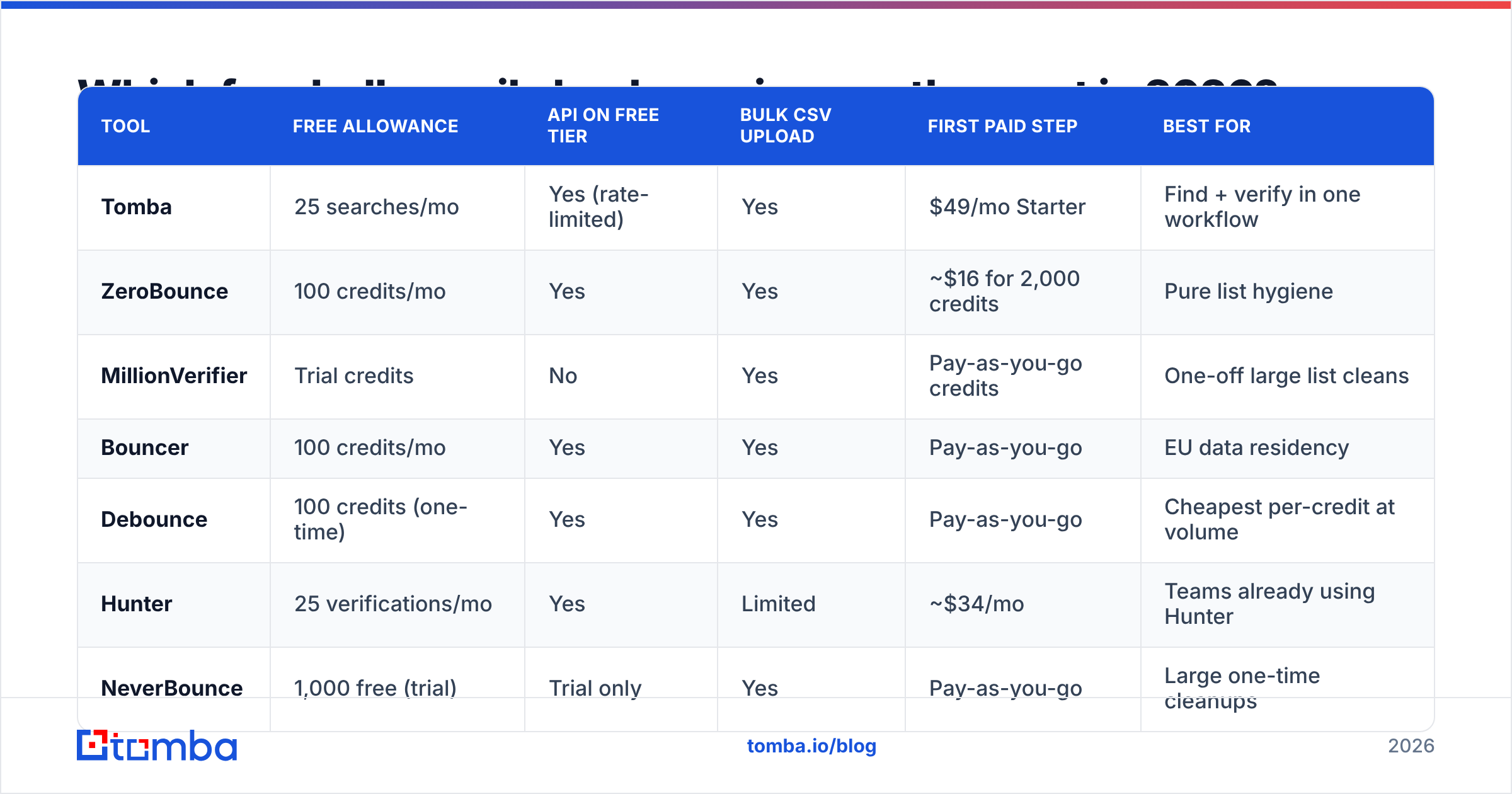
Free allowances change often, so treat these as a snapshot to verify on each vendor's pricing page before you commit. What does not change quickly is the shape of each offer: how many addresses, whether the API is included, and what the first paid step costs.
| Tool | Free allowance | API on free tier | Bulk CSV upload | First paid step | Best for |
|---|---|---|---|---|---|
| Tomba | 25 searches/mo | Yes (rate-limited) | Yes | $49/mo Starter | Find + verify in one workflow |
| ZeroBounce | 100 credits/mo | Yes | Yes | ~$16 for 2,000 credits | Pure list hygiene |
| MillionVerifier | Trial credits | No | Yes | Pay-as-you-go credits | One-off large list cleans |
| Bouncer | 100 credits/mo | Yes | Yes | Pay-as-you-go | EU data residency |
| Debounce | 100 credits (one-time) | Yes | Yes | Pay-as-you-go | Cheapest per-credit at volume |
| Hunter | 25 verifications/mo | Yes | Limited | ~$34/mo | Teams already using Hunter |
| NeverBounce | 1,000 free (trial) | Trial only | Yes | Pay-as-you-go | Large one-time cleanups |
| BookYourData | Sample credits | Paid tiers | Yes | Credit packs | Buying verified data outright |
Two patterns jump out. First, "free" clusters hard at 25–100 addresses per month — enough to test, never enough to clean a list. Second, the tools that include API access on the free tier are the ones worth prototyping against, because you can wire them into your stack before you pay. If the API only unlocks at $99/mo, your free test tells you nothing about the integration you actually need.
BookYourData sits in a different lane worth calling out: instead of verifying a list you already have, it sells pre-verified B2B contacts with a bounce guarantee. If your bottleneck is "I don't have enough contacts" rather than "my contacts are stale," buying verified data is often the shorter path than scraping and then cleaning.
How accurate are free bulk email checkers?#
Accuracy on a free tier is usually identical to the paid tier for the same tool — the throttle is volume, not quality. The real accuracy spread is between vendors, and it lives almost entirely in three edge cases.
Catch-all domains. Roughly 15–20% of B2B domains accept everything. Microsoft 365 tenants configured with a catch-all rule are especially common. A tool that returns "unknown" on all of them is passing 1 in 5 of your list back to you unverified. Tools with a dedicated catch-all verifier apply pattern analysis and historical send data to produce a confidence score instead of a shrug.
Greylisting. Some servers deliberately reject the first connection attempt and accept the second. A checker that does not retry marks those addresses invalid. You just deleted good contacts. This is the single most common source of false negatives, and it is invisible unless you spot-check.
Aggressive anti-verification. Yahoo, AOL, and a growing set of providers return "accept all" at the SMTP layer specifically to defeat verification probes. Any vendor claiming 99%+ accuracy on consumer domains is either measuring something else or guessing.

The practical takeaway: run the same 100-address sample through two or three free tiers. Include 20 addresses you know are live, 20 you know are dead, and 60 unknowns. Whichever tool flags the fewest known-live addresses as invalid is the one that handles greylisting properly. That test costs you nothing and tells you more than any vendor benchmark.
What does a free tier actually cost you?#
Nothing in dollars. Plenty in throughput and workflow.
- Volume ceiling. 100 credits cleans one small event list. It does not clean a quarterly outbound list of 12,000 records. You will hit the wall on day one of a real campaign.
- No API, no automation. If verification cannot run on record creation in your CRM, it becomes a manual monthly chore that someone eventually skips. Free tiers that gate the email verification API force you into CSV round-trips forever.
- Slower queue priority. Free jobs sit behind paid jobs. A 500-row file that takes 90 seconds on a paid plan can take 20 minutes on free during peak hours.
- No deduplication or normalization. Paid plans usually strip duplicates, normalize Gmail dots and plus-addressing, and merge across columns. Free plans often charge you a credit per duplicate.
- Data retention terms. Free tiers frequently reserve broader rights over uploaded data. If your list contains customer PII, read the DPA before uploading.
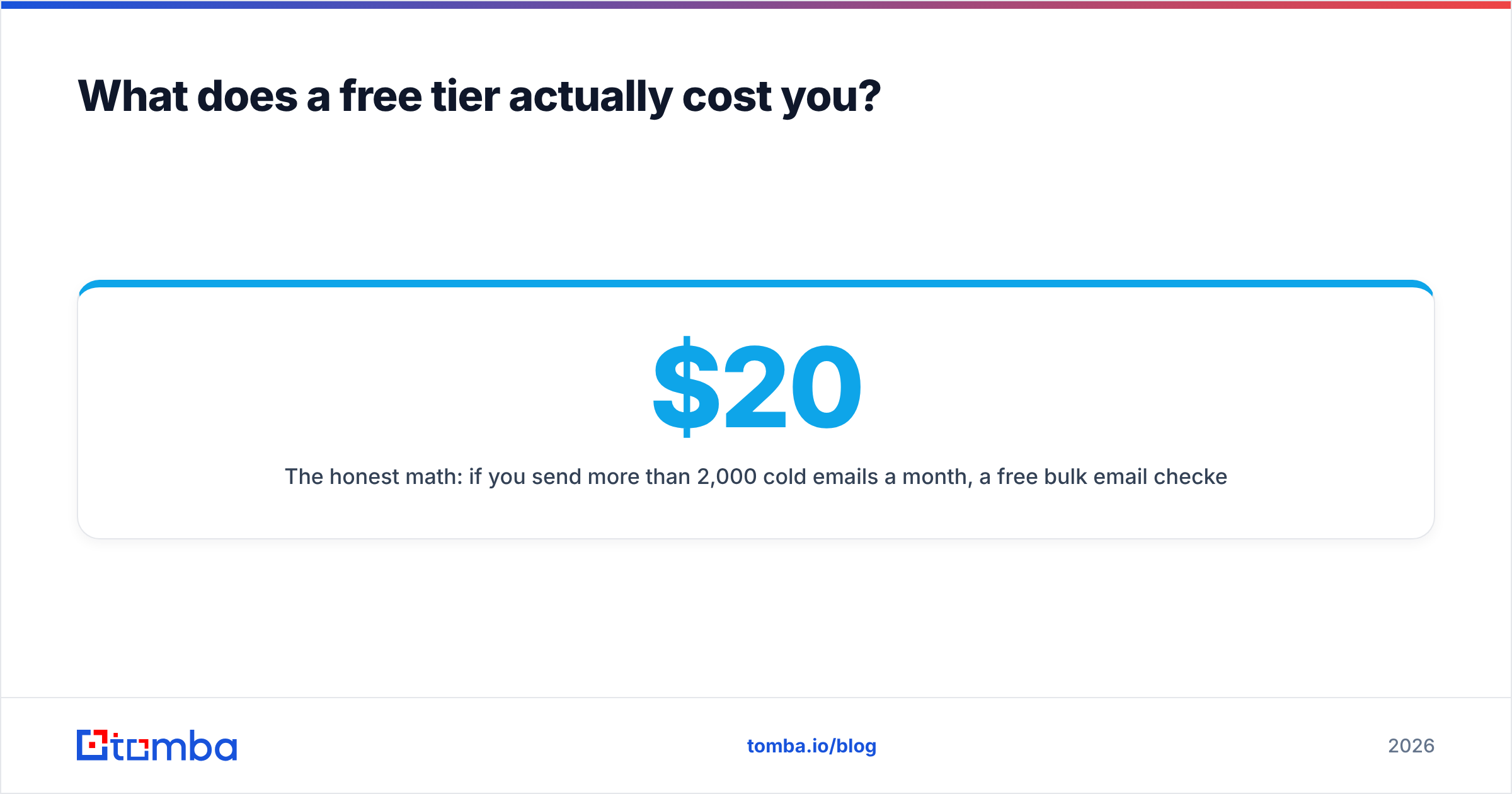
The honest math: if you send more than 2,000 cold emails a month, a free bulk email checker is a testing tool, not an operational one. Budget $20–$50/mo and move on. Tomba pricing starts at $49/mo for Starter, with a free tier of 25 searches to validate the workflow first.

Is verification the same as finding emails?#
No, and conflating them is the most expensive mistake in this category.
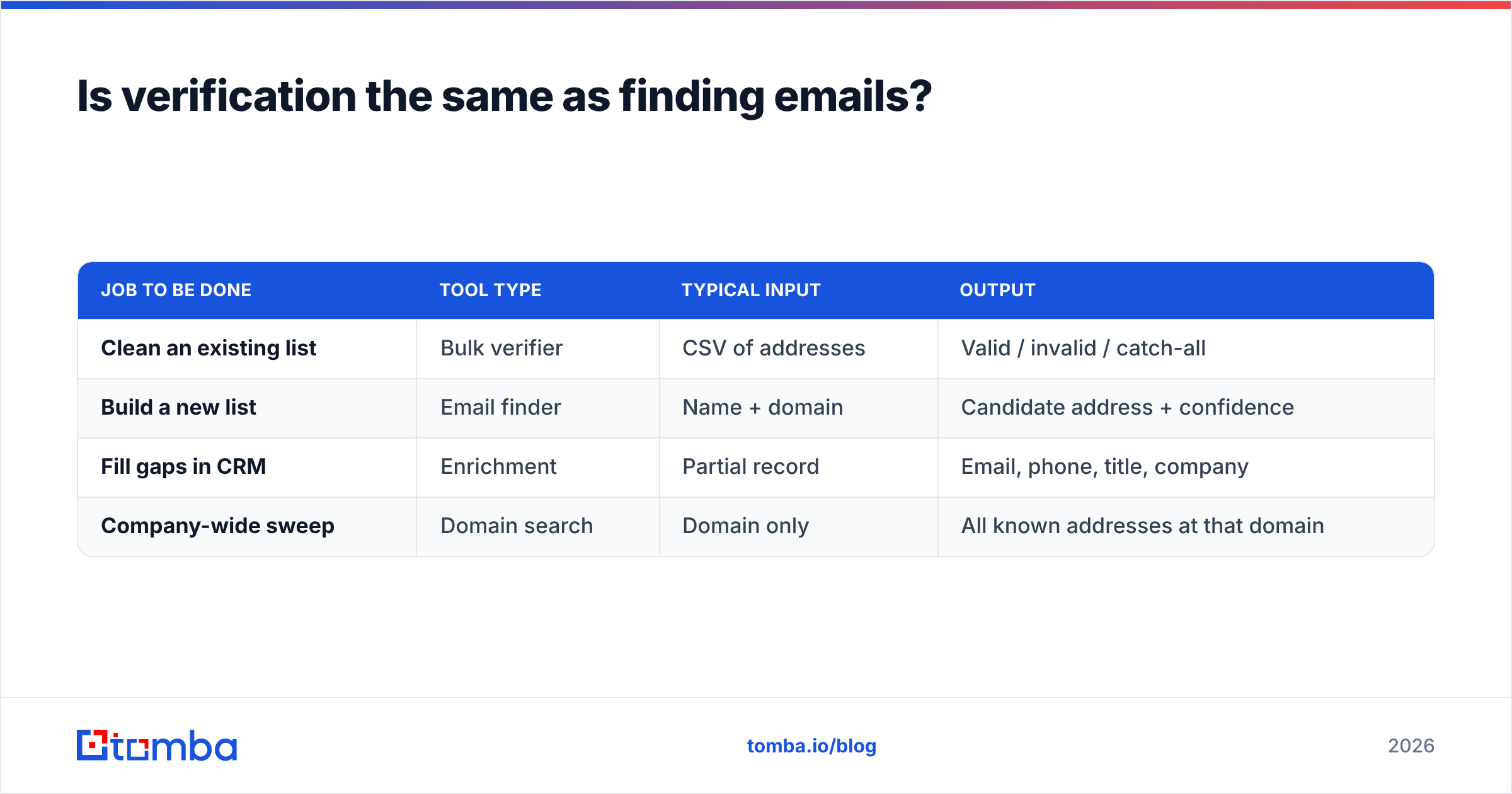
Verification answers: will this address accept mail? Finding answers: what is the address for this person at this company? You need both, and running them as separate tools in separate tabs is where lists go stale.
| Job to be done | Tool type | Typical input | Output |
|---|---|---|---|
| Clean an existing list | Bulk verifier | CSV of addresses | Valid / invalid / catch-all |
| Build a new list | Email finder | Name + domain | Candidate address + confidence |
| Fill gaps in CRM | Enrichment | Partial record | Email, phone, title, company |
| Company-wide sweep | Domain search | Domain only | All known addresses at that domain |
If your workflow is "scrape names from LinkedIn, guess the pattern, then verify," you are paying for two products and manually joining them. A combined platform runs the email finder and the verifier in one pass, so an address is scored the moment it is found. Tools like domain search go further and return every known address at a company with a confidence score attached, skipping the guess-then-check loop entirely.

For a broader view of how vendors stack up on features and pricing, the email verification category on G2 aggregates user-reported accuracy and support scores, which is a useful sanity check against marketing pages.
How do you run a bulk check without wrecking your list?#
A repeatable process beats a better tool. Here is the sequence that survives contact with a real list.
- Deduplicate first. Every duplicate is a wasted credit. Strip exact matches, then normalize (lowercase, remove Gmail dots, strip
+tags) and dedupe again. Free tools like a duplicate remover handle this before you spend anything. - Segment by domain type. Split corporate domains from free consumer domains (gmail, outlook, yahoo). Consumer domains verify less reliably and deserve different risk thresholds.
- Run the check. Upload, wait, download. For lists over 10,000 records, run a 500-row sample first and check the invalid rate. If it comes back above 40%, your source data is the problem, not the tool.
- Triage the output. Send to valid. Drop invalid. Hold catch-all and risky in a separate segment.
- Warm into the catch-all segment. Send to catch-all addresses in small batches from a secondary domain, watch the bounce responses, and promote the survivors. Never mix catch-alls into a main send.
- Re-verify on a schedule. B2B email data decays 22–30% per year through job changes alone. Anything older than 90 days should be re-checked before a send.
Step 5 is the one most teams skip, and it is why "verified" lists still bounce. A catch-all domain accepts everything at the SMTP layer and then silently discards mail to nonexistent mailboxes — which registers as a soft bounce or, worse, a spam trap hit on your side.
When should you stop using free and start paying?#
Three triggers, any one of which means the free tier has done its job:
- You hit the ceiling twice in a month. Free tiers are for evaluation. Two overruns means verification is now part of your operating rhythm.
- You need the API. The moment verification should happen automatically — on form submit, on CRM record creation, on list import — manual CSV uploads become the bottleneck.
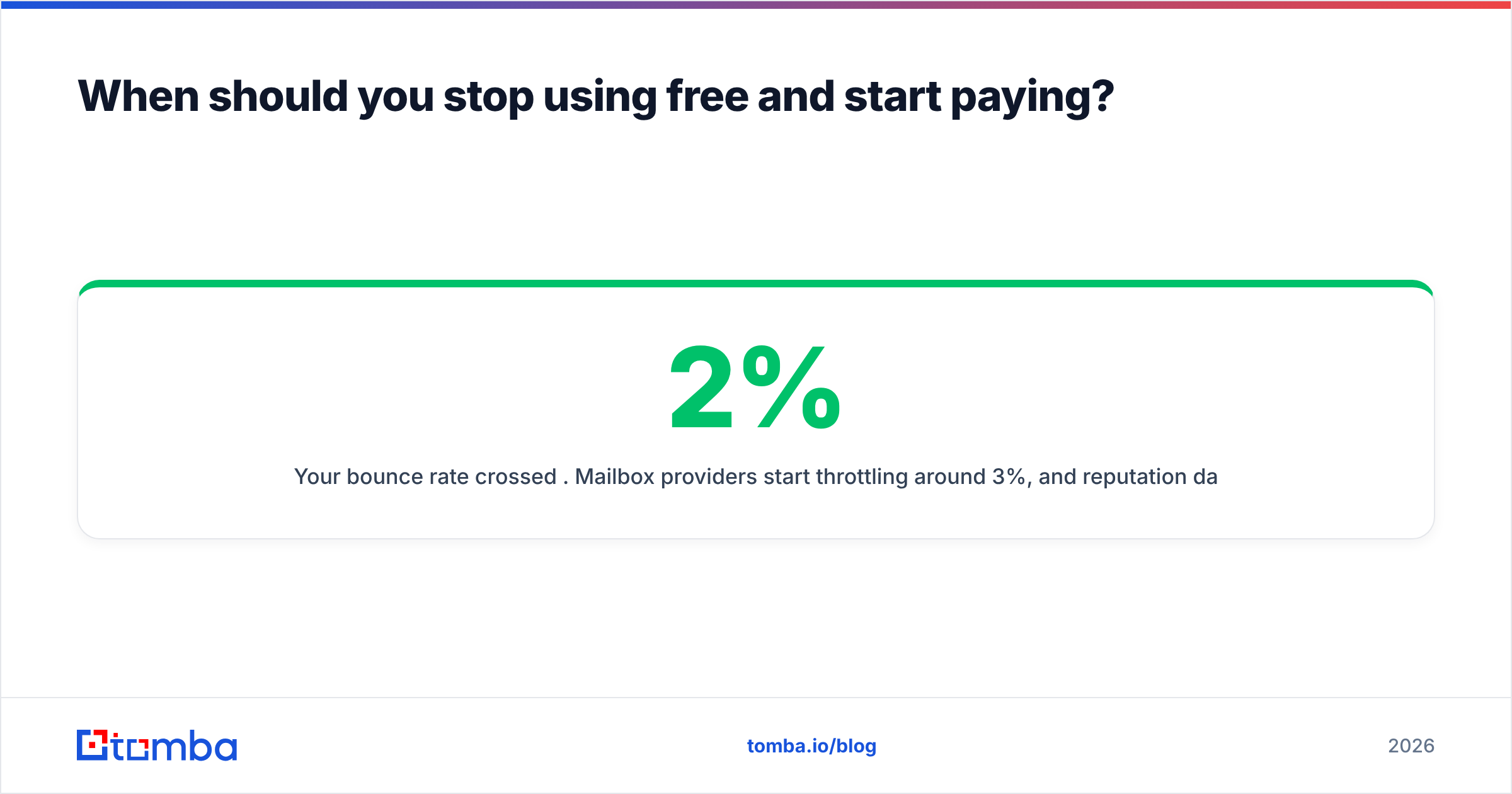
- Your bounce rate crossed 2%. Mailbox providers start throttling around 3%, and reputation damage takes weeks to undo. Paying $49/mo to protect a sending domain you spent months warming is not a close call.
Below those thresholds, free is genuinely fine. A founder validating a 200-person ICP list does not need a paid verification plan. A team sending 5,000 emails a week absolutely does.
Which free bulk email checker should you actually start with?#
Start with whichever free tier includes the API, because that is the only way to test the integration you will eventually depend on. Run the 100-address benchmark described above across two vendors, compare false-negative rates on known-live addresses, and pick the winner.
If your problem is bigger than hygiene — if you also need to find the addresses, enrich them with titles and phone numbers, and keep them fresh — verification-only tools will leave you stitching three subscriptions together. Tomba's Email Finder covers finding, verifying, and enriching in one workflow, with 25 free searches a month to test it against your own list before you spend anything. Start free, run your benchmark, and only upgrade when the ceiling actually gets in your way.
Related guides#
Ready to find emails that actually work?
Join 150,000+ professionals who stopped guessing and started sending. Free credits on signup — no credit card required.
Get the Tomba newsletter
Practical outbound tactics and product updates — once every two weeks.
About the author