Free Bulk Email Validation: What Actually Works in 2026
Free bulk email validation tools promise clean lists at zero cost. Here is what the free tiers actually verify, where they quietly fail, and when paying beats scrubbing.
TL;DR
- Free bulk email validation is real, but it is metered: most providers give you 25–100 free credits, then charge. "Unlimited free" tools are usually syntax checkers, not validators.
- Syntax and MX checks are cheap and genuinely free. SMTP-level verification, catch-all resolution, and role/disposable detection are where cost — and accuracy — actually live.
- A free tier is enough to audit a list (validate a 100-address random sample, extrapolate the bounce rate). It is rarely enough to clean one.
- Budget roughly $0.0005–$0.004 per verified address on paid plans. On a 10,000-record list that is $5–$40 — far cheaper than a suspended sending domain.
- The highest-leverage move is not validating harder. It is sourcing cleaner: verified-at-discovery data means less to scrub later.
Cold outbound dies at the mailbox provider, not in the inbox. Send 5,000 emails to a list with 12% dead addresses and Google and Microsoft read that bounce rate as a signal you bought a list. Your domain gets throttled, then filtered, then effectively muted. That is why "free bulk email validation" is one of the most-searched phrases in outbound — everyone wants the insurance without the invoice.
This guide covers what free actually buys you in 2026, which checks are structurally cheap versus structurally expensive, how the major tools' free tiers compare, and the decision rule for when free is sufficient versus when it is false comfort.
What is bulk email validation, and what does "free" cover?#
Bulk email validation is running a list of addresses through a sequence of checks to predict whether a message sent to each one will be delivered, bounce, or land somewhere that damages your sender reputation.
Think of it like an airport security line. Some checks are a glance at your boarding pass — instant, costs nothing. Others require pulling you aside and opening the bag — slow, staffed, expensive. Email validation works the same way, and the free tiers give you the boarding-pass glance.
The validation stack, cheapest to most expensive:
- Syntax check — Does the address conform to RFC 5322? Catches
john@@acme, trailing spaces, missing TLDs. Pure string parsing, zero network cost. Always free. - Domain and MX record lookup — Does
acme.comexist and does it publish mail exchange records? One DNS query, cached across your whole list. Effectively free at any volume. - Disposable and role detection — Is this
mailinator.com? Is thisinfo@,sales@,support@? Requires a maintained blocklist and role dictionary. Cheap to run, expensive to keep current. - SMTP handshake — Connect to the receiving mail server, issue
RCPT TO, read the response code without sending. This is the real test. It costs IP reputation, connection pools, and retry logic. This is what you pay for. - Catch-all resolution — Some domains accept mail to every address, so SMTP returns "OK" for
asdfgh@acme.com. Distinguishing a real mailbox behind a catch-all requires pattern intelligence and historical engagement data. This is the hardest and most expensive check. - Greylisting and rate-limit handling — Mail servers deliberately defer unknown senders. A validator that does not retry over hours returns "unknown" and calls it a day.
Free tiers reliably deliver steps 1–3. They partially deliver step 4. They almost never deliver steps 5–6, which is precisely where a list's real risk hides. If you want the underlying terminology, the B2B glossary breaks down each of these terms independently.

Is free bulk email validation actually free?#
Mostly no — it is free-to-sample. There are three distinct business models wearing the same label, and confusing them is how people end up with a "validated" list that still bounces at 9%.
Model 1: Free credits on a paid platform. You get 25–1,000 verifications, full-stack, then a paywall. The validation quality is identical to the paid product. This is the honest version and the one worth using.
Model 2: Free unlimited syntax/MX tools. Browser-based checkers that parse and do a DNS lookup. Genuinely unlimited, genuinely free, and genuinely unable to tell you whether a mailbox exists. Useful as a pre-filter to strip garbage before spending paid credits. A free email checker fits this slot — run it first, then pay only for what survives.
Model 3: Free-in-exchange-for-data. Upload your list, get results, and your contacts become training signal or database inventory. Read the terms. If you are handling EU or California data, this is a compliance problem, not a bargain.
The economics explain the gating. An SMTP verification requires a live TCP connection from a reputation-managed IP. Mailbox providers rate-limit aggressively and blacklist IPs that probe too hard. Running that infrastructure costs money per check — so nobody gives it away in volume. When a tool advertises unlimited free SMTP verification, it is usually doing DNS lookups and calling them verification.
How do the free tiers compare in 2026?#
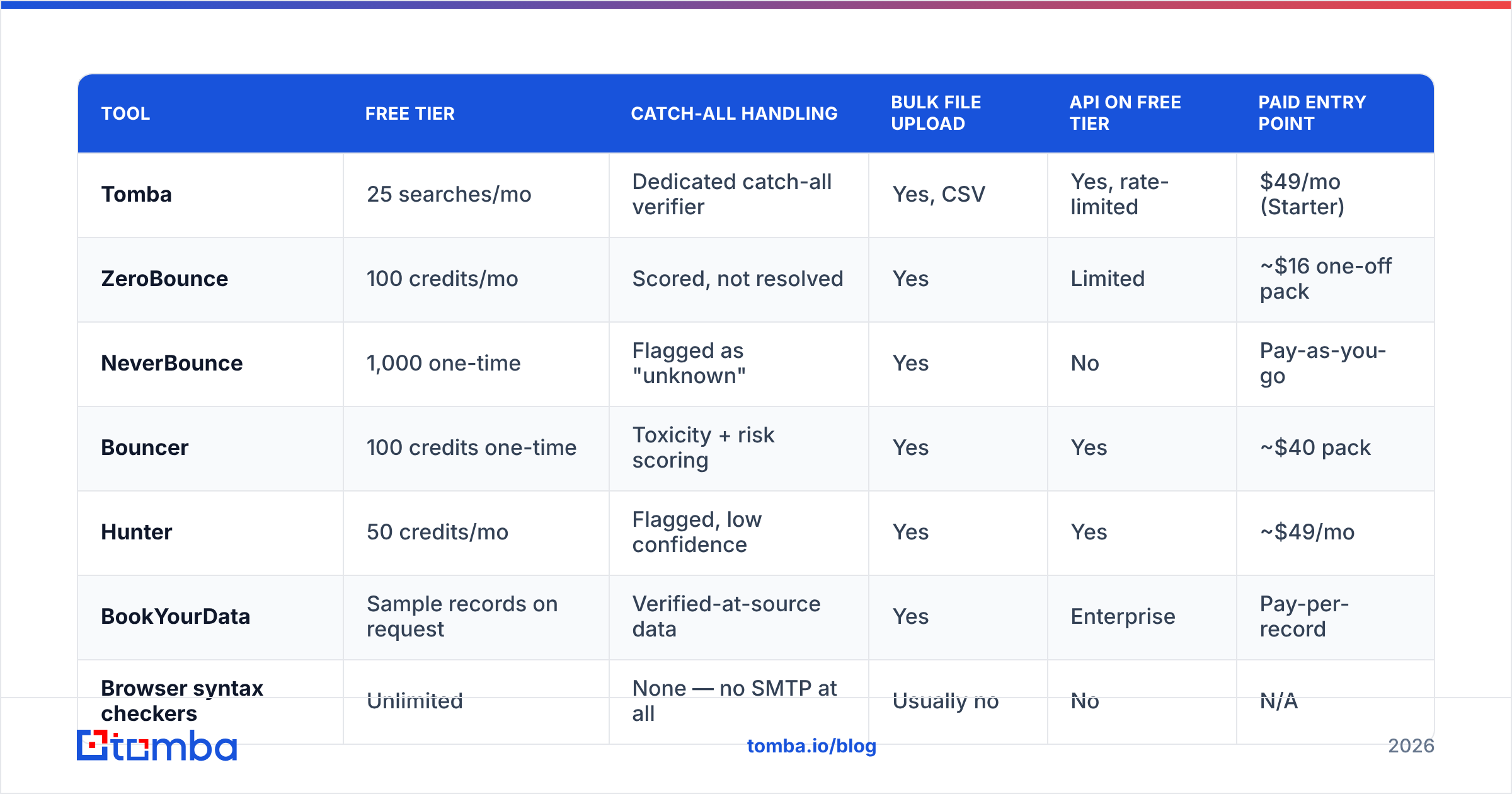
Here is what the commonly-used options actually give you before payment. Free-tier sizes change often — treat these as directional and confirm on the vendor's pricing page.
| Tool | Free tier | Catch-all handling | Bulk file upload | API on free tier | Paid entry point |
|---|---|---|---|---|---|
| Tomba | 25 searches/mo | Dedicated catch-all verifier | Yes, CSV | Yes, rate-limited | $49/mo (Starter) |
| ZeroBounce | 100 credits/mo | Scored, not resolved | Yes | Limited | ~$16 one-off pack |
| NeverBounce | 1,000 one-time | Flagged as "unknown" | Yes | No | Pay-as-you-go |
| Bouncer | 100 credits one-time | Toxicity + risk scoring | Yes | Yes | ~$40 pack |
| Hunter | 50 credits/mo | Flagged, low confidence | Yes | Yes | ~$49/mo |
| BookYourData | Sample records on request | Verified-at-source data | Yes | Enterprise | Pay-per-record |
| Browser syntax checkers | Unlimited | None — no SMTP at all | Usually no | No | N/A |
Two things stand out. First, "1,000 free" from NeverBounce is one-time, while "25/mo" from Tomba recurs — over a year the recurring tier delivers more. Match the shape of the offer to the shape of your need: a one-time migration cleanup wants a large one-time grant; ongoing prospecting wants a monthly refill.
Second, catch-all handling is the real differentiator. Roughly 15–20% of B2B domains run catch-all configurations, and they cluster in exactly the mid-market and enterprise accounts outbound teams target. A validator that returns "unknown" on those addresses has punted on a fifth of your list. Tools with a purpose-built catch-all verifier resolve a meaningful share of them; tools without one hand you a coin flip.
What does a free tier miss that actually costs you money?#
Four failure modes, in order of how much damage they do.
Stale-but-syntactically-valid addresses. sarah.chen@acme.com parses perfectly, the domain resolves, MX records exist — and Sarah left in 2024. Only an SMTP-level check or recent engagement data catches this. B2B contact data decays at roughly 22–30% per year according to widely-cited industry estimates, so a list you validated eighteen months ago is meaningfully rotten today. Free syntax tools will pass every one of those dead addresses.
Spam traps. Recycled traps are abandoned addresses that mailbox providers reactivate specifically to catch senders using old lists. They accept mail. SMTP says "valid." Hitting one is a direct hit to sender reputation and can land you on a blocklist. Detection requires proprietary trap-pattern databases that free tiers do not expose.
Accept-all domains scored as valid. The worst outcome is not "unknown" — it is a validator that marks a catch-all as "valid" to look accurate. You send, the server accepts at the gateway, and the message bounces internally or silently disappears. Your dashboard shows a clean delivery rate while nothing reaches a human.
Volume ceilings that force bad decisions. With 100 free credits and a 10,000-record list, the temptation is to validate 100, see 94% valid, and send the whole thing. That is statistically defensible only if your list is homogeneous. If 3,000 records came from a scraped source and 7,000 from a webinar signup, the aggregate number is meaningless. Sample each source separately.
How should you use free tiers strategically?#
Use free credits for measurement, paid credits for cleaning. Concretely:
- Segment by source first. Split your list by where each record came from — conference badge scan, website form, scraped directory, purchased file. Sources have wildly different decay rates.
- Pull a random 100 from each segment. Not the first 100 — alphabetical ordering correlates with import batches, which correlates with age.
- Run the sample through a full-stack free tier. Record valid / invalid / catch-all / unknown percentages per segment.
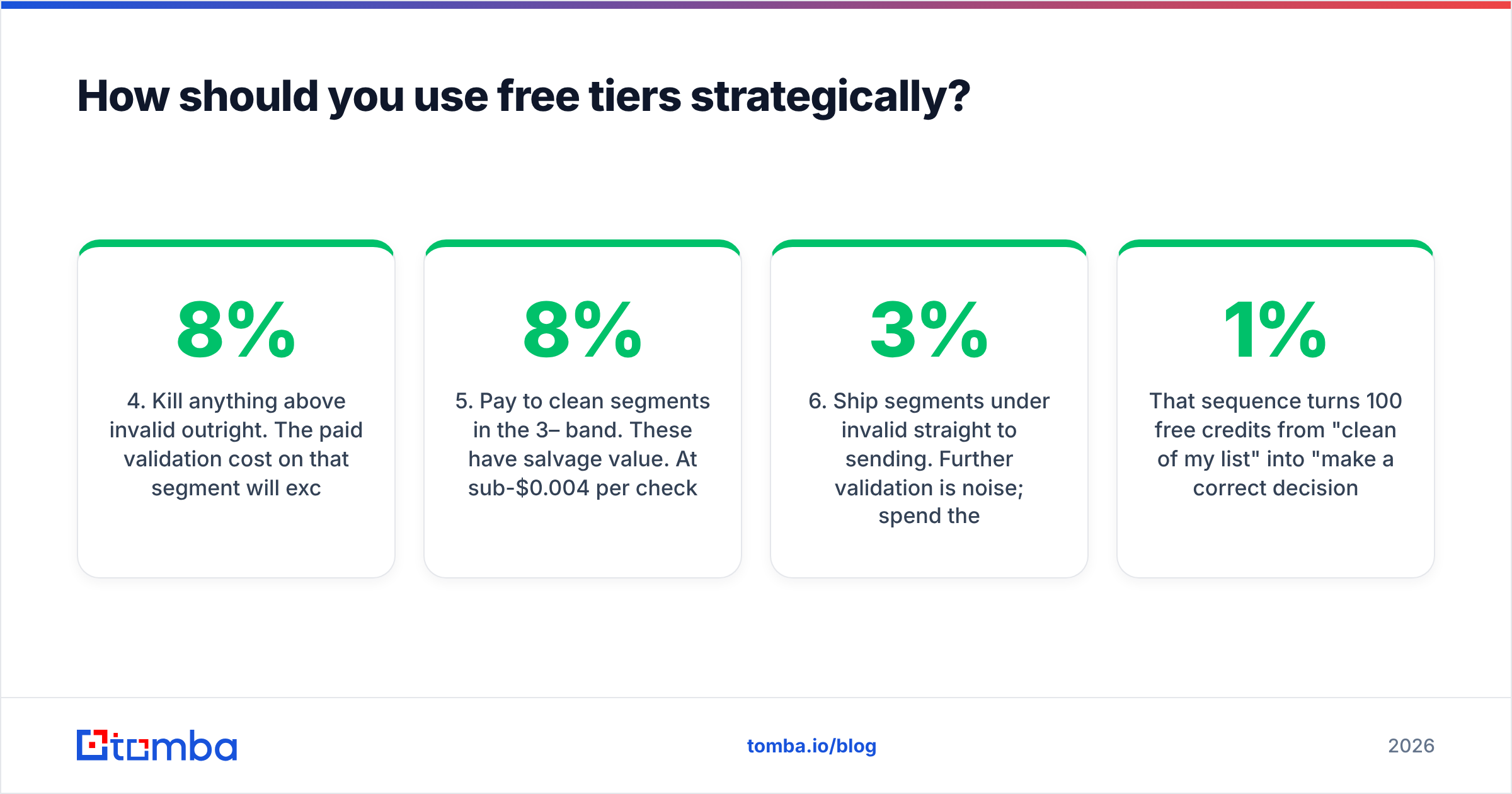
- Kill anything above 8% invalid outright. The paid validation cost on that segment will exceed the value of the surviving records. Re-source instead.
- Pay to clean segments in the 3–8% band. These have salvage value. At sub-$0.004 per check, a 5,000-record segment costs under $20 to make safe.
- Ship segments under 3% invalid straight to sending. Further validation is noise; spend the budget on warmup instead.
That sequence turns 100 free credits from "clean 1% of my list" into "make a correct decision about 100% of my list." Same credits, categorically different value.
One more habit worth building: strip duplicates before you validate anything. Paying to verify the same address three times because it appears in three CRM exports is the most common way teams waste credits. Run a deduplicate email list pass first — it is free and it routinely shaves 8–15% off an aggregated list.
Is validation better than sourcing verified data in the first place?#
Validation is remediation. Verified-at-discovery sourcing is prevention, and prevention wins on cost every time.
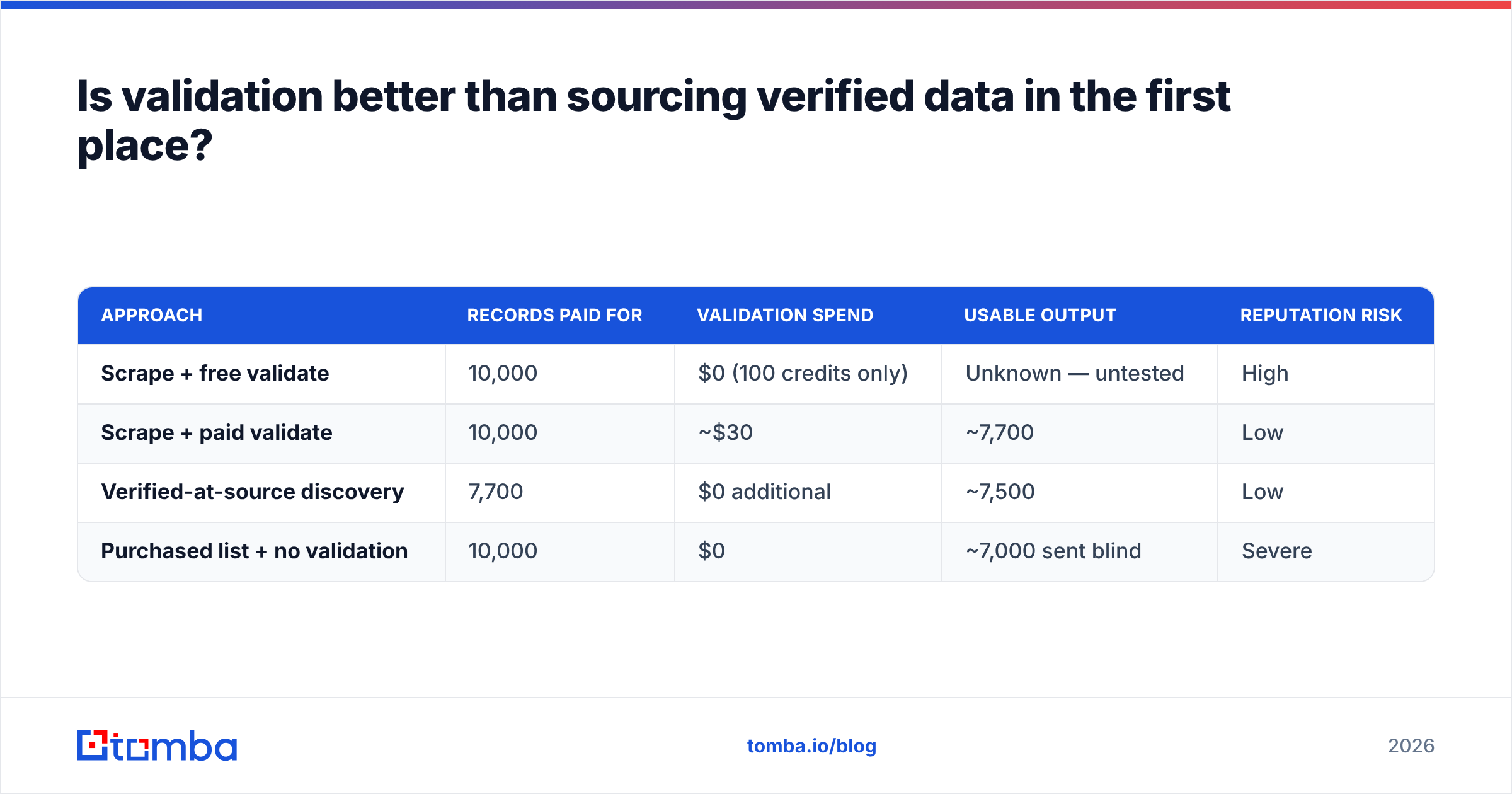
Here is the arithmetic. Buy or scrape 10,000 unverified B2B contacts, and a realistic 20–25% are dead on arrival. You pay for 10,000 records, pay again to validate 10,000, and end with roughly 7,700 usable. Source 7,700 addresses that were verified at the moment of discovery and you pay once, for exactly what you use.
| Approach | Records paid for | Validation spend | Usable output | Reputation risk |
|---|---|---|---|---|
| Scrape + free validate | 10,000 | $0 (100 credits only) | Unknown — untested | High |
| Scrape + paid validate | 10,000 | ~$30 | ~7,700 | Low |
| Verified-at-source discovery | 7,700 | $0 additional | ~7,500 | Low |
| Purchased list + no validation | 10,000 | $0 | ~7,000 sent blind | Severe |
This is why the tooling categories are converging. An email finder that verifies during discovery hands you an address already carrying a confidence score, so the separate validation step shrinks to a spot-check. Pair it with domain search to pull an entire company's addressable contacts in one pass and you skip the scrape-then-scrub loop entirely.
For teams already sitting on a large legacy list, the order is: dedupe, sample, segment, then clean only what is worth cleaning. For teams building a list now, the order is: source verified, spot-check monthly, never accumulate rot.

Accuracy claims in this category deserve scrutiny generally. Vendors define "valid" differently — some count catch-alls as valid, some exclude them from the denominator entirely, and 98% under one definition can be 84% under another. When comparing, ask specifically how catch-all and unknown results are classified before you compare headline numbers. Third-party review sites like G2 and Capterra surface user-reported bounce rates that are often more honest than vendor pages.

What should you do after validation?#
A clean list is necessary and not sufficient. Deliverability is a system, and validation is one component.
- Authenticate properly. SPF, DKIM, and DMARC must all pass. Google and Yahoo have enforced bulk-sender authentication requirements since 2024, and non-compliant mail is rejected outright regardless of address validity. Google's Postmaster Tools documentation is the authoritative reference for their thresholds.
- Keep complaint rates under 0.3%. Google's stated threshold. Validation does not help here — targeting and copy do.
- Warm new domains gradually. A perfectly clean list sent from a two-week-old domain at 500/day still gets filtered.
- Re-validate on a cadence. Quarterly for active sending lists, before every campaign for anything older than six months.
- Monitor bounce rate as a leading indicator. If it drifts above 2% mid-campaign, pause and re-check — something in the segment is decaying faster than you modeled.
Validation is the floor, not the ceiling. Teams that treat a clean list as the whole answer to email deliverability tend to discover authentication problems the expensive way.
The honest verdict on free bulk email validation#
Free bulk email validation is a legitimate and useful tool with a narrow correct use: diagnosing list health before you commit money or reputation to it. Used that way, 25–100 monthly credits are plenty, and you should absolutely take them.
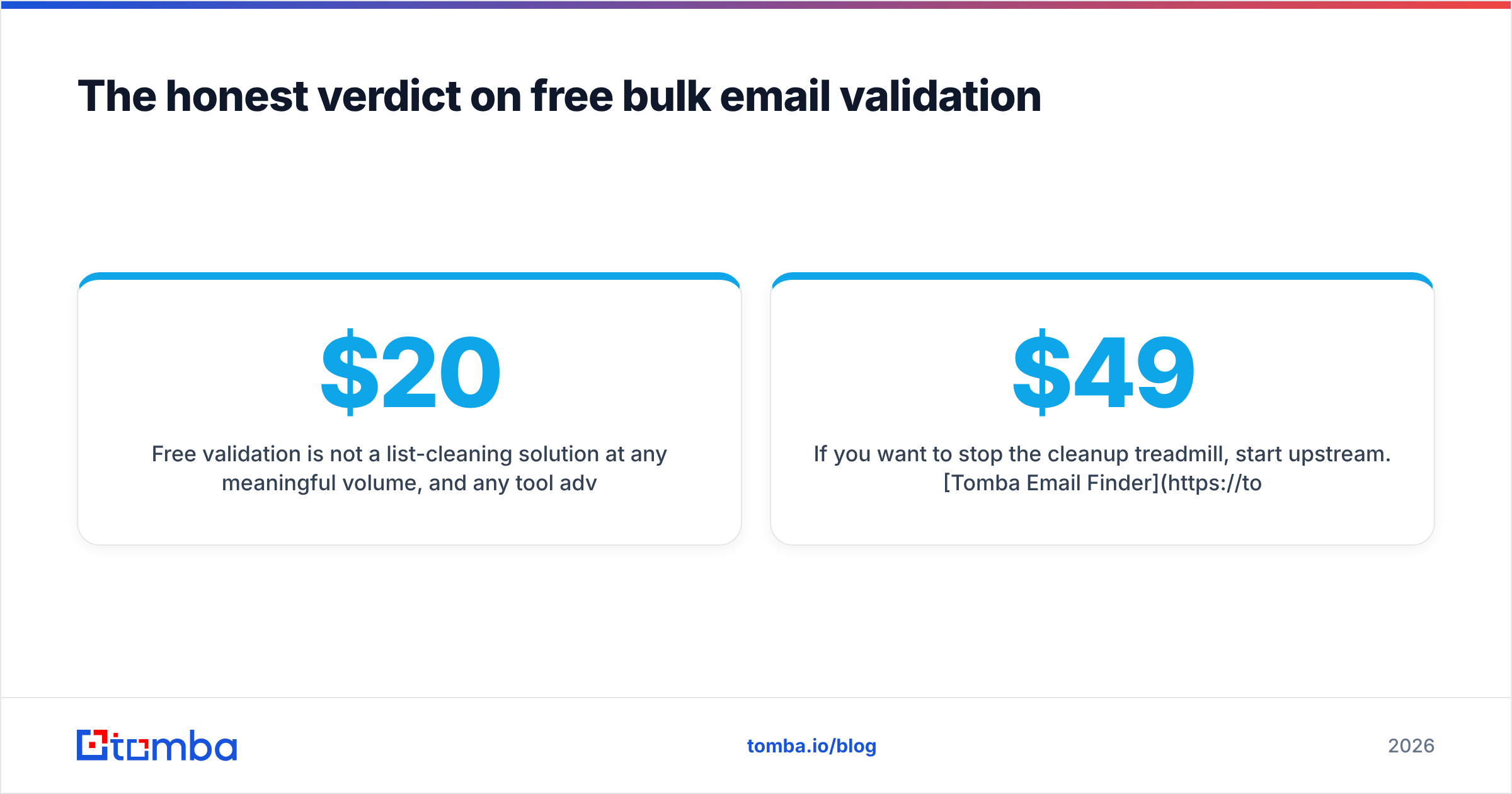
Free validation is not a list-cleaning solution at any meaningful volume, and any tool advertising unlimited free SMTP verification is either doing something cheaper than it claims or monetizing your upload. The paid step is small — usually $20–$40 on a list large enough to matter — relative to the cost of a throttled sending domain, which is measured in weeks of lost pipeline.
The bigger strategic point: the teams with the cleanest lists are not the ones validating hardest. They are the ones sourcing addresses that were verified at the moment they were found, then spot-checking rather than scrubbing.
If you want to stop the cleanup treadmill, start upstream. Tomba Email Finder returns professional addresses with verification built into discovery, so the list you build is already close to clean. The free tier gives you 25 searches per month to test it against contacts whose real status you can confirm independently — the only benchmark that actually means anything. Paid plans start at $49/mo on Starter, and full Tomba pricing scales through Growth at $99/mo and Pro at $249/mo. Run your own accuracy test before you commit to anyone's numbers, including ours.
Related guides#
Ready to find emails that actually work?
Join 150,000+ professionals who stopped guessing and started sending. Free credits on signup — no credit card required.
Get the Tomba newsletter
Practical outbound tactics and product updates — once every two weeks.
About the author