Free Email Checking in 2026: What Actually Works (and What Doesn't)
Free email checking tools promise clean lists at zero cost. Here's what free tiers actually catch, where they quietly fail, and when paying beats the free plan.
TL;DR
- Free email checking is real and useful — but most free tools only do syntax and MX checks, which catch maybe 30-40% of the addresses that will actually bounce.
- The expensive failures are catch-all domains, role accounts, spam traps, and recently-abandoned mailboxes. Almost no free tier handles those well.
- A sensible workflow: use free checkers for one-off lookups and small lists (under ~100 addresses), then switch to a paid verifier once a bad send costs you more than the credits would.
- Free tiers are best treated as trials with a monthly quota, not as an infrastructure choice. Tomba's free tier gives 25 searches/month; Starter is $49/mo.
- Bounce rate above 2-3% is the line where mailbox providers start throttling you. That threshold is what makes verification worth paying for.
What Is Free Email Checking, Exactly?#
Free email checking means running an address through a validation service without paying — either through a browser-based single-address checker, a free tier of a paid platform, or an open-source library you run yourself.
Think of it like a bouncer at a club door. A cheap bouncer checks whether your ID looks real — right shape, right hologram, name spelled plausibly. An expensive bouncer calls the DMV. Free email checking is almost always the first kind. It confirms the address is well-formed and that the domain can theoretically receive mail. It rarely confirms that a specific human still reads that inbox.
That distinction matters because bounces are not billed to you in dollars — they are billed in sender reputation. Google and Microsoft both published bulk-sender requirements that put a hard ceiling on spam complaints and implicitly on bounces. Cross that line and your delivery slows for every recipient, not just the bad ones.
What Do Free Email Checkers Actually Verify?#
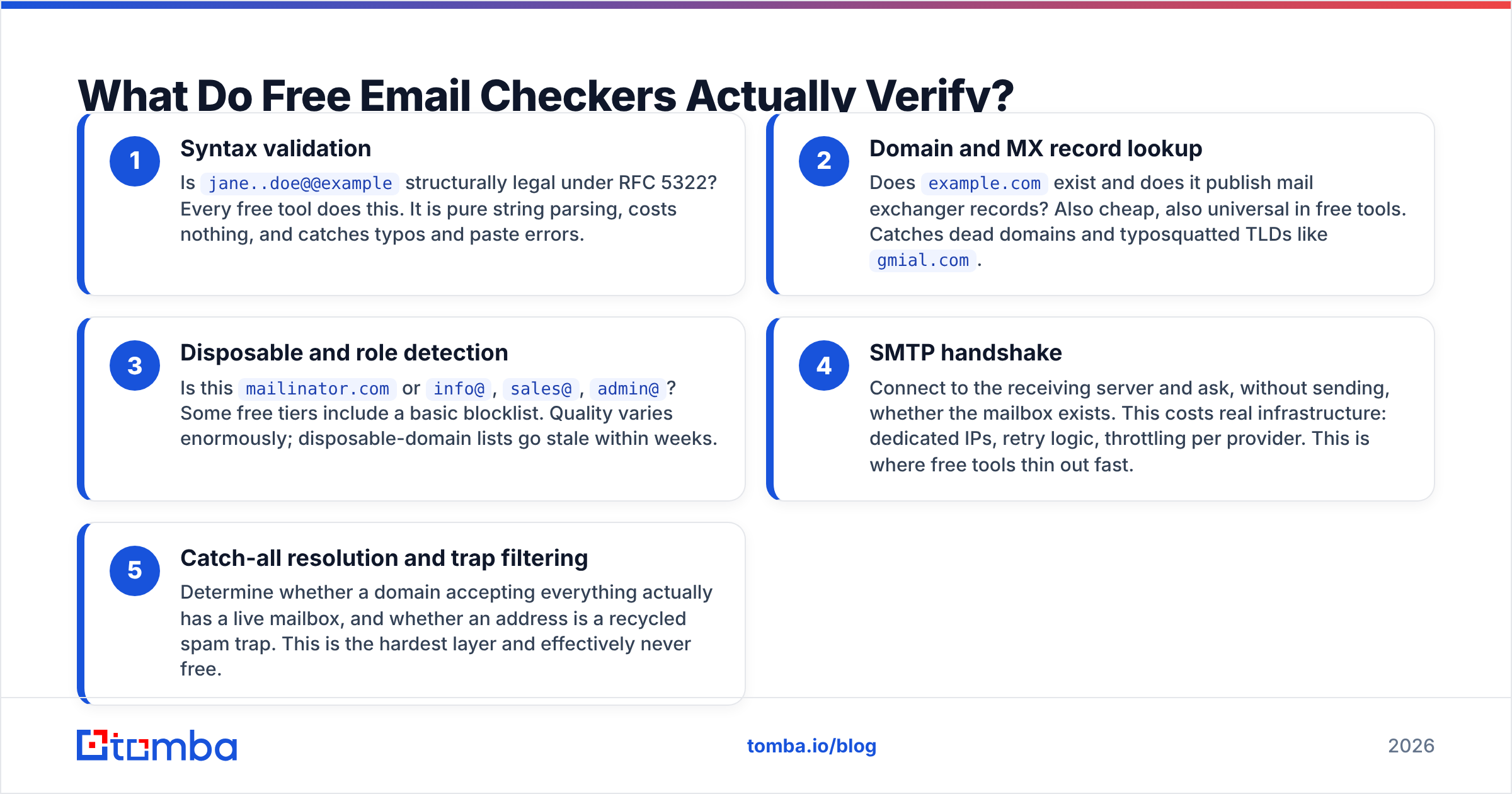
There are five layers to a full validation. Free tools typically stop at layer two or three.
- Syntax validation — Is
jane..doe@@examplestructurally legal under RFC 5322? Every free tool does this. It is pure string parsing, costs nothing, and catches typos and paste errors. - Domain and MX record lookup — Does
example.comexist and does it publish mail exchanger records? Also cheap, also universal in free tools. Catches dead domains and typosquatted TLDs likegmial.com. - Disposable and role detection — Is this
mailinator.comorinfo@,sales@,admin@? Some free tiers include a basic blocklist. Quality varies enormously; disposable-domain lists go stale within weeks. - SMTP handshake — Connect to the receiving server and ask, without sending, whether the mailbox exists. This costs real infrastructure: dedicated IPs, retry logic, throttling per provider. This is where free tools thin out fast.
- Catch-all resolution and trap filtering — Determine whether a domain accepting everything actually has a live mailbox, and whether an address is a recycled spam trap. This is the hardest layer and effectively never free.
Layers 1-3 are commodity. You can get them from a free browser tool, a Python library, or a five-line regex plus a DNS call. Layers 4-5 are the product. When a vendor gives away "free email verification," they are giving away the commodity part and metering the expensive part.

Is Free Email Checking Accurate Enough for Cold Outreach?#
Short answer: for a list under ~100 addresses that you built by hand, usually yes. For anything you bought, scraped, or exported in bulk, no.
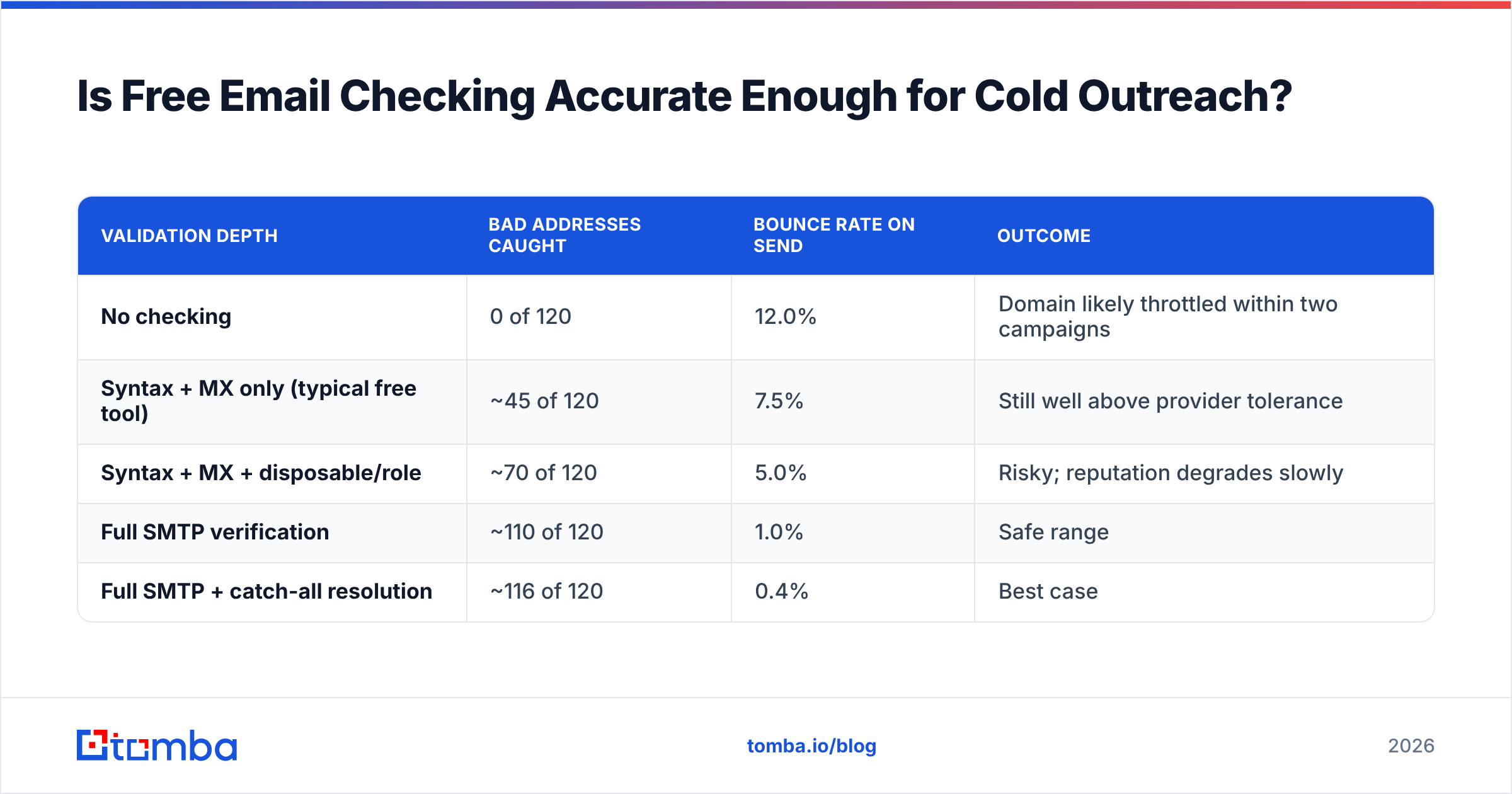
The math is simple. Suppose you have 1,000 addresses and the true bad rate is 12% — normal for a list assembled over six months from mixed sources.
| Validation depth | Bad addresses caught | Bounce rate on send | Outcome |
|---|---|---|---|
| No checking | 0 of 120 | 12.0% | Domain likely throttled within two campaigns |
| Syntax + MX only (typical free tool) | ~45 of 120 | 7.5% | Still well above provider tolerance |
| Syntax + MX + disposable/role | ~70 of 120 | 5.0% | Risky; reputation degrades slowly |
| Full SMTP verification | ~110 of 120 | 1.0% | Safe range |
| Full SMTP + catch-all resolution | ~116 of 120 | 0.4% | Best case |
Those figures are directional, not lab-precise — your true bad rate depends entirely on list age and source. But the shape holds across every list I have seen audited: the free layers remove the obvious garbage and leave most of the expensive garbage in place.
The expensive garbage is what hurts. A malformed address bounces harmlessly. A recycled spam trap at a real domain gets you listed. You can check whether your sending IP already carries damage with a blacklist checker before you assume the list is your only problem.
Which Free Email Checking Tools Are Worth Using?#
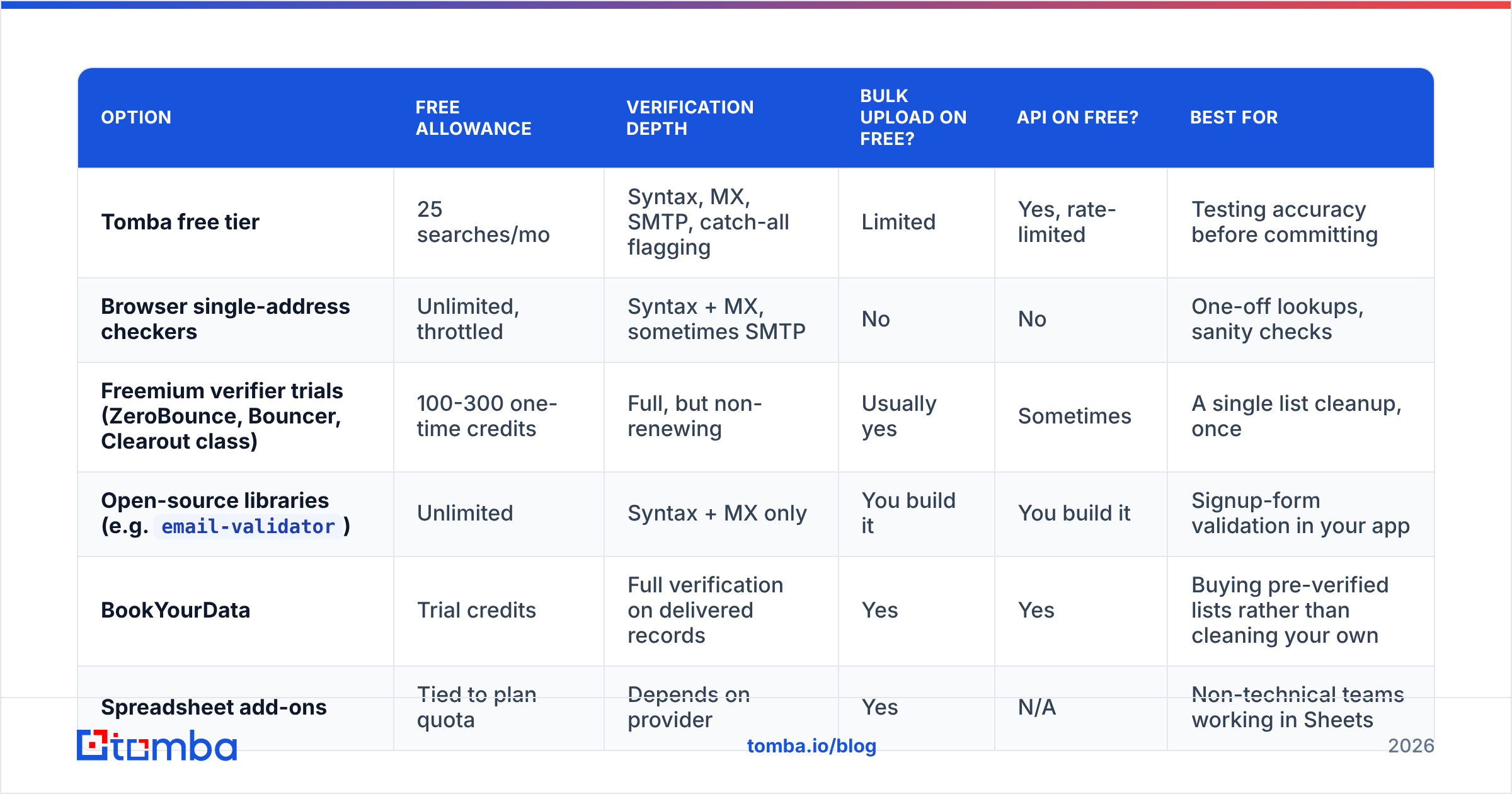
Here is an honest comparison of the main categories, including what each free tier actually gives you.
| Option | Free allowance | Verification depth | Bulk upload on free? | API on free? | Best for |
|---|---|---|---|---|---|
| Tomba free tier | 25 searches/mo | Syntax, MX, SMTP, catch-all flagging | Limited | Yes, rate-limited | Testing accuracy before committing |
| Browser single-address checkers | Unlimited, throttled | Syntax + MX, sometimes SMTP | No | No | One-off lookups, sanity checks |
| Freemium verifier trials (ZeroBounce, Bouncer, Clearout class) | 100-300 one-time credits | Full, but non-renewing | Usually yes | Sometimes | A single list cleanup, once |
Open-source libraries (e.g. email-validator) |
Unlimited | Syntax + MX only | You build it | You build it | Signup-form validation in your app |
| BookYourData | Trial credits | Full verification on delivered records | Yes | Yes | Buying pre-verified lists rather than cleaning your own |
| Spreadsheet add-ons | Tied to plan quota | Depends on provider | Yes | N/A | Non-technical teams working in Sheets |
Two practical notes on that table.
One-time credits are not a free tier. ZeroBounce-style trials give you 100 credits once. That cleans one list, one time. If your workflow involves continuous lead capture, a non-renewing trial is a demo, not a tool. A monthly renewing free quota — even a small one — is more useful for ongoing work.
Browser tools throttle silently. Free single-address checkers rate-limit by IP. Paste 40 addresses in a row and results 20 through 40 often come back as "unknown" without telling you why. Treat "unknown" as "unverified," never as "valid."
If you just need to confirm one address right now, a free email checker handles it without an account. For structural questions — "what format does this company use?" — a company email pattern lookup answers it faster than checking addresses one at a time.
How Do You Handle Catch-All Domains?#
Catch-all domains are the single biggest reason free email checking under-delivers.
A catch-all server accepts mail addressed to anything at that domain. ceo@acme.com, asdfgh@acme.com, nobody-here@acme.com — all accepted at the SMTP layer. A basic verifier sees "accepted" and returns valid. You send. The message lands in a black hole or a shared catch-all folder nobody reads, and it counts as delivered while producing zero replies.
Roughly 15-25% of B2B domains run catch-all, and the share skews higher among enterprises and agencies — exactly the accounts you most want to reach. Free tools handle this in one of three ways, all bad:
- Mark every catch-all address valid (inflates your "clean" count, tanks reply rate)
- Mark every catch-all address invalid (throws away real prospects, often 20% of your list)
- Mark them unknown and leave the decision to you (honest, but unhelpful at volume)
Real catch-all resolution needs pattern intelligence: does this company's naming convention produce this address, has this exact address appeared in verified sources, does the person exist at the company at all. That requires a data layer, not just an SMTP socket — which is why it sits behind paid plans everywhere. Tools like a catch-all verifier approach it by combining SMTP signals with observed-address data rather than guessing.
If a free tool never returns "catch-all" as a status category, it is not detecting catch-all domains at all. That is a red flag worth checking in the first ten addresses you test.
When Should You Stop Using Free and Start Paying?#
Cross any two of these lines and the free tier is costing you more than it saves.
- You send more than ~200 cold emails a month. Below that, manual verification is tractable. Above it, per-address checking eats hours you are not paying yourself to spend.
- Your bounce rate sits above 3%. This is the practical throttling threshold at major mailbox providers. Free checking rarely gets a mixed-source list under it.
- You are sending from a domain that also carries transactional or customer mail. Reputation damage from cold outreach spills onto your invoices and password resets. That risk is not worth $49 of savings.
- You need results in a spreadsheet, CRM, or app automatically. Free tiers gate the API and bulk upload — precisely the features that make verification a workflow instead of a chore.
- You have unknown-status addresses you keep guessing about. Every "unknown" you send to anyway is an unpriced bet on your sender reputation.
What Does Paid Email Verification Actually Cost?#
Less than most people assume, and the pricing model matters more than the headline number.
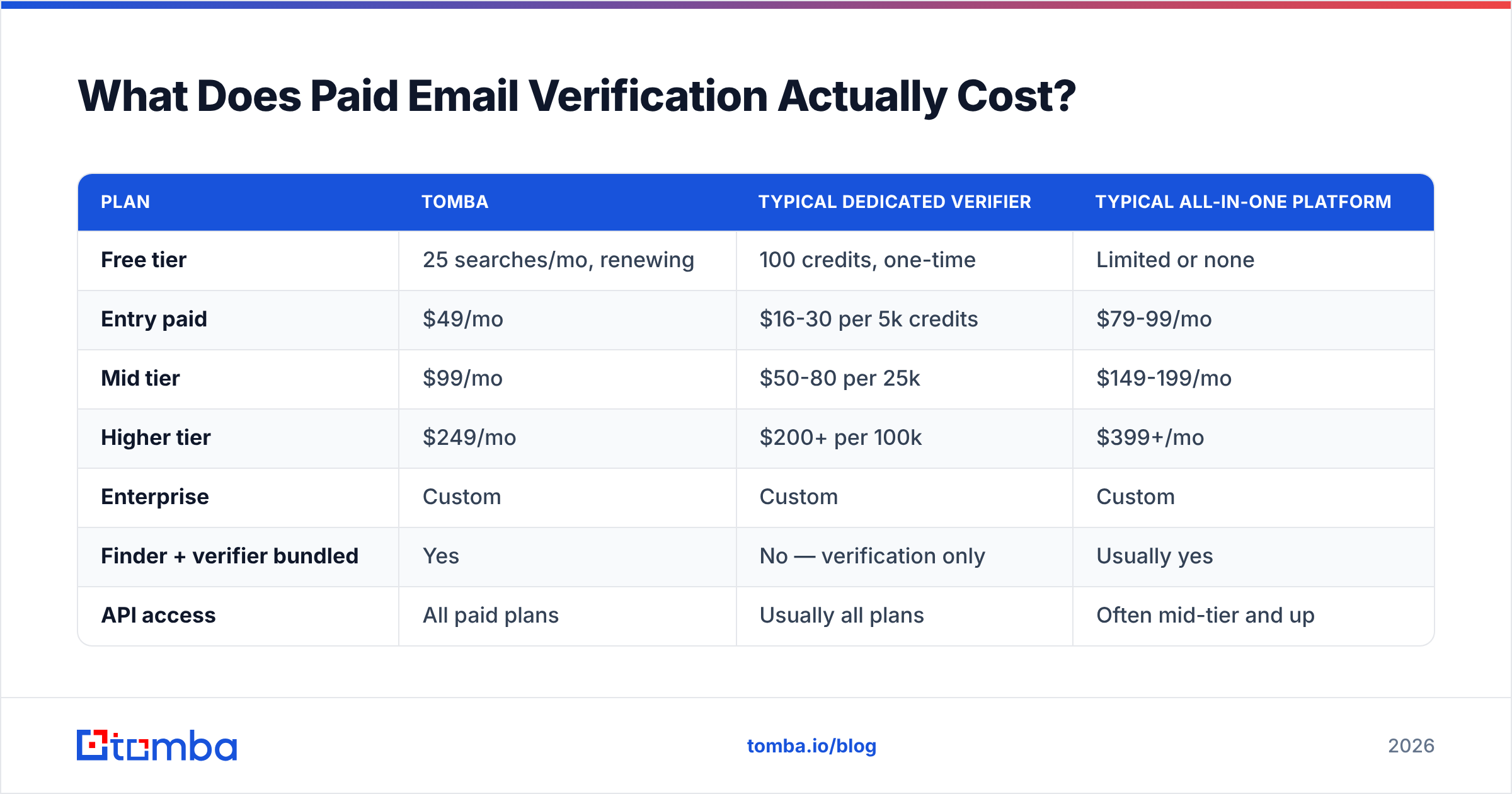
| Plan | Tomba | Typical dedicated verifier | Typical all-in-one platform |
|---|---|---|---|
| Free tier | 25 searches/mo, renewing | 100 credits, one-time | Limited or none |
| Entry paid | $49/mo | $16-30 per 5k credits | $79-99/mo |
| Mid tier | $99/mo | $50-80 per 25k | $149-199/mo |
| Higher tier | $249/mo | $200+ per 100k | $399+/mo |
| Enterprise | Custom | Custom | Custom |
| Finder + verifier bundled | Yes | No — verification only | Usually yes |
| API access | All paid plans | Usually all plans | Often mid-tier and up |
| Credit rollover | Plan-dependent | Rare | Rare |
The structural question is whether you need finding or only checking. Dedicated verifiers are cheap per credit but do nothing when you have a name and a company and no address at all. Bundled platforms cost more per month but replace two subscriptions. Full Tomba pricing sits in the bundled category — the email verifier and the finder share one credit pool, which matters if your real workflow is "I have a list of companies, get me people."
Also watch how vendors bill unknowns. Some charge a credit for every address submitted, including ones they cannot resolve. Others charge only for definitive results. On a catch-all-heavy B2B list, that difference can be 20% of your bill.
How Should You Build a Practical Verification Workflow?#
Layer the tools by cost, cheapest first. Every address you eliminate for free is one you do not pay to check.
- Deduplicate before anything else. Duplicate addresses waste credits and inflate perceived list size. A remove duplicates pass costs nothing and typically trims 5-15% off an aggregated list.
- Run free syntax and MX filtering. Strip malformed addresses and dead domains locally or with a free tool. This removes the cheap garbage at zero cost.
- Segment by domain type. Free-mail addresses (gmail, outlook) verify reliably via SMTP. Corporate domains need catch-all handling. Split them and treat them differently.
- Paid-verify only what survives. Send the filtered remainder to a full verifier. You have now cut credit spend by roughly a third versus verifying raw input.
- Route unknowns to a separate, slower track. Do not delete them and do not blast them. Warm them through LinkedIn or a low-volume secondary domain instead.
- Re-verify quarterly. B2B data decays at roughly 22-30% annually because people change jobs. A list verified in January is measurably worse by July.
That sequence is boring, which is the point. Most bounce disasters come from skipping step 1 or step 4, not from picking the wrong vendor.
What Should You Actually Do Next?#
Start free, but start with a test that tells you something. Take 25 addresses you already know the truth about — colleagues, customers, people who replied last month, plus a few you know are dead — and run them through whatever free tool you are considering. Compare the verdicts against reality. A tool that marks a known-dead address valid, or refuses to flag a catch-all, has told you exactly what it is worth before you commit a list to it.
Then be honest about volume. If you are checking a handful of addresses a week, free email checking is genuinely sufficient and paying would be waste. If you are running outbound at any real scale, the arithmetic flips fast: one throttled sending domain costs more in lost pipeline than a year of verification credits.
Ready to test it against your own data? Start with the Tomba Email Finder free tier — 25 searches a month, no card, with SMTP verification and catch-all flagging included rather than paywalled. Run your known-answers list through it, check the verdicts against what you already know, and decide from evidence instead of a pricing page. If the accuracy holds up on addresses you can verify yourself, it will hold up on the ones you cannot.
Further reading: Google's bulk sender guidelines set the deliverability thresholds most of this article is calibrated against, and G2's email verification category is a reasonable place to cross-check vendor claims against user reviews before you buy.
Related guides#
Ready to find emails that actually work?
Join 150,000+ professionals who stopped guessing and started sending. Free credits on signup — no credit card required.
Get the Tomba newsletter
Practical outbound tactics and product updates — once every two weeks.
About the author