Free Email Spam Tester: How to Check Your Score in 2026
Spam filters reject most cold email on signals you can check in 60 seconds. Here is how free spam testers score your message, which ones are worth using in 2026, and what to fix first when the number comes back ugly.
TL;DR
- A free email spam tester sends your draft to a disposable inbox, runs it through filter rules (usually SpamAssassin plus authentication checks), and returns a score out of 10 with a list of what tripped.
- The score is a diagnostic, not a delivery guarantee. Gmail and Outlook weigh sender reputation and engagement far more heavily than message content, and no free tool can see those signals for your domain.
- Most low scores trace back to three fixable things: missing or misaligned SPF/DKIM/DMARC, a blacklisted sending IP, and image-heavy or link-heavy HTML.
- Use a spam tester alongside list hygiene. A perfect 10/10 message sent to 30% invalid addresses still tanks your reputation within two campaigns.
- Re-test whenever you change domain, ESP, template, or sending volume. Otherwise a quarterly check is enough.
What is a free email spam tester?#
A free email spam tester is a tool that grades a single email message against the same rule sets commercial spam filters use, then tells you which rules you triggered.
Think of it like a smoke detector test button. Pressing it does not prove your house will never burn down. It proves the alarm is wired, the battery works, and nothing obvious is broken. That is the correct expectation for a spam score.
Mechanically, most of these tools work the same way:
- You get a throwaway address. The tool generates something like
test-8f3k2@mail-tester.com. - You send your real email to it from your real sending setup — same ESP, same domain, same signature, same links.
- The tool inspects the raw message. It parses headers, runs SpamAssassin rules, checks SPF, DKIM, and DMARC alignment, looks up your sending IP and domain on public blacklists, and scans the HTML and copy.
- It returns a score and a breakdown. Usually X/10, with each deduction itemized.
The critical detail people miss: you must send from the exact configuration you will use in production. Testing from your personal Gmail when you plan to send through a cold outreach tool on a separate domain gives you a score for the wrong sender.
Why do good emails still land in spam?#
Because content is the smallest input. Mailbox providers make the placement decision on a stack of signals, and only the bottom layer is what a free tester can read.
Here is the hierarchy, roughly in order of weight at Gmail and Microsoft in 2026:
- Sender reputation — the historical complaint rate, bounce rate, and spam-trap hits tied to your domain and IP. This dominates everything else and accumulates over weeks.
- Authentication — SPF, DKIM, and DMARC must pass and align. Since Google and Yahoo tightened bulk sender requirements, failing DMARC alignment at volume is close to an automatic rejection.
- Recipient engagement — opens, replies, moves out of spam, and "not spam" clicks. Cold email starts with zero engagement history, which is why it is structurally harder to deliver than newsletters.
- List quality — bounce rate above roughly 2-3% is read as a purchased or stale list. Invalid addresses do more damage than any subject line.
- Message content — spammy phrases, link-to-text ratio, image-only bodies, tracking pixels, URL shorteners, and shady link domains.
- Infrastructure hygiene — blacklisted IP, missing reverse DNS, misconfigured MX, brand-new domain with no sending history.
A free email spam tester covers items 2, 5, and 6 well. It cannot see 1, 3, or 4 at all. That is not a flaw in the tools; it is a boundary you need to plan around.
What does a spam score actually measure?#
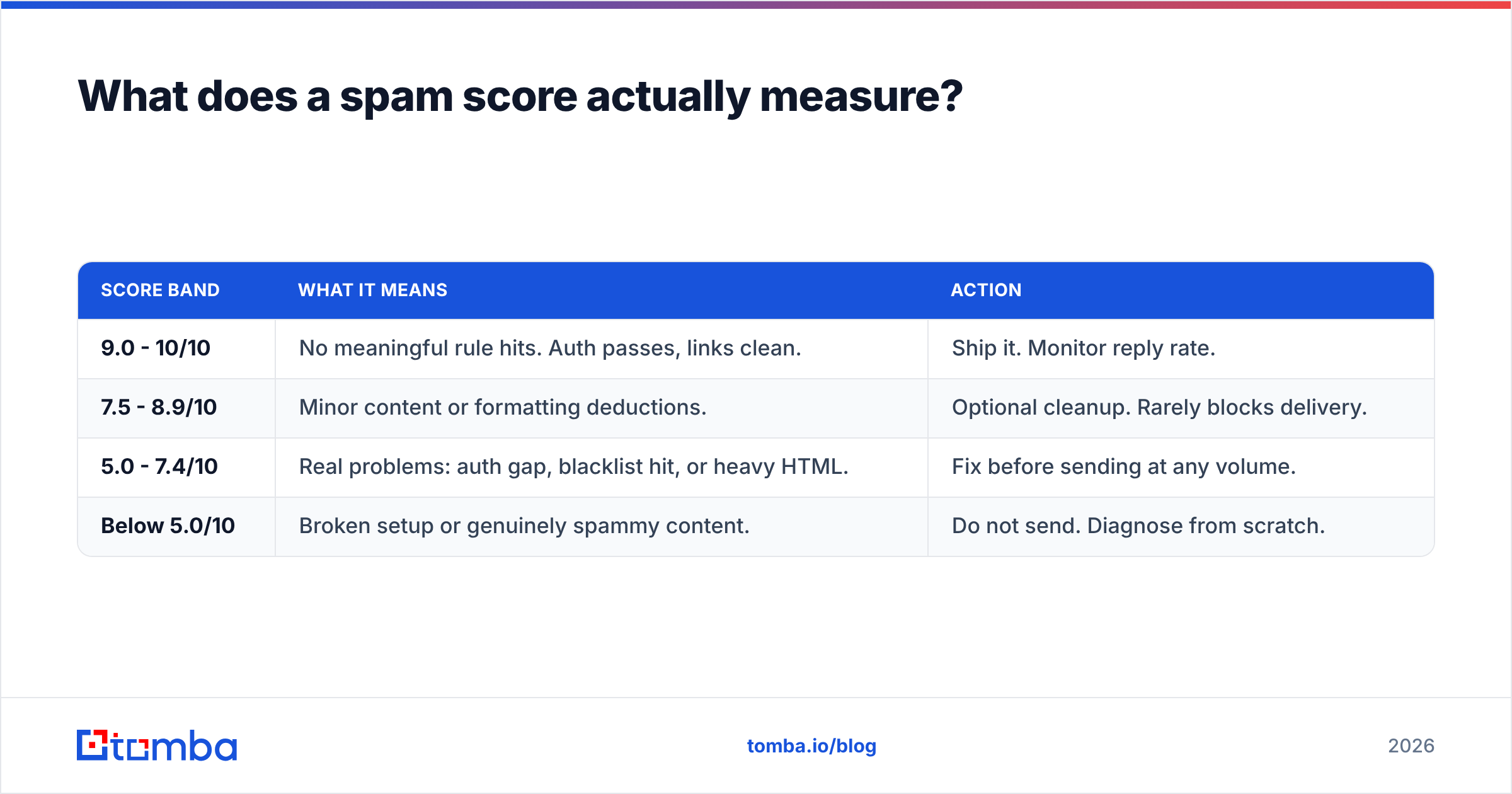
The number nearly every free tester reports is a normalized SpamAssassin score. SpamAssassin is an open-source filter that assigns positive or negative points to hundreds of rules and flags a message once the total crosses a threshold.
| Score band | What it means | Action |
|---|---|---|
| 9.0 - 10/10 | No meaningful rule hits. Auth passes, links clean. | Ship it. Monitor reply rate. |
| 7.5 - 8.9/10 | Minor content or formatting deductions. | Optional cleanup. Rarely blocks delivery. |
| 5.0 - 7.4/10 | Real problems: auth gap, blacklist hit, or heavy HTML. | Fix before sending at any volume. |
| Below 5.0/10 | Broken setup or genuinely spammy content. | Do not send. Diagnose from scratch. |
Two caveats worth internalizing.
First, Gmail and Outlook do not run SpamAssassin. They run proprietary machine-learning classifiers trained on their own traffic. A 10/10 SpamAssassin score is evidence of a clean message, not proof of inbox placement.
Second, the score is heavily weighted toward things you can fix in ten minutes. That is useful. It means a bad score is almost always actionable, while a good score just means you have cleared the floor.
Which free email spam testers are worth using in 2026?#
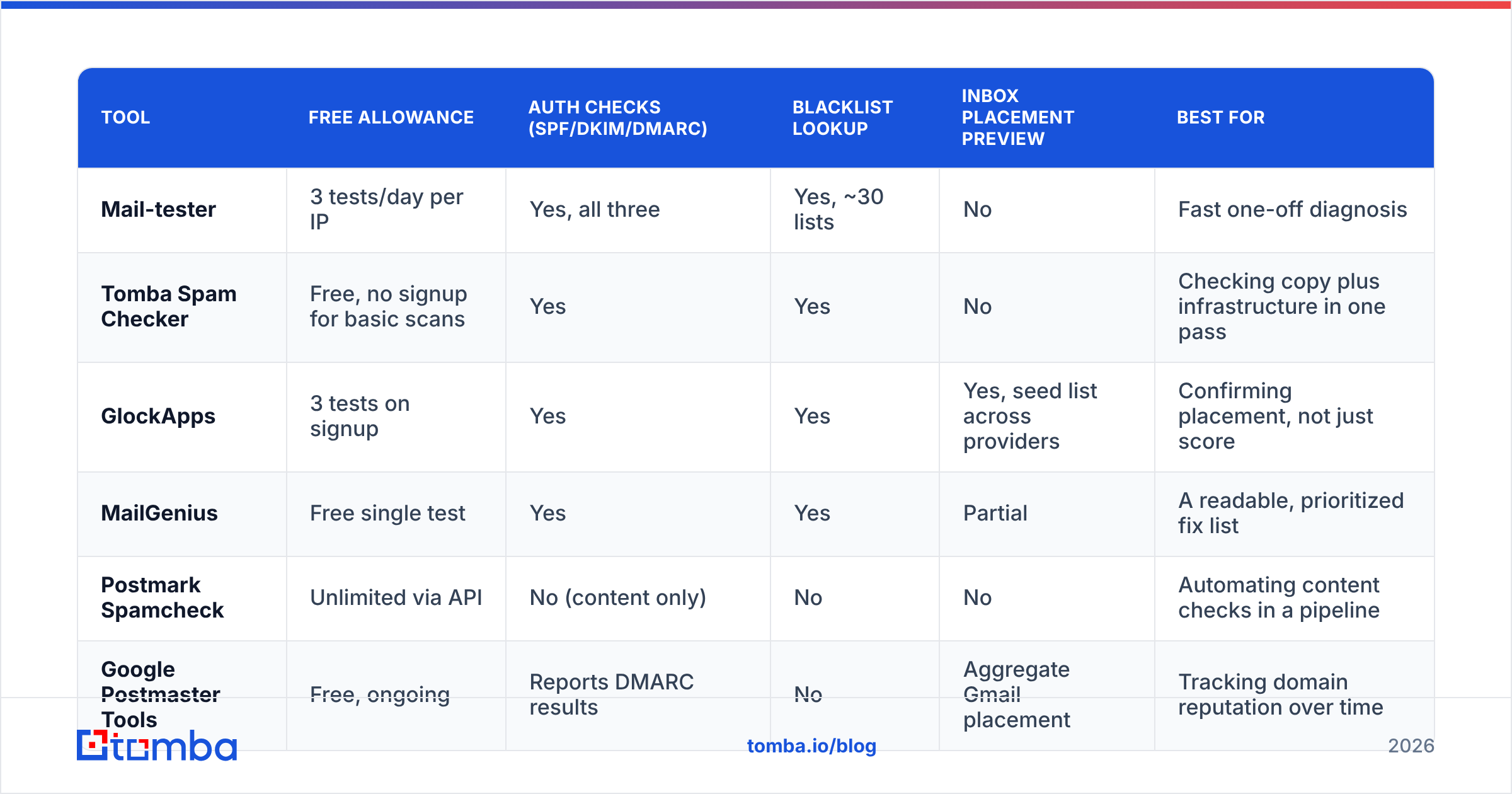
The free tier landscape has consolidated. Most tools give you a handful of free tests per day or per IP, then gate the rest. Here is how the common options compare.
| Tool | Free allowance | Auth checks (SPF/DKIM/DMARC) | Blacklist lookup | Inbox placement preview | Best for |
|---|---|---|---|---|---|
| Mail-tester | 3 tests/day per IP | Yes, all three | Yes, ~30 lists | No | Fast one-off diagnosis |
| Tomba Spam Checker | Free, no signup for basic scans | Yes | Yes | No | Checking copy plus infrastructure in one pass |
| GlockApps | 3 tests on signup | Yes | Yes | Yes, seed list across providers | Confirming placement, not just score |
| MailGenius | Free single test | Yes | Yes | Partial | A readable, prioritized fix list |
| Postmark Spamcheck | Unlimited via API | No (content only) | No | No | Automating content checks in a pipeline |
| Google Postmaster Tools | Free, ongoing | Reports DMARC results | No | Aggregate Gmail placement | Tracking domain reputation over time |
The honest recommendation: use two of them, not one.
Pick one message-level tester to grade the draft and catch authentication or blacklist problems. Then wire up Google Postmaster Tools for your sending domain, because it is the only free source of Gmail's actual opinion of your reputation. The first tells you whether the email is clean. The second tells you whether the sender is.
If you want to check copy in isolation before you have a sending domain configured, a spam checker that scores text without requiring a live send is faster for iterating on subject lines and body drafts. Pair it with a blacklist checker and an SPF checker to cover the infrastructure side.
How do you run a spam test properly?#
Most people run the test wrong and then trust the result. The sequence matters.
- Finish the email first. Test the final version with real links, real signature, real unsubscribe footer, and real merge tags resolved to sample values. A test on a stripped-down draft tells you nothing.
- Send from production infrastructure. Same domain, same ESP or sequencer, same mailbox. If you rotate across five sending domains, test each one. They have separate DNS records and separate reputations.
- Send it as a normal send, not a forward. Forwarding rewrites headers and breaks SPF, which produces a false failure.
- Read the full breakdown, not the headline number. A 7/10 with a single DKIM failure is a different problem than a 7/10 spread across a dozen content rules.
- Fix in order of weight. Authentication and blacklist issues first. Content tweaks last, because they are worth the fewest points.
- Re-test after each fix, not after all of them. Otherwise you will not know which change moved the number.
One more: test at least one variant with your tracking pixel and link tracking disabled. Open-tracking pixels and rewritten click domains are among the most common quiet deductions in cold email, and if your tracking domain is shared with other senders, you inherit their reputation.
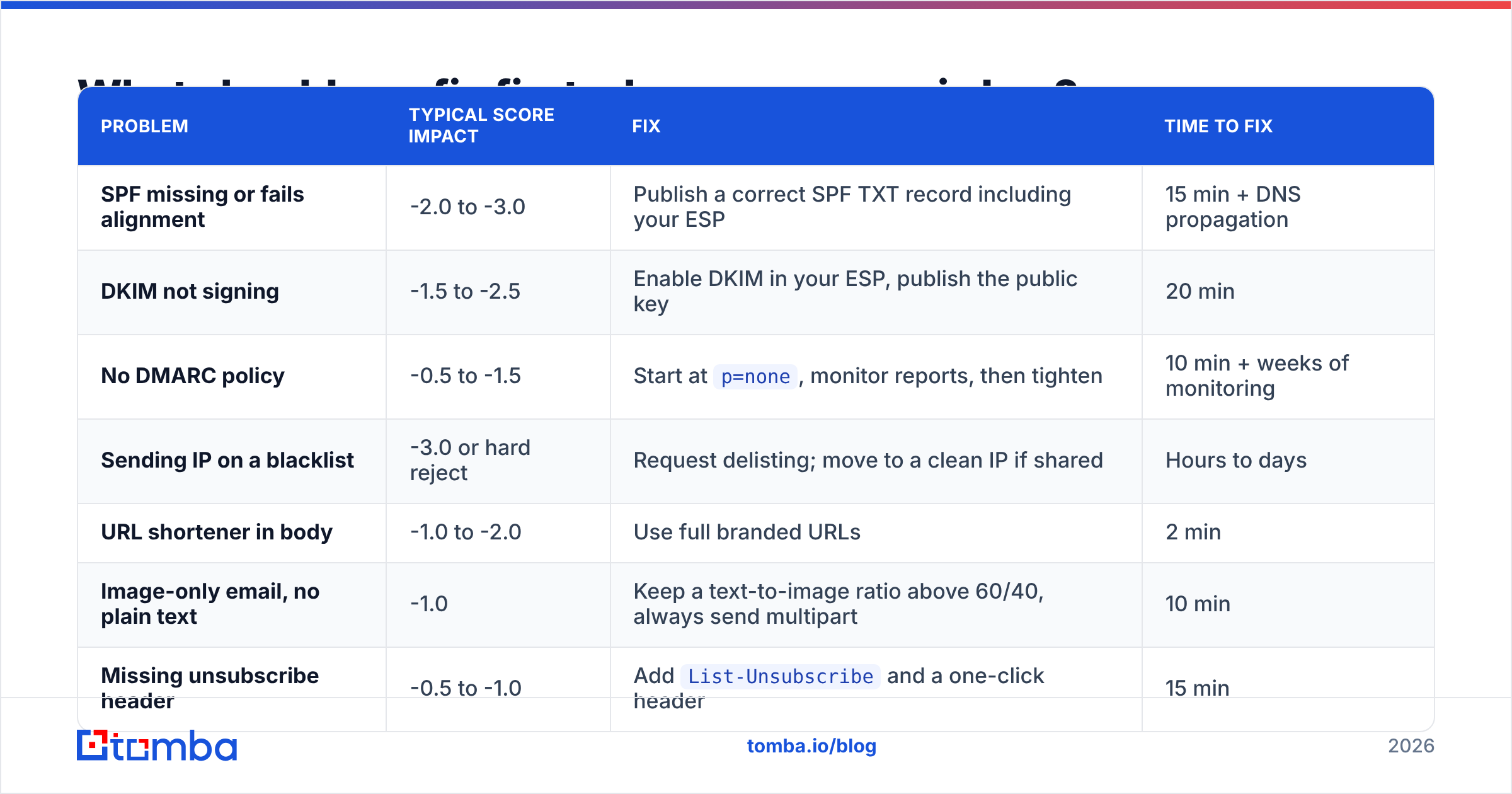
What should you fix first when your score is low?#
Work down this list. It is ordered by how much score each fix typically recovers.
| Problem | Typical score impact | Fix | Time to fix |
|---|---|---|---|
| SPF missing or fails alignment | -2.0 to -3.0 | Publish a correct SPF TXT record including your ESP | 15 min + DNS propagation |
| DKIM not signing | -1.5 to -2.5 | Enable DKIM in your ESP, publish the public key | 20 min |
| No DMARC policy | -0.5 to -1.5 | Start at p=none, monitor reports, then tighten |
10 min + weeks of monitoring |
| Sending IP on a blacklist | -3.0 or hard reject | Request delisting; move to a clean IP if shared | Hours to days |
| URL shortener in body | -1.0 to -2.0 | Use full branded URLs | 2 min |
| Image-only email, no plain text | -1.0 | Keep a text-to-image ratio above 60/40, always send multipart | 10 min |
| Missing unsubscribe header | -0.5 to -1.0 | Add List-Unsubscribe and a one-click header |
15 min |
| Brand-new domain, zero history | Not scored, but heavily filtered | Warm up over 3-4 weeks before volume | Weeks |
Notice that the biggest recoveries are all DNS and infrastructure. Rewriting "free" to "complimentary" in your subject line is a rounding error by comparison. Content-level superstition is the most overrated part of deliverability advice.
If you are unsure what your current email deliverability baseline looks like, run the authentication checks before you touch a word of copy.
Does a spam tester replace list verification?#
No, and this is the single most expensive misunderstanding in cold outreach.
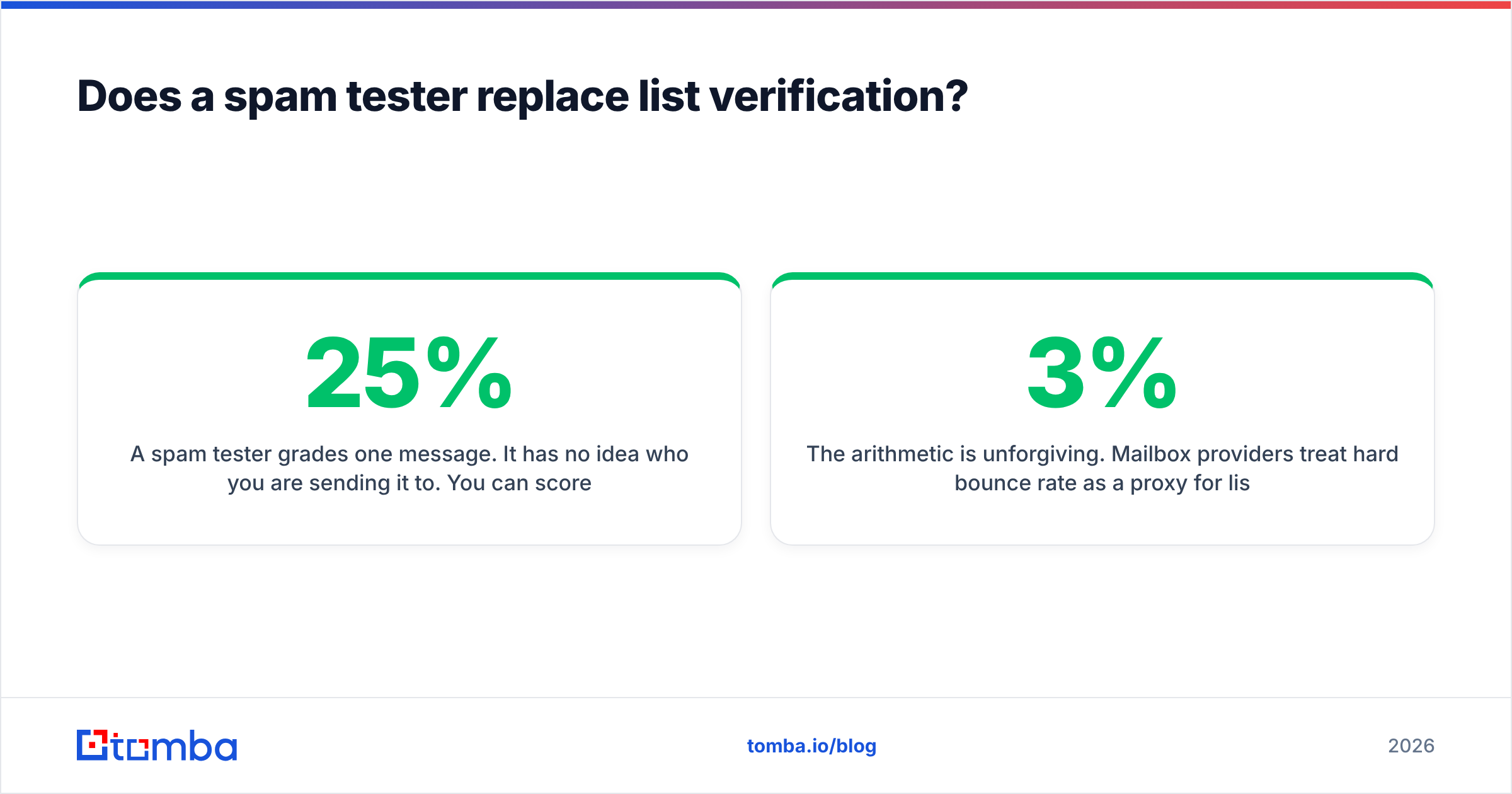
A spam tester grades one message. It has no idea who you are sending it to. You can score 10/10 and still destroy your domain reputation in two weeks if 25% of your list bounces.
The arithmetic is unforgiving. Mailbox providers treat hard bounce rate as a proxy for list acquisition quality. Cross roughly 3% and you get throttled. Cross 5-8% and you get filtered wholesale, regardless of how clean your HTML is. Purchased and scraped lists routinely bounce at 20-40% because B2B contact data decays at roughly 2-3% per month as people change jobs.
So the pre-send checklist has two independent branches:
- Message branch: run the free email spam tester, fix auth, clean the HTML, drop the shorteners.
- List branch: verify every address before it enters a sequence. Run bulk validation, remove hard bounces, and decide a policy for catch-all domains rather than guessing.
For the second branch, an email verifier that checks syntax, MX records, and SMTP acceptance in one pass will do more for your inbox rate than any amount of copy editing. Catch-all domains deserve their own treatment, since a standard SMTP check returns "accepted" for every address on them. A dedicated catch-all verifier resolves that ambiguity instead of leaving it in your list.
You can compare verification vendors on independent review sites like G2 if you want third-party accuracy claims rather than vendor marketing.
How often should you re-test?#
Trigger-based, not calendar-based. Re-run a spam test whenever any of these change:
- New sending domain or subdomain. Fresh DNS means fresh authentication risk.
- New ESP or sequencer. Your SPF include list changes, and so does your sending IP pool.
- Template redesign. Especially any change that adds images, embedded fonts, or new link domains.
- Volume increase above 2x. Reputation is volume-sensitive; what passed at 200/day may not pass at 1,000/day.
- Sudden reply-rate drop with no copy change. That pattern usually means placement moved, not that your offer got worse.
- Quarterly, as a baseline. Blacklist listings and expired DNS records happen without any action on your part.
Keep a simple log: date, domain, score, what changed. When placement degrades three months from now, that log is the fastest path to the cause.
What free spam testing cannot tell you#
Be clear about the boundaries so you do not over-trust the green checkmark.
- Per-provider placement. A score does not distinguish between Gmail inbox, Gmail Promotions, and Outlook Junk. Only seed-list testing does that, and free tiers of seed testing are limited to a handful of runs.
- Your actual reputation. Postmaster Tools shows Gmail's view once you have volume. Microsoft's SNDS covers Outlook. Neither is exposed inside a message-level tester.
- Engagement effects. Reply rate drives placement over time. A tester sees a single send in isolation.
- Recipient-side rules. Corporate mail gateways such as Proofpoint or Mimecast run their own policies that no public tester replicates.
- Whether your offer is any good. Deliverability gets you into the inbox. It does not make anyone care.
Treat the score as a pre-flight check. It confirms you are not taking off with a broken instrument. It does not fly the plane.
Where to start#
If you are setting up outbound from scratch, do it in this order: authenticate the domain, warm it for three to four weeks, verify the list, run the spam test, then send. Skipping straight to step four is how most teams end up burning a domain and blaming their copy.
And if the constraint is not deliverability but the list itself — stale contacts, missing decision-makers, guessed email patterns that bounce — fix the input before you optimize the pipe. The Tomba Email Finder returns verified professional addresses by name, domain, or company, with a confidence score attached to each result, so what enters your sequencer is already clean. The free tier gives you 25 searches a month to test accuracy on your own target accounts; paid plans start at $49/mo. Check the full Tomba pricing before you commit, and run your first sequence through both a spam tester and a verifier. The two together cost you an hour and save you a domain.
Related guides#
Ready to find emails that actually work?
Join 150,000+ professionals who stopped guessing and started sending. Free credits on signup — no credit card required.
Get the Tomba newsletter
Practical outbound tactics and product updates — once every two weeks.
About the author