Free Email Tracking Outlook: 2026 Tools and Setup Guide
Outlook's built-in read receipts are not tracking. Here is what actually works for free in 2026 — extensions, limits, privacy caveats, and when free stops being enough.
TL;DR — free email tracking Outlook options at a glance
- Outlook has no native open tracking. The "read receipt" checkbox asks permission. It is not a pixel.
- Free email tracking Outlook tools are all add-ins or Chrome extensions. Most cap you at 100–250 emails a month, and many skip the desktop app.
- Apple Mail Privacy Protection, Gmail image proxying, and company scanners fake opens. Treat open rate as a soft signal. Clicks and replies survive.
- Best free picks for 2026: Mailtrack (unlimited, adds a signature), Snov.io (100/mo), Saleshandy's free tier, and Outlook receipts for internal mail.
- Tracking tells you when someone opened. It cannot tell you if the address was ever real, so clean your list with an email verifier first.
Why doesn't Outlook have real email tracking built in?#
Because Microsoft built receipts for internal mail, not outbound sales.
Open Outlook and go to Options. You will see two checkboxes: Request a Delivery Receipt and Request a Read Receipt. That is not tracking. A read receipt pops a dialog box on the other end and asks the recipient to notify you. Inside the same Exchange tenant, it usually works. Across the open internet, it usually does not. The recipient clicks "No," or an admin turned receipts off years ago. You get nothing, and you never learn why.
Real tracking works differently. The tool drops a 1x1 transparent image into your outgoing HTML, hosted on its own server. When the recipient's mail client loads images, that server logs the request: time, rough location, device. That is an "open." Link tracking works the same way. Your https://prospect-company.com becomes https://track.tool.io/abc123, which redirects and logs the click on the way through.
Microsoft has never shipped this natively. Open pixels are a marketing tool, and Outlook is an enterprise mail client first. So every Outlook tracking setup is an add-in.
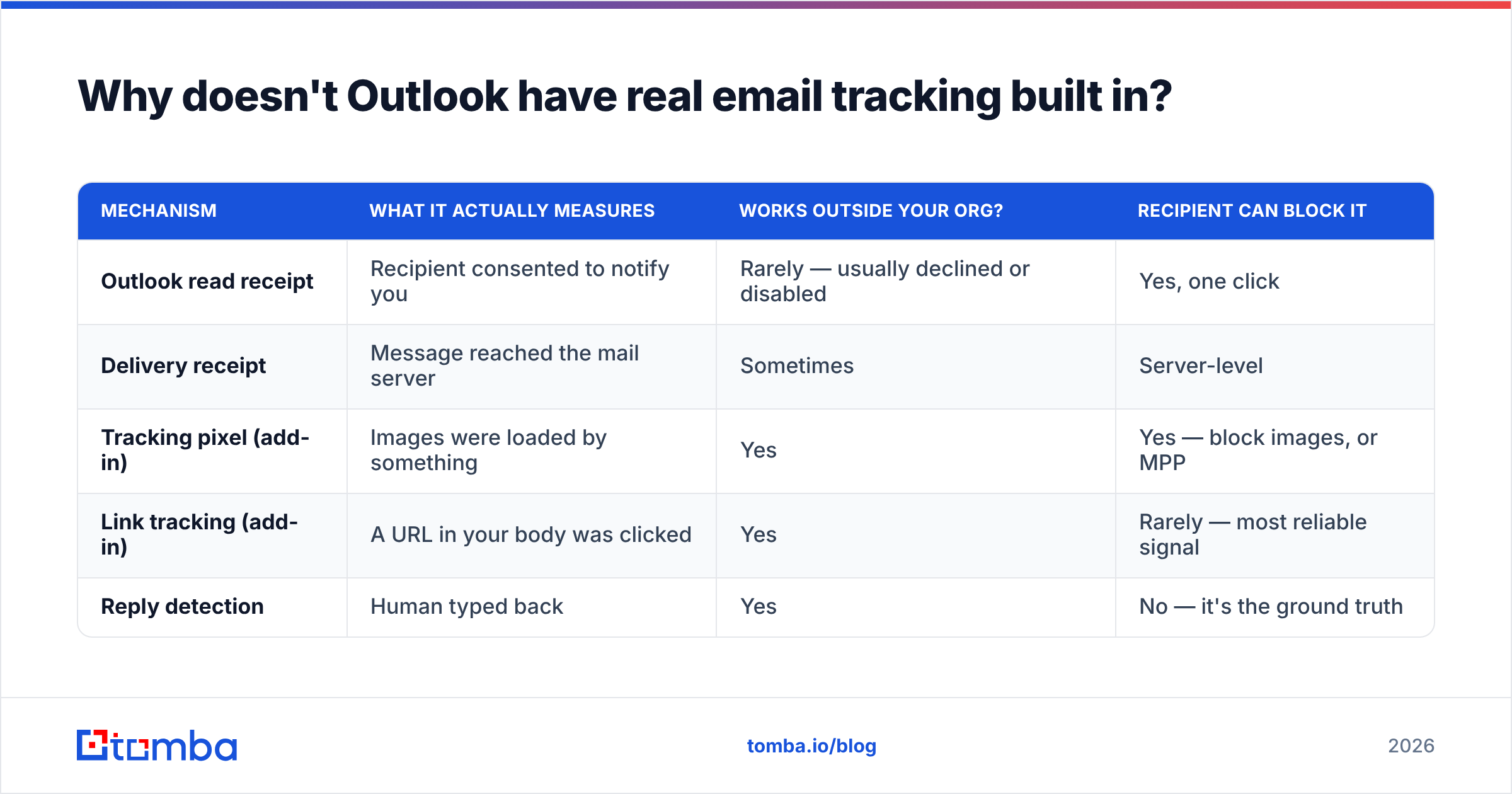
| Mechanism | What it actually measures | Works outside your org? | Recipient can block it |
|---|---|---|---|
| Outlook read receipt | Recipient consented to notify you | Rarely — usually declined or disabled | Yes, one click |
| Delivery receipt | Message reached the mail server | Sometimes | Server-level |
| Tracking pixel (add-in) | Images were loaded by something | Yes | Yes — block images, or MPP |
| Link tracking (add-in) | A URL in your body was clicked | Yes | Rarely — most reliable signal |
| Reply detection | Human typed back | Yes | No — it's the ground truth |
Which free email tracking Outlook tools are best in 2026?#
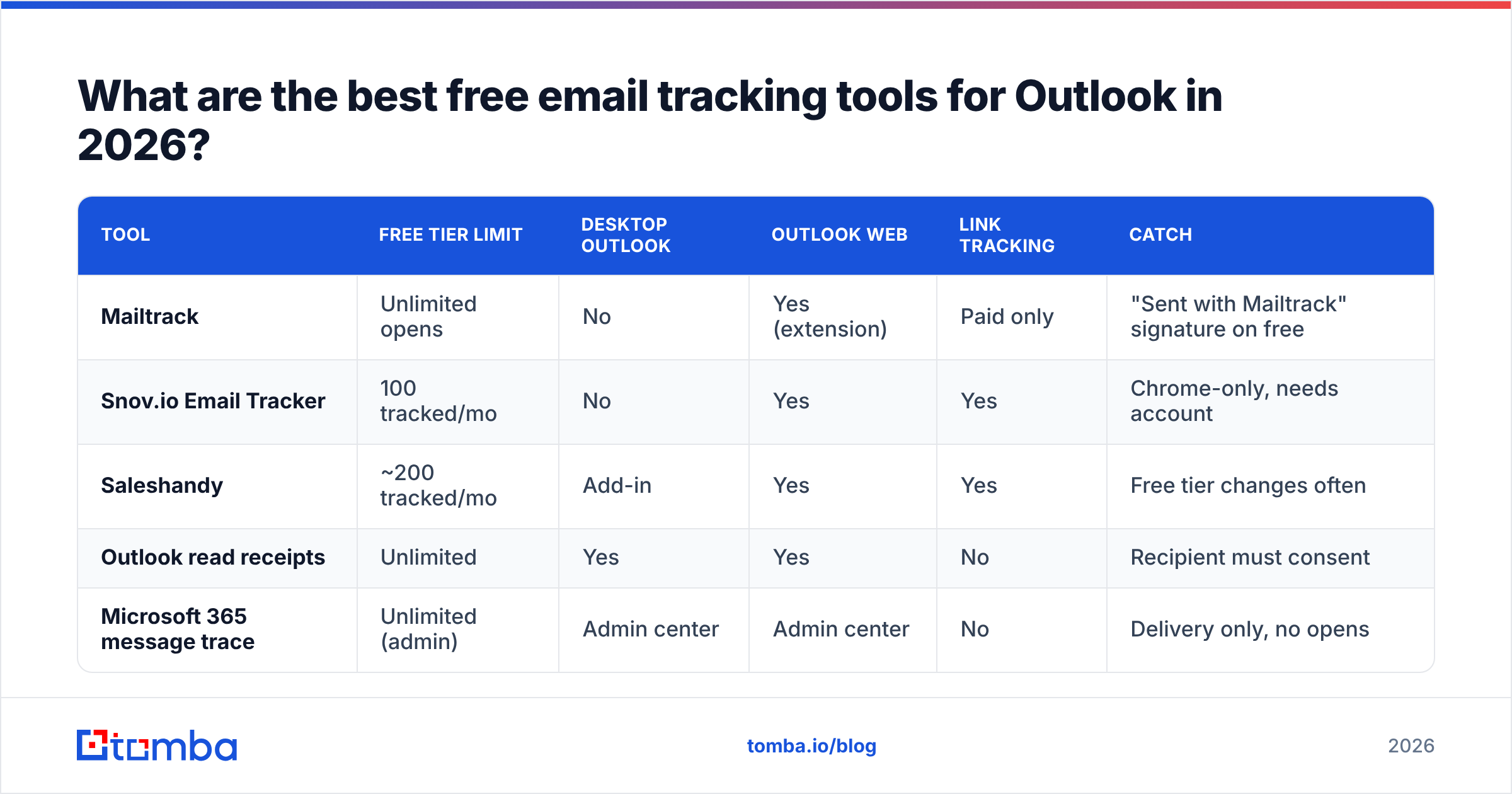
Five options cover almost every real use case. The split that matters is Outlook Web (OWA) only versus desktop support. Many "Outlook tracking" extensions are just Chrome extensions. They inject into outlook.office.com and do nothing in the installed desktop app.
| Tool | Free tier limit | Desktop Outlook | Outlook Web | Link tracking | Catch |
|---|---|---|---|---|---|
| Mailtrack | Unlimited opens | No | Yes (extension) | Paid only | "Sent with Mailtrack" signature on free |
| Snov.io Email Tracker | 100 tracked/mo | No | Yes | Yes | Chrome-only, needs account |
| Saleshandy | ~200 tracked/mo | Add-in | Yes | Yes | Free tier changes often |
| Outlook read receipts | Unlimited | Yes | Yes | No | Recipient must consent |
| Microsoft 365 message trace | Unlimited (admin) | Admin center | Admin center | No | Delivery only, no opens |
Mailtrack has the most generous free tier, and it is where most people land. Unlimited tracked emails, double-checkmark UI, live desktop alerts. The cost is a promo line added to every free email. For outbound sales that is a real problem, because it tells your prospect you are watching them open the message. For internal mail or job applications, it is fine. For a cold email to a VP of Engineering, it works against you.
Snov.io's tracker gives you 100 tracked emails a month with no signature, plus link tracking. That is rare in a free tier. The 100 cap is real, though. One busy SDR burns it in three days.
Saleshandy ships a true Outlook add-in instead of a browser extension, so it survives in the desktop client. Its free limit has moved around over the past two years, so check it before you build a workflow on it. If you outgrow it, there are Saleshandy alternatives with different pricing shapes.
Microsoft 365 message trace is the forgotten one. If you are a tenant admin, the Exchange admin center can tell you whether a message was delivered, delayed, or bounced. No opens, no clicks. But when a prospect says "I never got it," this is the only proof that holds up.
How do you set up free email tracking in Outlook step by step?#
There are four setup paths for free email tracking Outlook users can pick from, plus one step to do first. Start with the two add-in routes.
- Outlook Web + Chrome extension (fastest). Install the extension from the Chrome Web Store, sign in, and grant it access on
outlook.office.com. Reload the tab. Compose as normal, and the tracking toggle shows up in the compose window. Edge works too, since it accepts Chrome Web Store extensions. - Desktop Outlook + native add-in. Go to Home → Get Add-ins, search for the vendor, and click Add. The add-in lands in the compose ribbon. This is the only route that survives if your company blocks browser extensions, which is now common in regulated industries.
The next two paths need no add-in at all.
- Read receipts for internal mail. File → Options → Mail → Tracking → check Read receipt confirming the recipient viewed the message. Set it there for every message, or per message under the Options tab. Only worth it for same-tenant mail.
- Manual UTM link tracking (zero tools). Add
?utm_source=outlook&utm_campaign=q1-outbound&utm_content=prospect-slugto every link, then read the clicks in Google Analytics. You get no opens and no per-person detail unless eachutm_contentis unique. But it is free, installs nothing, and no IT team can block it.
Do this one before any of the four:
- Verify before you track. Run your list through an email verifier. A "no open" from a dead mailbox looks the same as a "no open" from a bored prospect. Skip this and you will spend a week rewriting subject lines for addresses that never existed.
Is free email tracking accurate in 2026?#
No. And the gap has grown every year since 2021.
Apple Mail Privacy Protection arrived in iOS 15 and is now the default for most Apple Mail users. It pre-loads every remote image through Apple's proxy the moment a message arrives. Your pixel fires whether or not a human ever looked at the screen. Apple's own Mail Privacy Protection documentation says it "hides your IP address and loads remote content privately in the background." Your tracker logs each of those as an open, from a place the recipient has never been.
Gmail's image proxy is a milder version of the same problem. Images are cached on Google's servers, so one real open can register once, or repeat oddly on re-render. Company security gateways — Mimecast, Proofpoint, Defender for Office 365 — open links and load images in a sandbox before delivery. That creates opens and clicks from a scanner, not a person.
What this means in practice:
- Open rate points in the right direction, but it is not literally true. A jump from 30% to 55% after a new subject line still means something. "Sarah opened this 14 times" usually means Sarah's phone synced 14 times.
- Link clicks are stronger, but not clean. Scanners click too. A click 0–3 seconds after delivery is a bot. A click at 9:14am the next day is a human.
- Replies are the only signal you cannot fake. Optimize for them.
- Never open-track a first cold email from a fresh domain. Pixels and redirect links are spam-filter signals. Warm the domain first, and check your sender reputation before you add tracking to a new mailbox.
What are the privacy and legal limits on tracking Outlook emails?#
Tracking is data processing, and it comes with real rules.
Under GDPR, an open pixel collects an IP address and device data tied to a real person. Vendors say legitimate interest covers B2B tracking. EU regulators have been narrowing that view, and several have ruled that tracking pixels in sales mail need consent under ePrivacy rules. German courts have pushed hardest. If you email EU contacts at scale, ask your own lawyer rather than the vendor's marketing page.
CAN-SPAM in the US says nothing about tracking. It covers sender identity, honest subject lines, and opt-out. Canada's CASL is stricter about consent to send at all, which makes tracking your smaller problem.
The rules most good outbound teams follow in 2026:
- Read opens in aggregate. Never quote them back to a person ("I saw you opened this three times" is the fastest way to lose a deal).
- Turn tracking off for recipients in Germany, and for any regulated buyer whose compliance team will spot the redirect domain.
- Use your own tracking subdomain, not the vendor's shared one, so you do not inherit another customer's reputation.
- Never treat tracking as permission. It shows behavior. It does not create a relationship.
When should you pay instead of using free tracking?#
Free tiers break at three predictable points.
Volume. 100–250 tracked emails a month is about one week of work for one SDR. Send more than 50 outbound emails a week and you will hit every free cap by mid-month, right when your sequence is live.
Attribution. Free trackers show a list of opens. They do not tie an open to a sequence step, a persona, or a deal stage, and none of them write back to your CRM. You end up matching browser alerts to HubSpot records by hand, which nobody keeps up for long.
Branding. The signature tax on free plans is the top reason sales teams upgrade. A promo footer on a cold email says "this is a mass send," and it undoes the personalization you worked on.
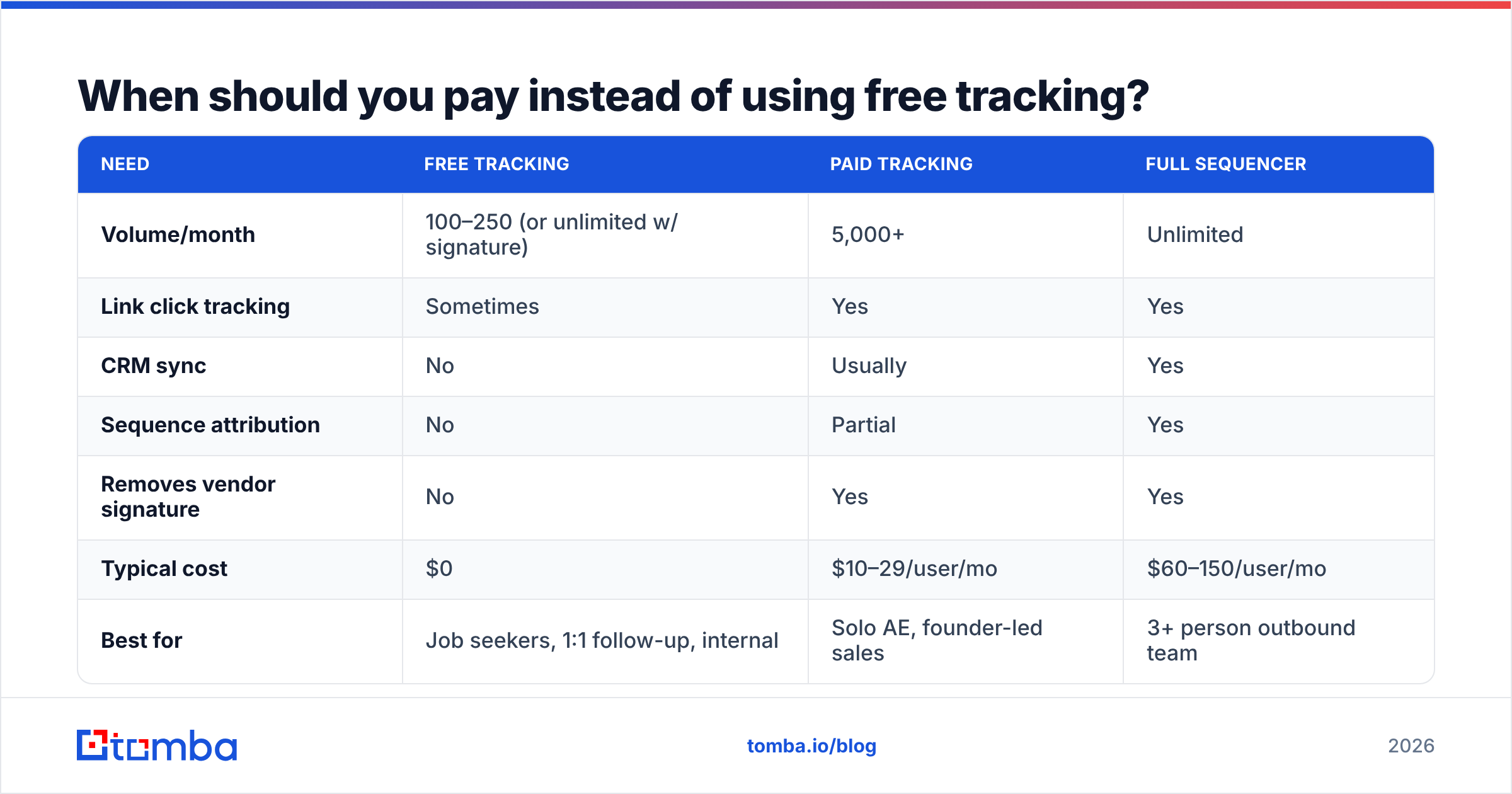
| Need | Free tracking | Paid tracking | Full sequencer |
|---|---|---|---|
| Volume/month | 100–250 (or unlimited w/ signature) | 5,000+ | Unlimited |
| Link click tracking | Sometimes | Yes | Yes |
| CRM sync | No | Usually | Yes |
| Sequence attribution | No | Partial | Yes |
| Removes vendor signature | No | Yes | Yes |
| Typical cost | $0 | $10–29/user/mo | $60–150/user/mo |
| Best for | Job seekers, 1:1 follow-up, internal | Solo AE, founder-led sales | 3+ person outbound team |
There is a fourth trigger people miss: your bounce rate makes the data meaningless. If 12% of your sends bounce, your open-rate denominator is garbage, and no tracker will fix it. That is a data problem, not a tracking problem. Vendors like BookYourData sell pre-verified B2B lists for teams that would rather buy clean data than build it. A verification pass before send fixes the same issue for lists you already own.
How does tracking fit into a real Outlook outbound workflow?#
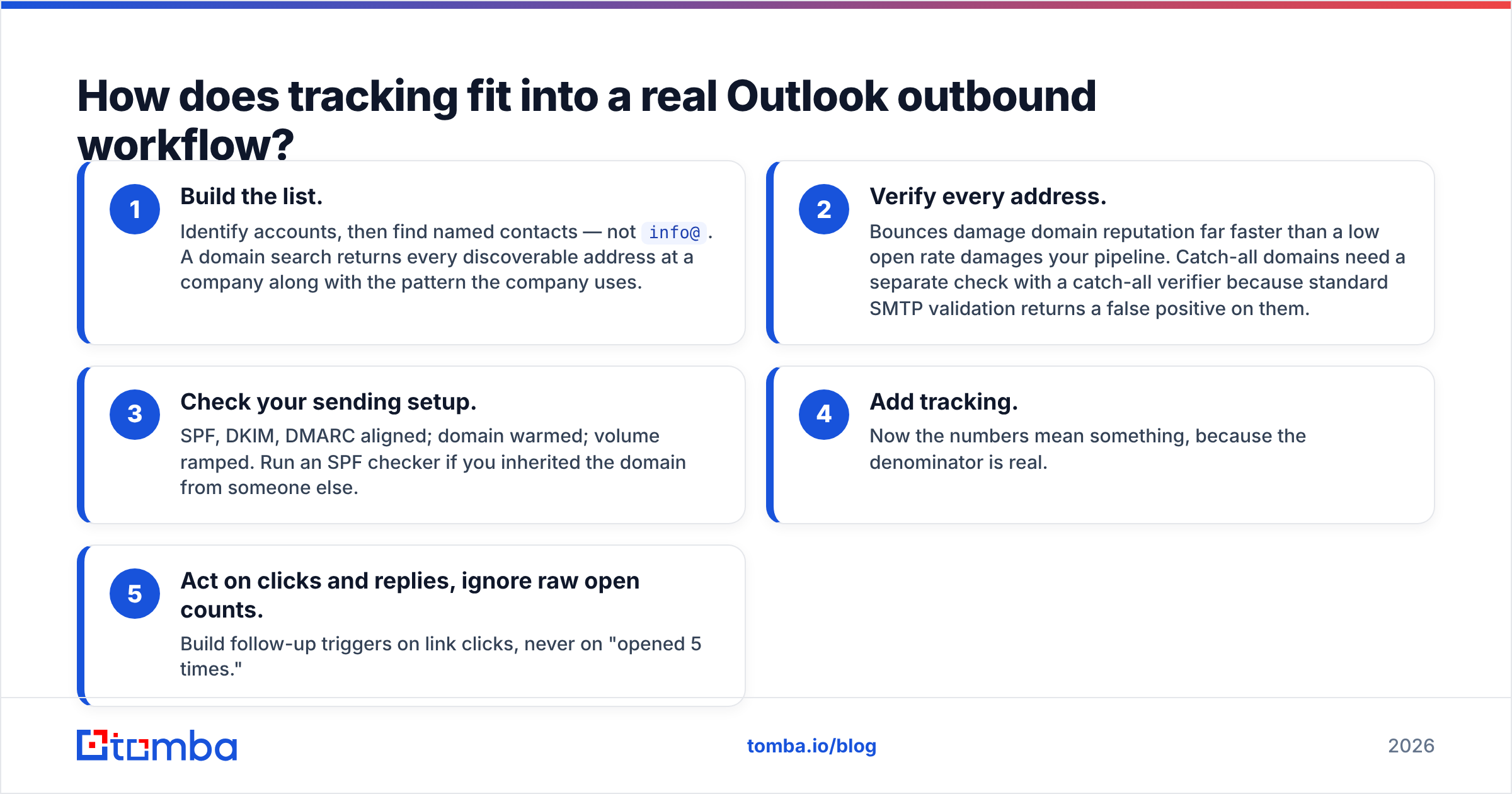
Tracking is step four, not step one. The order that works:
- Build the list. Pick accounts, then find named contacts, not
info@. A domain search returns every address it can find at a company, plus the pattern that company uses. - Verify every address. Bounces hurt your domain faster than a low open rate hurts your pipeline. Catch-all domains need a catch-all verifier, because standard SMTP checks return a false positive on them.
- Check your sending setup. SPF, DKIM, and DMARC aligned. Domain warmed. Volume ramped. Run an SPF checker if you inherited the domain.
- Add tracking. Now the numbers mean something, because the denominator is real.
- Act on clicks and replies. Ignore raw open counts. Trigger follow-ups on link clicks, never on "opened 5 times."
Step 2 is where most Outlook tracking setups quietly fail. Teams install a tracker, see 8% open rates, and spend three weeks rewriting subject lines. The real cause was the list: a third of the addresses were guessed from a naming pattern and never checked. Fix the input before you measure the output. If you pull contacts from profile URLs, a LinkedIn finder turns them into verified work addresses instead of guesses.
For teams comparing sequencing platforms that bundle tracking, G2's sales engagement category is a fine place to start on pricing and reviews. Microsoft's Outlook add-in documentation covers the API any add-in is limited to, which explains why some features are impossible in the desktop client.
The bottom line#
Free email tracking Outlook setups do work, with three honest caveats. The free caps are low. The desktop client is served far worse than Outlook Web. And open data in 2026 is noisy, so read it as a trend line, not a fact. Pick Mailtrack if you can live with the signature, Saleshandy if you need a real desktop add-in, and Snov.io if 100 a month is enough and you want link clicks without branding.
But tracking only measures what happens after you send. It cannot save a list built on guessed addresses. Before you install anything, make sure the addresses in your Outlook drafts are real. Tomba's Email Finder finds verified professional emails by name and domain, with 25 free searches a month and paid plans from $49/mo — see Tomba pricing. Get the addresses right first, then let the pixel tell you what it can.
Related guides#
Ready to find emails that actually work?
Join 150,000+ professionals who stopped guessing and started sending. Free credits on signup — no credit card required.
Get the Tomba newsletter
Practical outbound tactics and product updates — once every two weeks.
About the author