Free Email Verification Tools: What They Catch and Miss
Free email verification tools clean the easy 80% of a list and quietly leave the expensive 20%. Here is what each free tier actually checks, where the limits bite, and when paying beats patching.

TL;DR
- Free email verification tools reliably catch three things: syntax errors, dead domains, and known disposable providers. That is roughly 60-80% of the junk in a scraped list.
- What they miss is the expensive part: catch-all domains, role accounts, greylisted mailboxes, and spam traps. Those are the addresses that actually damage your sender reputation.
- Most "free" tiers are 100-250 credits per month, one-time, or capped at 10-25 rows per paste. Nobody runs a 20,000-row list through them without paying.
- A realistic 2026 stack: use a free checker for one-off lookups and quick sanity checks, then move to a paid verifier once your monthly send volume passes ~2,000 addresses.
- Bounce math beats tool math. At a 3% bounce rate on 10,000 sends you are fine; at 8% Google and Microsoft start throttling you, and no free tool will tell you why.
What are free email verification tools?#
Free email verification tools are services that check whether an email address is likely to accept mail — without charging you, at least up to a limit. Think of them as a bouncer who checks IDs at the door but only for the first 100 people in line, and only glances at the photo.
Under the hood, almost every verifier runs the same ladder of checks. The differences between free and paid tiers are which rungs they climb.
- Syntax validation — Does the address parse as a valid RFC 5322 string? Catches
john@@company.com, trailing spaces, and unicode garbage. Every free tool does this. It costs nothing. - Domain and MX lookup — Does
company.comresolve, and does it publish MX records that accept mail? Catches dead companies and typo domains likegmial.com. Also cheap, also universal in free tiers. - Disposable and free-provider detection — Is this a 10-minute-mail domain, or a personal Gmail sitting in a B2B list? Most free tools flag disposables against a public blocklist. Coverage of newer burner domains varies a lot.
- Role account detection — Is it
info@,sales@,support@,admin@? These are not people. They route to shared inboxes, get marked as spam more often, and inflate your complaint rate. Some free tools flag them; many don't. - SMTP handshake — Connect to the mail server, issue
RCPT TO, and read the response code without sending anything. This is where real verification happens. It requires clean sending IPs, rate limiting, and retry logic — which is exactly why free tiers ration it. - Catch-all and greylist handling — Some domains accept every address at the SMTP layer, then bounce internally. Distinguishing a real mailbox on a catch-all domain requires pattern data and historical signals, not just a handshake. Free tools almost never do this.
Rungs 1-3 are effectively free to run. Rungs 5-6 cost the provider money on every single check. That single fact explains every free-tier limit you will ever encounter.

Which checks do free tiers actually run?#
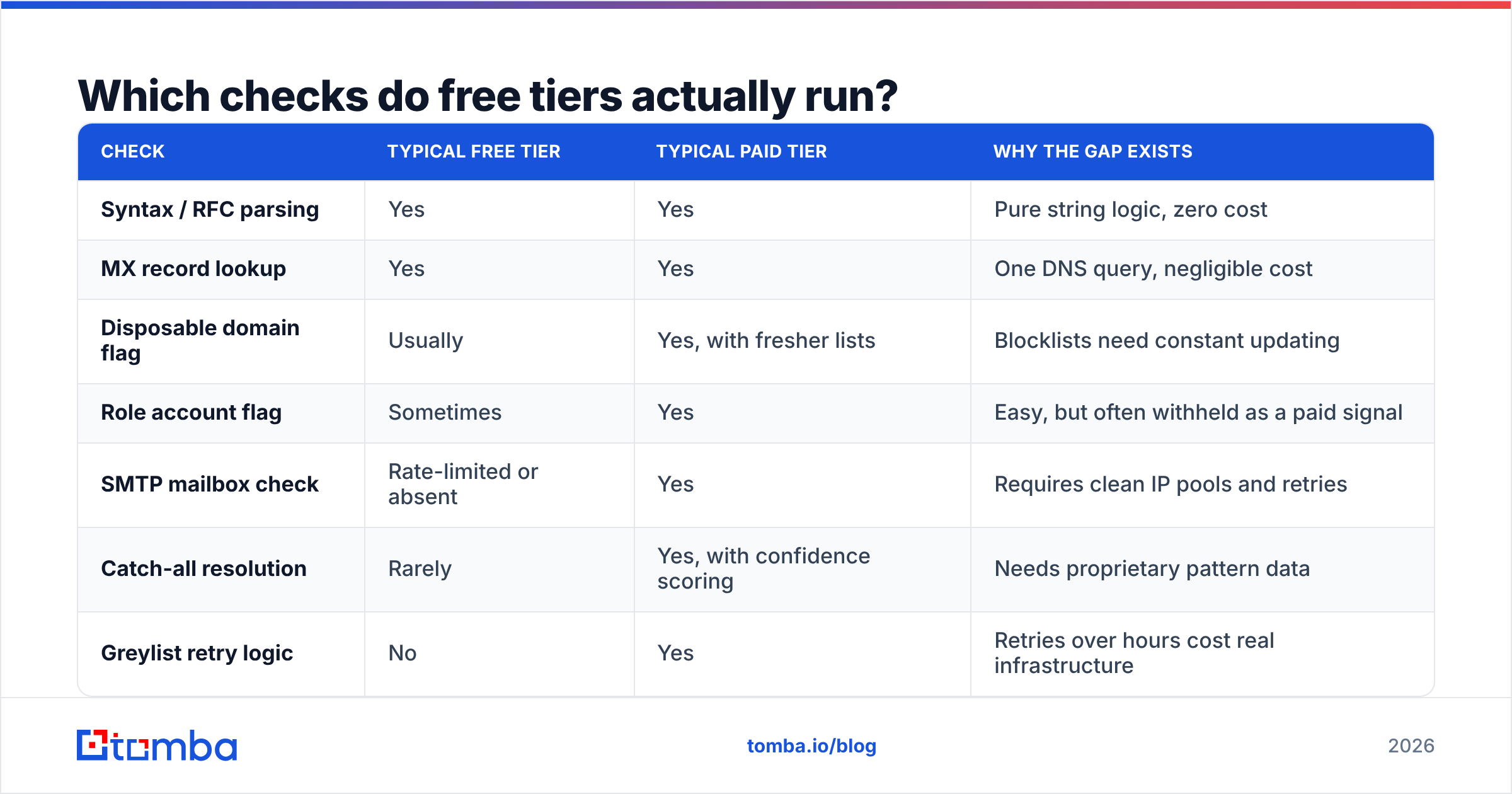
Here is the honest split. Note that "free tier" below means the no-credit-card allowance, not a trial.
| Check | Typical free tier | Typical paid tier | Why the gap exists |
|---|---|---|---|
| Syntax / RFC parsing | Yes | Yes | Pure string logic, zero cost |
| MX record lookup | Yes | Yes | One DNS query, negligible cost |
| Disposable domain flag | Usually | Yes, with fresher lists | Blocklists need constant updating |
| Role account flag | Sometimes | Yes | Easy, but often withheld as a paid signal |
| SMTP mailbox check | Rate-limited or absent | Yes | Requires clean IP pools and retries |
| Catch-all resolution | Rarely | Yes, with confidence scoring | Needs proprietary pattern data |
| Greylist retry logic | No | Yes | Retries over hours cost real infrastructure |
| Spam trap / complainer data | No | Sometimes | Requires partnerships and seed networks |
| Bulk CSV upload | 10-250 rows | 10k-1M rows | Compute scales linearly |
| API access | Rarely | Yes | The API is the product for most vendors |
If you only remember one line from this table: the free tier verifies the format, the paid tier verifies the mailbox. A list that passes every free check can still bounce at 15%.
How much does a free tier actually give you?#
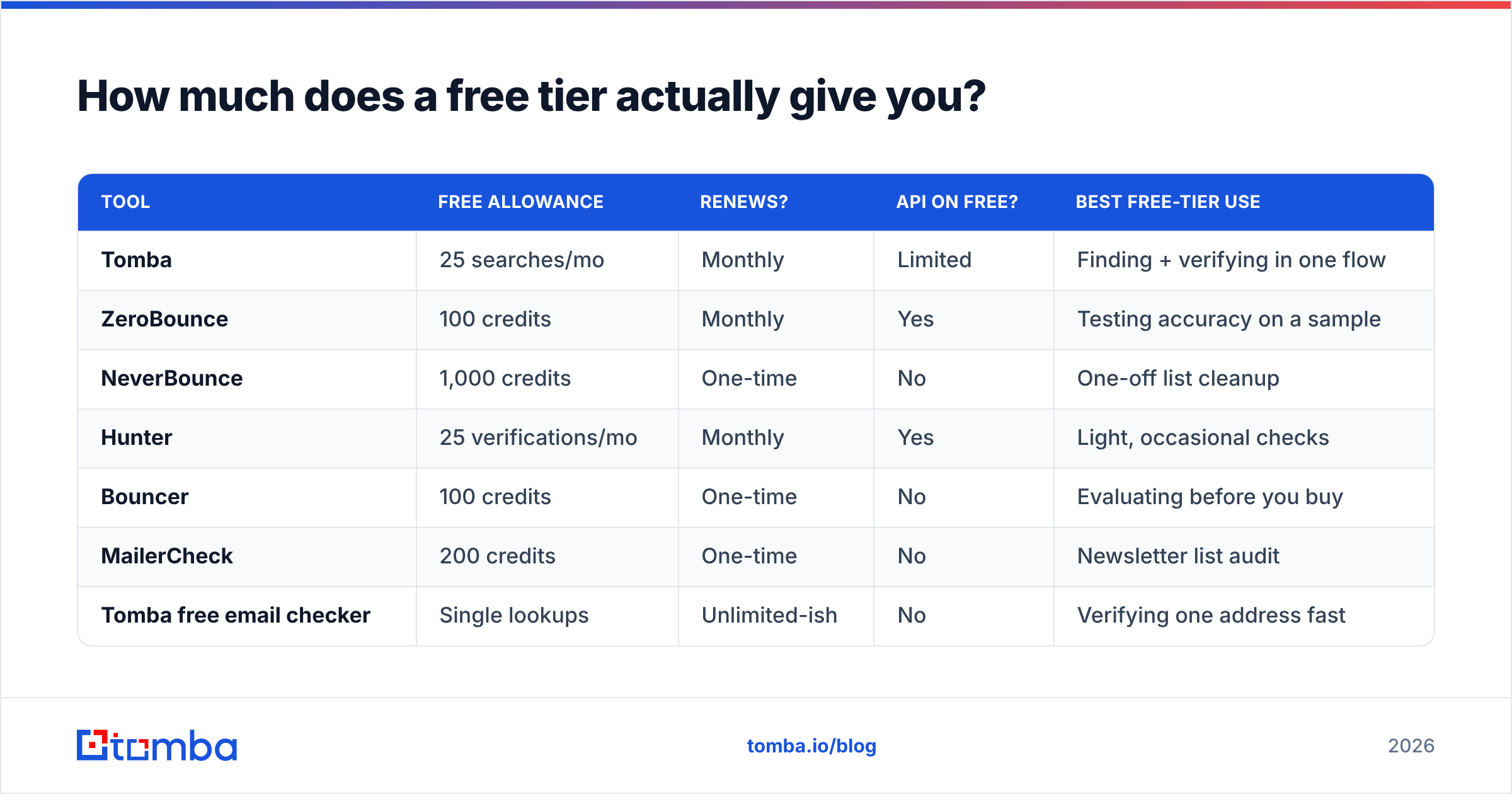
Volume limits are where marketing pages get slippery. "Free forever" often means 100 credits once, not 100 per month. Here is the shape of the market as of 2026 — always re-check the vendor's own pricing page before committing, since tiers move.
| Tool | Free allowance | Renews? | API on free? | Best free-tier use |
|---|---|---|---|---|
| Tomba | 25 searches/mo | Monthly | Limited | Finding + verifying in one flow |
| ZeroBounce | 100 credits | Monthly | Yes | Testing accuracy on a sample |
| NeverBounce | 1,000 credits | One-time | No | One-off list cleanup |
| Hunter | 25 verifications/mo | Monthly | Yes | Light, occasional checks |
| Bouncer | 100 credits | One-time | No | Evaluating before you buy |
| MailerCheck | 200 credits | One-time | No | Newsletter list audit |
| Tomba free email checker | Single lookups | Unlimited-ish | No | Verifying one address fast |
Two patterns jump out. First, monthly-renewing free tiers are rarer than one-time credits — vendors want you to sample, not subsist. Second, nearly every free tier withholds bulk API access, because that is the thing agencies and SaaS teams actually pay for.
If you want to test the format-level checks without signing up at all, a browser-based free email checker covers syntax, MX, and disposable detection in one paste. It won't resolve a catch-all, but it will stop you emailing contact@company.co when the domain is company.com.

Are free email verification tools accurate enough?#
Depends entirely on where your list came from. Accuracy is not a property of the tool alone — it is a property of the tool plus the input.
List sources, ranked by how much verification they need:
- Inbound form signups (last 90 days) — Syntax and MX checks are usually enough. These people typed their own address recently. A free tool handles this fine.
- CRM records older than 18 months — Roughly 22-30% annual decay is the common industry estimate as people change jobs. You need SMTP-level checks here. Free tiers will pass dead mailboxes as "valid domain."
- Scraped or exported lists — Assume 20-40% junk. Needs the full ladder including catch-all handling. Free tools are actively dangerous here because they produce false confidence.
- Purchased databases — Verify every single row, no exceptions, and expect spam traps that no verifier flags. Even paid tools miss seeded traps.
- Pattern-guessed addresses (
first.last@domain.comgenerated from a name) — These need SMTP verification by definition. If you generated the address, nothing but a mailbox check tells you it exists.
The middle three categories are where free tools quietly fail. A verifier that returns "valid" because company.com has MX records tells you nothing about whether sarah.chen@company.com is a real mailbox — and that is the only question that matters for your bounce rate.
This is also why running your addresses through a proper email verifier before a campaign is not optional above a certain volume. The check that costs a fraction of a cent prevents a domain reputation hit that costs weeks.
What does a bad list actually cost you?#
Bounce rate is the number every mailbox provider watches. Google's Postmaster Tools and Microsoft's SNDS both feed reputation scores partly from invalid-recipient rates.
Rough thresholds most deliverability practitioners work to:
- Under 2% bounce — Healthy. No action needed.
- 2-4% bounce — Acceptable but drifting. Audit your list source.
- 4-7% bounce — Providers begin throttling. Inbox placement drops before you notice reply-rate changes.
- Above 7% bounce — Active reputation damage. Recovery takes weeks of low-volume warmup, not days.
Now run the math. A 10,000-address list cleaned only by a free syntax-and-MX tool might still carry 8% invalid mailboxes — 800 hard bounces. That single send can push a warm domain into throttled territory. Paid verification on 10,000 addresses typically runs $30-80 depending on vendor and volume. Weighed against a month of degraded email deliverability, it is not a close call.

When should you stop using free tools?#
Four trigger points. Hit any of them and the free tier stops being a cost saving and starts being a liability.
- You send to more than ~2,000 unique addresses a month. Free credits run out mid-list, and a half-verified list is worse than an unverified one because you stop paying attention.
- You need API or workflow integration. Manual CSV round-trips break the moment verification needs to happen inside your CRM sync. An email verification API that runs on record creation removes the human step entirely.
- Your list includes catch-all domains. Larger enterprises frequently run catch-all configs. Free tools return "accept-all" and hand the decision back to you. A dedicated catch-all verifier applies pattern confidence instead of a coin flip.
- Bounce rate has already crossed 4%. At that point you are not preventing a problem, you are repairing one, and you need audit-grade data on every address.
There is a fifth, quieter trigger: when you are verifying addresses you also had to find. Running a finder in one tool and a verifier in another doubles the credit spend and the integration surface. Platforms that combine both — Tomba, Hunter, and Findymail among them — charge one credit for a find that already includes a verification status. BookYourData takes a different route by selling pre-verified contact records outright, which is a genuinely good fit if you would rather buy clean data than clean it yourself.
How do free and paid verification compare on real workflows?#
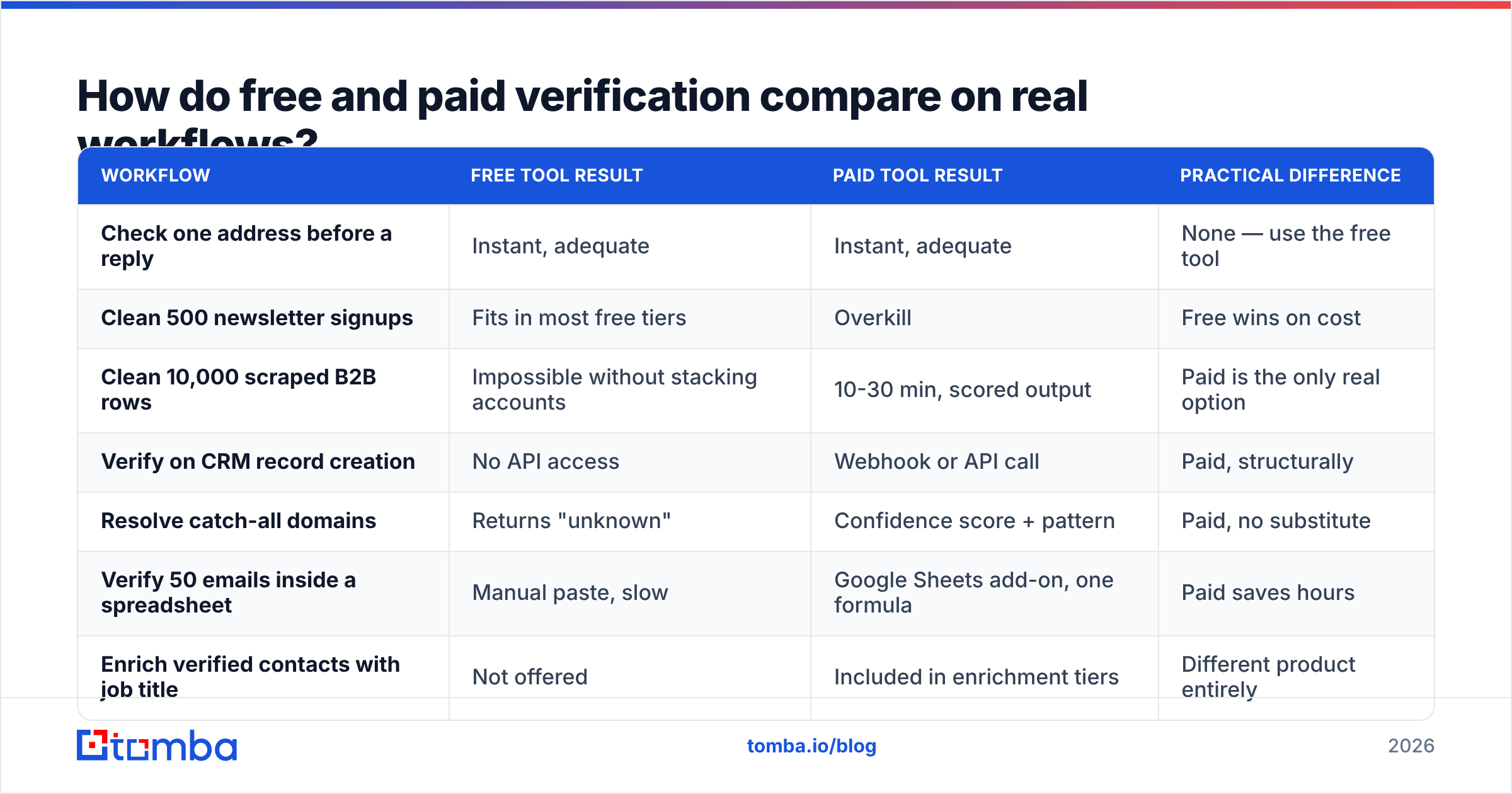
| Workflow | Free tool result | Paid tool result | Practical difference |
|---|---|---|---|
| Check one address before a reply | Instant, adequate | Instant, adequate | None — use the free tool |
| Clean 500 newsletter signups | Fits in most free tiers | Overkill | Free wins on cost |
| Clean 10,000 scraped B2B rows | Impossible without stacking accounts | 10-30 min, scored output | Paid is the only real option |
| Verify on CRM record creation | No API access | Webhook or API call | Paid, structurally |
| Resolve catch-all domains | Returns "unknown" | Confidence score + pattern | Paid, no substitute |
| Verify 50 emails inside a spreadsheet | Manual paste, slow | Google Sheets add-on, one formula | Paid saves hours |
| Enrich verified contacts with job title | Not offered | Included in enrichment tiers | Different product entirely |
Notice the pattern: free tools win on single lookups and small, high-quality lists. Paid tools win the moment volume, automation, or ambiguity enters the picture. That is not a knock on free tiers — it is what they are designed for.
What should a sensible 2026 stack look like?#
Here is a stack that most B2B teams under 50 people can run without overspending.
- Single-address checks: a browser-based free checker. No signup, no credits, instant answer. Use it before you send a one-off outreach email to a senior prospect.
- Format and pattern work: an email permutator to generate candidate addresses, then verification to pick the live one. Cheaper than guessing and sending.
- Find + verify in one step: a combined platform so every discovered address arrives with a deliverability status attached. Tomba's email finder returns a confidence score alongside the address, which removes the separate verification pass for most contacts.
- Bulk cleanup before campaigns: a bulk verifier run on the full list, 24-48 hours before send, so you have time to act on the results.
- Ongoing hygiene: re-verify any contact untouched for 12 months. Job changes, not typos, are what rot a B2B list.
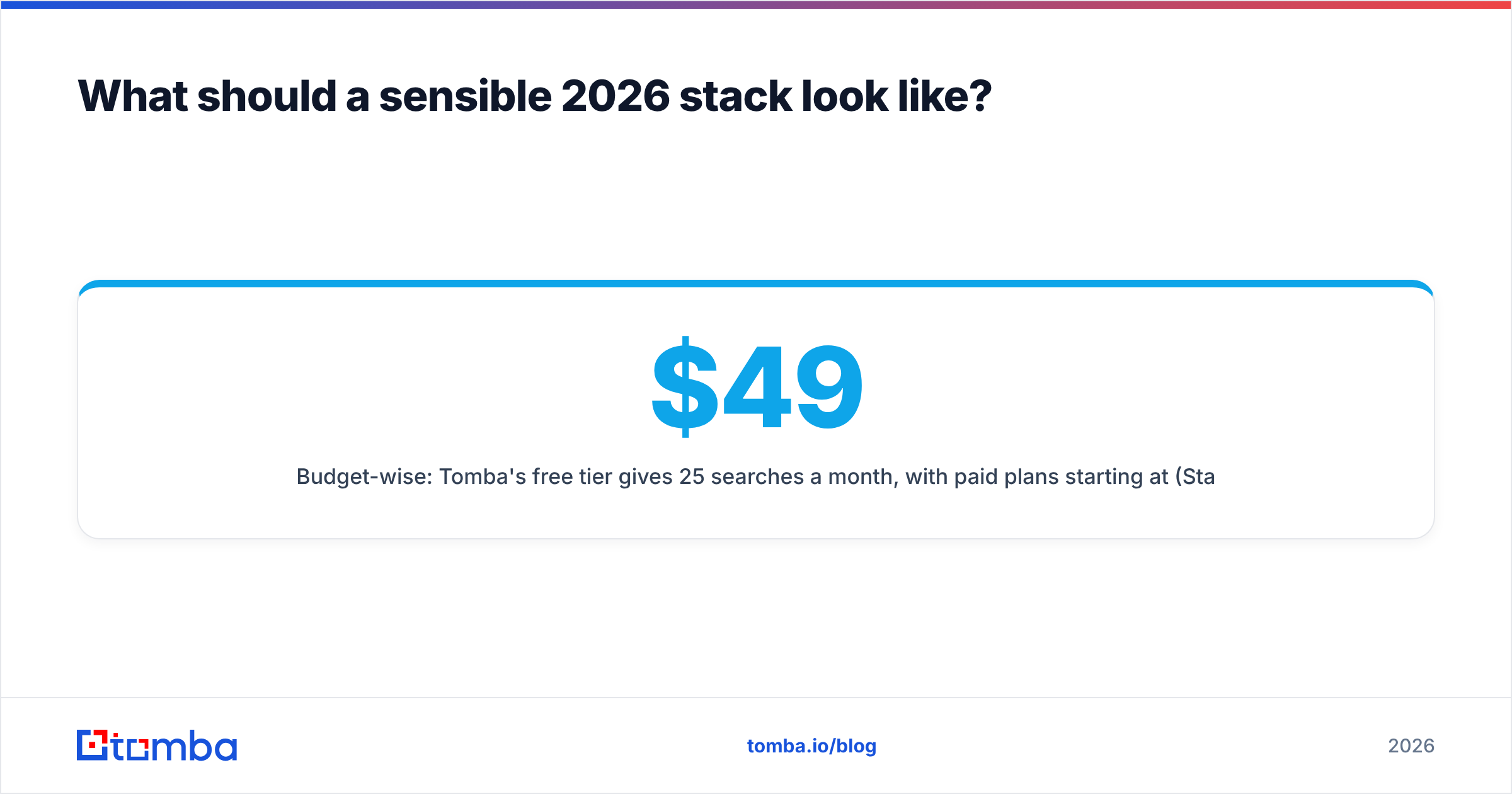
Budget-wise: Tomba's free tier gives 25 searches a month, with paid plans starting at $49/mo (Starter), $99/mo (Growth), and $249/mo (Pro) — full Tomba pricing is public. Most verification-only vendors sit in a similar band for comparable volume, so the deciding factor is usually whether you need finding and enrichment alongside verification, or verification alone. Independent review sites like G2 are useful for sanity-checking claimed accuracy rates against what buyers actually report.
What do free tools never tell you?#
Three blind spots survive even the best free tier.
Spam traps. Recycled addresses that mailbox providers repurpose as traps accept mail perfectly. They pass every SMTP check. Only providers with seed-list partnerships flag them, and none do it on a free plan. Your only defense is list hygiene discipline — never mail an address you have not confirmed in the last 12 months.
Complainer history. Some addresses belong to people who mark nearly everything as spam. A handful of these on a 5,000-send campaign is enough to trip a complaint-rate threshold. This data comes from consortium feedback loops, not from an SMTP handshake.
Deliverability context. Verification tells you a mailbox exists. It says nothing about whether your domain can reach it. If your SPF, DKIM, and DMARC are misaligned, a perfectly verified list still lands in spam. Check your SPF record and run a spam checker on the message itself before blaming the list.
That last point is the one most teams get backwards. They spend a week perfecting verification, send from an unauthenticated domain, and conclude the data was bad.
Ready to stop guessing which addresses are real?#
Free email verification tools have a real job: fast, zero-commitment checks on small volumes and single lookups. Keep one bookmarked. But the moment you are running campaigns, syncing a CRM, or working lists that came from anywhere other than your own signup form, the free tier's blind spots — catch-all domains, role accounts, stale mailboxes — turn into bounce rate, and bounce rate turns into throttling.
The cleanest fix is to verify at the point of discovery rather than as a separate cleanup pass. The Tomba Email Finder returns each address with a verification status and confidence score attached, so the list you build is already the list you can send to. Start on the free tier at 25 searches a month, and move to Starter at $49/mo when your volume outgrows it.
Related guides#
Ready to find emails that actually work?
Join 150,000+ professionals who stopped guessing and started sending. Free credits on signup — no credit card required.
Get the Tomba newsletter
Practical outbound tactics and product updates — once every two weeks.
About the author