Free Email Warmup in 2026: Does It Actually Work?
Free email warmup tools promise inbox placement for $0. Here is what they actually do, where the free tiers quietly break, and how to warm a domain properly without wasting 8 weeks.
TL;DR
- Free email warmup is real, but the free tiers are almost always capped at 1–2 inboxes, ~20–50 warmup emails/day, and no deliverability reporting — enough for a solo founder, not enough for a 5-inbox outbound setup.
- Warmup does not fix a bad list. Google and Microsoft weigh bounce rate and spam complaints far more heavily than the volume of friendly robot replies landing in your seed inboxes.
- The highest-ROI "free warmup" is not a tool at all: correct SPF/DKIM/DMARC, a clean verified list, and 4–6 weeks of slow real sending.
- Budget order that works: verify your list first, then authenticate, then warm. Reversing that order burns the domain you just warmed.
- If you must pick one paid line item, spend it on data quality — bounces are the fastest way to torch a warm domain.
What is free email warmup, and what does it actually do?#
Email warmup is the process of gradually building a sending reputation on a new mailbox or domain so that mailbox providers stop treating you as an unknown, and therefore suspicious, sender. A warmup tool automates this by connecting your inbox to a pool of other inboxes that email each other, open the messages, mark them "not spam," reply, and move them out of Promotions.
Think of it like a new credit card. The bank doesn't give you a $20,000 limit on day one — it gives you $500, watches how you behave for six months, and raises the ceiling once you've proved you pay. Gmail does the same thing with sending volume. A brand-new domain sending 300 cold emails on day one looks exactly like a spammer who just bought a burner domain, because that is statistically what it usually is.
"Free email warmup" means one of three things, and the distinction matters:
- A permanently free tier — a warmup vendor gives you 1 inbox and a low daily cap forever, hoping you upgrade. Real, but narrow.
- A free trial — 7 to 14 days of full-feature warmup. Useless on its own, because warmup takes 3–6 weeks to matter.
- Warmup bundled into a sending tool you already pay for — Instantly, Smartlead, and Saleshandy include warmup in plans you're buying anyway, so the marginal cost is $0. This is where most people actually get "free" warmup.
- Manual warmup — you send real emails to real people at a slowly increasing volume. Costs nothing, works everywhere, requires patience.
How does warmup actually change inbox placement?#
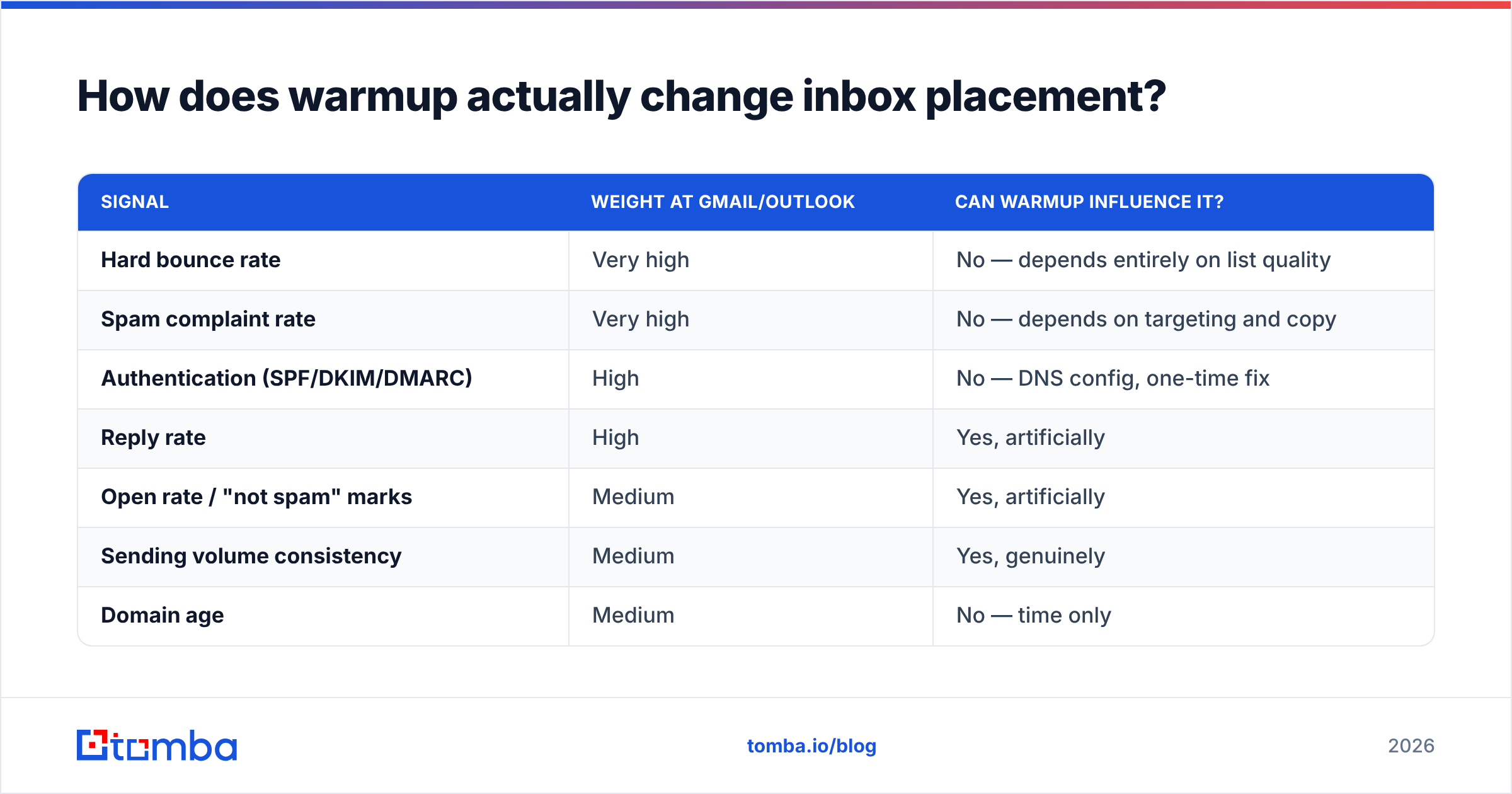
Mailbox providers score you on signals they can observe. Warmup manipulates a subset of them:
| Signal | Weight at Gmail/Outlook | Can warmup influence it? |
|---|---|---|
| Hard bounce rate | Very high | No — depends entirely on list quality |
| Spam complaint rate | Very high | No — depends on targeting and copy |
| Authentication (SPF/DKIM/DMARC) | High | No — DNS config, one-time fix |
| Reply rate | High | Yes, artificially |
| Open rate / "not spam" marks | Medium | Yes, artificially |
| Sending volume consistency | Medium | Yes, genuinely |
| Domain age | Medium | No — time only |
| Content/link reputation | Medium | Partially |
Read that table honestly: warmup moves three rows out of eight, and two of those three it moves artificially. Google's own Email Sender Guidelines are explicit that bulk senders must keep spam complaint rates under 0.3% and authenticate with SPF, DKIM, and DMARC. No warmup pool substitutes for either.
That is why the sequencing matters. Warming a domain and then blasting a scraped list is like conditioning for a marathon and then running it in flip-flops. The prep was real; it just wasn't the binding constraint.
Which free email warmup tools are worth using in 2026?#
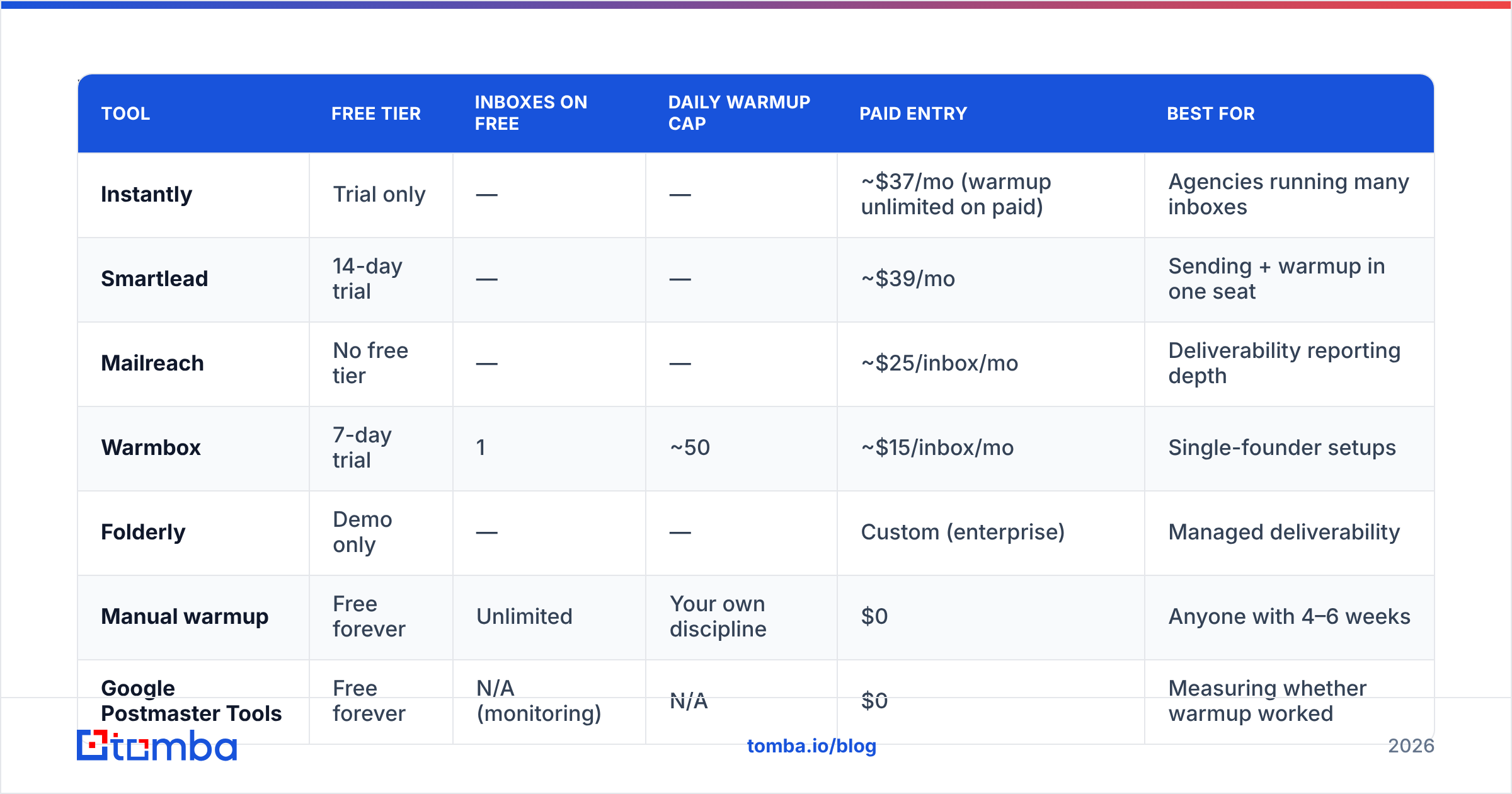
Here is the current state of the free tiers. Prices and limits change often — check each vendor's page before committing.
| Tool | Free tier | Inboxes on free | Daily warmup cap | Paid entry | Best for |
|---|---|---|---|---|---|
| Instantly | Trial only | — | — | ~$37/mo (warmup unlimited on paid) | Agencies running many inboxes |
| Smartlead | 14-day trial | — | — | ~$39/mo | Sending + warmup in one seat |
| Mailreach | No free tier | — | — | ~$25/inbox/mo | Deliverability reporting depth |
| Warmbox | 7-day trial | 1 | ~50 | ~$15/inbox/mo | Single-founder setups |
| Folderly | Demo only | — | — | Custom (enterprise) | Managed deliverability |
| Manual warmup | Free forever | Unlimited | Your own discipline | $0 | Anyone with 4–6 weeks |
| Google Postmaster Tools | Free forever | N/A (monitoring) | N/A | $0 | Measuring whether warmup worked |
The unglamorous winner for most readers is the last two rows combined: manual warmup plus Google Postmaster Tools for measurement. Postmaster gives you real domain reputation, spam rate, and authentication pass rates straight from Google — the only scoreboard that matters — and it costs nothing.
[Screenshot placeholder: Google Postmaster Tools domain reputation graph showing a new domain climbing from "Low" to "Medium" over 5 weeks]
Is a free warmup pool safe?#
Mostly, with two real caveats.
Caveat one: pool quality. Free tiers pool you with other free users — which skews toward brand-new domains and people testing spam. Reputation is partly guilt-by-association: if your seed pool is full of domains that get blocklisted, your engagement signals come from bad neighborhoods. Paid pools are typically better curated because paying customers churn if the pool degrades.
Caveat two: providers are getting better at detecting it. Warmup traffic has a fingerprint — reciprocal sending patterns, near-100% open rates, replies within seconds, identical message lengths. Microsoft in particular has grown less forgiving of synthetic engagement. Nobody credible claims warmup pools are permanently undetectable; they claim they work right now.
The practical read: use warmup as a ramp, not a permanent life-support system. If your inbox needs a warmup pool running forever to reach the inbox, warmup isn't the problem you have.

What does a manual warmup schedule look like?#
This is the version that costs nothing and never gets detected, because there's nothing synthetic about it. Six weeks, one inbox:
- Week 0 — Authenticate and verify. Publish SPF, DKIM, and DMARC. Confirm with an SPF checker and check you're not on a blocklist. Then run your prospect list through an email verifier and delete every risky address. Do not skip this; it is the whole ballgame.
- Week 1 — 5–10 emails/day. Send to people who will actually reply: existing customers, partners, your own other accounts, warm intros. Real conversations, real replies.
- Week 2 — 15–20/day. Introduce your first genuine cold segment, tightly targeted. Personalise heavily. You want replies, not volume.
- Week 3–4 — 30–40/day. Keep the reply rate above 5%. If it drops, your targeting or copy is the issue — stop scaling and fix it.
- Week 5–6 — 50/day steady state. For a Google Workspace or Microsoft 365 mailbox, 50/day per inbox is a sane permanent ceiling for cold outreach. Need more? Add inboxes, not volume per inbox.
- Ongoing — monitor weekly. Postmaster reputation "High" or "Medium," spam rate under 0.1%, bounce rate under 2%. Any red line means pause and diagnose.
The rule underneath the schedule: volume growth should never outrun engagement growth. Doubling sends while replies stay flat is the exact pattern filters are built to catch.
[Screenshot placeholder: Instantly warmup dashboard showing daily ramp curve and inbox-placement percentage across Gmail, Outlook, and Yahoo]
Why does list quality beat warmup every time?#
Because bounces are scored instantly and warmup is scored slowly.
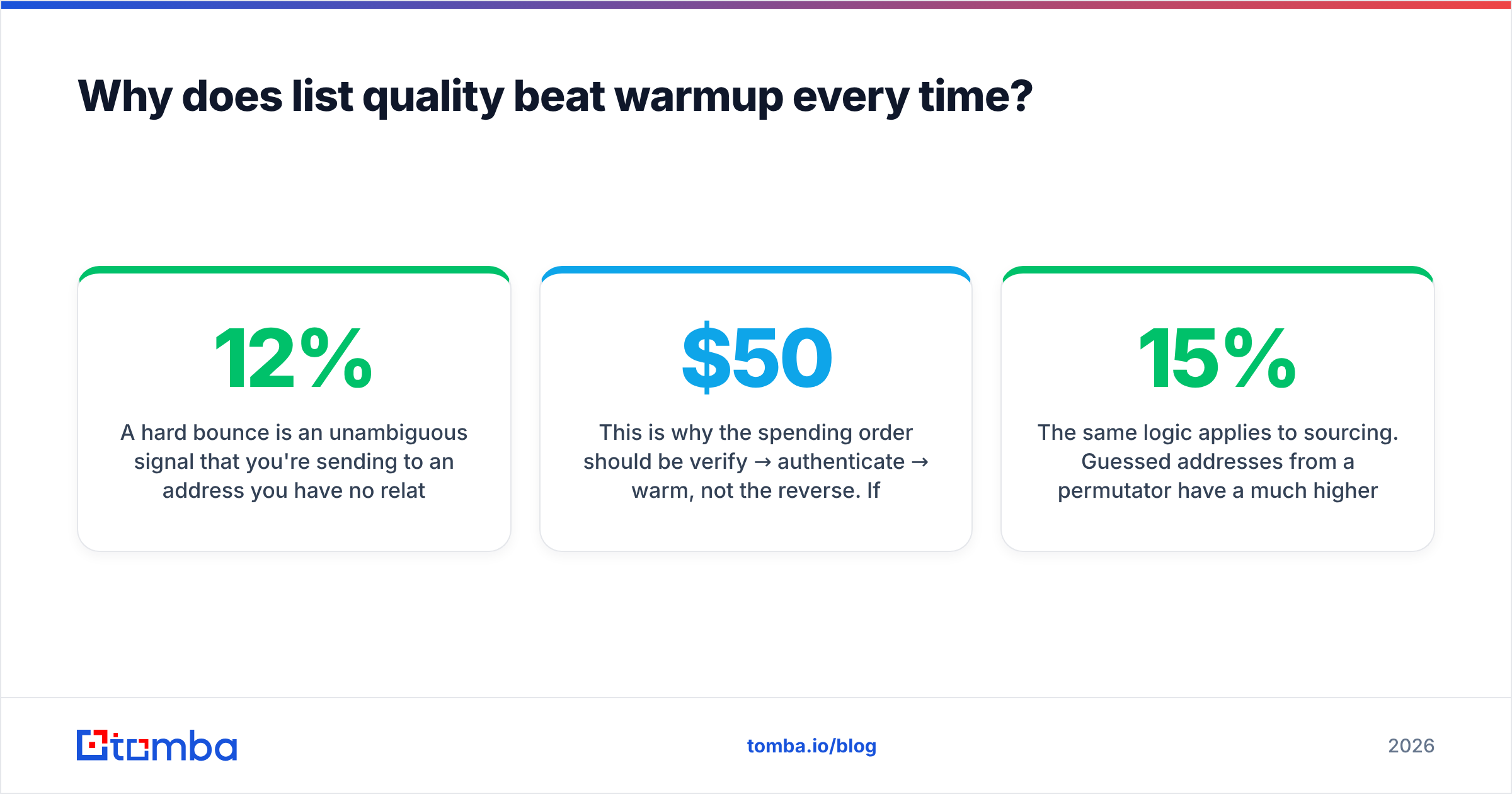
A hard bounce is an unambiguous signal that you're sending to an address you have no relationship with. Send 200 emails to a stale list with a 12% invalid rate and you've generated 24 hard bounces in an hour. No amount of prior warmup absorbs that. Meanwhile, five weeks of warmup emails might shift your reputation one notch. The asymmetry is brutal: reputation takes weeks to build and hours to destroy.
This is why the spending order should be verify → authenticate → warm, not the reverse. If you have $50 to allocate this month, put it into clean data. Running a list through a bulk email verifier before the first send removes the single largest risk to the domain you're about to spend six weeks warming.
The same logic applies to sourcing. Guessed addresses from a permutator have a much higher invalid rate than verified addresses from a real source. If you're building the list yourself, use a tool that verifies at the point of discovery rather than one that guesses patterns and hopes — that difference alone can swing your bounce rate from 15% to under 3%. Peers in this space handle it differently: BookYourData sells pre-verified contact records with a bounce guarantee, which is a legitimate route if you'd rather buy verified data than build it. The principle is the same either way — verified in, verified out.
Also worth knowing: catch-all domains will pass a basic syntax check and still bounce or silently drop. A catch-all verifier separates the ones that genuinely accept mail from the ones that accept everything and deliver nothing.
Free vs paid warmup: which should you actually buy?#
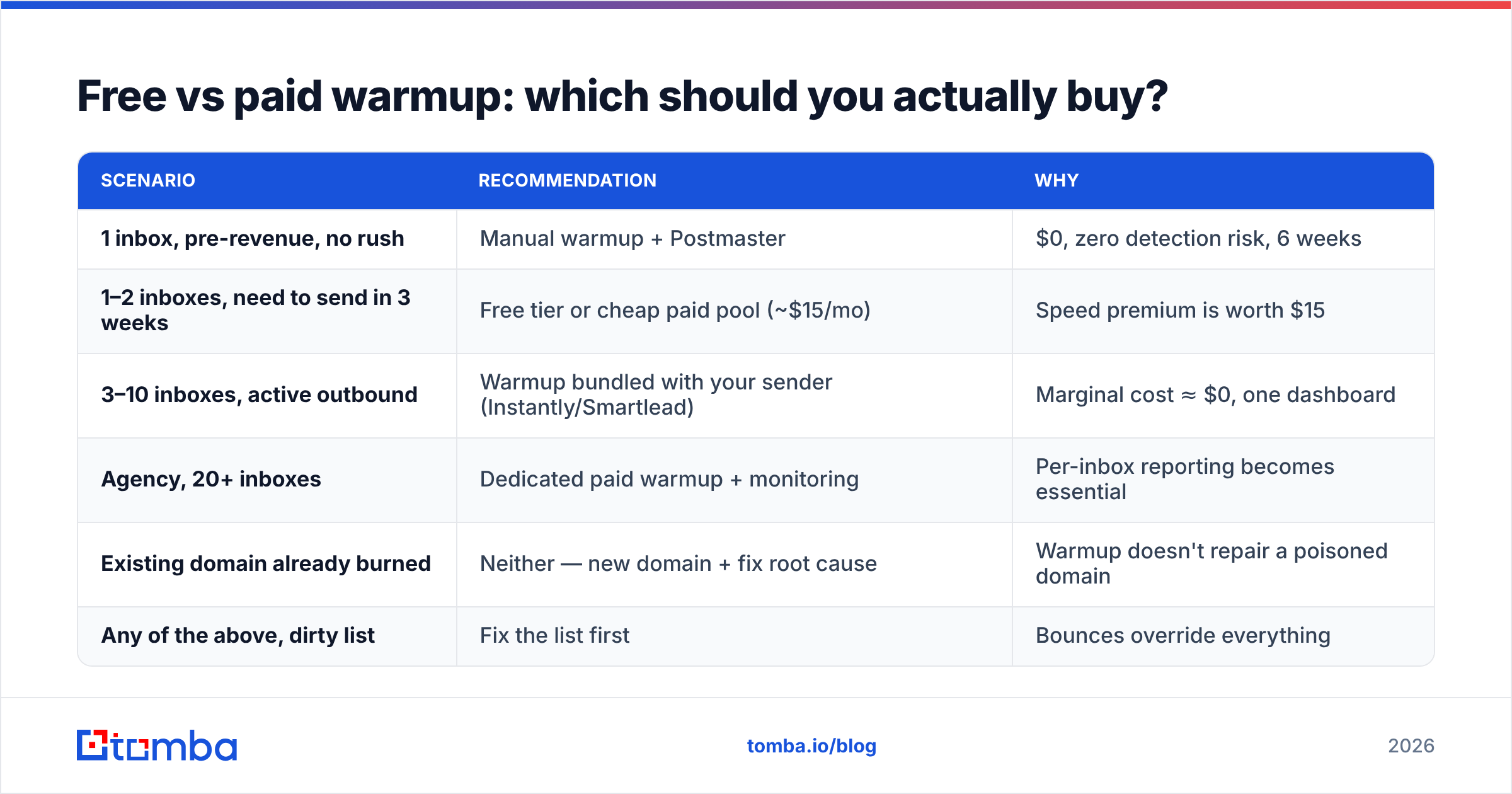
| Scenario | Recommendation | Why |
|---|---|---|
| 1 inbox, pre-revenue, no rush | Manual warmup + Postmaster | $0, zero detection risk, 6 weeks |
| 1–2 inboxes, need to send in 3 weeks | Free tier or cheap paid pool (~$15/mo) | Speed premium is worth $15 |
| 3–10 inboxes, active outbound | Warmup bundled with your sender (Instantly/Smartlead) | Marginal cost ≈ $0, one dashboard |
| Agency, 20+ inboxes | Dedicated paid warmup + monitoring | Per-inbox reporting becomes essential |
| Existing domain already burned | Neither — new domain + fix root cause | Warmup doesn't repair a poisoned domain |
| Any of the above, dirty list | Fix the list first | Bounces override everything |
Note the last two rows. Warmup is a ramp for a healthy setup, not a repair tool for a broken one. If your primary domain is already flagged, the standard fix is a fresh sending domain (never your primary), full authentication, verified list, and a slow ramp — and to actually solve whatever caused the original damage.
For a broader view of how sender reputation is calculated across providers, Validity's benchmark research is one of the few vendor-neutral sources publishing actual placement data year over year.
What should you measure to know warmup worked?#
Track four numbers weekly. If you're not measuring these, warmup is a ritual, not a strategy.
- Domain reputation (Postmaster): target Medium or High. Low means stop sending immediately.
- Spam complaint rate: under 0.1% is healthy; 0.3% is Google's hard ceiling for bulk senders.
- Hard bounce rate: under 2%. Above 5% and your list, not your warmup, is the problem.
- Reply rate on real campaigns: under 3% suggests targeting or copy issues that no warmup fixes.
One extra check most people skip: send a test to a seed set across Gmail, Outlook, and Yahoo and look at where it actually lands. Warmup vendors report placement inside their own pool, which is a friendlier environment than the open internet. Your own seed test is the more honest number.
The bottom line#
Free email warmup is worth doing, and for most single-inbox senders the free route — manual ramping plus Google Postmaster Tools for measurement — genuinely gets you there. Where free tiers fall down is scale: one inbox, low caps, no per-inbox placement reporting. If you're running three or more sending accounts, the warmup bundled into your sending platform is effectively free and far less fiddly.
But keep the priority order straight. Warmup buys you a ramp. Clean data is what keeps you on the road. Every hour you spend optimising warmup pool settings is worth less than the ten minutes spent removing invalid addresses from the list you're about to send.
Start with the list, not the pool. Use the Tomba Email Finder to source verified business addresses at the point of discovery — real, source-backed emails instead of permutator guesses — so your first cold campaign after warmup lands with a bounce rate under 3% instead of torching six weeks of work. The free plan includes 25 searches a month, and paid plans start at $49/mo on Tomba pricing if you need volume. Verify first, warm second, send third.
Related guides#
Ready to find emails that actually work?
Join 150,000+ professionals who stopped guessing and started sending. Free credits on signup — no credit card required.
Get the Tomba newsletter
Practical outbound tactics and product updates — once every two weeks.
About the author