Free Sales Prospecting Tools: 14 That Actually Work in 2026
Most "free" prospecting tools are 14-day trials in disguise. Here are 14 with genuinely free tiers, what each one actually gives you, and where the credit ceiling bites.
TL;DR
- Most tools marketed as "free sales prospecting tools" are 7–14 day trials with a credit card gate. Only about a dozen offer a genuinely renewable free tier.
- A workable free stack in 2026 costs $0 and covers roughly 100–250 verified contacts per month across 3–4 tools — enough for a solo founder or a first SDR, not enough for a team.
- The three limits that actually bite: monthly credit caps, export restrictions (view-only contacts you can't download), and verification quality on the free plan.
- Tomba's free tier gives 25 searches/month with the same verification engine as paid plans, plus free standalone utilities (email verifier, permutator, pattern finder) that don't consume credits.
- Stack free tiers by function — one finder, one verifier, one enrichment source, one CRM — rather than hunting for a single tool that does everything for nothing.
What counts as a free sales prospecting tool?#
A free sales prospecting tool has a renewable free tier — credits that reset every month, no expiry date, no card required to start. That is a much smaller category than the marketing suggests.
Three things get labeled "free" and shouldn't be:
- Time-boxed trials. 14 days of a $99/mo plan is a discount, not a free tool. You will build a workflow on it and then pay or lose it.
- Freemium with export locks. You can see 500 contacts. You can export zero. The data is real; your access to it isn't.
- Free-forever with a card on file. Technically free, practically a subscription you forgot to cancel.
The tools worth your time in the fourth category: a real monthly allowance, self-serve signup, and data you can export as CSV. Below, every tool listed meets at least the first two.

Which free sales prospecting tools are worth using in 2026?#
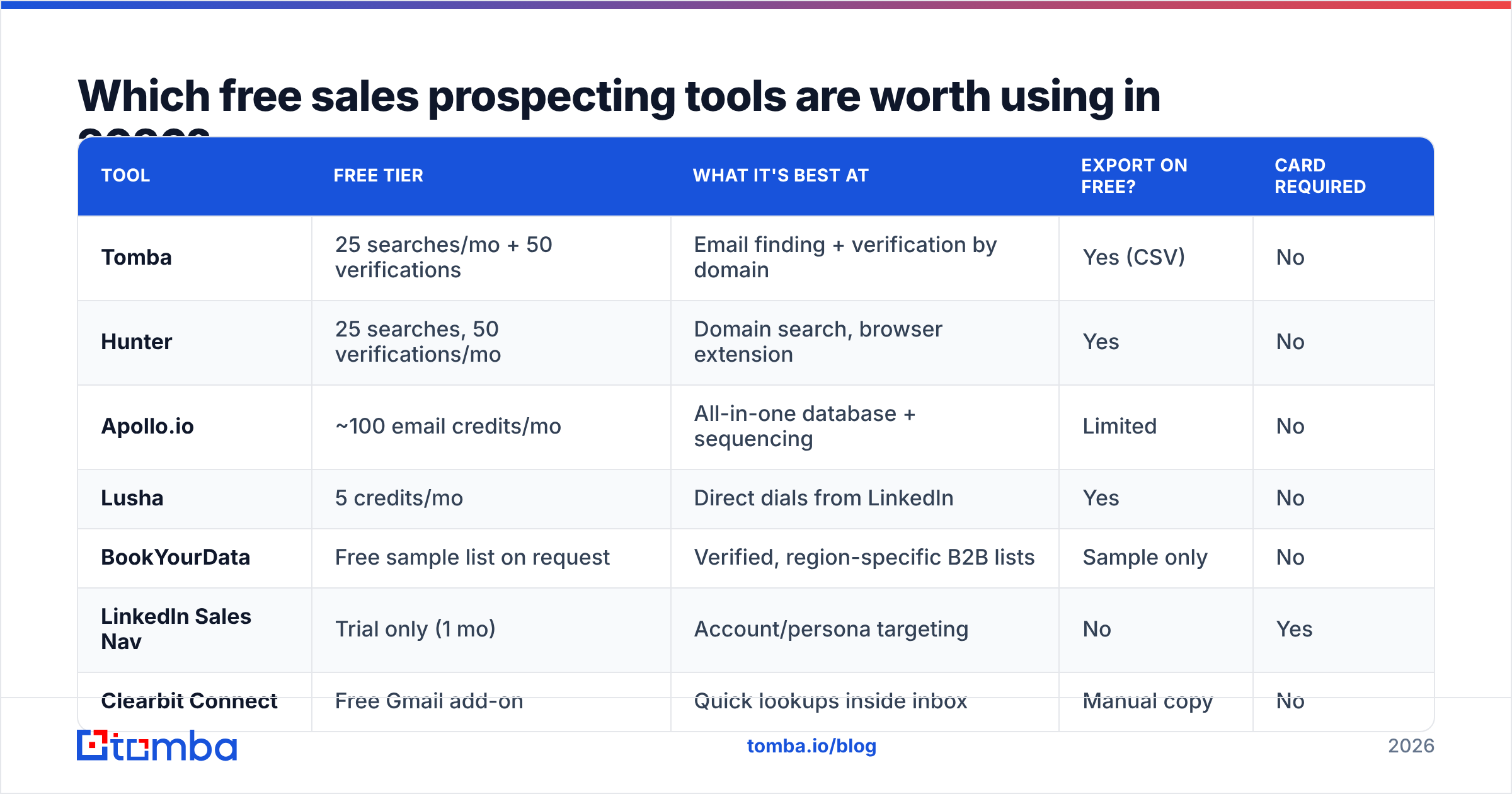
Here is the honest comparison. "Monthly free credits" means credits that reset — not one-time signup bonuses.
| Tool | Free tier | What it's best at | Export on free? | Card required |
|---|---|---|---|---|
| Tomba | 25 searches/mo + 50 verifications | Email finding + verification by domain | Yes (CSV) | No |
| Hunter | 25 searches, 50 verifications/mo | Domain search, browser extension | Yes | No |
| Apollo.io | ~100 email credits/mo | All-in-one database + sequencing | Limited | No |
| Lusha | 5 credits/mo | Direct dials from LinkedIn | Yes | No |
| BookYourData | Free sample list on request | Verified, region-specific B2B lists | Sample only | No |
| LinkedIn Sales Nav | Trial only (1 mo) | Account/persona targeting | No | Yes |
| Clearbit Connect | Free Gmail add-on | Quick lookups inside inbox | Manual copy | No |
| HubSpot CRM | Unlimited contacts, free forever | Pipeline + logging activity | Yes | No |
A few notes that the table can't carry:
Tomba's 25 searches is the standard entry allowance in this category, and it's the same search engine and verification pipeline the paid plans use — you're not getting a degraded index. Paid starts at $49/mo (Starter) and $99/mo (Growth) if you outgrow it. See Tomba pricing for the full ladder.
Apollo's free plan is generous on volume and stingy on export. Great for research inside the app, frustrating the moment you want the list in your own CRM. If that limit is what pushed you here, the Apollo alternative breakdown covers the export tradeoffs specifically.
Lusha's 5 credits sound insulting until you realize they're direct dials. Five phone numbers a month is five real conversations if you pick the right five.
BookYourData works differently — it's a pay-as-you-go verified list vendor rather than a search tool, and it will send you a free sample so you can test accuracy before buying. If your motion is "give me 2,000 verified CFOs in DACH," that model beats burning search credits one contact at a time.
HubSpot CRM's free tier is the outlier: genuinely unlimited contact storage with no expiry, which makes it the default free destination for whatever the other tools produce. HubSpot's own pricing page documents where the free/paid line sits.
How do you build a free prospecting stack that actually works?#
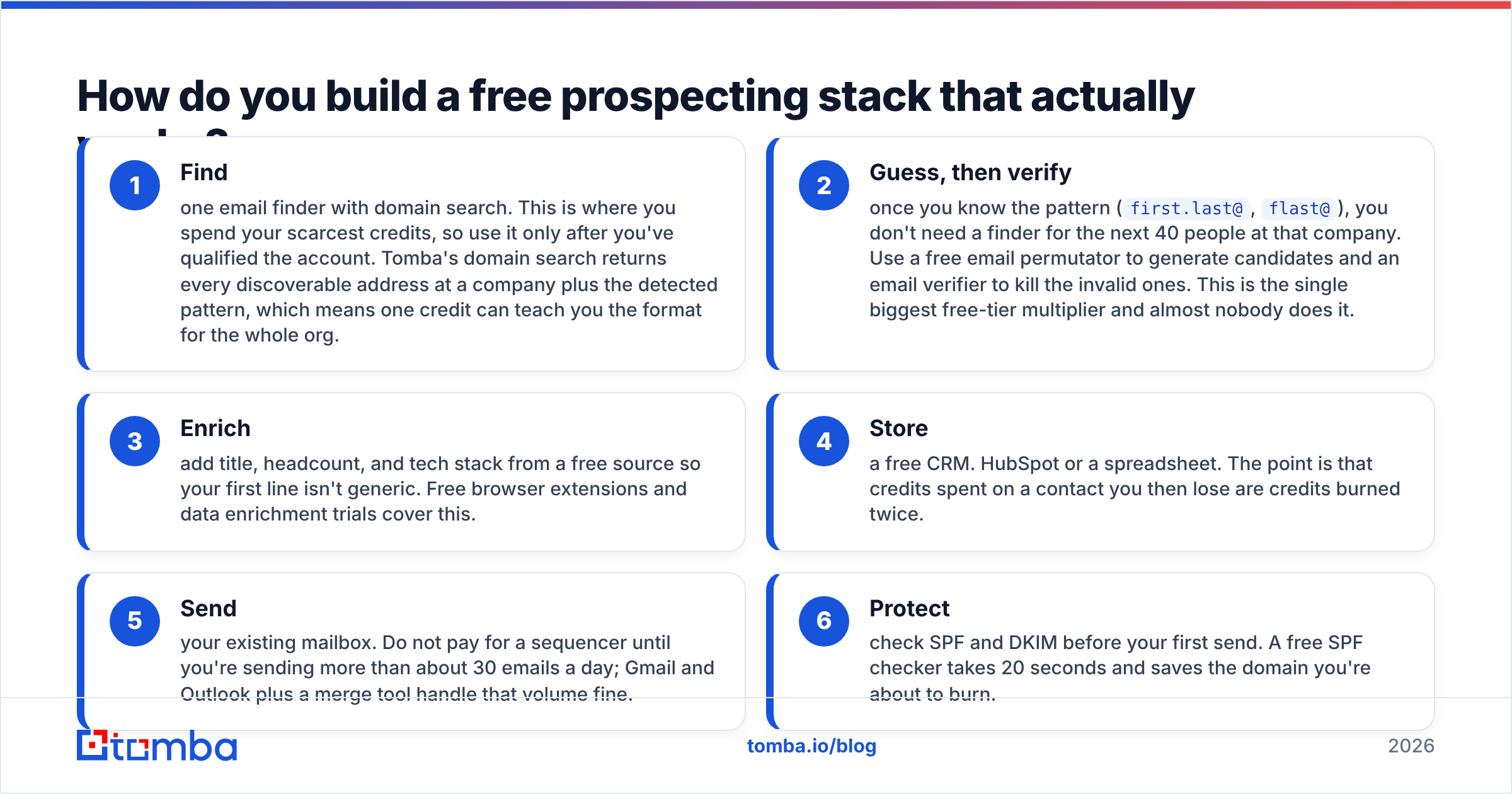
Stop looking for one tool. Assign each free tier a job and let the caps stack.
- Find — one email finder with domain search. This is where you spend your scarcest credits, so use it only after you've qualified the account. Tomba's domain search returns every discoverable address at a company plus the detected pattern, which means one credit can teach you the format for the whole org.
- Guess, then verify — once you know the pattern (
first.last@,flast@), you don't need a finder for the next 40 people at that company. Use a free email permutator to generate candidates and an email verifier to kill the invalid ones. This is the single biggest free-tier multiplier and almost nobody does it. - Enrich — add title, headcount, and tech stack from a free source so your first line isn't generic. Free browser extensions and data enrichment trials cover this.
- Store — a free CRM. HubSpot or a spreadsheet. The point is that credits spent on a contact you then lose are credits burned twice.
- Send — your existing mailbox. Do not pay for a sequencer until you're sending more than about 30 emails a day; Gmail and Outlook plus a merge tool handle that volume fine.
- Protect — check SPF and DKIM before your first send. A free SPF checker takes 20 seconds and saves the domain you're about to burn.
Run that loop and 25 finder credits produce far more than 25 contacts, because steps 2 and 6 do the heavy lifting for free.
Where do free tiers break down?#
Four failure points, in the order you'll hit them.
The credit ceiling arrives faster than you think. A single account research pass — find the VP, the director, and two managers — is four credits. Six accounts and your month is done. If you're prospecting more than about 10 accounts a month, free tiers are a testing budget, not an operating budget.
Catch-all domains eat your accuracy. Roughly 15–20% of B2B domains accept all mail, which means a standard SMTP check returns "valid" for addresses that don't exist. Most free verifiers report these as valid and move on. A dedicated catch-all verifier uses pattern confidence and secondary signals instead, and this is one area where the free plans across the market genuinely differ in quality — test it with 10 addresses you already know before trusting it.
Bulk is almost always paywalled. Every free tier is a one-at-a-time tool. The moment you have a list of 300 domains, you need bulk email finder access, and that's a paid feature everywhere. There is no free workaround that respects rate limits.
API access is rarely free. If you want prospecting inside your own product or workflow, the Tomba API and its competitors gate that behind paid plans. Free tiers are UI-only by design.
Are free tools accurate enough to send from?#
Accuracy on free tiers is the same as paid — for the tools that use one engine. The difference is volume, not quality. Where accuracy drops is in how you use the free tier.
Two habits ruin otherwise-good data:
- Skipping verification because it costs a credit. A 5% bounce rate on a 200-email send is 10 hard bounces, which is enough to move you toward the spam folder on a young domain. Spending verification credits is cheaper than rebuilding sender reputation.
- Trusting guessed addresses without a check. A permutator produces eight candidates. Seven are wrong. Sending to all eight is how you get blocked. Generate, then verify, then send to one.
G2's category data is useful for sanity-checking vendor accuracy claims, since it aggregates user-reported deliverability rather than vendor self-reporting. Treat any claim above 98% as marketing until you've tested it on your own ICP — accuracy varies enormously by region and company size, and a tool that's excellent on US SaaS can be mediocre on European manufacturing.
When should you stop using free tools?#
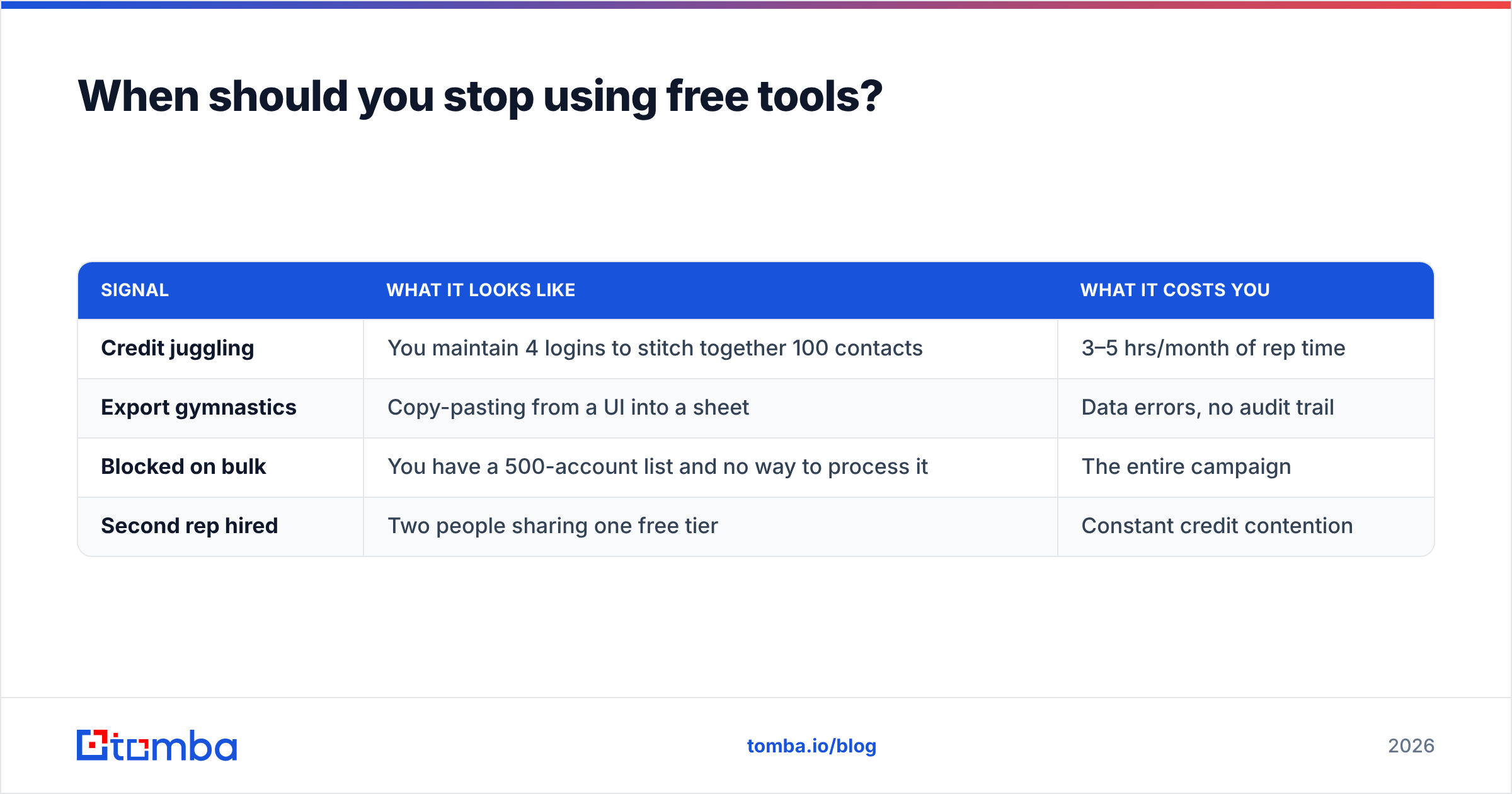
Three signals, any one of which means the free stack is now costing you more than it saves:
| Signal | What it looks like | What it costs you |
|---|---|---|
| Credit juggling | You maintain 4 logins to stitch together 100 contacts | 3–5 hrs/month of rep time |
| Export gymnastics | Copy-pasting from a UI into a sheet | Data errors, no audit trail |
| Blocked on bulk | You have a 500-account list and no way to process it | The entire campaign |
| Second rep hired | Two people sharing one free tier | Constant credit contention |
The math is simple. A rep costs roughly $30/hour loaded. If free-tier friction eats 4 hours a month, that's $120 — more than a Starter plan at $49/mo, and you still don't have bulk or API access.
The honest upgrade trigger is hour four. Below that, free tiers are correct. Above it, you're paying with time at a worse rate than you'd pay with money.
What about free tools that aren't finders?#
The finder gets the attention, but the free utilities around it move numbers just as much:
- Pattern detection — a company email pattern check tells you the format for an entire org from one known address.
- Subject line testing — free subject line generators won't write your campaign, but they'll stop you shipping a 62-character subject that truncates on mobile.
- Spam scoring — run the draft through a spam checker before the first send. Trigger words in your template affect every email in the sequence.
- Deduplication — merged lists from four free tools will have overlaps. A remove duplicates pass prevents the same person getting your opener twice from two campaigns.
- Reverse lookup — got an email from a form fill with no name attached? Reverse email lookup fills the gaps in inbound leads for free.
None of these consume finder credits. They are the highest-ROI free tools in prospecting and they're almost never in "best free prospecting tools" lists because they don't have a pricing page to link to.
How should you evaluate a free tier before committing?#
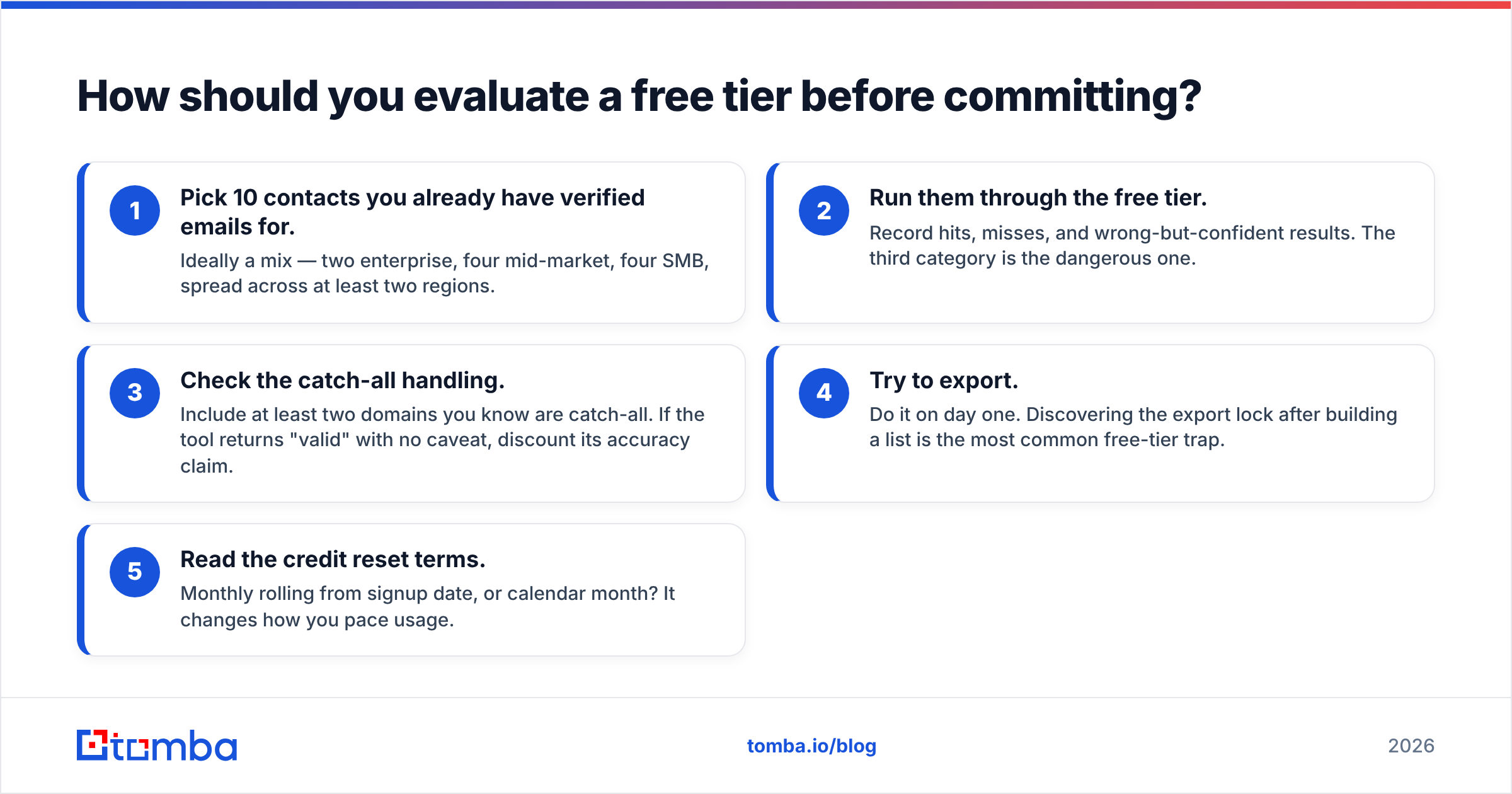
Run this test in under 30 minutes before you build any workflow on a tool:
- Pick 10 contacts you already have verified emails for. Ideally a mix — two enterprise, four mid-market, four SMB, spread across at least two regions.
- Run them through the free tier. Record hits, misses, and wrong-but-confident results. The third category is the dangerous one.
- Check the catch-all handling. Include at least two domains you know are catch-all. If the tool returns "valid" with no caveat, discount its accuracy claim.
- Try to export. Do it on day one. Discovering the export lock after building a list is the most common free-tier trap.
- Read the credit reset terms. Monthly rolling from signup date, or calendar month? It changes how you pace usage.
A tool that scores 7/10 with honest "unknown" flags beats one that scores 9/10 by guessing on the other three. Guessed addresses cost you deliverability, and deliverability is the only asset in outbound that you can't buy back.
What does a realistic month look like on free tiers?#
Concretely, with a stack of Tomba + HubSpot free + your own mailbox:
- Week 1 — build a 40-account target list manually from LinkedIn and industry directories. Cost: 0 credits, 3 hours.
- Week 2 — run domain search on 12 highest-fit accounts. Extract the pattern for each. Cost: 12 credits, and you now know the format for all 12 companies.
- Week 3 — permutate and verify contacts at those 12 accounts. Roughly 45 addresses generated, verified down to ~30 confident sends. Cost: verification credits only.
- Week 4 — send, follow up twice, log everything in the free CRM. Roughly 30 contacts, 3 touches each.
That's 30 verified, personalized contacts a month at $0. It is a real motion for a founder testing a market. It is not a real motion for a funded team with a pipeline number, and pretending otherwise is how quarters get missed.
The bottom line#
Free sales prospecting tools are legitimately good in 2026 — better than paid tools were five years ago. The constraint isn't quality, it's throughput. Use free tiers to validate that your ICP responds at all, then buy volume once the message is proven.
Start with a real free tier rather than a trial: Tomba's Email Finder gives you 25 searches a month with no card, the same verification engine as the paid plans, and CSV export from day one — so if you outgrow it, you're upgrading a workflow you already trust instead of migrating away from a trial that expired.
Related guides#
Ready to find emails that actually work?
Join 150,000+ professionals who stopped guessing and started sending. Free credits on signup — no credit card required.
Get the Tomba newsletter
Practical outbound tactics and product updates — once every two weeks.
About the author