Free Trial Email Template: 12 Proven Sequences for 2026
Most free trial emails get ignored because they talk about the product instead of the user's next action. Here are 12 templates, a full sequence timeline, and the metrics that decide whether a trial converts.
TL;DR
- A free trial email template only works when it is tied to an activation event, not a calendar day. "Day 3" emails that ignore what the user did convert at roughly half the rate of behavior-triggered ones.
- The highest-converting sequence is 6–8 emails across a 14-day trial: welcome, activation nudge, use-case proof, mid-trial check, social proof, expiry warning, expiry day, and one post-expiry win-back.
- Subject lines that reference the user's own account state ("Your 3 saved searches expire Friday") beat generic value claims by a wide margin in every published SaaS benchmark.
- Plain-text emails from a real human's address outperform HTML newsletters for trials — you are simulating a conversation, not broadcasting.
- Bad email data kills trial sequences before copy matters. If your signup form collects a personal address or a typo'd work domain, every template below lands nowhere.
What is a free trial email template, and why do most fail?#
A free trial email template is a reusable message sent to someone who has started a trial of your product, designed to move them to a specific next action — activate a feature, book a call, invite a teammate, or upgrade.
Think of it like a hotel concierge. A bad concierge hands every guest the same laminated brochure at check-in. A good one notices you arrived with hiking boots and mentions the trailhead two blocks away. Same information, radically different conversion.
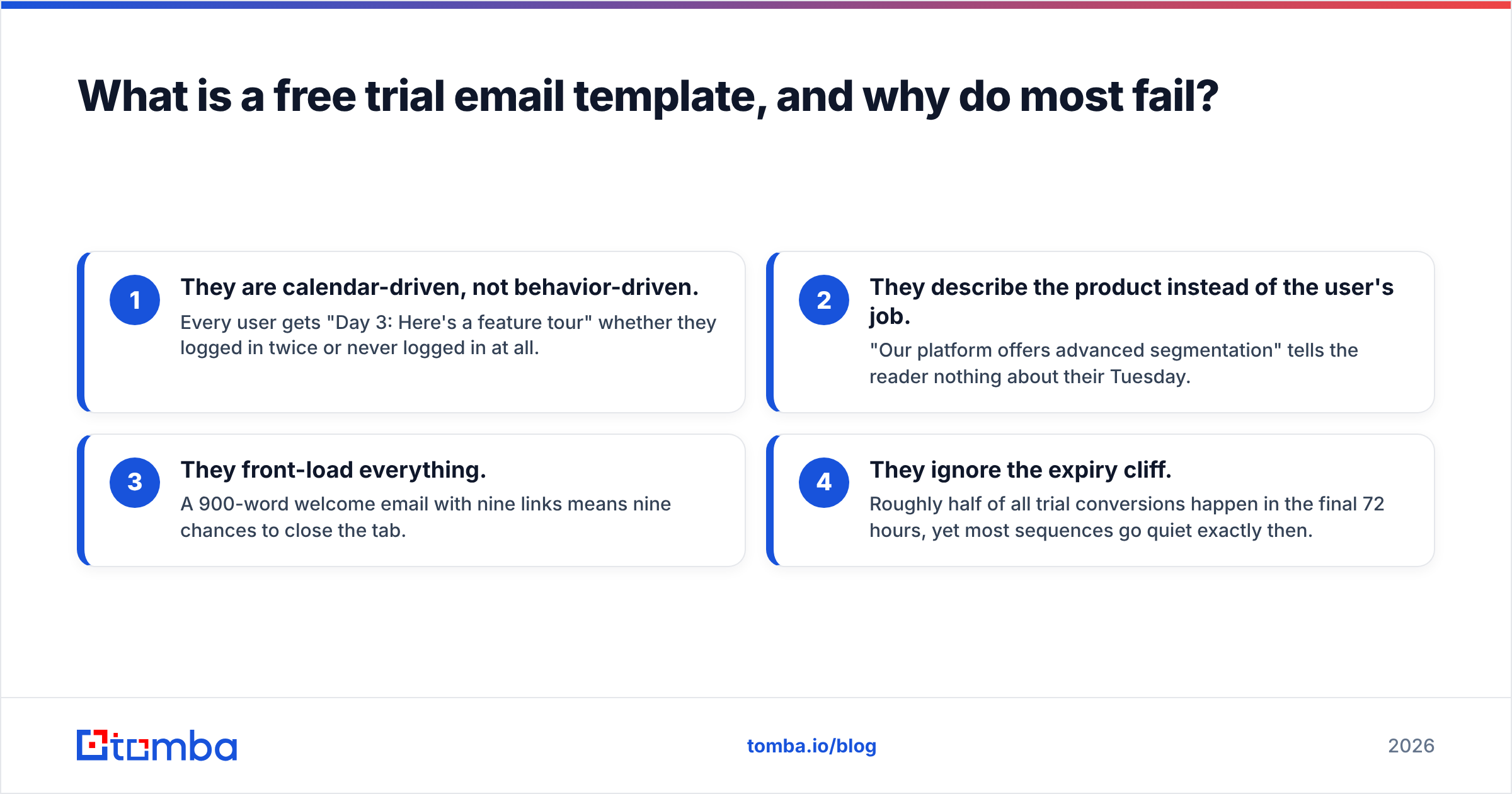
Most trial sequences fail for four reasons:
- They are calendar-driven, not behavior-driven. Every user gets "Day 3: Here's a feature tour" whether they logged in twice or never logged in at all.
- They describe the product instead of the user's job. "Our platform offers advanced segmentation" tells the reader nothing about their Tuesday.
- They front-load everything. A 900-word welcome email with nine links means nine chances to close the tab.
- They ignore the expiry cliff. Roughly half of all trial conversions happen in the final 72 hours, yet most sequences go quiet exactly then.
The fix is structural, not stylistic. Before you rewrite a single subject line, map your trial to one activation event — the single action that most strongly predicts conversion in your data. For a CRM that might be "imported 50 contacts." For an email tool, "sent the first campaign." Every email before activation pushes toward that event. Every email after it pushes toward the upgrade.
What does a full free trial email sequence look like?#
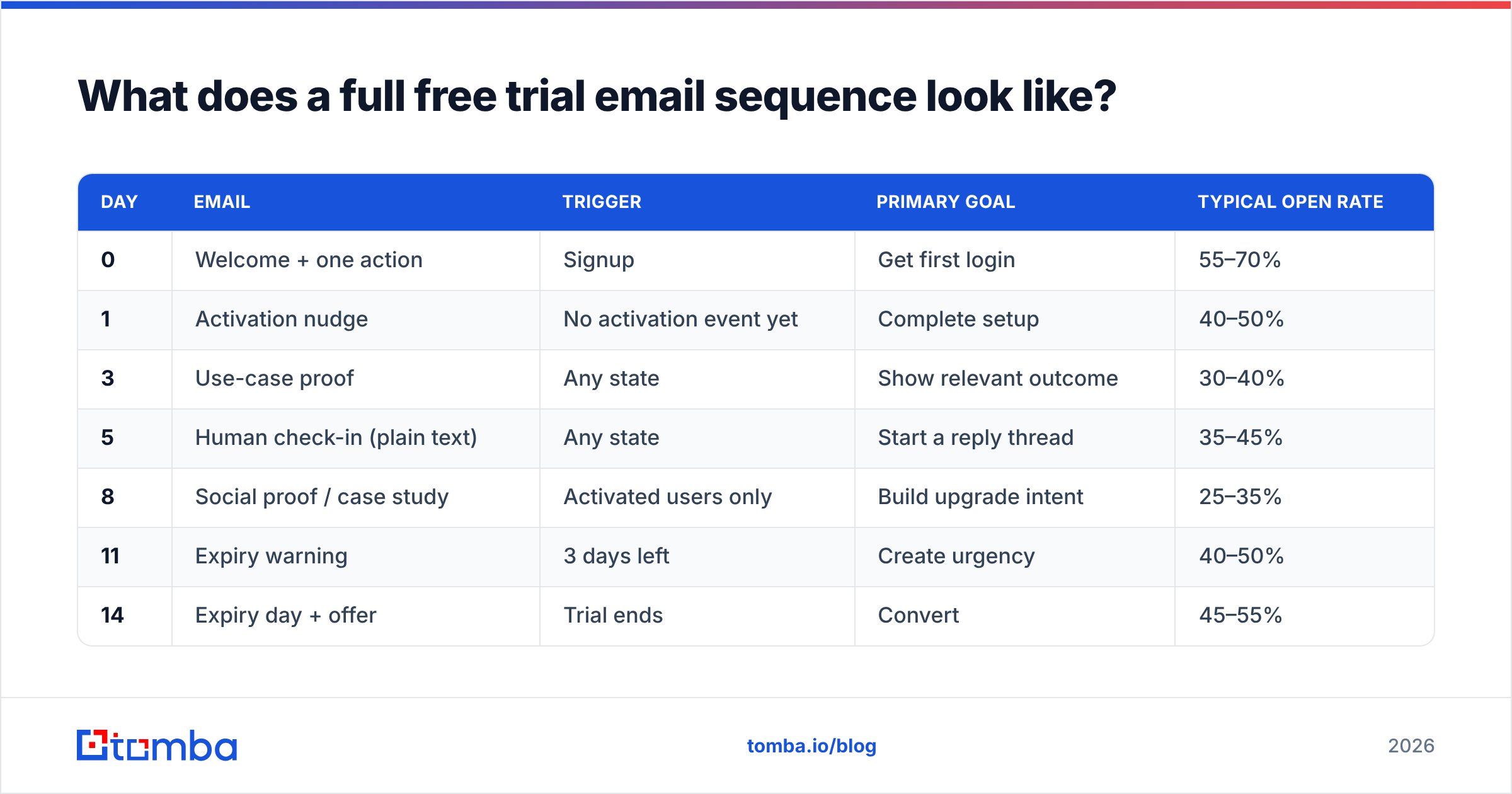
Here is the day-by-day structure that works for a standard 14-day B2B trial. Adjust the compression for 7-day trials and stretch it for 30-day ones, but keep the ratio: roughly 40% of your emails should land in the final quarter of the trial.
| Day | Trigger | Primary goal | Typical open rate | |
|---|---|---|---|---|
| 0 | Welcome + one action | Signup | Get first login | 55–70% |
| 1 | Activation nudge | No activation event yet | Complete setup | 40–50% |
| 3 | Use-case proof | Any state | Show relevant outcome | 30–40% |
| 5 | Human check-in (plain text) | Any state | Start a reply thread | 35–45% |
| 8 | Social proof / case study | Activated users only | Build upgrade intent | 25–35% |
| 11 | Expiry warning | 3 days left | Create urgency | 40–50% |
| 14 | Expiry day + offer | Trial ends | Convert | 45–55% |
| 17 | Win-back | No upgrade | Recover or learn why | 20–30% |
Two branches matter more than the rest. If a user has not activated by day 5, stop selling and start troubleshooting — that person needs a support email, not a case study. If a user has activated and is using the product heavily, pull the expiry warning forward to day 8; power users decide early and hate being nurtured.
The 12 templates#
1. Welcome — one action only
Subject: Your {Product} account is live
Hi {First name},
Your account is ready. One thing to do first: {single action, linked}.
That takes about two minutes and unlocks {specific outcome}. Everything else can wait.
If you hit anything odd, just reply — this inbox is monitored by a human.
— {Sender}
2. Activation nudge — no login after 24 hours
Subject: Stuck on setup?
Hi {First name},
I noticed you signed up yesterday but haven't {activation event} yet. That's usually one of three things: {reason A}, {reason B}, or you got pulled into something else.
If it's the first two, here's the 90-second fix: {link}.
If it's the third, no problem — want me to send this again next Tuesday?
3. Use-case proof — segment by signup intent
Subject: How {similar company type} uses {Product} for {job}
{Company} had the same problem you described at signup: {problem}. They set up {feature} and cut {metric} by {number}.
Here's the exact configuration they used: {link}.
4. Human check-in — plain text, no images, no signature block
Subject: quick question
{First name} — what made you sign up for {Product}?
Asking because the answer changes what I'd point you at next.
That is the entire email. It is the highest-reply-rate message in most trial sequences precisely because it doesn't look like marketing.
5. Feature depth — for activated users
Subject: The part of {Product} most people miss
You've already {activation event}. The thing that usually doubles the value from here is {advanced feature}, because {reason}.
Two-minute walkthrough: {link}.
6. Objection handler — for stalled users
Subject: Is it the pricing or the setup?
Most people who go quiet during a trial are stuck on one of two things. If it's pricing, here's how {Product} compares on total cost: {link}. If it's setup, book 15 minutes and I'll do it with you: {link}.
7. Social proof — mid-trial
Subject: {Number} teams switched from {Competitor} last quarter
Here's what they said about the migration, in their words: {three short quotes}.
8. Expiry warning — three days out
Subject: 3 days left on your {Product} trial
Your trial ends {date}. Here's what you'll keep and what you'll lose:
Keep: {list}. Lose: {list}.
Upgrading takes one click: {link}.
9. Expiry day
Subject: Your trial ends today
Today is the last day of your {Product} trial. Your {saved work} stays in the account for 30 days, so nothing disappears if you need a week to decide.
If you're ready: {link}. If you need more time: reply with "extend" and I'll add seven days.
10. Win-back — three days after expiry
Subject: What didn't work?
Your trial ended and you didn't upgrade, which is useful information for me. Was it {reason A}, {reason B}, or something else?
One-line reply is plenty.
11. Extension offer — for high-intent non-converters
Subject: Another 14 days, no card needed
You were active right up to the last day, which usually means the timing was wrong, not the product. I've added 14 days to your account. No card, no strings.
12. Annual upgrade — post-conversion
Subject: Two months free if you switch to annual
You've been on the monthly plan for 30 days. Annual works out to {price}, which is two months free, and locks your rate through {year}.
How do you personalize a free trial email template at scale?#
Personalization is a data problem before it is a copy problem. The three variables that actually move conversion are:
- Signup intent — what the person typed into "what are you trying to do?" on the signup form. Segment your entire sequence on this one field.
- Activation state — has the user completed the single event that predicts conversion? This determines which branch of the sequence they receive.
- Company context — industry, headcount, and tech stack, pulled from enrichment rather than asked for in the form.
That third one is where most teams over-collect. Every extra form field costs you signups. Ask for a work email and nothing else, then run data enrichment against the domain to fill in company size, industry, and stack. You get the segmentation without the friction.
One caution: personalization tokens that fail loudly are worse than no personalization. "Hi {First name}," rendered literally is a trust-killer, and it happens constantly when signup data is dirty. Set fallbacks on every token and QA the fallback path, not just the happy path.
Which channel and cadence should you use?#
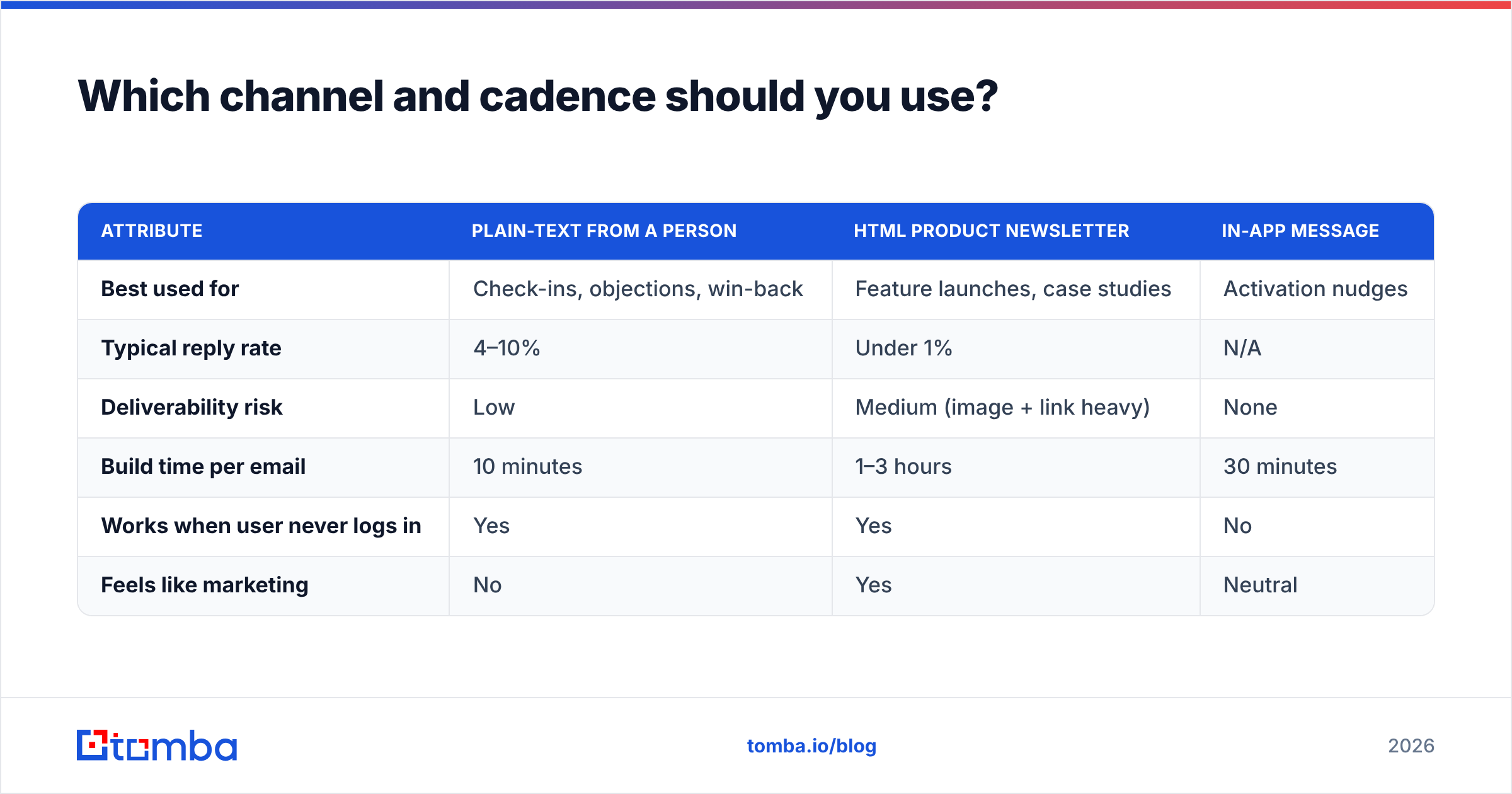
| Attribute | Plain-text from a person | HTML product newsletter | In-app message |
|---|---|---|---|
| Best used for | Check-ins, objections, win-back | Feature launches, case studies | Activation nudges |
| Typical reply rate | 4–10% | Under 1% | N/A |
| Deliverability risk | Low | Medium (image + link heavy) | None |
| Build time per email | 10 minutes | 1–3 hours | 30 minutes |
| Works when user never logs in | Yes | Yes | No |
| Feels like marketing | No | Yes | Neutral |
The practical answer is a mix: in-app for activation (the user is already there), plain text for anything requiring a human response, and HTML only for genuinely visual content like a case study with charts.
On cadence, the common fear is over-emailing. In practice, trial users tolerate more email than marketing lists because they opted into an evaluation window with a hard deadline. Eight emails across 14 days reads as attentive. The unsubscribe risk comes from irrelevance, not frequency — a user who has already activated receiving three more "finish your setup" nudges will unsubscribe faster than one receiving eight well-targeted messages.
Watch your sender reputation as volume climbs. Trial sequences run from a subdomain in most setups, and a spike in sends to unverified addresses is the fastest way to poison it. Google's bulk sender guidelines set the current bar for authentication and complaint rates, and they apply to transactional-adjacent trial mail too.
What metrics tell you the sequence is working?#
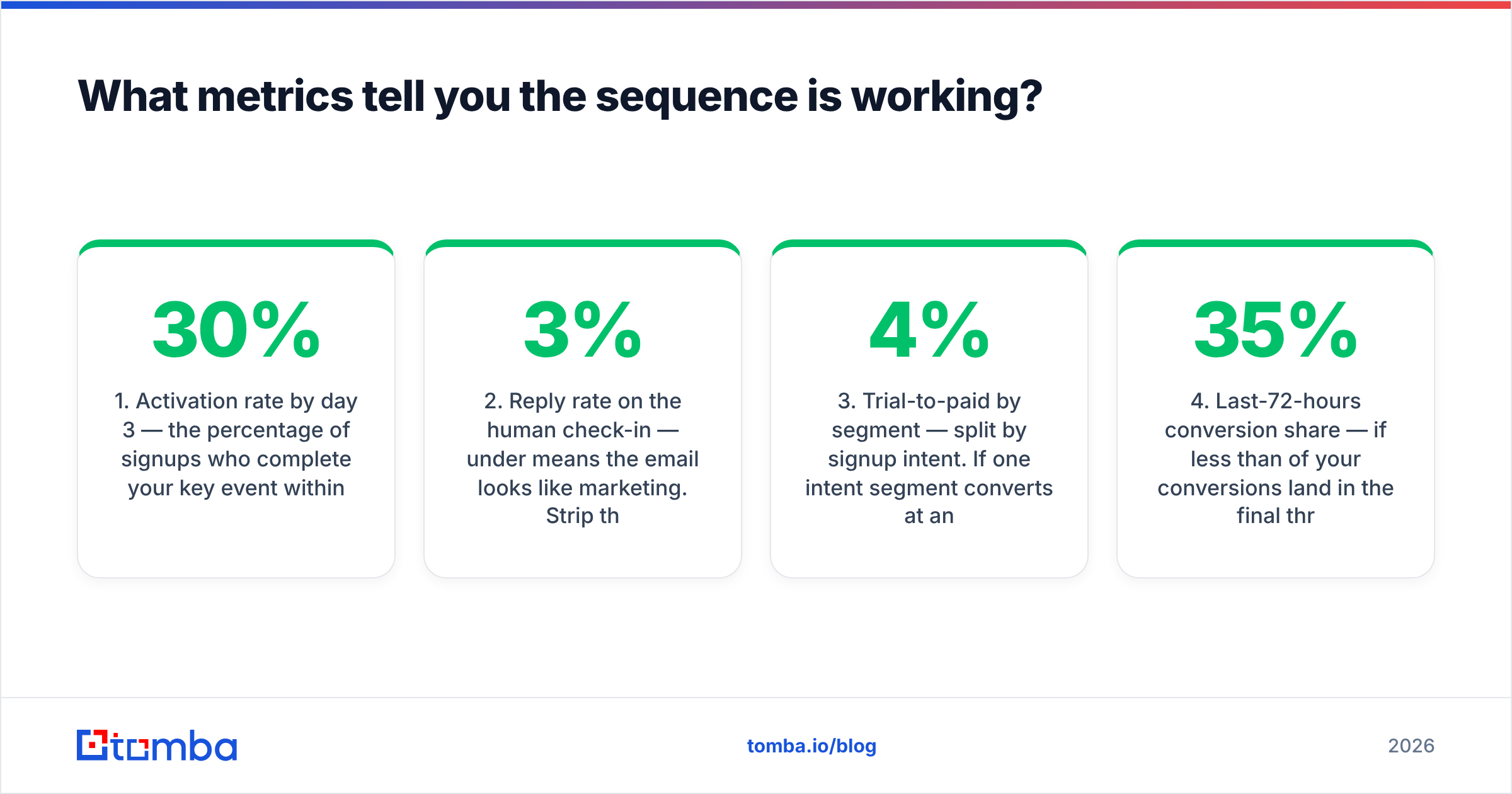
Open rate is the weakest signal in the set, and since Apple Mail Privacy Protection it is close to noise. Track these instead:
- Activation rate by day 3 — the percentage of signups who complete your key event within 72 hours. This is the single number your first three emails are responsible for. Below 30% means your onboarding, not your copy, is the bottleneck.
- Reply rate on the human check-in — under 3% means the email looks like marketing. Strip the signature block, remove the logo, shorten it.
- Trial-to-paid by segment — split by signup intent. If one intent segment converts at 4% and another at 18%, you have a positioning insight, not an email problem.
- Last-72-hours conversion share — if less than 35% of your conversions land in the final three days, your expiry sequence is too soft.
- Bounce rate on the welcome email — anything above 2% means your signup form is accepting garbage. Fix this first; it corrupts every downstream metric.
- Win-back reply rate — the qualitative goldmine. Ten honest replies about why someone didn't upgrade beat a hundred survey responses.
G2's software buyer behavior research consistently shows that evaluation windows are getting shorter and buying committees larger, which argues for two things in your sequence: an earlier expiry push, and at least one email designed to be forwarded internally to a decision-maker.
How do you keep trial emails out of spam?#
Trial email has a structural advantage — the recipient asked for it — and a structural risk: signup forms attract typos, disposable addresses, and bots.
Three controls handle most of it:
- Verify at the point of signup. Run every submitted address through an email verifier before it enters the sequence. This catches typos ("gmial.com"), disposable domains, and dead mailboxes in real time.
- Authenticate properly. SPF, DKIM, and a DMARC policy at
p=noneminimum, moving toward quarantine. Check your record with an SPF checker after any DNS change. - Separate the streams. Trial nurture mail should not share a subdomain with cold outbound. If your prospecting sends get flagged, you don't want your product emails going down with them.
The reason verification matters more here than in most email programs: a hard bounce on a welcome email means a real prospect never heard from you at all. That is not a deliverability statistic, it is a lost deal. If you are also building the top-of-funnel lists that feed trials, the same verification logic applies before the first touch — a bulk verify pass on any imported list costs a fraction of what a burned domain costs.
What should you change for a 7-day versus 30-day trial?#
Short trials (7 days) compress everything and drop the middle. Send welcome, activation nudge, human check-in, expiry warning at day 5, and expiry day. Five emails, no case studies — there is no room for education, only for getting to value.
Long trials (30 days) have the opposite problem: users forget you exist. Add two things. First, a weekly digest of what happened in their account ("You ran 4 searches this week"), which is the highest-value long-trial email because it manufactures relevance from the user's own data. Second, a mid-trial re-engagement branch at day 15 for anyone who hasn't logged in for a week — treat that person as a new signup and restart the activation sequence.
For product-led setups where the trial is really a freemium tier with limits, swap "expiry" for "limit approaching." The template shape is identical; only the deadline mechanic changes.
Start with clean data, then write#
The best free trial email template in the world fails against a bad address. Before you rebuild your sequence, audit where your trial signups come from and how many of those addresses are real, deliverable work emails rather than personal accounts or typos.
If you are sourcing prospects to invite into a trial in the first place — outbound-led PLG, partner referrals, event lists — start with the Tomba Email Finder. It resolves verified professional addresses by name and domain, so the sequence you just built actually lands in an inbox where a buying decision can happen. The free tier gives you 25 searches a month to test the workflow, and paid plans start at $49/month; see Tomba pricing for the full breakdown.
Write the templates second. Fix the data first.
Related guides#
Ready to find emails that actually work?
Join 150,000+ professionals who stopped guessing and started sending. Free credits on signup — no credit card required.
Get the Tomba newsletter
Practical outbound tactics and product updates — once every two weeks.
About the author