FullEnrich Pros and Cons: An Honest 2026 Review
FullEnrich waterfalls 15+ data vendors into one API to find emails and mobile numbers. Here's where that model wins, where it quietly costs you, and who should pick something simpler.
TL;DR
- FullEnrich is a waterfall enrichment tool: it queries 15+ underlying data vendors in sequence until one returns an email or mobile number, then charges you only for the hit.
- The strongest case for it is mobile phone numbers and hard-to-find contacts, where no single provider covers enough of the market.
- The weakest case is volume email finding on known domains — you're paying an aggregator margin for data a direct provider already has.
- Credit math is the thing most teams get wrong: emails and phones cost different amounts, and a "1 credit" headline is not what your CSV actually costs.
- Best fit: small-to-mid outbound teams doing high-value, low-volume prospecting. Poor fit: anyone enriching tens of thousands of rows a month on a fixed budget.
What is FullEnrich and how does the waterfall model work?#
FullEnrich (fullenrich.com) is a contact enrichment platform built on a simple premise: no single B2B data provider has everyone. Provider A knows the SaaS founder in Berlin. Provider B knows the plant manager in Ohio. Neither knows both.
Think of it like calling three friends to find someone's number instead of one. You stop calling as soon as someone picks up with the answer — and you only "pay" for the call that worked.
Technically, that's a waterfall: you submit a contact (name + company domain, or a LinkedIn URL), and FullEnrich fans the request across its vendor stack in a priority order you can partly configure. First valid result wins, request stops, credit is deducted. Misses cost nothing.
Here's what that architecture actually changes for you:
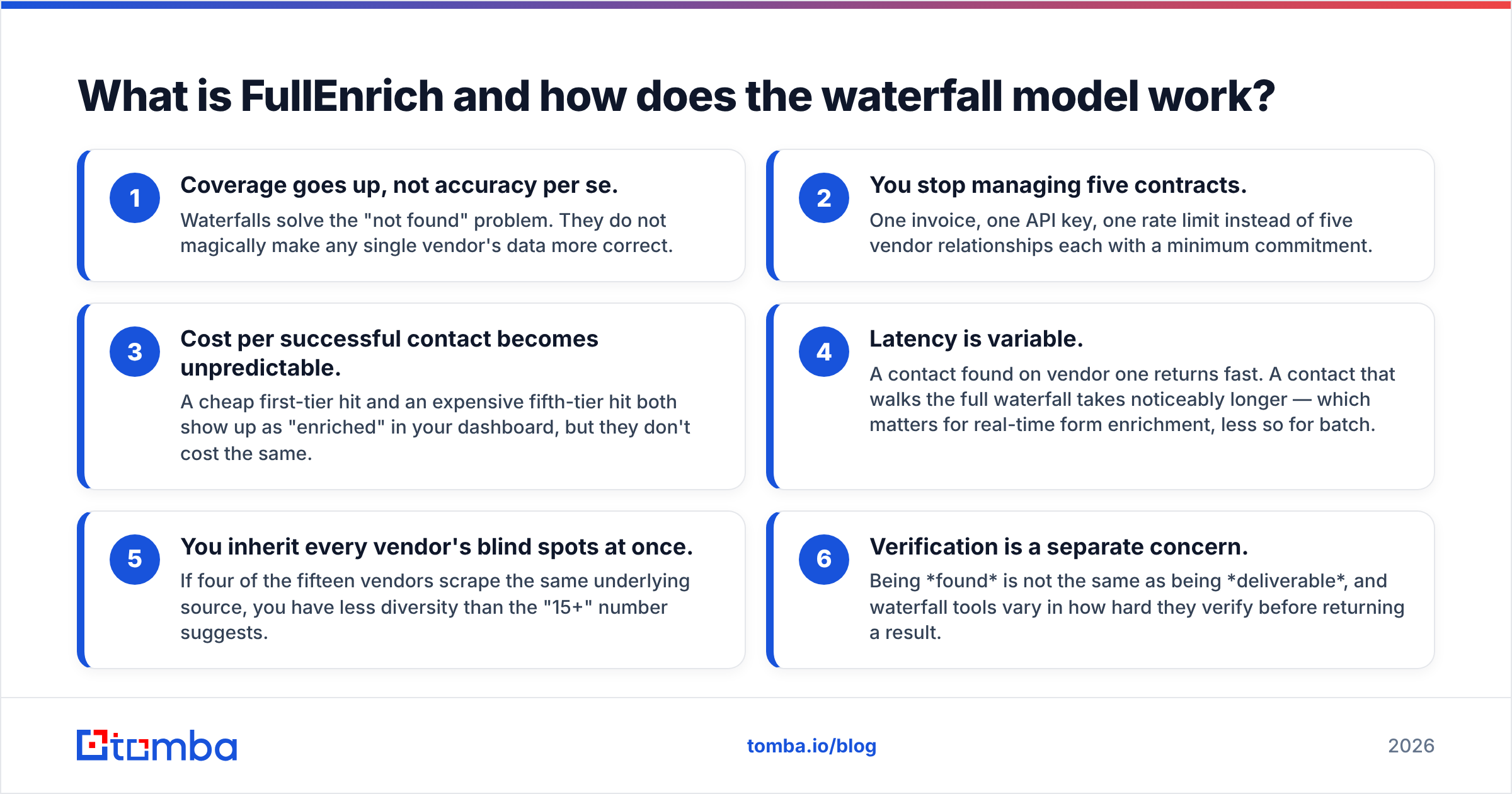
- Coverage goes up, not accuracy per se. Waterfalls solve the "not found" problem. They do not magically make any single vendor's data more correct.
- You stop managing five contracts. One invoice, one API key, one rate limit instead of five vendor relationships each with a minimum commitment.
- Cost per successful contact becomes unpredictable. A cheap first-tier hit and an expensive fifth-tier hit both show up as "enriched" in your dashboard, but they don't cost the same.
- Latency is variable. A contact found on vendor one returns fast. A contact that walks the full waterfall takes noticeably longer — which matters for real-time form enrichment, less so for batch.
- You inherit every vendor's blind spots at once. If four of the fifteen vendors scrape the same underlying source, you have less diversity than the "15+" number suggests.
- Verification is a separate concern. Being found is not the same as being deliverable, and waterfall tools vary in how hard they verify before returning a result.
What are the real pros of FullEnrich?#
Mobile number coverage is the headline win. Email finding is a relatively solved problem — pattern detection plus verification gets you most of the way. Mobile numbers are not. They come from opt-in databases, app permissions, and resold datasets with wildly uneven geography. Aggregating vendors is genuinely the right answer here, and FullEnrich's phone hit rates on US and Western European tech contacts hold up better than any single provider I've tested against the same list.
Pay-per-hit billing is honest. Plenty of enrichment tools charge per row submitted. If your list is messy or your ICP is niche, you burn 60% of your credits on nothing. FullEnrich charging only on success removes that failure mode and makes budget forecasting less punishing on low-match lists.
LinkedIn URL as an input works well. Most sales teams' raw material is a Sales Navigator export, not a clean name-plus-domain CSV. Accepting a LinkedIn profile URL as the primary key removes an entire cleanup step. If you're building lists from LinkedIn, this alone can justify a trial — though a dedicated LinkedIn finder covers the email half of that job at a lower unit cost.
The API and integrations are competent. Native connections to HubSpot, Clay, Zapier, and Make mean it slots into an existing stack rather than demanding a new one. Bulk enrichment runs asynchronously with webhook callbacks, which is the correct design for a variable-latency service.
No annual lock-in on entry plans. Monthly billing with credit rollover on some tiers is friendlier than the annual-contract-or-nothing posture common in this category.
What are the cons you should know before buying?#
You're paying an aggregator margin. This is the structural trade-off. FullEnrich buys from vendors and resells with markup — that's the business. For contacts that a first-tier provider would have found anyway, you paid extra for a lookup you could have done direct. On email-only workloads at volume, this shows up clearly in your cost per verified contact.
Credit costs are not uniform. An email and a mobile number are not one credit each. Phone enrichment consumes more, and multi-field enrichment consumes more still. Teams routinely model their spend on the email rate, then find their monthly allowance gone at 40% of the list. Read the credit table before you commit, and run a 500-row pilot to derive your actual blended cost per contact.
Verification depth varies by source. When a result comes back from a lower-tier vendor, you're trusting that vendor's freshness. Some waterfall results are stale role accounts or addresses that were valid eighteen months ago. Always run returned emails through an independent email verifier before you load them into a sequence — treat enrichment output as candidate data, not confirmed data.
Catch-all domains stay unresolved. No aggregator fixes this. If the target company runs a catch-all mail server, every vendor in the stack returns "accept all" and you're left guessing. You need a dedicated catch-all verifier to make those addresses actionable, or you accept a higher bounce risk.
Compliance surface is wider. Fifteen sources means fifteen data-provenance stories. For EU-heavy prospecting under GDPR legitimate-interest processing, "our vendor's vendor sourced it" is a weaker position than a provider that documents where its data comes from directly. Ask for the DPA and the source list before your legal team asks you.
Support and roadmap velocity are startup-scale. That cuts both ways — you'll get a founder in your Slack, but you won't get a 24/7 enterprise SLA.
How does FullEnrich compare to other enrichment options?#
The honest framing isn't "which tool is best" — it's "which layer of the stack are you buying." Waterfall aggregators, direct email finders, and full sales-intelligence platforms solve different problems and are priced accordingly.
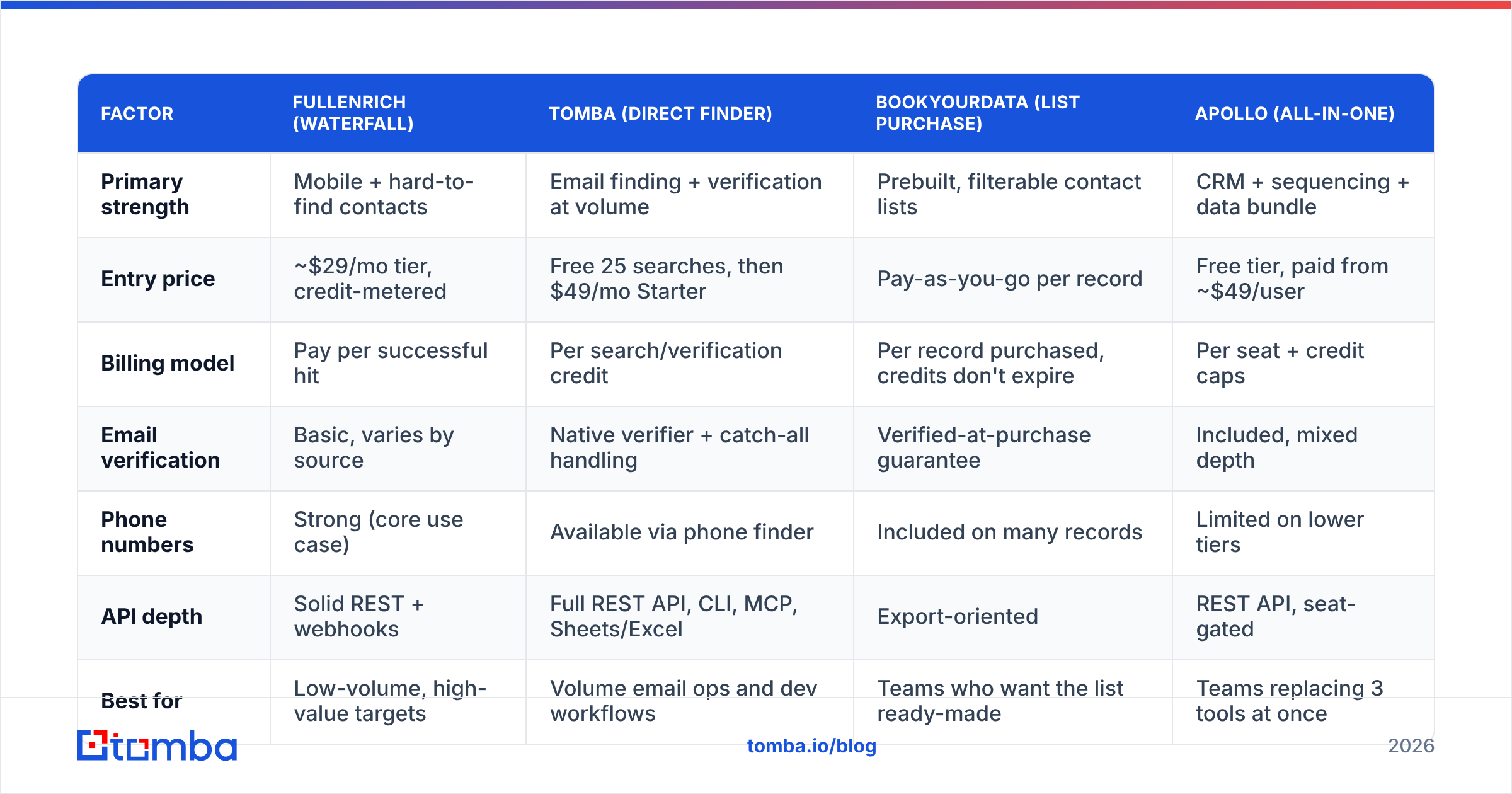
| Factor | FullEnrich (waterfall) | Tomba (direct finder) | BookYourData (list purchase) | Apollo (all-in-one) |
|---|---|---|---|---|
| Primary strength | Mobile + hard-to-find contacts | Email finding + verification at volume | Prebuilt, filterable contact lists | CRM + sequencing + data bundle |
| Entry price | ~$29/mo tier, credit-metered | Free 25 searches, then $49/mo Starter | Pay-as-you-go per record | Free tier, paid from ~$49/user |
| Billing model | Pay per successful hit | Per search/verification credit | Per record purchased, credits don't expire | Per seat + credit caps |
| Email verification | Basic, varies by source | Native verifier + catch-all handling | Verified-at-purchase guarantee | Included, mixed depth |
| Phone numbers | Strong (core use case) | Available via phone finder | Included on many records | Limited on lower tiers |
| API depth | Solid REST + webhooks | Full REST API, CLI, MCP, Sheets/Excel | Export-oriented | REST API, seat-gated |
| Best for | Low-volume, high-value targets | Volume email ops and dev workflows | Teams who want the list ready-made | Teams replacing 3 tools at once |
A few notes on that table. BookYourData is a genuinely different purchase: you're buying a filtered list with an accuracy guarantee rather than enriching rows you already have, and its non-expiring credits suit teams with lumpy prospecting cycles. Apollo bundles data with the sequencer, which is either excellent value or a lock-in problem depending on whether you already own an outbound platform — if you're evaluating that trade, the Apollo alternative breakdown covers the unbundled path.
And Tomba sits at the direct-provider layer: fewer moving parts, lower unit cost on email, with domain search and bulk operations for when your input is "everyone at these 400 companies" rather than "this specific person."
When should you actually choose FullEnrich?#
Choose it when the following describe you:
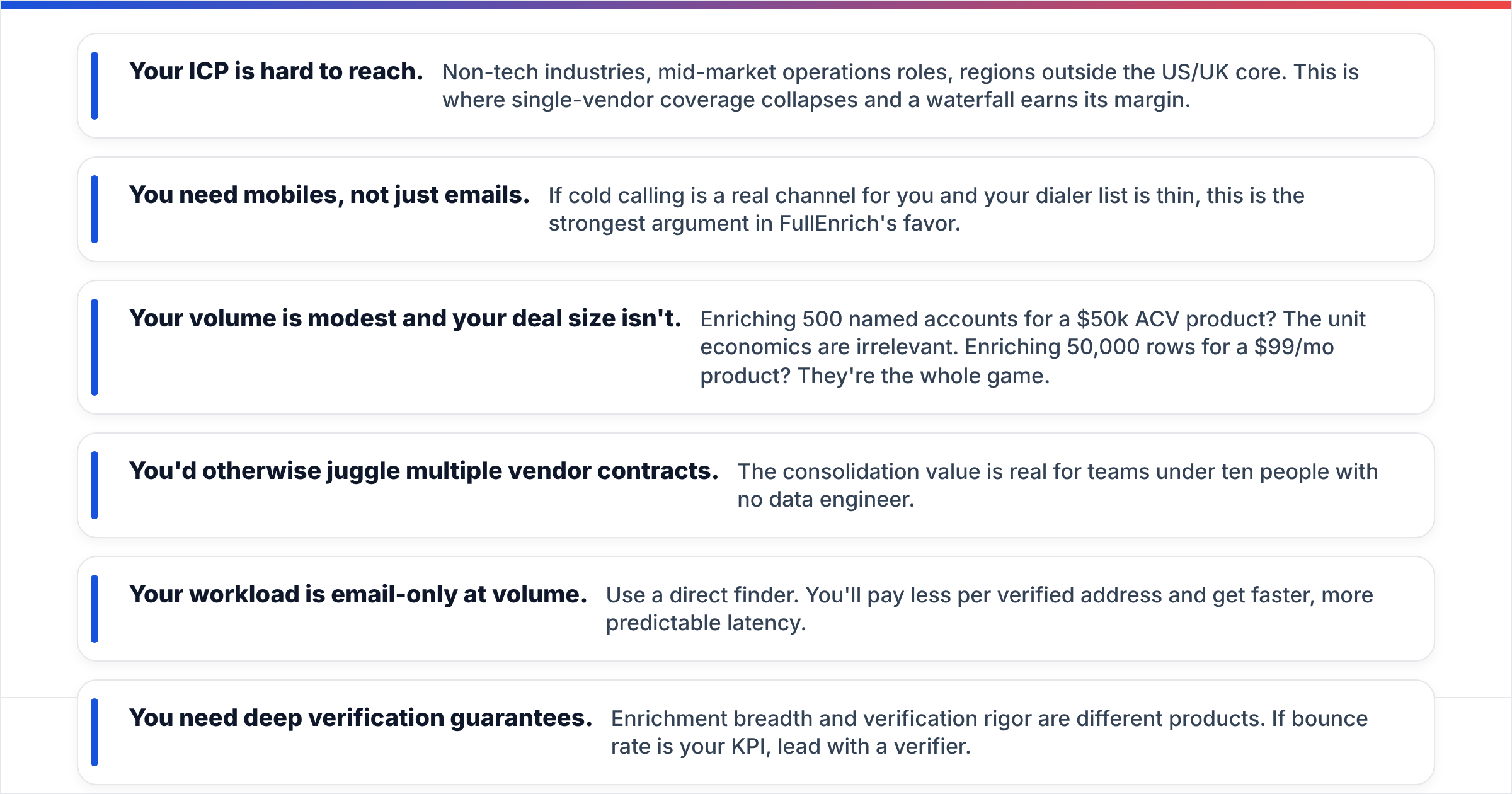
- Your ICP is hard to reach. Non-tech industries, mid-market operations roles, regions outside the US/UK core. This is where single-vendor coverage collapses and a waterfall earns its margin.
- You need mobiles, not just emails. If cold calling is a real channel for you and your dialer list is thin, this is the strongest argument in FullEnrich's favor.
- Your volume is modest and your deal size isn't. Enriching 500 named accounts for a $50k ACV product? The unit economics are irrelevant. Enriching 50,000 rows for a $99/mo product? They're the whole game.
- You'd otherwise juggle multiple vendor contracts. The consolidation value is real for teams under ten people with no data engineer.
Skip it when:
- Your workload is email-only at volume. Use a direct finder. You'll pay less per verified address and get faster, more predictable latency.
- You need deep verification guarantees. Enrichment breadth and verification rigor are different products. If bounce rate is your KPI, lead with a verifier.
- You're building a product feature on top. Aggregator pricing at scale gets expensive fast, and you inherit an availability dependency on fifteen upstream services.
For a sanity check on channel health before you spend anything on data: bad email deliverability will destroy your results regardless of how good the contact data is. Fix the sending infrastructure first. G2's enrichment category is a reasonable place to cross-check current user sentiment, and HubSpot's data hygiene guidance is worth reading before you pipe any enrichment output into a CRM.
What does a smart enrichment stack look like in 2026?#
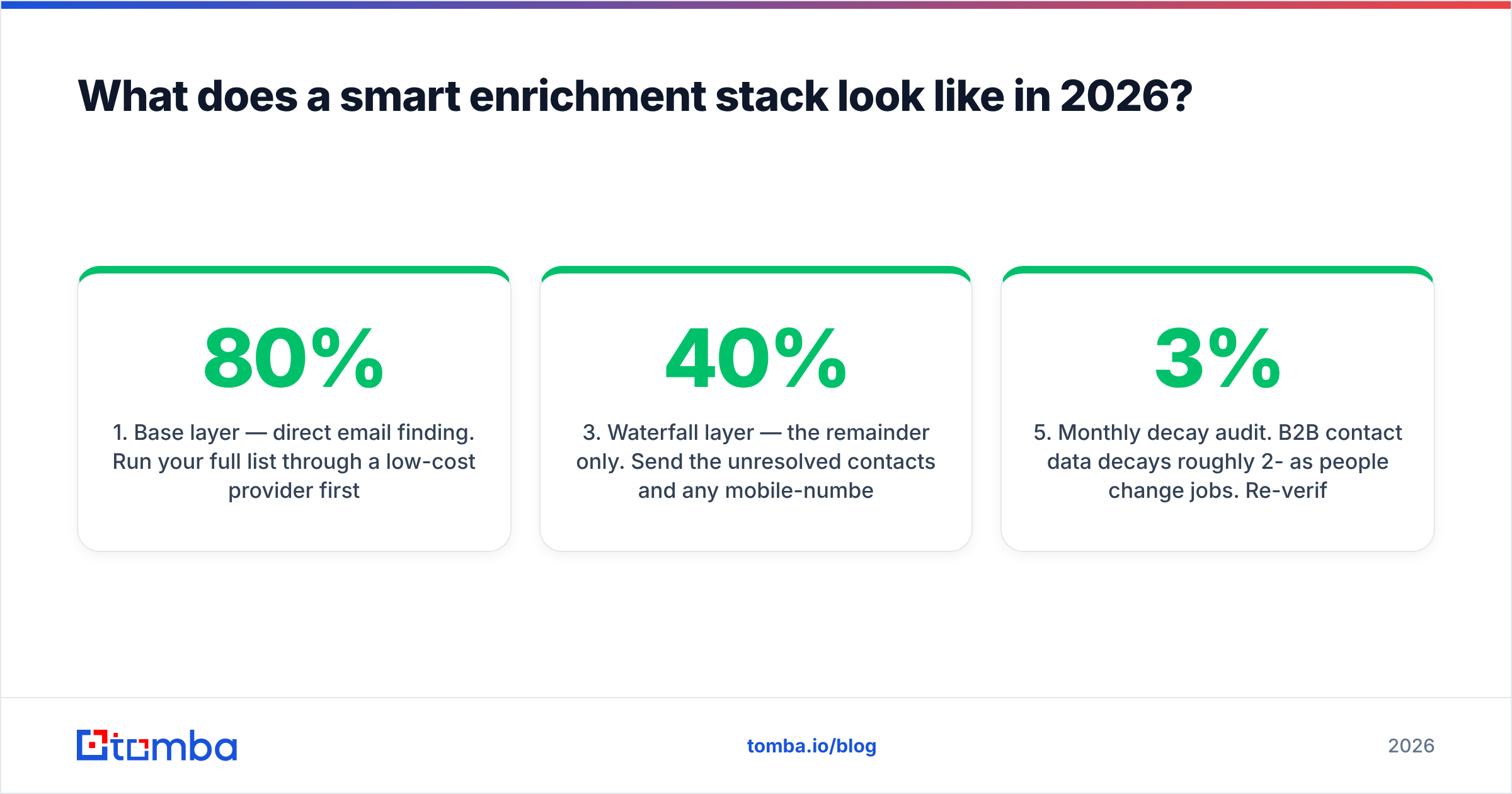
The pattern that works for most teams isn't one tool. It's a cheap, high-coverage base layer plus a targeted expensive layer:
- Base layer — direct email finding. Run your full list through a low-cost provider first. Whatever it finds, you never pay aggregator rates for. This typically resolves 60-80% of a standard B2B tech list.
- Verification pass. Everything found gets verified independently. Catch-alls get routed to a dedicated catch-all check rather than being dropped or blindly mailed.
- Waterfall layer — the remainder only. Send the unresolved contacts and any mobile-number requirements to an aggregator like FullEnrich. You're now paying its premium on 20-40% of the list instead of 100%.
- CRM write-back with dedupe. Enrichment that doesn't reach the CRM cleanly creates duplicate records, which is worse than no enrichment.
- Monthly decay audit. B2B contact data decays roughly 2-3% per month as people change jobs. Re-verify anything older than a quarter before it goes into a sequence.
That sequencing routinely cuts blended enrichment cost by half versus routing everything through a waterfall, because the expensive path only handles the contacts that actually need it. It costs you one extra step in your workflow and gives you back a line item on your budget.
Verdict: is FullEnrich worth it?#
FullEnrich is a well-built tool solving a real problem, and the pay-per-hit model is more honest than most of its category. If mobile numbers or hard-to-find contacts are your bottleneck, it deserves a trial — run 500 rows, measure your blended cost per usable contact (not per hit), and compare that to what you're paying now.
But if you're primarily finding work emails at known companies, the waterfall is solving a problem you don't have, and you're paying a margin for it. Most teams over-buy at this layer.
Start with the base layer. Tomba's Email Finder resolves the bulk of a standard B2B list at direct-provider cost, with verification and catch-all handling built in rather than bolted on — free for your first 25 searches, $49/mo on Starter, with a full API, CLI, and Sheets add-on when you're ready to automate. See Tomba pricing for the volume tiers. Then send only what's left to a waterfall, and let it earn its premium on the contacts that genuinely need it.
Related guides#
Ready to find emails that actually work?
Join 150,000+ professionals who stopped guessing and started sending. Free credits on signup — no credit card required.
Get the Tomba newsletter
Practical outbound tactics and product updates — once every two weeks.
About the author