G Lock EasyMail7 vs FindThatLead: Which One Do You Need?
One is a desktop bulk email sender you license once. The other is a cloud prospecting suite with an email finder attached. Here's how G-Lock EasyMail7 and FindThatLead actually differ — and which one belongs in your outbound stack.
G Lock EasyMail7 vs FindThatLead is an odd match-up. One tool sends email. The other finds it. This guide covers what each one does, what it costs, and which one your team needs.
TL;DR
- They are not the same kind of tool. G-Lock EasyMail7 is a Windows app that sends bulk email. FindThatLead is a cloud tool that finds leads and sends a little.
- Pick EasyMail7 if you already own a clean, opt-in list. You pay once, and you send through your own SMTP or Amazon SES.
- Pick FindThatLead if your problem is finding people. It scrapes domains, works with LinkedIn, and runs small campaigns.
- Trust neither one for data quality. Both work best when a good finder and a good checker feed them. That is where a tool like Tomba's email finder fits.
- The honest verdict: most 2026 outbound teams run three parts. A finder, a checker, and a sender. One box rarely does all three well.
What is the real difference in G Lock EasyMail7 vs FindThatLead?#
Start with the category. That is the whole answer in one line. EasyMail7 sends email. FindThatLead finds it.
G-Lock EasyMail7 is desktop software from G-Lock Software. You install it on a Windows PC or a Windows VPS. Then you point it at a mail service. That can be your own SMTP, Amazon SES, SendGrid, Mailgun, or direct send. The app handles lists, merge tags, HTML design, and slow bulk sending. Your subscriber data stays on your machine. It is old-school newsletter software with a modern SES engine bolted on.
FindThatLead is a SaaS tool from Spain. Its core job is email discovery. Give it a name plus a company domain, a whole domain, or a LinkedIn URL. It hands back work email addresses. Around that core sit a Chrome add-on, a Prospector that builds lists by role and place, a checker, LinkedIn tools, and a basic drip sender.
So G Lock EasyMail7 vs FindThatLead is really two questions in one trench coat:
- Do I need contacts I do not have yet?
- Do I need to email the contacts I already have, at volume, on my own setup?
If only the first one is true, skip EasyMail7. If only the second one is true, FindThatLead is a pricey newsletter tool with a weak sender.
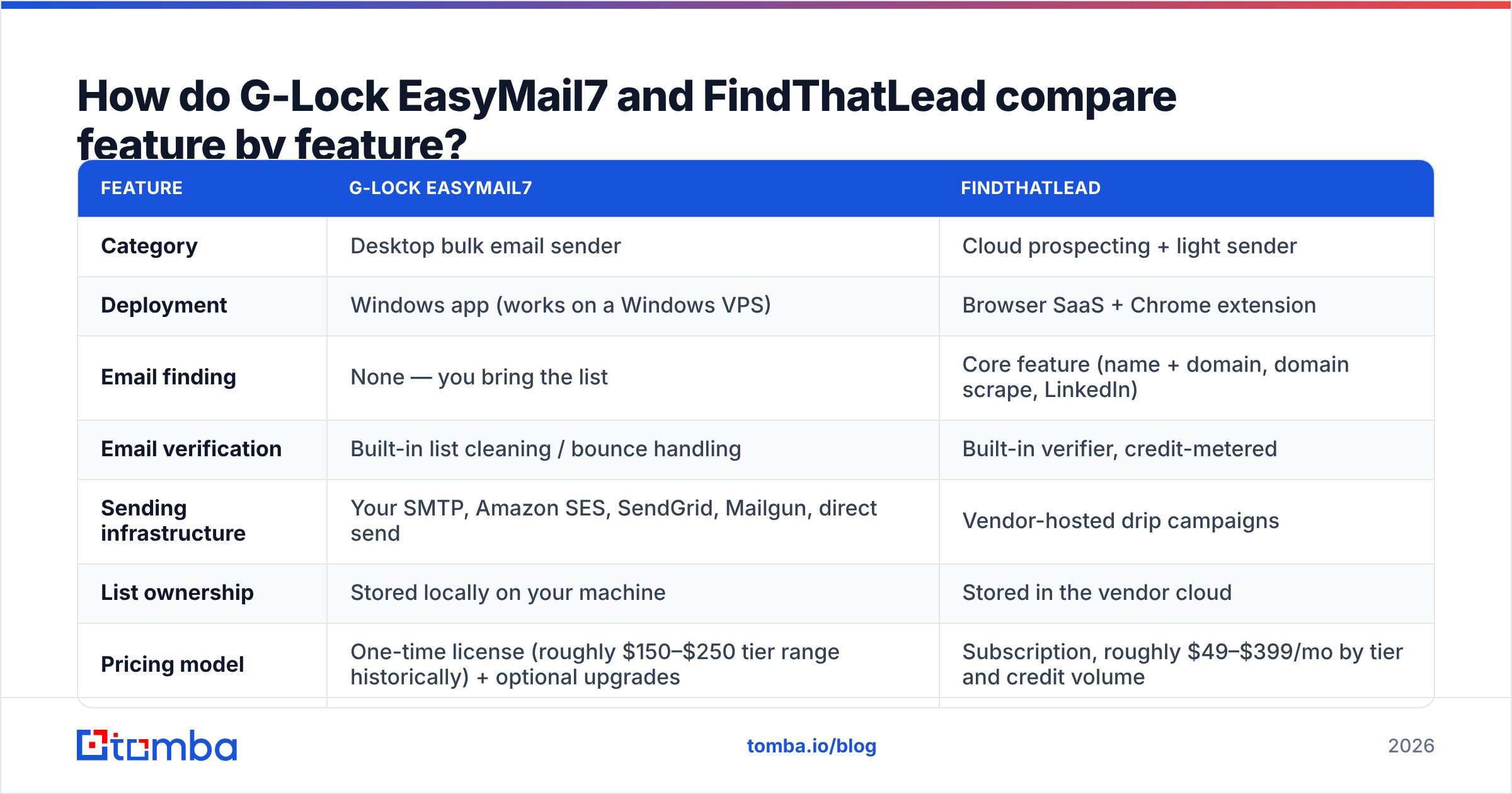
How do G-Lock EasyMail7 and FindThatLead compare feature by feature?#
Here is the side-by-side that matters. Check every price on the vendor page before you buy. Both firms have changed their plans more than once.
| Feature | G-Lock EasyMail7 | FindThatLead |
|---|---|---|
| Category | Desktop bulk email sender | Cloud prospecting + light sender |
| Deployment | Windows app (works on a Windows VPS) | Browser SaaS + Chrome extension |
| Email finding | None — you bring the list | Core feature (name + domain, domain scrape, LinkedIn) |
| Email verification | Built-in list cleaning / bounce handling | Built-in verifier, credit-metered |
| Sending infrastructure | Your SMTP, Amazon SES, SendGrid, Mailgun, direct send | Vendor-hosted drip campaigns |
| List ownership | Stored locally on your machine | Stored in the vendor cloud |
| Pricing model | One-time license (roughly $150–$250 tier range historically) + optional upgrades | Subscription, roughly $49–$399/mo by tier and credit volume |
| Free option | Free/limited edition with capped list size | Limited free credits on signup |
| LinkedIn workflow | No | Yes (extension + Scrab.in ecosystem) |
| API | Limited | Yes, for finding and verifying |
| Best for | Newsletters, opt-in lists, high-volume owned audiences | Cold outbound list building, SMB agencies |
| Weak spot | No data sourcing at all | Sending deliverability + data depth outside core markets |
The G Lock EasyMail7 vs FindThatLead table has a clear pattern. EasyMail7 assumes you already solved the hard part. FindThatLead assumes sending is the easy part. Both guesses cost teams money.
Which one is better for cold outbound in 2026?#
For cold email, G Lock EasyMail7 vs FindThatLead has a clear winner. FindThatLead takes this round. But the catch is big.
Cold outbound needs three things, in order. A tight list. Checked addresses. A sender that guards your domain. FindThatLead covers the first two well. It covers the third one badly. Its campaign tool is fine for 50 to 200 emails a week from one mailbox. It is not built for inbox rotation, warm-up ramps, spintax at scale, or smart reply tracking.
EasyMail7 does that third job well. You route mail through your own Amazon SES account. You control send rate and IP behavior in fine detail. But it does not touch the first two jobs at all. Feed it a scraped list you never checked, and you will burn a domain in a week. No amount of throttling saves you.
That is why email deliverability is where these two tools quietly meet. Google and Yahoo now demand signed domains, one-click unsubscribe, and spam rates under 0.3%. Those rules apply to a desktop app and a web app alike. Neither vendor can rescue a bad list. Both will punish one.
What should you check before you choose?#
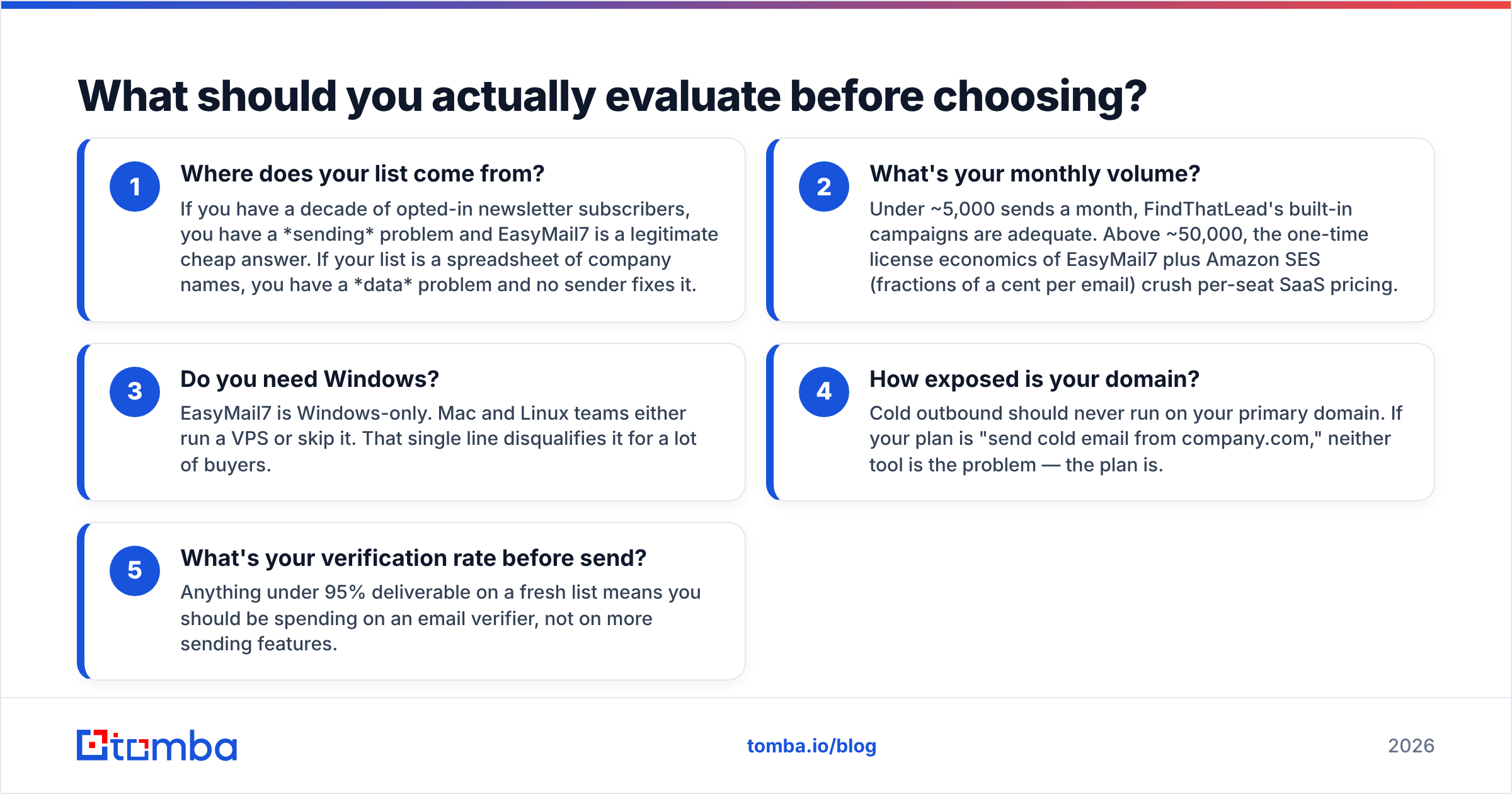
Run these five checks in order. They settle most of the debate before you open a pricing page.
Where does your list come from? Say you have ten years of opt-in newsletter readers. Then you have a sending problem, and EasyMail7 is a cheap, fair answer. Say your list is a sheet of company names. Then you have a data problem, and no sender fixes that.
What is your monthly volume? Under about 5,000 sends a month, the built-in FindThatLead campaigns are enough. Above about 50,000, the math flips. A one-time EasyMail7 license plus Amazon SES costs a fraction of a cent per email. Per-seat SaaS pricing cannot match that.
Do you need Windows? EasyMail7 runs on Windows only. Mac and Linux teams rent a VPS or skip the tool. That one line rules it out for many buyers.
How exposed is your domain? Never run cold email on your main domain. If your plan is to send cold email from company.com, the tool is not the problem. The plan is.
What is your check rate before send? A fresh list under 95% deliverable is a warning sign. Spend on an email verifier first, not on more sending features.
Most teams learn at step 1 that they were shopping in the wrong aisle.
Is FindThatLead's email data accurate enough?#
Honest answer: fine in big markets, thin outside them.
FindThatLead does well on US and European firms with simple email patterns. Think first.last@ and finitial+last@. Those two shapes cover most B2B mailboxes. It drops off where most single-source finders drop off. Odd patterns. Small firms in Asia and Latin America. Catch-all domains. People who changed jobs last quarter.
Two failure modes to watch for:
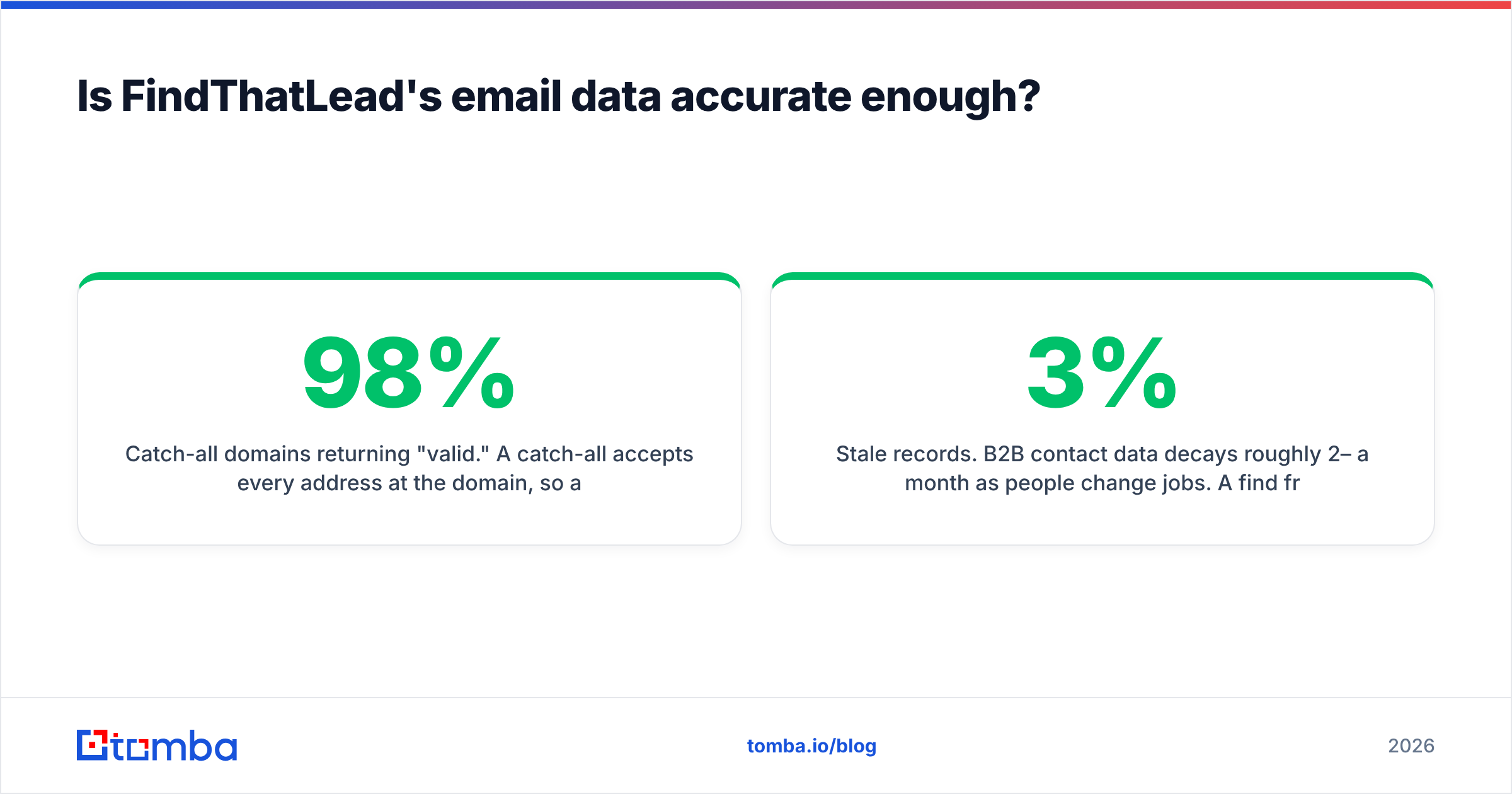
- Catch-all domains that answer "valid." A catch-all accepts every address at the domain. So a simple SMTP check reports success for an address no human will ever read. You need a catch-all verifier that scores the odds, not one that says yes or no. Skip it, and a list that looks 98% clean can bounce at 20%.
- Stale records. B2B contact data rots by 2% to 3% a month as people change jobs. A find from six months ago is not the same asset as a find from today. Neither tool re-checks your list for you.
This is where a second data source earns its keep. Run the same target list through Tomba's domain search for pattern coverage. Then bulk verify before you send. You usually recover contacts the first tool missed. You also strip the ones it guessed wrong. Two sources beat one, every time.

How much do G-Lock EasyMail7 and FindThatLead cost?#
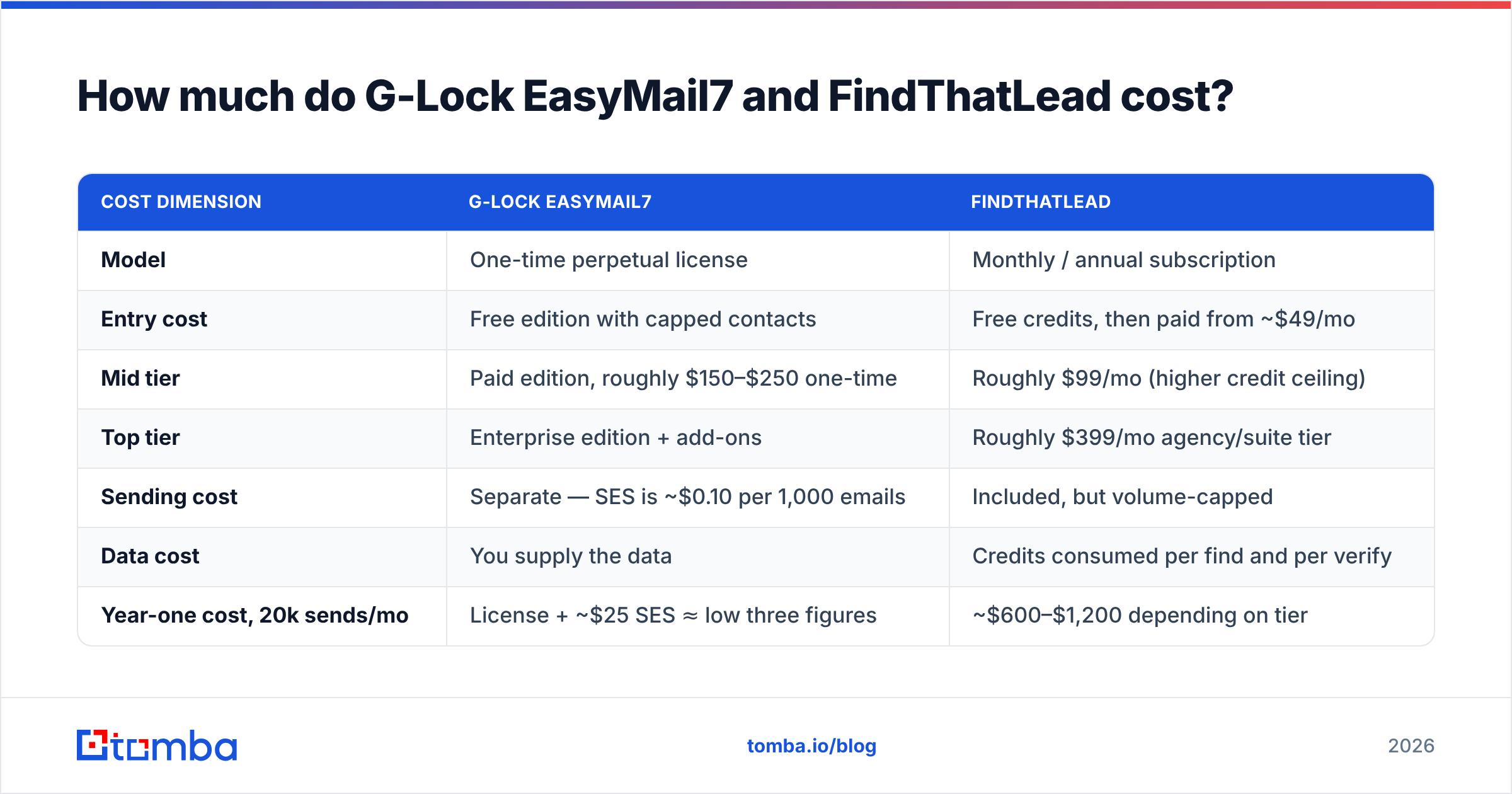
Price is where G Lock EasyMail7 vs FindThatLead gets messy. The two models differ, so line them up first.
| Cost dimension | G-Lock EasyMail7 | FindThatLead |
|---|---|---|
| Model | One-time perpetual license | Monthly / annual subscription |
| Entry cost | Free edition with capped contacts | Free credits, then paid from ~$49/mo |
| Mid tier | Paid edition, roughly $150–$250 one-time | Roughly $99/mo (higher credit ceiling) |
| Top tier | Enterprise edition + add-ons | Roughly $399/mo agency/suite tier |
| Sending cost | Separate — SES is ~$0.10 per 1,000 emails | Included, but volume-capped |
| Data cost | You supply the data | Credits consumed per find and per verify |
| Year-one cost, 20k sends/mo | License + ~$25 SES ≈ low three figures | ~$600–$1,200 depending on tier |
EasyMail7 wins on cost per send at volume, by a wide margin. FindThatLead wins on cost per new contact. EasyMail7 finds nobody.
Here is where a data layer lands for comparison. Tomba pricing starts free at 25 searches a month. Starter is $49/mo, Growth is $99/mo, and Pro is $249/mo. The price tracks find and verify volume, not seats or sends. Compare like with like. Data tools against data tools, senders against senders.
What does a better 2026 outbound stack look like?#
Split the job into three parts. Buy the best tool for each part. That is almost always cheaper, and always safer, than one all-in-one.
- Data layer — a finder plus a checker that covers your target region. This layer sets your bounce rate and spam rate. It also decides whether the other two layers work at all.
- Sequencing layer — inbox rotation, warm-up, reply tracking, and per-mailbox limits. Dedicated sequencers do this. Neither tool here does all of it.
- Delivery layer — signed domains with SPF, DKIM, and DMARC set up right. Test yours with a free SPF checker before you send. Then watch your sender reputation after you do.
Read G Lock EasyMail7 vs FindThatLead through that model. EasyMail7 is a cheap, solid delivery layer for lists you own. FindThatLead is a mid-tier data layer with a bonus sequencer. Neither one is a full stack. Buying either as though it were is the mistake that shows up as a 22% bounce rate three weeks later.
Review sites help as a sanity check. G2 files these two products under different software types. That alone should tell you something.
G Lock EasyMail7 vs FindThatLead: which should you choose?#
- Choose G-Lock EasyMail7 if you run newsletters or an agency with an opt-in list. You are on Windows, you want your data stored locally, and a one-time license beats a monthly bill.
- Choose FindThatLead if you are a small business or agency doing LinkedIn prospecting. You need contacts more than send volume, and you accept cloud credit limits.
- Choose neither as your data source if accuracy at scale is the real constraint. Bolt a proper finder and checker onto whichever sender you like. Then re-check every list within 30 days of sending.
The real question in G Lock EasyMail7 vs FindThatLead is not which tool wins. It is which layer of your outbound is broken. Answer that first, and the tool choice takes about ten minutes.
Fix the layer that actually moves reply rates. Maybe your bottleneck is finding real, current, deliverable addresses, not sending to them. Then start with the Tomba Email Finder. Search by domain, name, or company. Verify before you send. Export straight into whichever sender you picked above. The free tier gives you 25 searches a month, so you can test the find rate on your own accounts first.
Related guides#
Ready to find emails that actually work?
Join 150,000+ professionals who stopped guessing and started sending. Free credits on signup — no credit card required.
Get the Tomba newsletter
Practical outbound tactics and product updates — once every two weeks.
About the author