G Lock EasyMail7 vs Salesbot: Which Outbound Tool Wins in 2026?
One is a desktop bulk mailer you own outright. The other is an always-on conversational bot inside your CRM. Here is how G-Lock EasyMail7 and Salesbot actually compare on cost, data, deliverability, and the job each one is built to do.
G Lock EasyMail7 vs Salesbot is an odd match-up. One is a desktop bulk mailer you own. The other is a chat bot inside your CRM. Here is how each one earns a slot in your stack.
TL;DR
- G Lock EasyMail7 is a Windows email sender. You buy the license once and send through your own SMTP.
- Salesbot is a chat bot that lives in a CRM. It answers inbound messages the moment they land.
- The two are not real rivals. One pushes mail out. The other catches chats coming in.
- Most people who search G Lock EasyMail7 vs Salesbot want one thing: a fix for a slow pipeline.
- The price models are opposite. One is a one-time license. The other is a monthly fee per seat.
- Neither tool hands you contact data. Both assume your list is clean. That is where cheap stacks break.
- Pick EasyMail7 if you own a good list. Pick Salesbot if inbound chat is drowning your reps. Fix your data either way.
G Lock EasyMail7 vs Salesbot: what are you comparing?#
Start with the honest answer. These two tools sit in different classes. The match-up only makes sense once you name the job.
Think of a restaurant. EasyMail7 is the kitchen line. It pushes out plates at volume. Salesbot is the host at the door. It greets each guest, asks a few questions, and points them to a table. You would not ask which one is better. You would ask which one your restaurant lacks.
So why do both names show up in one search? They fill the same slot in a small team's head. Both promise cheap sales automation with no big contract. EasyMail7 says: send thousands of emails without paying an ESP every month. Salesbot says: handle chats without hiring another rep. Both answer a headcount problem on a budget.
So the rest of this post drops the "which tool wins" frame. The better question is simple. Given your bottleneck, which one earns the slot?
What is G-Lock EasyMail7?#
G-Lock EasyMail7 is desktop email software from G-Lock Software. It runs on Windows. It installs on your PC and keeps your lists in a local database. It sends through SMTP accounts you supply. That can be Google Workspace, Microsoft 365, Amazon SES, SendGrid, or a private server.
The core trait is ownership. You do not rent seats in a cloud tool. You buy a license, install the app, and your contacts stay on your machine.
What you get in practice:
- Local lists — import CSV, XLSX, or a database. Segment, dedupe, and store contacts on disk, not in a vendor cloud.
- SMTP rotation — attach several sending accounts and rotate them. It is the usual way around daily send caps.
- Merge tags — first name, company, and custom fields from your own columns. Conditional blocks work too.
- HTML editor and templates — write in the app. Each send can carry a plain-text version.
- Bounce and open tracking — handled through your own mailboxes and tracking pixels, not a hosted dashboard.
- One-time license — you pay per version, not per contact and not per month.
The age shows. It is Windows only. The screens are plain. And every part of email health is on you: auth records, reputation, warmup, and send speed. The app will send a bad list at full speed. It has no view on whether that is wise.

What is Salesbot?#
Salesbot is the chat layer inside modern sales CRMs. The best known version is the Salesbot feature in Kommo, the CRM once called amoCRM. Other CRMs ship the same idea under other names.
It does not blast outbound. It sits on your inbound channels: website chat, WhatsApp, Instagram, Messenger, Telegram, and email. When someone writes in, the bot replies at once. It asks a few questions, tags the lead, moves the deal, and books a meeting. It hands off to a human when the script runs out.
The value is speed. Studies on lead response keep showing the same thing. Reply in the first few minutes and you close far more deals. Reply hours later and you lose most of them. A bot that answers at 2am is not smarter than your rep. It is just awake.
What you set up:
- Triggers — a new message, a new lead, a stage change, a form, or a no-reply timer.
- Flow — a visual builder of questions and branches. Many now add an AI fallback for free-form replies.
- CRM actions — set a field, assign an owner, change a stage, create a task, send an alert.
- Handoff rules — when to stop the bot and ping a human. Most teams get this one wrong on the first try.
The trade-off is traffic. The bot is only as useful as the chats it gets. If nobody writes in, it is a costly screensaver. It is also a CRM feature, not a standalone app. You buy the whole CRM with it.
G Lock EasyMail7 vs Salesbot: head-to-head#
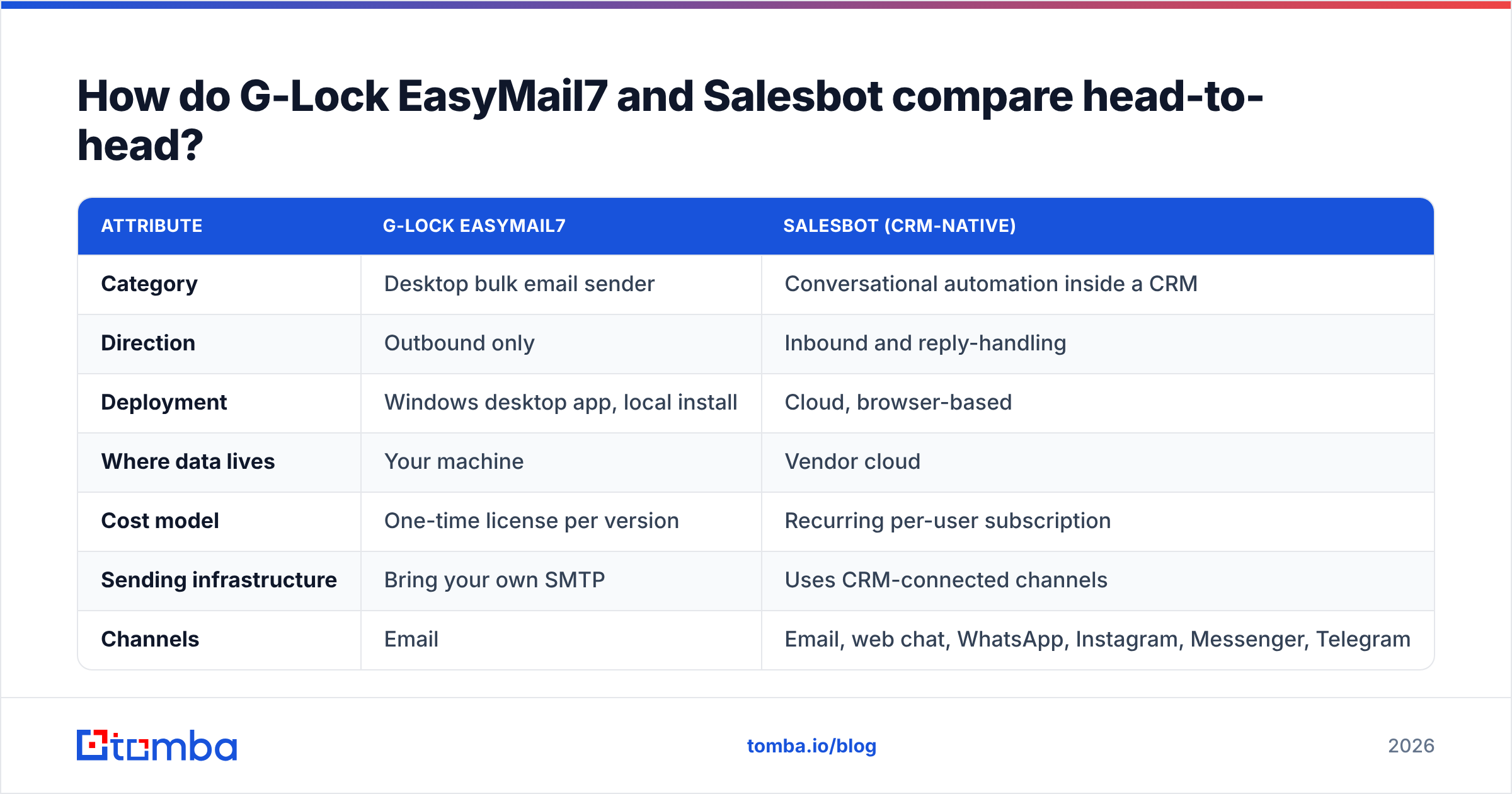
| Attribute | G-Lock EasyMail7 | Salesbot (CRM-native) |
|---|---|---|
| Category | Desktop bulk email sender | Conversational automation inside a CRM |
| Direction | Outbound only | Inbound and reply-handling |
| Deployment | Windows desktop app, local install | Cloud, browser-based |
| Where data lives | Your machine | Vendor cloud |
| Cost model | One-time license per version | Recurring per-user subscription |
| Sending infrastructure | Bring your own SMTP | Uses CRM-connected channels |
| Channels | Email, web chat, WhatsApp, Instagram, Messenger, Telegram | |
| Personalization | Merge tags from imported columns | Dynamic, based on live conversation and CRM fields |
| Works while you sleep | Scheduled sends only | Yes, responds in real time |
| Team collaboration | Weak — single-machine by design | Strong — shared pipeline, ownership, notes |
| Learning curve | Low for basic sends, high for deliverability | Medium — flow building takes iteration |
| Supplies contact data | No | No |
| Best for | Owner-operators with an existing clean list | Teams with inbound volume and slow response times |
Two rows matter most.
Team work. EasyMail7 is a one-person tool. Lists, history, and results live on one Windows box. If that person is away or the laptop dies, the record dies too. Salesbot rides on the CRM instead. Everything is shared, logged, and owned by name.
Contact data. Both say no. That row decides whether either tool makes you any money.
G Lock EasyMail7 vs Salesbot: which costs less over three years?#
The sticker prices point in opposite directions. The honest answer depends on team size.
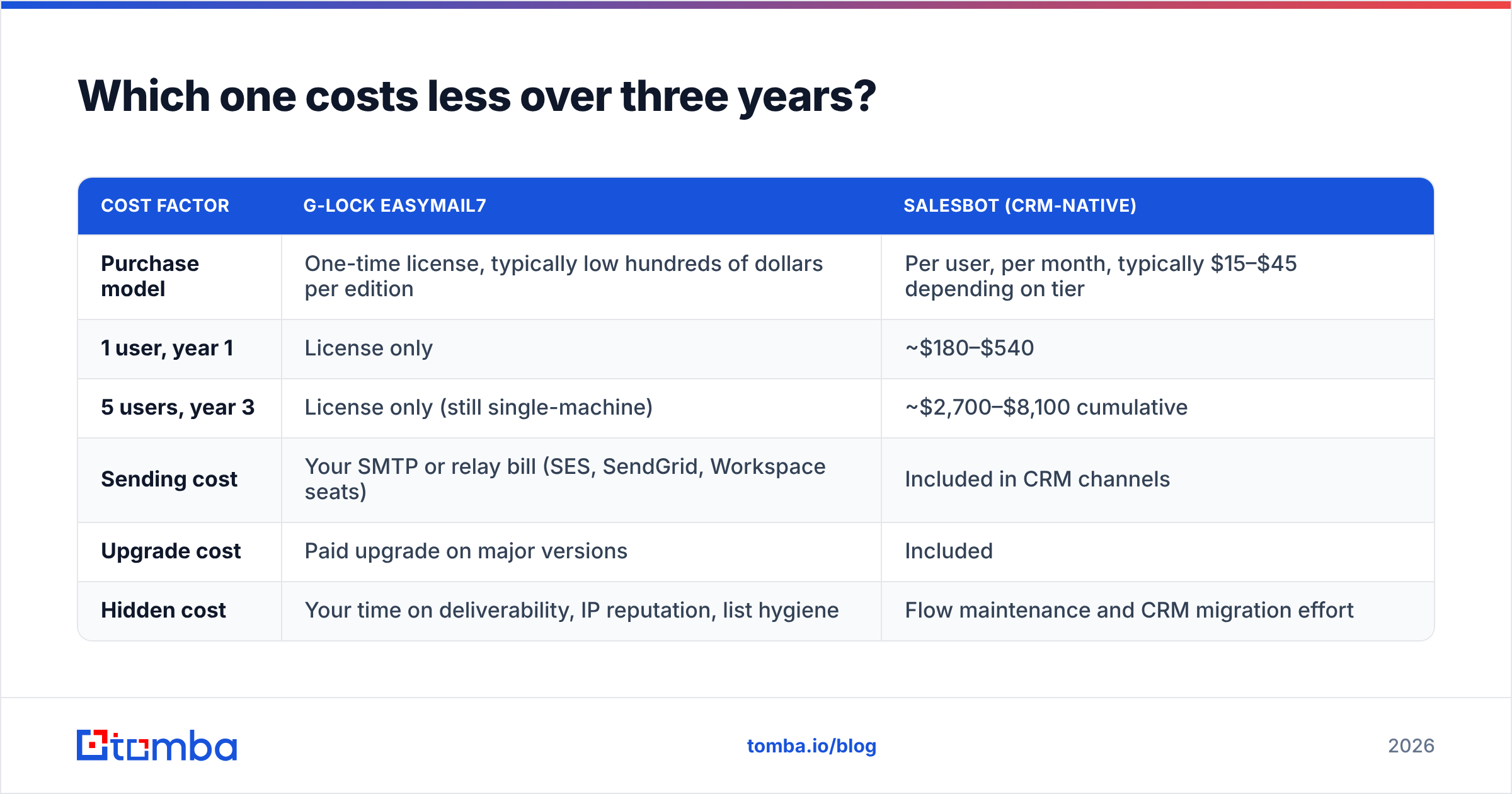
| Cost factor | G-Lock EasyMail7 | Salesbot (CRM-native) |
|---|---|---|
| Purchase model | One-time license, typically low hundreds of dollars per edition | Per user, per month, typically $15–$45 depending on tier |
| 1 user, year 1 | License only | ~$180–$540 |
| 5 users, year 3 | License only (still single-machine) | ~$2,700–$8,100 cumulative |
| Sending cost | Your SMTP or relay bill (SES, SendGrid, Workspace seats) | Included in CRM channels |
| Upgrade cost | Paid upgrade on major versions | Included |
| Hidden cost | Your time on deliverability, IP reputation, list hygiene | Flow maintenance and CRM migration effort |
Check each vendor's own pricing page before you budget. Both have shuffled tiers over the years, and edition names shift.
On raw dollars, EasyMail7 wins for a solo user. It still wins at year three. But that math hides labor. You will spend hours on SPF, DKIM, and DMARC. You will rotate SMTP accounts, watch bounce rates, and warm up a burned domain. None of that is free. Bill your own time at a real rate and the cheap desktop sender is often the pricier option.
Salesbot costs more as the team grows. That looks worse on a spreadsheet, but it is easy to predict. And the bot ships with a CRM you may need anyway. So the extra cost of the bot itself is often close to zero.
Which one is better for deliverability?#
Neither tool protects you. That is the hard part.
EasyMail7 hands you full control of sending. Full control means full risk. No vendor watches your complaint rate. No one throttles you before you burn the domain. Send 5,000 emails from a fresh domain through a rotated SMTP pool. You will learn fast how Gmail and Outlook feel about it.
The 2024 bulk sender rules from Google and Yahoo set a floor. You need signed domains. You need a working list-unsubscribe header. You need spam complaints under 0.3%. A desktop sender will let you break all three with no warning. Run an SPF checker on your domain before the first send, not after your replies dry up.
Salesbot mostly dodges this. It works on inbound and reply threads. Volume is low and the person already knows you. But it inherits the mailbox it sends from. A bot on a burned domain is still a bot on a burned domain.
For both tools, the list is the real variable. Bad addresses cause hard bounces. Hard bounces hurt your reputation. A weak reputation then drags down everything else. Clean your list with an email verifier first. That single step does more for email deliverability than any feature in this G Lock EasyMail7 vs Salesbot match-up.

Do either of these tools give you leads?#
No. And that gap sinks most stacks built on either one.
EasyMail7 needs a list you already own. Salesbot needs traffic already at the door. Neither one finds a decision maker at a company you have never met. Neither one tells you if row 412 of your CSV is a live mailbox or a dead alias.
That is a separate layer. It is the layer worth being picky about:
- Find the address — a domain lookup that returns named people with roles, not just
info@. Tomba's domain search works per company. The email finder works per person from a name and a domain. - Confirm it is real — SMTP checks, catch-all detection, syntax and MX checks before anything enters your sender.
- Enrich what you found — job title, seniority, and company size. Then your merge tags say something real.
- Feed it in — an API or CSV bridge, so contacts flow into the sender or the bot with no manual export.
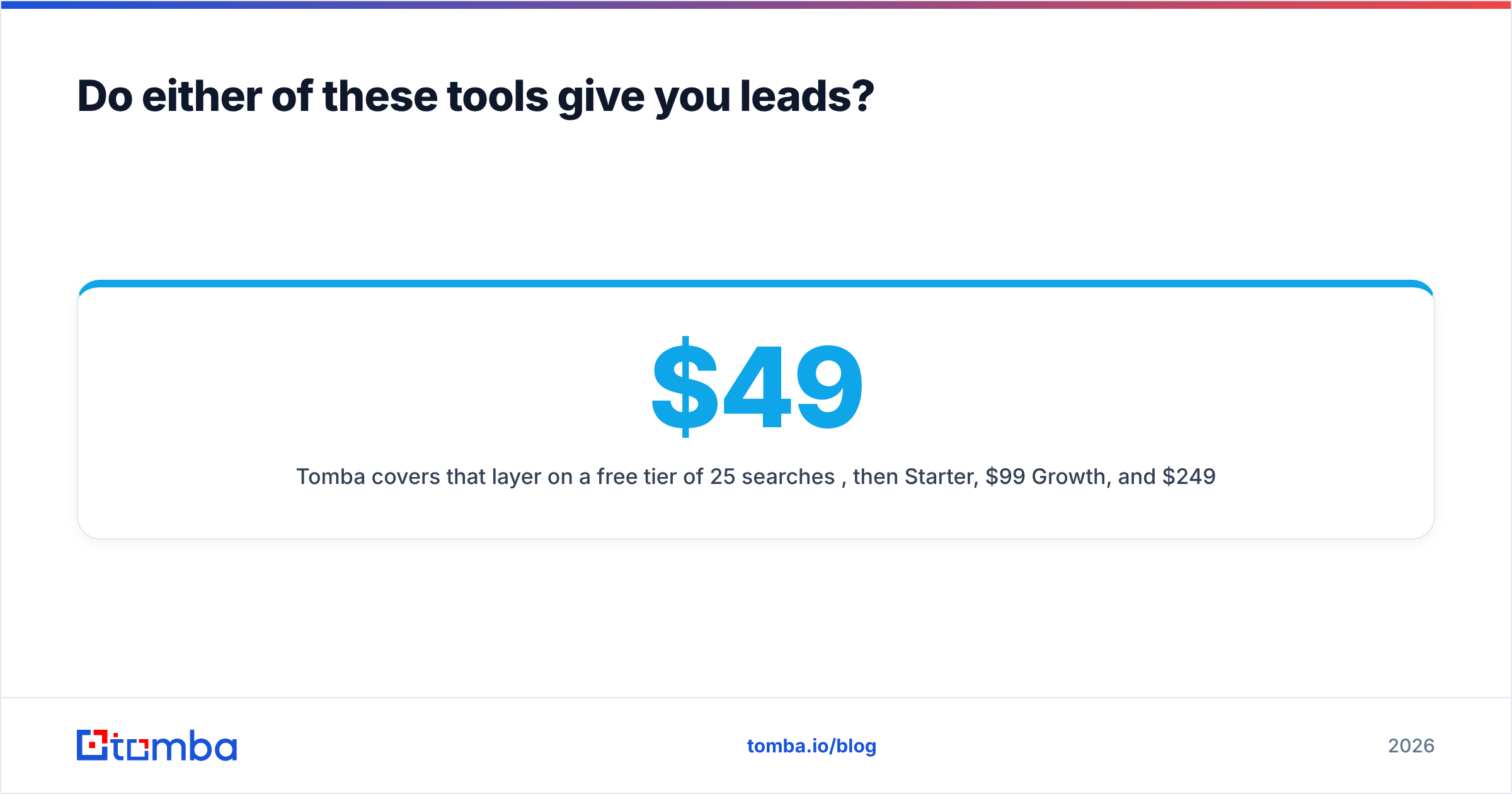
Tomba covers that layer. The free tier gives 25 searches a month. Paid plans run $49/mo Starter, $99/mo Growth, and $249/mo Pro. Full Tomba pricing is public. It is not a sender and not a CRM. It sits under both. That is why it fits with either side of this comparison instead of replacing them.
Review sites like G2 help too. They surface the gripes vendors leave off their own pages. Most of those gripes are about support speed and stale data. Marketing copy never puts a number on either.
G Lock EasyMail7 vs Salesbot: which should you choose?#
Match the tool to the bottleneck. Here is the call in plain terms.
Choose G-Lock EasyMail7 if:
- You are a solo operator or a two-person shop on Windows.
- You own a permission-based list of customers, event sign-ups, or newsletter readers.
- You want to mail that list without a monthly ESP bill.
- Data residency matters and you want contacts stored on your own machine.
- You are happy to own SPF, DKIM, DMARC, warmup, and send speed yourself.
- Your volume is steady rather than spiky.
Choose Salesbot if:
- You already run a CRM in that ecosystem, or you are willing to move.
- Chats arrive faster than your reps can answer, above all after hours.
- Your leads come through chat, WhatsApp, or social DMs, not just email.
- You want lead scoring and routing to happen with no human touch.
- More than two people need a shared view of the pipeline.
Choose neither if your real problem is a shortage of good contacts. A sender or a bot is then a faster car with no fuel. Fix the data layer first. Then pick the engine.
Run both if you have separate outbound and inbound motions. A licensed desktop sender can work a nurture list while a CRM bot catches website chat. They barely overlap, so they will not clash.
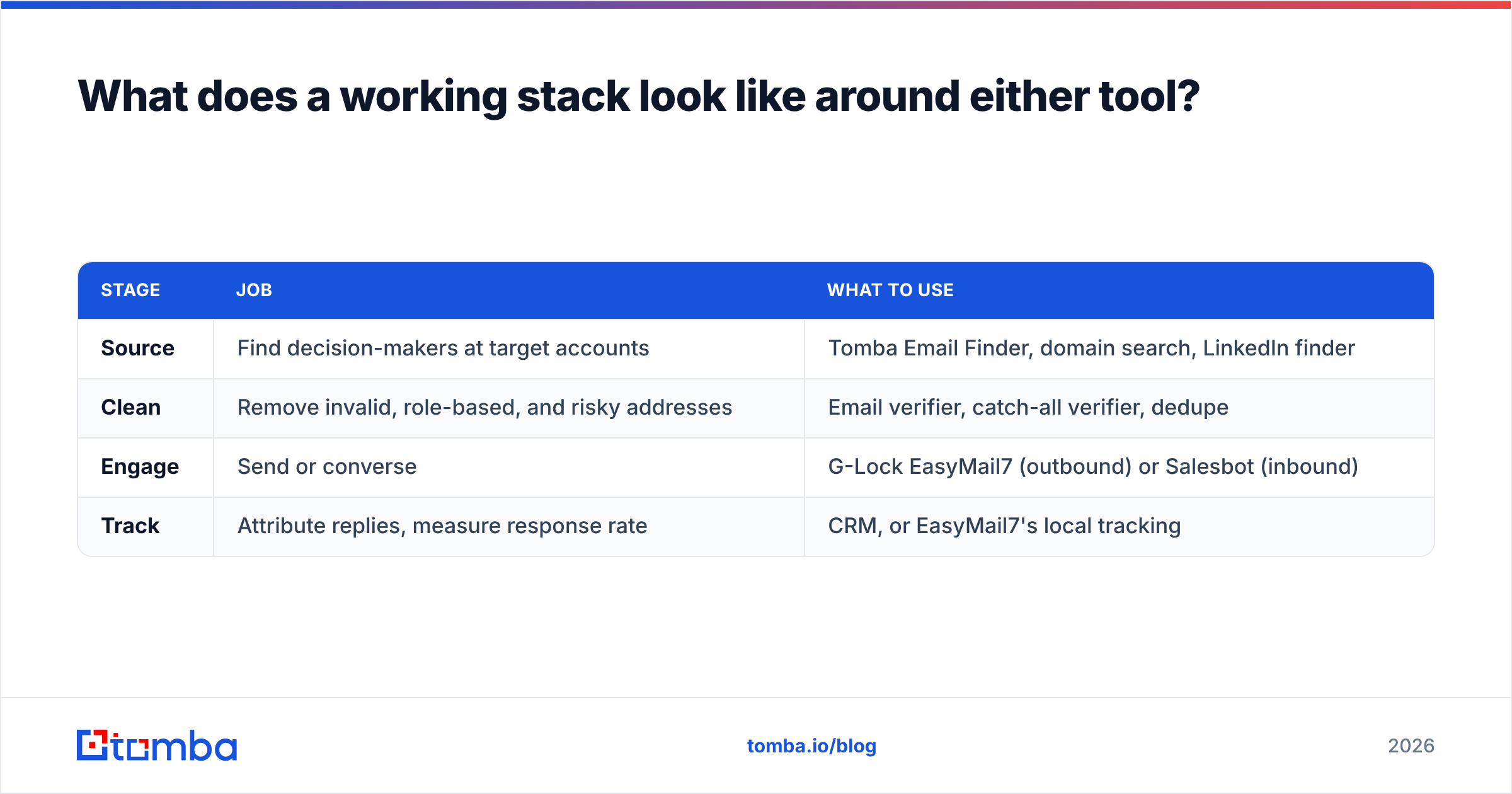
What does a working stack look like?#
One pattern holds up no matter which side you pick. It has four stages.
| Stage | Job | What to use |
|---|---|---|
| Source | Find decision-makers at target accounts | Tomba Email Finder, domain search, LinkedIn finder |
| Clean | Remove invalid, role-based, and risky addresses | Email verifier, catch-all verifier, dedupe |
| Engage | Send or converse | G-Lock EasyMail7 (outbound) or Salesbot (inbound) |
| Track | Attribute replies, measure response rate | CRM, or EasyMail7's local tracking |
Skip the clean row and the other three get worse. That is not a sales pitch. It is arithmetic. A 20% bad rate on a 5,000-address list is 1,000 hard bounces. That alone can push a young domain into the spam folder before one prospect reads a word.
The verdict#
So how does G Lock EasyMail7 vs Salesbot end? EasyMail7 wins on cost and control for one operator with a list they trust. Salesbot wins on speed to lead and team leverage when real inbound volume shows up. Forced to pick one for a growing B2B team in 2026, I would take Salesbot. Shared pipeline views and instant replies compound over time. A single-seat Windows sender does not.
But here is the point neither vendor will make. Your outbound results ride on the quality of the addresses you feed in. The software that hits send matters far less. Both tools on this page assume that problem is already solved.
Solve it first. Start with the Tomba Email Finder. You get 25 free searches a month and no card is needed. Build a list of real people with real mailboxes. Then plug it into whichever tool fits your bottleneck, and let it do the job it is good at.
Related guides#
Ready to find emails that actually work?
Join 150,000+ professionals who stopped guessing and started sending. Free credits on signup — no credit card required.
Get the Tomba newsletter
Practical outbound tactics and product updates — once every two weeks.
About the author