Gamalogic vs Limeleads: Which B2B Email Tool Wins in 2026?
Gamalogic finds and verifies emails on demand. Limeleads sells you a pre-built US contact list. They solve different problems — here's how they compare on data freshness, coverage, API access, and real cost per usable contact.
Gamalogic vs Limeleads is a fair question with an unfair answer: they are not the same kind of tool. One finds and checks an email the moment you ask for it. The other sells you a list that was built months ago. This guide compares both on data model, accuracy, price, and API access, so you can pick the right one on the first try.
TL;DR
- They are not the same category. Gamalogic is an on-demand email finder and verifier (you bring the names or domains). Limeleads is a static B2B contact database you search and export from.
- Choose Gamalogic if you already have a target list — CRM records, LinkedIn exports, event attendees — and need addresses attached and validated.
- Choose Limeleads if you have no list at all and want a cheap, US-heavy set of company contacts you can filter by industry, size, and location.
- Neither is a full GTM stack. Gamalogic is thin on firmographic enrichment; Limeleads is thin on API depth, non-US coverage, and freshness guarantees.
- The real cost metric is dollars per usable contact, not per credit. A $0.01 record that bounces costs you far more than a $0.04 record that lands.
What are Gamalogic and Limeleads, exactly?#
Gamalogic is an email finder and verifier. You give it a person's name plus a company domain — or just a domain. It returns likely addresses and then checks them. It ships as a web app and an API. The pitch is throughput: bulk lookups, bulk checks, developer access. You can see its current feature set on the Gamalogic homepage.
Limeleads is a different animal. It is a lead database: a pre-built index of business contacts. You search it with filters — industry, employee count, revenue, job title, geography, tech stack — and export a CSV. You are not solving for one person. You are browsing an inventory. Coverage leans heavily toward US companies. The pitch has long been cheap list building for small sales teams. Check the Limeleads site for its current filter set.
That distinction drives everything else in this comparison. One tool answers "what is Priya Raman's email at acme.com?" The other answers "give me 2,000 VPs of Marketing at US manufacturers with 50–200 employees."
Mixing up the two is the most common buying mistake here. Some teams buy a database when they needed a finder. Then they complain the data is stale. Of course it is — it was built months ago. Others buy a finder with no list to feed it, then wonder why there is nothing to search.

How do the two data models actually differ?#
Here is the mechanical difference. It explains every tradeoff below — pricing, freshness, coverage, and bounce rate.
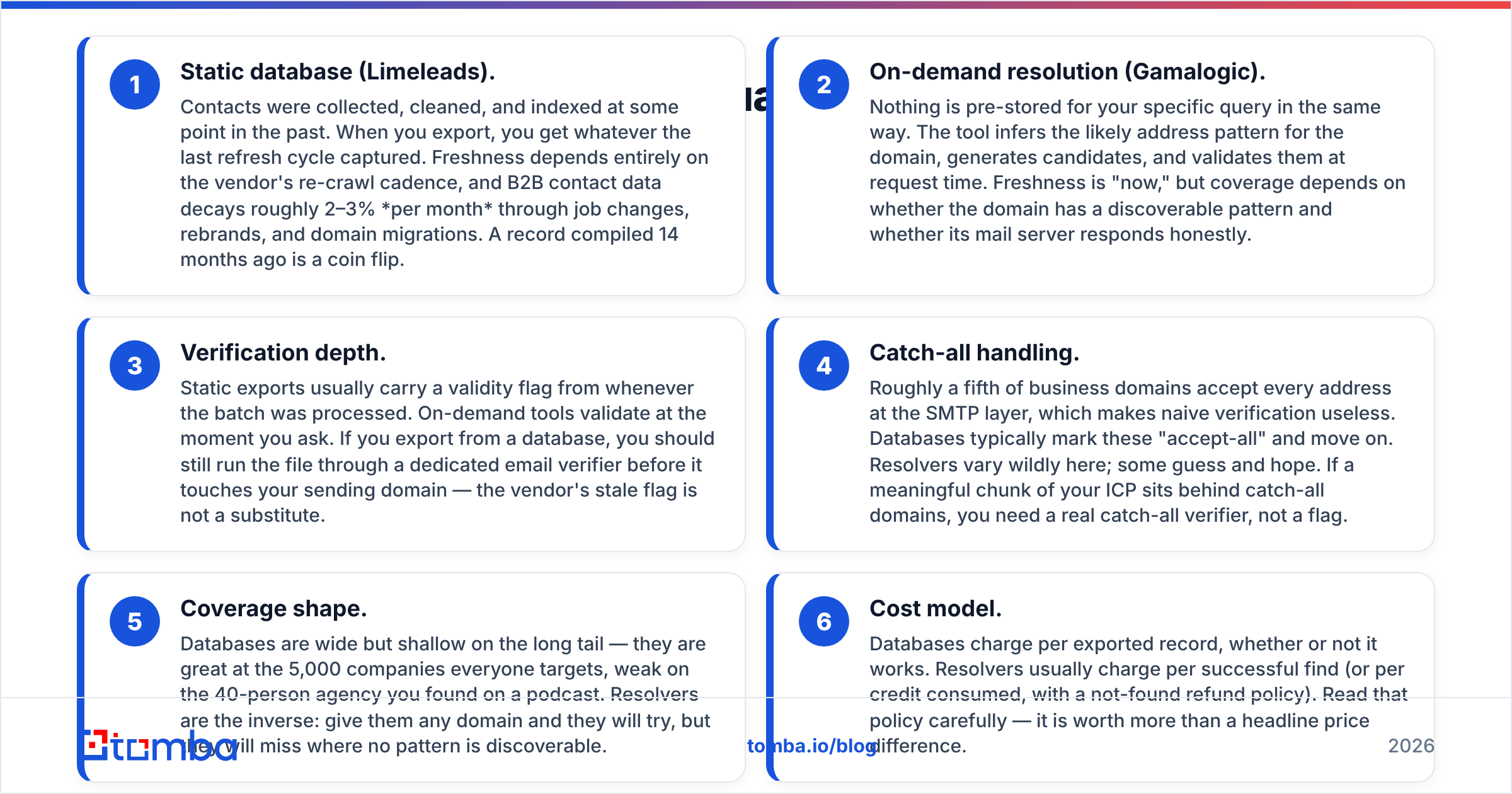
Static database (Limeleads). Contacts were collected, cleaned, and indexed at some point in the past. When you export, you get whatever the last refresh cycle captured. Freshness depends on how often the vendor re-crawls. B2B contact data decays about 2–3% per month. People change jobs, brands change names, domains move. A record built 14 months ago is a coin flip.
On-demand lookup (Gamalogic). Nothing is stored in advance for your query. The tool works out the likely address pattern for the domain. It builds candidates and checks them right then. Freshness is "now." Coverage depends on two things: whether the domain has a pattern you can spot, and whether its mail server answers honestly.
Verification depth. A static export carries a valid flag from the day the batch was processed. On-demand tools check at the moment you ask. So run every database export through a dedicated email verifier before it touches your sending domain. An old flag is not a substitute.
Catch-all handling. About one in five business domains accepts every address at the SMTP layer. That makes simple checks useless. Databases mark these "accept-all" and move on. Finders vary a lot here; some just guess. If much of your target market sits behind catch-all domains, you need a real catch-all verifier, not a flag.
Coverage shape. Databases are wide but thin on the long tail. They cover the 5,000 companies everyone targets. They miss the 40-person agency you found on a podcast. Finders are the reverse. Give them any domain and they will try. They come up empty when no pattern exists.
Cost model. Databases charge per exported record, working or not. Finders usually charge per successful find, or per credit with a refund for misses. Read that refund policy. It matters more than the headline price.
Which one has better data accuracy?#
Neither vendor publishes an audited accuracy number. So treat any marketing percentage as a claim, not a fact. That goes for them, for us, and for everyone else. What you can do is run your own test in about 45 minutes.
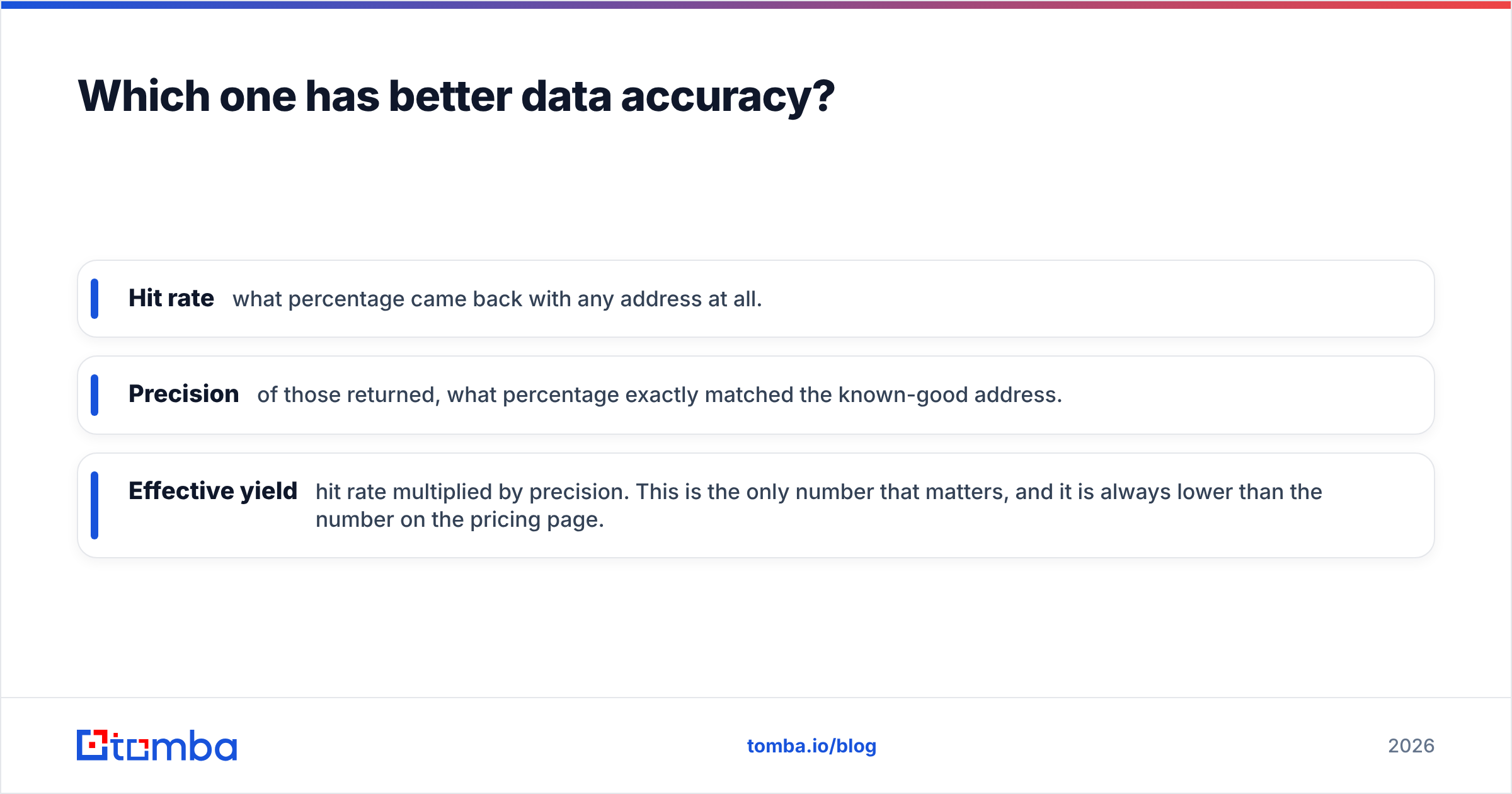
Take 100 contacts you know are correct. People who replied to you. People who signed contracts. People with confirmed activity in your CRM. Strip the emails out. Feed the names and domains to each tool. Then measure three numbers, not one:
- Hit rate — what percentage came back with any address at all.
- Precision — of those returned, what percentage matched the known-good address.
- Effective yield — hit rate multiplied by precision. This is the only number that matters. It is always lower than the one on the pricing page.
For context: mid-market B2B domains in the US and Western Europe tend to land at 55–75% effective yield. That holds across the whole tool category. Any claim of 95%+ on every segment is measuring something narrower than you are. Coverage drops fastest on non-English domains, firms under 20 people, and locked-down enterprises.

The split is easy to predict. Limeleads looks great on well-known US companies in its index. Outside the index it returns nothing, because you cannot search what was never crawled. Gamalogic will try any domain you give it. That means better long-tail coverage, plus more risky-flagged results you have to filter yourself.
Gamalogic vs Limeleads: how do they compare feature by feature?#
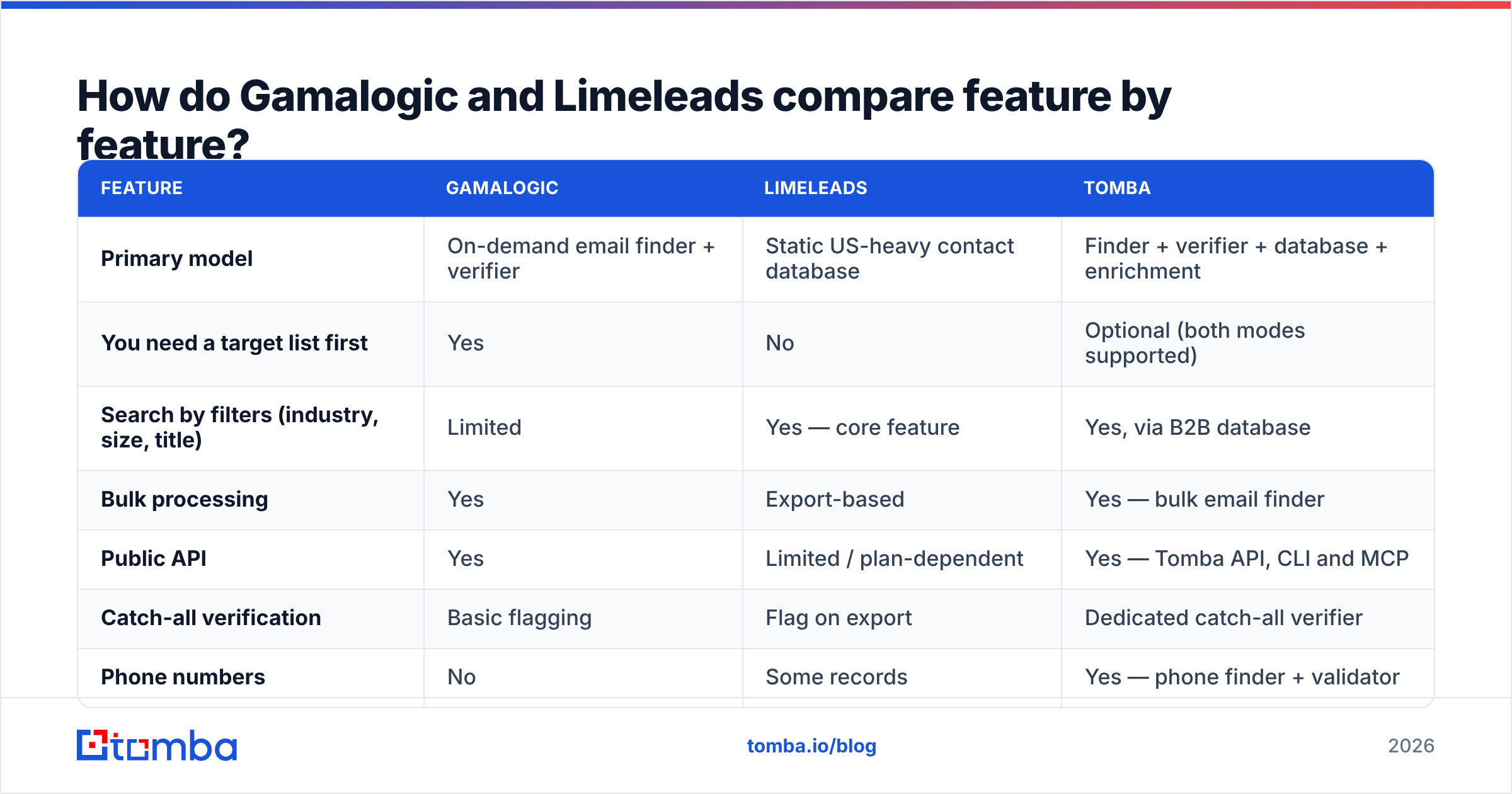
| Feature | Gamalogic | Limeleads | Tomba |
|---|---|---|---|
| Primary model | On-demand email finder + verifier | Static US-heavy contact database | Finder + verifier + database + enrichment |
| You need a target list first | Yes | No | Optional (both modes supported) |
| Search by filters (industry, size, title) | Limited | Yes — core feature | Yes, via B2B database |
| Bulk processing | Yes | Export-based | Yes — bulk email finder |
| Public API | Yes | Limited / plan-dependent | Yes — Tomba API, CLI and MCP |
| Catch-all verification | Basic flagging | Flag on export | Dedicated catch-all verifier |
| Phone numbers | No | Some records | Yes — phone finder + validator |
| Spreadsheet add-ons | No | CSV export only | Google Sheets, Excel, Airtable |
| Non-US coverage | Domain-agnostic, pattern-based | Weak | Global |
| Free tier | Trial credits | Limited preview | 25 searches/mo, no card |
The pattern holds across every row. Gamalogic is a narrow, technical tool. It finds and checks addresses, then stops. Limeleads is a broad, shallow tool. It gets you volume fast in one region and thins out beyond it.

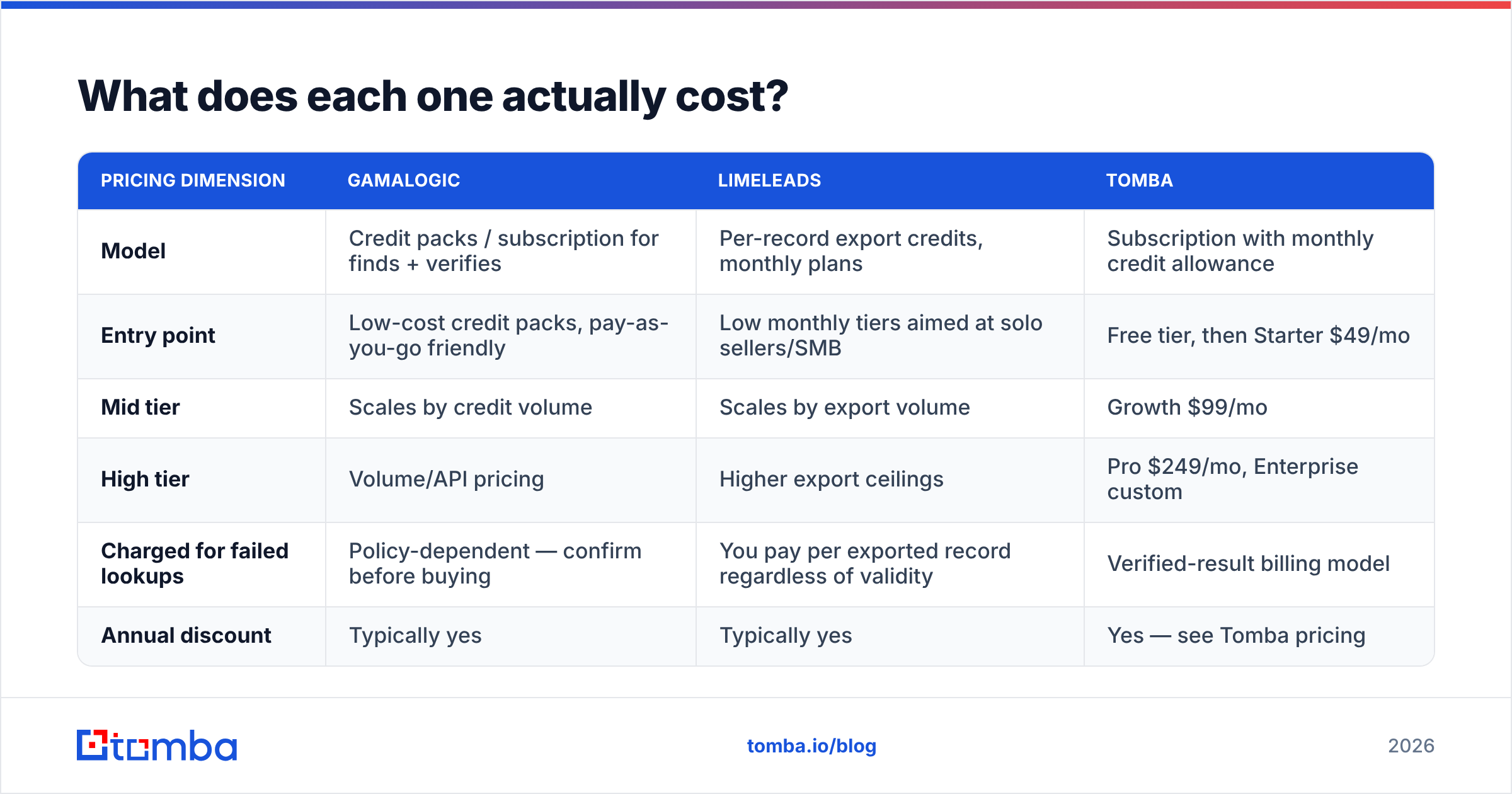
What does each one actually cost?#
Both vendors have changed packaging more than once. Check their pricing pages before you commit. The shape of each model is stable, though, and worth knowing.
| Pricing dimension | Gamalogic | Limeleads | Tomba |
|---|---|---|---|
| Model | Credit packs / subscription for finds + verifies | Per-record export credits, monthly plans | Subscription with monthly credit allowance |
| Entry point | Low-cost credit packs, pay-as-you-go friendly | Low monthly tiers aimed at solo sellers/SMB | Free tier, then Starter $49/mo |
| Mid tier | Scales by credit volume | Scales by export volume | Growth $99/mo |
| High tier | Volume/API pricing | Higher export ceilings | Pro $249/mo, Enterprise custom |
| Charged for failed lookups | Policy-dependent — confirm before buying | You pay per exported record regardless of validity | Verified-result billing model |
| Annual discount | Typically yes | Typically yes | Yes — see Tomba pricing |
Do the math vendors never show you. Say a tool costs $0.02 per record and hits 60% effective yield. Your real cost per usable contact is $0.033. A tool at $0.04 with 88% yield costs $0.045. That is barely more. And it does not burn your sender reputation with 40% bad sends. Add the cost of a bounced campaign — a blocked domain, a warmed inbox lost, two weeks of re-warming — and the cheap option is no longer cheap.
That is the whole argument in one line, and it is the hill worth dying on:

Who should choose Gamalogic?#
Pick Gamalogic when these describe you:
- You already own the target list. A scraped conference roster, a LinkedIn Sales Navigator export, an inherited CRM segment with missing contact fields.
- You are a developer or ops person, not a browsing salesperson. The API-first shape is the point; the UI is not where the value lives.
- Your ICP is international or long-tail. Pattern-based lookup does not care whether the domain is in Ohio or Odense. A US-indexed database does.
- You want find and verify from one vendor rather than stitching two subscriptions together.
Where it will frustrate you: there is no real "go find me new companies" mode. Company data is thin. You get no phone numbers. If your reps start the day asking who to talk to, Gamalogic has no answer for that step.
Who should choose Limeleads?#
Pick Limeleads when:
- You are starting from zero. No list, no CRM history, no defined accounts — just an ICP description you can turn into filters.
- Your market is US SMB and mid-market. That is where the index is densest and where it competes honestly.
- Budget is the binding constraint and you accept that you will re-verify everything yourself before sending.
- You want CSV in, CRM out, with no engineering involvement.
Where it will frustrate you: freshness. A static database is a photo of a moving crowd. Expect gaps outside North America. Plan to lose 10–25% of every export at the verification step. Budget for that loss up front. It is not a defect. It is how static data works.
What are the best alternatives to both?#
If neither model fits cleanly, the honest answer is that most teams want both jobs done under one roof.
- BookYourData — a strong pick if you want a pay-as-you-go database with a bounce guarantee and no forced subscription. It is a well-run peer in the list-building lane. For pure "buy a targeted list" work, it belongs on your shortlist next to Limeleads.
- Apollo — database, sequencing, and a light CRM layer. It is heavier and pricier. You buy the all-in-one whether you wanted one or not. Our Apollo alternative breakdown covers the tradeoffs.
- Tomba — the finder-first option that also carries a searchable database, verification, catch-all handling, enrichment, and phone data. The email finder covers the Gamalogic use case. Domain search and the contact database cover the Limeleads use case. The API, CLI, Sheets, and Excel surfaces mean neither RevOps nor reps get stuck.
Before you commit to any of them, read the reviews on G2 and filter by your own company size. The tool that delights a 400-person org is rarely the one that delights a three-person team. Average star ratings hide that completely.
Gamalogic vs Limeleads: so which one wins in 2026?#
Verdict: it depends on whether you have a list. If you have to ask, you probably want a hybrid.
The Gamalogic vs Limeleads call comes down to one question: do you already have names to work with?
- If your bottleneck is "I have names but no emails" — Gamalogic is the closer fit of the two, and its API is the reason.
- If your bottleneck is "I have no idea who to contact" — Limeleads is the closer fit, provided your market is US-centric and you re-verify before sending.
- If your bottleneck is "both, and I do not want two invoices" — neither is the answer, and you should look at consolidated platforms.
Whichever way you go, three rules survive the choice. Verify every list right before you send, not on the day you buy it. Track effective yield by vendor and by segment, every month — vendors drift, and the tool that won your test in January may lose it in June. And never let one data source be the only thing between your pipeline and an empty quarter.
Ready to stop choosing between a finder and a database? Start with the Tomba Email Finder. Find addresses by name and domain. Verify them in the same pass. Catch the catch-alls. Pull it all through an API, a Chrome extension, or Google Sheets. The free tier gives you 25 searches a month, no card required. That is enough to run the 100-contact accuracy test described above against whatever you use today. Run the test, compare effective yield, and let the numbers pick your vendor.
Related guides#
Ready to find emails that actually work?
Join 150,000+ professionals who stopped guessing and started sending. Free credits on signup — no credit card required.
Get the Tomba newsletter
Practical outbound tactics and product updates — once every two weeks.
About the author