Gazelle vs ListKit: Which B2B Data Tool Wins in 2026?
Gazelle sells company growth intelligence. ListKit sells verified contact lists for cold email. They get compared constantly and they solve different problems — here is the honest breakdown, plus what most teams actually end up buying.
TL;DR
- Gazelle and ListKit are not really competitors. Gazelle sells company-level growth intelligence (expansion signals, firmographics, investment activity). ListKit sells contact-level lead lists built for cold email teams.
- If your question is "which accounts should we chase this quarter?", Gazelle is closer to the right shape. If it's "give me 5,000 verified emails for a sequence by Friday", ListKit is closer.
- Both are priced as bundles. You pay for the platform, the seats, and the credits you may not use — which is why teams running high-volume outbound usually pair a light database with a dedicated finder/verifier.
- Neither tool removes your verification obligation. Any list, from any vendor, decays 2–3% per month and needs a re-verify pass before it touches your sending domain.
- The stack most outbound teams settle on in 2026: one account-signal source, one contact source, and one independent verifier. Tomba's email finder and email verifier cover the last two from $49/mo.
What is Gazelle, exactly?#
Gazelle is a company intelligence platform. Its core asset is a database of millions of companies enriched with growth signals — headcount trajectory, revenue movement, facility and location changes, investment and expansion activity, industry classification, and parent/subsidiary structure.
The original market was economic development: agencies and site-selection teams trying to spot which companies were about to expand into their region. That heritage shows in the product. You get strong account-level context — where a company operates, whether it's growing, how it's structured across geographies — and comparatively thin person-level data.
What that means practically: Gazelle helps you build a target account list with a defensible reason for each account being on it. It does not hand you a ready-to-send list of decision-maker emails.
What is ListKit, exactly?#
ListKit came out of the agency cold-email world and it's built for that motion. You filter by job title, industry, headcount, location, technographics, and intent-style signals, then export contacts with emails and phone numbers already run through verification.
The pitch is speed to first send. Filter, export, push into your sequencer, go. ListKit leans heavily on the workflow around the data — templates, done-for-you list guidance, integrations with the sending tools agencies actually use.
The trade-off is depth. You get a contact and a company row. You do not get the layered account-level story (expansion history, corporate structure, investment timeline) that a company-intelligence tool builds its whole product around.

How do Gazelle and ListKit compare head-to-head?#
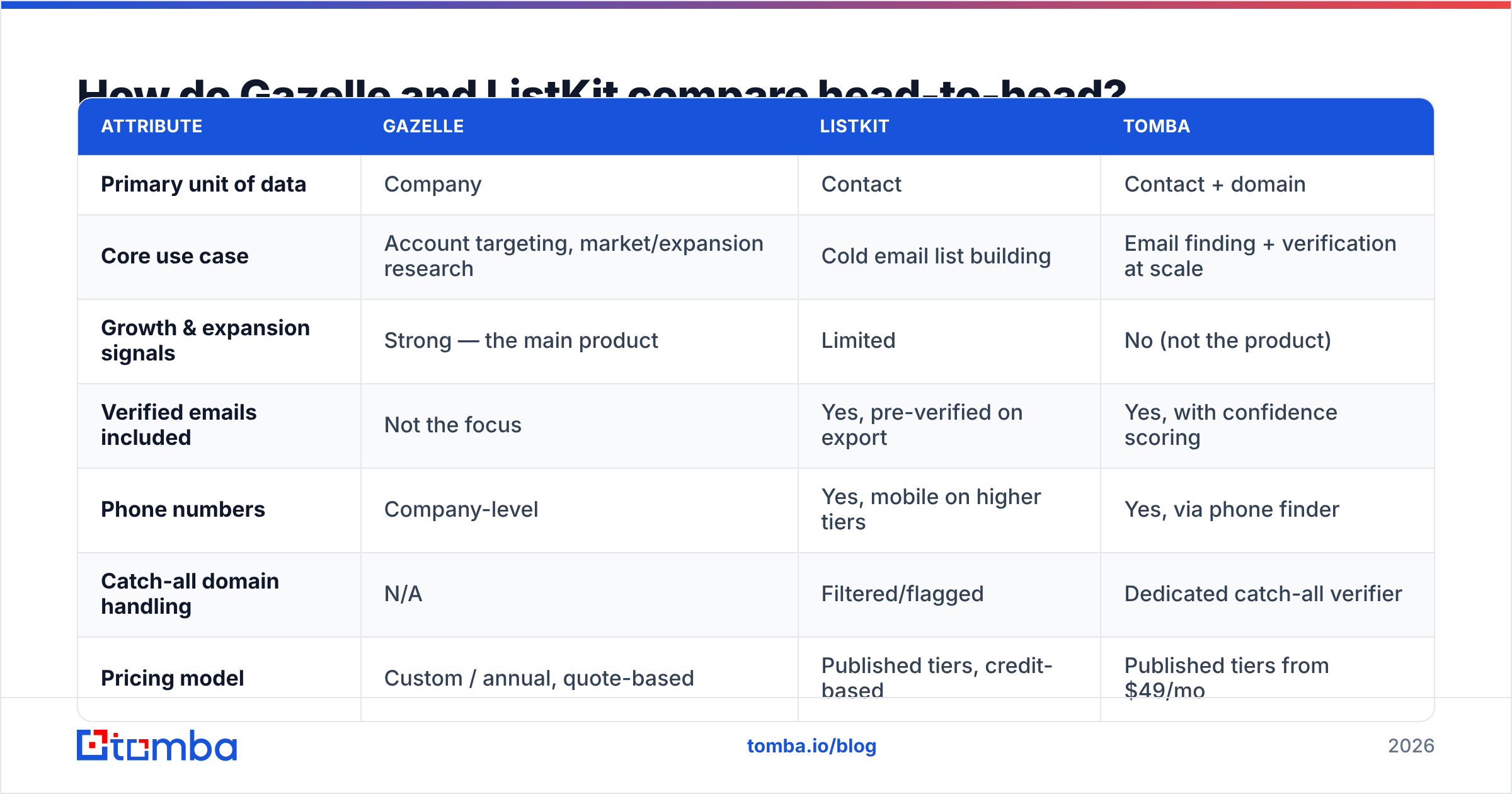
| Attribute | Gazelle | ListKit | Tomba |
|---|---|---|---|
| Primary unit of data | Company | Contact | Contact + domain |
| Core use case | Account targeting, market/expansion research | Cold email list building | Email finding + verification at scale |
| Growth & expansion signals | Strong — the main product | Limited | No (not the product) |
| Verified emails included | Not the focus | Yes, pre-verified on export | Yes, with confidence scoring |
| Phone numbers | Company-level | Yes, mobile on higher tiers | Yes, via phone finder |
| Catch-all domain handling | N/A | Filtered/flagged | Dedicated catch-all verifier |
| Pricing model | Custom / annual, quote-based | Published tiers, credit-based | Published tiers from $49/mo |
| Free tier | Demo only | Trial credits | 25 searches/mo, no card |
| API access | Enterprise | Available on paid plans | Full email finder API on all paid plans |
| Best fit | Economic development, market entry, ABM research | Agencies, SDR teams sending volume | Teams who need accurate contacts without seat lock-in |
The table makes the real story obvious. These two products barely overlap on the row that matters most to you. Pick based on which unit of data your process starts from — account or person — not on which vendor markets harder.
Which one has better data accuracy?#
Wrong question, mostly. They're accurate about different things.
Gazelle's accuracy claim lives at the firmographic level: is this company's headcount, location footprint, and industry code correct? That data is relatively stable and refreshes on a slower cycle. When it's wrong, you waste research time, not sending reputation.
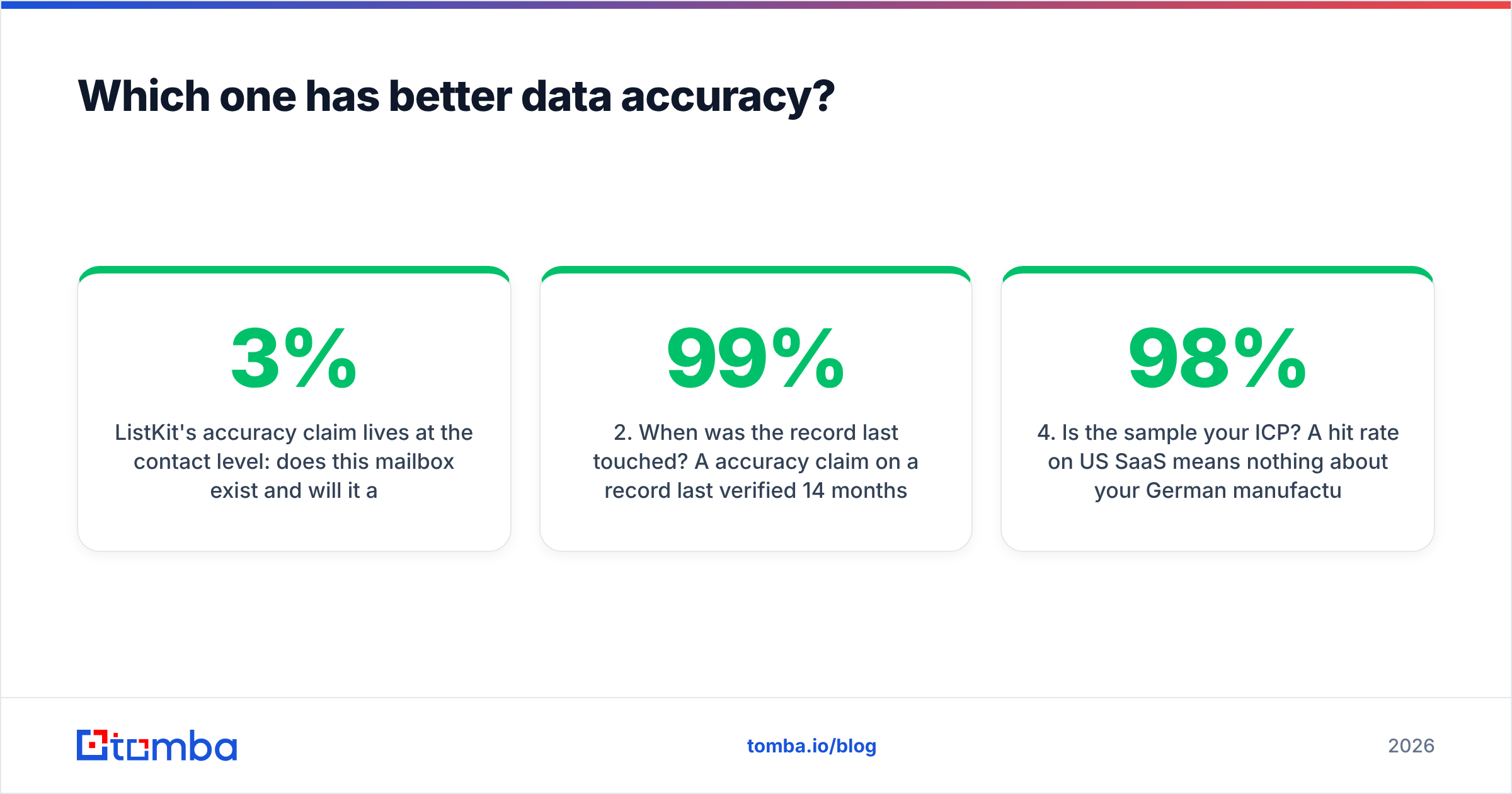
ListKit's accuracy claim lives at the contact level: does this mailbox exist and will it accept mail? That data decays fast. Industry consensus on B2B contact decay sits around 2.5–3% per month — roughly a third of any list you buy today is stale within a year. Job changes, domain migrations, and mailbox deletions do the damage.
Three things to check before you trust any vendor's accuracy number:
- What counts as "verified"? Syntax + MX check is cheap and near-worthless. SMTP-level validation with catch-all detection is the real bar.
- When was the record last touched? A 99% accuracy claim on a record last verified 14 months ago is a claim about the past.
- How are catch-all domains reported? Vendors that count catch-alls as "valid" inflate their numbers. Vendors that drop them silently shrink your list without telling you. Run domains through a catch-all verifier and decide yourself.
- Is the sample your ICP? A 98% hit rate on US SaaS means nothing about your German manufacturing list. Test on 200 rows of your actual target segment.
That last point is the one people skip. Run the same 200-company sample through every tool you're evaluating, then measure hit rate and bounce rate yourself. Vendor benchmarks are marketing; your sample is evidence.
What does each one actually cost?#
Both vendors move their pricing, so treat this as directional and confirm on their sites before you sign anything.
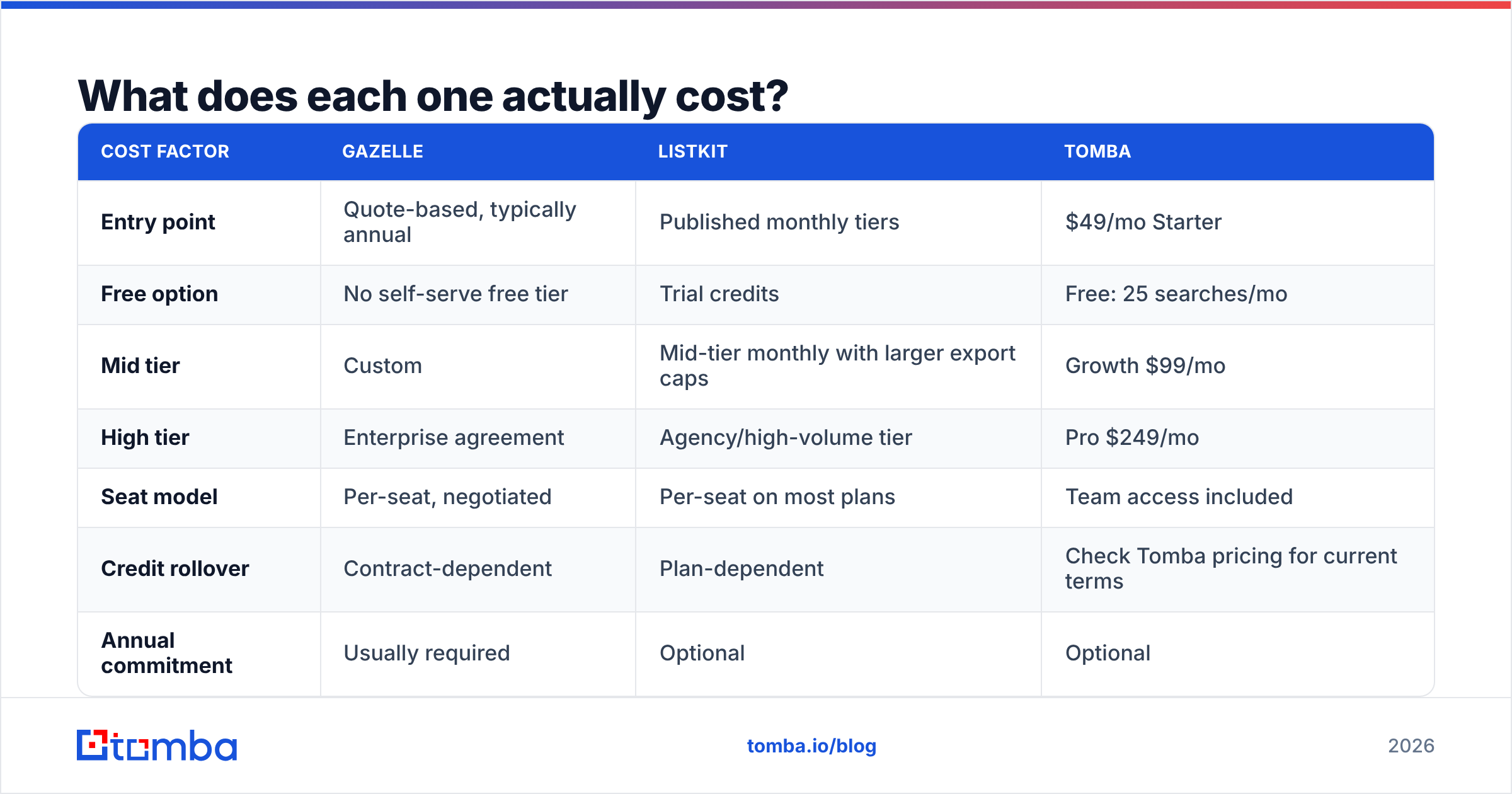
| Cost factor | Gazelle | ListKit | Tomba |
|---|---|---|---|
| Entry point | Quote-based, typically annual | Published monthly tiers | $49/mo Starter |
| Free option | No self-serve free tier | Trial credits | Free: 25 searches/mo |
| Mid tier | Custom | Mid-tier monthly with larger export caps | Growth $99/mo |
| High tier | Enterprise agreement | Agency/high-volume tier | Pro $249/mo |
| Seat model | Per-seat, negotiated | Per-seat on most plans | Team access included |
| Credit rollover | Contract-dependent | Plan-dependent | Check Tomba pricing for current terms |
| Annual commitment | Usually required | Optional | Optional |
The pattern worth noticing: quote-based pricing almost always means an annual commitment and a seat count you negotiate once and then live with for twelve months. That's fine for a research function with predictable usage. It's painful for an outbound team whose volume swings with campaign season.
Published, self-serve pricing lets you scale down in a slow month. If your usage is spiky, that flexibility is worth more than a marginally better per-record rate.
Who should choose Gazelle?#
Choose Gazelle when the account list is the hard part.
- Economic development and site selection. This is Gazelle's home turf. Nothing else in this comparison touches expansion-signal data.
- Market entry research. You need to understand which companies in a region are growing, who owns whom, and where the facilities are.
- Enterprise ABM. You have 300 target accounts, not 30,000, and each one justifies real research before anyone reaches out.
- Consulting and advisory work. You're producing analysis about a market, not sequences into it.
If you fit those, Gazelle earns its price. You'll still need a contact layer bolted on — Gazelle tells you the account is interesting, not which VP of Operations to email.
Who should choose ListKit?#
Choose ListKit when volume and speed are the constraint.
- Lead-gen agencies running multiple client campaigns with different ICPs each month.
- SDR teams that already know their ICP and just need bodies in the sequence.
- Founders doing outbound themselves who want the shortest path from filter to first send.
- Anyone testing a new segment where the cheapest way to validate is 500 emails and a two-week window.
The honest caveat: you're buying from a shared pool. Your competitors filtering on the same ICP get overlapping lists. That's true of every list vendor — ListKit, its peers, all of them — and it's the structural reason your copy and your offer matter more than your data source.

Are there better alternatives to Gazelle and ListKit?#
Depends what you're replacing. A few honest options:
- BookYourData — a solid pay-as-you-go B2B contact database with a strong accuracy guarantee. Good pick if you want to buy a list outright without a subscription, and a genuinely respectable peer in this category.
- Apollo — huge database plus a built-in sequencer. Best if you want one platform for data and sending; worst if you dislike per-seat pricing. See our Apollo alternative breakdown.
- Clearbit-style enrichment — for filling gaps in records you already own rather than sourcing new ones.
- Tomba — narrower on purpose. Finds and verifies contacts by domain, name, or LinkedIn profile, and exposes all of it through an API rather than locking it in a UI.
Tomba is not trying to be Gazelle. There's no expansion-signal data, no site-selection module, no market-research layer. What it does is the part both tools charge a bundle for: turning "this company and this person" into a deliverable, verified email address — with a free tier to test it and $49/mo entry pricing if it works.
How do you build a stack that beats either tool alone?#
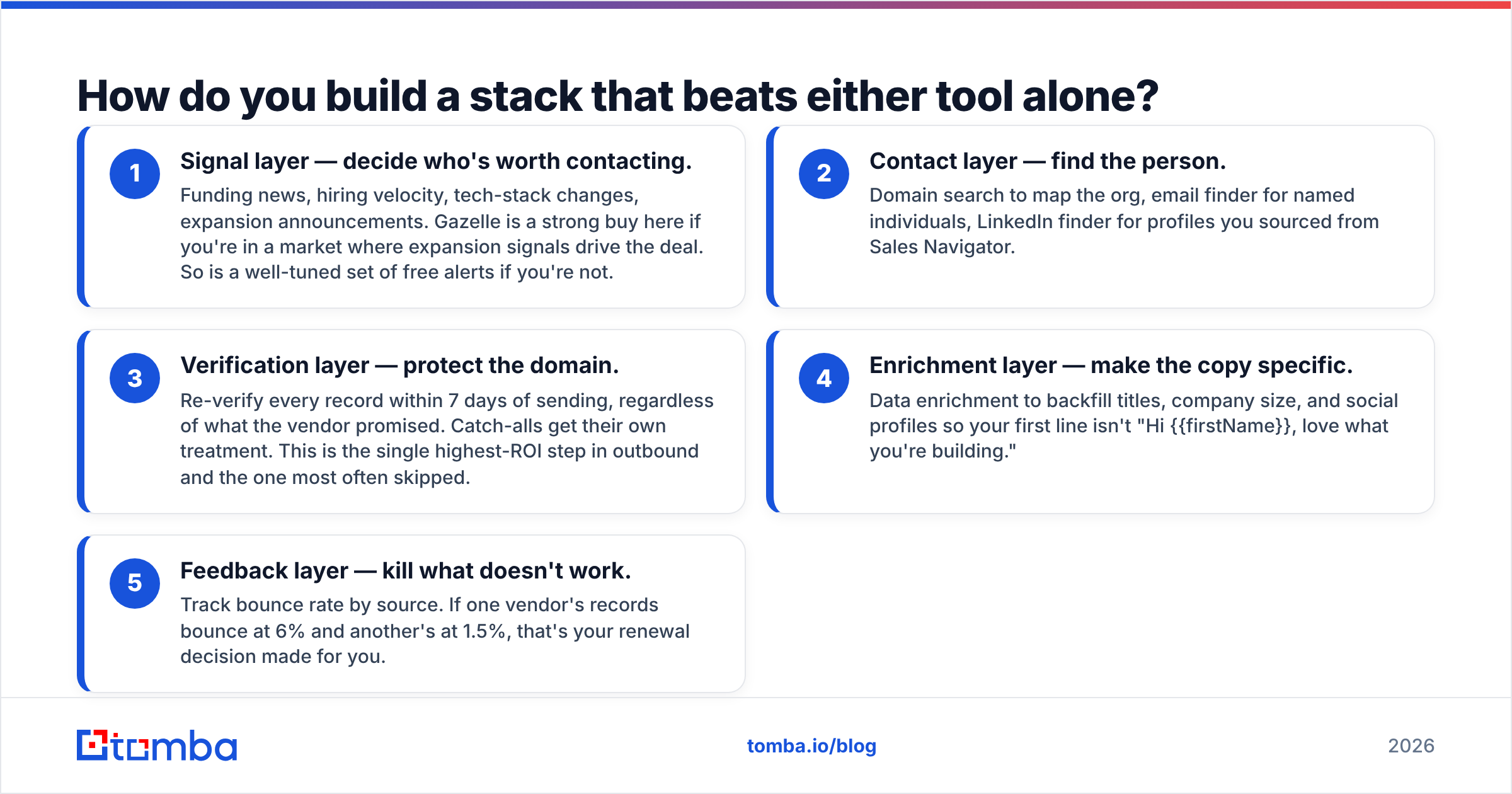
The teams getting the best cost-per-meeting in 2026 aren't buying one platform. They're assembling three cheap layers:
- Signal layer — decide who's worth contacting. Funding news, hiring velocity, tech-stack changes, expansion announcements. Gazelle is a strong buy here if you're in a market where expansion signals drive the deal. So is a well-tuned set of free alerts if you're not.
- Contact layer — find the person. Domain search to map the org, email finder for named individuals, LinkedIn finder for profiles you sourced from Sales Navigator.
- Verification layer — protect the domain. Re-verify every record within 7 days of sending, regardless of what the vendor promised. Catch-alls get their own treatment. This is the single highest-ROI step in outbound and the one most often skipped.
- Enrichment layer — make the copy specific. Data enrichment to backfill titles, company size, and social profiles so your first line isn't "Hi {{firstName}}, love what you're building."
- Feedback layer — kill what doesn't work. Track bounce rate by source. If one vendor's records bounce at 6% and another's at 1.5%, that's your renewal decision made for you.
Split like this, the stack costs less than most single-vendor bundles and each layer is independently replaceable. When a vendor raises prices or degrades quality, you swap one layer instead of migrating a whole workflow. Reviews on G2 are useful for spotting when a vendor's quality has slipped — sort by most recent, not by rating.
What's the verdict on Gazelle vs ListKit?#
Buy Gazelle if account intelligence is your bottleneck. Expansion signals, corporate structure, and market-level research are genuinely hard to replicate, and Gazelle is one of few tools built specifically for that job. Budget for a contact layer on top.
Buy ListKit if send volume is your bottleneck. It gets you from filter to export fast, with verification already applied, and it's designed around the way agencies actually work.
Buy neither if what you actually needed was accurate emails. That's the most common outcome of this comparison. Teams start evaluating two platforms, realize 80% of what they need is "find and verify this person's work email," and discover they were about to pay platform pricing for a utility.
Start with the free tier: 25 searches a month, no card. Run your own 200-row accuracy test against whatever Gazelle or ListKit quote you. If Tomba's Email Finder covers the job at $49/mo, you just saved a five-figure annual contract — and if it doesn't, you've got real evidence for which of the other two to sign.
Related guides#
Ready to find emails that actually work?
Join 150,000+ professionals who stopped guessing and started sending. Free credits on signup — no credit card required.
Get the Tomba newsletter
Practical outbound tactics and product updates — once every two weeks.
About the author