How to Generate Local Leads in 2026: A Field-Tested Playbook
Local lead gen is not national lead gen with a city name bolted on. Here is the 2026 playbook: which channels actually convert, what each one costs, and how to build a local list that doesn't bounce.
TL;DR
- Local lead generation fails for a boring reason: the list, not the message. Most "local" databases are stale directory scrapes with 20-40% dead contacts.
- The four channels that actually produce local pipeline in 2026 are Google Business Profile, local service ads, geo-targeted outbound, and partner referrals. Everything else is a supporting act.
- Outbound to local businesses works better than outbound to enterprise — smaller buying committees, faster decisions — but only if you build the list yourself from map data plus a real email finder.
- Budget roughly $300-$1,500/month for a working local lead engine at small scale. Tooling is the cheapest line item; wasted sends are the most expensive.
- Verify before you send. A 5% bounce rate on a 400-contact local campaign is enough to damage your domain for months.
What does it actually mean to generate local leads?#
Generating local leads means producing qualified buyers inside a defined geographic radius — a metro, a county, a delivery zone — where proximity is part of the qualification.
That last clause is the whole game. A SaaS company in Austin can sell to Berlin. A commercial HVAC contractor in Austin cannot. When proximity is a hard filter, your total addressable market shrinks from "millions of companies" to something you can literally count: 1,200 dental practices in the metro, 340 property management firms, 89 mid-size manufacturers.
That constraint changes the math in three ways:
- Exhaustible market. You can contact your entire TAM in a quarter. Burning it with a bad list is not a rate-limit problem, it's a permanent one.
- Reputation compounds locally. Local buyers talk to each other in ways national buyers don't — chambers, trade groups, referral networks, the same three Facebook groups.
- Intent signals are physical. A new building permit, a lease signing, a second location opening, a new GM hire. These are public, timely, and nobody scrapes them well.
Most "local lead generation" content ignores all three and tells you to claim your Google Business Profile. Claim it — but that's table stakes, not a strategy.

Which channels actually generate local leads in 2026?#
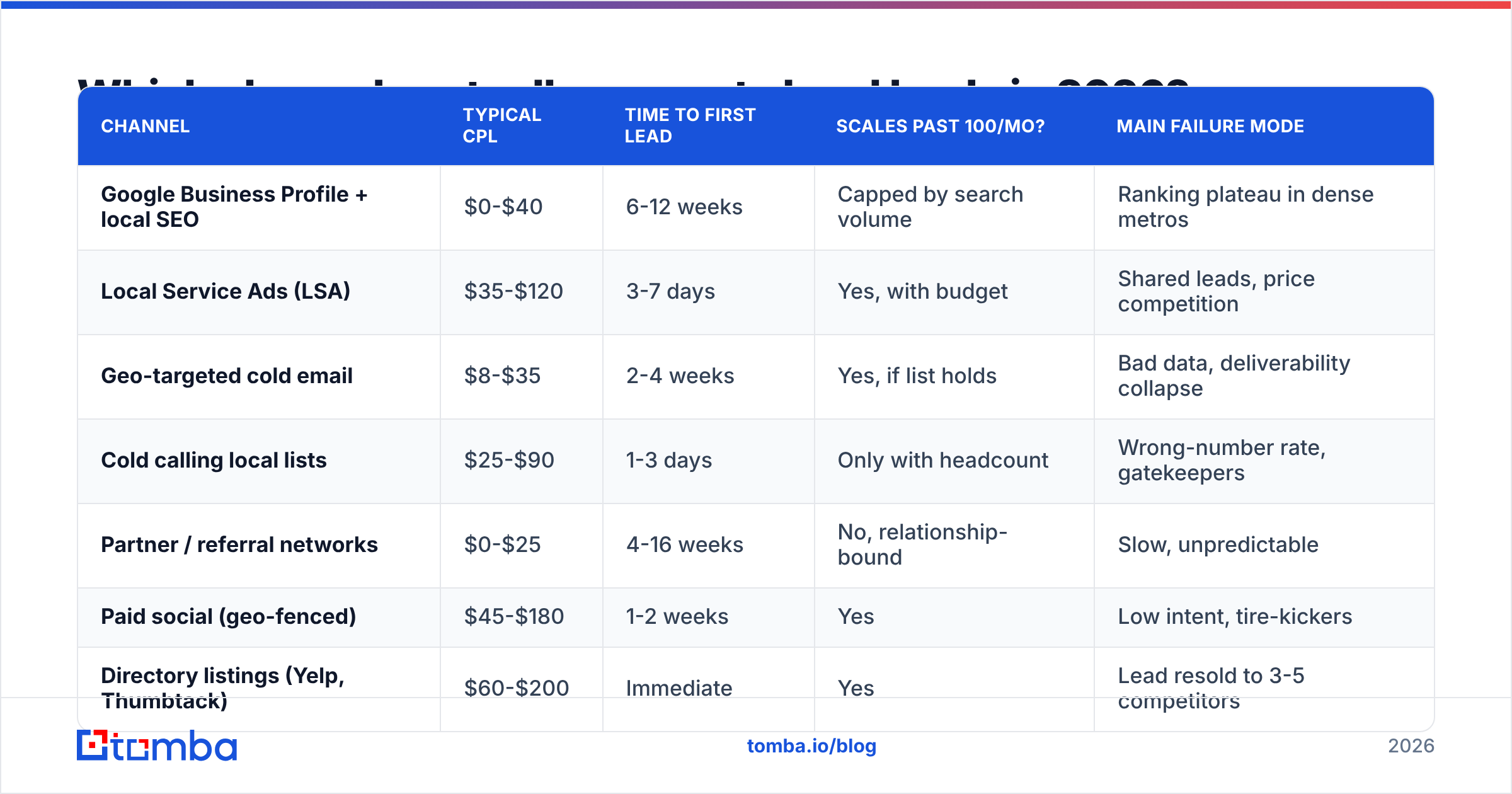
Here's the honest ranking, based on what small and mid-size local operators report on G2 and what shows up in cost-per-lead benchmarks published by HubSpot:
| Channel | Typical CPL | Time to first lead | Scales past 100/mo? | Main failure mode |
|---|---|---|---|---|
| Google Business Profile + local SEO | $0-$40 | 6-12 weeks | Capped by search volume | Ranking plateau in dense metros |
| Local Service Ads (LSA) | $35-$120 | 3-7 days | Yes, with budget | Shared leads, price competition |
| Geo-targeted cold email | $8-$35 | 2-4 weeks | Yes, if list holds | Bad data, deliverability collapse |
| Cold calling local lists | $25-$90 | 1-3 days | Only with headcount | Wrong-number rate, gatekeepers |
| Partner / referral networks | $0-$25 | 4-16 weeks | No, relationship-bound | Slow, unpredictable |
| Paid social (geo-fenced) | $45-$180 | 1-2 weeks | Yes | Low intent, tire-kickers |
| Directory listings (Yelp, Thumbtack) | $60-$200 | Immediate | Yes | Lead resold to 3-5 competitors |
Two things jump out. First, the cheapest channels are the slowest, and the fastest channels are the most expensive — there is no shortcut that's both. Second, geo-targeted cold email sits in the sweet spot: mid-single-digit-dollar CPL, live in a couple weeks, and it scales — but its failure mode is the nastiest on the list.
That failure mode is worth its own section.
Why do most local email campaigns fail before the first send?#
Because the list came from a directory scrape, and directory data rots faster than almost any other B2B data category.
Local businesses churn hard. Restaurants, salons, contractors, agencies, clinics — the owner changes, the manager leaves, the generic info@ inbox gets abandoned in favor of a booking platform. A local list built in January is measurably worse by June.
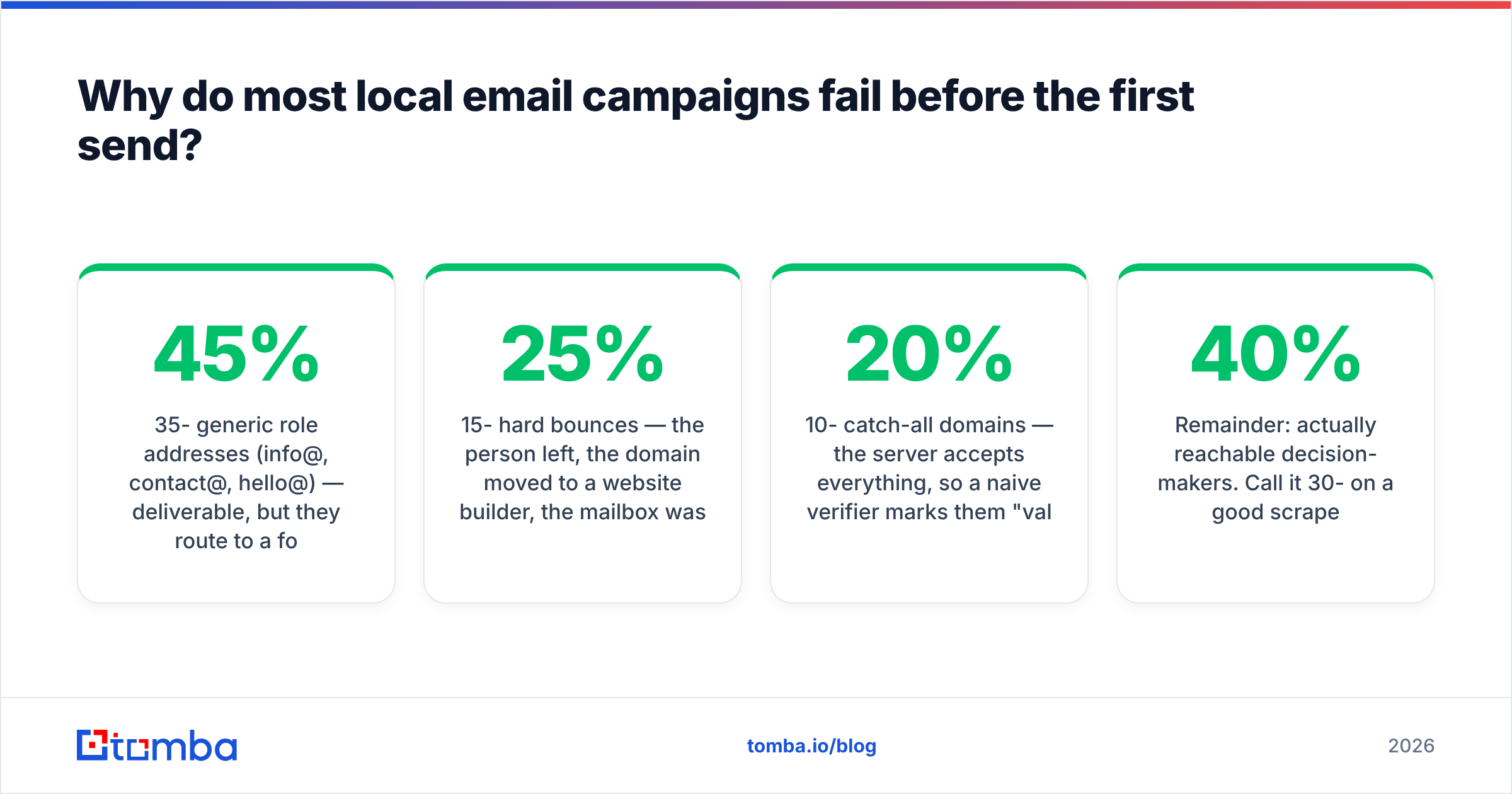
Here's what a typical scraped local list looks like when you actually check it:
- 35-45% generic role addresses (
info@,contact@,hello@) — deliverable, but they route to a form-filler or nobody. - 15-25% hard bounces — the person left, the domain moved to a website builder, the mailbox was deleted.
- 10-20% catch-all domains — the server accepts everything, so a naive verifier marks them "valid" and you find out the truth from your bounce report.
- Remainder: actually reachable decision-makers. Call it 30-40% on a good scrape.
If you send to that raw list, you're looking at a 15%+ bounce rate. Google and Microsoft both treat sustained bounce rates above 2% as a spam signal. You will not get a warning; you'll just watch reply rates go to zero and blame the copy.
The fix is unglamorous and mechanical:
- Build from map data, not directories. Google Maps / Places gives you the business name, category, address, phone, and website. That's your seed layer — and it's fresher than any aggregated directory.
- Resolve the decision-maker, not the business. For a 12-person local firm, you want the owner or the operations lead, not
info@. Use a domain search against each website to see who's actually publicly listed, then narrow by role. - Verify every address, including catch-alls. A standard SMTP check passes catch-all domains blindly. You need a dedicated catch-all verifier to separate real mailboxes from accept-everything servers.
- Re-verify anything older than 90 days. Local data decays at roughly 2-3% per month. On a 2,000-contact list, that's 40-60 dead addresses every month you sit on it.
- Keep phone as a parallel channel. Local buyers answer phones far more than enterprise buyers do. Enriching your list with B2B phone numbers roughly doubles your reachable surface for the same research cost.
Step 3 is where most teams cut corners, and it's the one that actually protects the domain.
How do you build a local prospect list from scratch?#
Concretely, in about a day of work for a metro-sized market:
Step 1 — Define the geography numerically. Not "the Chicago area." A radius in miles from a lat/long, or a list of ZIP codes. Ambiguity here produces junk later.
Step 2 — Enumerate the categories. Pick the 3-6 business categories you actually sell to. A commercial cleaning company sells to offices, clinics, gyms, and schools — four distinct searches, not one.
Step 3 — Pull the map layer. Query each category × geography combination. You'll get 200-2,000 businesses depending on density. Deduplicate on domain, because franchises and multi-location operators will appear repeatedly.
Step 4 — Filter for viability. Drop businesses without a website (you can't find email for them and they're usually too small), and drop obvious national chains where the local branch has no buying authority.
Step 5 — Find contacts. Run each surviving domain through an email finder to get named contacts with roles. For a 500-domain local list, expect 350-450 usable named contacts.
Step 6 — Verify and segment. Verify everything. Then segment by category, because a gym owner and a clinic administrator need completely different first lines.
Step 7 — Layer intent where you can. New permits, new listings, recent hires, recent funding, a website that just changed platforms. Any one of these gives you a non-generic opening.
This is roughly 4-6 hours of work the first time and under an hour once you've templated it. If you're running it repeatedly across markets, push it through the Tomba API or a bulk email finder run rather than doing it by hand.
Which tools are worth paying for?#
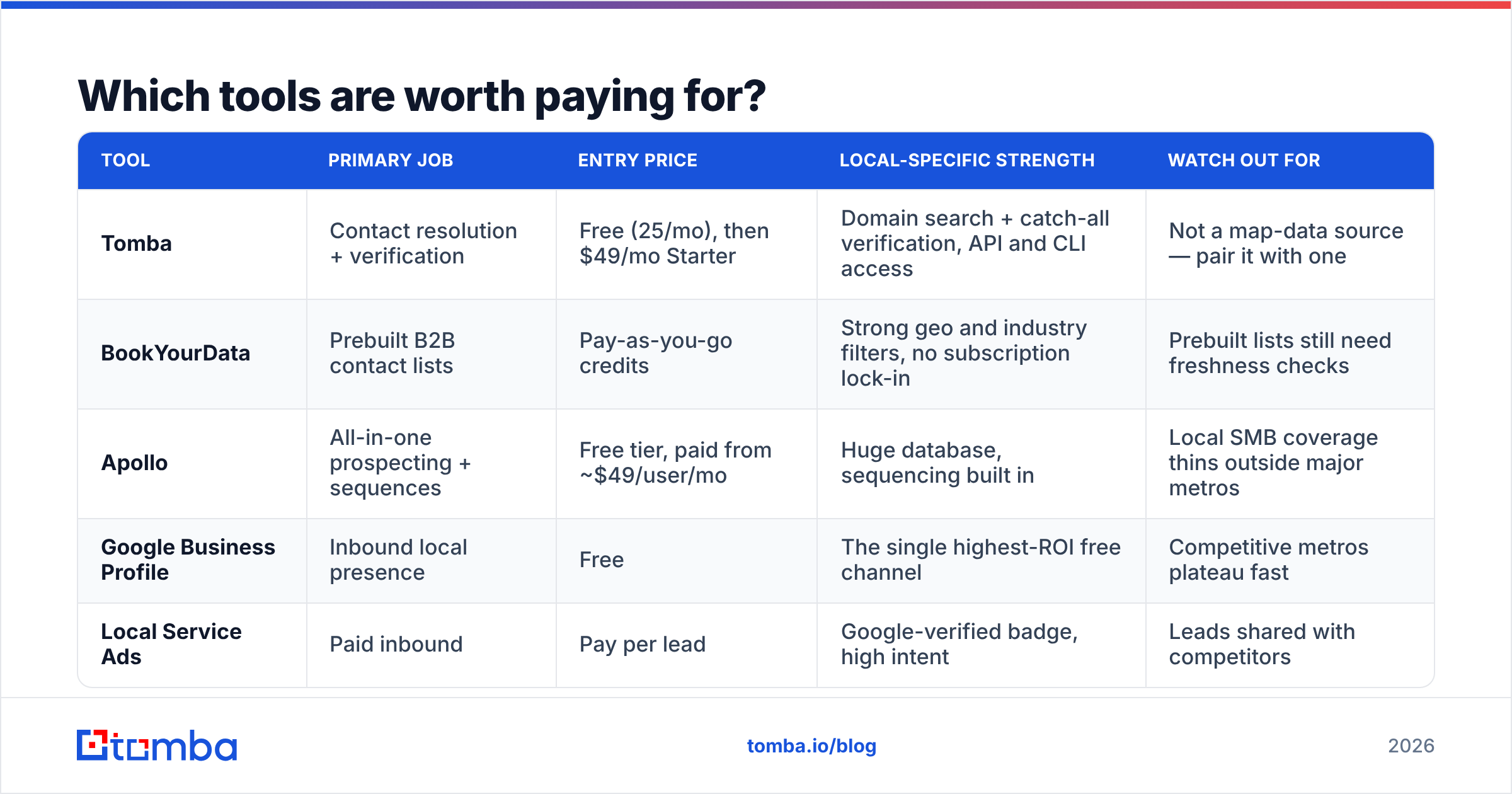
You need three functions: geographic data, contact resolution, and sending. Some tools cover two; almost none cover all three well.
| Tool | Primary job | Entry price | Local-specific strength | Watch out for |
|---|---|---|---|---|
| Tomba | Contact resolution + verification | Free (25/mo), then $49/mo Starter | Domain search + catch-all verification, API and CLI access | Not a map-data source — pair it with one |
| BookYourData | Prebuilt B2B contact lists | Pay-as-you-go credits | Strong geo and industry filters, no subscription lock-in | Prebuilt lists still need freshness checks |
| Apollo | All-in-one prospecting + sequences | Free tier, paid from ~$49/user/mo | Huge database, sequencing built in | Local SMB coverage thins outside major metros |
| Google Business Profile | Inbound local presence | Free | The single highest-ROI free channel | Competitive metros plateau fast |
| Local Service Ads | Paid inbound | Pay per lead | Google-verified badge, high intent | Leads shared with competitors |
The pattern most local teams land on: a map/geo source for the business layer, a contact resolver for the people layer, and a sending tool with conservative volume limits. Tomba's plans start free at 25 searches so you can test list quality on one category before committing budget — worth doing, because list quality varies enormously by vertical and metro.
If you'd rather buy a list than build one, BookYourData is a reasonable option for geo-filtered B2B data, particularly when you need coverage in a category you can't easily enumerate from maps. Just run it through verification before you send — that's true of every purchased list regardless of vendor.

What should a local outreach message actually say?#
Short, specific, and geographically anchored. The advantage you have over a national sender is that you can prove you're local — use it.
Three things that measurably lift reply rates on local campaigns:
- Name the neighborhood, not the city. "Your Northside location" beats "your Chicago business." It signals you looked.
- Reference something observable. A recent review theme, a new service page, a hiring post, a second location. One line is enough.
- Offer something proximity-shaped. An in-person visit, a same-week response, a local reference customer. These are things a national competitor structurally cannot offer.
What doesn't work: the "I noticed you're a [category] in [city]" opener. Every automated tool produces that line, and local owners have seen it four hundred times.
Keep the first email under 90 words. Local decision-makers read email on a phone between jobs. If it needs scrolling, it gets archived. If you want a starting structure, the cold email templates library is a reasonable baseline — just strip out anything that sounds like it was written for a VP of Revenue Operations at a 500-person company.
How do you keep local deliverability from collapsing?#
Local outbound has a specific deliverability risk that national outbound doesn't: domain clustering. If you're emailing 200 businesses in one metro, a meaningful chunk of them share the same regional email host or the same website-builder mail service. One spam complaint in that cluster propagates faster than it would across a diversified national list.
Practical guardrails:
- Cap daily sends per inbox at 30-40 for local campaigns, lower than the 50 you might use nationally.
- Warm the sending domain for at least three weeks before the first real campaign. Use a warmup calculator to set a realistic ramp rather than guessing.
- Keep bounce rate under 2% — which is a list problem, not a sending problem. Verify first with an email verifier, then send.
- Check your SPF record, DKIM, and DMARC before the first send. Since 2024 both Gmail and Outlook enforce authentication for bulk senders, and "bulk" thresholds keep dropping.
- Monitor your sender reputation weekly, not monthly. Local campaigns are short and finite; by the time a monthly check catches a problem, the campaign is over.
The Google Postmaster Tools documentation is the authoritative source on what Gmail actually penalizes. Read it once properly — it's more useful than most deliverability blog posts, including this section.
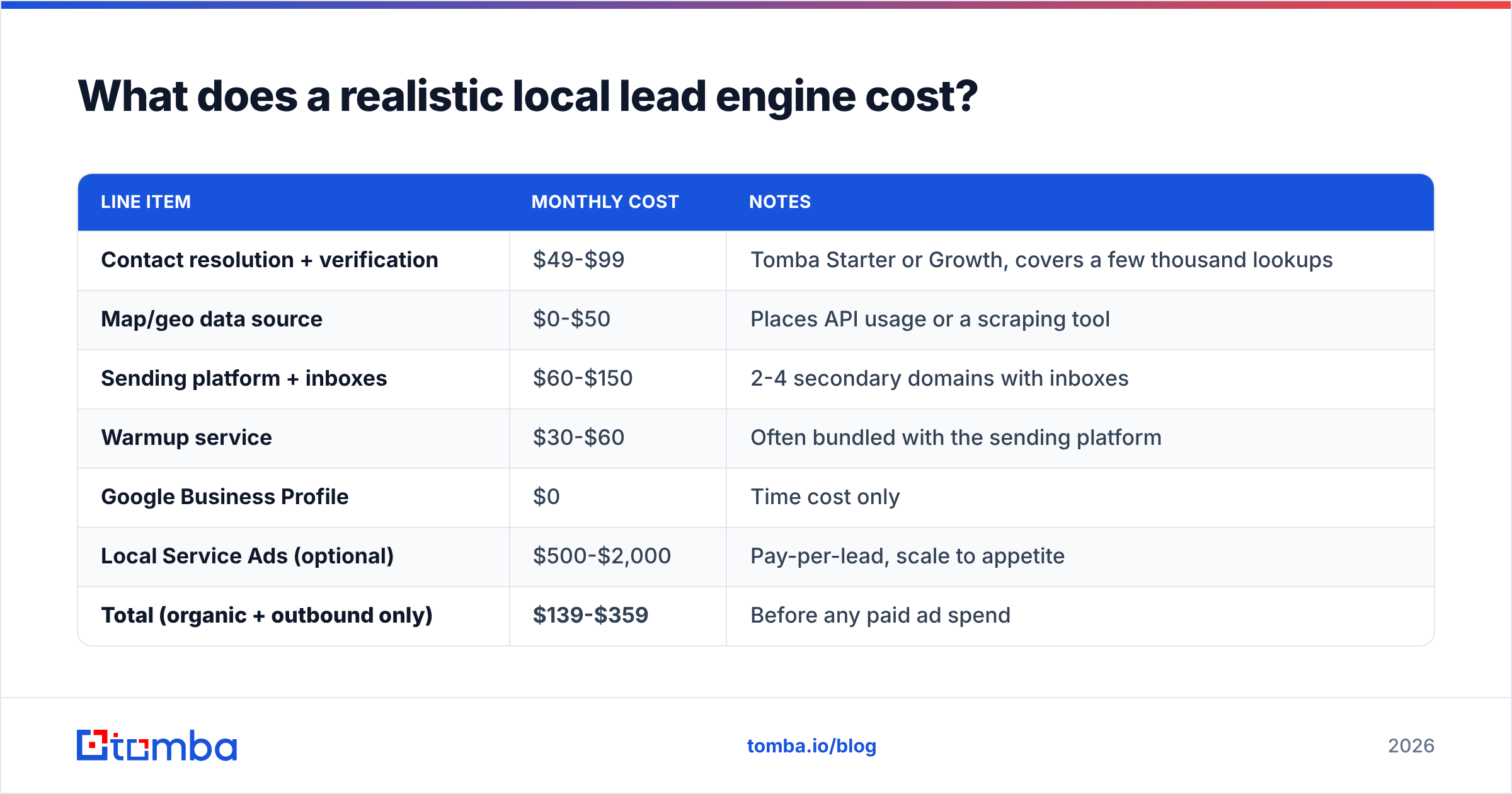
What does a realistic local lead engine cost?#
For a small local operator targeting one metro:
| Line item | Monthly cost | Notes |
|---|---|---|
| Contact resolution + verification | $49-$99 | Tomba Starter or Growth, covers a few thousand lookups |
| Map/geo data source | $0-$50 | Places API usage or a scraping tool |
| Sending platform + inboxes | $60-$150 | 2-4 secondary domains with inboxes |
| Warmup service | $30-$60 | Often bundled with the sending platform |
| Google Business Profile | $0 | Time cost only |
| Local Service Ads (optional) | $500-$2,000 | Pay-per-lead, scale to appetite |
| Total (organic + outbound only) | $139-$359 | Before any paid ad spend |
Under $400/month gets you a functioning outbound and inbound local engine. The expensive failure isn't tooling — it's spending three months emailing a list where 40% of the addresses were never going to land, then concluding local outbound doesn't work.
Where does this go wrong most often?#
Four recurring mistakes, in order of how much damage they do:
- Sending to an unverified list. Fastest way to burn a domain. Always the first thing to fix.
- Targeting the business instead of the person.
info@is a form, not a human. Named contacts reply at several times the rate of role addresses. - Treating the metro as one segment. A 900-contact list with one message will underperform three 300-contact lists with three messages, every time.
- Abandoning after one pass. Local TAM is small, so a single touch across 500 businesses feels like "we tried outbound." It isn't. Three to four touches over six weeks is the minimum honest test.
If you're seeing sub-1% reply rates, the problem is almost certainly #1 or #2, not your copy.
Getting started#
Pick one category and one ZIP-code cluster. Pull the businesses, resolve 100 named contacts, verify all of them, and send a four-touch sequence. That's a real test, and it costs under a hundred dollars.
The Tomba Email Finder is built for exactly this step — turning a list of local business domains into verified, named, role-tagged contacts you can actually reach. The free tier gives you 25 searches to check data quality in your specific vertical and metro before you spend anything, and Starter at $49/mo covers most single-market operators. Start with one category, measure the bounce rate, and scale from what actually holds up.
Related guides#
Ready to find emails that actually work?
Join 150,000+ professionals who stopped guessing and started sending. Free credits on signup — no credit card required.
Get the Tomba newsletter
Practical outbound tactics and product updates — once every two weeks.
About the author