Generating Sales Leads in 2026: The Complete Playbook
Most lead gen advice stops at "post on LinkedIn." This is the operational version: how to source, verify, score, and route leads in 2026 — with real numbers, real tools, and the tradeoffs nobody lists.
TL;DR
- Generating sales leads in 2026 is a data problem before it is a messaging problem. Bad contact data caps your reply rate no matter how good the copy is.
- The three durable channels are outbound email, inbound/SEO, and warm referral or partner motion. Everything else — paid social, events, cold calling — is a supplement with a much higher cost per qualified lead.
- Expect roughly $30–$120 cost per qualified B2B lead outbound, $150–$400 paid search, and near-zero marginal cost inbound after the content investment is sunk.
- Verify every address before it hits a sequence. A 5% bounce rate is the line where inbox providers start throttling you.
- The winning stack is small: a source of contacts, a verifier, a sequencer, and a CRM with clean routing. Not eleven tools.
What does "generating sales leads" actually mean in 2026?#
A lead is a person or account you have a defensible reason to contact and a working way to reach them. That definition kills half the "lead lists" floating around, because most of them fail the second half — the contact data is stale, the role has changed, or the mailbox bounces.
The shift since 2023 is that supply is no longer the constraint. You can pull 50,000 contacts matching an ICP in an afternoon. What's constrained is deliverability and attention. Google and Microsoft tightened bulk-sender requirements in 2024, and enforcement has only hardened since. If your list is dirty, your domain gets throttled before your message gets read.
So generating sales leads now breaks into four jobs, in order:
- Define the ICP narrowly enough to be wrong quickly. "SaaS companies 50–500 employees" is not an ICP. "Series B vertical SaaS with a self-serve motion and a named RevOps hire" is.
- Source contacts with verifiable identity signals — a real name, a real role, a real domain, a verified address.
- Verify and score before any send. Bounce risk and fit risk are separate checks and both are cheap relative to burning a sending domain.
- Route and sequence with an owner, an SLA, and a defined next step.
Skip step 3 and steps 1, 2, and 4 stop mattering.
Which lead generation channels are worth your budget?#
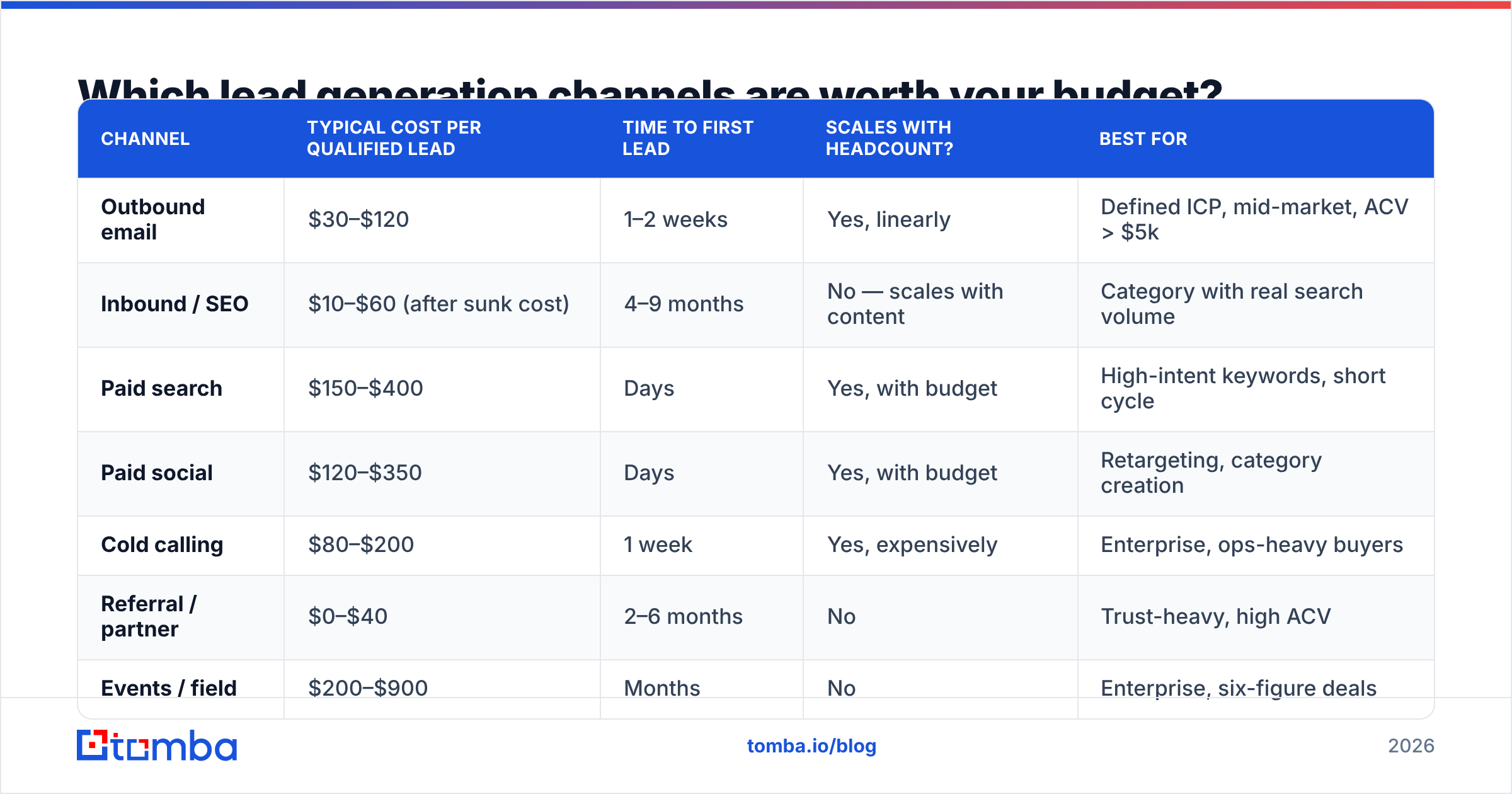
Here's what the channel economics look like for a typical B2B team with a $10k–$40k ACV. Numbers are directional ranges drawn from vendor benchmarks and practitioner reporting, not guarantees — your ICP moves every one of them.
| Channel | Typical cost per qualified lead | Time to first lead | Scales with headcount? | Best for |
|---|---|---|---|---|
| Outbound email | $30–$120 | 1–2 weeks | Yes, linearly | Defined ICP, mid-market, ACV > $5k |
| Inbound / SEO | $10–$60 (after sunk cost) | 4–9 months | No — scales with content | Category with real search volume |
| Paid search | $150–$400 | Days | Yes, with budget | High-intent keywords, short cycle |
| Paid social | $120–$350 | Days | Yes, with budget | Retargeting, category creation |
| Cold calling | $80–$200 | 1 week | Yes, expensively | Enterprise, ops-heavy buyers |
| Referral / partner | $0–$40 | 2–6 months | No | Trust-heavy, high ACV |
| Events / field | $200–$900 | Months | No | Enterprise, six-figure deals |
Two things fall out of this table that most teams get wrong.
First, outbound is not dead — bad outbound is dead. The cost per qualified lead stayed roughly flat while reply rates fell, because the teams still winning cut volume by 70% and raised targeting precision. Sending 200 well-researched emails a week beats 2,000 sprayed ones on both pipeline and domain health.
Second, inbound looks cheapest only after you've paid for it. A blog that produces leads at $20 each cost you nine months and a writer. Model it as capital expenditure, not as a channel you can turn on this quarter.
How do you build a lead source that doesn't decay?#
B2B contact data decays at roughly 20–30% per year — people change jobs, companies rebrand, domains migrate. That means a list you bought in January is meaningfully wrong by summer. Your source needs to be a pipeline, not a purchase.
Four sourcing motions, ranked by durability:
- Domain-first sourcing. Build the account list first (from funding data, tech signals, job postings, or a customer-lookalike model), then resolve contacts per domain. A domain search pulls current addresses and email patterns for a company on demand, so you're never working from a snapshot.
- Trigger-based sourcing. Watch for events that create budget or urgency: a new VP hire, a funding round, a tooling change detected on the site. Then resolve the specific human who owns the problem.
- Traffic-based sourcing. Identify companies already visiting your site and reach the relevant buyer there. Website visitor reveal turns anonymous traffic into named accounts, which is the closest outbound gets to warm.
- Static list purchase. Fastest, decays fastest. Useful for market sizing and for testing a new segment cheaply — not as your primary engine.
The practical rule: resolve contacts at send time, not at planning time. If your workflow pulls a fresh address the week you're sending, decay stops being your problem. That's why an email finder API inside the workflow beats an exported CSV sitting in a shared drive.
Why does data accuracy decide your reply rate?#
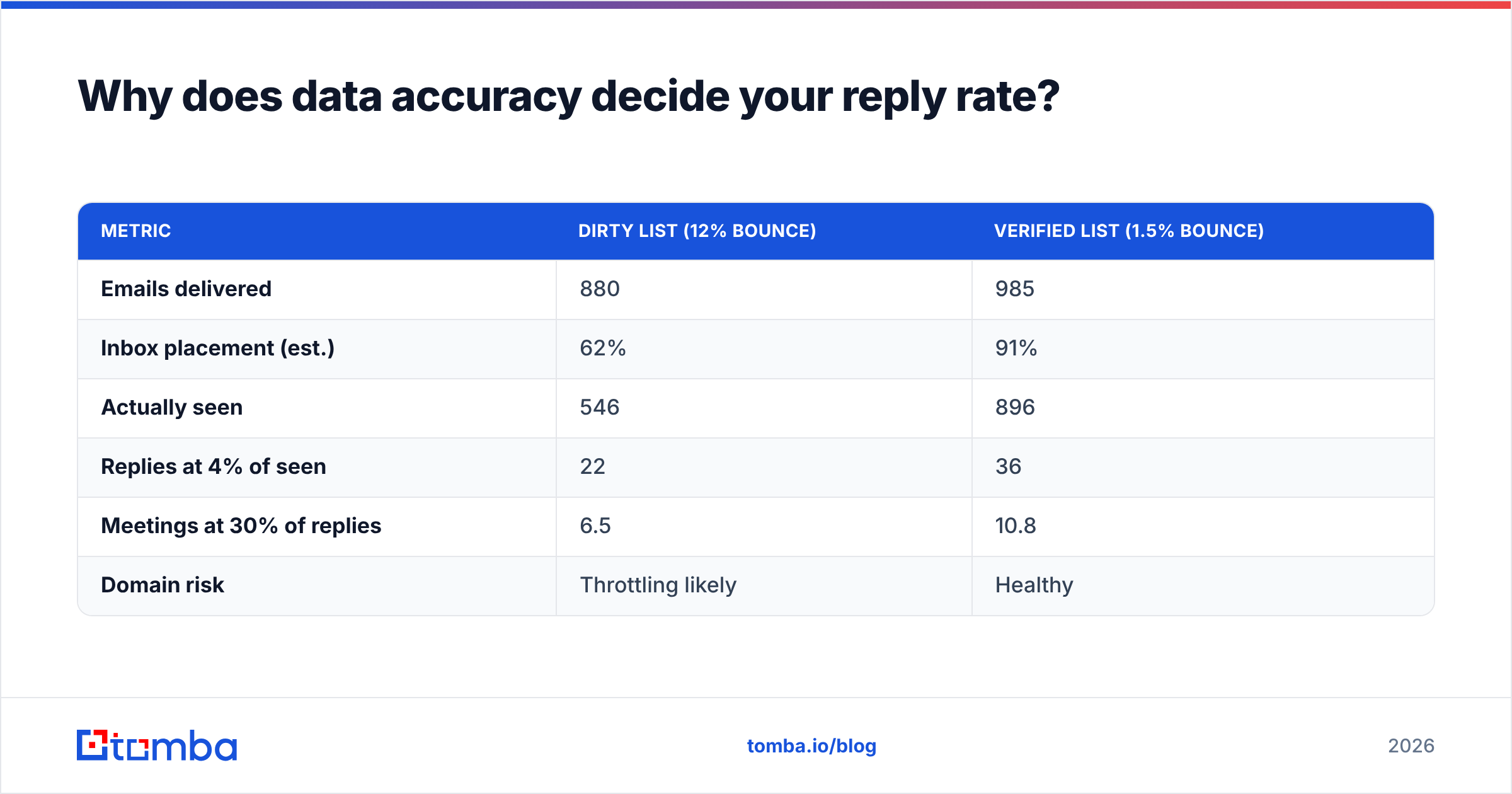
Because deliverability gates everything downstream. Run the arithmetic on 1,000 contacts:
| Metric | Dirty list (12% bounce) | Verified list (1.5% bounce) |
|---|---|---|
| Emails delivered | 880 | 985 |
| Inbox placement (est.) | 62% | 91% |
| Actually seen | 546 | 896 |
| Replies at 4% of seen | 22 | 36 |
| Meetings at 30% of replies | 6.5 | 10.8 |
| Domain risk | Throttling likely | Healthy |
Same copy. Same offer. Same sender. A 66% swing in meetings booked, entirely from data hygiene. And the dirty-list column understates the damage, because a throttled domain drags down next month's campaign too.

The mechanics are unglamorous. Run every address through an email verifier before it enters a sequence. Treat catch-all domains separately — they accept everything at SMTP and tell you nothing, so a dedicated catch-all verifier is the only way to score them honestly rather than guessing. Suppress role addresses (info@, sales@, support@) unless you have a specific reason to hit them.
Google's own bulk sender guidelines put the spam-complaint threshold at 0.3% and require authenticated sending. Your bounce rate should sit under 2%; over 5% and you're actively damaging your sender reputation.
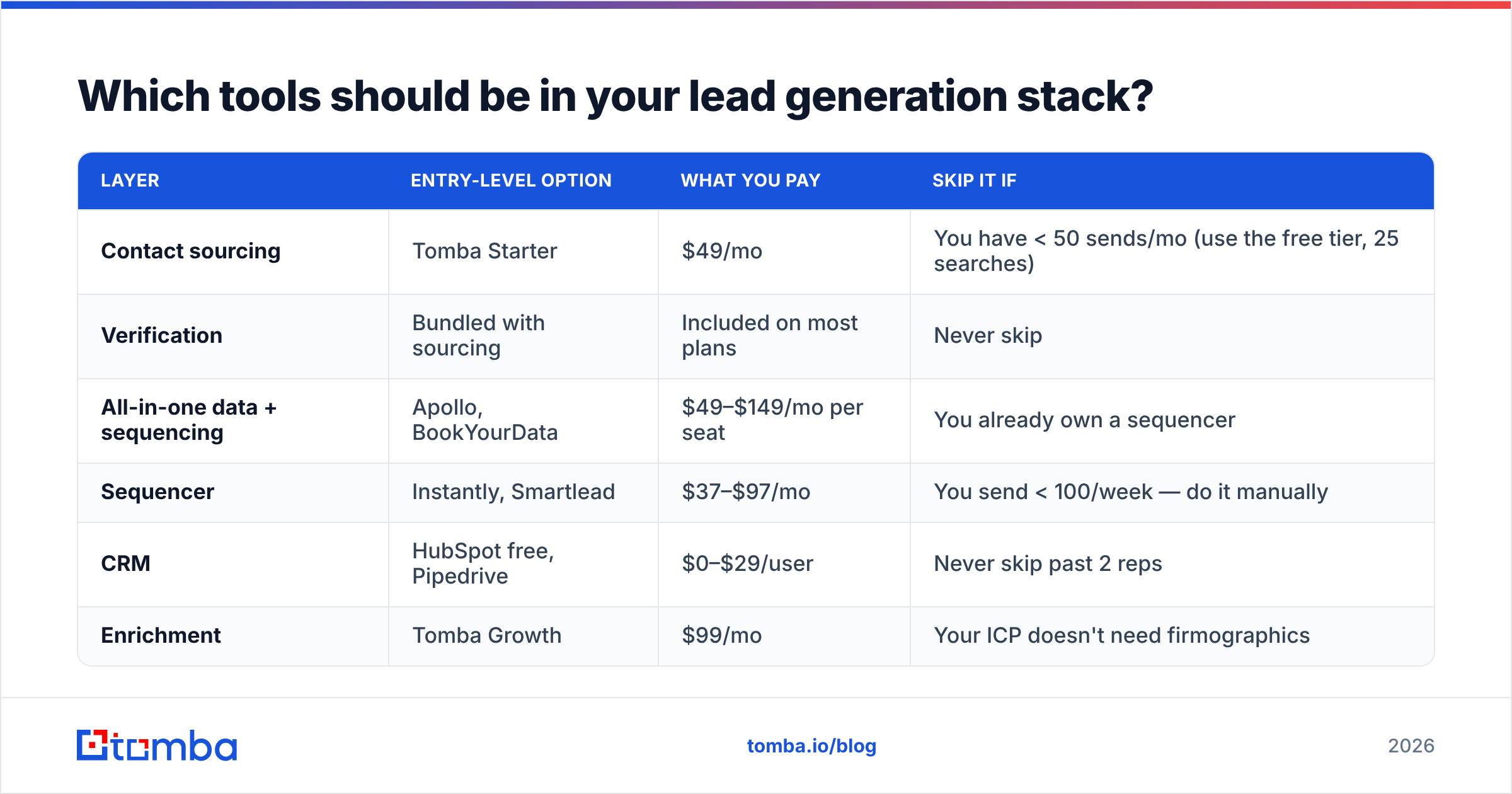
Which tools should be in your lead generation stack?#
Most teams over-buy. Here's the honest breakdown of what each layer costs and what you actually need at each stage.
| Layer | Entry-level option | What you pay | Skip it if |
|---|---|---|---|
| Contact sourcing | Tomba Starter | $49/mo | You have < 50 sends/mo (use the free tier, 25 searches) |
| Verification | Bundled with sourcing | Included on most plans | Never skip |
| All-in-one data + sequencing | Apollo, BookYourData | $49–$149/mo per seat | You already own a sequencer |
| Sequencer | Instantly, Smartlead | $37–$97/mo | You send < 100/week — do it manually |
| CRM | HubSpot free, Pipedrive | $0–$29/user | Never skip past 2 reps |
| Enrichment | Tomba Growth | $99/mo | Your ICP doesn't need firmographics |
A few calibration notes so this reads as it should:
Tomba (pricing) is built around the finder-plus-verifier core: free tier at 25 searches/month, Starter $49/mo, Growth $99/mo, Pro $249/mo, Enterprise custom. It's the right pick when you want sourcing and verification in one place and you're bringing your own sequencer. The Chrome extension, Google Sheets add-on, and HubSpot integration matter more than the raw credit count for most teams, because they're where the workflow actually lives.
BookYourData is a genuinely strong option if you prefer a pay-as-you-go database model with an accuracy guarantee rather than a monthly subscription — different purchasing shape, same goal, and worth pricing against a subscription tool before you commit.
Apollo bundles data and sequencing, which is convenient at seat scale and expensive at seat scale. If you outgrow it or want to unbundle, the Apollo alternative comparison walks the tradeoffs.
Whatever you pick, verify the vendor's coverage against your ICP with a 100-row sample before you sign an annual deal. Vendor-published accuracy rates are averages across their whole database and tell you almost nothing about your specific segment. G2's lead intelligence category is a reasonable place to sanity-check the field.

How do you qualify leads without slowing the pipeline?#
Scoring exists to answer one question: who gets a human, and who gets a nurture sequence. Everything else is dashboard decoration.
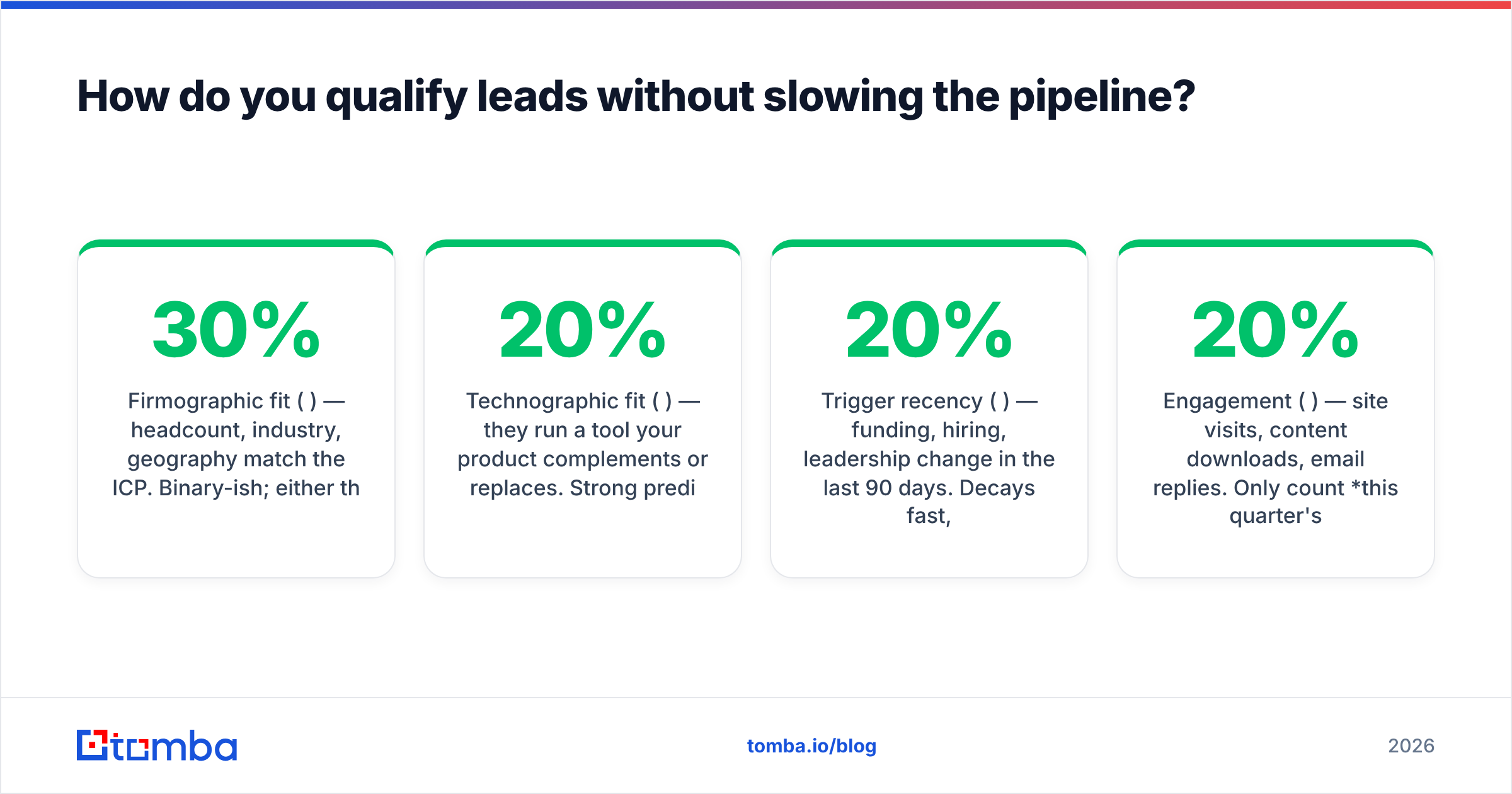
Keep it to five signals, weighted:
- Firmographic fit (30%) — headcount, industry, geography match the ICP. Binary-ish; either they're in the box or they're not.
- Technographic fit (20%) — they run a tool your product complements or replaces. Strong predictor, cheap to detect.
- Trigger recency (20%) — funding, hiring, leadership change in the last 90 days. Decays fast, so weight recency hard.
- Engagement (20%) — site visits, content downloads, email replies. Only count this quarter's activity.
- Role authority (10%) — the person can either sign or block. Weight it lowest, because you often enter below the buyer and work up.
Set the threshold so that roughly 20–30% of leads clear it. If 60% clear, your bar is too low and reps will stop trusting the score within a month. That's the failure mode nobody plans for: scoring dies from over-generosity, not from bad math.
Route cleared leads within an hour. Response-time research from HubSpot and others consistently finds sharp drop-offs in connect rate after the first hour, and the effect is large enough to swamp most copy improvements. A fast, mediocre follow-up beats a slow, perfect one.

What does a realistic 90-day lead generation build look like?#
Days 1–14 — Define and source. Write the ICP in one sentence with three disqualifiers. Build a 300-account target list manually. Resolve contacts with a bulk email finder run, verify everything, and throw out anything that doesn't come back clean. You should end with roughly 250–400 usable contacts, not 5,000.
Days 15–30 — Warm the infrastructure. New sending domain, SPF/DKIM/DMARC configured, mailbox warmed for at least three weeks before real volume. Check your SPF record is actually valid rather than assuming it. This step is boring and skipping it costs you the quarter.
Days 31–60 — Send small, measure honestly. Start at 20–30 emails per mailbox per day. Track reply rate and positive-reply rate separately — total replies include "unsubscribe" and "wrong person." Below a 3% positive reply rate, the problem is almost always targeting, not copy. Rewrite the ICP before you rewrite the subject line.
Days 61–90 — Scale what held. Add mailboxes rather than raising per-mailbox volume. Layer in a second channel — usually LinkedIn outreach or phone — against the accounts that opened but didn't reply. Now you can start buying larger data volumes, because you know what a good lead looks like in your own numbers.
The compounding mistake is inverting this: buying 50,000 contacts on day one, sending immediately, burning the domain by week three, and concluding that outbound doesn't work. It worked. The data and the ramp didn't.
What should you measure?#
Four numbers, reviewed weekly:
- Verified-contact rate — what share of sourced contacts survive verification. Below 70% and your source is weak.
- Positive reply rate — replies that want a conversation, as a share of delivered. Target 2–5% for cold, higher for triggered.
- Cost per qualified lead — fully loaded, including tooling and rep time. Compare against the channel table above.
- Lead-to-opportunity rate — the honest check on whether your scoring means anything. If it doesn't move when you tighten the score, your score is noise.
Ignore open rates. Apple's Mail Privacy Protection has made them unreliable since 2021 and no serious team should still be optimizing against them.
Start with the data layer#
Every lead generation program lives or dies on whether the contact you're reaching is real, current, and reachable. Fix that first and everything downstream — copy, cadence, channel mix — starts producing signal instead of noise.
The Tomba Email Finder is built for exactly that layer: resolve verified professional addresses by domain, name, or company, with verification built in so nothing dirty reaches your sequence. Start on the free tier at 25 searches a month, test it against 100 accounts in your actual ICP, and only scale spend once your verified-contact rate proves the source is worth it.
Related guides#
Ready to find emails that actually work?
Join 150,000+ professionals who stopped guessing and started sending. Free credits on signup — no credit card required.
Get the Tomba newsletter
Practical outbound tactics and product updates — once every two weeks.
About the author