Generect vs Jet Leads Pro: Which B2B Lead Tool Wins?
Generect and Jet Leads Pro both promise fresh B2B contacts, but they solve different problems. Here is an honest breakdown of data sourcing, verification, pricing models and export limits — plus where a dedicated email finder beats both.
TL;DR
- Generect is a real-time lead-generation platform built around LinkedIn-style search: you define an audience, it builds and refreshes the list, and it leans on live lookups rather than a static database.
- Jet Leads Pro sits in the lighter, cheaper corner of the market — a lead extraction and contact-scraping tool aimed at solo founders and small agencies who want lists fast without an enterprise contract.
- Neither tool is primarily a verification engine. If your bounce rate matters more than your list size, you will still need a dedicated verifier in the chain.
- Pricing models differ structurally: Generect sells recurring credit tiers with API access, Jet Leads Pro leans toward low-cost or lifetime-style access with tighter export caps.
- For teams that mainly need accurate work emails at a predictable price, a focused email finder like Tomba (free tier at 25 searches/mo, Starter at $49/mo) is usually the cheaper, cleaner layer under whichever prospecting tool you choose.
What are Generect and Jet Leads Pro?#
Short version: both sell you B2B contact data, but they get it different ways and sell it to different buyers.
Generect positions itself as a real-time lead generation engine. Instead of handing you a frozen snapshot of a database that was scraped 14 months ago, it runs searches against live sources when you request them, then enriches the results with work emails and company attributes. That design choice matters: real-time lookup tends to produce fresher job titles and fewer "left the company in 2023" ghosts, at the cost of slower bulk pulls and a pricing model that has to charge per lookup rather than per seat. You can see their current positioning on the Generect site.
Jet Leads Pro occupies the opposite end. It targets the individual operator — the agency owner, the freelance SDR, the founder doing their own outbound — with an extraction-first workflow: point it at a search, pull contacts, export CSV, load into a sequencer. The appeal is price and speed, not governance, compliance documentation, or API depth.
That distinction drives everything below. You are not really choosing between two versions of the same product. You are choosing between a data platform and a data extractor.
How the two tools differ structurally#
- Data acquisition model — Generect leans on live queries against professional networks and company sources; Jet Leads Pro leans on extraction and stored results from prior pulls.
- Who it is priced for — Generect's tiers assume a team with a budget line; Jet Leads Pro's assume a card-swipe purchase under $100.
- Verification depth — Generect applies pattern and SMTP-style checks on found emails; Jet Leads Pro typically returns what it found, verification optional or bolt-on.
- API and automation — Generect exposes an API for pipeline work; extraction tools often stop at CSV export and a browser extension.
- Compliance posture — Enterprise-oriented platforms publish GDPR/CCPA handling and DPA terms; budget extractors frequently do not, which becomes your legal problem, not theirs.
- Support expectations — Recurring-subscription vendors staff support; low-cost or lifetime-deal tools usually do not.

How accurate is the data from each?#
Accuracy is the only metric that survives contact with a real inbox, and it is the one every vendor's marketing page treats loosely.
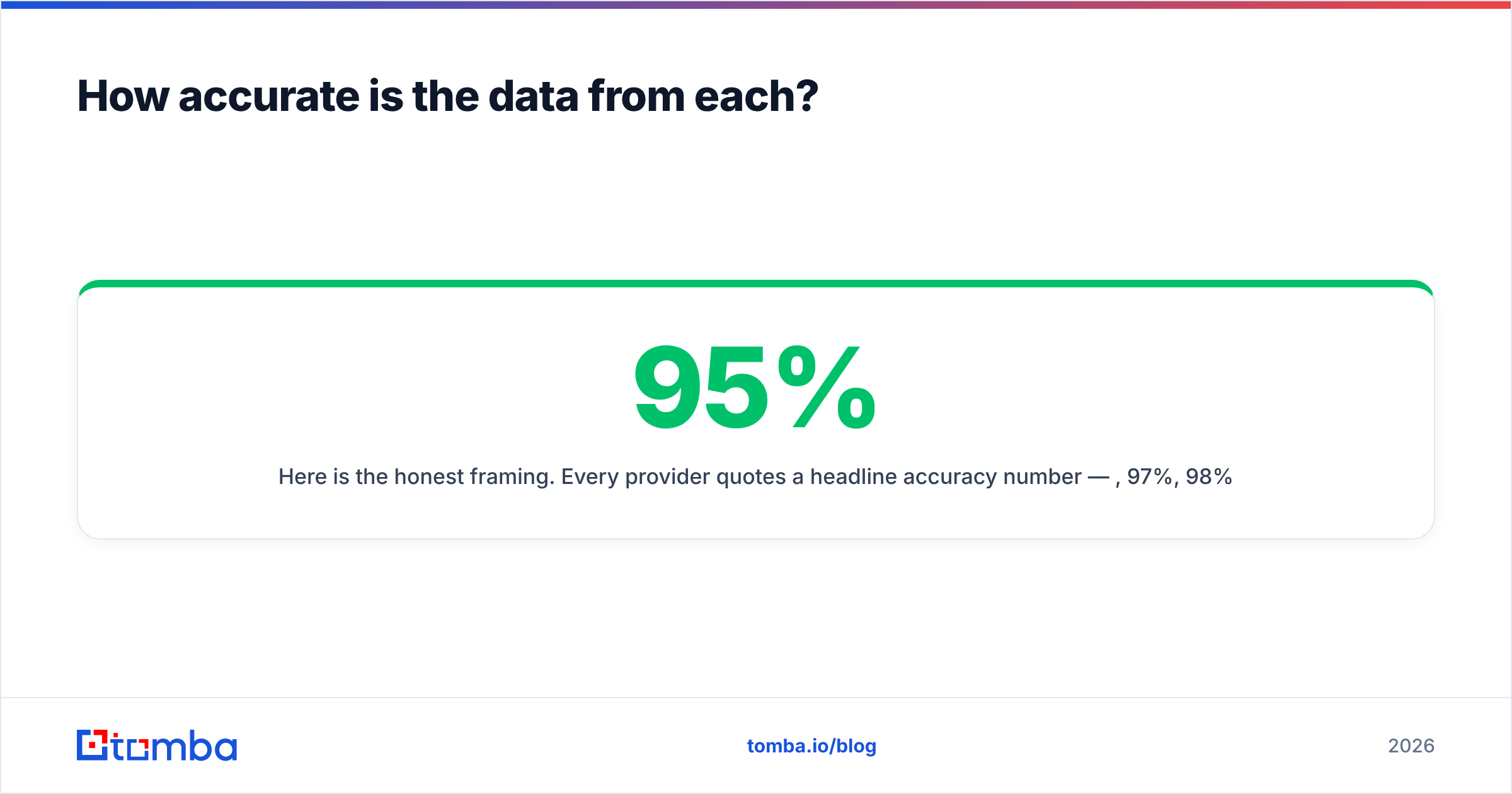
Here is the honest framing. Every provider quotes a headline accuracy number — 95%, 97%, 98% — and every number is measured on a sample the vendor chose. What actually determines your bounce rate is three things:
- Recency of the source record. A correct email from 2022 is a wrong email in 2026 if the person changed jobs. Real-time lookup wins here; static database resale loses.
- Whether the domain is catch-all. Roughly a fifth of B2B domains accept every address at the SMTP layer, which makes standard verification return "valid" for addresses that do not exist. Tools that do not flag catch-all separately are quietly inflating their accuracy claims. This is exactly what a dedicated catch-all verifier exists to solve.
- Pattern guessing vs. confirmed sighting. Guessing
first.last@domain.comfrom a naming convention is not the same as having observed that address in a public source. Good tools tell you which one you got; weak tools present both as equal.

In practice: Generect's real-time model gives it a structural advantage on freshness, particularly for roles that churn (SDRs, marketing managers, anyone at a Series B company). Jet Leads Pro's extraction model is faster and cheaper for stable targets — an owner-operated dental practice's contact address does not change quarterly — but degrades harder on high-churn segments.
If you are running cold outbound at volume, assume both outputs need a verification pass before they touch your sending domain. Skipping that step is the single most common cause of a burned domain, and no lead tool's marketing page will warn you about it.

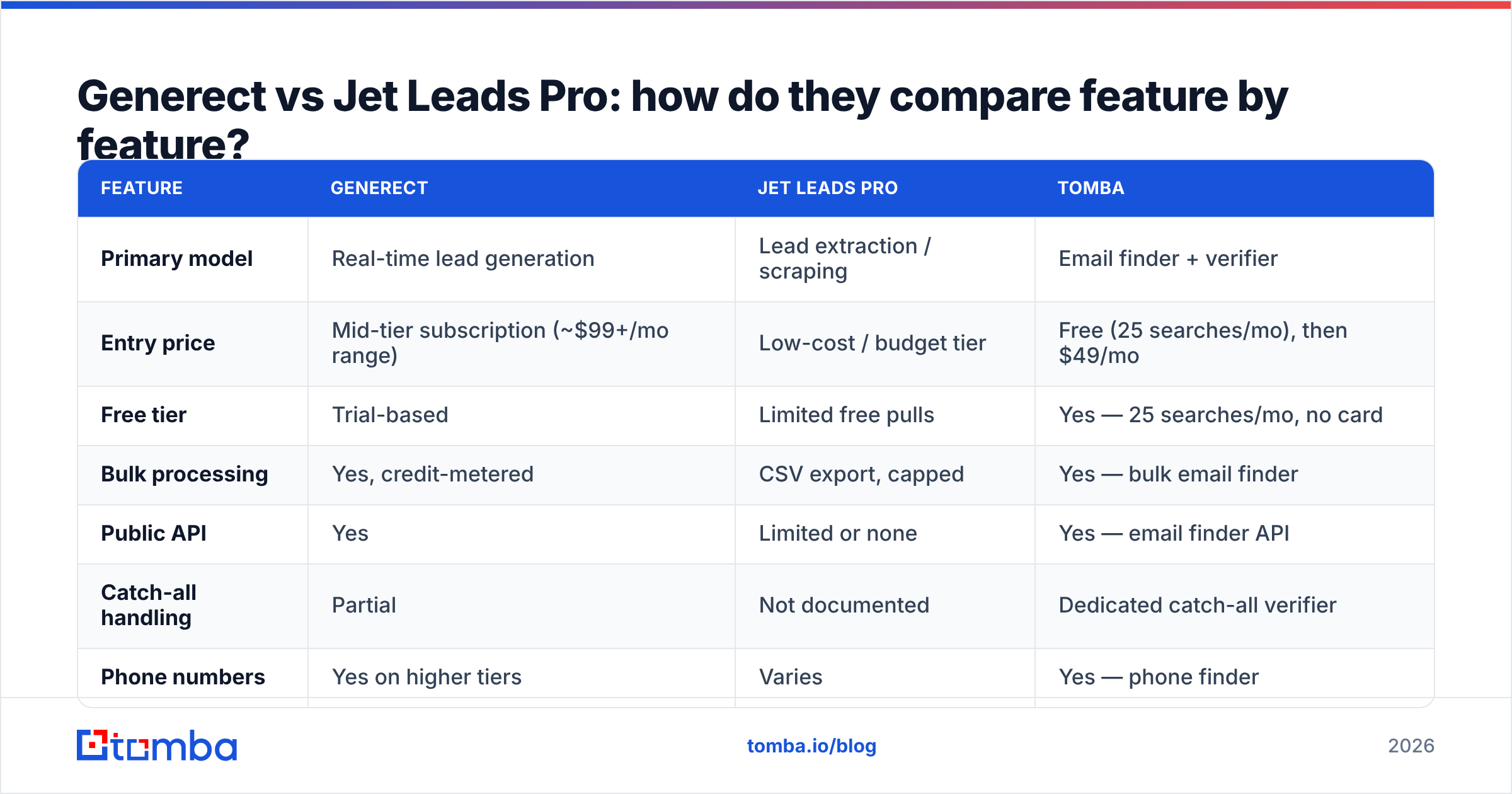
Generect vs Jet Leads Pro: how do they compare feature by feature?#
The table below reflects each vendor's publicly described positioning at the time of writing. Vendor pricing and limits change often — always confirm on the vendor's own page before you buy.
| Feature | Generect | Jet Leads Pro | Tomba |
|---|---|---|---|
| Primary model | Real-time lead generation | Lead extraction / scraping | Email finder + verifier |
| Entry price | Mid-tier subscription (~$99+/mo range) | Low-cost / budget tier | Free (25 searches/mo), then $49/mo |
| Free tier | Trial-based | Limited free pulls | Yes — 25 searches/mo, no card |
| Bulk processing | Yes, credit-metered | CSV export, capped | Yes — bulk email finder |
| Public API | Yes | Limited or none | Yes — email finder API |
| Catch-all handling | Partial | Not documented | Dedicated catch-all verifier |
| Phone numbers | Yes on higher tiers | Varies | Yes — phone finder |
| Chrome extension | Yes | Yes | Yes |
| Verification included | Basic | Add-on / optional | Native verifier included |
| Best fit | Teams needing fresh, enriched lists | Solo operators on a budget | Teams needing accurate emails at a fixed cost |

What the table does not show#
Three things matter that no feature grid captures:
- Credit burn rate. A tool that charges a credit for a failed lookup is materially more expensive than one that only charges on success. Ask this question before signing. It changes effective cost by 20–40% on hard verticals.
- Export ceilings. Budget tools frequently cap daily or monthly exports well below what the subscription implies. That cap is where "cheap" turns expensive.
- Data lineage. Where did the record come from? Vendors that publish their data sources are making a checkable claim. Vendors that do not are asking for trust you cannot audit — and if a prospect files a GDPR access request, "we bought it from a tool" is not an answer.
Which one is better for cold outbound at volume?#
Generect, if your budget allows it — but with a verifier bolted on.
The reasoning is simple. Cold outbound at volume punishes stale data twice: once through bounces that damage your sender reputation, and again through wasted sequence slots on people who left the company. Real-time lookup reduces both failure modes. Generect's architecture is built for that.
Jet Leads Pro is the better pick when volume is low and the target list is stable. If you are sending 200 emails a month to local businesses, paying a platform subscription to solve a problem you do not have is bad math.
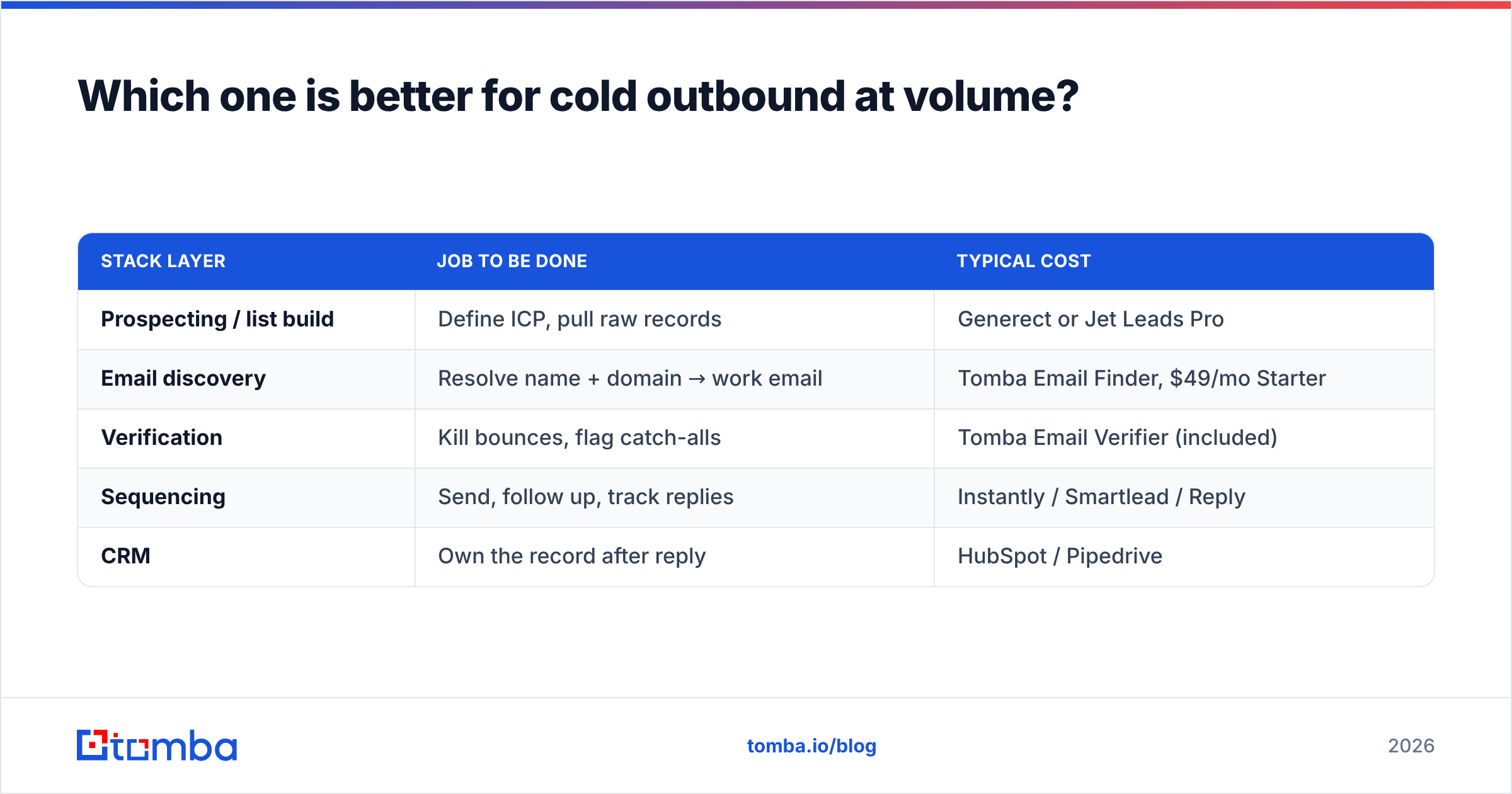
But here is the pattern that actually wins for most teams, and it is neither tool alone:
| Stack layer | Job to be done | Typical cost |
|---|---|---|
| Prospecting / list build | Define ICP, pull raw records | Generect or Jet Leads Pro |
| Email discovery | Resolve name + domain → work email | Tomba Email Finder, $49/mo Starter |
| Verification | Kill bounces, flag catch-alls | Tomba Email Verifier (included) |
| Sequencing | Send, follow up, track replies | Instantly / Smartlead / Reply |
| CRM | Own the record after reply | HubSpot / Pipedrive |
Splitting discovery from list-building is not over-engineering. It is how you stop paying platform prices for a commodity lookup, and it means switching prospecting tools does not force you to rebuild your entire data pipeline.
What does each tool actually cost in practice?#
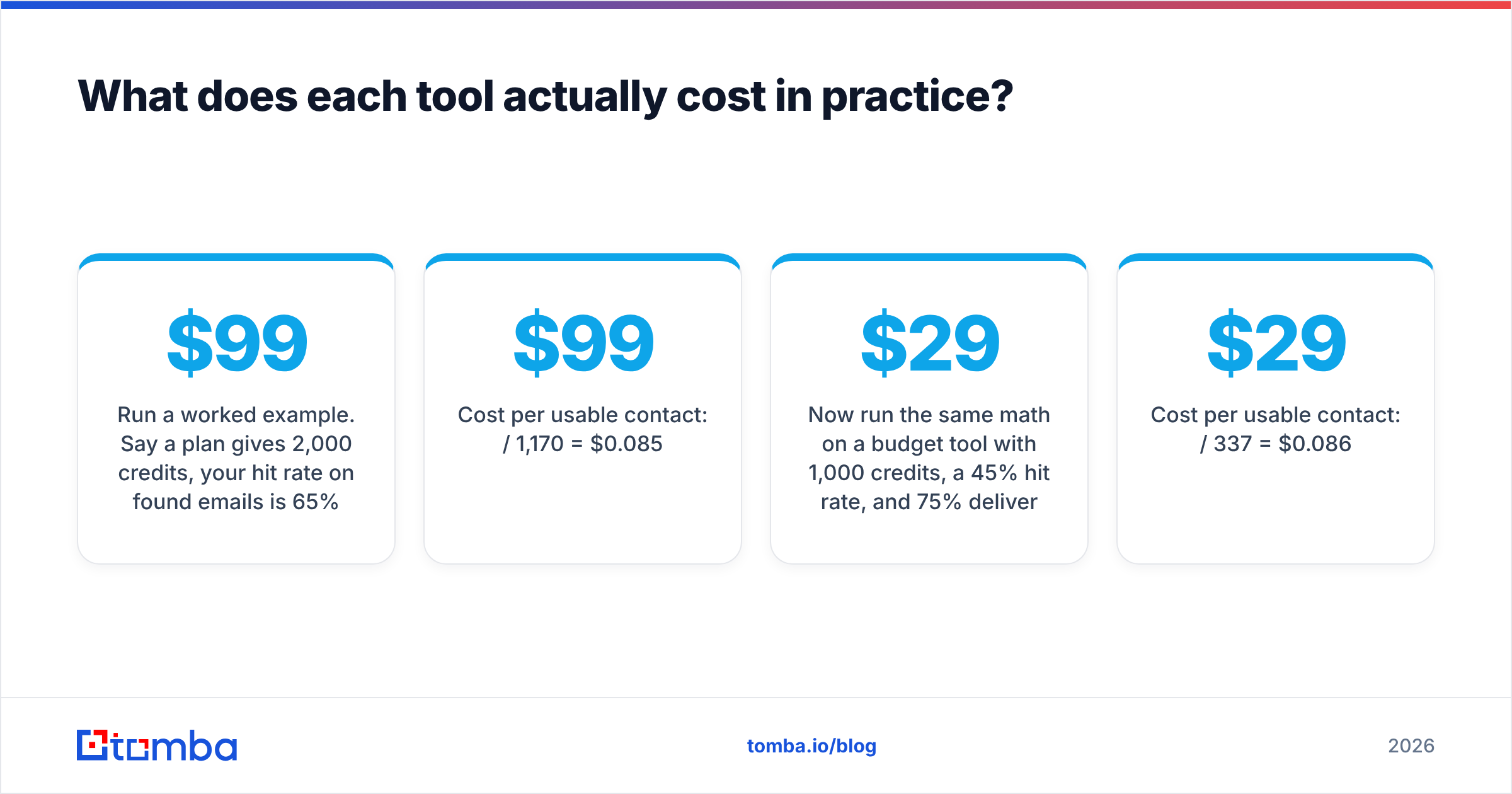
Sticker price is the least useful number in this category. Compute cost-per-usable-contact instead:
Cost per usable contact = (monthly price) / (credits × hit rate × deliverable rate)Run a worked example. Say a $99/mo plan gives 2,000 credits, your hit rate on found emails is 65%, and of those, 90% are actually deliverable after verification:
- Usable contacts: 2,000 × 0.65 × 0.90 = 1,170
- Cost per usable contact: $99 / 1,170 = $0.085
Now run the same math on a $29 budget tool with 1,000 credits, a 45% hit rate, and 75% deliverability:
- Usable contacts: 1,000 × 0.45 × 0.75 = 337
- Cost per usable contact: $29 / 337 = $0.086
Nearly identical. The cheap tool was never cheap — it just moved the cost from your invoice to your bounce rate and your SDR's time. This is the calculation most buyers skip, and it is why "we switched to save money" so often ends in a burned domain.
For reference, Tomba pricing runs a free tier at 25 searches/mo, Starter at $49/mo, Growth at $99/mo, Pro at $249/mo, and custom Enterprise — with verification included rather than metered separately, which removes one variable from the equation above.
What are the best alternatives to both?#
Neither Generect nor Jet Leads Pro is the only reasonable answer. A short, honest map of the category:
- Apollo.io — huge database plus sequencing in one product. Great if you want one bill; weaker on European data freshness. See Apollo alternatives for the trade-offs.
- BookYourData — pay-as-you-go B2B lists with a strong accuracy guarantee and no subscription lock-in. Genuinely good if you want to buy a defined list once rather than rent a platform.
- RocketReach — deep on personal contact data and executive coverage, priced accordingly.
- Clearbit / enrichment-first tools — best when you already have the accounts and need attributes, not names.
- Tomba — narrow by design: find the email, verify the email, expose it over an API. Not a sequencer, not a CRM.
Independent review sites are the sanity check here. Filter G2's lead intelligence category or Capterra's lead generation listings by company size and read the one-star reviews first — they surface export caps and credit-burn complaints that the marketing pages never mention.
How should you run the evaluation yourself?#
Do not trust anyone's benchmark, including this one. Run a 100-row bake-off — it takes about an hour and settles the argument permanently:
- Build a control list. Take 100 contacts you already have verified emails for, across at least three industries and two regions. Strip the emails.
- Run the list through each tool. Same names, same domains, same day.
- Score hit rate. What percentage returned any email?
- Score accuracy. Of those, what percentage matched your known-good address?
- Score catch-all honesty. How many domains were flagged as catch-all rather than silently marked valid?
- Score cost. Credits consumed, including credits burned on failed lookups.
The winner on step 4 and step 5 is your tool. A vendor that returns 95 emails with 60% accuracy is worse than one that returns 70 emails with 95% accuracy — the first one costs you a domain, the second one costs you 30 prospects you can find another way.
If you want to run steps 2–5 without writing code, drop the list into a Google Sheets add-on or the bulk email finder, and compare exports side by side.
The verdict#
Generect wins when data freshness justifies platform pricing — mid-market and up, high-churn target segments, teams that need API access to feed a real pipeline.
Jet Leads Pro wins when the budget is the constraint and the target list is stable — solo operators, local-business outreach, agencies validating an offer before investing in tooling.
Neither wins the verification layer, and that is the layer that determines whether your campaign lands in the inbox or the spam folder.
If email accuracy is the part of your stack that keeps breaking, start with the narrow tool built for exactly that job. The Tomba Email Finder resolves names and domains to verified work emails, flags catch-alls instead of hiding them, and includes verification in the plan rather than metering it separately. Test it on 25 searches free — run the same 100-row bake-off described above, and let the hit rate decide instead of the pricing page.
Related guides#
Ready to find emails that actually work?
Join 150,000+ professionals who stopped guessing and started sending. Free credits on signup — no credit card required.
Get the Tomba newsletter
Practical outbound tactics and product updates — once every two weeks.
About the author