Generect vs LeadGibbon 2026: B2B Lead Data Compared
Generect sells lead data through an API and search app. LeadGibbon sells LinkedIn-sourced lists through a browser extension. Here is how they actually differ on coverage, accuracy, pricing and workflow fit in 2026.
Generect vs LeadGibbon comes down to one question: do you want an API or a browser extension? Generect is data infrastructure. LeadGibbon is a list-building workbench. This guide compares both on coverage, email accuracy, pricing and workflow fit in 2026.
TL;DR
- Generect is API-first. You query companies and people in code, and it returns enriched records with work emails. It fits engineering-adjacent teams and agencies.
- LeadGibbon is extension-first. You browse LinkedIn, save leads, and export a spreadsheet with emails attached. It fits SDRs and founders who want a list today.
- Neither tool wins on every axis. Generect wins on automation and volume pricing. LeadGibbon wins on speed and an easy learning curve.
- Both share one weak spot. The email you get back is only as good as the verifier behind it, and neither sells itself as a verifier.
- If your problem is email accuracy rather than list discovery, a finder-plus-verifier stack usually costs less per delivered email.
What are Generect and LeadGibbon?#
Both tools answer the same question: who matches this profile, and how do I reach them? They just start from opposite ends.
Generect is a B2B lead database with an API on top. You define an ICP: industry, headcount, geography, job title, tech signals. It returns structured records. The pitch is that you never touch a CSV. Your CRM or your sequencer calls the endpoint, and the data lands where you need it. Generect also runs real-time lookups instead of serving only from a frozen snapshot.
LeadGibbon starts in the browser. Its core is a Chrome extension plus a web app. You run a LinkedIn Sales Navigator search, click to save the results, and LeadGibbon adds work emails and company data. Then you export to CSV, Google Sheets, or your outreach tool. It has a long review history on G2. The recurring theme there: fast and simple, sometimes patchy on emails.
Here is the short version. Generect is infrastructure. LeadGibbon is a workbench. That one difference drives almost everything below.
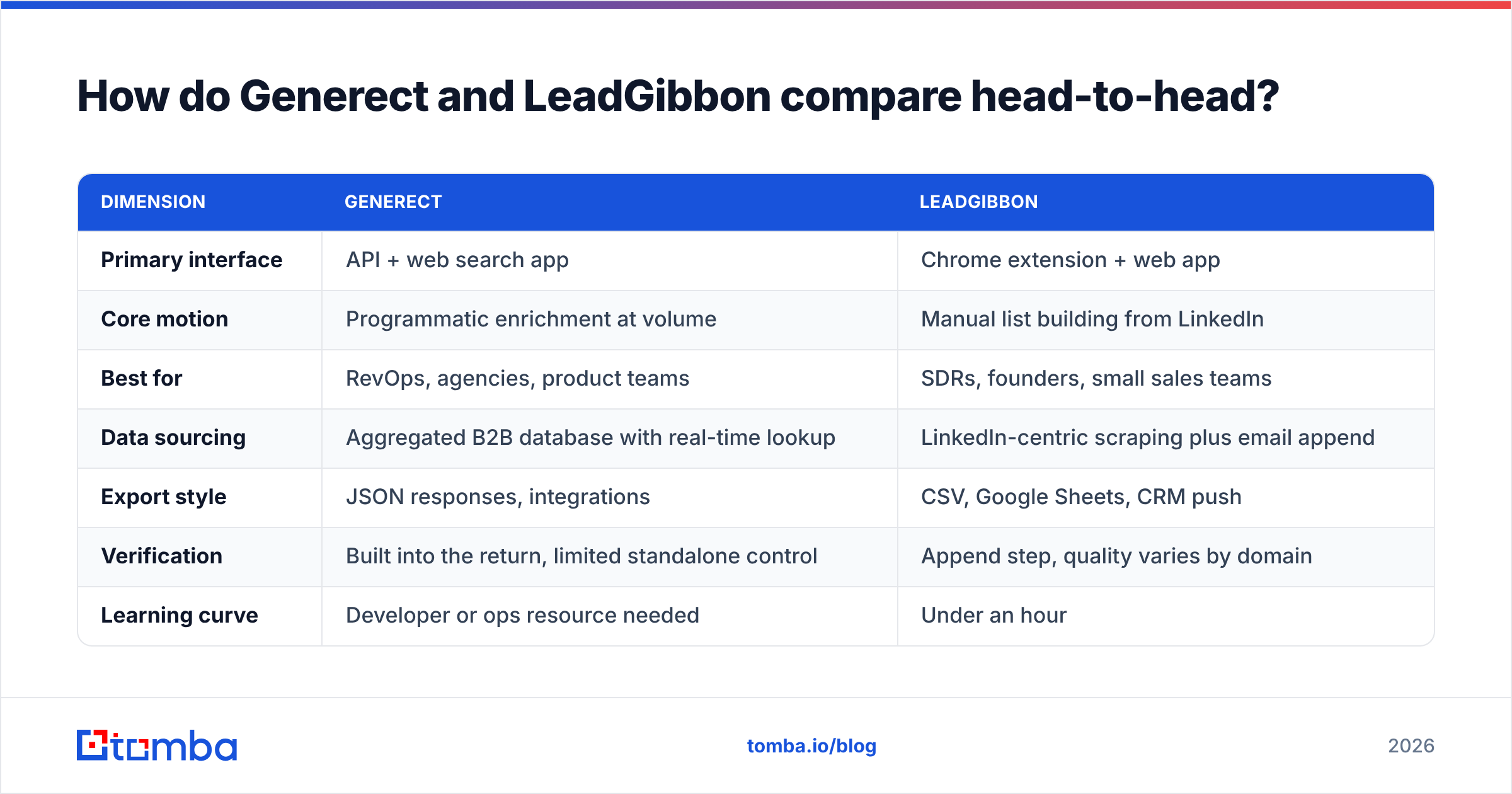
Generect vs LeadGibbon: how do they compare head-to-head?#
| Dimension | Generect | LeadGibbon |
|---|---|---|
| Interface | API + web app | Chrome extension + web app |
| Core motion | Enrichment at volume | Manual list building |
| Best for | RevOps, agencies | SDRs, founders |
| Sourcing | B2B database, live lookup | LinkedIn scrape + email append |
| Export | JSON, integrations | CSV, Sheets, CRM |
| Verification | Bundled, few controls | Append step, varies |
| Learning curve | Needs a developer | Under an hour |
| Entry cost | Higher, volume-priced | Lower, per seat |
| Phone numbers | Higher tiers | Limited |
| Weak point | Overkill for 300 leads | Ceiling at scale |
Read that table as a fork in the road, not a scoreboard. Do you have a developer and a repeat enrichment need? Then the API model wins on cost over twelve months. Are you one person who needs 400 contacts by Thursday? Then the extension gets you there first.

Which tool gives you better data coverage and accuracy?#
Coverage and accuracy are two different questions. Vendors love to blur them.
Coverage asks: does the tool have a record for this person? Generect pulls from an aggregated database, so it tends to cover more mid-market and enterprise records across regions. It does not depend on whether someone keeps an active LinkedIn profile. LeadGibbon is strong exactly where LinkedIn is strong: North America, Western Europe, tech, SaaS, marketing and recruiting. It thins out where LinkedIn adoption is low. Think manufacturing, local services, parts of APAC, and family-owned firms.
Accuracy asks: will the email actually deliver? Here both tools get graded harshly. Neither one is a verification company. Email checking is a feature bolted onto a discovery product. In practice, that means three things.
- Guessed address patterns can slip through as "found" without a real SMTP check.
- Catch-all domains come back as valid because the server accepts everything. That tells you nothing.
- Role addresses (info@, sales@, hello@) pad the count but rarely help one-to-one outbound.

Send cold email at volume and accuracy becomes the whole game. A tool that returns 1,000 addresses at 82% deliverability is worse than one that returns 700 at 96%. You pay for the bounces twice: once in credits, once in sender reputation. So most teams that scale put a dedicated email verifier in front of the sequencer, whatever discovery tool they use. Ask both vendors about catch-all verification directly. It is a line item worth pricing.
How does pricing actually compare?#
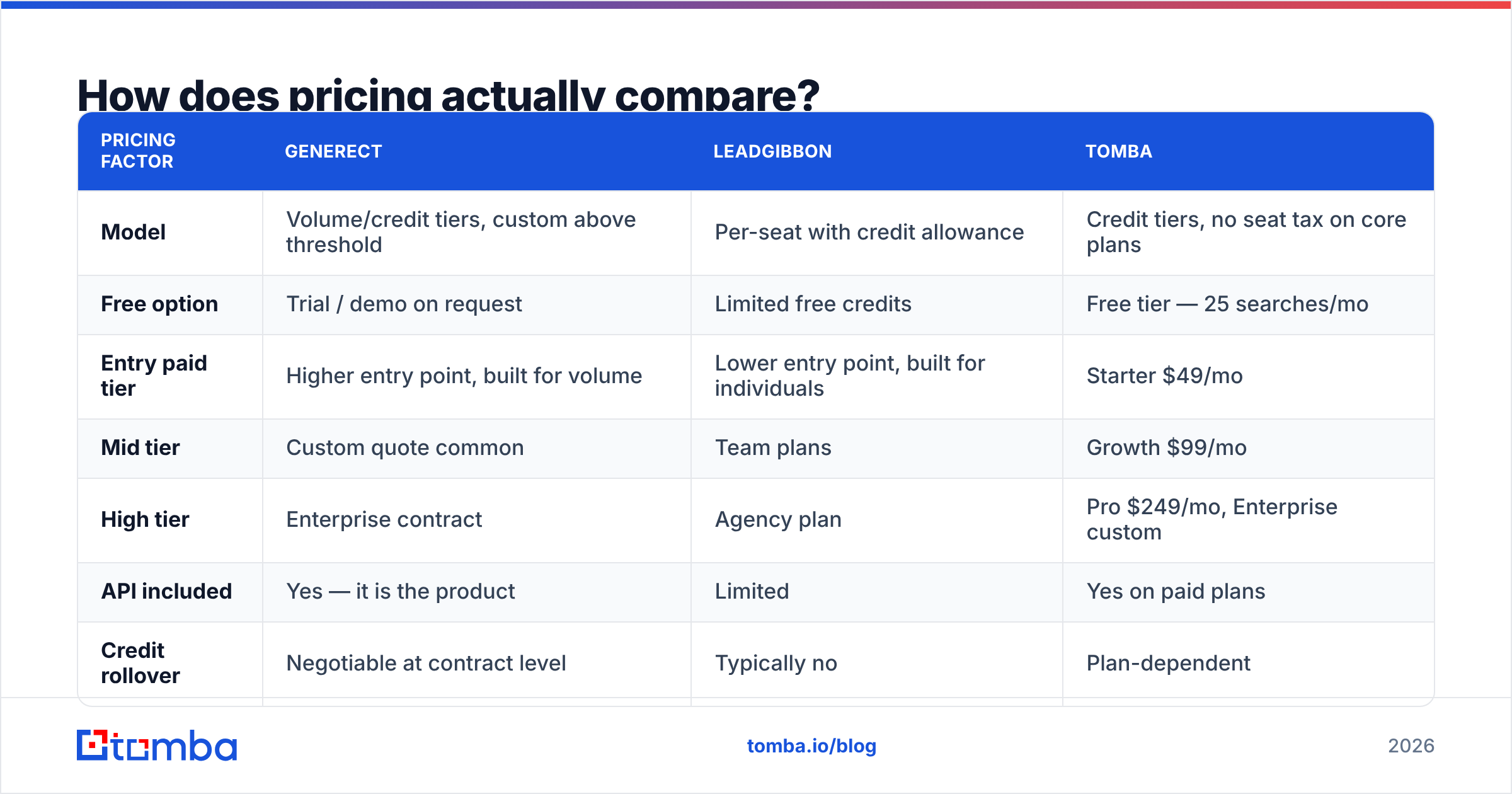
Both vendors move their pricing. Both quote custom deals above a certain volume. Treat published numbers as a starting point and confirm on the vendor page before you buy. The shape of the pricing matters more than the sticker.
| Pricing factor | Generect | LeadGibbon | Tomba |
|---|---|---|---|
| Model | Volume/credit tiers, custom above threshold | Per-seat with credit allowance | Credit tiers, no seat tax on core plans |
| Free option | Trial / demo on request | Limited free credits | Free tier — 25 searches/mo |
| Entry paid tier | Higher entry point, built for volume | Lower entry point, built for individuals | Starter $49/mo |
| Mid tier | Custom quote common | Team plans | Growth $99/mo |
| High tier | Enterprise contract | Agency plan | Pro $249/mo, Enterprise custom |
| API included | Yes — it is the product | Limited | Yes on paid plans |
| Credit rollover | Negotiable at contract level | Typically no | Plan-dependent |
Check three things before you sign anything.
- What counts as a consumed credit. A search that returns nothing should not cost the same as a verified email. Ask explicitly.
- Whether unused credits roll over. Seasonal outbound teams burn 3x in Q1 and idle in Q3. No rollover quietly doubles your cost.
- Seat pricing versus data pricing. Per-seat models get expensive when five people all need occasional access. Compare against Tomba pricing, where the meter runs on data, not headcount.
Who should choose Generect?#
Pick Generect when this sentence fits: we need this to run without a human.
- You have engineering time. The endpoint is the value. If nobody writes the integration, you bought a Ferrari for the garage.
- Enrichment is continuous, not episodic. New signups need firmographics on creation. Your CRM holds 40,000 stale records. A form submission should trigger a lookup. Those are API jobs.
- You run many ICPs. Agencies query across client accounts faster in code than in a UI.
- You need coverage beyond LinkedIn. Database-first tools win in industries where prospects skip profiles.
Where Generect frustrates people: you cannot hand it to a new SDR on day one. And for 250 contacts for a one-off event campaign, setup costs more than it saves. A UI tool or a bulk email finder upload finishes sooner.
Who should choose LeadGibbon?#
Pick LeadGibbon when speed and simplicity beat elegance.
- Your prospecting starts on LinkedIn. Reps already live in Sales Navigator. An extension captures what they are looking at, so it removes friction instead of adding a system.
- You are pre-RevOps. No ops hire, no data engineer, no appetite for a build. You need a spreadsheet now.
- Your volumes are modest. A few thousand contacts a month sits well inside what a UI workflow handles.
- You want to test an ICP cheaply. Build 200 contacts, send, read the reply rate, adjust. Fast iteration beats perfect infrastructure early on.
Where LeadGibbon frustrates people: the ceiling. Manual saving does not scale with headcount. Per-seat cost compounds. Email fill rates drop outside LinkedIn-native industries. Users also hit the usual list-tool tax, so plan to remove duplicates across saved searches before import.
What are the real limitations of each tool?#
The honest version, both sides.
Generect's weak spots
- You need a technical resource to unlock the real advantage.
- Pricing is opaque. Self-serve buyers see "contact us" where they want a number.
- If you only need discovery, not enrichment at scale, you are over-buying.
LeadGibbon's weak spots
- LinkedIn dependency makes LinkedIn's rate limits and account risk your problem.
- Email quality swings by domain type. Catch-all handling is the usual complaint.
- Per-seat economics punish teams that grow.
What they share
- Neither is verification-first, so bounce management stays your job.
- Neither replaces a sequencer, a CRM, or deliverability tooling.
- Both are one layer in a stack. You still need warmup, authentication records, and list hygiene. If your SPF record is broken, no data vendor saves you.

Is there a better alternative for email finding specifically?#
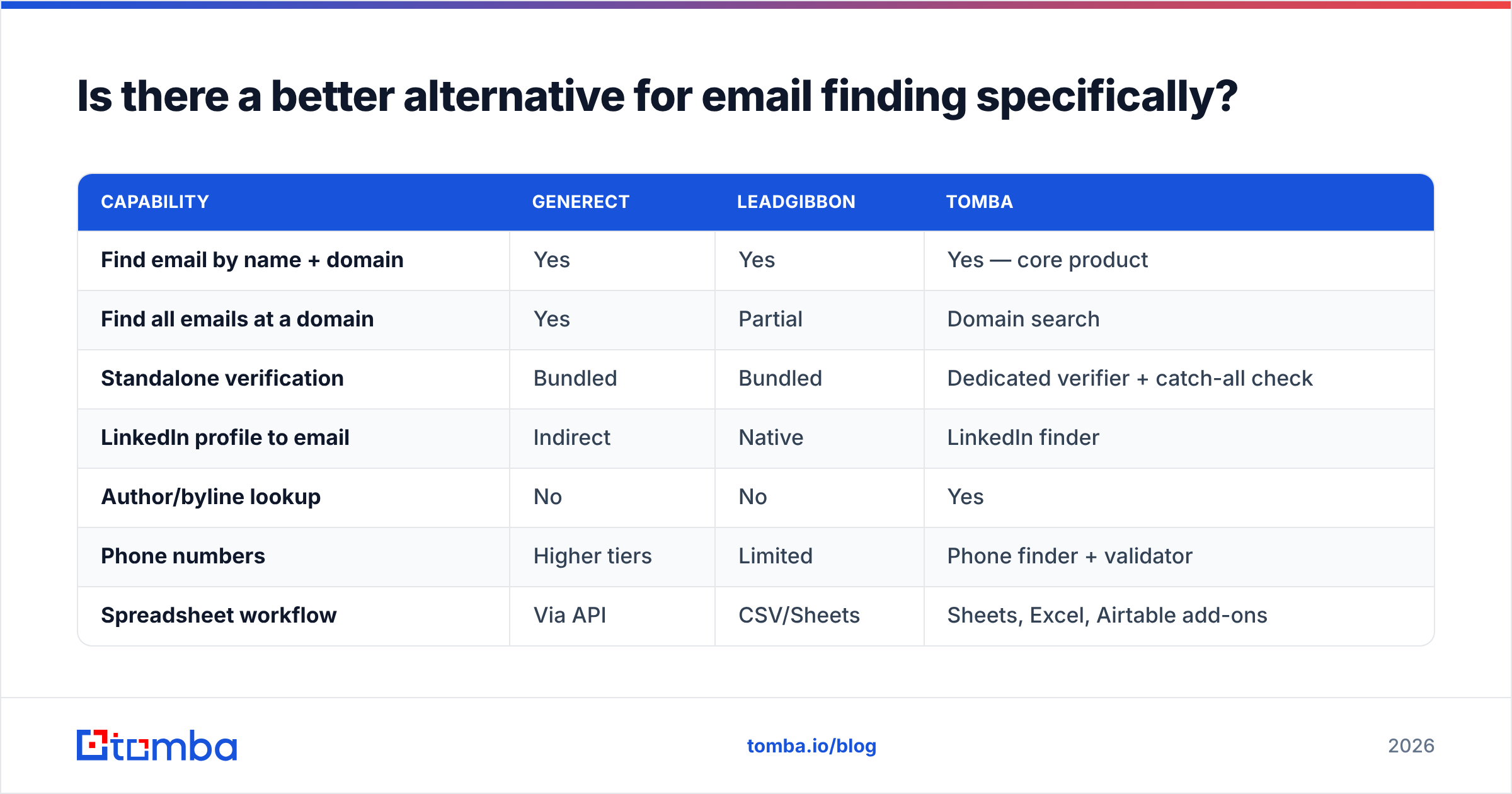
Maybe. If your real bottleneck is a correct, deliverable work email for a known person or company, both tools do more than you need. And they charge for it.

| Capability | Generect | LeadGibbon | Tomba |
|---|---|---|---|
| Find email by name + domain | Yes | Yes | Yes — core product |
| Find all emails at a domain | Yes | Partial | Domain search |
| Standalone verification | Bundled | Bundled | Dedicated verifier + catch-all check |
| LinkedIn profile to email | Indirect | Native | LinkedIn finder |
| Author/byline lookup | No | No | Yes |
| Phone numbers | Higher tiers | Limited | Phone finder + validator |
| Spreadsheet workflow | Via API | CSV/Sheets | Sheets, Excel, Airtable add-ons |
| Free tier | Trial | Limited credits | 25 searches/mo |
| Public API | Core product | Limited | Tomba API, CLI, MCP |
The point is not that one tool beats all others. It is that "lead database," "list builder," and "email finder plus verifier" are three different products sold with the same vocabulary. Buy the one that matches your bottleneck.
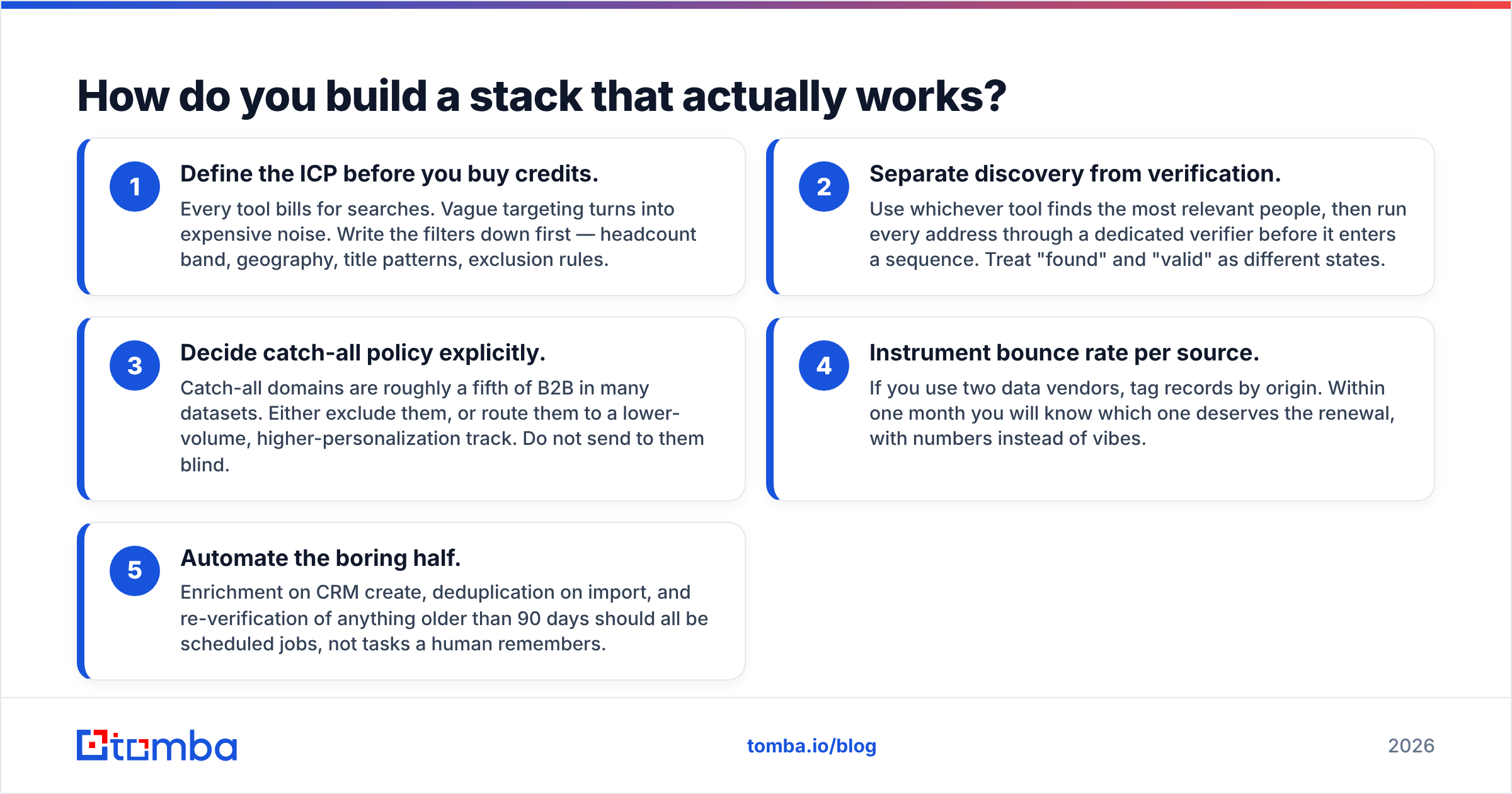
How do you build a stack that actually works?#
Five decisions, in order. Get these right and the vendor choice matters less than you think.
- Define the ICP before you buy credits. Every tool bills for searches. Vague targeting buys expensive noise. Write the filters down first: headcount band, geography, title patterns, exclusion rules.
- Separate discovery from verification. Find people with whichever tool covers them best. Then run every address through a dedicated verifier before it enters a sequence. "Found" and "valid" are different states.
- Set a catch-all policy. Catch-all domains make up roughly a fifth of B2B data. Either exclude them, or route them to a lower-volume, higher-personalization track. Do not send to them blind.
- Track bounce rate per source. Use two vendors and tag records by origin. Within a month you will know which one earns the renewal, with numbers instead of vibes.
- Automate the boring half. Enrichment on CRM create, dedupe on import, and re-verification after 90 days. Schedule them as jobs, not as tasks a human remembers.
Point five is where Generect's API-first model shines. Any provider with a real API can do it too.
Frequently asked questions#
Is Generect or LeadGibbon better for cold email? For a small team under a few thousand sends a month, LeadGibbon moves faster. For programmatic outbound that feeds a sequencer, Generect's API model wins. Both still need a separate verification step before send.
Do either of them replace an email verifier? Not reliably. Both return a validity signal. Neither gives you the fine controls: catch-all handling, role-address filters, re-verification on a schedule.
Which is cheaper? LeadGibbon usually has the lower entry price. Generect usually has better unit economics at volume. The crossover depends on your monthly record count, so model it with your own numbers.
Can I use both? Yes, and some agencies do. They use LeadGibbon for opportunistic LinkedIn capture and an API provider for systematic enrichment. Just dedupe across sources before anything hits a sequence.
Generect vs LeadGibbon: which one should you pick?#
Short answer: pick Generect if you have engineering capacity and continuous enrichment needs. Pick LeadGibbon if you need lists this week and nobody on your team writes code. Neither choice is wrong for the right shape of team.
But maybe you nodded along at the accuracy section. Then your problem is not which list builder to buy. Too many of your addresses bounce. That is a finder-and-verifier problem, not a database problem.
Try the Tomba Email Finder on the free tier. You get 25 searches a month, no card. Run the same 25 prospects you would run through Generect or LeadGibbon. Compare the fill rate. Then compare what happens after you hit send. Paid plans start at $49/mo, and the verifier and catch-all checks live in the same account. The API, CLI, and spreadsheet add-ons keep you out of a single locked workflow. Measure it against your incumbent for one campaign. The bounce report will tell you what the pricing pages cannot.
Related guides#
Ready to find emails that actually work?
Join 150,000+ professionals who stopped guessing and started sending. Free credits on signup — no credit card required.
Get the Tomba newsletter
Practical outbound tactics and product updates — once every two weeks.
About the author