Generect vs Leadleaper: Which Email Finder Wins in 2026?
Generect sells fresh LinkedIn-sourced leads; Leadleaper is a lightweight Chrome-extension email grabber. We tested pricing, accuracy, exports and API depth to show which one fits your outbound stack — and when neither does.
TL;DR
- Generect is a LinkedIn-first lead database with real-time search, an API, and mid-market pricing. It suits teams that build lists from Sales Navigator filters and want them enriched in bulk.
- Leadleaper is a lightweight Chrome extension that grabs emails from LinkedIn profiles and search pages. It suits solo sellers and recruiters doing 20–100 lookups a week, not list-building at scale.
- On pure email accuracy neither publishes independently audited numbers. Both self-report 90%+; real-world bounce rates on unverified exports land closer to 8–20% depending on the segment.
- Generect wins on API depth, export volume, and firmographic filters. Leadleaper wins on price-per-seat and zero learning curve.
- If you need domain-level coverage (find every contact at a company, not just LinkedIn profiles you can see), a dedicated email finder with a documented verification pipeline is the better third option.
What are Generect and Leadleaper, exactly?#
They solve overlapping problems with very different architectures, and that difference decides which one you should buy.
Generect (generect.com) is a B2B lead-generation platform built around real-time LinkedIn data. You feed it a Sales Navigator-style search — job title, headcount, industry, geography — and it returns structured leads with work emails, company data, and in some tiers direct dials. It exposes a REST API, which is the main reason agencies and RevOps teams pick it: you can wire lead pulls into a sequencer or a CRM without a human touching a CSV.
Leadleaper (leadleaper.com) is a browser extension. You install it in Chrome, open a LinkedIn profile or a search results page, click the button, and it captures names, titles, companies, and guessed-then-checked email addresses into an internal list you can export. There is no independent database you can query without LinkedIn in front of you. That constraint is the whole product philosophy: it is a capture tool, not a data warehouse.
The practical translation:
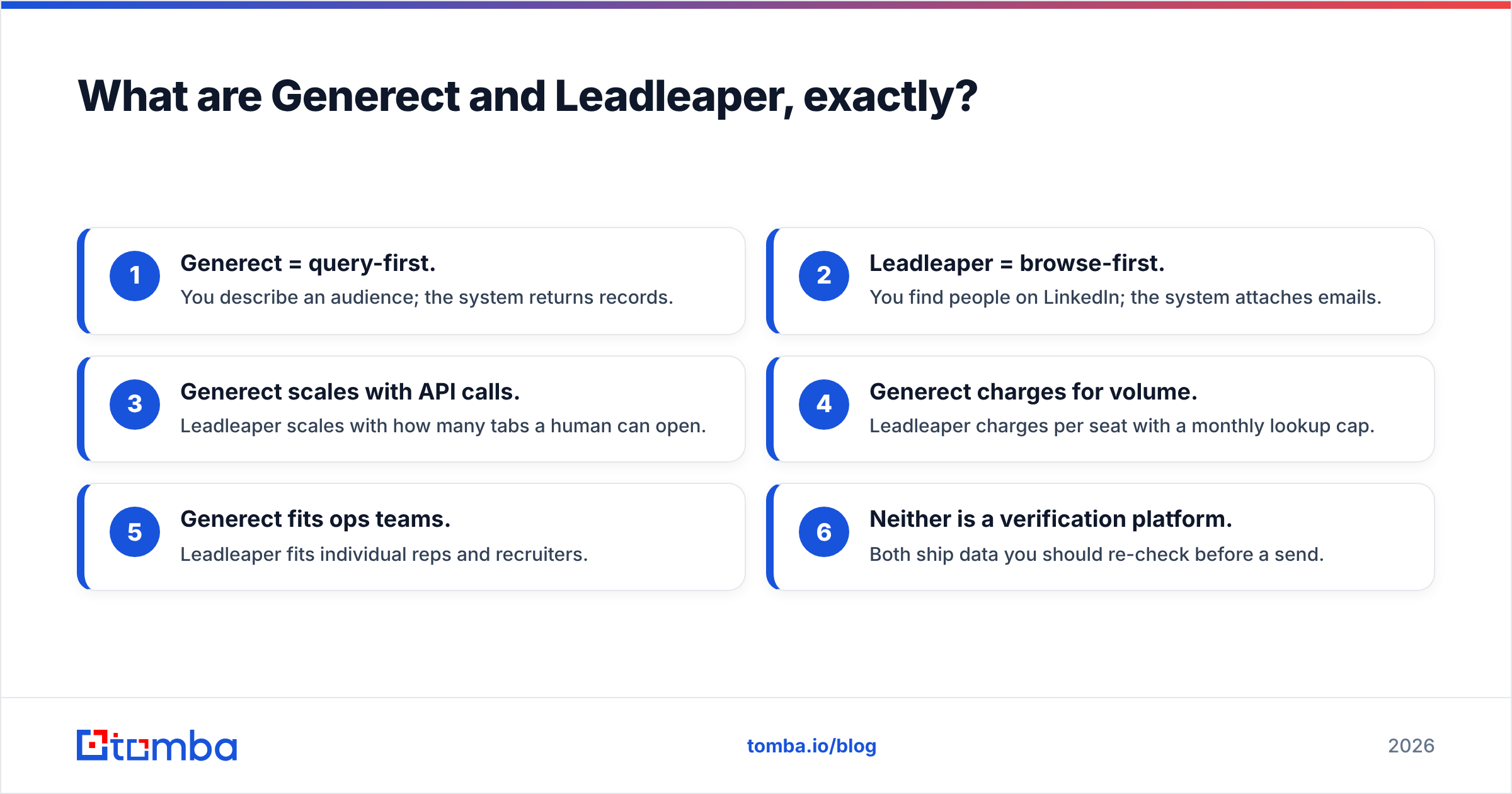
- Generect = query-first. You describe an audience; the system returns records.
- Leadleaper = browse-first. You find people on LinkedIn; the system attaches emails.
- Generect scales with API calls. Leadleaper scales with how many tabs a human can open.
- Generect charges for volume. Leadleaper charges per seat with a monthly lookup cap.
- Generect fits ops teams. Leadleaper fits individual reps and recruiters.
- Neither is a verification platform. Both ship data you should re-check before a send.

How do Generect and Leadleaper compare on features and pricing?#
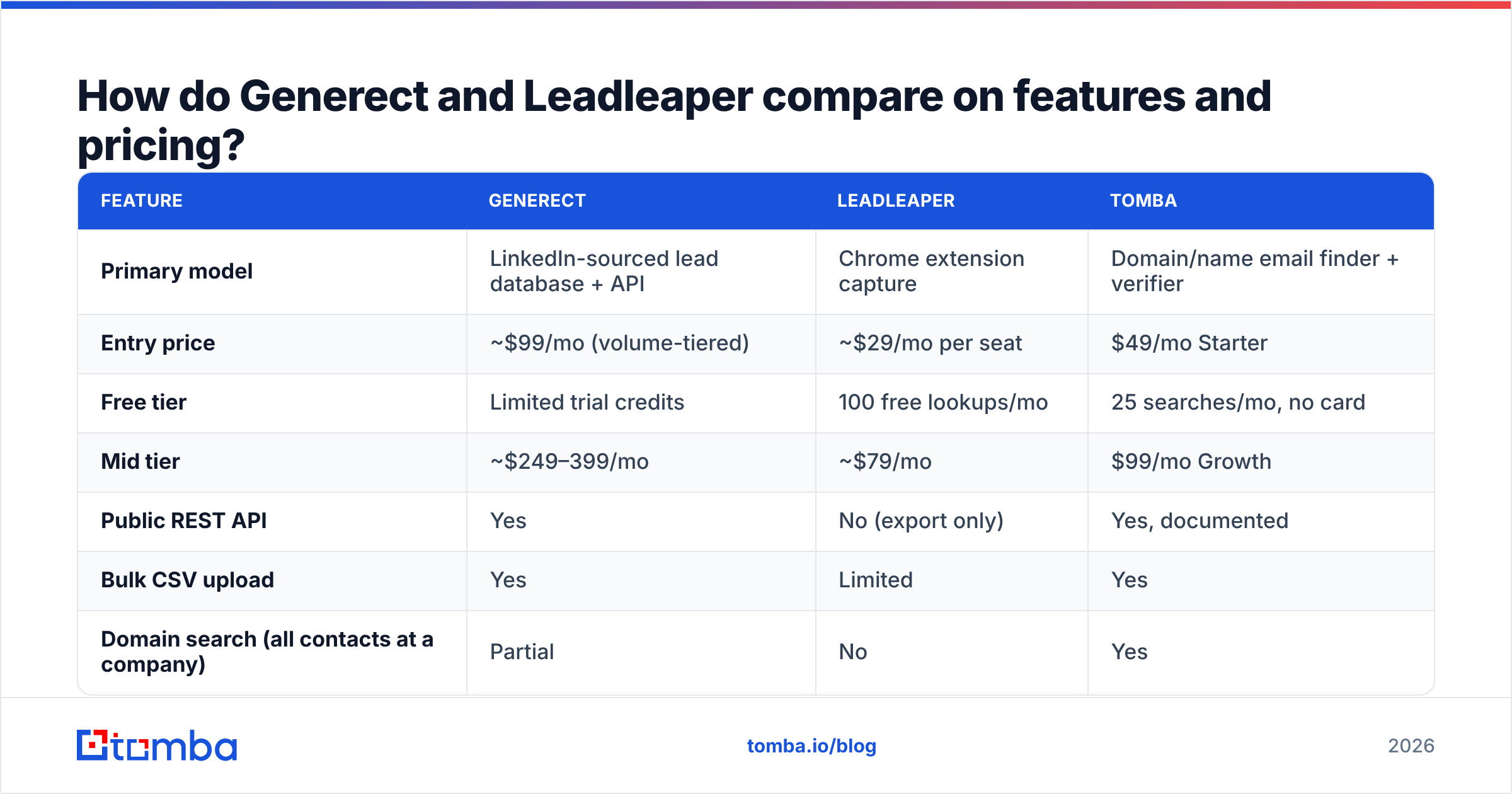
Pricing on both tools moves, and both publish tiers that change with promotions — check their live pages before you commit. As of early 2026, here is how the offers line up, with Tomba included as a neutral third reference point since most buyers evaluating these two also shortlist a dedicated finder.
| Feature | Generect | Leadleaper | Tomba |
|---|---|---|---|
| Primary model | LinkedIn-sourced lead database + API | Chrome extension capture | Domain/name email finder + verifier |
| Entry price | ~$99/mo (volume-tiered) | ~$29/mo per seat | $49/mo Starter |
| Free tier | Limited trial credits | 100 free lookups/mo | 25 searches/mo, no card |
| Mid tier | ~$249–399/mo | ~$79/mo | $99/mo Growth |
| Public REST API | Yes | No (export only) | Yes, documented |
| Bulk CSV upload | Yes | Limited | Yes |
| Domain search (all contacts at a company) | Partial | No | Yes |
| Built-in email verification | Basic | Basic pattern check | Dedicated verifier + catch-all handling |
| Phone numbers | Yes, higher tiers | No | Yes |
| Chrome extension | Yes | Yes (core product) | Yes |
| Best for | Agencies, RevOps, API workflows | Solo reps, recruiters | Teams needing verified emails at any volume |
Two things jump out of that table.
First, the price gap is not apples-to-apples. Leadleaper's $29 buys you a seat and a lookup allowance; Generect's $99+ buys you a data pipeline. If you compare per-1,000-contacts, Generect often lands cheaper than paying three Leadleaper seats to grind through the same list manually. If you compare per-user for someone doing 50 lookups a week, Leadleaper wins outright.
Second, neither includes a serious verification layer. That is the line item buyers consistently underestimate. A "found" email is not a deliverable email. You can read more on how bounce math wrecks a domain in our breakdown of email deliverability, but the short version: at 5% hard bounce you're on thin ice, at 10% Google and Microsoft start filtering your whole domain.
Which one is more accurate?#
Neither publishes an audited accuracy figure, so treat both marketing claims as vendor-reported.
Here is what we can say from how each system works:
- Generect's accuracy is source-dependent. Records pulled fresh from an active LinkedIn profile with a matched company domain verify well. Records for people who changed jobs three months ago and whose company uses a catch-all domain verify badly. Because Generect returns records in bulk, the bad ones arrive in bulk too.
- Leadleaper's accuracy is pattern-dependent. It derives an address from name + company domain, then attempts a check. On companies with a clean
first.last@pattern and an SMTP server that answers honestly, this works. On Microsoft 365 tenants that accept everything, it cannot tell you anything useful, and it will still hand you an address.
That second failure mode — the catch-all domain — is where most cold-email lists quietly rot. Roughly a fifth to a quarter of B2B domains accept all mail at the gateway and only bounce internally hours later. No SMTP ping can resolve that; you need a catch-all verifier that scores the address on pattern evidence and historical engagement rather than a single handshake.

Practical rule: whatever tool you pick, run the export through a separate email verifier before it touches your sequencer. The cost of verification (fractions of a cent per record) is trivially smaller than the cost of a burned sending domain.
Is Generect better than Leadleaper for outbound teams?#
For teams of three or more running structured outbound, yes — with caveats.
Where Generect pulls ahead:
- API access. You can trigger a lead pull from a workflow, push results straight to HubSpot or Pipedrive, and never open a spreadsheet. Leadleaper has no equivalent.
- Filter depth. Headcount bands, funding signals, tech stack in some tiers, and geography let you build an ICP query once and re-run it monthly for new matches.
- Volume economics. Past roughly 2,000 contacts a month, the per-record cost drops below what seat-based tools deliver.
- Team management. Shared credit pools, usage visibility, and role permissions exist. On a per-seat extension, every rep is an island.
Where Generect stumbles:
- Onboarding friction. Query builders take a week to learn well. Reps who just want an email for the person on screen will not use it.
- Data freshness varies by region. North American and Western European coverage is solid; APAC and LATAM records thin out fast.
- Cost floor. If your team sends 300 emails a month, you are paying for a pipeline you do not need.
Where Leadleaper genuinely wins:
- Zero ramp. Install, click, done. A new SDR is productive in ten minutes.
- Fits the recruiter workflow. Recruiters live inside LinkedIn search. A tool that works where they already are beats a tool that makes them leave.
- Cheap to test. The free lookup allowance is enough to judge whether the data is good for your niche before you spend anything.
- No commitment. Cancel and you lose a browser button, not an integration.
If your motion is "find one specific person, email them today," Leadleaper is the correct, cheaper answer and Generect is overkill. If your motion is "build a 5,000-contact list matching this ICP every quarter," the reverse is true.
What are the real limitations of both tools?#
Three constraints apply to both, and they matter more than the feature checkboxes.
1. LinkedIn dependency. Both tools derive most value from LinkedIn data. LinkedIn actively restricts scraping, rate-limits accounts, and periodically breaks extensions. Any tool whose supply chain runs through a platform hostile to it carries structural risk. Extensions get flagged; accounts get warnings. Build your process so a single tool outage is an inconvenience, not a stoppage.
2. No domain-level coverage. Neither tool answers "give me every reachable contact at acme.com" cleanly. That query is the backbone of account-based outbound — you want the VP, the director, and the two managers, not just whichever one surfaced in your search. A domain search built on public web crawling plus pattern inference answers it directly; a LinkedIn-derived tool answers it only for profiles you can already see.
3. Verification is an afterthought in both. This is worth restating because it is the single most common post-purchase regret. Teams buy a finder, skip verification to save $30/month, then spend six weeks recovering sender reputation after a 19% bounce campaign. Verification is not an upsell. It is the difference between a list and a liability.

How do the alternatives stack up?#
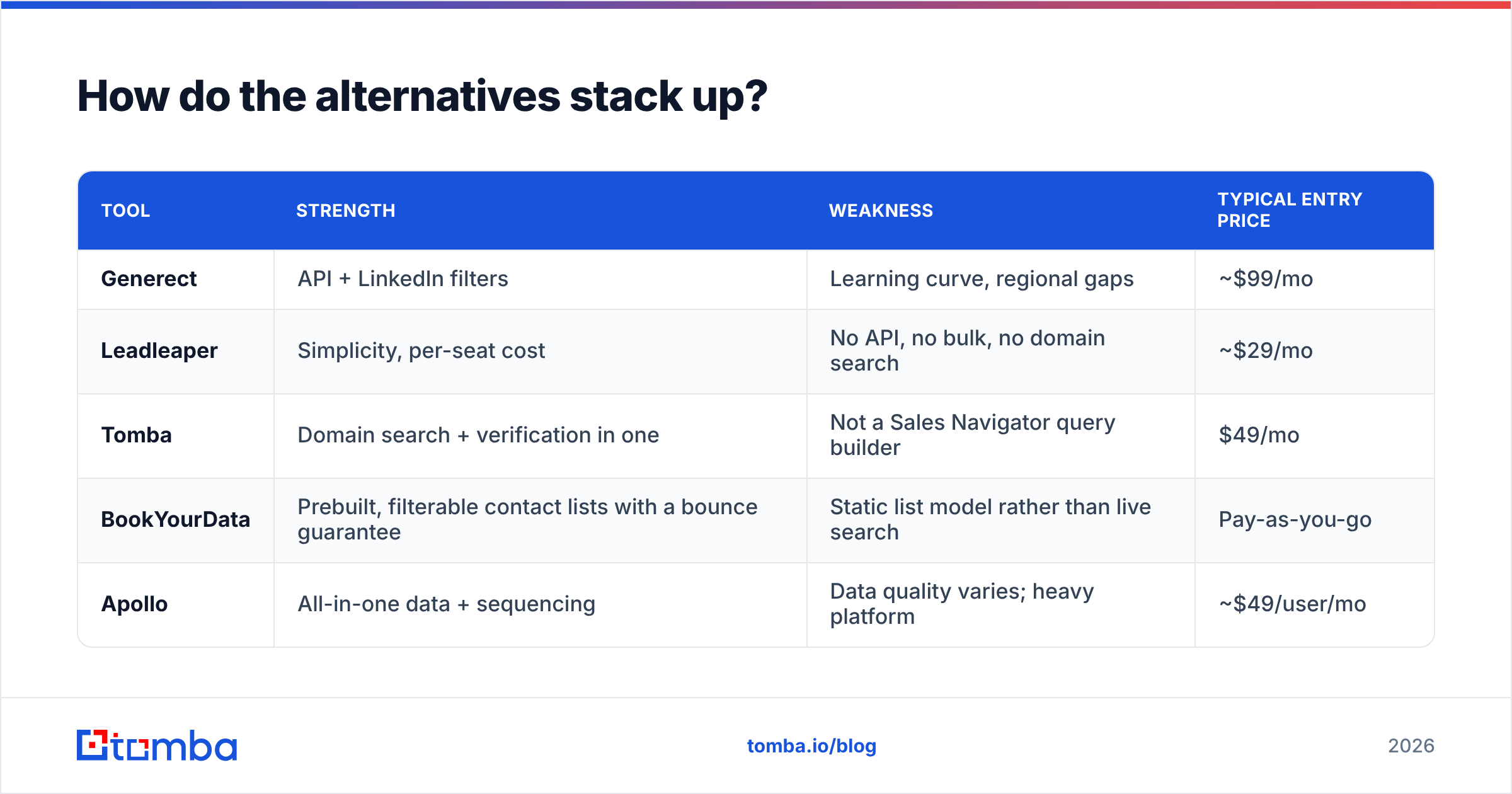
Most buyers comparing these two are really asking a broader question: what is the cheapest way to get accurate B2B contact data into a sequencer? A few honest options.
| Tool | Strength | Weakness | Typical entry price |
|---|---|---|---|
| Generect | API + LinkedIn filters | Learning curve, regional gaps | ~$99/mo |
| Leadleaper | Simplicity, per-seat cost | No API, no bulk, no domain search | ~$29/mo |
| Tomba | Domain search + verification in one | Not a Sales Navigator query builder | $49/mo |
| BookYourData | Prebuilt, filterable contact lists with a bounce guarantee | Static list model rather than live search | Pay-as-you-go |
| Apollo | All-in-one data + sequencing | Data quality varies; heavy platform | ~$49/user/mo |
BookYourData deserves a specific mention for a use case neither Generect nor Leadleaper covers well: you know exactly the industry, title, and geography you want, you want the list now, and you do not want to run queries or click through profiles. Its pay-as-you-go model with a delivery guarantee is a genuinely different purchase — closer to buying a dataset than renting a search tool. For teams that need a one-off targeted list rather than an ongoing pipeline, it is often the fastest route.
Apollo bundles data and sending, which is convenient until you want to swap either half. If you're already there and unhappy, our notes on Apollo alternatives cover the migration paths.
For the record on independent signal: check current user reviews on G2 rather than any vendor's own testimonials page, and filter by company size — a tool that delights 5-person agencies often frustrates 200-person sales orgs, and the aggregate star rating hides that entirely.
Which should you choose in 2026?#
Pick by workflow, not by feature count.
Choose Generect if: you have a defined ICP, pull more than 1,000 contacts a month, want API-driven enrichment, and have someone on the team who will own the query building. Budget an extra verification step regardless.
Choose Leadleaper if: you are one to three people, your prospecting is manual and LinkedIn-native, you do fewer than a few hundred lookups a month, and $29 is the ceiling. It does what it says with minimal friction.
Choose neither if: your core need is account coverage rather than profile capture, or if bounce rate is already hurting you. In that case, the ordering matters — find contacts by domain, verify them, then load your sequencer. That is a different tool category, and paying for it separately usually costs less than the credits you burn on records that never should have shipped.
A useful hybrid many teams land on: keep a cheap extension for one-off lookups a rep does while browsing, and run bulk list building through a finder with a real API and a real verifier. The two jobs are different enough that one tool doing both usually does one of them badly.
How should you test either tool before you buy?#
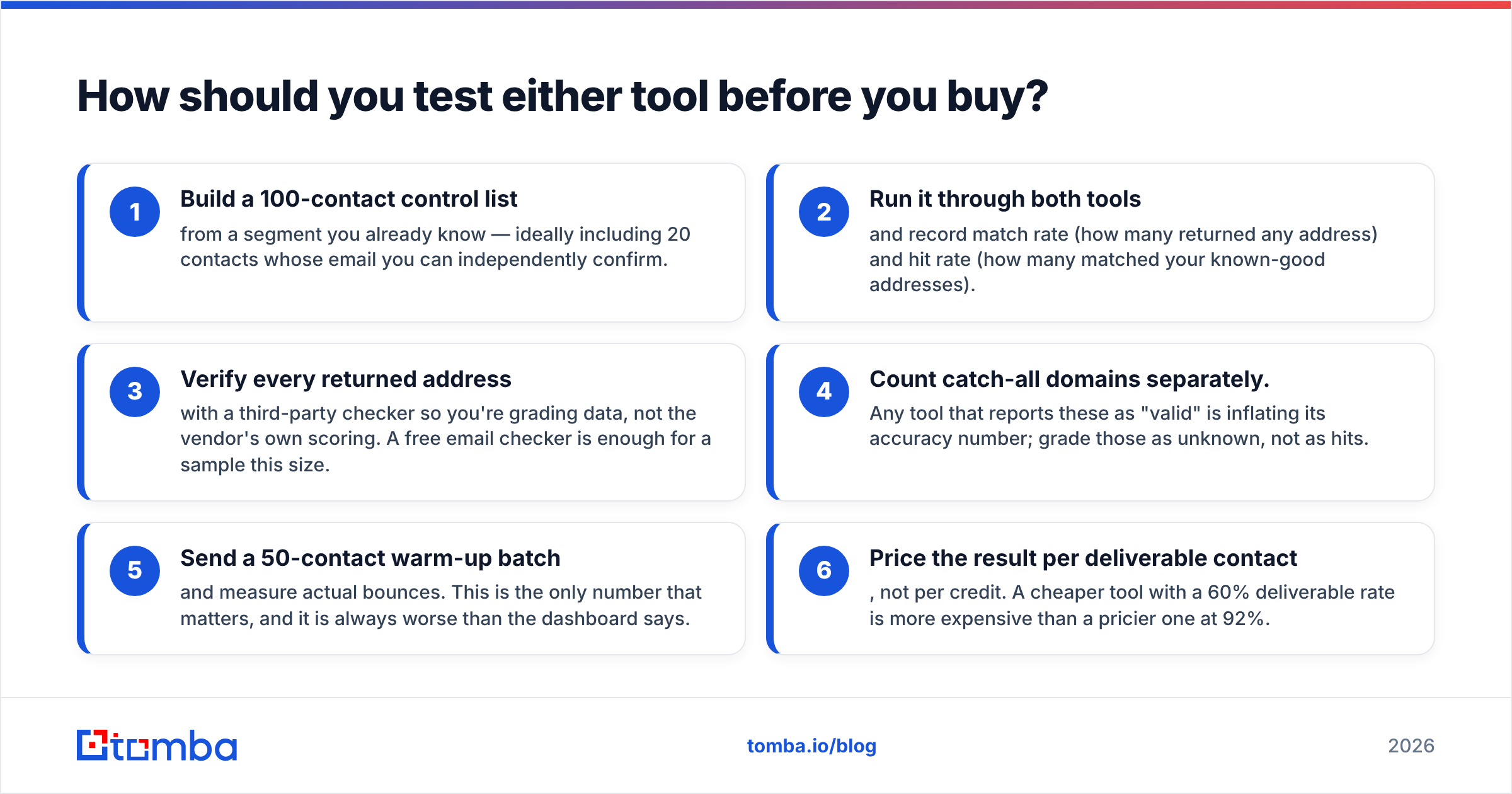
Run the same controlled test on both. It takes an afternoon and saves quarters of regret.
- Build a 100-contact control list from a segment you already know — ideally including 20 contacts whose email you can independently confirm.
- Run it through both tools and record match rate (how many returned any address) and hit rate (how many matched your known-good addresses).
- Verify every returned address with a third-party checker so you're grading data, not the vendor's own scoring. A free email checker is enough for a sample this size.
- Count catch-all domains separately. Any tool that reports these as "valid" is inflating its accuracy number; grade those as unknown, not as hits.
- Send a 50-contact warm-up batch and measure actual bounces. This is the only number that matters, and it is always worse than the dashboard says.
- Price the result per deliverable contact, not per credit. A cheaper tool with a 60% deliverable rate is more expensive than a pricier one at 92%.
That last calculation reorders most shortlists. Teams that run it usually discover the tool they were about to buy on sticker price is the expensive one.
Ready to build a list that actually lands?#
Generect and Leadleaper both solve a slice of the problem: finding an address attached to a name. Neither is built to guarantee that address survives contact with a mail server, and neither answers the account-coverage question cleanly.
If your priority is finding verified work emails by domain, name, or company — with a documented API, bulk processing, catch-all handling, and a free tier to test on real data before you spend anything — start with the Tomba Email Finder. Twenty-five free searches a month, no card required, and Tomba pricing starts at $49/mo when you outgrow it. Run your control list through it alongside whichever tool you're evaluating and let the bounce rate settle the argument.
Related guides#
Ready to find emails that actually work?
Join 150,000+ professionals who stopped guessing and started sending. Free credits on signup — no credit card required.
Get the Tomba newsletter
Practical outbound tactics and product updates — once every two weeks.
About the author