Generect vs Nymeria (2026): Which B2B Data Tool Wins?
Generect sells live LinkedIn-sourced lead lists. Nymeria sells contact enrichment on top of profiles you already found. They solve different halves of the same problem — here's which one actually belongs in your stack.
Generect vs Nymeria comes down to one question: do you need to find new leads, or reach people you already found? Generect builds the list. Nymeria fills in the contact details. Here is the short version.
TL;DR
- Generect is a LinkedIn-native lead generation platform. You give it a search (or a Sales Navigator URL), it returns structured company and people records with emails, pitched around freshness rather than a static warehouse.
- Nymeria is a contact enrichment tool. You give it a profile, a name, or a domain, and it returns emails, phones, and social handles — usually via its Chrome extension or API.
- They overlap on "give me an email," but they are not substitutes. Generect answers who should I contact. Nymeria answers how do I reach this specific person.
On cost, the two land closer together than the feature lists suggest:
- On price, both sit in the $39–$150/mo range for solo and small-team usage, with credit models that punish bulk work. Verify current numbers on their own pages before you buy — both have changed packaging more than once.
- If your bottleneck is verified email addresses at scale (not list-building UI), a dedicated finder with a real API — like Tomba Email Finder at $49/mo — usually costs less per usable contact than either.
What is Generect and who is it for?#
Generect is a B2B lead generation platform built around LinkedIn as its primary source. It does not query a pre-built database snapshot. Its pitch is that it pulls records at request time, so job titles and company affiliations reflect what LinkedIn shows now rather than what it showed nine months ago.
The practical workflow looks like this: you define an audience (industry, headcount, geography, title) or paste a LinkedIn Sales Navigator search URL, and Generect returns a structured list — company name, domain, person name, title, LinkedIn URL, and a work email where it can resolve one. There's an API for teams that want to skip the UI entirely and feed results into a CRM or sequencer.
Who it fits: agencies and outbound teams that build new lists constantly and care more about the audience-definition step than about squeezing the last 3% of email coverage out of a known list.
Who it doesn't fit: anyone whose contacts already exist in a CRM and just need email and phone appended. You'd be paying for a list-builder you're not using.
What is Nymeria and who is it for?#
Nymeria is a contact enrichment and people-search tool. Its most-used surface is a browser extension that sits on top of LinkedIn, GitHub, and a few other profile sites and reveals email addresses and phone numbers for whoever you're looking at. It also ships a bulk enrichment flow and a documented API.
The mental model is different. Generect starts with a query. Nymeria starts with an identity — a URL, an email, a name plus company — and fills in the rest. That makes it excellent for recruiters working a shortlist, founders doing 20 high-intent touches a week, and anyone whose sourcing already happens somewhere else.
Nymeria has historically been developer-friendly: clean API docs, straightforward auth, and a person-schema that maps cleanly onto a CRM contact record. If you're building an internal tool rather than clicking through a dashboard, that matters.

Generect vs Nymeria: how do they compare head-to-head?#
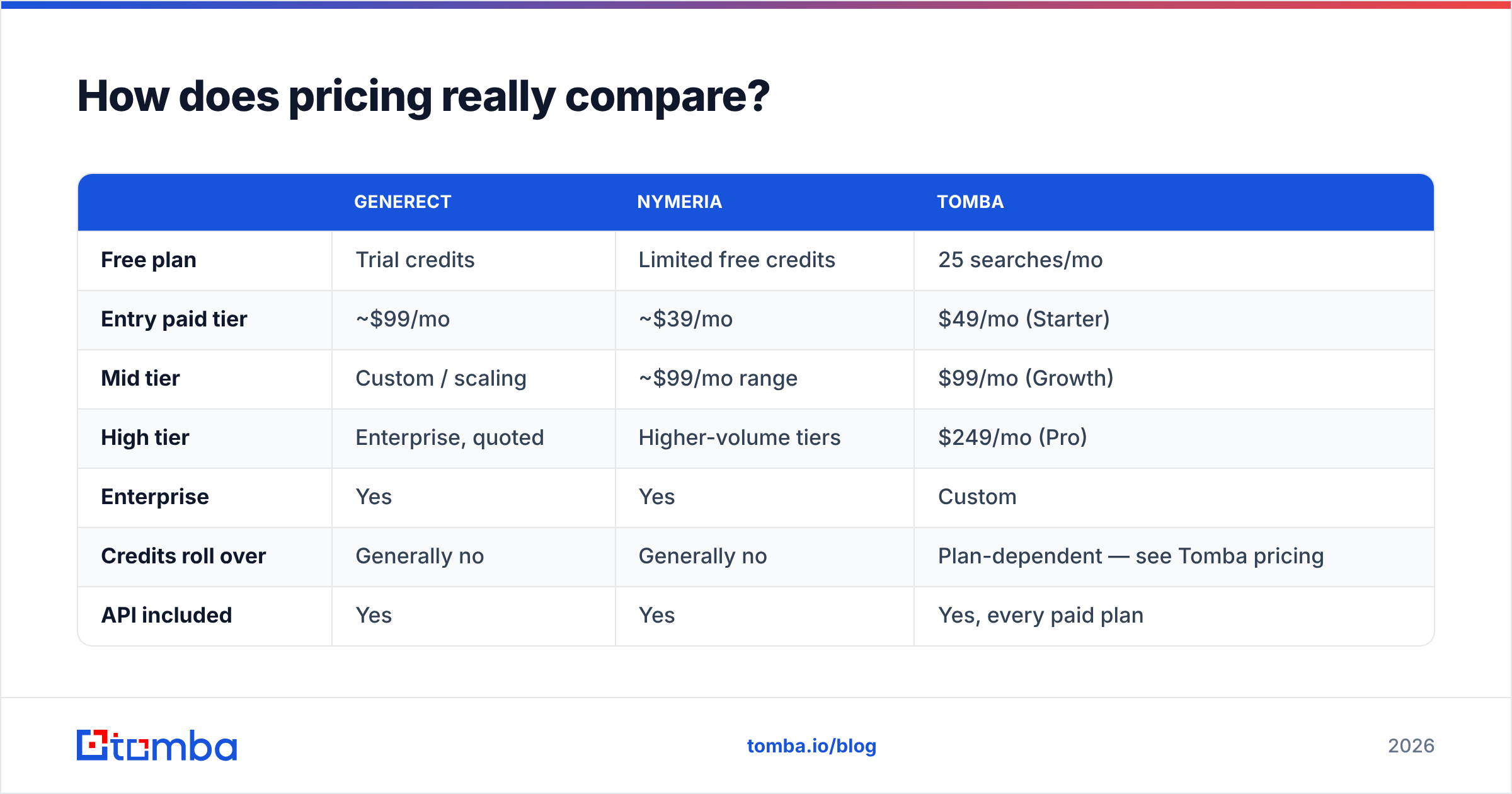
| Dimension | Generect | Nymeria | Tomba |
|---|---|---|---|
| Primary job | Build new lead lists | Enrich known people | Find + verify work emails |
| Main source | LinkedIn / live lookups | Aggregated profile data | Public web crawl + pattern inference |
| Entry point | Search filters, Sales Nav URL | Chrome extension, API | Domain, name+company, API, extension |
| Bulk workflow | Yes (list export) | Yes (CSV upload) | Yes (bulk email finder) |
| Email verification | Included, limited depth | Included | Dedicated email verifier + catch-all handling |
| Phone numbers | Some records | Yes | Yes (phone finder) |
| Free tier | Trial / limited credits | Limited free credits | 25 searches/mo, no card |
| Paid entry point | ~$99/mo range | ~$39/mo range | $49/mo Starter |
| API | Yes | Yes, well documented | Yes, Tomba API on all paid plans |
| Best for | Agencies building fresh ICP lists | Recruiters, devs, 1:1 enrichment | Teams that need verified emails cheaply at volume |
Pricing above reflects publicly listed tiers at the time of writing. Both vendors repackage often. Always confirm on generect.com and nymeria.io before you commit budget.
The row that matters most is "primary job." Teams burn money on this category by buying a list-builder when they needed an enricher, or an enricher when they needed a database. Decide which half of the funnel is actually broken before you compare feature grids.
Where does the data actually come from?#
This is the question that predicts accuracy better than any marketing claim.
Generect's model leans on LinkedIn-time lookups. The upside is obvious: a person who changed jobs last month shows their new employer. The downside is equally real. LinkedIn does not publish work email addresses, so the email itself is still derived. Generect infers a pattern from the company domain and validates it. That inference step is where accuracy is won or lost, not in the profile scrape.
Nymeria's model is an aggregated people-data graph: profile data merged across sources, keyed to a person identity, with emails attached from historical collection and pattern inference. The upside is coverage on personal emails and older records. The downside is staleness. An aggregated record can confidently return a work email at a company the person left in 2023.
Neither is dishonest about this. It's the fundamental tradeoff in the category: live sourcing gets you current employment, aggregated sourcing gets you deeper contact coverage. Nobody has both perfectly.

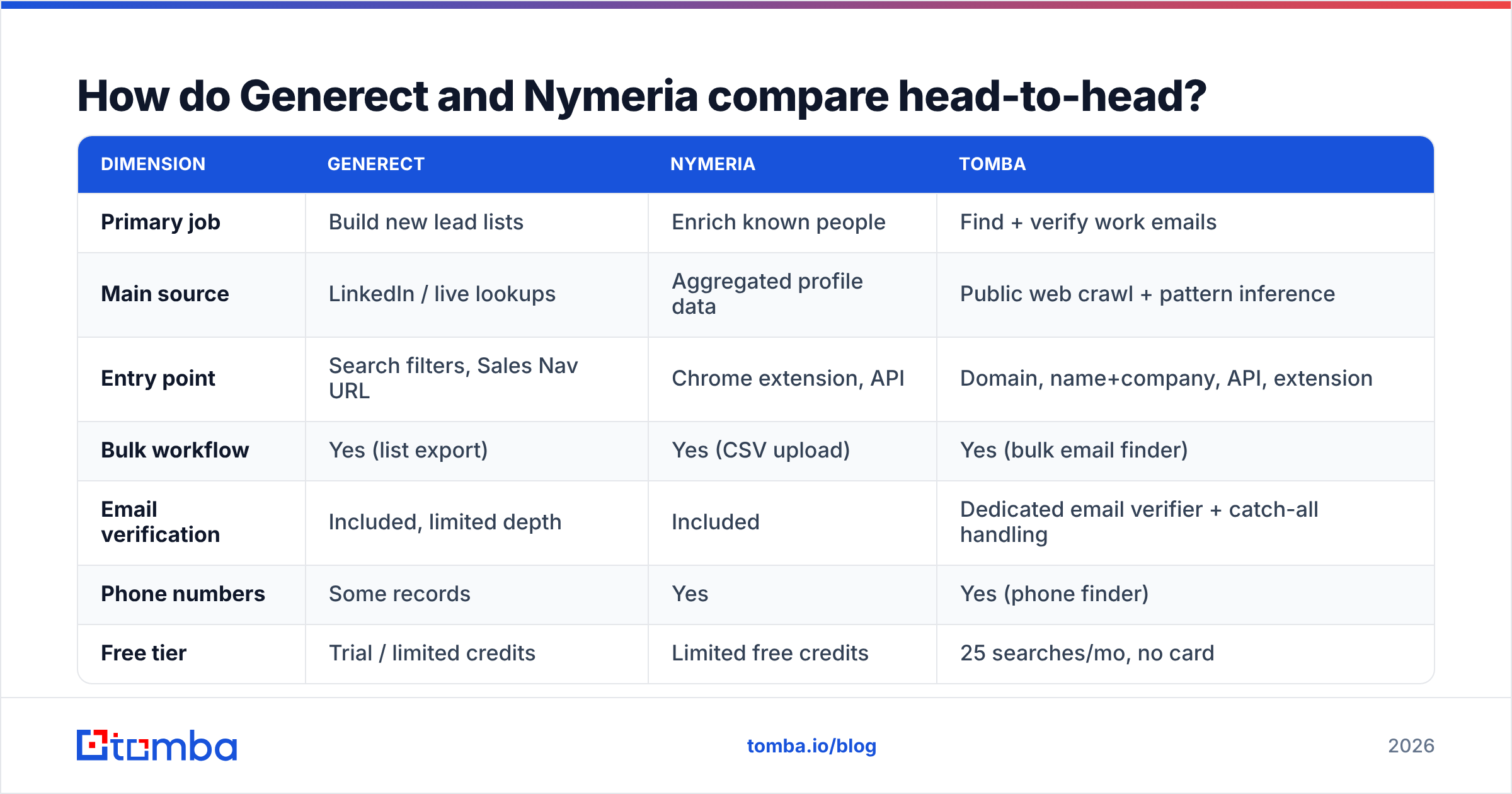
Four things drive real-world accuracy regardless of vendor:
- Domain pattern confidence — does the tool know that
acme.comusesfirst.last@versusflast@? A tool that has seen 400 verified emails at that domain guesses far better than one that has seen four. Check any vendor's company email pattern coverage on your own target accounts before trusting a global accuracy number. - SMTP validation depth — a real handshake against the mail server beats a syntax check every time, and catch-all domains need separate handling.
- Recency of the employment signal — an email that was valid is worthless if the person left.
- Catch-all policy — vendors that mark every catch-all as "valid" inflate their accuracy stat and your bounce rate. A catch-all verifier that scores them separately is the honest approach.
Ask any vendor — Generect, Nymeria, or Tomba — how they handle #4. The answer tells you whether their headline accuracy number is measured or marketed.
How does pricing really compare?#
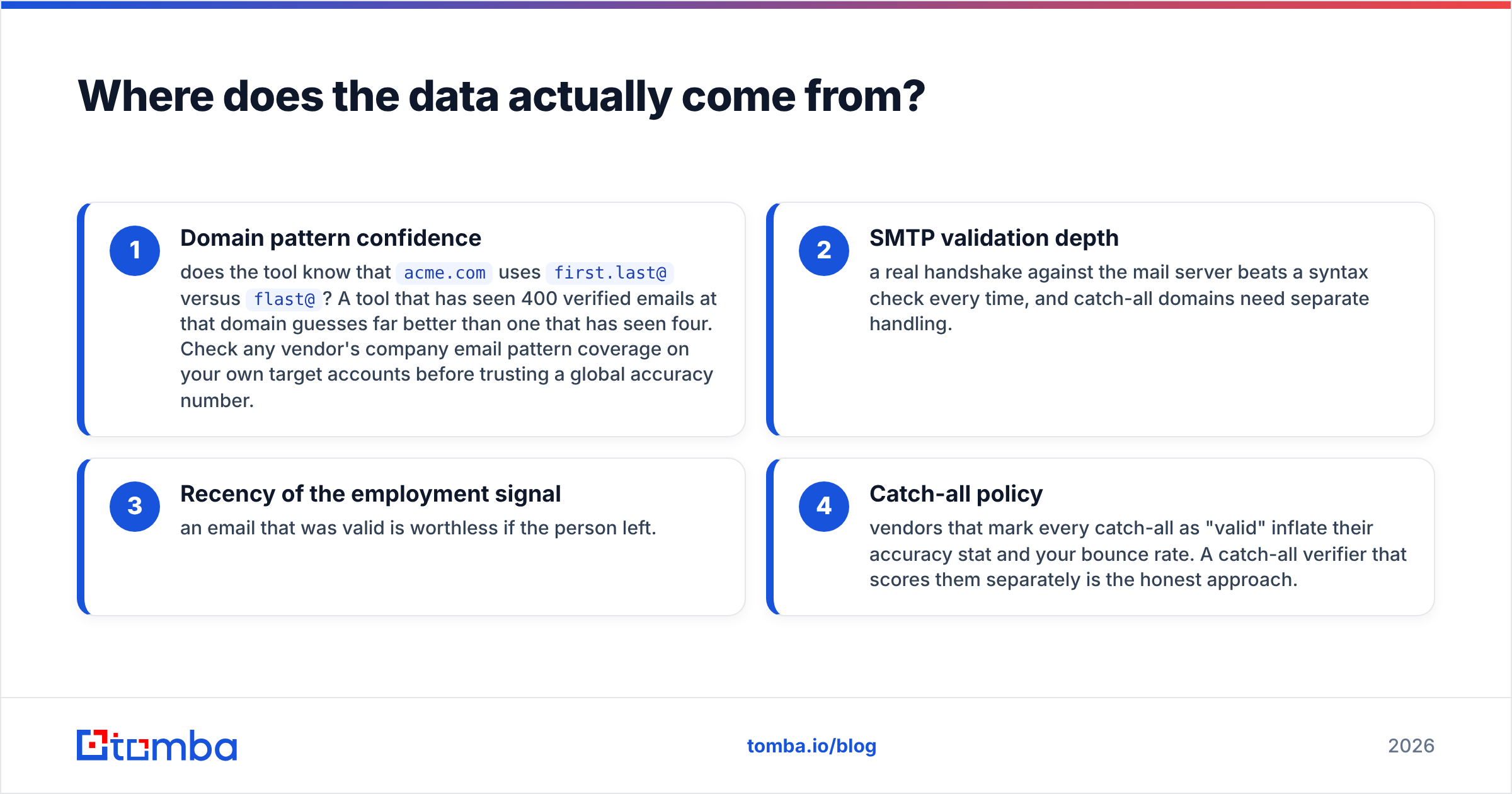
Credit math is where these tools stop looking similar.
| Generect | Nymeria | Tomba | |
|---|---|---|---|
| Free plan | Trial credits | Limited free credits | 25 searches/mo |
| Entry paid tier | ~$99/mo | ~$39/mo | $49/mo (Starter) |
| Mid tier | Custom / scaling | ~$99/mo range | $99/mo (Growth) |
| High tier | Enterprise, quoted | Higher-volume tiers | $249/mo (Pro) |
| Enterprise | Yes | Yes | Custom |
| Credits roll over | Generally no | Generally no | Plan-dependent — see Tomba pricing |
| API included | Yes | Yes | Yes, every paid plan |
| Charged for failed lookups | Varies | Varies | No credit for no result |
Two pricing traps worth naming:
Trap one: credit definition. "1 credit" can mean one revealed email, one enriched record with five fields, or one API call that returned nothing. A $39 plan that charges for misses can be more expensive per usable contact than a $99 plan that doesn't. Model your actual hit rate, not the sticker.
Trap two: verification billed separately. Some stacks charge you to find an email and again to verify it. If you're running 10,000 lookups a month, that doubles your line item. Confirm whether verification is bundled.

Which one is better for cold outbound?#
For a cold email motion specifically, weight three things: deliverability risk, cost per verified contact, and how fast you can go from ICP definition to a sequencer-ready CSV.
Generect wins on speed-to-list. Paste a Sales Navigator search, get a structured export, load it into your sequencer. If you're an agency spinning up a new client's ICP on Monday and sending by Wednesday, that's the entire value proposition.
Nymeria wins on precision touches. If your motion is 30 hand-picked accounts with multithreaded outreach to 4 people each, the extension workflow beats any bulk export. You're not building a list; you're closing gaps in one you already curated.
Neither is optimized for cost-per-verified-email at volume. That's a different product category, and it's the one that sets your bounce rate. Under 3% is the practical safety line for email deliverability. Above 5%, mailbox providers start throttling you no matter how good your copy is. Google and Microsoft both tightened bulk-sender rules in recent years, and those rules judge sender behavior, not intent.
The stack that actually works for most teams: use a list-builder for audience definition, then run every address through a dedicated verifier before it touches a sequencer. Treating "found" and "verified" as the same event is the single most common cause of a burned sending domain.
What are the strongest alternatives to both?#
If neither tool maps cleanly onto your bottleneck, the honest answer is that you're comparing the wrong axis. Here's how the adjacent options break down.

- Apollo — huge database plus a sequencer, but data quality varies by segment and the all-in-one bundling means you pay for modules you won't use. See our Apollo alternative breakdown.
- BookYourData — pay-as-you-go list purchasing with a verified-data guarantee. Genuinely good if you want to buy a finished list rather than run lookups, and the no-subscription model suits campaign-based buyers.
- Clearbit / enrichment platforms — strong firmographics, weaker on individual work emails, priced for companies with a RevOps function. Our Clearbit alternative comparison covers the tradeoffs.
- RocketReach — broad coverage, extension-first, similar positioning to Nymeria. Compare via our RocketReach alternative page.
- Tomba — narrower scope on purpose: find the email, verify the email, enrich the record, expose all of it through an API. Free tier at 25 searches/mo, Starter at $49/mo.
You can read peer reviews for all of these on G2 and Capterra. Sort by "most recent" rather than "most helpful," because data quality in this category changes faster than review scores do.
How should you actually test them?#
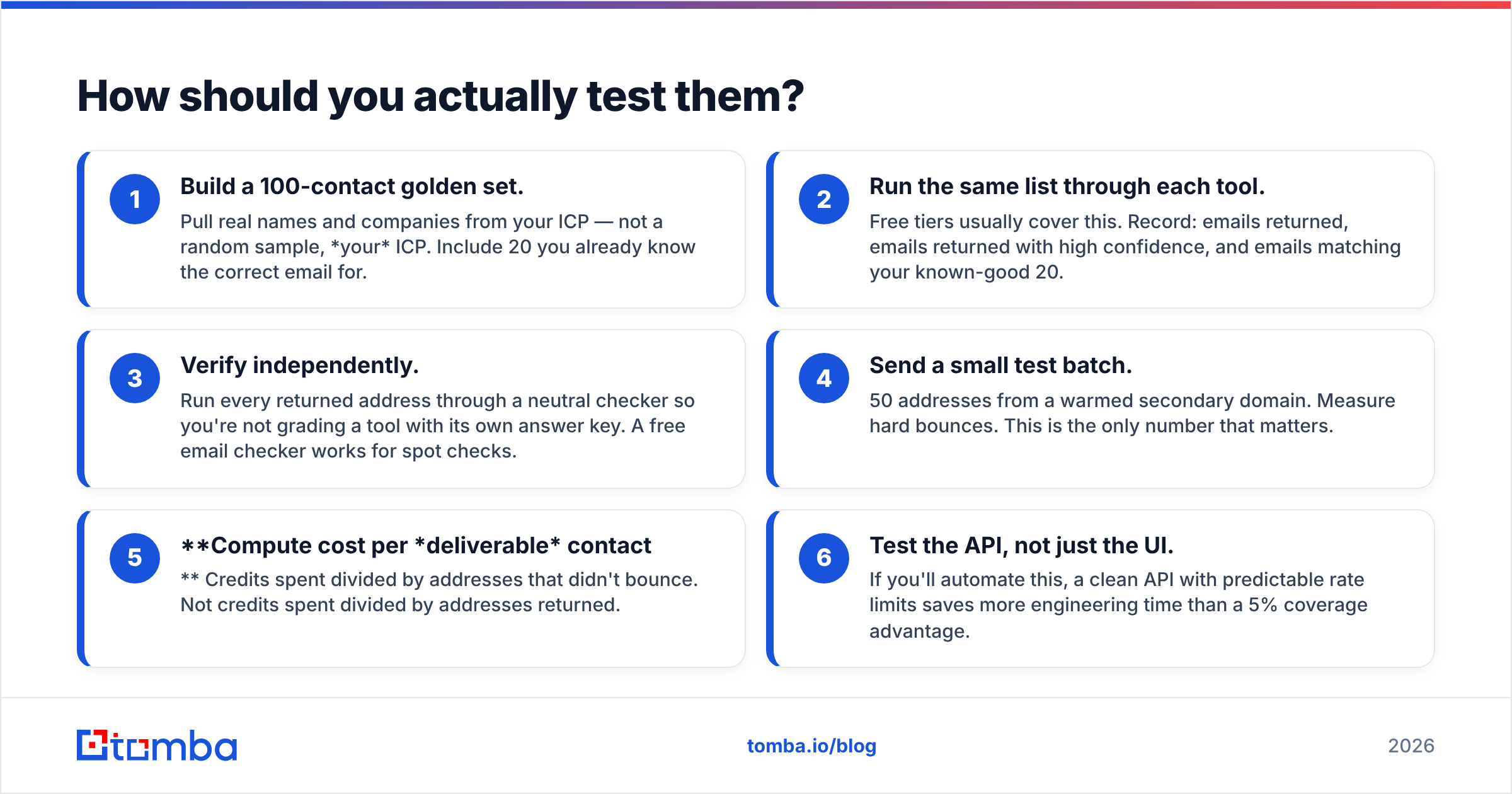
Don't compare marketing pages. Run a bake-off. It takes an afternoon.
- Build a 100-contact golden set. Pull real names and companies from your ICP — not a random sample, your ICP. Include 20 you already know the correct email for.
- Run the same list through each tool. Free tiers usually cover this. Record: emails returned, emails returned with high confidence, and emails matching your known-good 20.
- Verify independently. Run every returned address through a neutral checker so you're not grading a tool with its own answer key. A free email checker works for spot checks.
The last three steps are where most bake-offs stop too early:
- Send a small test batch. 50 addresses from a warmed secondary domain. Measure hard bounces. This is the only number that matters.
- Compute cost per deliverable contact. Credits spent divided by addresses that didn't bounce. Not credits spent divided by addresses returned.
- Test the API, not just the UI. If you'll automate this, a clean API with predictable rate limits saves more engineering time than a 5% coverage advantage.
Most teams find their real hit rate is 20–40 points below the vendor's advertised accuracy. That isn't because vendors lie. Global accuracy averages just don't describe your specific vertical. A tool that's excellent on US SaaS can be mediocre on European manufacturing.
Frequently asked questions#
Is Generect or Nymeria better for recruiting? Nymeria, in most cases. Recruiting workflows start from a specific candidate profile and need personal emails and phone numbers, which is exactly Nymeria's shape. Generect's strength is company-level audience building, which matters less when you're sourcing individuals.
Can I use both together? Yes, and some agencies do — Generect to build the list, Nymeria to fill gaps on the records that came back empty. It works, but you're paying two subscriptions plus verification. Do the math against a single tool with better native coverage first.
Do either of them guarantee accuracy? Both publish accuracy claims. Neither offers an unconditional guarantee in the way a pay-per-valid-record vendor does. Assume you own the verification step regardless of what you buy.
What about GDPR and CCPA? Both operate under the standard B2B-data compliance posture: legitimate-interest basis, opt-out handling, data subject request processes. If you're selling into the EU, read the actual DPA rather than the trust-page summary, and confirm how each vendor handles suppression lists.
The bottom line#
Generect vs Nymeria is a choice between two different jobs, not two versions of the same tool. Generect is the better buy if list-building is your bottleneck and LinkedIn is your source of truth. Nymeria is the better buy if you already know who you want to reach and need contact details fast, especially through an extension or API.
But if you read this comparison because your bounce rate is too high, your credits vanish too fast, or your engineering team is fighting a clunky API — the answer isn't either of them. It's a tool built specifically for finding and verifying work emails, priced so volume doesn't punish you.
That's the job Tomba Email Finder is built for: find emails by domain, name, or company; verify them with real SMTP checks and honest catch-all scoring; enrich the record; and do all of it through one API on every paid plan. Start with the free tier — 25 searches a month, no card — run it against your golden set alongside Generect and Nymeria, and let cost-per-deliverable-contact decide.
Related guides#
Ready to find emails that actually work?
Join 150,000+ professionals who stopped guessing and started sending. Free credits on signup — no credit card required.
Get the Tomba newsletter
Practical outbound tactics and product updates — once every two weeks.
About the author