How to Get Past the Gatekeeper in B2B Sales (2026 Guide)
Gatekeepers block roughly 90% of unsolicited sales calls. Here are the scripts, sequencing, and data moves that actually get you to the decision-maker in 2026 — plus what to stop doing.
TL;DR
- The fastest way to get past the gatekeeper is to not need one: a verified direct dial or work email routes around the switchboard entirely.
- Manipulation scripts ("he's expecting my call") still work about as often as they burn the account permanently. Treat them as a last resort, not a system.
- Gatekeepers are internal researchers now, not receptionists. Executive assistants, office managers, and ops coordinators screen on relevance, not tone of voice.
- Call timing matters more than wording: before 8:30am and after 5:15pm bypasses screening at many mid-market companies without a single trick.
- The durable stack is data → timing → script, in that order. Most reps invert it and wonder why their connect rate sits at 3%.
What does "the gatekeeper" actually mean in 2026?#
The gatekeeper is anyone whose job includes deciding whether your call, email, or LinkedIn message reaches the person you want. That used to mean a receptionist at a front desk. Today it means five different roles, and each one screens differently:
- The executive assistant. Guards a named calendar. Screens on whether you are relevant to a project the exec is already working on. Almost never screens on politeness.
- The office manager / ops coordinator. Guards a general line at a 50–500 person company. Screens on whether you sound like a vendor pitch. Will route you if you name a specific person and a specific reason.
- The IVR / phone tree. Guards nothing intelligently — it just requires you to know an extension or a last name. This is the easiest gatekeeper to beat and the one most reps quit on.
- The inbox filter. Spam filtering, tab sorting, and increasingly AI triage assistants. Beat with email deliverability hygiene, not charm.
- The junior "evaluator." A manager told to "look into options" and report back. Not technically a gatekeeper, but functionally one — they can kill a deal without your prospect ever hearing your name.
Lumping all five into one villain is why generic gatekeeper scripts fail. A line that works on an IVR ("I need extension for Maria in Finance") is useless on an EA who knows Maria's calendar down to the 15-minute block.
Why do most gatekeeper tricks fail now?#
Because the tricks are 30 years old and the gatekeepers have heard all of them. The classic playbook — sound busy, use first names only, imply prior contact, call at lunch when "the B-team" answers — was built for an era when the front desk had no computer. Now the person answering can search your name, your company, and your last three LinkedIn posts before you finish your opening line.
Three specific failure modes:
- Fabricated familiarity. "Sarah asked me to follow up." If Sarah didn't, you've now created a documented lie inside your target account. Some EAs circulate a shared "do not route" list. That's a permanent account burn for one connect.
- Vagueness as a strategy. "It's a personal matter." This reads as a debt collector or a scam call in 2026 and gets you flagged.
- Volume over precision. Dialing the main line 40 times because you don't have a direct number. Every one of those calls trains the gatekeeper to recognize your caller ID.
Gartner's B2B buying research has consistently shown buyers spend the majority of their purchase journey researching independently rather than talking to reps — meaning your prospect is far more likely to Google you after a screened call than to take it cold. Reputation compounds. Tricks don't.
Is it better to bypass the gatekeeper or work with them?#
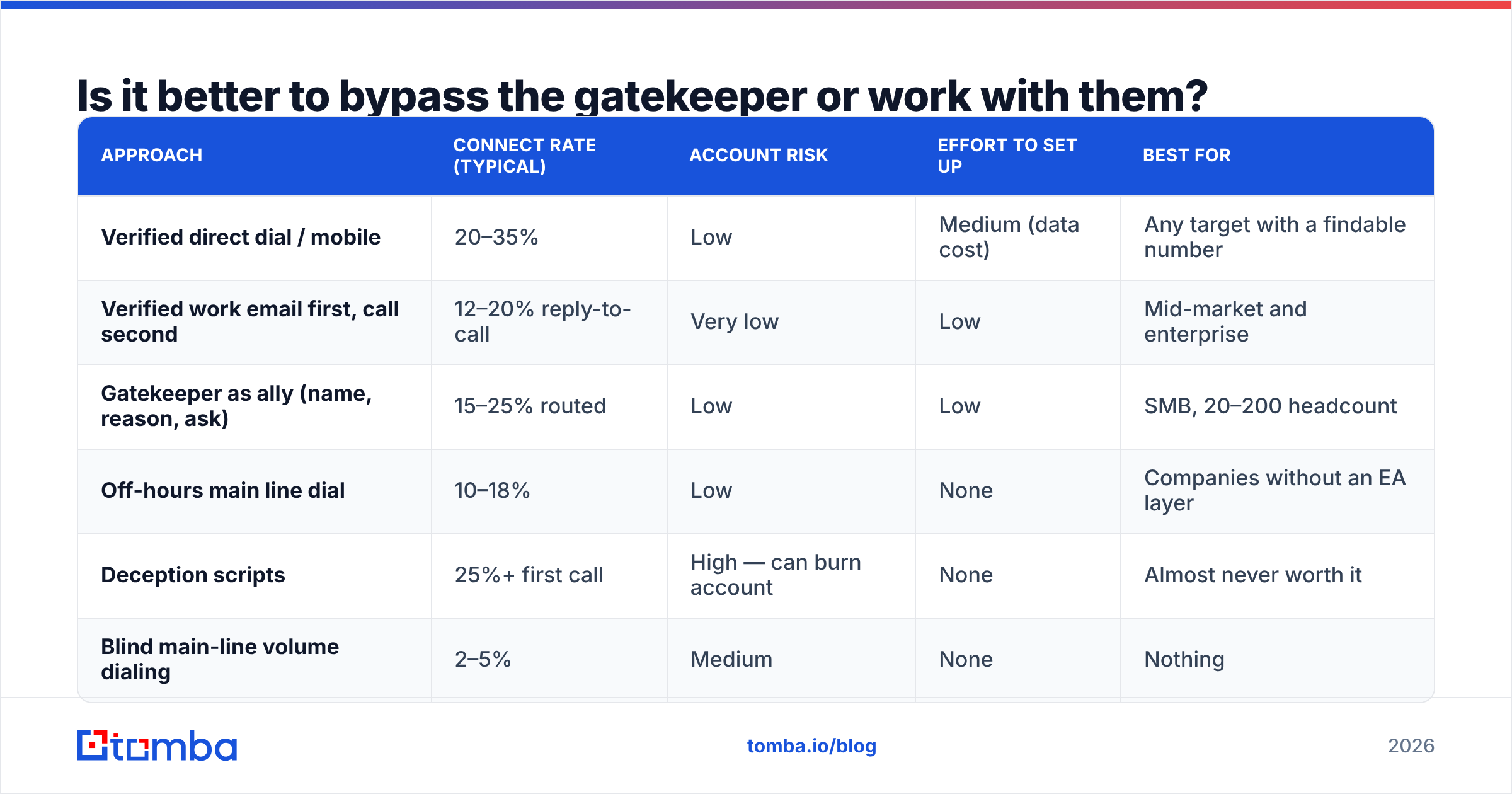
Both, in a specific order. The honest hierarchy looks like this:
| Approach | Connect rate (typical) | Account risk | Effort to set up | Best for |
|---|---|---|---|---|
| Verified direct dial / mobile | 20–35% | Low | Medium (data cost) | Any target with a findable number |
| Verified work email first, call second | 12–20% reply-to-call | Very low | Low | Mid-market and enterprise |
| Gatekeeper as ally (name, reason, ask) | 15–25% routed | Low | Low | SMB, 20–200 headcount |
| Off-hours main line dial | 10–18% | Low | None | Companies without an EA layer |
| Deception scripts | 25%+ first call | High — can burn account | None | Almost never worth it |
| Blind main-line volume dialing | 2–5% | Medium | None | Nothing |
The top three rows are where a repeatable process lives. Notice that deception has the second-highest raw connect rate — that's exactly why it persists, and exactly why it's a trap. A tactic that works once and closes the door for 18 months has terrible unit economics on a named-account list.
The four-step sequence that actually holds up#
- Get the direct contact before you dial. A verified mobile or work email removes the gatekeeper from the equation. This is the single highest-leverage step and the one reps skip because it costs money.
- Earn a reason to call. A trigger event — funding round, new hire in the department, a job posting mentioning the exact problem you solve, a tech-stack change. A reason survives screening; a pitch doesn't.
- Warm the channel first. One short, specific email or LinkedIn touch before the call. When the gatekeeper asks "does he know what this is about?", "I emailed him Tuesday about their Snowflake migration" is a true answer that routes you.
- Call with a name, a reason, and a small ask. "Hi, I'm trying to reach Daniel Okonkwo — I emailed him Tuesday about the RevOps contractor role they posted. Is he the right person, or should I be talking to someone on his team?" That last clause is the whole trick: you're giving the gatekeeper a job they can do.
What do you actually say? (scripts by gatekeeper type)#
For the general line / office manager:
"Hi — I'm hoping you can point me in the right direction. I'm trying to figure out who owns vendor onboarding over there. I sent a note to your ops inbox last week and want to make sure it landed with the right person rather than keep bothering the general line."
Why it works: you ask for routing help, not access. You admit you're an outsider. You give them an out ("the right person"), which is a task they're paid to perform.
For the executive assistant:
"Hi, this is Lena from Northsend. I'm not going to pretend Priya's expecting me. She posted about consolidating their reporting stack last month — I work with three companies that did the same thing and got it wrong the first time. Is there a better way to get 10 minutes on her calendar than calling you, or is this it?"
Why it works: EAs respond to competence and honesty at a rate that surprises people. Naming the screening ritual out loud disarms it. Asking them to define the process makes them the authority, which they are.
For the IVR:
Dial 0, then if that fails, try any extension in the 100–120 range and ask whoever answers to transfer you. Or use the directory-by-last-name feature — which requires you to know the last name, which requires data, which brings us back to step one.
For the "send me an email" deflection:
"Happy to. So it doesn't die in an inbox — should I send it to her directly, or does it work better if it comes to you and you forward it? And what's the one thing she'd need to see in it to think it's worth 10 minutes?"
You just converted a brush-off into a briefing.
Where does the data layer fit in?#
This is the unglamorous part that determines everything else. You cannot run steps 2–4 without knowing (a) who the actual decision-maker is, (b) how to reach them directly, and (c) whether that contact is still valid.
B2B contact data decays fast — commonly cited industry estimates put annual decay somewhere between 22% and 30%, driven by job changes, restructures, and domain migrations. A list you bought 14 months ago is roughly a quarter fiction. That's why "the number doesn't work" and "he left the company" are the two most common outcomes of a bought list, and why reps who don't refresh their data end up defaulting to main-line dialing and gatekeeper roulette.
A minimum viable data workflow:
- Identify the person, not the title. Use LinkedIn, the company's own team page, conference speaker lists, and press releases. Titles vary wildly across companies; the person is what you need.
- Find the work email. A pattern-based email finder resolves first-name/last-name-plus-domain formats and confirms them against known-good records, rather than guessing
first.last@and hoping. - Map the whole department. A domain search pulls the addresses and roles at a company in one pass, which is how you find the person who actually owns the budget instead of the one with the shiniest title.
- Verify before you send. Running the list through an email verifier is what keeps your bounce rate under 2% and your sender reputation intact. Bounces are the fastest way to become an inbox gatekeeper's problem.
- Get the direct dial. A phone finder is the literal gatekeeper bypass — a mobile number has no receptionist attached to it.
How the tooling options compare#
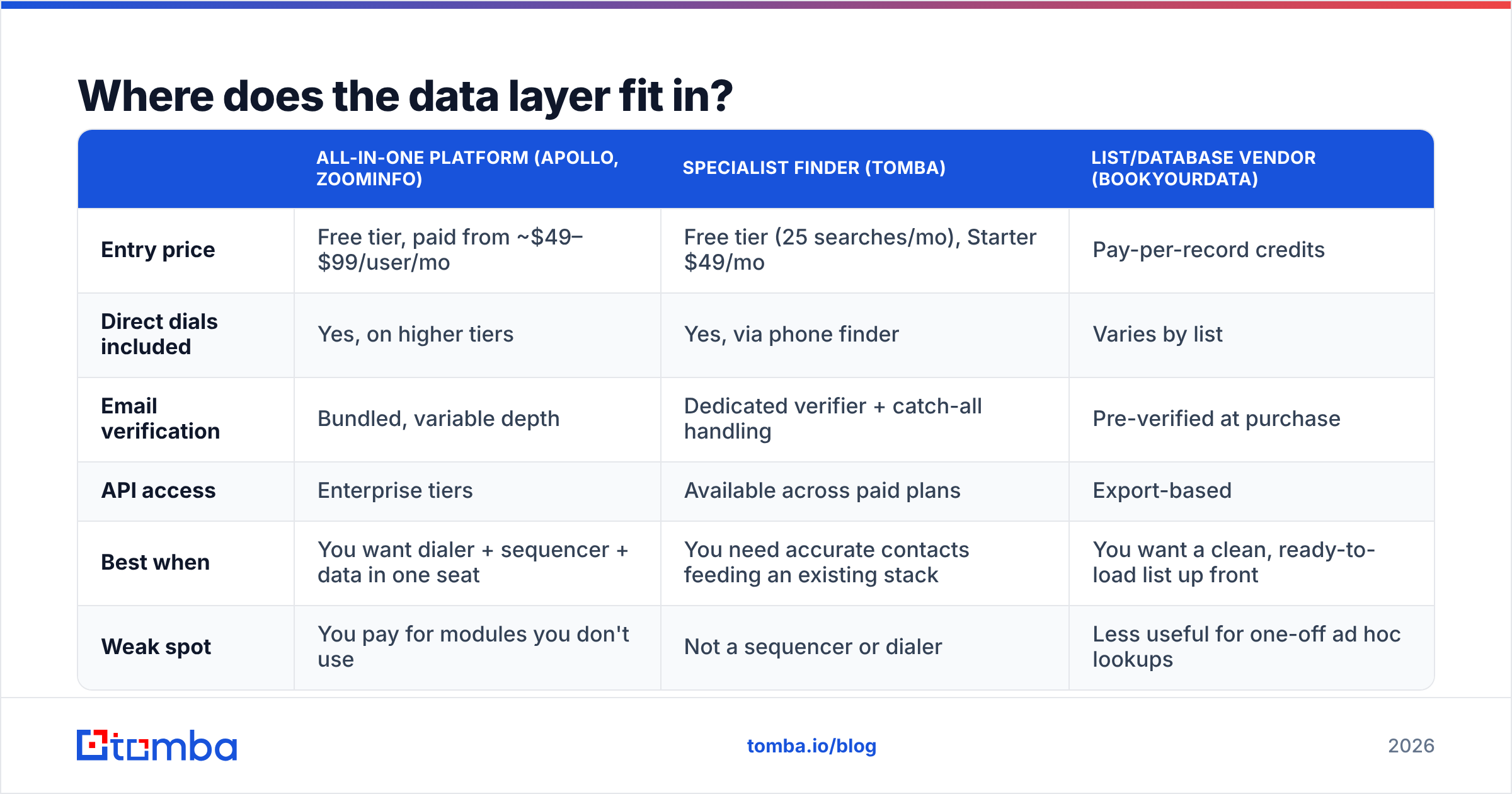
Most teams end up choosing between an all-in-one sales platform, a specialist data provider, and a compliance-first B2B list vendor. They solve different problems:
| All-in-one platform (Apollo, ZoomInfo) | Specialist finder (Tomba) | List/database vendor (BookYourData) | |
|---|---|---|---|
| Entry price | Free tier, paid from ~$49–$99/user/mo | Free tier (25 searches/mo), Starter $49/mo | Pay-per-record credits |
| Direct dials included | Yes, on higher tiers | Yes, via phone finder | Varies by list |
| Email verification | Bundled, variable depth | Dedicated verifier + catch-all handling | Pre-verified at purchase |
| API access | Enterprise tiers | Available across paid plans | Export-based |
| Best when | You want dialer + sequencer + data in one seat | You need accurate contacts feeding an existing stack | You want a clean, ready-to-load list up front |
| Weak spot | You pay for modules you don't use | Not a sequencer or dialer | Less useful for one-off ad hoc lookups |
There's no universally correct pick. If your team already runs Outreach or Instantly for sequencing, buying a second sequencer inside an all-in-one is waste — you want the data layer only. If you're a two-person team with no stack at all, the bundled option saves you integration work. If you need a defined, compliant list for a specific campaign in a specific geography, a list vendor like BookYourData is a cleaner fit than paying per-lookup. Check Tomba pricing against per-seat platform costs before assuming the bundle is cheaper; per-seat pricing gets expensive fast on a team of eight.
When should you call to avoid screening entirely?#
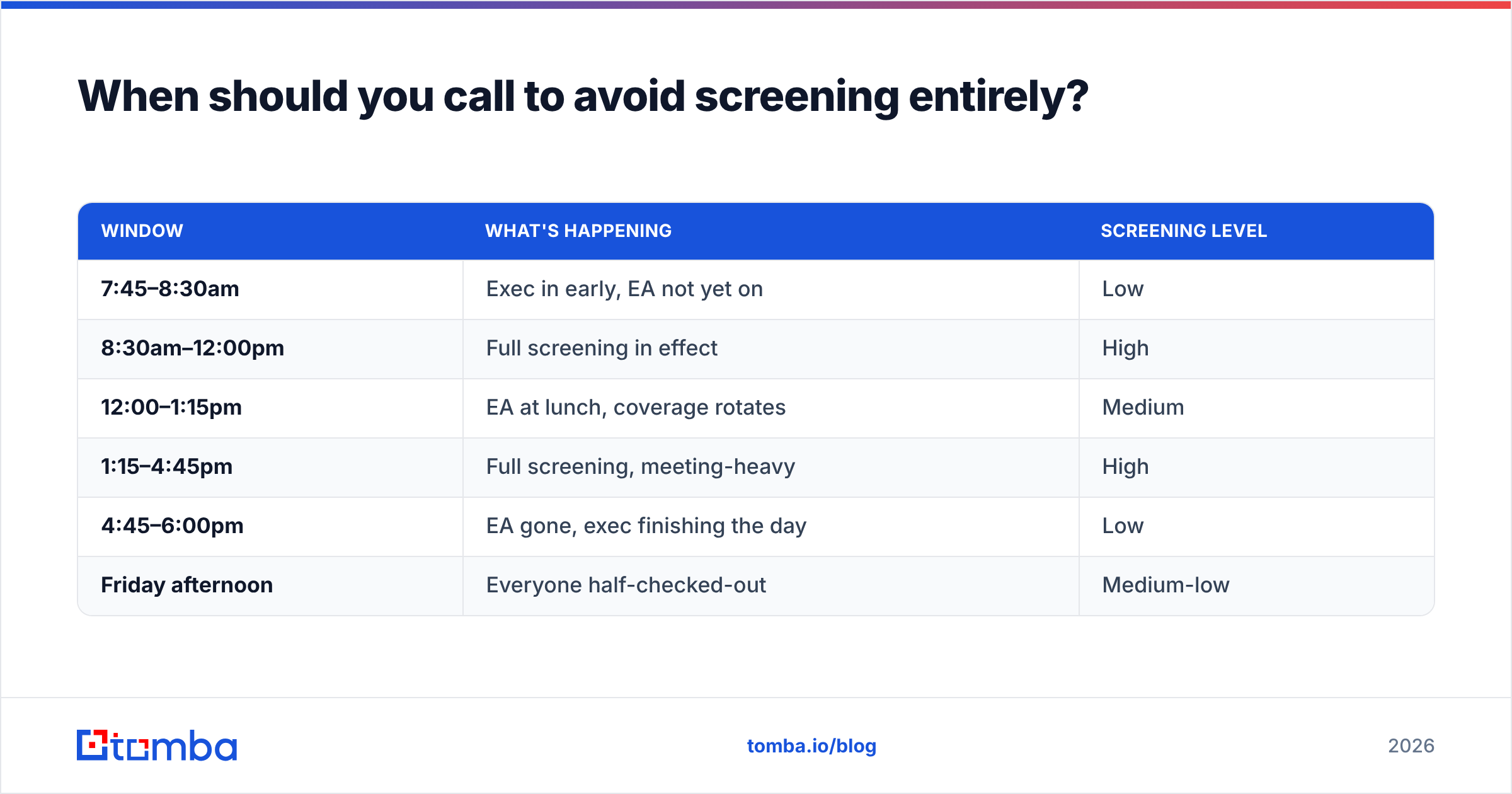
Timing is free and most reps ignore it.
| Window | What's happening | Screening level |
|---|---|---|
| 7:45–8:30am | Exec in early, EA not yet on | Low |
| 8:30am–12:00pm | Full screening in effect | High |
| 12:00–1:15pm | EA at lunch, coverage rotates | Medium |
| 1:15–4:45pm | Full screening, meeting-heavy | High |
| 4:45–6:00pm | EA gone, exec finishing the day | Low |
| Friday afternoon | Everyone half-checked-out | Medium-low |
Two caveats. First, this assumes a single time zone — verify the prospect's local time before you dial, not yours. Second, off-hours calling only works on a direct line or a main line that still rings through; many switchboards route to voicemail outside business hours, which converts your clever timing into a voicemail drop. Combine timing with a direct number and it becomes genuinely reliable.
What about the email and LinkedIn gatekeepers?#
Same principle, different mechanism. Your email doesn't get screened by a person — it gets screened by authentication records, engagement history, and content patterns.
- Get SPF, DKIM, and DMARC configured correctly. Run an SPF checker if you're unsure whether yours is passing. Google and Yahoo's bulk-sender requirements made this non-optional.
- Keep bounce rates under 2%. Verify before every send, not once per quarter.
- Warm new domains for at least three weeks before real volume.
- Write like a person. Run a draft through a spam checker before scaling a sequence — words like "guaranteed" and "risk-free" still trip filters.
On LinkedIn, the gatekeeper is the connection request itself. A cold connect with no note gets accepted or ignored on profile strength alone. Engaging with two of the prospect's posts a week before the request measurably improves acceptance, which costs nothing but patience. LinkedIn's own official product documentation covers the messaging limits that constrain any outreach cadence there.
Does any of this actually change your numbers?#
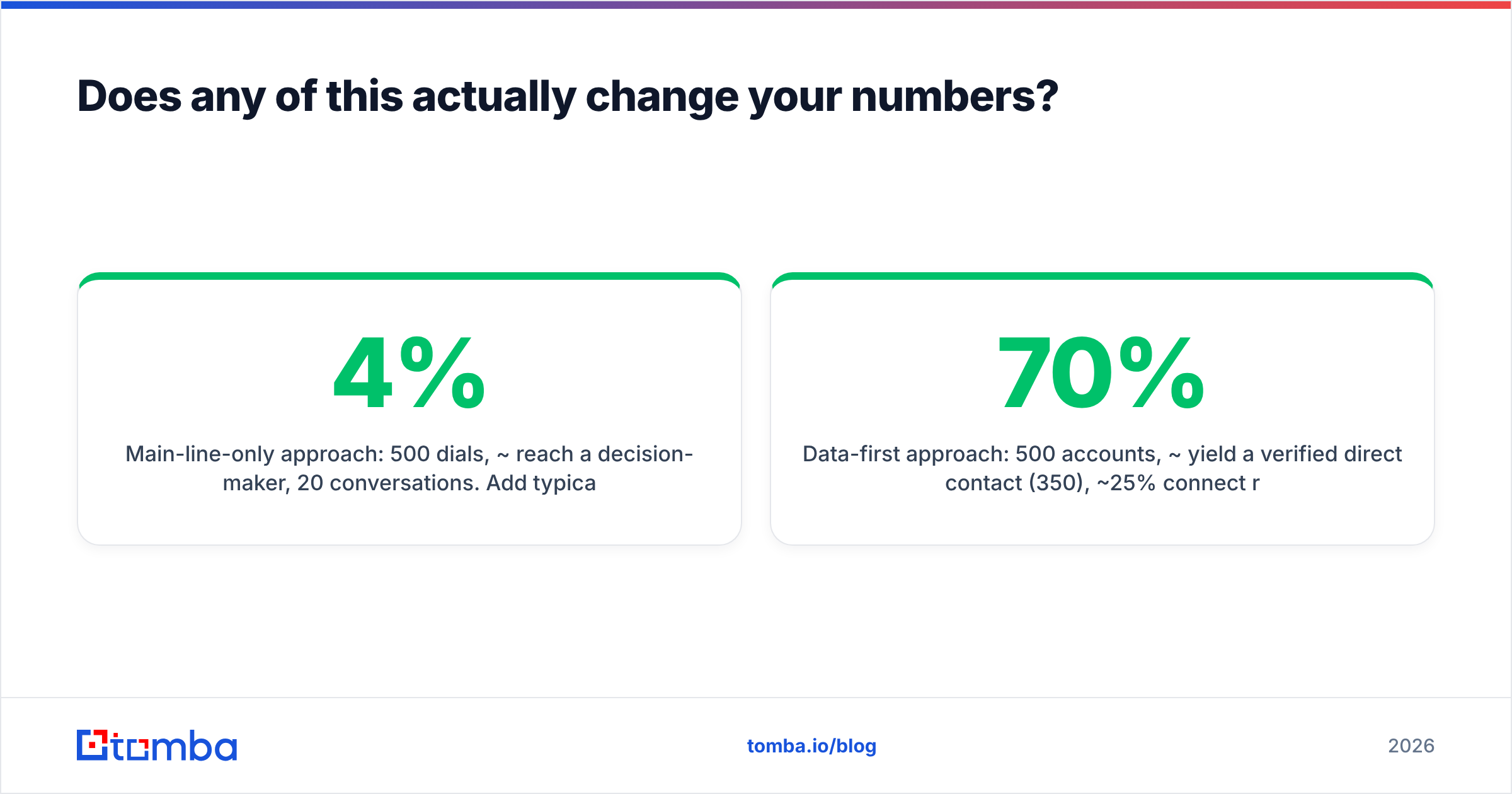
Run the arithmetic on 500 target accounts.
Main-line-only approach: 500 dials, ~4% reach a decision-maker, 20 conversations. Add typical no-shows and you're looking at maybe 6 meetings.
Data-first approach: 500 accounts, ~70% yield a verified direct contact (350), ~25% connect rate on direct dials (88 conversations), plus an email channel running in parallel. Call it 25–30 meetings from the same account list. The difference isn't the script. It's that 350 of those calls never encountered a gatekeeper at all.
The scripts in this post are worth having — you'll always hit accounts where the direct data doesn't exist, and being good on the phone with an EA is a real skill. But treat scripts as your fallback layer, not your strategy. Reps who lead with data and use scripts as backup consistently outperform reps who lead with scripts and hope. Peer reviews on G2's sales intelligence category tell the same story across dozens of tools: teams rate data accuracy as the top driver of connect rate, well ahead of dialer features.
Where should you start this week?#
Pick 50 accounts. For each, find the actual decision-maker's name, verify a work email, and try to source a direct dial. Then run the four-step sequence: contact data, trigger event, warm touch, call with a specific ask. Track connect rate against your previous 50 main-line dials. You'll have your answer in about ten days.
If you're building that contact layer from scratch, start with the Tomba Email Finder — it resolves verified work emails by name and domain, and the free tier gives you 25 searches a month to test against accounts you already know, so you can check the accuracy yourself before committing to a plan. Get the data right first, and the gatekeeper conversation becomes a much smaller part of your job.
Related guides#
Ready to find emails that actually work?
Join 150,000+ professionals who stopped guessing and started sending. Free credits on signup — no credit card required.
Get the Tomba newsletter
Practical outbound tactics and product updates — once every two weeks.
About the author