GetProspect vs FindEmails.com (Toofr): 2026 Comparison
GetProspect and FindEmails.com (formerly Toofr) attack B2B email finding from opposite ends. One is a database-first prospecting suite, the other a lean lookup engine. Here's which one actually fits your workflow — and where both fall short.
GetProspect vs FindEmails.com is a choice between two very different tools. One sells you a lead database. The other sells you a cheap lookup. Below: real pricing, find rates, credit rules, and the one we'd actually pay for.
TL;DR
- GetProspect is a database-first prospecting suite. You get ~200M contact records, a LinkedIn Chrome extension, and built-in lists. The free tier gives 50 valid emails a month. Best if you want to browse leads rather than look them up one by one.
- FindEmails.com (formerly Toofr) is a lean, cheap lookup engine. Paste a name and a domain, get an email with a confidence score. Entry pricing is the lower of the two. The UI and the integrations show their age.
- On raw find rates, neither one leads the category. Both sit in the "good enough for warm domains, weak on long-tail and catch-all" band.
- Need verification depth, catch-all handling, or a modern API? Both fall short of dedicated finders. Tomba's Starter plan is $49/mo with a real verification layer behind it.
- Our pick: GetProspect if you're a solo SDR who wants list-building and finding in one tab. FindEmails.com if you only need bulk CSV enrichment at the lowest cost per email.
GetProspect vs FindEmails.com: what are they?#
Two tools, two philosophies, one job.
GetProspect launched as a LinkedIn email extractor and grew into a full prospecting platform. You search a contact database by job title, company size, industry, or location. You save results into lists. You export them or push them to your CRM. The Chrome extension surfaces emails while you scroll LinkedIn Sales Navigator. It behaves like a mini-Apollo.
FindEmails.com started life as Toofr, a bootstrapped tool built by Ryan Buckley around 2014. The rebrand kept the engine intact. You supply a first name, a last name, and a company domain. It returns the most likely email with a numeric confidence score. There's bulk CSV upload, a simple API, and very little else. That minimalism is the whole pitch.
The split matters more than the feature lists suggest. GetProspect answers "who should I email?" FindEmails.com answers "what is this person's email?" If you already have a target list — from LinkedIn, a conference sheet, a scraped directory — the second question is the only one you have.
GetProspect vs FindEmails.com pricing: what does each cost?#
Pricing is where the two diverge hardest. It's also where the marketing pages get slippery.
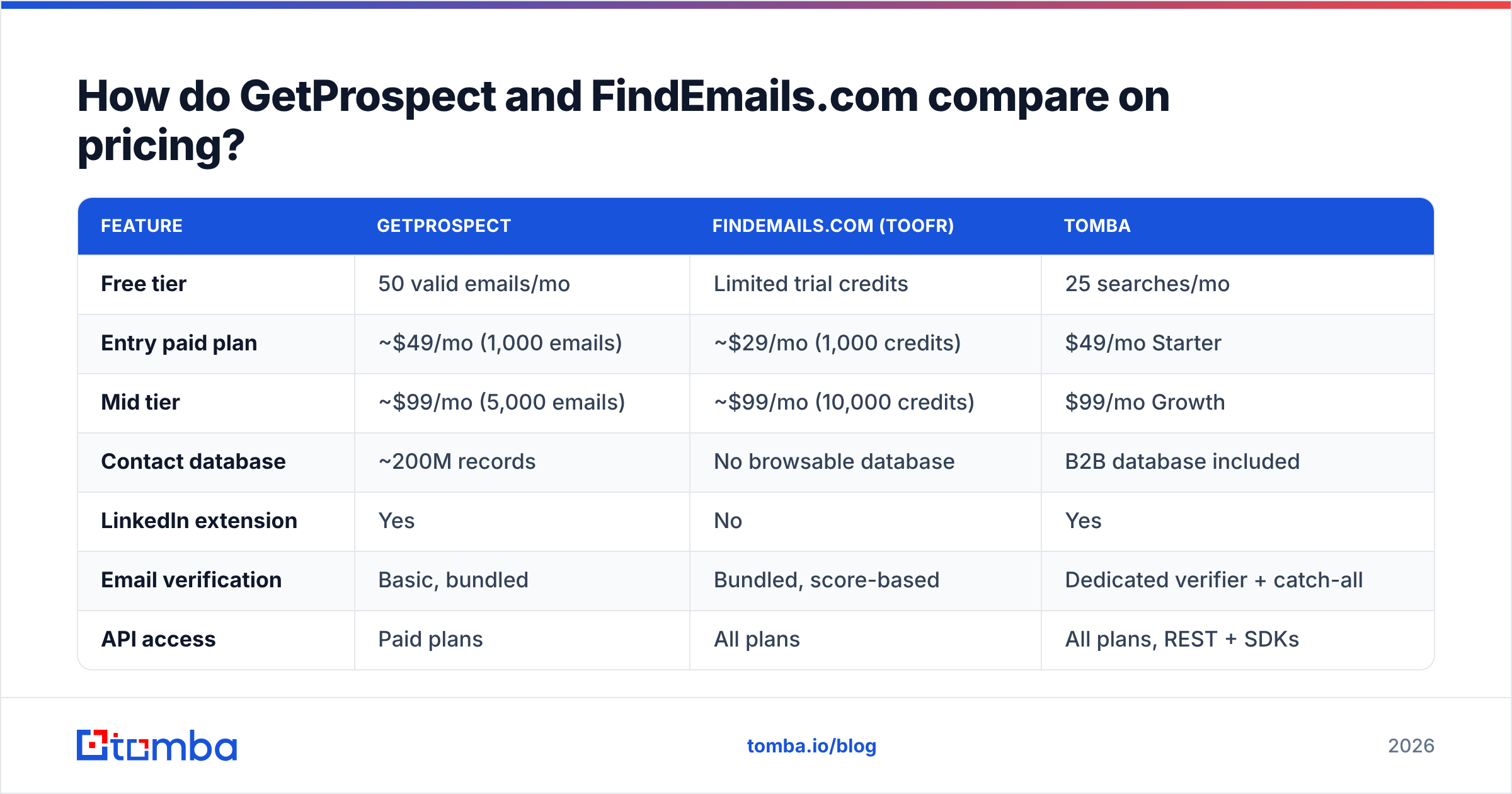
| Plan | GetProspect | FindEmails.com (Toofr) | Tomba |
|---|---|---|---|
| Free tier | 50 valid emails/mo | Limited trial credits | 25 searches/mo |
| Entry paid plan | ~$49/mo (1,000 emails) | ~$29/mo (1,000 credits) | $49/mo Starter |
| Mid tier | ~$99/mo (5,000 emails) | ~$99/mo (10,000 credits) | $99/mo Growth |
| Credit rollover | No | No | No |
What you get for that money differs just as much:
| Capability | GetProspect | FindEmails.com (Toofr) | Tomba |
|---|---|---|---|
| Contact database | ~200M records | None to browse | B2B database included |
| LinkedIn extension | Yes | No | Yes |
| Email verification | Basic, bundled | Bundled, score-based | Dedicated verifier + catch-all |
| API access | Paid plans | All plans | All plans, REST + SDKs |
| Bulk CSV enrichment | Yes | Yes | Yes |
Two footnotes change the math.
GetProspect only charges for valid emails. That's good policy. You don't burn credits on misses. But "valid" is graded by their own verifier, which is looser than a standalone service. A "valid" result that bounces still cost you a credit — and some sender reputation.
FindEmails.com charges per lookup attempt on some plan structures. Its credit definitions have also shifted across pricing revisions. Read the current terms before you commit to an annual plan. Cheap credits stop being cheap when half of them return guesses.
For a look at how a modern tiered structure reads, Tomba pricing lists flat monthly plans: Free (25 searches), Starter $49, Growth $99, Pro $249. Verification is included rather than sold as a separate SKU.
Which one finds more emails?#
Neither wins outright. Anyone quoting a clean number is selling something.
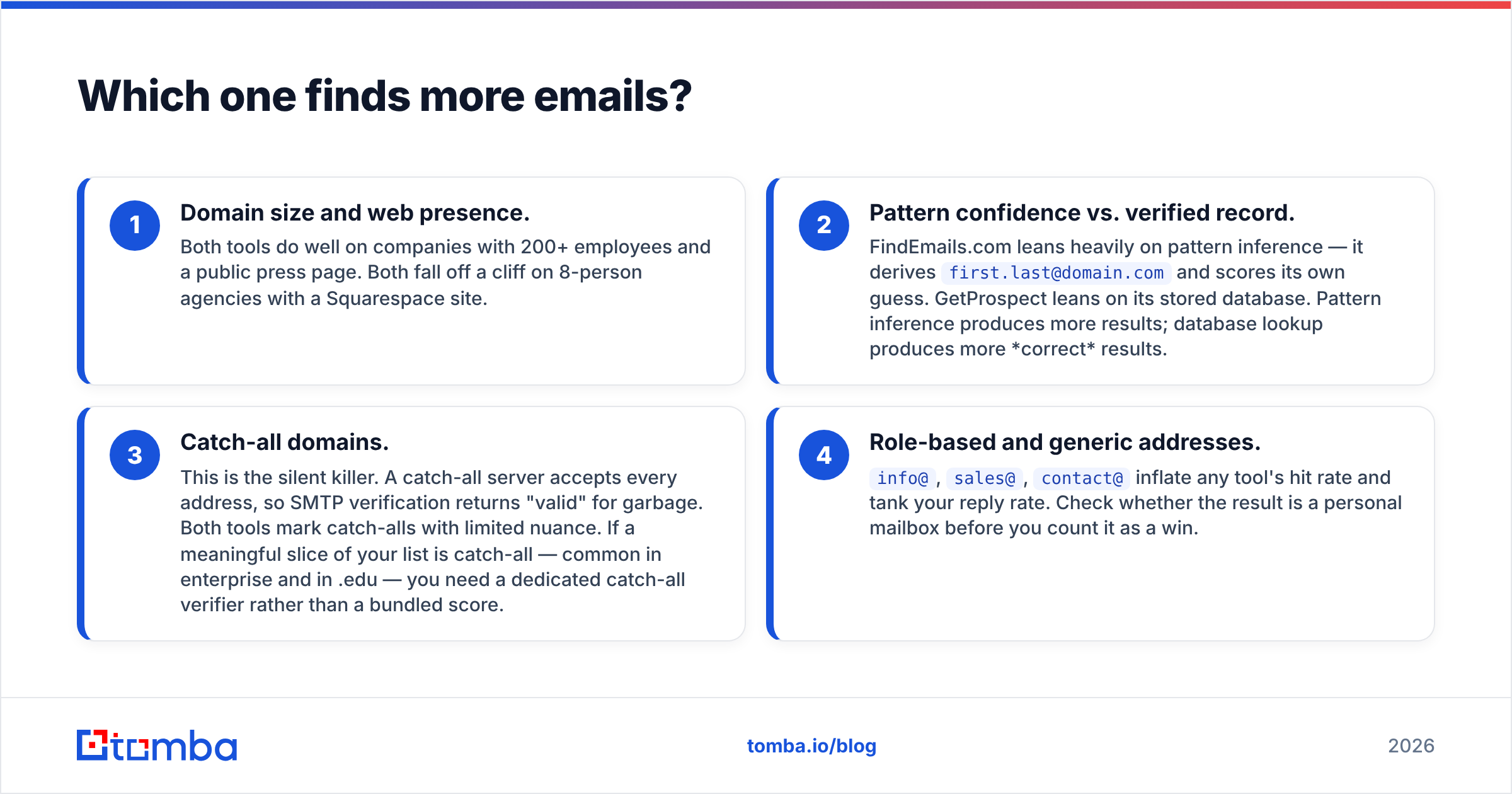
Here's what actually drives find rate, in rough order of impact.
1. Domain size and web presence. Both tools do well on companies with 200+ employees and a public press page. Both fall off a cliff on 8-person agencies with a Squarespace site.
2. Pattern guess vs. stored record. FindEmails.com leans on pattern inference. It derives first.last@domain.com and scores its own guess. GetProspect leans on its stored database. Pattern inference returns more results. Database lookup returns more correct ones.
3. Catch-all domains. This is the silent killer. A catch-all server accepts every address, so SMTP checks return "valid" for garbage. Both tools flag catch-alls with little nuance. If a big slice of your list is catch-all — common in enterprise and .edu — use a dedicated catch-all verifier instead of a bundled score.
4. Role-based and generic addresses. info@, sales@, and contact@ inflate any tool's hit rate and tank your reply rate. Check that the result is a personal mailbox before you count it as a win.
The practical test is simple. Take 100 contacts whose emails you already know: past customers, current pipeline, your team's own contacts. Run them through both trials. Measure exact matches, not "returned something." Most teams find their real hit rate is 15-25 points below the vendor's marketing number.
A confidence score is not verification. A score of 92 means the model believes the pattern. It does not mean an SMTP handshake confirmed the mailbox. If you send cold, run every result through a real email verifier before it reaches your sequencer.
Is GetProspect better than FindEmails.com for LinkedIn prospecting?#
Yes, clearly. This is GetProspect's home turf.
The GetProspect Chrome extension works on LinkedIn and Sales Navigator search results. Run a search, click the extension, and it pulls profiles into a list with emails attached. For an SDR who lives inside Sales Navigator, that saves real time over pasting names into a lookup box.
FindEmails.com has no LinkedIn extension. You'd export profiles some other way, then upload a CSV. That's an extra tool and an extra step.
One caveat, stated plainly. LinkedIn's user agreement bans automated scraping, and LinkedIn has restricted accounts for extension-driven bulk extraction. Every vendor here works in that grey zone.
So use a secondary account and keep volumes modest. Don't build your whole pipeline on a channel that someone else's policy team can switch off. If you want the same outcome with less exposure, a server-side LinkedIn finder resolves a profile URL to an email without a browser extension. Different tool, different risk profile.
Is FindEmails.com (Toofr) still worth it in 2026?#
It depends on what you're optimizing for.
Where it holds up:
- Cost per email. At the entry tier it's among the cheapest credible options. If you enrich a 5,000-row list once a quarter and can live with a 60-70% hit rate, the math works.
- Simplicity. No onboarding, no data model to learn, no seats to manage. Upload, download, done.
- A usable API. The endpoint is straightforward and documented well enough for a scrappy integration.
Where it shows its age:
- UI and UX. The interface hasn't kept pace with the category. It's functional, not pleasant.
- No database to browse. You must bring your own list. Fine if you have one. Disqualifying if you don't.
- Thin integrations. No native HubSpot, Salesforce, or Pipedrive connector. You're living in CSV.
- Verification depth. Score-based confidence, not multi-signal verification. No serious catch-all handling.

The honest read: FindEmails.com was excellent for its era and is now a budget option rather than a competitive one. If price is your only constraint, it still clears the bar. If you send enough volume that a 4% bounce rate threatens your domain, the savings vanish the first time you have to warm a new sending domain.
What should you check before you buy either one?#
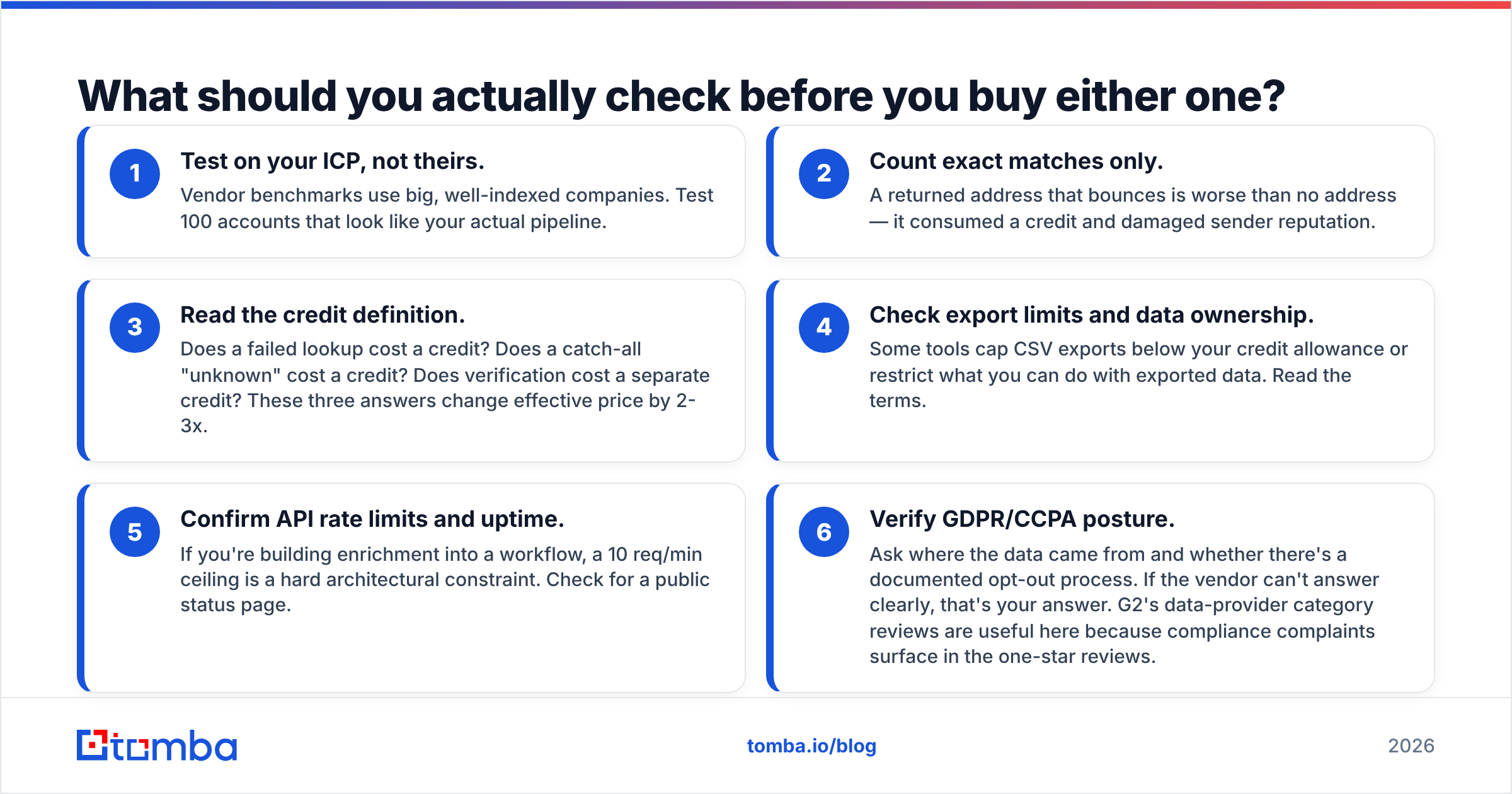
Run this checklist against any email finder, not just these two.
1. Test on your ICP, not theirs. Vendor benchmarks use big, well-indexed companies. Test 100 accounts that look like your actual pipeline.
2. Count exact matches only. An address that bounces is worse than no address. It burned a credit and hurt your sender reputation.
3. Read the credit definition. Does a failed lookup cost a credit? Does a catch-all "unknown" cost one? Is verification billed separately? Those three answers swing your effective price by 2-3x.
4. Check export limits and data ownership. Some tools cap CSV exports below your credit allowance, or limit what you may do with exported data. Read the terms.
5. Confirm API rate limits and uptime. If enrichment sits inside a workflow, a 10 req/min ceiling is a hard architectural limit. Look for a public status page.
6. Verify GDPR/CCPA posture. Ask where the data came from and how opt-outs work. If the vendor can't answer clearly, that's your answer. G2's data-provider category helps here, because compliance complaints surface in the one-star reviews.
Which alternatives are worth considering?#
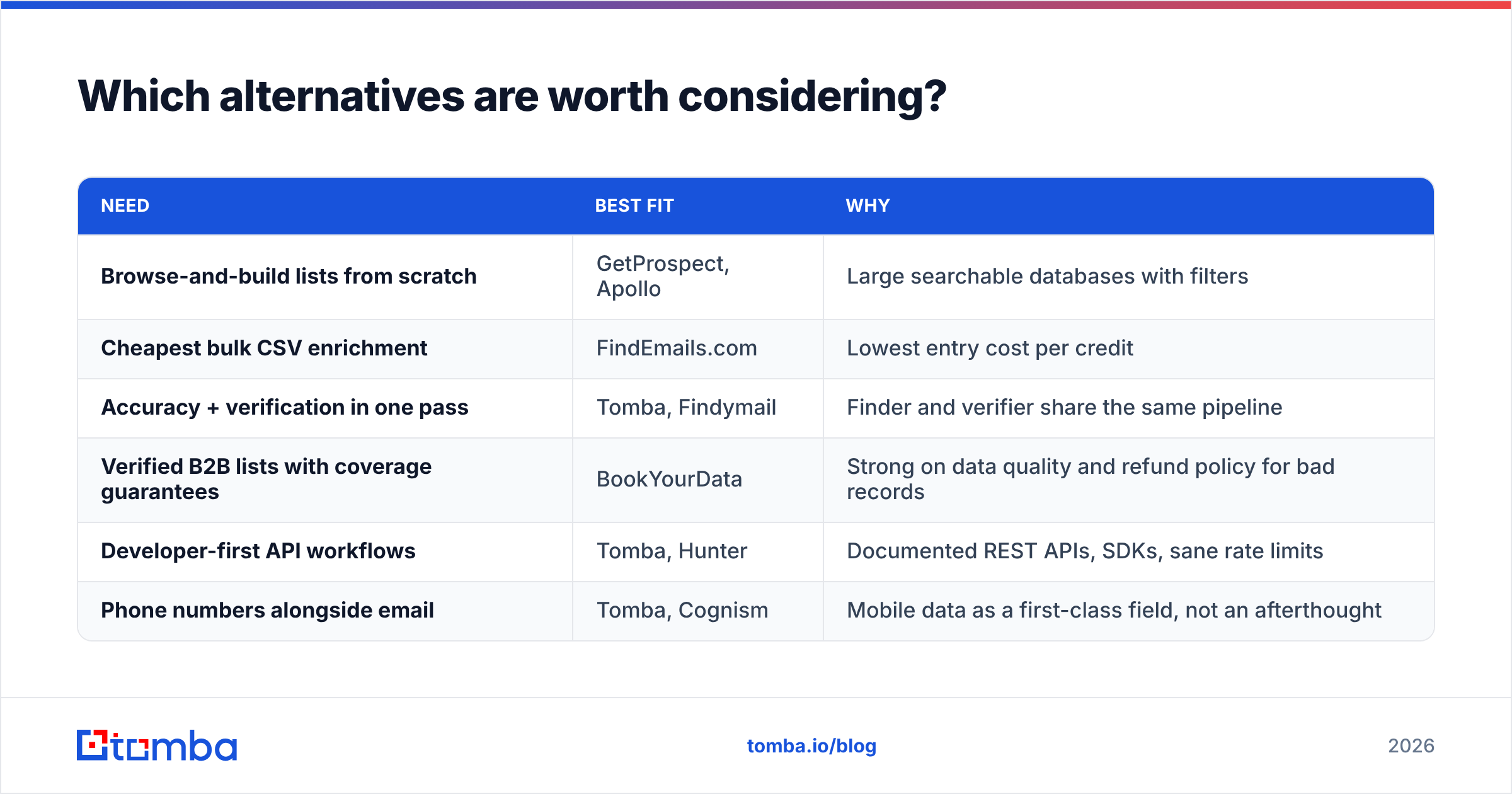
Both tools sit in a crowded field. Often the right answer is neither.
| Need | Best fit | Why |
|---|---|---|
| Browse-and-build lists from scratch | GetProspect, Apollo | Large searchable databases with filters |
| Cheapest bulk CSV enrichment | FindEmails.com | Lowest entry cost per credit |
| Accuracy + verification in one pass | Tomba, Findymail | Finder and verifier share the same pipeline |
| Verified B2B lists with coverage guarantees | BookYourData | Strong data quality and refunds for bad records |
| Developer-first API workflows | Tomba, Hunter | Documented REST APIs, SDKs, sane rate limits |
| Phone numbers alongside email | Tomba, Cognism | Mobile data as a first-class field |
Two notes on that table. BookYourData fits when you want purchased, pre-verified lists rather than on-demand lookups. Different motion, different buying process, and a more concrete accuracy guarantee than most.
Apollo wins on database breadth, but it bundles a sequencer you may not want. If that's your situation, an Apollo alternative that unbundles finding from sending usually costs less.
If your bottleneck is finding rather than browsing, the pattern that works is straightforward. Source your list wherever you already source it — LinkedIn, conference sites, job boards, domain search on target accounts. Then run one high-quality find-and-verify pass instead of stacking two mediocre tools.
How do you build a workflow that doesn't depend on one vendor?#
Split the job into four stages. Most teams collapse them into one tool, then find they're locked in.
- Source. Where target accounts come from — Sales Navigator, a job-board scrape, an event list, inbound signals from website visitor reveal.
- Find. Name + domain to email address. This is the commodity layer. Swap vendors freely and test quarterly.
- Verify. SMTP, MX, and catch-all handling before anything hits a sequencer. Non-negotiable above a few hundred sends a week.
- Send. Your sequencer, warmed, and separate from your primary domain.
Keeping find and verify separate means a vendor's find-rate slump can't quietly poison your deliverability. It also lets you benchmark honestly. Verify with the same tool that found the address and you're grading the exam you wrote.
Run the whole thing through an API or a spreadsheet add-on instead of manual exports. The Tomba API and the Google Sheets add-on fit that pattern, as do the equivalents from most serious vendors. The tool isn't the point. Manual CSV shuffling is where lists go stale and duplicates pile up.
The verdict#
Choose GetProspect if you're a solo SDR or small team that builds lists and finds emails in one place, works mostly inside LinkedIn, and values a searchable database over raw accuracy. The valid-emails-only credit policy is a real advantage.
Choose FindEmails.com if you already have your target list, need cheap bulk enrichment, and will verify results elsewhere before sending. It's a budget tool that knows it's a budget tool.
Choose neither if your outbound volume is high enough that bounce rate is a business risk. At that point per-credit price stops mattering. Accuracy and catch-all handling start mattering a lot. That's when you test a finder with a real verification layer under it.
Whichever way GetProspect vs FindEmails.com lands for you, run your own 100-contact accuracy test before signing anything annual. It takes an afternoon, and it's the only benchmark that reflects your pipeline.
Ready to test a finder built for accuracy first? The Tomba Email Finder turns names and domains into verified professional emails. It flags catch-alls outright instead of scoring around them. Every plan ships with an API, a Chrome extension, and Sheets and Excel add-ins. Start free with 25 searches a month — no card — and run it head-to-head against whatever you use now.
Related guides#
Ready to find emails that actually work?
Join 150,000+ professionals who stopped guessing and started sending. Free credits on signup — no credit card required.
Get the Tomba newsletter
Practical outbound tactics and product updates — once every two weeks.
About the author