GetProspect vs Gigasheet: Lead Finder vs Data Spreadsheet
GetProspect finds B2B emails. Gigasheet opens million-row CSVs in a browser. They solve opposite halves of the same pipeline — here's which one your team actually needs, and what it costs to run both.
TL;DR
- GetProspect is a B2B contact database and email finder. Gigasheet is a browser-based spreadsheet built to open files far bigger than Excel can handle. They are not substitutes.
- If your problem is "I don't have enough contacts," GetProspect (or a dedicated email finder) is the tool. If your problem is "I have 4 million rows and Excel crashed," Gigasheet is the tool.
- Gigasheet has no email-finding engine. Uploading a list of company names to it will return exactly zero new email addresses.
- Most outbound teams end up using a finder plus a place to clean and dedupe the output — the cheap version of that stack is an email finder with bulk processing and an API, not two separate subscriptions.
- Verify before you send, regardless of source. Database records decay roughly 25-30% per year, and neither tool sends your emails for you.
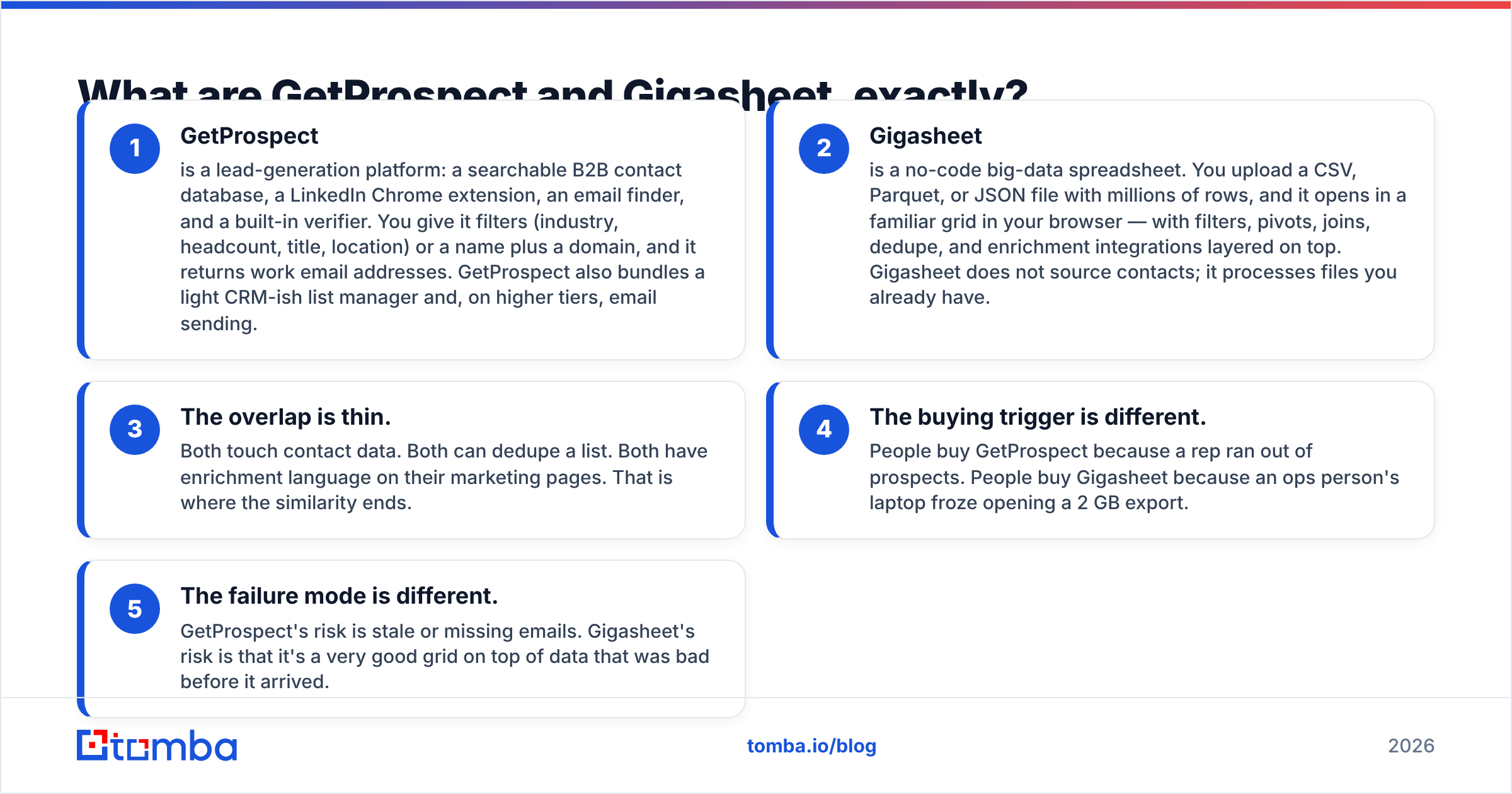
What are GetProspect and Gigasheet, exactly?#
The reason this comparison keeps showing up in search is that both tools sit near the words "B2B data" — but they occupy different ends of the pipeline.
- GetProspect is a lead-generation platform: a searchable B2B contact database, a LinkedIn Chrome extension, an email finder, and a built-in verifier. You give it filters (industry, headcount, title, location) or a name plus a domain, and it returns work email addresses. GetProspect also bundles a light CRM-ish list manager and, on higher tiers, email sending.
- Gigasheet is a no-code big-data spreadsheet. You upload a CSV, Parquet, or JSON file with millions of rows, and it opens in a familiar grid in your browser — with filters, pivots, joins, dedupe, and enrichment integrations layered on top. Gigasheet does not source contacts; it processes files you already have.
- The overlap is thin. Both touch contact data. Both can dedupe a list. Both have enrichment language on their marketing pages. That is where the similarity ends.
- The buying trigger is different. People buy GetProspect because a rep ran out of prospects. People buy Gigasheet because an ops person's laptop froze opening a 2 GB export.
- The failure mode is different. GetProspect's risk is stale or missing emails. Gigasheet's risk is that it's a very good grid on top of data that was bad before it arrived.
If you only read one line: GetProspect creates records, Gigasheet manipulates records.

How do GetProspect and Gigasheet compare feature by feature?#
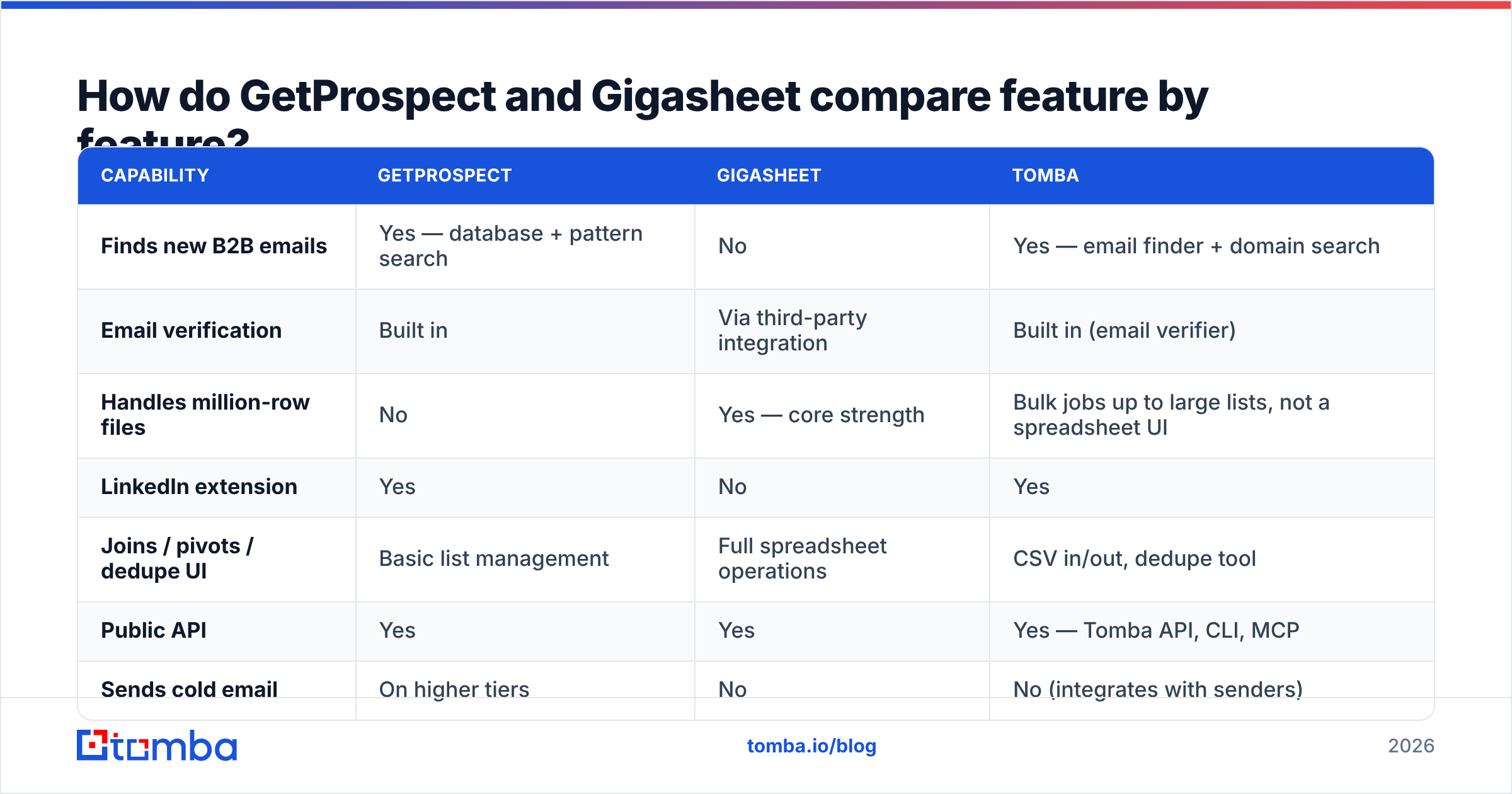
| Capability | GetProspect | Gigasheet | Tomba |
|---|---|---|---|
| Finds new B2B emails | Yes — database + pattern search | No | Yes — email finder + domain search |
| Email verification | Built in | Via third-party integration | Built in (email verifier) |
| Handles million-row files | No | Yes — core strength | Bulk jobs up to large lists, not a spreadsheet UI |
| LinkedIn extension | Yes | No | Yes |
| Joins / pivots / dedupe UI | Basic list management | Full spreadsheet operations | CSV in/out, dedupe tool |
| Public API | Yes | Yes | Yes — Tomba API, CLI, MCP |
| Sends cold email | On higher tiers | No | No (integrates with senders) |
| Free tier | Yes, limited monthly credits | Yes, file-size limited | Yes — 25 searches/mo |
Read the table as two columns of "no." Gigasheet's column of "no" is all about acquisition. GetProspect's column of "no" is all about scale-processing. Neither is a flaw — each tool is honest about what it does.
Which one is better for building a prospect list?#
GetProspect, and it isn't close. Gigasheet has no contact-discovery layer at all.
The real question is whether GetProspect is the best finder for your motion. Three things to check before you commit:
- Coverage in your niche. Database tools are strong where their crawl and contributor network are strong. US SaaS mid-market? Usually fine. German Mittelstand manufacturers or LATAM logistics? Test 100 target domains before you buy. Every finder looks accurate on a demo list of Fortune 500 companies.
- Credit accounting. Ask what burns a credit: a search that returns nothing, a verification, a re-lookup of a record you already pulled. This single detail swings effective cost more than headline price does.
- Verification depth. A "valid" flag that only checks syntax and MX records is not verification. You want SMTP-level checks plus explicit handling of catch-all domains — which is a category most tools quietly mark as "accept all" and let you sort out later. A dedicated catch-all verifier exists because that bucket is often 20-30% of a B2B list.
For teams whose bottleneck is finding one specific person's email rather than pulling 10,000 filtered records, a focused finder is usually cheaper and more accurate than a full database subscription. That's the wedge Tomba, Findymail, and similar tools occupy — pay for lookups, not for a seat on a data warehouse you rarely query.
Which one is better for cleaning and analyzing data?#
Gigasheet, clearly. This is where it earns its subscription.
Concrete jobs Gigasheet does well that a lead tool cannot:
- Opening a 3 GB Salesforce or product-analytics export without a data engineer.
- Joining a 900k-row usage table against a 40k-row account list on domain.
- Deduping across fuzzy keys, then exporting only the delta.
- Sharing a filtered view with a non-technical stakeholder who would otherwise ask for "just a quick pull."
If your ops team currently solves these with a Python notebook nobody else can run, Gigasheet is a legitimate purchase. If your team solves them with a 30k-row Google Sheet, you don't need it yet — Sheets and a dedupe tool will do.
One caveat worth stating plainly: a spreadsheet that scales does not make bad data good. Gigasheet will happily open 2 million rows of contacts with a 41% bounce rate and render them beautifully.

What do GetProspect and Gigasheet actually cost?#
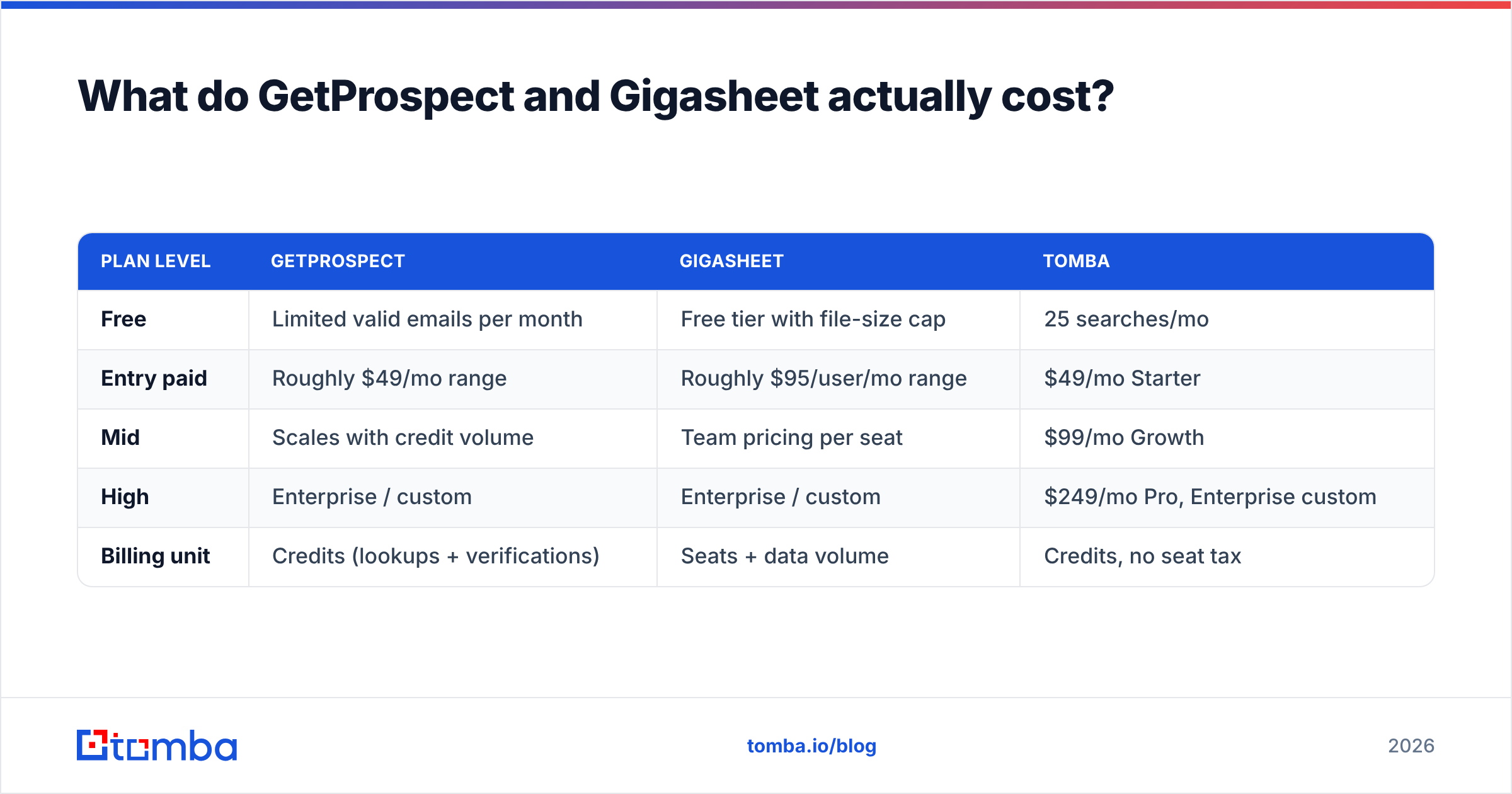
Pricing on both sides changes often and varies by contract length, so treat these as directional and confirm on each vendor's own pricing page before you budget.
| Plan level | GetProspect | Gigasheet | Tomba |
|---|---|---|---|
| Free | Limited valid emails per month | Free tier with file-size cap | 25 searches/mo |
| Entry paid | Roughly $49/mo range | Roughly $95/user/mo range | $49/mo Starter |
| Mid | Scales with credit volume | Team pricing per seat | $99/mo Growth |
| High | Enterprise / custom | Enterprise / custom | $249/mo Pro, Enterprise custom |
| Billing unit | Credits (lookups + verifications) | Seats + data volume | Credits, no seat tax |
Two structural differences matter more than the sticker price:
Seats vs credits. Gigasheet's model is per-user, which is normal for an analysis tool but punishing if six people occasionally need to peek at a file. Finder tools bill by lookup, so a large team with light usage pays less than a small team with heavy usage. Match the model to your usage shape, not to the headline number. You can compare that structure against Tomba pricing directly.
Annual lock-in. Both categories discount annual plans heavily. Both categories also have a high churn rate at month three, when someone finally measures cost per usable contact. Run a paid month before you sign a year.
Do you actually need both — or something else?#
Here's the honest decision tree.
| Your situation | What to buy |
|---|---|
| Reps have no contacts to work | An email finder (GetProspect, Tomba, or similar) |
| Files too big for Excel, data already sourced | Gigasheet |
| Both problems, small team | Finder with bulk + API; use Sheets for the rest |
| Both problems, data-heavy RevOps team | Both, plus a warehouse eventually |
| You want a ready-made vertical list | A curated list vendor such as BookYourData, which sells verified contacts outright |
The middle row is where most 5-20 person outbound teams land, and it's the row people over-buy. If your "big data" problem is a 200k-row list you touch twice a quarter, you do not need a per-seat spreadsheet platform. You need a finder that can process a list without you babysitting it — which is what bulk email finder jobs and a scriptable API are for. Push a CSV in, get enriched and verified rows back, load them into whatever CRM or sequencer you already pay for.
Conversely, if you're a RevOps analyst joining product telemetry to CRM accounts weekly, no email finder on earth replaces Gigasheet. Buy it and stop fighting your laptop.
How accurate is the data from either tool?#
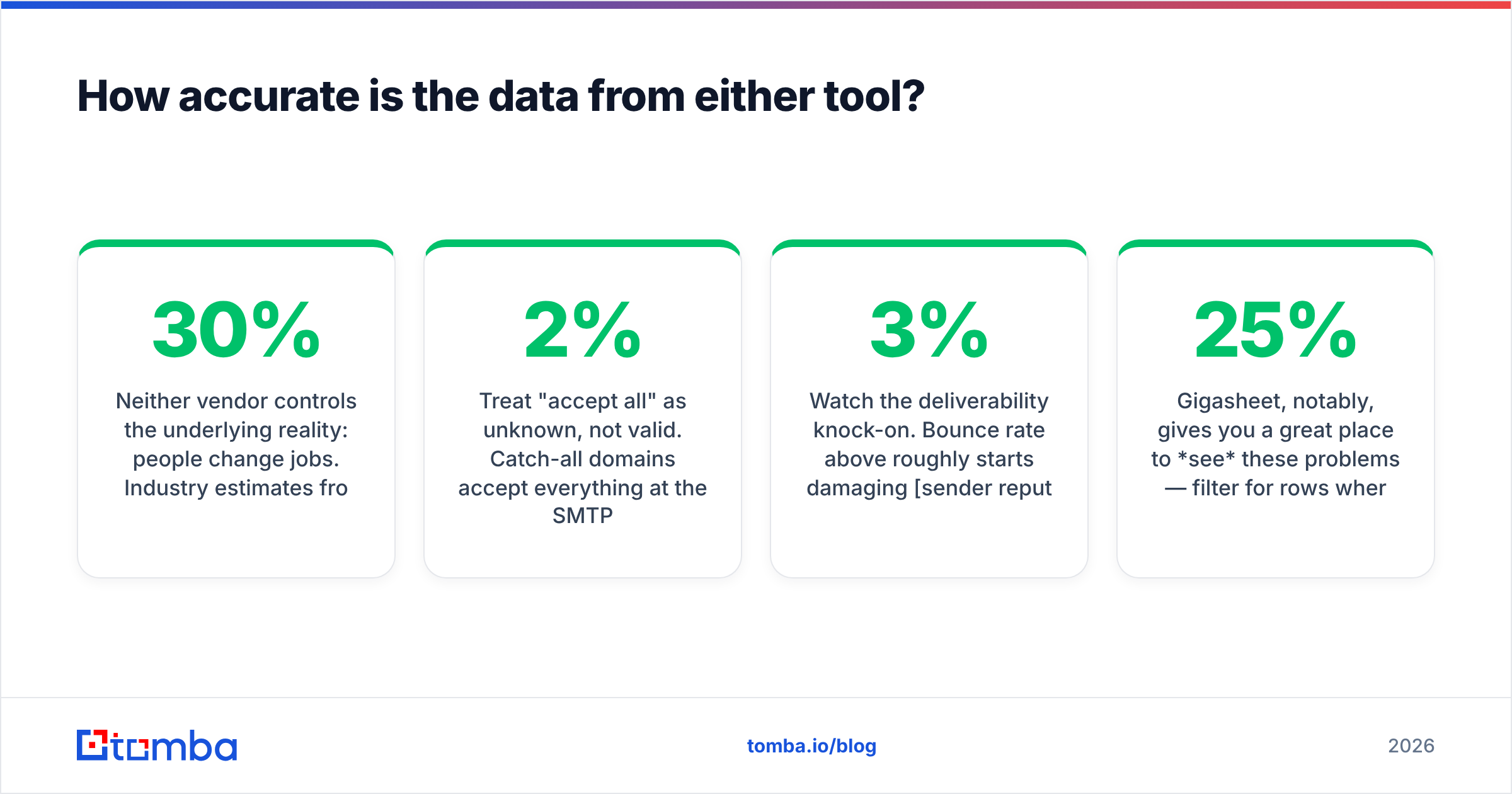
Neither vendor controls the underlying reality: people change jobs. Industry estimates from analyst firms including Gartner and vendor benchmarking on G2 consistently put B2B contact-data decay in the 25-30% per year range, which means roughly one in four records in a list you bought last January is wrong today.
Practical rules that hold across every tool in this comparison:
- Verify at send time, not at purchase time. A list verified in March and mailed in August is not a verified list. Re-run it.
- Treat "accept all" as unknown, not valid. Catch-all domains accept everything at the SMTP layer. Sending to them blind is how a 2% bounce rate becomes 9%.
- Sample before scaling. Pull 100 records, verify them independently, and count real bounces on a small send. That number — not the vendor's claimed accuracy percentage — is your accuracy.
- Watch the deliverability knock-on. Bounce rate above roughly 3% starts damaging sender reputation, and a damaged domain costs far more to repair than the credits you saved by skipping verification.
Gigasheet, notably, gives you a great place to see these problems — filter for rows where the verification status is anything but "valid" and you'll usually find 15-25% of a purchased list. It just won't fix them.
What's the fastest workflow if you only want one subscription?#
A pattern that works for most teams under 25 reps:
- Define the account list first. Firmographics, not people. Fifty to 500 target domains.
- Run domain search per account to get the people and the company's email pattern in one pass, rather than guessing names one at a time.
- Verify everything in bulk, and split catch-alls into their own segment with a lower-risk send strategy.
- Enrich only what survives. Titles, LinkedIn URLs, phone numbers — spend enrichment credits on verified contacts, not on the whole raw pull.
- Export to your sequencer. The finder should not be your sending tool; deliverability lives with your sending domain setup.
- Re-verify quarterly. Put it on a calendar or it never happens.
Steps 1-4 are one tool. Step 5 is your existing stack. Nothing in that list requires a million-row spreadsheet unless you're operating at genuine data-warehouse scale — at which point you're past both tools and into dbt and a real warehouse anyway.
The verdict#
Buy GetProspect if you need contacts. Buy Gigasheet if you need to wrangle files you already have. Buy both only if you've genuinely hit both walls, and price the combined per-seat cost honestly before you do.
And if you're evaluating GetProspect mainly because you need reliable work emails at a predictable cost — without a per-seat tax and without a separate verification vendor — compare it against a finder-first stack. The Tomba Email Finder covers domain search, verification, catch-all handling, bulk jobs, and an API on one credit pool, starting free at 25 searches a month and $49/mo when you outgrow it. Run 100 of your own target domains through it and through GetProspect on the same day. The tool with more verified hits on your list wins — that's the only benchmark that matters.
Related guides#
Ready to find emails that actually work?
Join 150,000+ professionals who stopped guessing and started sending. Free credits on signup — no credit card required.
Get the Tomba newsletter
Practical outbound tactics and product updates — once every two weeks.
About the author