GetProspect vs MergeMail: Find or Send? 2026 Comparison
GetProspect finds B2B email addresses. MergeMail sends mail merges from Gmail. They solve opposite halves of the same problem — here is which one you actually need first, and what each costs.
TL;DR
- GetProspect and MergeMail are not really competitors. GetProspect is a B2B contact database and email finder; MergeMail is a Gmail mail-merge sender. One fills the list, the other mails it.
- If your problem is "I don't have enough good addresses," GetProspect (or a dedicated finder) is the buy. If your problem is "I have 400 rows in a spreadsheet and no way to send them personalised email," MergeMail is the buy.
- MergeMail is cheap and Gmail-native, which is also its ceiling: you inherit Gmail's daily sending limits and you get no data, no verification, and no multi-inbox rotation.
- GetProspect's free tier is generous for testing but its per-credit cost climbs fast once you're enriching thousands of rows monthly, and catch-all domains still need separate verification.
- The realistic 2026 stack is three layers: a finder + verifier for data, a sender for delivery, and a CRM for the pipeline. Buying one tool and expecting both halves is how campaigns quietly die.
What are GetProspect and MergeMail, exactly?#
GetProspect is a B2B lead-generation platform built around a contact database and a LinkedIn Chrome extension. You search by job title, company size, industry, location, or technology, and it returns names with work email addresses. There's a list-management layer, basic CRM-ish fields, CSV import/export for enrichment, and — added over the last few product cycles — a light email-sending module. Its centre of gravity is still data.
MergeMail is a different animal. It's a Gmail add-on and web app that turns a Google Sheet into a personalised mail merge. You write a template with {{FirstName}}-style merge fields, point it at a sheet or a contact list, and it sends from your own Gmail or Google Workspace account. It tracks opens and clicks, supports scheduled sending, drip campaigns, and reusable templates. It does not find anyone's email address. It assumes you already have the list.
So the honest framing for GetProspect vs MergeMail is not "which is better." It's "which half of the outbound problem are you solving this quarter."

Do GetProspect and MergeMail actually compete?#
They overlap on exactly one edge: GetProspect has added outreach features, and MergeMail lets you manage contact lists. That overlap is thin in both directions.
GetProspect's sending is fine for a low-volume follow-up sequence to lists you built inside GetProspect. It is not a replacement for a purpose-built sequencer, and it isn't Gmail-native the way MergeMail is — if your entire workflow lives in Gmail threads and Google Sheets, MergeMail feels like an extension of tools you already use, while GetProspect feels like a separate app you have to visit.
MergeMail's contact lists are storage, not sourcing. Uploading a CSV is not the same as generating one. If the list is bad, MergeMail will happily send to every dead address on it and hand you a bounce report afterwards — which is the expensive way to learn your data was stale.
The practical test: open your last failed campaign and ask which number was actually broken. Sub-30% deliverability with a decent reply rate on the delivered slice means a data problem. Clean delivery with a 0.4% reply rate means a copy and targeting problem. Buying a sender to fix a data problem is the single most common outbound mis-purchase.
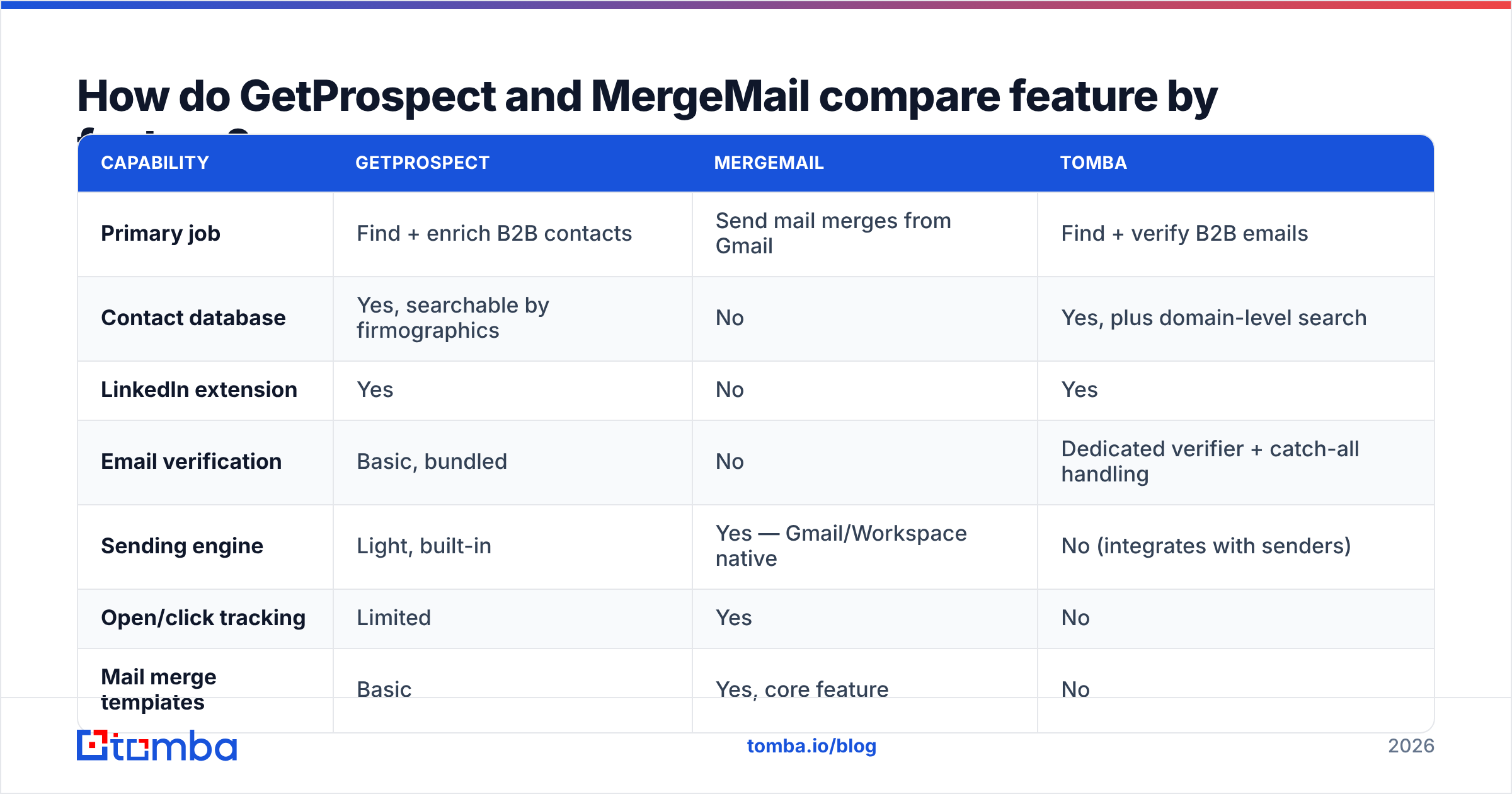
How do GetProspect and MergeMail compare feature by feature?#
| Capability | GetProspect | MergeMail | Tomba |
|---|---|---|---|
| Primary job | Find + enrich B2B contacts | Send mail merges from Gmail | Find + verify B2B emails |
| Contact database | Yes, searchable by firmographics | No | Yes, plus domain-level search |
| LinkedIn extension | Yes | No | Yes |
| Email verification | Basic, bundled | No | Dedicated verifier + catch-all handling |
| Sending engine | Light, built-in | Yes — Gmail/Workspace native | No (integrates with senders) |
| Open/click tracking | Limited | Yes | No |
| Mail merge templates | Basic | Yes, core feature | No |
| Bulk CSV enrichment | Yes | No | Yes |
| Public API | Yes | Limited | Yes, documented REST API |
| Sending limits | Platform-imposed | Inherits Gmail's daily cap | N/A |
| Best for | List building | Small-batch personalised sends | Data accuracy at scale |
Read that table as a stack diagram, not a leaderboard. The columns barely fight each other. GetProspect and Tomba compete on the data row; MergeMail owns the sending rows outright and doesn't contest the data rows at all.
The row that matters most and gets ignored most is email verification. A finder that returns an address without telling you its confidence level is handing you a liability. Bounce rates above roughly 3% start visibly damaging sender reputation, and Gmail and Microsoft have both tightened bulk-sender enforcement since 2024. If GetProspect gives you 2,000 addresses and MergeMail sends to all of them from your primary Workspace domain, one bad list can dent the domain you also use for customer support.
What do GetProspect and MergeMail cost in 2026?#
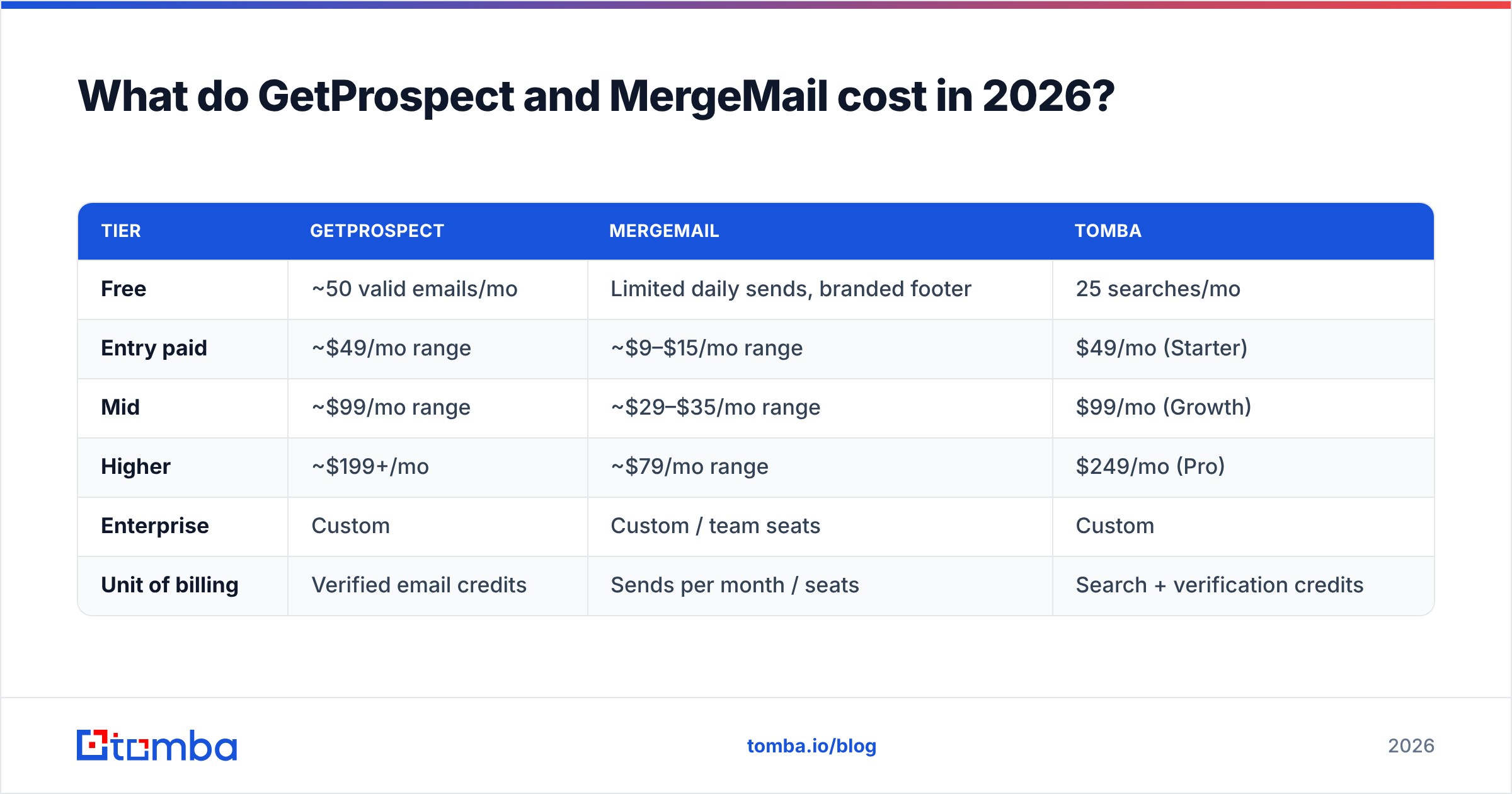
Pricing on both platforms changes often, so treat these as shape-of-the-curve rather than a quote — check each vendor's page before you buy.
| Tier | GetProspect | MergeMail | Tomba |
|---|---|---|---|
| Free | ~50 valid emails/mo | Limited daily sends, branded footer | 25 searches/mo |
| Entry paid | ~$49/mo range | ~$9–$15/mo range | $49/mo (Starter) |
| Mid | ~$99/mo range | ~$29–$35/mo range | $99/mo (Growth) |
| Higher | ~$199+/mo | ~$79/mo range | $249/mo (Pro) |
| Enterprise | Custom | Custom / team seats | Custom |
| Unit of billing | Verified email credits | Sends per month / seats | Search + verification credits |
Two things fall out of this.
First, MergeMail is genuinely cheap because sending through your own Gmail account costs it almost nothing — Google carries the infrastructure. That's a real advantage for a solo founder or a two-person agency. It's also why it can't scale: you can't buy your way past Google's per-account daily send cap inside MergeMail. You buy more Workspace seats instead, and at that point a dedicated sending platform is usually cheaper per email.
Second, credit-based data pricing punishes sloppy workflows. Every duplicate row you enrich, every contact you look up twice because two reps searched the same account, every guess at a person who left the company in 2023 — those all burn credits. Deduplicating before enrichment, not after, is the cheapest optimisation available. Tomba's bulk email finder and the free remove duplicates utility exist for exactly that reason; run the list through dedupe first, then spend credits.
Which one should you buy first?#
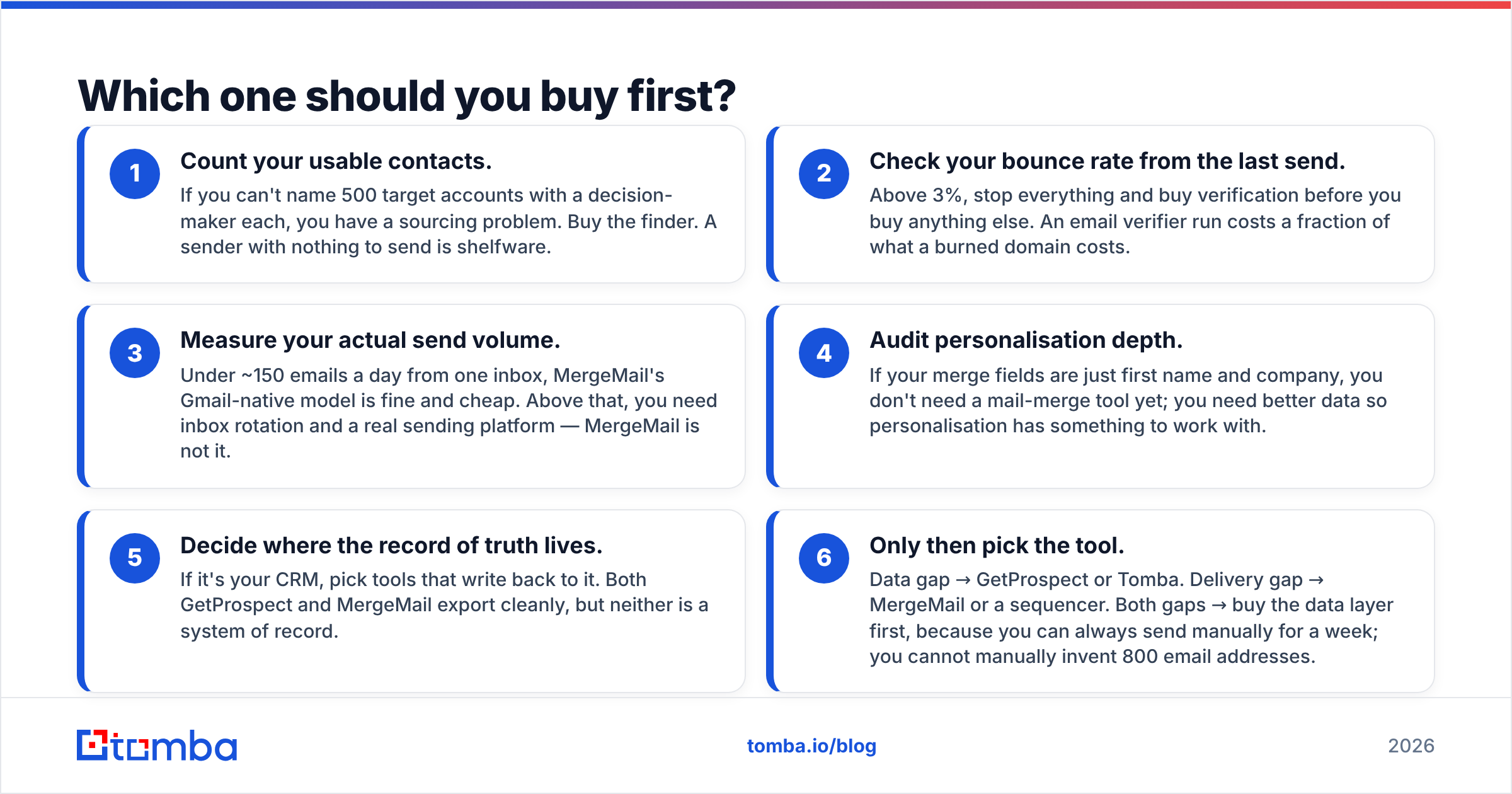
Work through this in order — most teams get it wrong by starting at step three.
- Count your usable contacts. If you can't name 500 target accounts with a decision-maker each, you have a sourcing problem. Buy the finder. A sender with nothing to send is shelfware.
- Check your bounce rate from the last send. Above 3%, stop everything and buy verification before you buy anything else. An email verifier run costs a fraction of what a burned domain costs.
- Measure your actual send volume. Under ~150 emails a day from one inbox, MergeMail's Gmail-native model is fine and cheap. Above that, you need inbox rotation and a real sending platform — MergeMail is not it.
- Audit personalisation depth. If your merge fields are just first name and company, you don't need a mail-merge tool yet; you need better data so personalisation has something to work with.
- Decide where the record of truth lives. If it's your CRM, pick tools that write back to it. Both GetProspect and MergeMail export cleanly, but neither is a system of record.
- Only then pick the tool. Data gap → GetProspect or Tomba. Delivery gap → MergeMail or a sequencer. Both gaps → buy the data layer first, because you can always send manually for a week; you cannot manually invent 800 email addresses.
Where does each tool break down?#
GetProspect's weak points. Coverage is strongest in tech, SaaS, and English-speaking markets, and thins out in regional mid-market companies, manufacturing, and non-Latin-script markets. Catch-all domains — where the mail server accepts everything and confirms nothing — are the standard blind spot for every finder, and a returned address on a catch-all domain is a guess dressed as a result unless the vendor tells you so explicitly. That's the specific case a catch-all verifier is built for, and it's worth checking how any finder labels those rows before you trust its "verified" count. The built-in sending module is also serviceable rather than competitive; if you compared it head-to-head against a real sequencer, you'd notice within a week.
MergeMail's weak points. You are on Gmail's rails, permanently. That means Google's daily send limits, Google's spam heuristics, and Google's account-level enforcement. There's no warmup, no domain rotation, no dedicated sending IP, and no data layer whatsoever. Open tracking via pixel is increasingly unreliable thanks to Apple Mail Privacy Protection and image proxying — treat open rates from any Gmail merge tool as directional at best. And because it sends from your real inbox, a bad list doesn't just hurt a throwaway domain; it hurts the domain.

Is there a combination that works better than either alone?#
Yes, and it's the configuration most functioning outbound teams land on after a year of trial and error.
Layer one — sourcing. A finder that returns addresses with an explicit confidence score, plus a verifier that separates valid, invalid, and catch-all. This is where accuracy is won or lost. Tomba's email finder and domain search cover the two common shapes of this job: "I know the person, find the address" and "I know the company, show me who's there." Both are available through the Tomba API if you'd rather enrich inside your own pipeline than click through a UI.
Layer two — sending. MergeMail is a legitimate choice here at low volume, and unbeatable on price if your whole team lives in Gmail. Above roughly 150–200 sends a day per mailbox, move to a platform with warmup, multi-inbox rotation, and reply detection.
Layer three — the CRM. Whatever you already use. The tools above should push into it, not replace it. Reviews on G2 are a reasonable sanity check on integration quality before you commit, since integration depth is the thing vendors describe most optimistically.
The reason to split layers rather than buy one all-in-one: the failure modes are independent. A data vendor going stale doesn't force you to rebuild your sequences, and switching senders doesn't cost you your contact database. All-in-one platforms are convenient right up until one component degrades and you discover you can't replace it in isolation.
Which should you pick — the honest verdict?#
Pick GetProspect if you're building lists from scratch, work primarily through LinkedIn, and want a searchable database plus light sending in one subscription. It's a data tool with a sending feature, and it should be judged on the data.
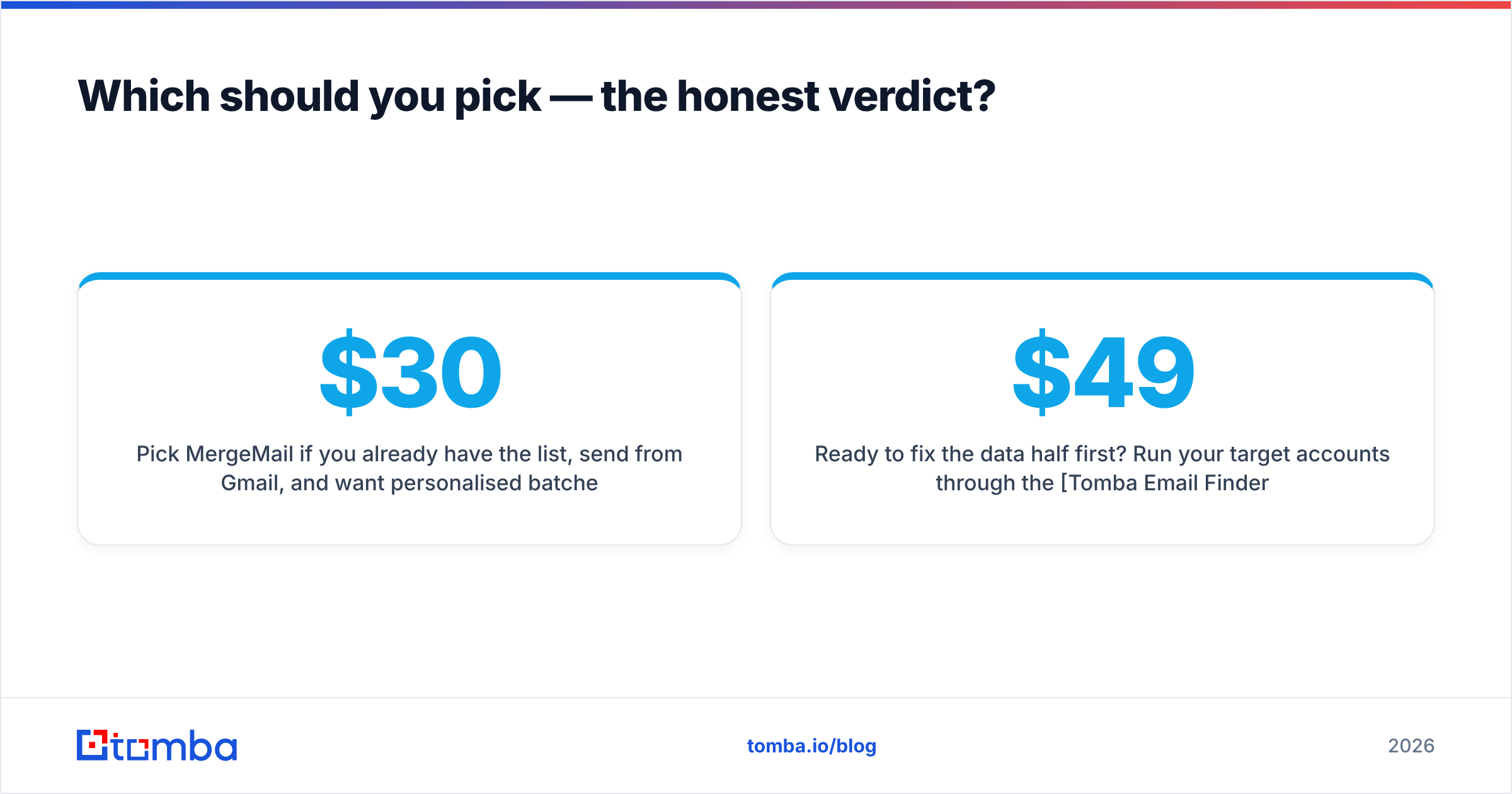
Pick MergeMail if you already have the list, send from Gmail, and want personalised batches out the door for under $30 a month. It's a sending tool with contact storage, and it should be judged on delivery convenience — not on anything resembling lead generation.
Pick neither as your whole stack. The most common failure in the GetProspect vs MergeMail decision is treating it as an either/or when it's a sequencing question: data first, delivery second.
And if the deciding factor is data quality — bounce rates, catch-all handling, coverage outside US tech — compare the finder layer on its own merits rather than as a bundled feature. Start with the free tier, run 25 known-good contacts through it, and count how many come back correct. That test takes ten minutes and tells you more than any comparison table, including this one.
Ready to fix the data half first? Run your target accounts through the Tomba Email Finder — 25 free searches a month, no card, with confidence scores and catch-all flags on every result so you know what you're actually sending to. When the free tier runs out, Tomba pricing starts at $49/mo for Starter and $99/mo for Growth, with the same verification depth on every plan. Build the list right, then let MergeMail or your sequencer of choice do what it's good at.
Related guides#
Ready to find emails that actually work?
Join 150,000+ professionals who stopped guessing and started sending. Free credits on signup — no credit card required.
Get the Tomba newsletter
Practical outbound tactics and product updates — once every two weeks.
About the author