GetProspect vs SafetyMails: Which Email Tool Wins in 2026?
GetProspect finds emails. SafetyMails verifies them. Here's an honest breakdown of pricing, accuracy, data coverage, and which one actually belongs in your outbound stack in 2026.
GetProspect vs SafetyMails is a fair fight only if you know what each tool does. One finds new email addresses. The other checks the addresses you already have. Here's how they compare on price, accuracy, and fit.
TL;DR
- Different categories. GetProspect is a B2B email finder and lead database. SafetyMails is an email verifier.
- Pick GetProspect if you have no contact data yet. It builds lists from LinkedIn or from company domains.
- Pick SafetyMails if you already own a list. It strips out bounces before you hit send.
Pricing works differently on each side, too:
- GetProspect sells monthly contact credits.
- SafetyMails sells verification credits. On prepaid packs they usually don't expire, so one-off cleanups cost less.
- Most teams need both jobs done. One platform that finds and verifies — like Tomba at $49/mo — usually beats paying two vendors.
What is GetProspect and who is it for?#
GetProspect is a lead generation platform. It is built around two things. First, a Chrome extension that pulls emails while you browse LinkedIn. Second, a B2B contact database you can filter by job title, industry, headcount, location, and tech stack.
The workflow is prospect-first. You start with a company or a person. GetProspect returns a work email plus extra fields — company size, LinkedIn URL, sometimes a phone number. It exports to CSV or pushes into HubSpot, Pipedrive, and Salesforce.
Who it fits:
- SDRs living inside LinkedIn Sales Navigator. The extension grabs contacts from search results with no copy-paste.
- Founders doing early outbound with no bought data and no list to start from.
- Agencies building lists per client, where each campaign needs fresh, filtered contacts.
- Recruiters sourcing candidate contact details from profile pages.
What it is not: a bulk hygiene tool. GetProspect does run basic checks on the emails it finds. But it is not built to take a 200,000-row list from somewhere else and tell you which addresses will bounce.
What is SafetyMails and what problem does it solve?#
SafetyMails is an email verification service. You upload a list, or call the API the moment someone submits a form. It returns a status for each address: valid, invalid, disposable, role-based, catch-all, or unknown.
Its core value is bounce prevention. A high bounce rate tells mailbox providers that you don't manage your list. That hurts your email deliverability. Google and Yahoo both cap spam complaints and expect senders to keep bounces low. Google's own sender guidelines spell out the rules for bulk senders.
SafetyMails leans on a few features:
- Disposable domain detection. It flags temporary inboxes — mailinator, 10minutemail, and thousands of clones — that pad your list and never convert.
- Real-time API validation. It blocks junk at the signup form instead of cleaning it up months later.
- Non-expiring prepaid credits on most packs. That suits teams who clean quarterly rather than daily.
- Compliance-friendly reports. You get exportable proof that you scrubbed a list, which helps with GDPR and LGPD paperwork.
What it is not: a source of new contacts. SafetyMails will never hand you the email of a VP at a company you've never touched. It only judges addresses you already have.

GetProspect vs SafetyMails: how do they compare?#
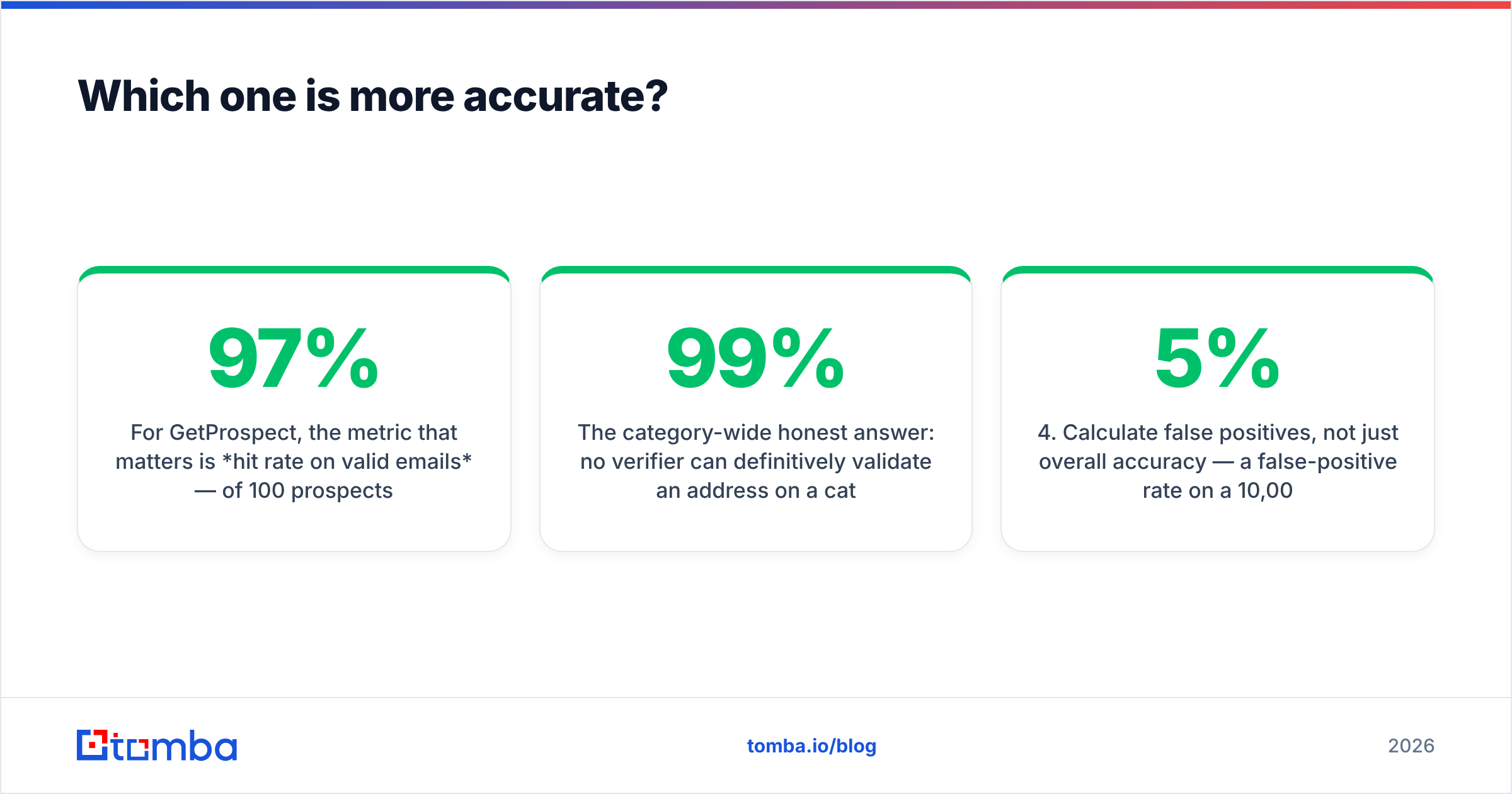
Here's the honest side-by-side. Half these rows read "N/A" for one side. That's the point.
| Attribute | GetProspect | SafetyMails | Tomba |
|---|---|---|---|
| Primary function | Email finding + B2B database | Email verification | Finding + verification |
| Finds new contacts | Yes | No | Yes |
| Bulk list verification | Limited | Yes — core product | Yes |
| Disposable detection | Basic | Strong | Yes |
| Catch-all handling | Flags only | Detailed status | Dedicated catch-all verifier |
| LinkedIn extension | Yes | No | Yes |
| Phone numbers | Partial | No | Yes |
| Real-time API | Yes | Yes | Yes |
| Credit expiry | Monthly reset | Prepaid packs often don't expire | Monthly, with free tier |
| Free tier | Limited monthly credits | Small trial allowance | 25 searches/mo |
| Entry paid plan | Roughly $49/mo range | Pay-as-you-go packs from single digits | $49/mo Starter |
| Best for | Building lists from scratch | Cleaning lists you own | Both, one bill |
Pricing is where most buyers get confused. GetProspect charges per contact found. SafetyMails charges per address checked. Those are different units. Comparing "$X per 1,000" across them tells you very little. Finding a contact takes pattern building, SMTP probing, and enrichment. A verification check only runs the last step.
So it comes down to the job. Need 5,000 new contacts a month? Verification is a rounding error on the bill. Need to clean a 500,000-row legacy database once? A finder subscription is dead weight.
Which one is more accurate?#
Accuracy means different things here, so measure each tool on its own terms.
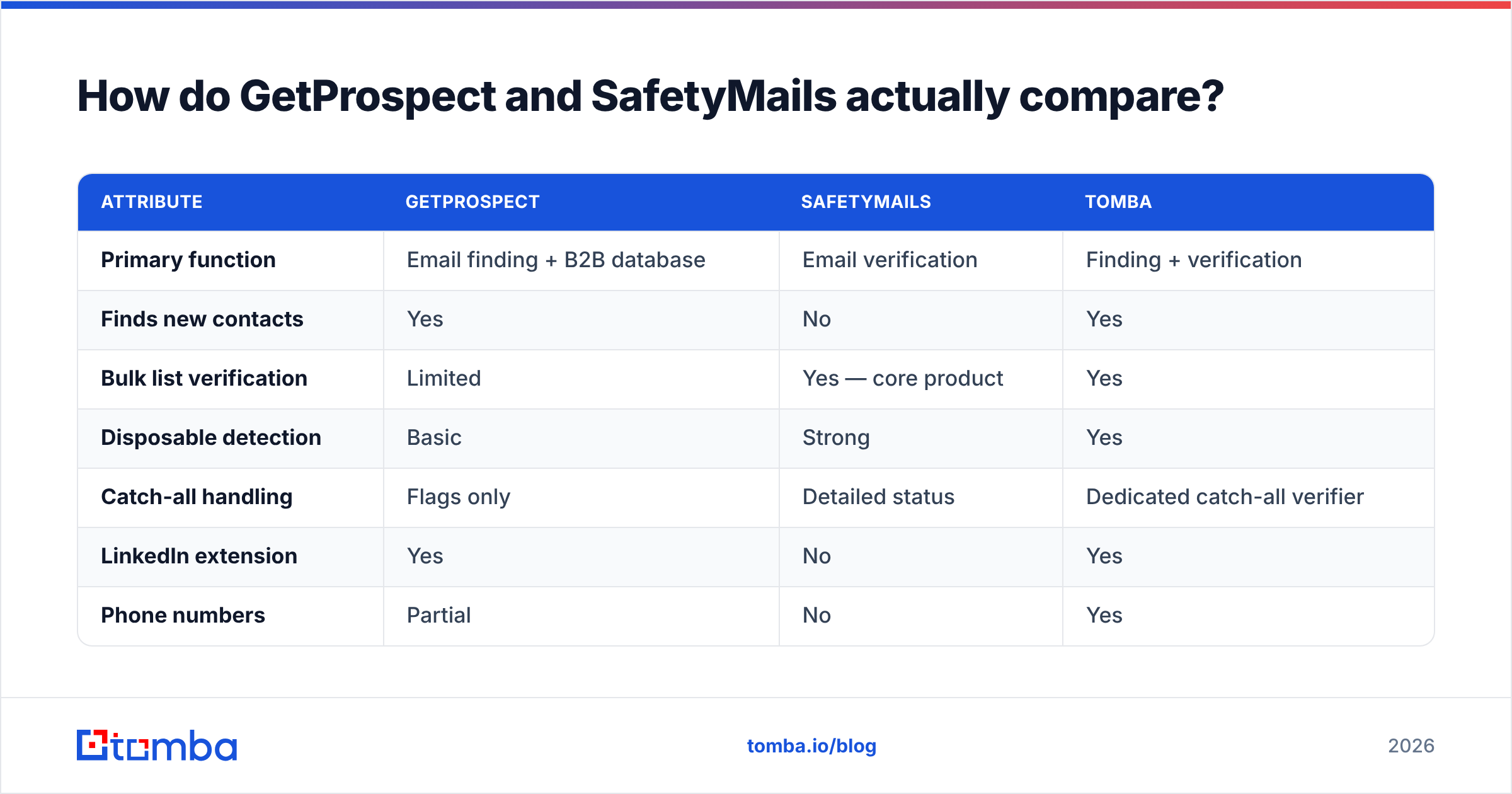
For GetProspect, the number that matters is hit rate. Of 100 prospects you search, how many come back with an address that really receives mail? Vendors in this category claim 85–97%. Those numbers are self-reported, and they swing by segment. US SaaS mid-market data is dense. European SMB and non-English markets are thin everywhere.
For SafetyMails, the number is the false-positive rate. How often does it call an address valid, only for that address to bounce? A verifier that marks everything unknown is never wrong and never useful. One that marks everything valid gets you blacklisted.

Here's the honest answer for the whole category. No verifier can prove an address is live on a catch-all domain with SMTP alone, because the server accepts everything. Any vendor claiming 99% certainty on catch-alls is inferring from patterns, not verifying. That's why a catch-all verifier ships as a separate tier at most serious vendors. It leans on pattern history and other signals instead of a single handshake.
Test both before you commit. GetProspect vs SafetyMails is a question your own data can settle:
- Build a 200-contact control list where you already know the outcomes. Past campaign data works well.
- Run it through the tool.
- Compare the claimed status against actual delivery.
- Count false positives, not overall accuracy. A 5% false-positive rate on a 10,000-send campaign is 500 bounces. That is enough to damage sender reputation.
Reviews on G2 help you judge support quality and UX. They don't measure bounce rates. Only your own test does.
Is GetProspect better than SafetyMails?#
Wrong question. Here's the decision framework that replaces it.
Choose GetProspect if:
- Your bottleneck is "I don't know who to email."
- You prospect inside LinkedIn daily and want one-click capture.
- You need extra fields — headcount, industry, tech — next to the email.
- You build brand-new lists every month instead of maintaining one.
Choose SafetyMails if:
- Your bottleneck is "I have addresses, but my bounce rate is scary."
- You run signup forms and want junk blocked at the door.
- You clean now and then, and hate paying monthly for a quarterly job.
- You need proof of list hygiene for a compliance review.
Choose neither — get both jobs from one vendor if:
- You run outbound all the time and need find → verify → send as one loop.
- You don't want two vendors, two APIs, and two invoices.
- Your list decays fast. B2B contact data goes stale at roughly 25–30% a year as people change jobs.
That third case covers most outbound teams. It's why platforms merged the two jobs. An email finder that hands you an unverified address has done half the work. A verifier with no discovery layer leaves you stuck with someone else's data.

What does a combined stack cost?#
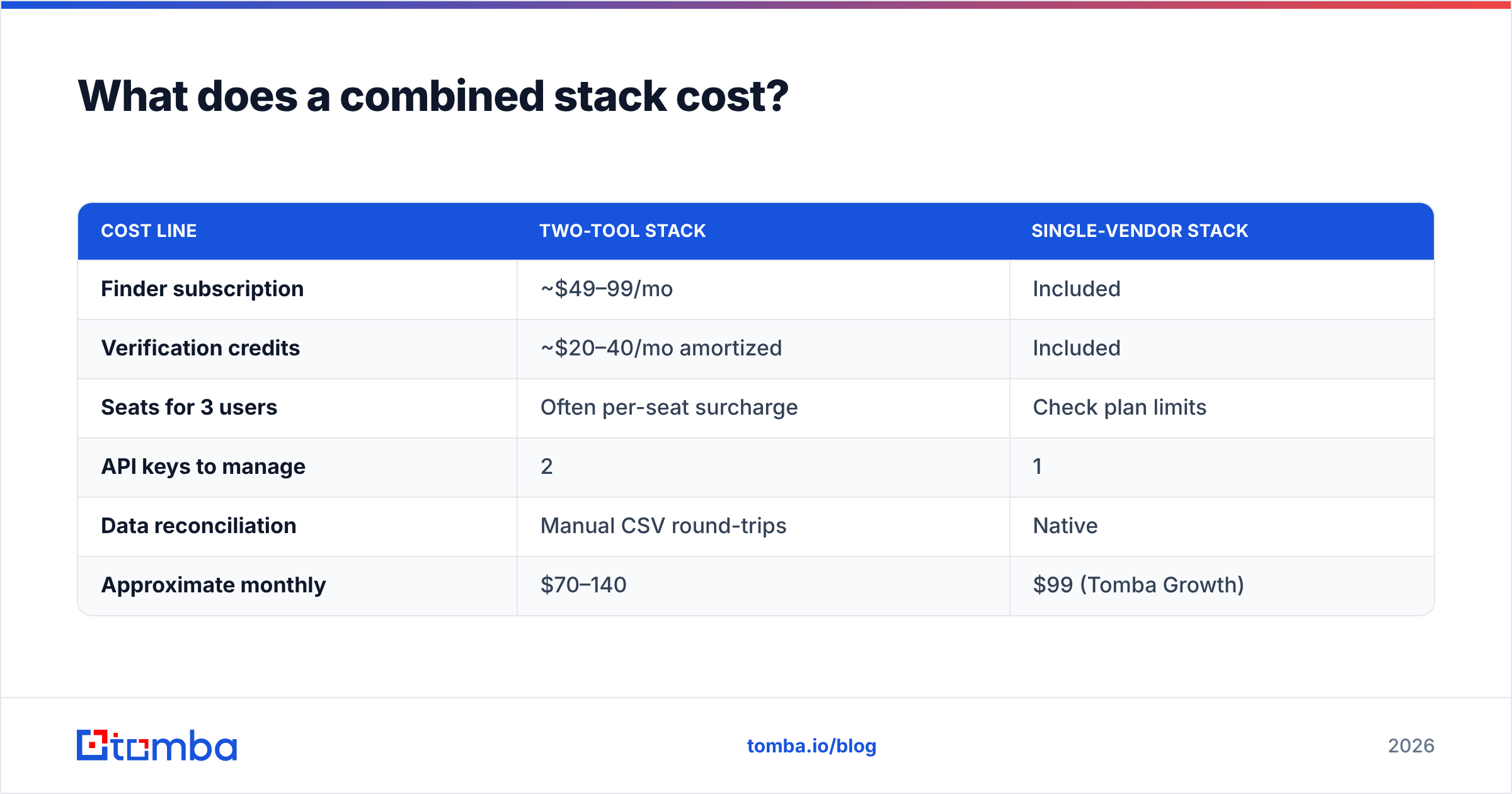
Let's price a real scenario. An SDR team of three needs 3,000 new contacts a month. It also verifies a 20,000-address database every quarter.
| Cost line | Two-tool stack | Single-vendor stack |
|---|---|---|
| Finder subscription | ~$49–99/mo | Included |
| Verification credits | ~$20–40/mo spread out | Included |
| Seats for 3 users | Often per-seat surcharge | Check plan limits |
| API keys to manage | 2 | 1 |
| Data reconciliation | Manual CSV round-trips | Native |
| Approximate monthly | $70–140 | $99 (Tomba Growth) |
Raw dollars land close together. The real gap is operational. With two tools, every list makes a round trip: export from the finder, upload to the verifier, download the result, re-import to your sequencer. That's three failure points and a pile of stale CSVs in someone's Downloads folder.
For reference, Tomba pricing runs Free (25 searches/mo), Starter $49/mo, Growth $99/mo, Pro $249/mo, and custom Enterprise. Finding, verification, domain search, and data enrichment all sit in one account. Comparing paid databases instead? BookYourData is worth a look. It sells contact records outright rather than metering credits, so you own the data instead of renting access.

How do you actually migrate or combine them?#
Already running GetProspect and thinking about a switch? This sequence keeps your campaigns alive:
- Export everything first. Pull your full contact history to CSV before you touch a subscription. Credits and stored contacts often vanish on downgrade.
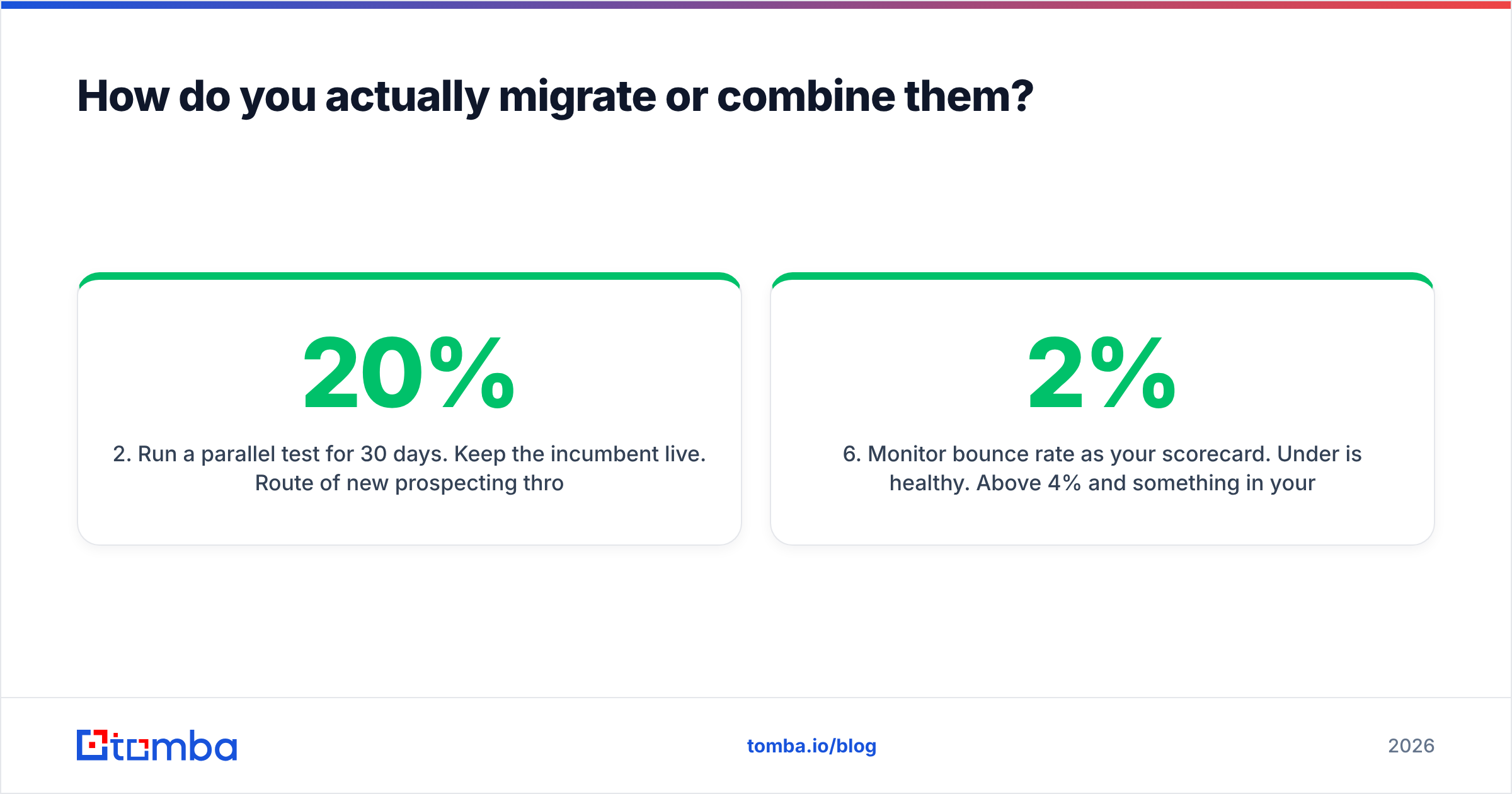
- Run a parallel test for 30 days. Keep the current tool live. Send 20% of new prospecting through the challenger. Compare hit rate and bounce rate on the same segment.
- Dedupe before you verify. Checking the same address twice burns credits for nothing. Run a remove duplicates pass first.
- Verify at the point of use, not in bulk. Addresses decay. A database verified in January tells you nothing in June. Verify the segment you're about to email, the week you email it.
- Wire the API, not the CSV. Whichever vendor wins, connect it to your CRM. HubSpot and Salesforce integrations exist for both categories, and the saved round trips add up.
- Watch bounce rate as your scorecard. Under 2% is healthy. Above 4%, something in your data pipeline is broken — whatever the vendor dashboard claims.
What are the common mistakes with both tools?#
Treating verification as one-time. A list verified six months ago is not a verified list. Job changes alone kill a quarter of B2B contacts a year.
Ignoring catch-all domains. Large companies often run catch-all servers. Drop every catch-all as risky and you delete your best accounts. Send to all of them blindly and you spike bounces. Segment them and warm them on their own. That's what a catch-all finder is for.
Buying finder credits for a hygiene problem. If a 12% bounce rate on an old list is the issue, new contacts won't fix it. Diagnose first.
Confusing valid with deliverable. An address can be valid and still land in spam, because your domain authentication is broken. Run an SPF checker and confirm DMARC alignment before you blame the data vendor.
Trusting advertised accuracy. Every vendor here publishes a number between 95% and 99%. None of them measure it the same way. Your control-list test beats all of them combined.
The verdict: GetProspect vs SafetyMails#
GetProspect and SafetyMails aren't really rivals. They are two halves of one workflow, sold apart. GetProspect answers "who do I email?" SafetyMails answers "will this email land?" If you only have one of those problems, buy the tool that solves it and skip the other.
Have both problems? Continuous outbound means you do. Two subscriptions then add cost, delay, and CSV shuffling for no real gain. Consolidation is the practical call.
Ready to stop juggling tools? The Tomba Email Finder covers discovery, verification, catch-all handling, and enrichment in one account. It starts free with 25 searches a month, then $49/mo on Starter, with no separate verification bill. Run your control list through it, compare the bounce rate against your current stack, and let the data decide.
Related guides#
Ready to find emails that actually work?
Join 150,000+ professionals who stopped guessing and started sending. Free credits on signup — no credit card required.
Get the Tomba newsletter
Practical outbound tactics and product updates — once every two weeks.
About the author