GetProspect vs SendFlock: Which B2B Email Tool Wins in 2026
GetProspect finds the contacts. SendFlock sends the campaigns. They are not the same category of tool — and picking the wrong one is how outbound teams burn a quarter. Here is the honest breakdown.
TL;DR
- GetProspect and SendFlock are not direct competitors. GetProspect is a contact database and email finder; SendFlock is a cold email sending and sequencing platform. Comparing them like-for-like is the mistake most buyers make.
- If your problem is "I don't have enough good contacts," you need the data layer. If your problem is "my emails aren't landing or following up," you need the sending layer.
- Data quality decides everything downstream. A 12% bounce list will sink the best-warmed inbox on any sending tool.
- Most functional outbound stacks in 2026 run two tools: one for finding and verifying contacts, one for sending. Bundled all-in-ones usually compromise on the data side.
- Budget reality: expect roughly $50–$120/month combined for a one-to-three person outbound motion, plus verification credits.
What are GetProspect and SendFlock, exactly?#
GetProspect is a B2B contact database with an email finder layered on top. You filter a database by job title, company size, industry, location and technology, then export contacts with work emails attached. It also ships a LinkedIn Chrome extension, which is how a large share of its users actually work: browse Sales Navigator, click, pull emails into a list. You can read the vendor's own positioning at getprospect.com.
SendFlock sits at the other end of the pipeline. It is a cold email sending platform — you connect mailboxes, load a contact list you already have, build multi-step sequences, and it handles scheduling, throttling, inbox rotation, reply detection and campaign reporting. It does not exist to find you contacts. It exists to get the contacts you already have into inboxes without torching your domain.
That distinction matters more than any feature checklist. Think of it like a restaurant: GetProspect is the supplier who delivers the ingredients, SendFlock is the kitchen that cooks and plates them. A brilliant kitchen with rotten produce still serves a bad meal. Technically, one is a data-acquisition layer and the other is an execution layer, and they occupy different rows in your stack diagram.
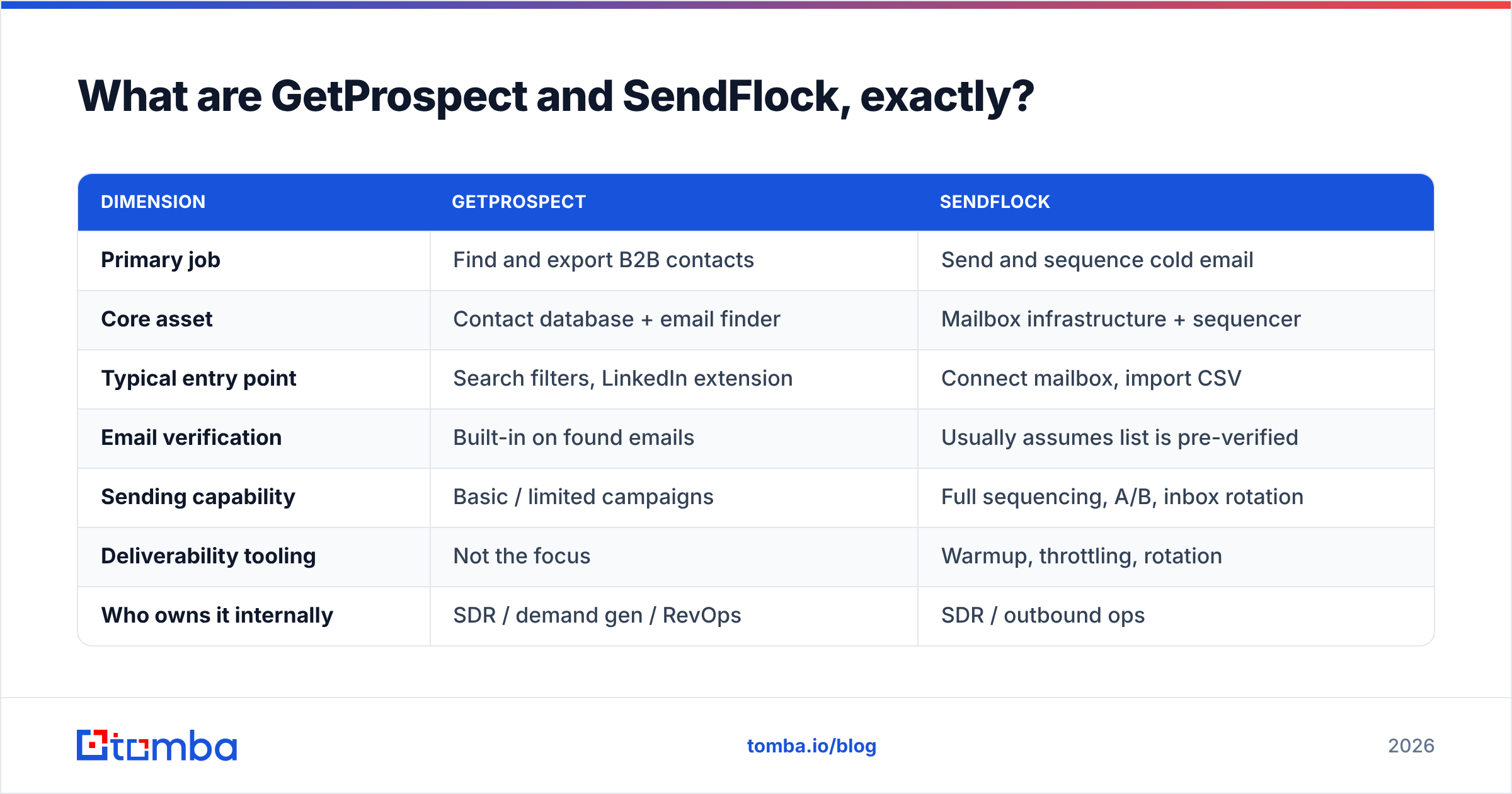
Here is how the two actually split:
| Dimension | GetProspect | SendFlock |
|---|---|---|
| Primary job | Find and export B2B contacts | Send and sequence cold email |
| Core asset | Contact database + email finder | Mailbox infrastructure + sequencer |
| Typical entry point | Search filters, LinkedIn extension | Connect mailbox, import CSV |
| Email verification | Built-in on found emails | Usually assumes list is pre-verified |
| Sending capability | Basic / limited campaigns | Full sequencing, A/B, inbox rotation |
| Deliverability tooling | Not the focus | Warmup, throttling, rotation |
| Who owns it internally | SDR / demand gen / RevOps | SDR / outbound ops |
| Fails when | Database has thin coverage in your ICP | Input list is unverified or off-ICP |
Which tool has the better email data?#
Only one of them is competing on this at all, so the honest answer is: GetProspect, by definition. But "better than a tool that doesn't do it" is a low bar, and the more useful question is whether GetProspect's data is good enough to run your outbound on alone.
Three things determine that, and none of them appear on a pricing page:
- Coverage in your specific ICP. Database size headlines ("200M+ contacts") tell you almost nothing. A database heavy on US SaaS mid-market can be nearly empty for German manufacturing SMBs or Gulf-region logistics. Run the same 50-account test list through any tool before you commit.
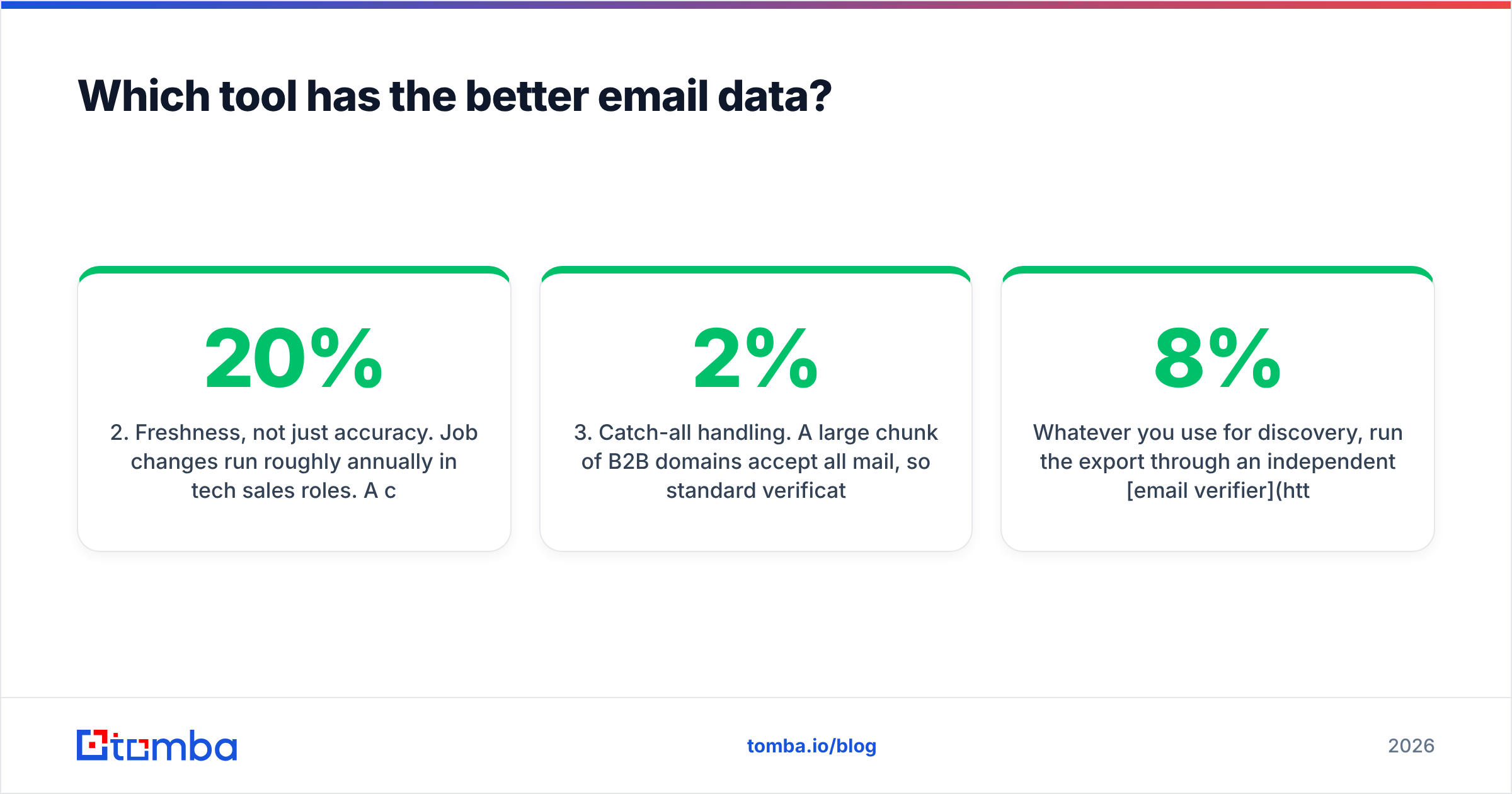
- Freshness, not just accuracy. Job changes run roughly 20% annually in tech sales roles. A contact that was accurate in March 2025 may be a hard bounce today. Ask when the record was last re-verified, not whether it was ever verified.
- Catch-all handling. A large chunk of B2B domains accept all mail, so standard verification returns "unknown" rather than valid or invalid. How a tool treats those — silently drop, silently include, or flag honestly — swings your real bounce rate by several points. If you send to catch-alls blind, you find out the hard way; a dedicated catch-all verifier is the difference between a 2% and a 9% bounce rate on those domains.

The practical test that separates marketing claims from reality: take 100 contacts you already know are correct (your own customers, your CRM's closed-won records), strip the emails, and ask each tool to find them. Score hit rate and accuracy. It takes an afternoon and it will contradict at least one vendor's landing page.
Whatever you use for discovery, run the export through an independent email verifier before it touches a sending tool. Vendors that both find and verify their own data have an obvious incentive problem — they grade their own homework. A second, unaffiliated verification pass typically strips another 3–8% of a "clean" list.
Which tool sends cold email better?#
SendFlock, clearly. This is its entire product surface, and GetProspect's campaign features are a convenience add-on rather than a serious sending platform.
What a dedicated sending tool gives you that a data tool's bolt-on campaigns generally do not:
- Mailbox rotation. Spread volume across 5–20 sending accounts so no single mailbox exceeds safe daily limits. This is table stakes for anything above ~50 sends/day.
- Warmup and ramping. New domains and mailboxes need weeks of gradual volume increase before real campaigns. Sending 200 cold emails from a two-week-old domain is the fastest way to a spam folder. Model the ramp with a warmup calculator before you launch.
- Reply and bounce handling. Auto-pausing a sequence when someone replies, and hard-stopping on bounces, protects both your reputation and your prospect relationships.
- Sending windows and jitter. Randomized intervals inside business hours in the recipient's timezone, rather than 400 identical sends at 09:00:00.
- Per-step reporting. Knowing that step 3 drives 40% of your replies is what turns a sequence into a repeatable asset.
None of that helps if your list is bad, though. Deliverability is downstream of data — mailbox providers weigh bounce rate, spam complaints and engagement heavily when deciding placement. The mechanics are well documented on Wikipedia's email deliverability overview, and every credible deliverability guide agrees on the ordering: clean list first, infrastructure second, copy third.
Put bluntly: a sending platform can protect a good list. It cannot rescue a bad one.
What does GetProspect vs SendFlock actually cost?#
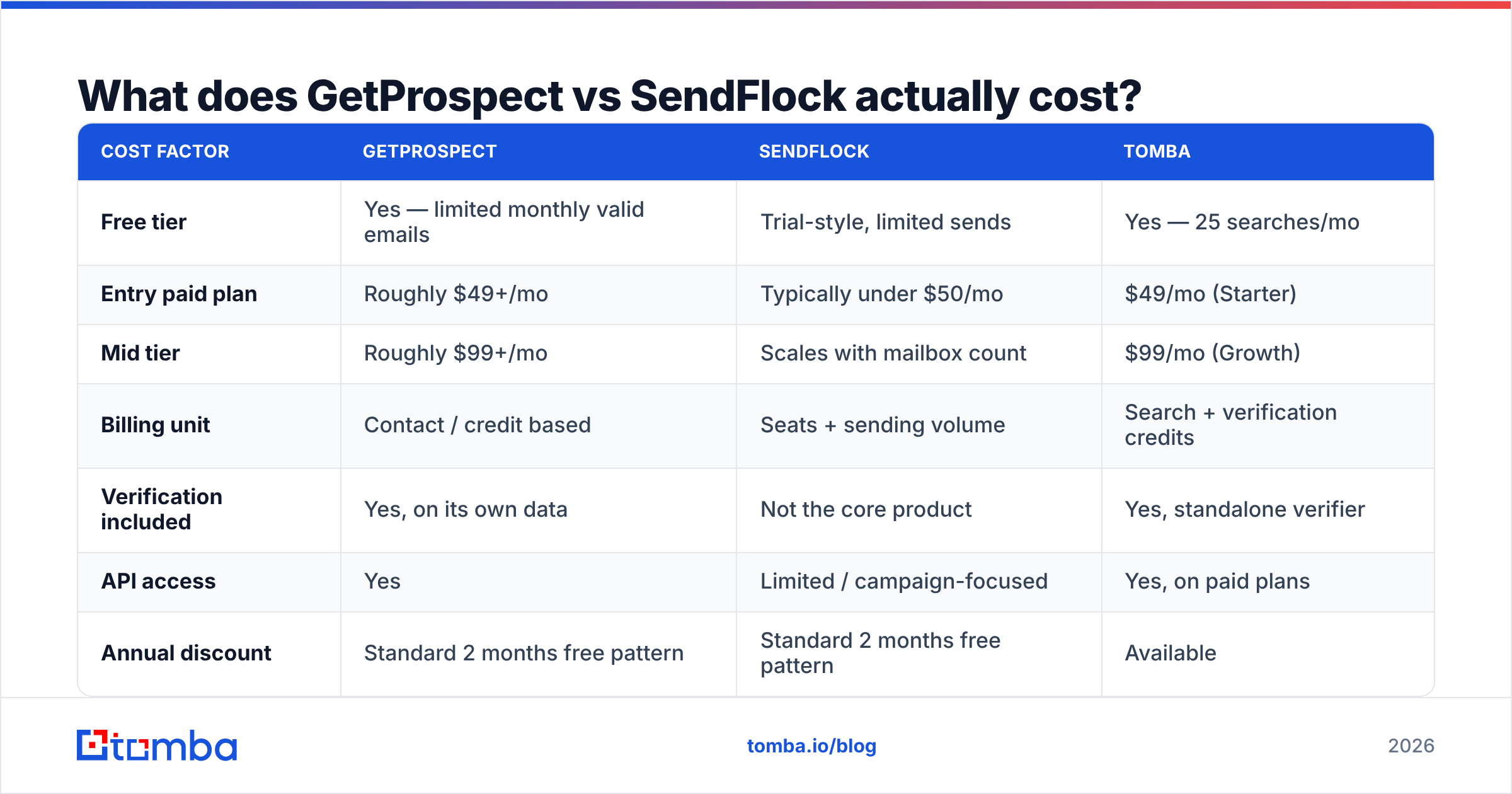
Pricing on both moves, and both run promotional tiers, so treat the numbers below as directional and verify on the vendors' own pages before you buy. The structural difference is what matters and that does not change: GetProspect charges for contact credits, SendFlock charges for sending capacity and seats.
| Cost factor | GetProspect | SendFlock | Tomba |
|---|---|---|---|
| Free tier | Yes — limited monthly valid emails | Trial-style, limited sends | Yes — 25 searches/mo |
| Entry paid plan | Roughly $49+/mo | Typically under $50/mo | $49/mo (Starter) |
| Mid tier | Roughly $99+/mo | Scales with mailbox count | $99/mo (Growth) |
| Billing unit | Contact / credit based | Seats + sending volume | Search + verification credits |
| Verification included | Yes, on its own data | Not the core product | Yes, standalone verifier |
| API access | Yes | Limited / campaign-focused | Yes, on paid plans |
| Annual discount | Standard 2 months free pattern | Standard 2 months free pattern | Available |
Two budgeting traps to watch:
Credit rollover. Some data tools expire unused credits monthly. If your prospecting is lumpy — heavy at quarter start, light mid-quarter — you pay for capacity you never use. Check the rollover policy, not just the headline price.
Mailbox costs are separate. A sending platform's price rarely includes the Google Workspace or Microsoft 365 seats and secondary domains you need. Budget $6–$8 per mailbox per month on top, and a serious multi-inbox setup adds up fast. Compare that against transparent Tomba pricing, where you are paying for lookups rather than infrastructure.
Which should you pick for your team?#
Choose by the bottleneck you actually have, not by which product demo was slicker.
- You have a target list but no emails — you need the data layer. GetProspect, Tomba, or a comparable finder. Sending tools are irrelevant until you have addresses.
- You have thousands of verified contacts but no sending motion — you need SendFlock or a peer. Buying more data first is procrastination dressed as progress.
- You have neither — start with data. You can send your first 40 emails a day manually from a single mailbox and learn what converts. You cannot manually generate 2,000 accurate email addresses.
- You have both but results are flat — the problem is almost never the tool. Audit ICP fit and message-to-market match before adding software. Check your response rate by segment and you will usually find the leak is targeting, not tooling.
- You are running high volume across many domains — you need both layers, separately, with a real verification step in between. This is the standard configuration for teams doing 10k+ sends a month.
- You are a solo founder testing a market — free tiers on a data tool plus a single well-warmed mailbox will carry you for the first 90 days. Do not buy a sequencer for 200 emails a month.
Peer review sites are useful here as a sanity check on your own testing — filter G2's lead intelligence category by company size closest to yours, and read the 3-star reviews rather than the 5-star ones. The middle reviews describe the real friction.
Is there a better combination than either alone?#
For most teams, yes: a specialist data layer feeding a specialist sending layer, with verification in between.
That is the argument for treating your contact source as its own decision rather than an afterthought bundled with your sequencer. A dedicated email finder plus domain search covers the two common discovery patterns — "I know the person" and "I know the company" — and a bulk email finder handles the list-at-a-time workflow that account-based motions require.
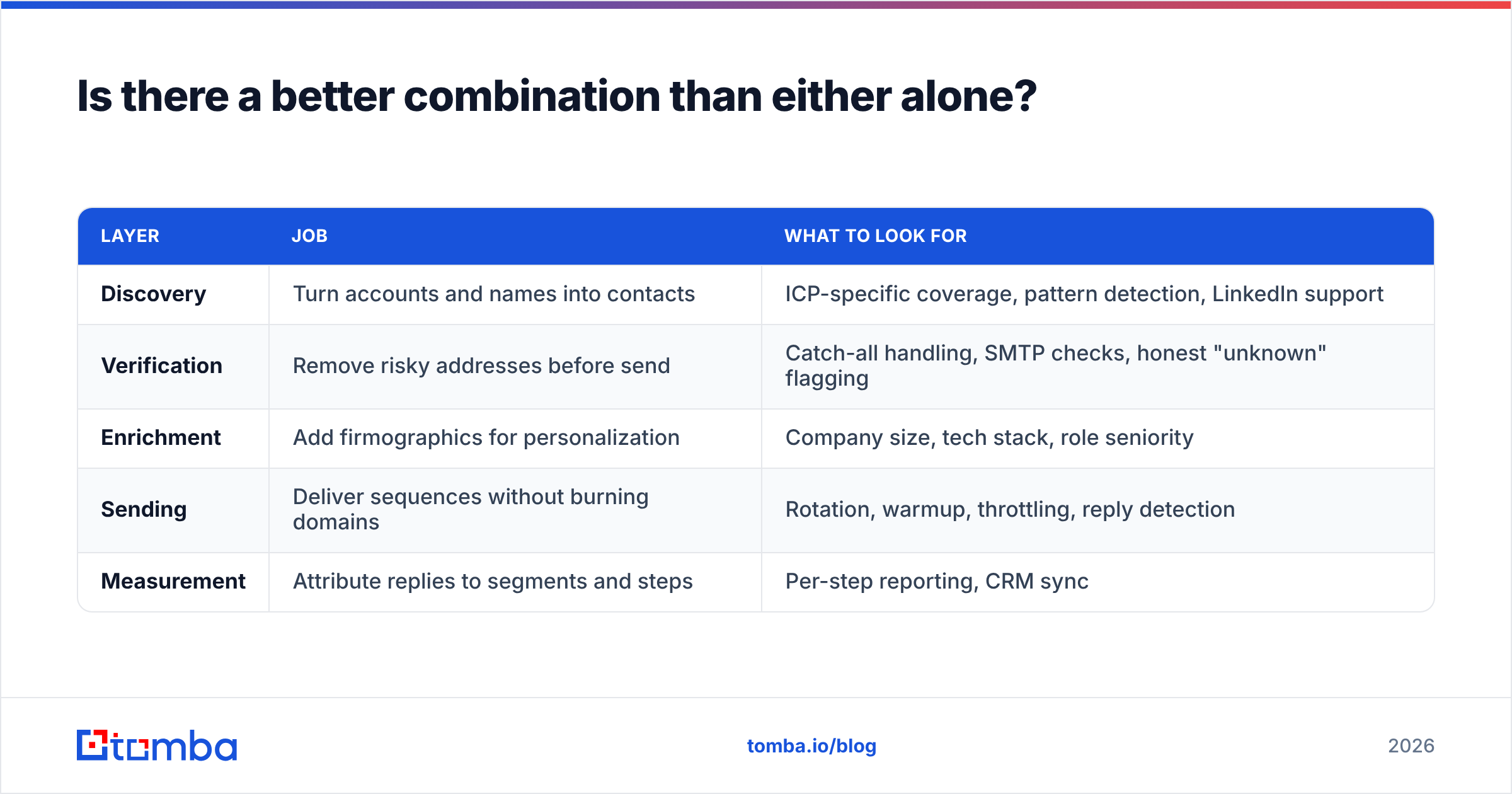
The stack that tends to hold up under scale looks like this:
| Layer | Job | What to look for |
|---|---|---|
| Discovery | Turn accounts and names into contacts | ICP-specific coverage, pattern detection, LinkedIn support |
| Verification | Remove risky addresses before send | Catch-all handling, SMTP checks, honest "unknown" flagging |
| Enrichment | Add firmographics for personalization | Company size, tech stack, role seniority |
| Sending | Deliver sequences without burning domains | Rotation, warmup, throttling, reply detection |
| Measurement | Attribute replies to segments and steps | Per-step reporting, CRM sync |
Each layer can be swapped independently when it underperforms. Bundled all-in-ones make that swap expensive, because leaving the sending tool means leaving the data too. That lock-in is the hidden cost of "one tool for everything," and it is usually paid at renewal time.
One more practical note: whichever combination you choose, connect it to your CRM early. Manually shuttling CSVs between a finder, a verifier and a sequencer is where three hours a week disappears. A HubSpot integration or an API-driven sync eliminates most of that overhead in an afternoon of setup.
What's the verdict on GetProspect vs SendFlock?#
There isn't a single winner, because they answer different questions.
GetProspect wins if your gap is contacts — it gives you a searchable database, a LinkedIn workflow and built-in verification, and it will fill a list faster than manual research ever could. Its ceiling is coverage: strong in some segments, thin in others, and you will only know which by testing your own ICP.
SendFlock wins if your gap is execution — it turns a static list into a running, measurable, multi-step campaign without you babysitting send limits. Its ceiling is input quality: it has no opinion about whether the addresses you loaded are real.
The teams that get outbound working treat these as two separate purchases, judge each on its own merits, and refuse to accept a weak data layer as the price of a good sending layer. Test both against your actual accounts, measure hit rate and bounce rate rather than feature counts, and re-run the test annually — coverage shifts as databases are re-scraped and re-verified.
If your bottleneck is the data side, start there. The Tomba Email Finder gives you 25 free searches a month to run exactly the head-to-head accuracy test described above — no credit card, no sales call. Pull 50 contacts you can verify independently, compare hit rates against whatever you're using now, and let the numbers pick your data layer. Then plug the clean output into whichever sending platform fits your volume.
Related guides#
Ready to find emails that actually work?
Join 150,000+ professionals who stopped guessing and started sending. Free credits on signup — no credit card required.
Get the Tomba newsletter
Practical outbound tactics and product updates — once every two weeks.
About the author