Gigasheet vs Lusha: Which B2B Data Tool Wins in 2026?
Gigasheet analyzes huge lead files in the browser. Lusha finds contact data. They solve opposite halves of the same problem — here's which one your team actually needs, and what it costs.
TL;DR
- They are not really competitors. Gigasheet is a browser-based big-data spreadsheet for analyzing files with millions of rows. Lusha is a contact-data provider that sells emails, phone numbers, and company records.
- Buy Gigasheet if your bottleneck is cleaning, joining, and deduping lead files that crash Excel. Buy Lusha if your bottleneck is not having contact data in the first place.
- Pricing shape differs sharply. Gigasheet charges by rows/storage and seats; Lusha charges by credits per revealed contact. Credit math is where Lusha budgets usually break.
- Neither one is a complete stack. Most teams end up pairing a data source, a verifier, and an analysis layer — three jobs, and no single vendor here does all three well.
- The cheapest reliable path for most SMB and mid-market teams: a per-lookup email finder with verification built in, plus a lightweight spreadsheet layer for QA.
What is Gigasheet, and what problem does it actually solve?#
Gigasheet is a spreadsheet that runs in your browser and doesn't fall over at a million rows. That's the whole pitch, and it's a good one. Excel starts wheezing around 1,048,576 rows — a hard ceiling — and Google Sheets gets sluggish long before that. Gigasheet handles files in the hundreds of millions of rows with a familiar point-and-click interface: filter, group, pivot, join, dedupe, without writing SQL or spinning up a Python notebook.
For revenue teams the practical use cases are narrow but real:
- Deduping a merged lead list. You exported 400,000 rows from three sources. Excel won't open the file. Gigasheet will.
- Joining enrichment output back to source records. VLOOKUP across two million rows is a coffee break. Gigasheet does it as a table join.
- Auditing a purchased database. Group by domain, count nulls, spot the 30% of records with no phone number before you pay for them.
- Cleaning exports before CRM import. Normalize casing, split full names, strip test records, then push clean data to HubSpot or Salesforce.
- Ad-hoc analysis without engineering. RevOps people who know spreadsheets but not dbt get a lot done here.
What Gigasheet does not do: give you a single new contact. It has no proprietary B2B database. If your CSV has 400,000 rows of garbage, Gigasheet gives you clean, well-organized garbage — very fast.
What is Lusha, and where does its data come from?#
Lusha is a contact-data platform. You give it a name, a company, or a LinkedIn profile, and it returns a work email and often a direct dial. It ships a Chrome extension that overlays LinkedIn and company sites, a web app for list building, and an API. Its reputation is built on mobile phone coverage — that's the thing sales teams renew for.
Lusha's data comes from a mix of community contribution (users who install the extension share their address books), public web sources, and third-party licensing. This model has consequences. Coverage is excellent in tech, SaaS, and North America — the places where the extension is popular. It thins out fast in European mid-market manufacturing, Latin America, and roles that don't live on LinkedIn.
The community-sourced model also drives Lusha's periodic GDPR headlines. If you sell into the EU, get your DPA and legitimate-interest documentation sorted before your first campaign, not after a complaint.
Correction on the image above — it renders as: 
Gigasheet vs Lusha: how do they compare head to head?#
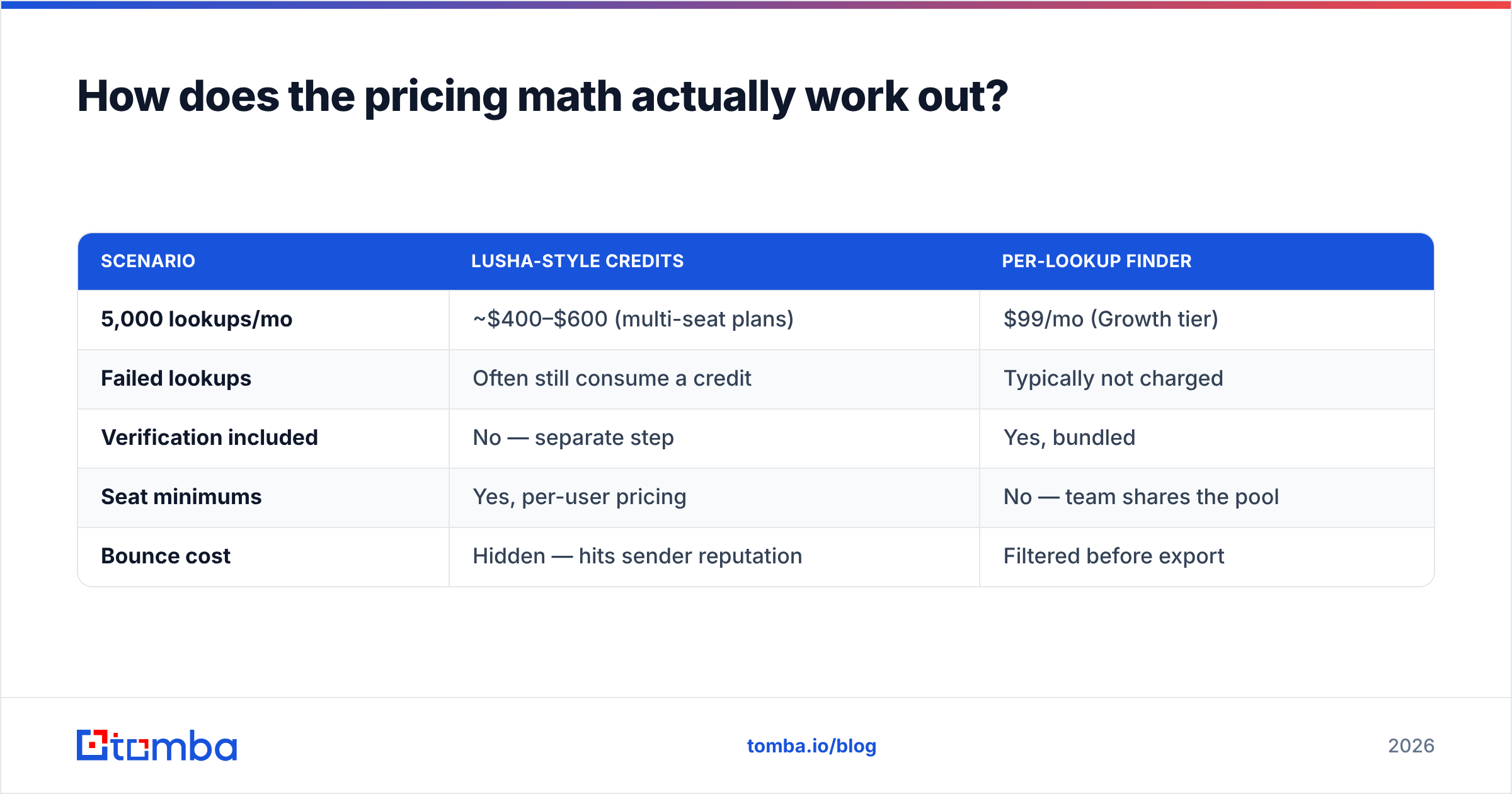
Here's the honest side-by-side. Note how few rows have real overlap — that's the finding, not a formatting accident.
| Dimension | Gigasheet | Lusha |
|---|---|---|
| Core job | Analyze and clean large data files | Source contact emails + phone numbers |
| Has its own B2B database? | No | Yes |
| Row/volume ceiling | Hundreds of millions of rows | List exports capped by plan credits |
| Pricing model | Free tier, then seat + data-volume tiers (roughly $95/mo entry, custom above) | Free tier (limited credits), then per-user credit packs; mid-tier commonly lands $50–$100/user/mo |
| Free tier | Yes — limited rows and storage | Yes — small monthly credit allowance |
| Phone numbers | Only if already in your file | Direct dials and mobiles — a core strength |
| Email verification | No | Basic validity signal only |
| Chrome extension | No | Yes — LinkedIn overlay is the main workflow |
| API | Yes (file ops) | Yes (contact lookup) |
| CRM sync | Export-based | Native HubSpot, Salesforce, Pipedrive |
| Best for | RevOps, data ops, analysts | SDRs, AEs, recruiters |
| Weak spot | Zero data generation | Credit burn, EU coverage gaps, no deep cleaning |
Read that table again and the conclusion writes itself: asking "Gigasheet or Lusha" is like asking "dishwasher or groceries." One processes what you have. The other supplies what you don't. The real question is what your pipeline is missing.
Which one should you buy for your specific bottleneck?#
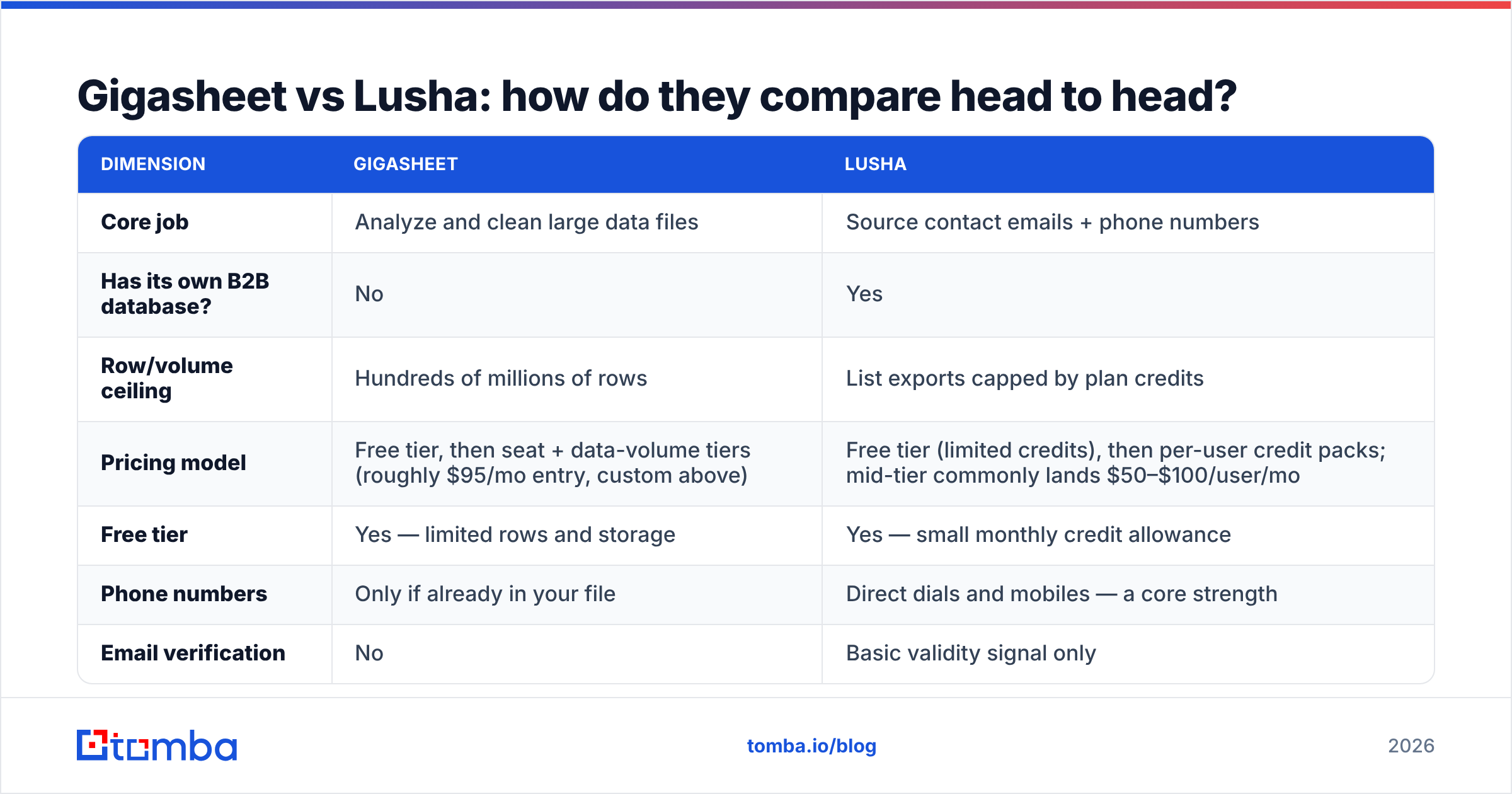
Diagnose before you prescribe. Match your symptom to the row:
| Your symptom | Root cause | Right tool |
|---|---|---|
| "Reps have no one to call" | No data source | Lusha or a dedicated email finder |
| "Excel crashes on our export" | No analysis layer | Gigasheet |
| "30% of our emails bounce" | No verification step | An email verifier |
| "We're paying twice for the same contact" | No dedupe process | Gigasheet (or a dedupe utility) |
| "Credits ran out on the 14th" | Wrong pricing model | Per-lookup pricing, not per-seat credits |
| "Data is stale within a quarter" | Static database, no refresh | Real-time lookup at send time |
Two of those six symptoms — bouncing emails and credit burn — are the ones that quietly cost the most money, and neither Gigasheet nor Lusha fixes them cleanly.
How does the pricing math actually work out?#
This is where most evaluations go wrong, because both vendors price on axes that don't map to each other.
Gigasheet scales on data volume and seats. The free tier is genuinely usable for one-off cleanup jobs. Paid tiers start around $95/month and climb based on stored rows and collaborators. If you touch big files twice a quarter, the free tier may be all you need — which is unusual honesty for a SaaS pricing page and worth crediting.
Lusha scales on credits, one credit per revealed contact, per user. The trap is predictable: a five-rep team on a mid-tier plan burns through its monthly allowance in the first two weeks of a push, then either buys overage or goes dark. And a credit spent on a contact who left the company eight months ago is still a spent credit.
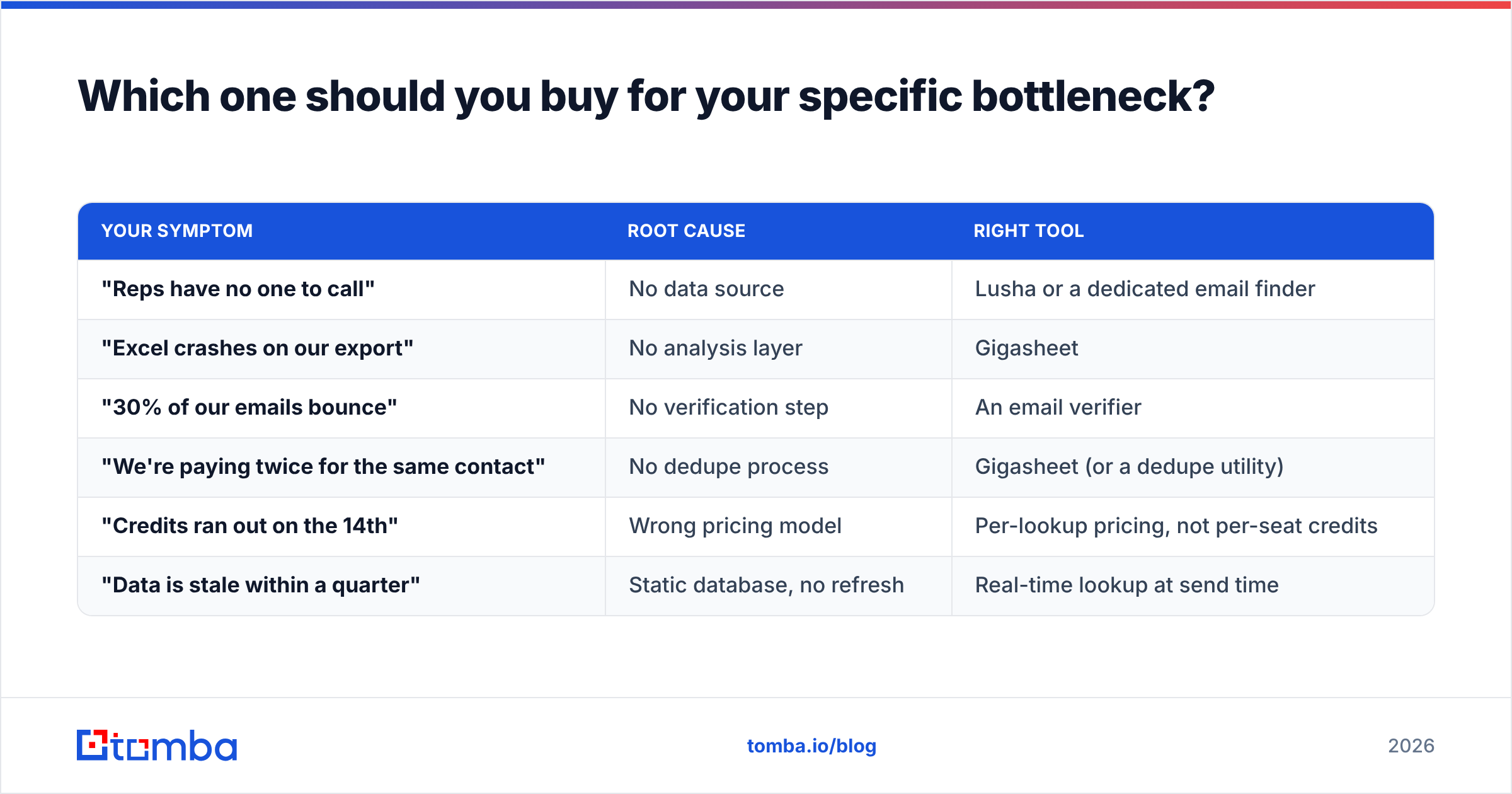
Run the comparison on cost-per-usable contact, not cost-per-credit:
| Scenario | Lusha-style credits | Per-lookup finder |
|---|---|---|
| 5,000 lookups/mo | ~$400–$600 (multi-seat plans) | $99/mo (Growth tier) |
| Failed lookups | Often still consume a credit | Typically not charged |
| Verification included | No — separate step | Yes, bundled |
| Seat minimums | Yes, per-user pricing | No — team shares the pool |
| Bounce cost | Hidden — hits sender reputation | Filtered before export |
That last row is the expensive one. A 12% bounce rate doesn't just waste credits; it damages sender reputation across your whole domain, and recovering from a reputation dip takes weeks. Gartner and most RevOps practitioners now treat data hygiene as a deliverability control, not a nice-to-have.

What are the strongest alternatives to both?#
If you accept that you need sourcing and hygiene and an analysis layer, the shortlist changes shape. A few names worth knowing:
- Tomba — an email finder with verification bundled at the same step. Free tier at 25 searches/month, Starter $49/mo, Growth $99/mo, Pro $249/mo. Strong on domain search for mapping every reachable contact at a target account, and a bulk email finder for list work.
- BookYourData — a pay-as-you-go B2B contact database with a strong accuracy guarantee and no forced subscription. Genuinely useful if you want to own a list outright rather than rent lookups, and one of the better options for buyers who dislike credit-treadmill pricing.
- Apollo.io — database plus sequencer plus dialer in one. Broadest scope on this list; data accuracy is variable by segment. See the Apollo alternative breakdown if you're already on it.
- Clay — the enrichment orchestration layer. It waterfalls across many providers, including several named here. Powerful, expensive, and steep to learn.
- Google BigQuery / DuckDB — the free answer to Gigasheet if you have anyone who writes SQL. Zero UI polish, unlimited scale.
For phone-heavy motions specifically, a dedicated phone finder plus a phone validator covers the ground Lusha is best at, without the per-seat credit structure.

Can you just use both together?#
Yes, and for large data teams that's a reasonable architecture. The pattern looks like this:
- Source contacts via Lusha's extension or API, or a per-lookup finder.
- Verify every address before it reaches a sequencer — this is the step teams skip and regret.
- Load the combined output into Gigasheet for dedupe, join, and QA at volume.
- Segment by fit criteria — headcount, tech stack, region — using Gigasheet's grouping.
- Push the clean segment to your CRM or sequencer.
- Re-verify anything older than 90 days before reuse. B2B contact data decays at roughly 2–2.5% per month, which compounds to a quarter of your list going bad in a year.
The friction is that step 1 and step 3 live in different tools with different billing, different admins, and a manual CSV handoff between them. For a team under 20 reps, that overhead usually isn't worth it. Consolidating steps 1 and 2 into one vendor and doing step 3 in Google Sheets covers 90% of the value at 30% of the cost and complexity.

What should you check before signing either contract?#
Run this list against any vendor in this category, not just these two:
- Test with your ICP, not their demo list. Pull 100 real target accounts. Measure hit rate and bounce rate yourself. Vendor-published accuracy numbers are marketing.
- Ask what happens on a failed lookup. Charged or not? This single answer can double or halve your effective cost.
- Check regional coverage explicitly. Ask for hit-rate data in your top three countries. North America numbers hide a lot of European gaps.
- Get the compliance paperwork upfront. DPA, data-sourcing disclosure, opt-out handling. If a vendor is slow here, that's your answer.
- Confirm export rights. Some plans restrict how much data you can export or whether you keep it after churning.
- Verify the integration depth. "Has a HubSpot integration" can mean bidirectional sync or a CSV button. Not the same thing.
- Read recent reviews, not the highlight reel. G2 reviews from the last two quarters tell you more about current data quality than a case study from 2023.
One more: check whether the tool gives you the raw email pattern for a domain, not just individual hits. Knowing that a company uses first.last@ lets you construct addresses for people no database has yet — which is exactly where a company email pattern checker earns its keep.
So what's the verdict?#
Gigasheet wins if your data problem is volume. It's the best browser-native tool for wrangling files that break Excel, and its free tier means you can validate that before paying anything. RevOps and data ops teams get real value here.
Lusha wins if your data problem is phone numbers in North American tech. That's a narrower claim than its marketing makes, but within that lane it performs, and the LinkedIn extension workflow is genuinely fast for individual reps.
Neither wins if your actual problem is bounce rate, credit burn, or list decay — which, in our experience reviewing these stacks, is what's really wrong at most companies that think they need a new data tool. Adding a spreadsheet doesn't fix bad emails. Adding more credits doesn't fix a database that was stale when you bought it.
The sequence that works: fix sourcing accuracy first, verification second, analysis third. Most teams do it backwards, buy the analysis layer, and discover they've built a very impressive pipeline for processing bad data.
Ready to fix the first step? Tomba Email Finder finds verified work emails by domain, name, or company — with verification bundled into the same lookup, not sold as an add-on. Start free with 25 searches a month, no card required, and scale to Starter at $49/mo or Growth at $99/mo when your volume justifies it. Test it against 100 of your real target accounts and compare the hit rate to whatever you're paying for now.
Related guides#
Ready to find emails that actually work?
Join 150,000+ professionals who stopped guessing and started sending. Free credits on signup — no credit card required.
Get the Tomba newsletter
Practical outbound tactics and product updates — once every two weeks.
About the author