Gigasheet vs Tomba: Big-Data Spreadsheet or Email Finder?
Gigasheet opens 500M-row CSVs in a browser. Tomba finds and verifies the B2B emails that fill those rows. Here's how the two actually compare on pricing, accuracy, and workflow fit — plus when you need both.
TL;DR
- Gigasheet and Tomba are not competitors in the normal sense. Gigasheet is a browser-based big-data spreadsheet built to open files Excel chokes on. Tomba is a B2B email finder and verification platform built to produce contact data in the first place.
- If your problem is "I have a 4 GB CSV and Excel won't open it," you want Gigasheet. If your problem is "I have 3,000 company domains and no email addresses," you want Tomba.
- Pricing sits in different universes: Gigasheet's paid seats have historically landed around $95/user/month with a limited free tier; Tomba runs Free (25 searches/mo), Starter $49/mo, Growth $99/mo, and Pro $249/mo.
- The strongest setup for most outbound teams is both, in sequence: Tomba finds and verifies, Gigasheet dedupes, filters, and joins at scale.
- Neither tool sends email. Budget for a sequencer separately.
What Are Gigasheet and Tomba Actually For?#
Think of it like a kitchen. Gigasheet is an industrial-grade countertop and set of knives — enormous prep surface, handles whatever volume you throw at it, but it doesn't grow ingredients. Tomba is the supplier that delivers the ingredients. Confusing the two is how teams end up paying for a spreadsheet and still having no one to email.
Gigasheet is a no-code, browser-based analytics spreadsheet. You upload a file — CSV, JSON, Parquet, log exports — and it renders as a familiar grid regardless of whether it has 50,000 rows or 500 million. Under the hood it's a columnar database wearing a spreadsheet costume, which is why filters, group-bys, and pivots stay responsive at sizes where Excel returns "not responding." It's popular with security analysts, data journalists, RevOps teams, and anyone who inherited a monstrous export from a system nobody wants to query directly. You can see the current product surface on gigasheet.com.
Tomba is an email finder and data platform. You give it a domain, a name, or a LinkedIn profile, and it returns a professional email address with a confidence score and SMTP-level validation. Around the core email finder sit a domain search, an email verifier, a catch-all verifier, a phone finder, and enrichment endpoints. The output is contact records, not analysis.
The distinction matters commercially. Gigasheet charges you to manipulate rows. Tomba charges you to create them.

How Do Gigasheet and Tomba Compare Feature by Feature?#
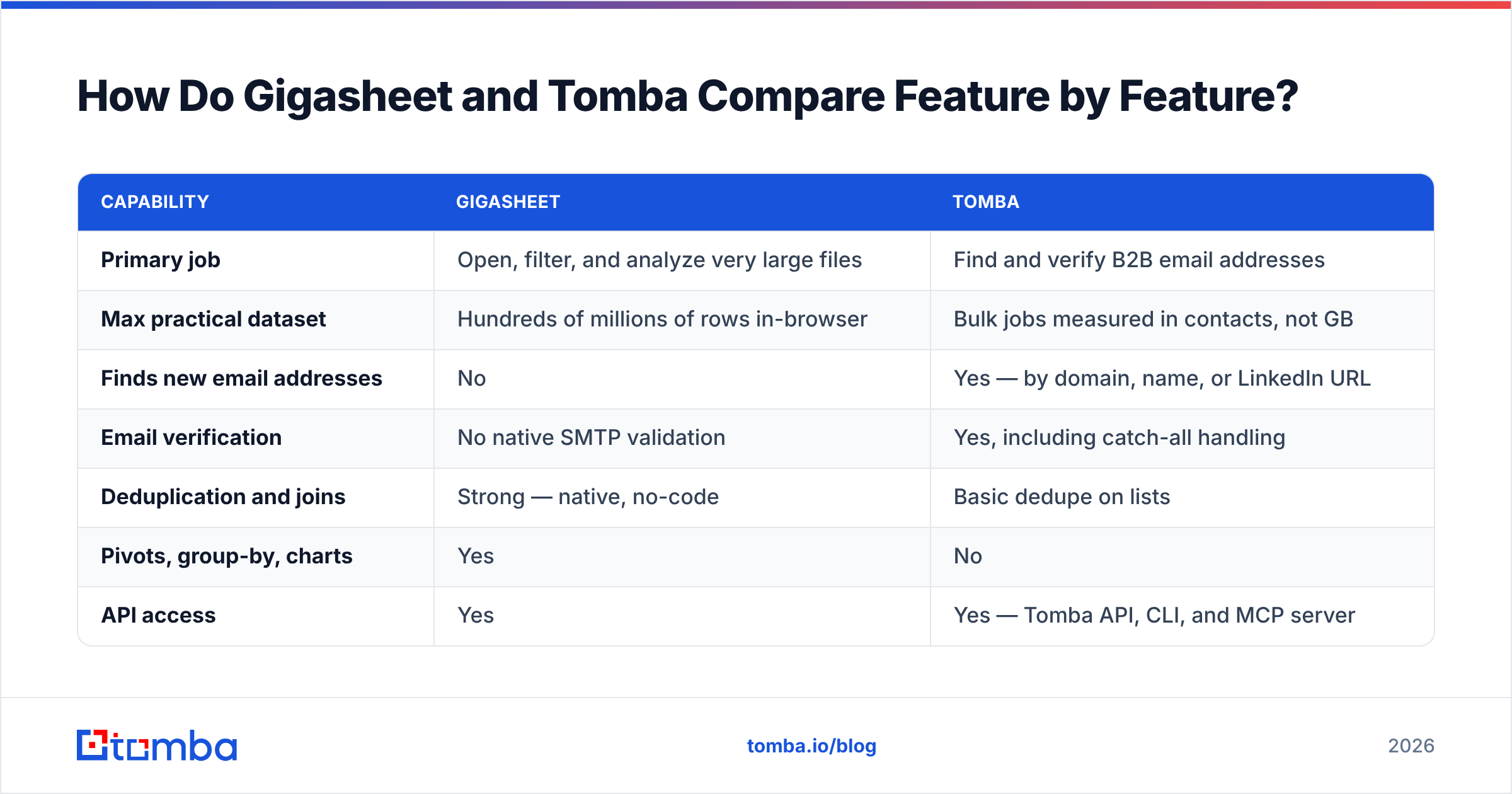
Here's the honest side-by-side. Note how few cells overlap — that's the real finding.
| Capability | Gigasheet | Tomba |
|---|---|---|
| Primary job | Open, filter, and analyze very large files | Find and verify B2B email addresses |
| Max practical dataset | Hundreds of millions of rows in-browser | Bulk jobs measured in contacts, not GB |
| Finds new email addresses | No | Yes — by domain, name, or LinkedIn URL |
| Email verification | No native SMTP validation | Yes, including catch-all handling |
| Deduplication and joins | Strong — native, no-code | Basic dedupe on lists |
| Pivots, group-by, charts | Yes | No |
| API access | Yes | Yes — Tomba API, CLI, and MCP server |
| Spreadsheet add-ins | Browser-native app | Google Sheets, Excel, Airtable, Chrome extension |
| CRM integrations | Limited, mostly via export/API | HubSpot, Salesforce, Pipedrive, Zapier, Make |
| Free tier | Yes, capped | Yes — 25 searches/month |
| Typical buyer | Data analyst, RevOps, security | SDR, growth marketer, recruiter, founder |
If you only read one row, read "Finds new email addresses." That's the fork in the road.
What Does Each Tool Cost in 2026?#
Pricing is where the comparison gets genuinely useful, because the two vendors bill on completely different units — seats versus credits.
| Plan tier | Gigasheet (approx.) | Tomba |
|---|---|---|
| Free | Yes, with row/file caps and limited retention | Yes — 25 searches/mo |
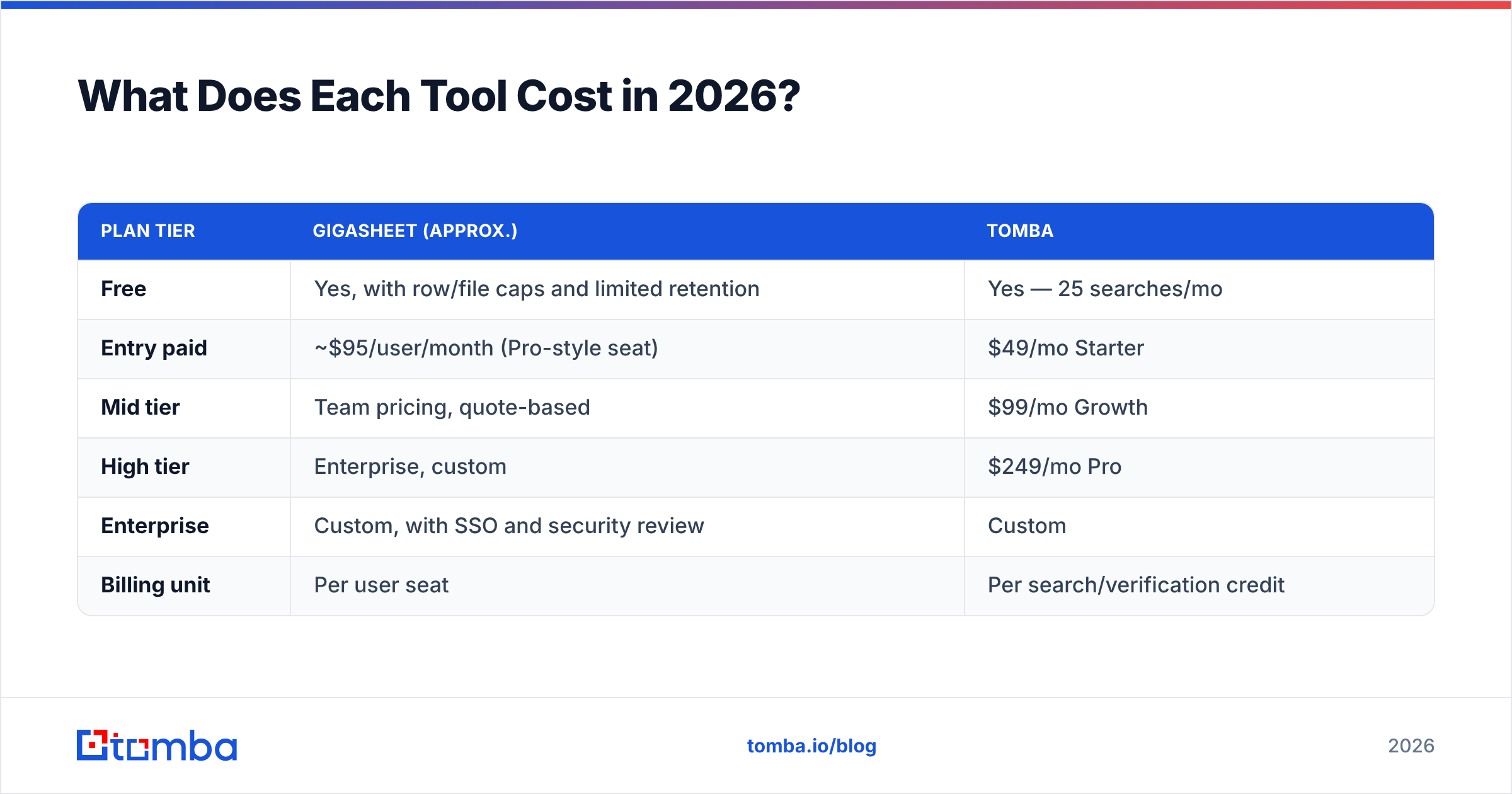
| Entry paid | ~$95/user/month (Pro-style seat) | $49/mo Starter |
| Mid tier | Team pricing, quote-based | $99/mo Growth |
| High tier | Enterprise, custom | $249/mo Pro |
| Enterprise | Custom, with SSO and security review | Custom |
| Billing unit | Per user seat | Per search/verification credit |
Two caveats before you build a budget on that table. First, Gigasheet has adjusted its packaging more than once; treat the ~$95 figure as a historical anchor and confirm on their pricing page before you commit. Second, seat-based and credit-based pricing punish different behaviors. Seats hurt when you have ten people who each touch data twice a month. Credits hurt when you run one enormous bulk job and then go quiet. Look at Tomba pricing alongside your actual monthly contact volume rather than your headcount — most teams over-buy by anchoring on the wrong unit.
Third-party review platforms are useful sanity checks on both. G2 carries verified reviews for each vendor, and the recurring themes are consistent: Gigasheet users praise raw file-handling and complain about advanced-analysis limits; email-finder users everywhere care about hit rate and bounce rate above all else.
Is Gigasheet Better Than Tomba for Lead Generation?#
No — and it isn't trying to be. Gigasheet has no mechanism for discovering an email address that doesn't already exist in your file. What it does exceptionally well is make an existing list usable.
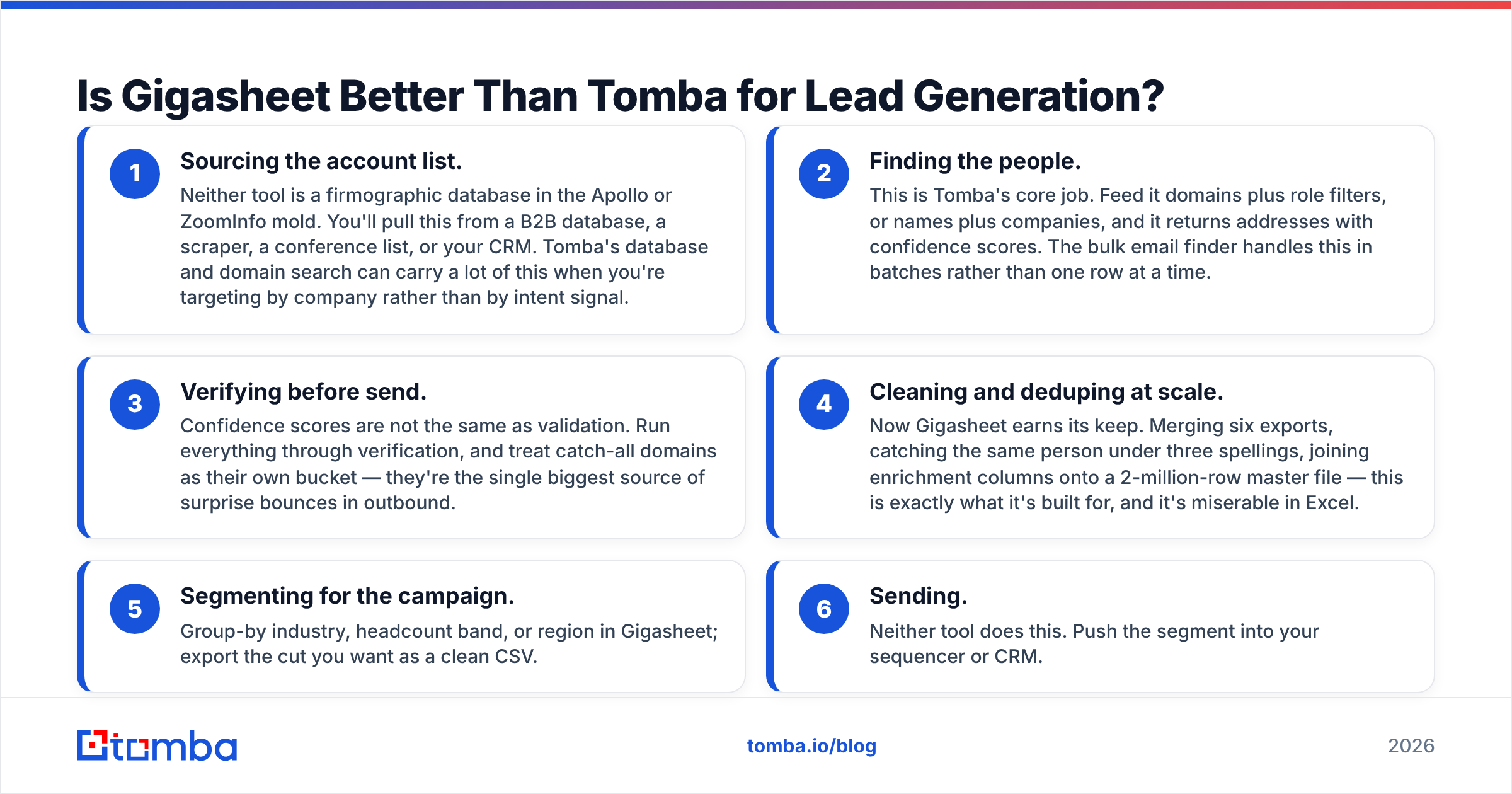
Here's how the two split a realistic lead-gen workflow:
- Sourcing the account list. Neither tool is a firmographic database in the Apollo or ZoomInfo mold. You'll pull this from a B2B database, a scraper, a conference list, or your CRM. Tomba's database and domain search can carry a lot of this when you're targeting by company rather than by intent signal.
- Finding the people. This is Tomba's core job. Feed it domains plus role filters, or names plus companies, and it returns addresses with confidence scores. The bulk email finder handles this in batches rather than one row at a time.
- Verifying before send. Confidence scores are not the same as validation. Run everything through verification, and treat catch-all domains as their own bucket — they're the single biggest source of surprise bounces in outbound.
- Cleaning and deduping at scale. Now Gigasheet earns its keep. Merging six exports, catching the same person under three spellings, joining enrichment columns onto a 2-million-row master file — this is exactly what it's built for, and it's miserable in Excel.
- Segmenting for the campaign. Group-by industry, headcount band, or region in Gigasheet; export the cut you want as a clean CSV.
- Sending. Neither tool does this. Push the segment into your sequencer or CRM.
Steps 2 and 3 are Tomba. Step 4 and 5 are Gigasheet. Nobody wins the argument because they're answering different questions.
Where Does Gigasheet Genuinely Beat Tomba?#
Be fair to the tool that's better at its own job:
- Files that break everything else. A 12 GB log export or a 300-million-row transaction dump opens in a browser tab. That's not a marketing claim you'll find matched in any email-finder product.
- No-code joins across datasets. Merging two large files on a shared key without writing SQL is the feature most Gigasheet users cite first.
- Exploratory analysis. Pivots, aggregations, and column stats over data that would otherwise require a warehouse and an analyst's calendar.
- Non-contact data. Server logs, transaction records, IoT telemetry, public datasets — none of which Tomba touches or claims to.
- Sharing without downloading. Collaborators view a huge dataset through a link instead of emailing a 4 GB attachment around.
If your data problem is shaped like "too many rows," Gigasheet is the right purchase and this comparison ends here.
Where Does Tomba Genuinely Beat Gigasheet?#
Equally fair in the other direction:
- It creates data instead of reorganizing it. Domain in, verified email out. There is no Gigasheet equivalent.
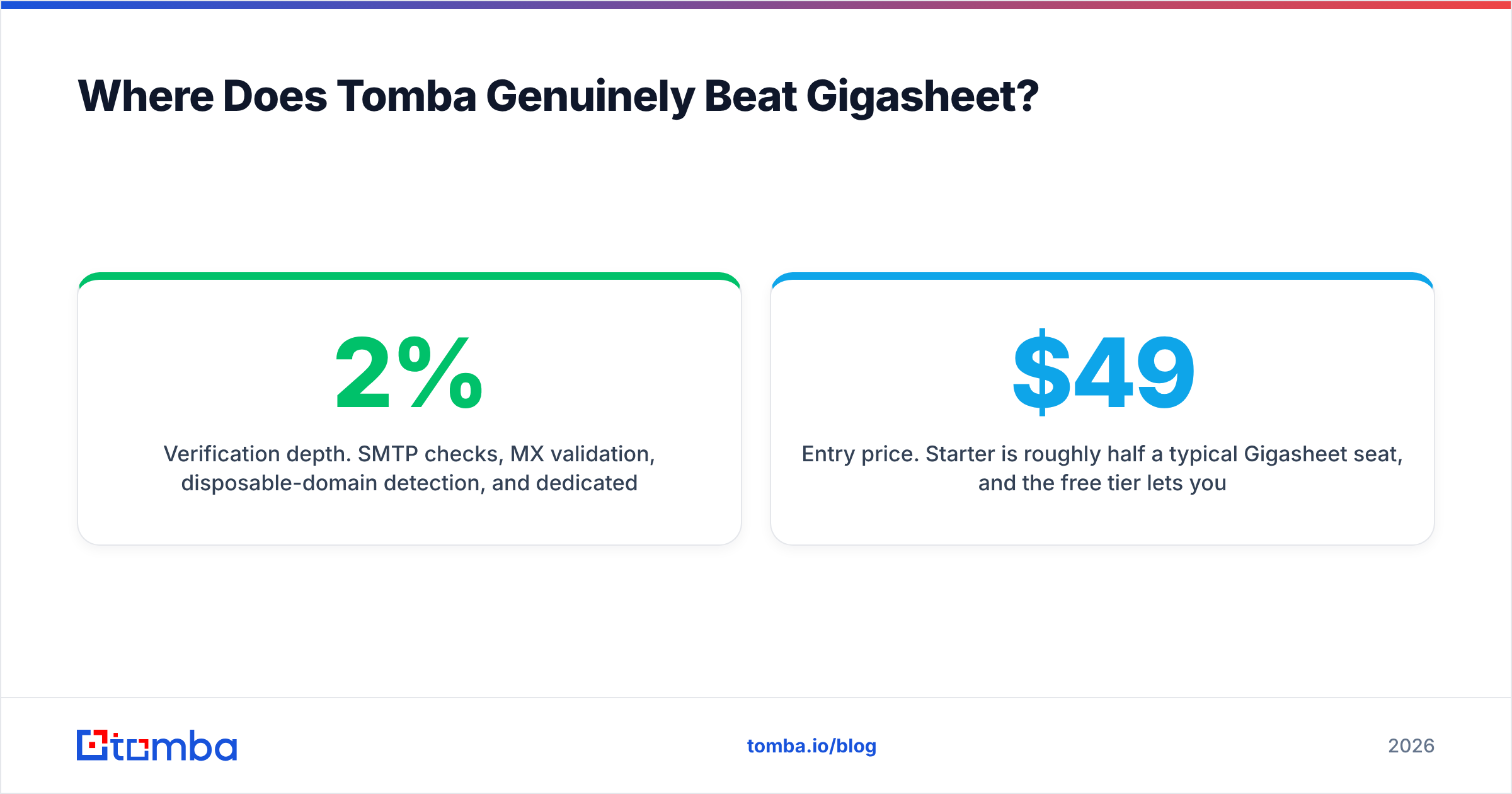
- Verification depth. SMTP checks, MX validation, disposable-domain detection, and dedicated catch-all verification — the layer that separates a 2% bounce rate from a 22% one and protects your sender reputation.
- Entry price. $49/mo Starter is roughly half a typical Gigasheet seat, and the free tier lets you validate the hit rate on your own target accounts before spending anything.
- Where the work actually happens. Add-ins for Google Sheets, Excel, and Airtable, plus a Chrome extension, mean prospecting happens inside the tools reps already have open.
- Automation surface. A documented REST API, CLI, and MCP server make it straightforward to wire email discovery into an existing pipeline rather than into a human's afternoon.

Can You Use Gigasheet and Tomba Together?#
Yes, and for teams working above roughly 50,000 contacts it's the setup that actually holds up.
The pattern that works:
- Enrich first, at the source. Run domains through Tomba's API or bulk tools. Write the results — email, confidence score, verification status, department — as columns on your raw file.
- Load the enriched file into Gigasheet. Now you're operating on a dataset that already has the expensive column filled in.
- Dedupe against your CRM export. Join on email address, drop anyone already in an open opportunity, and you avoid the most embarrassing outbound mistake there is.
- Filter to the segment. Verification status = valid, department = marketing, employee count > 200. Export.
- Re-verify anything older than 90 days. B2B contact data decays fast — job changes are relentless. Push stale segments back through the verifier before the next campaign rather than discovering the decay via bounces.
The ordering matters. Enriching after you've built the segment means you pay for finds on rows you're about to discard. Enrich the addressable set, then cut.
What Are the Alternatives to Each?#
If neither tool fits, the substitutes come from opposite categories.
Instead of Gigasheet, teams typically move to a warehouse plus a BI layer (BigQuery with Looker Studio, Snowflake with a notebook), or to DuckDB locally for analysts comfortable with SQL. Cheaper on compute, considerably worse for non-technical users — which is the entire reason Gigasheet exists.
Instead of Tomba, the field is crowded: Hunter, Apollo, Findymail, RocketReach, Clearbit, and BookYourData all overlap in places. They differ on how they source data, whether they bundle sequencing, and whether they sell prebuilt lists or on-demand lookups. BookYourData, for instance, leans toward verified prebuilt list purchase rather than per-lookup discovery — a legitimately different buying motion, and the better choice if you'd rather buy a segment outright than run finds. Tomba's positioning is on discovery plus verification depth at a lower entry price, with the full Apollo alternative and RocketReach alternative breakdowns covering the trade-offs in detail.
One consistent rule regardless of vendor: test hit rate on your accounts, not on the demo list. Vendor-wide accuracy averages tell you very little about how a tool performs on 200-person German manufacturing firms or US healthcare nonprofits. Every provider has segments where it's excellent and segments where it isn't.
Frequently Asked Questions#
Does Gigasheet find email addresses? No. It has enrichment integrations that can append data to existing rows, but discovery of unknown professional email addresses is not its function. That's what an email finder does.
Does Tomba handle files as large as Gigasheet? No, and it doesn't need to. Tomba's bulk tools process contact lists in the tens or hundreds of thousands. Gigasheet is built for files measured in gigabytes.
Which is cheaper? Tomba's entry plan is $49/mo versus roughly $95 for a Gigasheet seat, but they're not substitutes, so "cheaper" only matters if you were genuinely choosing between them. If you need both, budget both.
Can I run either from a spreadsheet I already use? Tomba, yes — Google Sheets and Excel add-ins pull data into the sheet you're already in. Gigasheet replaces the spreadsheet rather than plugging into it.
Do either of them send cold email? Neither. You'll need a separate sequencer, and you'll still need proper SPF, DKIM, and DMARC configured to protect email deliverability.
The Verdict#
Buy Gigasheet if your bottleneck is file size. Buy Tomba if your bottleneck is missing contacts. Buy both if you're running outbound at a scale where a spreadsheet is a real piece of infrastructure rather than a convenience — which, past a few hundred thousand rows, it is.
For most sales and growth teams reading this comparison, the honest answer is that the contact data is the harder half of the problem. A perfectly organized spreadsheet of companies you can't reach is a project, not a pipeline.
Start with the Tomba Email Finder. The free tier gives you 25 searches a month — enough to run your real target list through it and see the hit rate on your own accounts before spending a dollar. If the addresses come back clean, Starter at $49/mo covers most single-rep workloads, and Growth at $99/mo handles a full team's prospecting. Then, when your file finally outgrows Excel, add Gigasheet on top. That order works. The reverse rarely does.
Related guides#
Ready to find emails that actually work?
Join 150,000+ professionals who stopped guessing and started sending. Free credits on signup — no credit card required.
Get the Tomba newsletter
Practical outbound tactics and product updates — once every two weeks.
About the author