9 Best GlockApps Alternatives in 2026 (Free and Paid Tools)
GlockApps is a solid seed-list tester, but it is not the only way to find out where your cold email lands. Here are nine alternatives compared on price, seed coverage, warmup, and what they actually fix.

TL;DR
- GlockApps is a seed-list inbox placement tester. It tells you where your email landed across Gmail, Outlook, and Yahoo — it does not fix why.
- If you only need a one-off spam score before a launch, Mail-Tester does 80% of the job for free.
- If your real problem is warmup and reputation over weeks, MailReach, Warmup Inbox, or InboxAlly fit better than a testing-only tool.
- If your problem is a dirty list, no placement tool will save you — verification and list hygiene come first.
- Most teams end up running two tools: one for placement testing and one for list quality. Budget for both.
What does GlockApps actually do?#
GlockApps is an inbox placement testing platform. You send a campaign to a list of seed addresses it controls across major providers, and it reports back where each copy landed: Inbox, Promotions, Spam, or nowhere at all. Around that core it wraps DMARC monitoring, blacklist checks, a bounce/uptime monitor, and a spam-filter breakdown (SpamAssassin rules, authentication results, content flags).
That's genuinely useful. The trap is what people expect from it. A seed test is a diagnostic, not a treatment. It tells you that 34% of your mail hit spam at Outlook last Tuesday. It does not tell you that the cause was a purchased list with a 9% bounce rate, or a cold domain sending 400 emails on day three, or an SPF record with two include statements too many.
So the honest way to shop for GlockApps alternatives is to first name your actual problem:
- "I don't know where my email lands." → You want a placement tester. GlockApps, MailReach, or Mailtrap.
- "My new domain has no reputation." → You want warmup. Warmup Inbox, InboxAlly, or a sequencer with warmup built in.
- "My bounce rate is embarrassing." → You want verification and list hygiene, not a seed test.
- "My email looks broken in Outlook." → You want rendering QA. Litmus or Email on Acid.
- "I got blacklisted and I don't know when." → You want monitoring. MxToolbox or Google Postmaster Tools.
- "Everything is fine and I still get 2% replies." → That's a copy and targeting problem. No tool on this list fixes it.
Why do teams look for GlockApps alternatives?#
Four complaints come up repeatedly in G2 reviews and in outbound communities:
Test credits burn fast. Every seed send consumes a test. If you're running six sequences across four domains and you want a weekly read on each, you exhaust an entry plan quickly and end up on a tier that costs more than your sending tool.
Seed lists aren't your audience. Seed addresses are automated inboxes that never open, never reply, never move mail out of spam. Gmail personalises filtering heavily. A seed inbox with zero engagement history is a pessimistic proxy for a real prospect who has opened your last two emails. Read placement scores as directional, not absolute.
The UI is dense. DMARC reports, uptime monitors, blacklist status, and spam tests all live in one dashboard with a lot of tabs. Teams who wanted "is my email landing, yes or no" find it heavier than needed.
It diagnoses, it doesn't remediate. You still need warmup, list cleaning, and DNS fixes elsewhere.
What are the best GlockApps alternatives in 2026?#
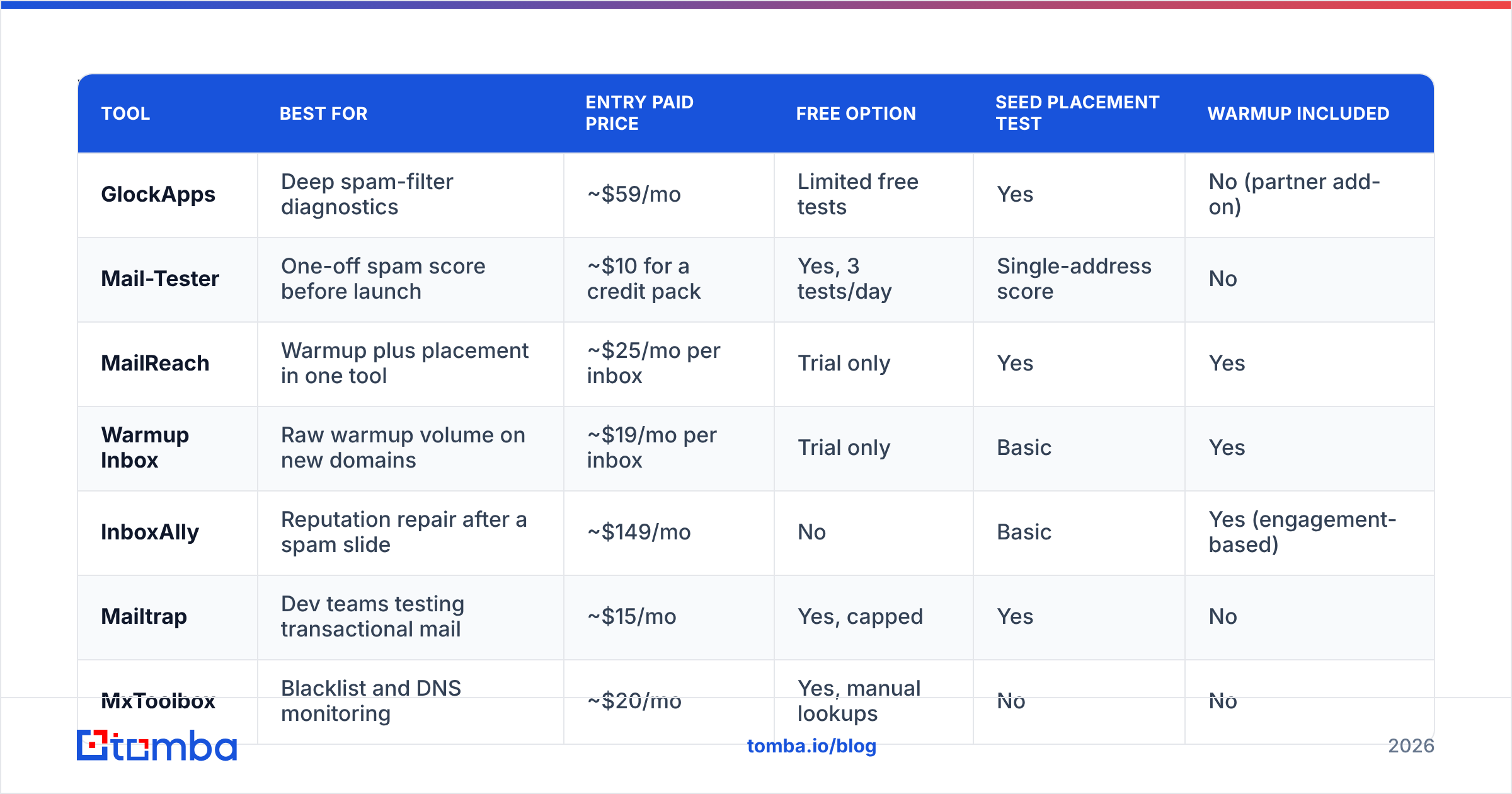
Pricing below is the published entry paid tier at time of writing and moves often — treat it as a band, not a quote, and check the vendor page before you buy.
| Tool | Best for | Entry paid price | Free option | Seed placement test | Warmup included |
|---|---|---|---|---|---|
| GlockApps | Deep spam-filter diagnostics | ~$59/mo | Limited free tests | Yes | No (partner add-on) |
| Mail-Tester | One-off spam score before launch | ~$10 for a credit pack | Yes, 3 tests/day | Single-address score | No |
| MailReach | Warmup plus placement in one tool | ~$25/mo per inbox | Trial only | Yes | Yes |
| Warmup Inbox | Raw warmup volume on new domains | ~$19/mo per inbox | Trial only | Basic | Yes |
| InboxAlly | Reputation repair after a spam slide | ~$149/mo | No | Basic | Yes (engagement-based) |
| Mailtrap | Dev teams testing transactional mail | ~$15/mo | Yes, capped | Yes | No |
| MxToolbox | Blacklist and DNS monitoring | ~$20/mo | Yes, manual lookups | No | No |
| Litmus | Rendering across 100+ clients | ~$99/mo | Trial only | Spam filter tests | No |
| Google Postmaster Tools | Real Gmail reputation data | Free | Free | No (aggregate data) | No |
Mail-Tester#
The pragmatic first stop. Send one email to a generated address, get a score out of 10 with authentication results, SpamAssassin rules triggered, and blacklist status. It costs nothing for a few checks per day. Mail-Tester won't tell you Gmail tab placement and won't run scheduled tests, but for "did I break something in this template," it's faster than logging into a dashboard.
Pick it if: you test occasionally and mostly want to catch broken SPF/DKIM or spammy copy.
MailReach#
Warmup and inbox placement in one subscription, priced per connected inbox. That per-inbox model is the real differentiator: if you run three sending domains, you pay for three inboxes and you get both continuous warmup and spam testing for each. GlockApps charges for tests regardless of how many mailboxes you run.
Pick it if: you run cold outbound at moderate scale and want warmup and testing on the same bill.
Warmup Inbox and InboxAlly#
Both attack reputation directly rather than measuring it. Warmup Inbox pushes automated conversations through your mailbox so providers see two-way engagement. InboxAlly is positioned for recovery — pulling mail out of spam and marking it read to retrain filters, priced for teams with a genuine reputation problem rather than casual users.
Pick it if: your placement scores are already bad and you need the number to move, not a prettier report of why it's bad.
Mailtrap#
Built for engineering teams. It gives you a sandbox SMTP inbox that captures outbound mail from staging, plus spam scoring and HTML checks, and it has grown into a full sending platform. If your deliverability question is about password resets and receipts rather than cold campaigns, this is the more natural home.
Pick it if: the mail you're worried about is transactional and sent by your app.
MxToolbox and Google Postmaster Tools#
The monitoring layer. MxToolbox watches ~100 blacklists and your DNS records and alerts on change. Google Postmaster Tools is free and gives you something no seed test can: aggregate reputation, spam-complaint rate, and authentication pass rates from Gmail's own view of your domain, based on real recipients. If you send meaningful volume to Gmail, set it up regardless of what else you buy. You can cover the DNS side yourself with a SPF checker and a blacklist checker before you pay for monitoring.
Pick it if: you want an early warning system rather than a testing tool.
Litmus and Email on Acid#
Rendering QA. They screenshot your email across dozens of clients and devices and run spam-filter previews on the side. Overkill for a plain-text cold email, essential if you send designed marketing HTML.
Pick it if: your emails have layouts that can break.
How do these tools compare on what actually drives placement?#
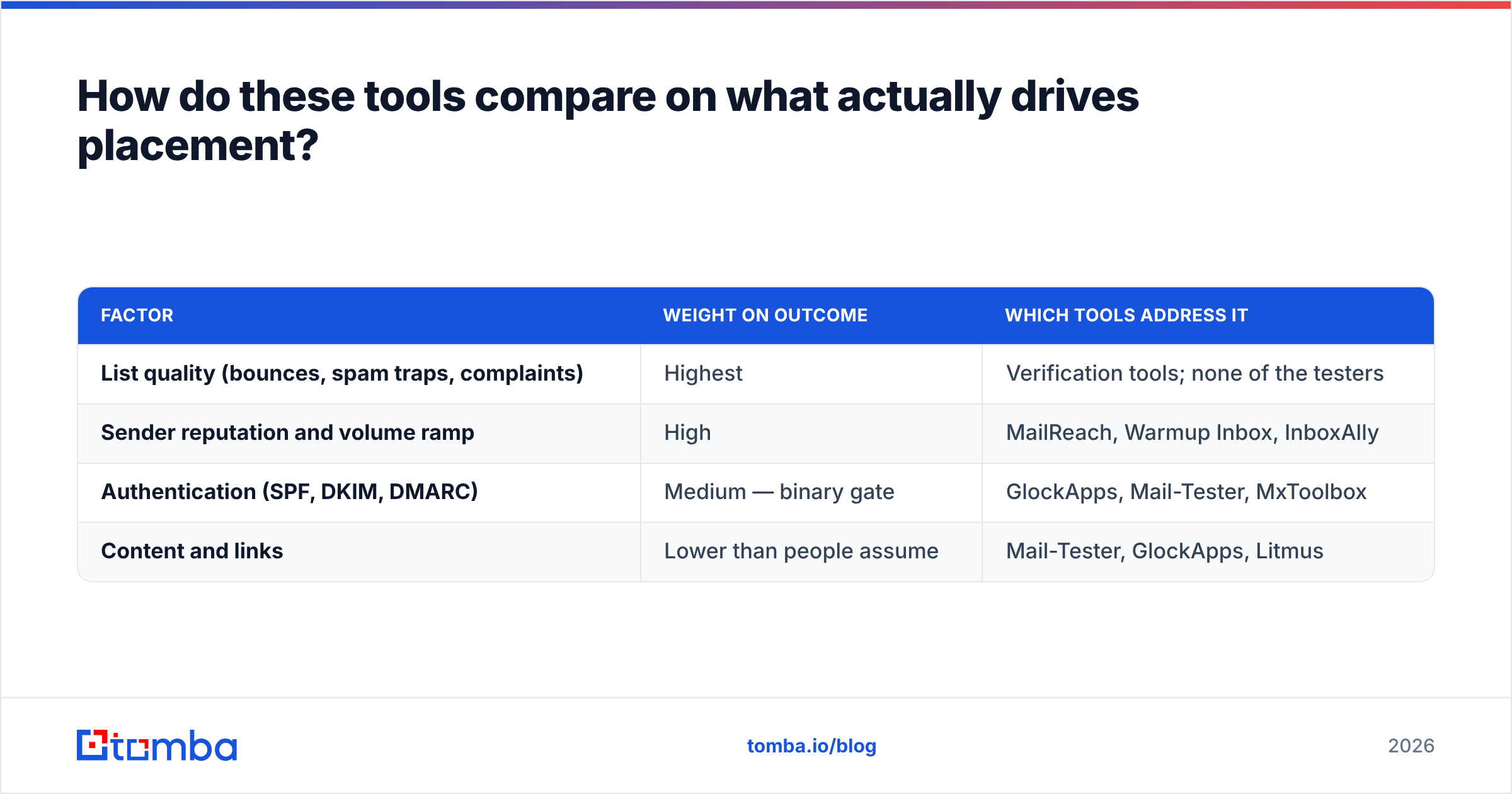
Placement is decided by roughly four inputs, weighted heavily toward the first two:
| Factor | Weight on outcome | Which tools address it |
|---|---|---|
| List quality (bounces, spam traps, complaints) | Highest | Verification tools; none of the testers |
| Sender reputation and volume ramp | High | MailReach, Warmup Inbox, InboxAlly |
| Authentication (SPF, DKIM, DMARC) | Medium — binary gate | GlockApps, Mail-Tester, MxToolbox |
| Content and links | Lower than people assume | Mail-Tester, GlockApps, Litmus |
Notice the pattern. Every tool in the GlockApps category clusters in the bottom two rows — the things you can fix in an afternoon. The top row, the one that actually decides your fate, is unaddressed by all of them.
A 5% hard bounce rate will sink you no matter how clean your DMARC record is. Mailbox providers read repeated sends to dead addresses as a signal you didn't get permission and don't maintain your data. That's why the highest-ROI move for most outbound teams isn't buying a better seed test — it's running the list through an email verifier before the first send, and re-verifying anything older than 90 days. B2B contact data decays roughly 2-3% per month through job changes alone.

When is GlockApps still the right choice?#
Don't switch for the sake of switching. GlockApps stays the better pick when:
- You need per-filter forensics. The breakdown of which SpamAssassin rules fired and how each provider's filter reacted is more granular than what most alternatives print.
- You manage deliverability for clients. Scheduled recurring tests, exportable reports, and DMARC aggregation make it defensible in an agency deliverable.
- You send at volume to mixed ESPs. Seed coverage across many providers matters more when your list isn't 80% Google Workspace.
- You need an audit trail. Historical placement data over months is worth something when you're arguing with a client about why numbers dropped.
If none of those describe you, you're probably paying for depth you don't read.
What should a lean outbound team actually run?#
Here's a stack that covers the whole chain without three overlapping subscriptions:
- Verify before you send. Clean the list, drop the catch-alls you can't confirm, and keep hard bounces under 2%. Run it in bulk so it isn't a manual chore — a bulk verify pass on a 5,000-row list takes minutes.
- Fix authentication once. SPF, DKIM, and DMARC set to at least
p=nonewith reporting on. Free checkers do this; it's a one-time job, not a subscription. - Warm the domain for 3-4 weeks. Ramp volume gradually. Use a warmup tool or your sequencer's built-in feature.
- Baseline with a placement test. One test before launch, one after any template change. Free tiers cover this until you're running many domains.
- Monitor continuously. Google Postmaster Tools plus blacklist alerts. Both can be free.
- Score the copy. Run the draft through a spam checker before it goes into a sequence — catching a trigger phrase costs nothing compared to burning a domain.
Total cost of that stack is well below stacking GlockApps and a warmup tool and a verifier from three vendors. And it front-loads the effort where it pays: your sender reputation is built from the quality of who you send to, long before a filter ever reads your subject line.
Is a placement test worth paying for at all?#
Yes, but as an instrument, not insurance. Three rules keep it honest:
- Test on change, not on schedule. New domain, new template, new sending IP, sudden reply drop. Weekly tests on a stable setup mostly generate noise.
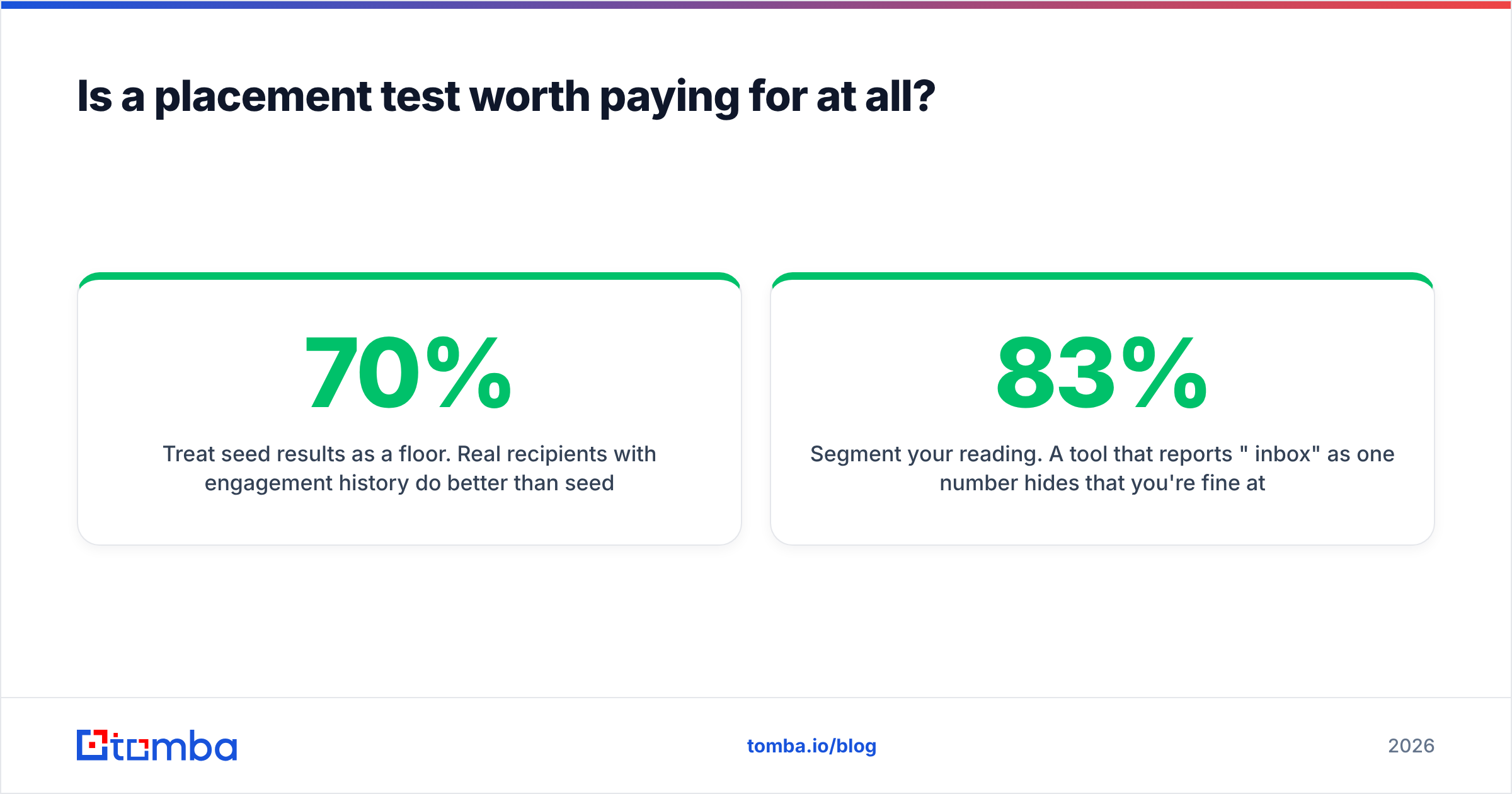
- Treat seed results as a floor. Real recipients with engagement history do better than seed inboxes. If seeds show 70% inbox, your real placement is likely higher — but if seeds show 20%, you have a genuine problem.
- Segment your reading. A tool that reports "83% inbox" as one number hides that you're fine at Gmail and dead at Outlook. Provider-level breakdown is the only part of the report worth acting on.
The teams that obsess over placement scores while sending to unverified lists have the causality backwards. Providers filter based on how recipients behave. Bad data produces bad behaviour — bounces, no opens, complaints — and no amount of spam-score tuning outruns that.
Start with the list, not the score#
If you're shopping GlockApps alternatives because your cold email isn't landing, run one diagnostic first: pull your last campaign's bounce rate. If it's above 3%, your problem isn't the tool you test with — it's the data you send to.
Fix that side first. Tomba's Email Finder finds verified professional addresses by domain, name, or company, and returns a confidence score with each result so you know what you're sending to before it hits your sequencer. Every address is checked against live sources and syntax, MX, and SMTP validation, so hard bounces stay near zero and your domain reputation stays intact. The free tier gives you 25 searches a month to test the accuracy against your own list; paid plans start at $49/mo, with full Tomba pricing published up front.
Clean data first, placement tests second. That order is the whole game.
Related guides#
Ready to find emails that actually work?
Join 150,000+ professionals who stopped guessing and started sending. Free credits on signup — no credit card required.
Get the Tomba newsletter
Practical outbound tactics and product updates — once every two weeks.
About the author